![Rize vs Time Doctor: Which time tracker is best? [2026]](/_next/image?url=%2Fassets%2Fblog%2Frize-vs-time-doctor%2Frize-vs-time-doctor.webp&w=3840&q=75)
Rize and Time Doctor both show up on nearly every "best time tracking software" list published in the last few years. Both have been around long enough, updated often enough, and reviewed by enough real people that you can trust they work.
Sit them next to each other for five minutes, though, and the comparison falls apart fast. Rize is focused on turning your hours into clean, billable data without you doing a thing, while Time Doctor takes an all-in-one approach to watching, measuring, and paying an entire distributed team.
I have used Rize every single day for more than three years now, mostly to track and invoice my own freelance work. I also ran Time Doctor's full 14-day trial with a small test team, screenshots on, activity levels on, to see what happens once real people are clocked into it.
Below is the quick, at-a-glance breakdown for anyone in a hurry. Everyone else, keep reading, because the sections after it are what decide which one fits how you work.
Rize vs. Time Doctor at a glance
Quick Answer
Choose Rize if you want fully automatic, privacy-first time tracking that turns your hours into invoice-ready entries and profitability reports without timers. Choose Time Doctor if you need screenshots, activity levels, and native payroll/HRIS integrations for a distributed team.
| Feature category | Rize | Time Doctor |
|---|---|---|
| Ease of use | Effortless. Install it, and it quietly tracks your day without asking a single question. | Functional, not fun. Four separate apps, and a project and task to pick before the clock even starts. |
| Tracking method | Fully automatic. Starts and stops on its own based on the app or window you're in. | Fully manual. The clock doesn't move until someone picks a project and hits play. |
| Privacy vs. monitoring | Privacy-first. Reads app names, window titles, and URLs. No keystrokes, no surveillance. | Full surveillance, if you flip it on. Optional screenshots, activity levels, and unusual-activity flags. |
| Billing & profitability | Built for profit. A dedicated tab turns automatically tracked hours into revenue, cost, and margin. | Built for payroll. Time Approvals and Unusual Activity Reports catch mistakes in hours someone typed by hand. |
| Focus & productivity | Proactive. A Focus Quality Score and a Distraction Blocker step in while you're drifting. | Reactive. An Activity Level percentage and a report someone else reads after your day is already over. |
| Platform availability | Narrow. Mac and Windows only. | Broad. Windows, Mac, Linux, iOS, and Android, plus a browser extension. |
| Integrations | A short native list, Zapier for everything else, invoicing built straight in. | 60+ apps on the free tier, with native HR and payroll syncs behind an added fee. |
| Pricing | Flat and simple. $9.99 to $39.99/mo for individuals, plus per-seat pricing for teams. | Tiered, with add-ons. $6.67 to $16.70/user/mo, plus $200/mo per native payroll integration. |
Rize wins on ease of use with zero setup friction
Both tools are easy enough once you learn them. The difference is that Rize barely asks you to learn anything.
Rize is desktop-only, Mac or Windows, and setup takes about as long as it takes to make a coffee. Download it, tell it roughly how you like your work categorized, and you're done. The AI reads whatever app you have open, the window title, the URL, and quietly sorts your day into work, meetings, or “watching soccer highlights at 2 pm,” without asking you a single question along the way. I've used Rize every day for over three years now, and the only skill it's ever demanded of me is remembering to open my laptop.
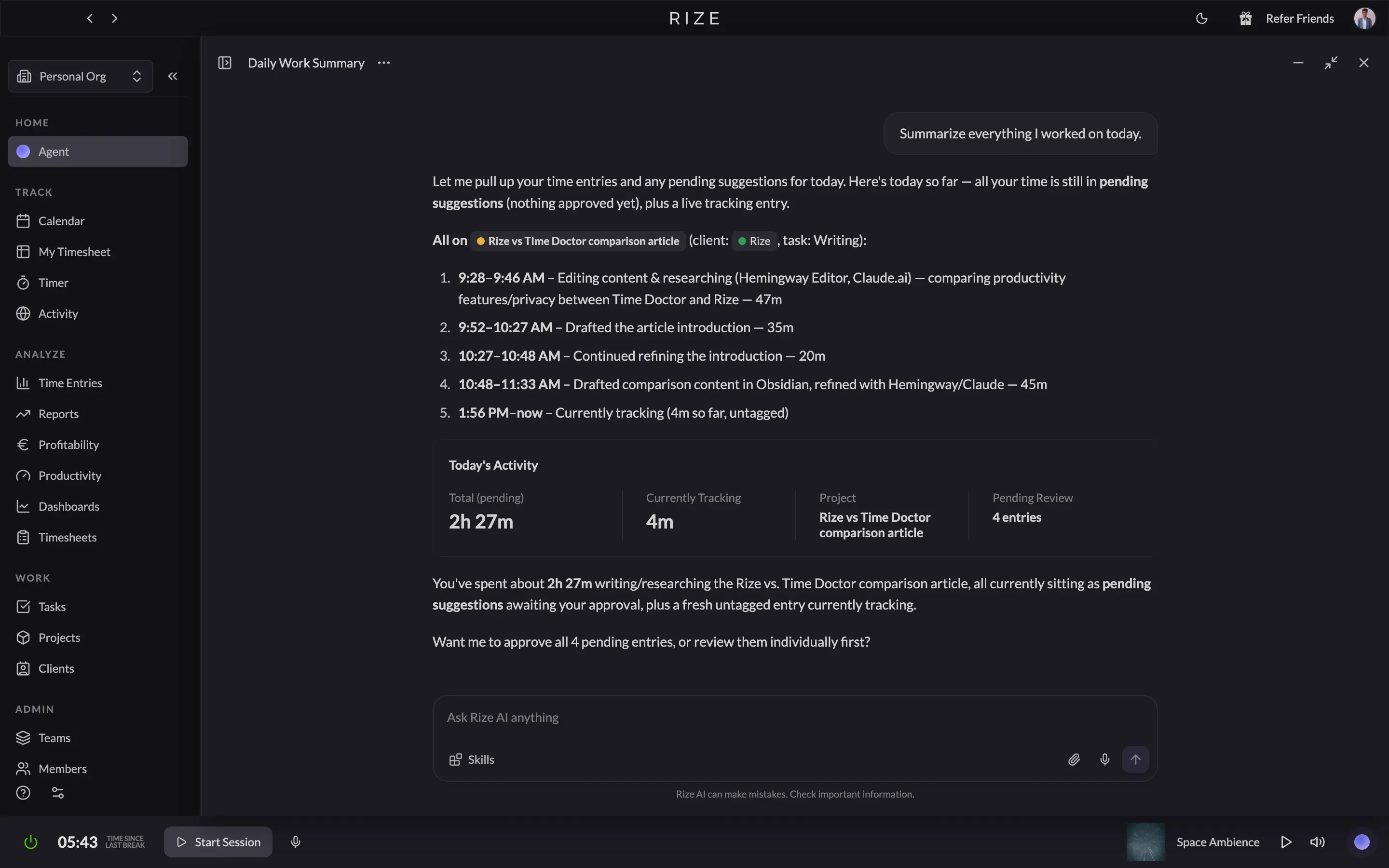
The dashboard matches that philosophy. It's clean, modern, and built around one big AI chat box that just answers “how was my week” instead of making you dig through six report tabs to find out. Even the menu bar controls, the ones you'd use to start a focus block or log a meeting, are two clicks and done. Nothing about Rize wants you to notice it's running. That's the entire pitch, and it's rare that Rize's design matches its promise this cleanly.
Time Doctor can't pull that off, because it isn't trying to. It's four separate apps wearing one name: a desktop tracker, a mobile app, a web dashboard, and a Chrome extension, each one doing a different job. Before you can even start tracking on the desktop app, you have to create and pick a task from a project first, which sounds minor until you realize that's a decision Rize never once makes you sit through. Skip that step and Time Doctor just sits there, blinking, waiting for you to tell it what you're doing with your life.
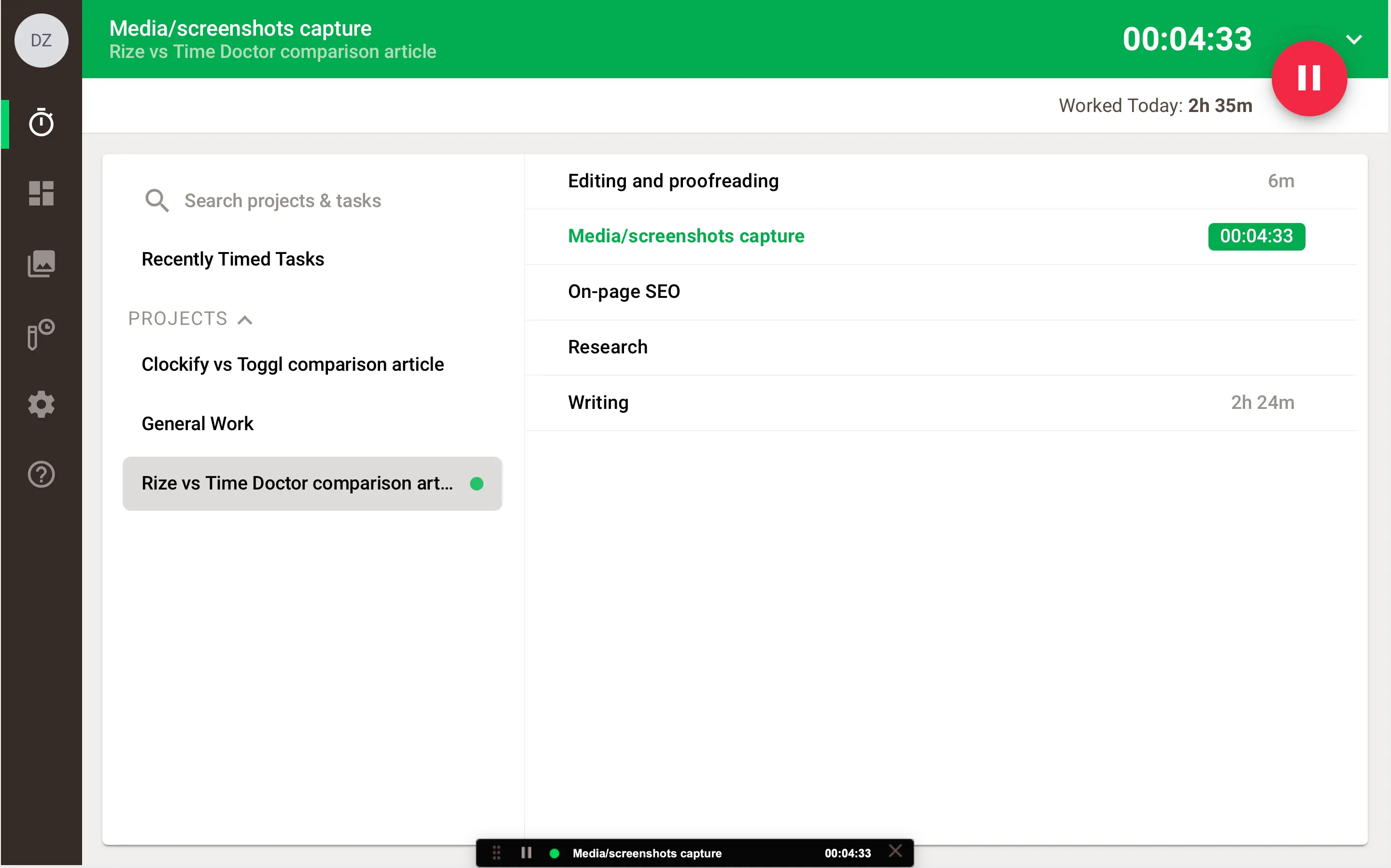
None of it is hard, exactly. It's software built by people whose priorities were clearly compliance and reporting. The web dashboard alone runs nine tabs across the top, everything from Screencasts to Payroll to Approvals crammed into one bar, and it functions fine. But “fine” is the ceiling here, not the floor. Nobody opens Time Doctor and feels delighted. They open it because somebody above them told them to.
Rize wins on ease of use because it's built to disappear, but if your team needs Time Doctor's screenshots and task-level accountability anyway, that friction is a small price for what you're buying.
Rize scales from manual to fully automatic; Time Doctor stays stuck on manual.
Time Doctor's clock doesn't move until you move it. Rize's does, whether you touch it or not, though it'll happily hand you the reins if you want them.
Rize does have a Timer tab, and it's exactly as simple as you'd want: press play, it counts up, pause it, extend it, stop it, done. Most days I never open it, because after a few days of nudging Rize in Settings under Tracking Rules toward what counts as work for me, it stops waiting around. The moment I open a Google Doc or fire up my code editor, it quietly starts a focus session on its own. Nobody asked it to. It just learned that my writing days look like Hemingway Editor, Gmail, and an unhealthy amount of LinkedIn.
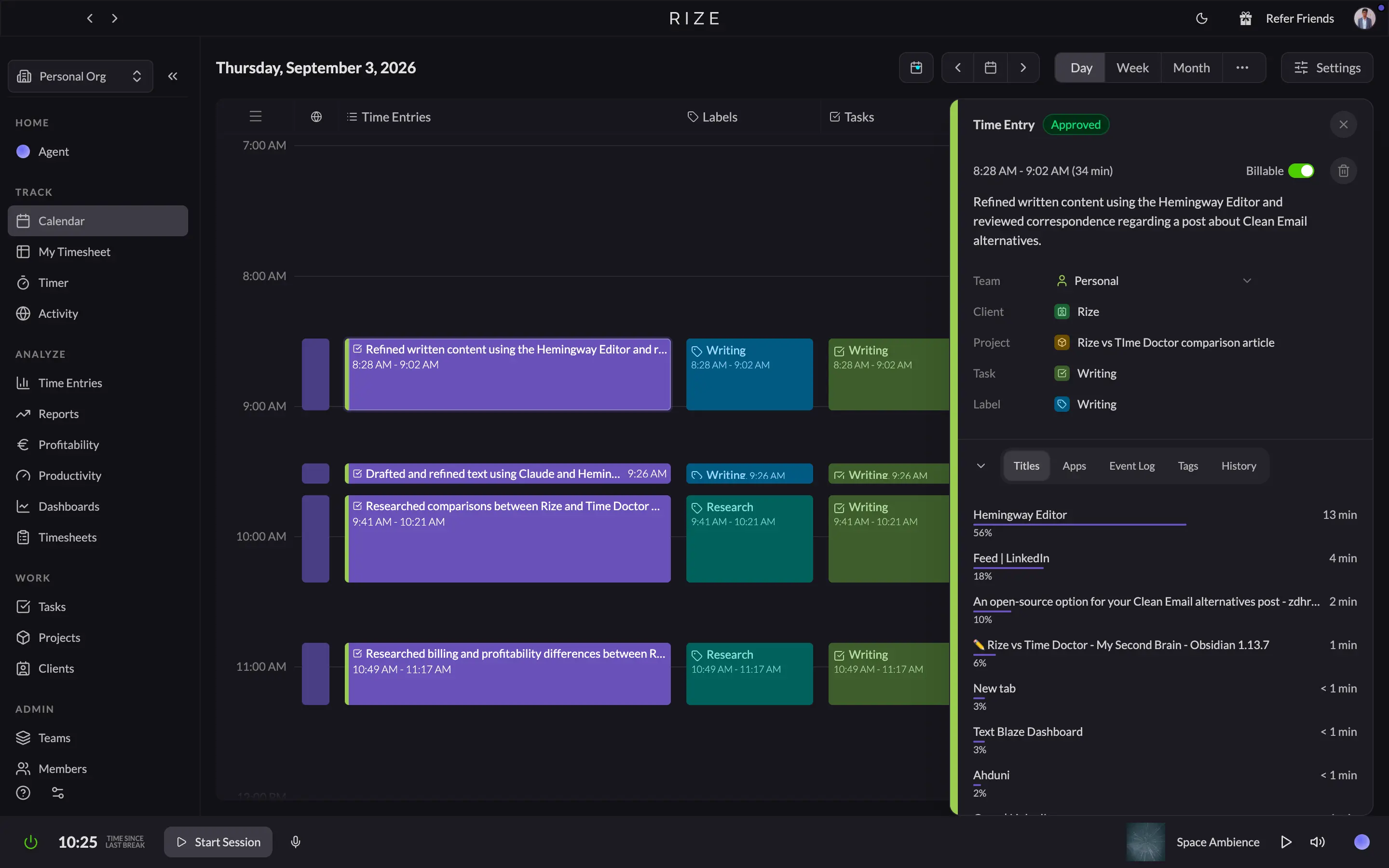
Every finished stretch of work shows up as a suggested timesheet entry, already written up in plain English, already guessed at for client, project, task, and label, with a confidence score attached to that guess. Open any entry, and it shows you exactly which apps and windows built that block of time, right down to the document title. I had Rize running while writing a chunk of this very section, and by the time I checked my timesheet, it had already described what I did and tagged it correctly. My only job was hitting Accept.
Time Doctor doesn't offer any version of that, because Time Doctor doesn't move until you tell it to. You pick a project, pick a task from a dropdown, and only then does the clock start. Skip that, or forget to hit play, and the time doesn't get logged. Time Doctor has no idea if you spent that stretch deep in a client deck or three episodes into a documentary about competitive eating, because as far as it's concerned, you weren't clocked into anything.
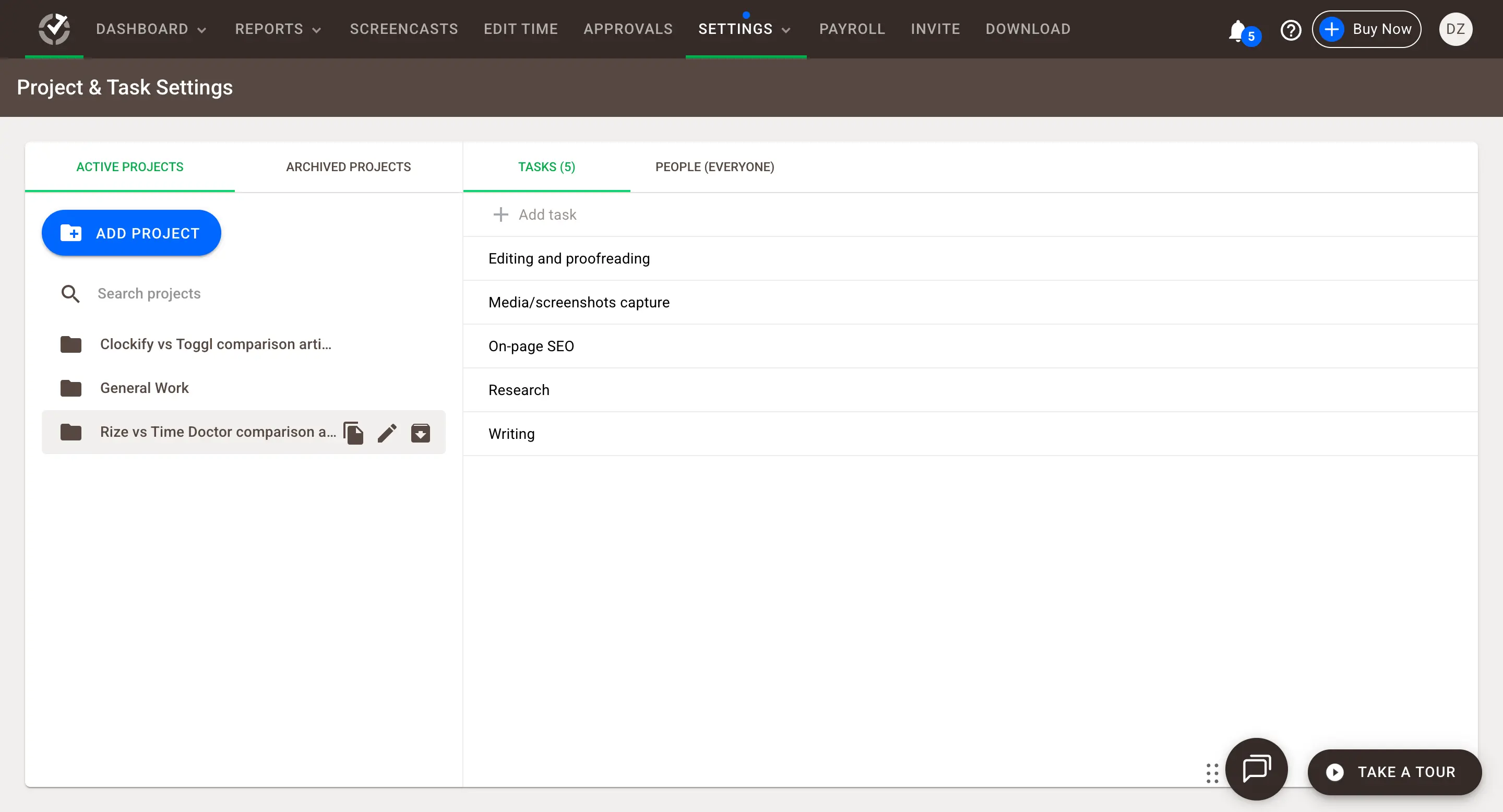
To Time Doctor's credit, it doesn't abandon you after that. You can edit any entry after the fact, tack on a reason, and idle alerts will nudge you if you've clearly wandered off. But every part of that is still you doing the work of the software.
If your team needs proof that a human deliberately clocked into a specific task, Time Doctor's manual grind is the whole point, but if you'd rather your software just remember your day for you, Rize wins this one without a fight.
Rize wins on profitability. Time Doctor wins on payroll and proof of hours.
Rize tells you if a client's making you money, and it doesn't need to convince you the number's real. Time Doctor tells you if you paid someone correctly, but only as well as whoever typed in their hours. That second half matters more than it sounds like it should.
Rize has a Profitability tab, and it's the reason I check my numbers more than once a quarter now. Open any client contract and Revenue, Cost, Profit, and Margin show up as actual cards. Because the underlying hours were captured automatically in the background instead of typed in from memory.
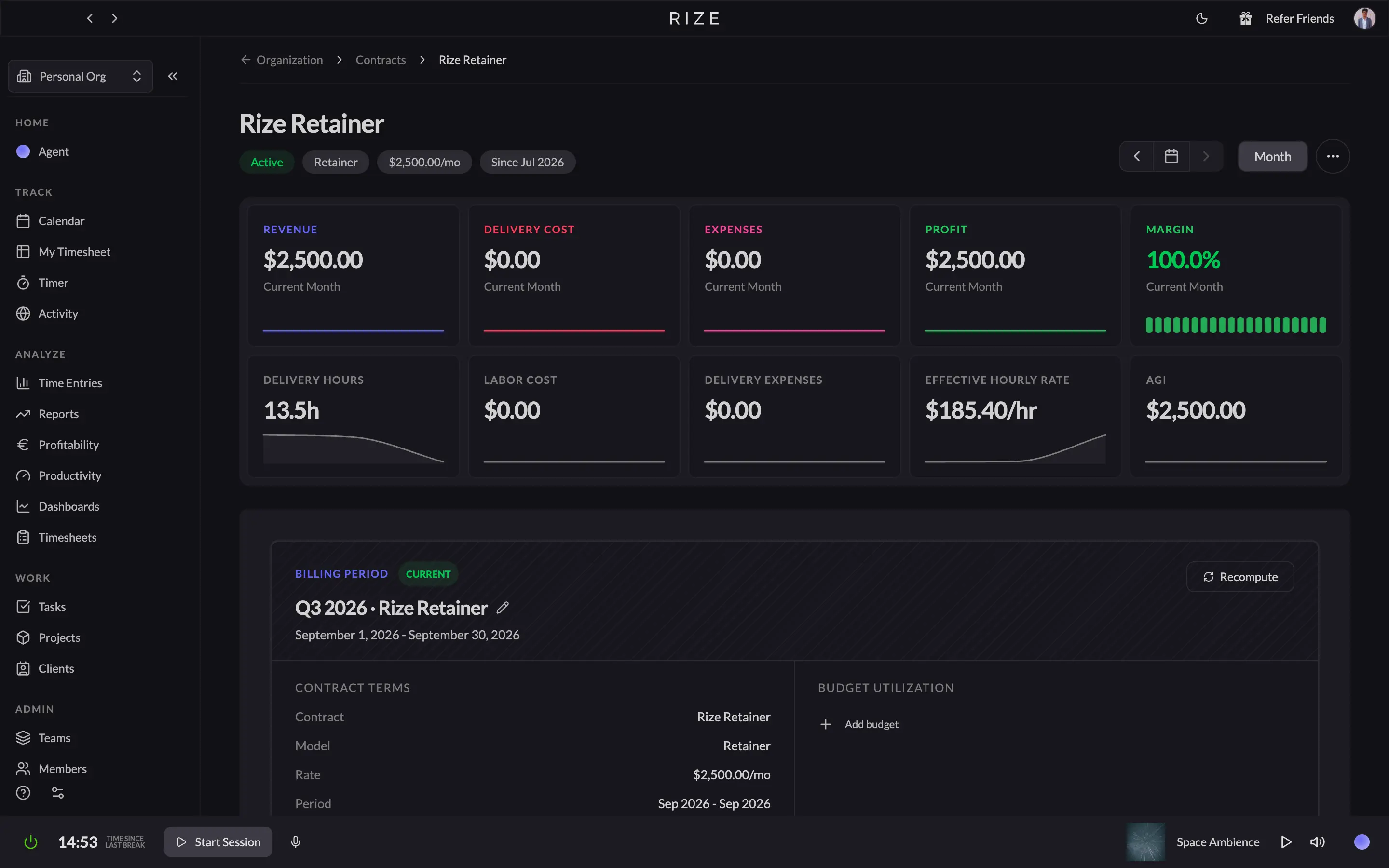
Rize also lets each team member review and approve their own entries before anyone above them sees a thing. A lead's dashboard shows tracked time, approved time, and time still sitting in pending, and only the approved slice counts toward a client's report or a project's margin. That's real freedom for the person doing the work. You get final say on what leaves your desk, and your manager never has to take your word for it either, because the capture underneath was automatic to begin with. Both sides get what they want without either one policing the other.
Time Doctor doesn't have a profitability tab, and to its credit, it isn't pretending to. What it has is Payroll and Time Approvals, built for paying people for hours they logged. The catch is that Time Doctor tracks manually by default. Someone has to pick a project, hit play, and remember to do it again after every meeting, bathroom break, or minor existential crisis, unless an admin specifically flips their tracking to automatic. And people, in my extensive personal experience of being one, are not reliable narrators of their own workday.
So Time Doctor's Time Approvals step exists for a reason Rize's doesn't need: a manager has to sanity-check numbers that were typed by hand and could be wrong in either direction, forgotten hours that never got billed, or padded ones that did. The Unusual Activity Report catches the worst of it after the fact, flagging entries that look off before they hit a client's invoice. That's a genuinely useful feature. It's also, if you sit with it for a second, a patch for a problem Rize's design never creates in the first place.
If you want reports that don't require anyone's honesty to be accurate, Rize's automatic capture and self-approval flow gets you there by default, but if your team runs on manual entries anyway, Time Doctor's approvals and anomaly detection are the necessary, if reactive, cleanup for mistakes automatic tracking would have prevented before they happened.
Rize builds your focus habits in real time. Time Doctor just keeps score of them.
Rize tries to keep you and your team focused while you're losing it. Time Doctor waits until the day is over, then hands someone else a report about how much you lost.
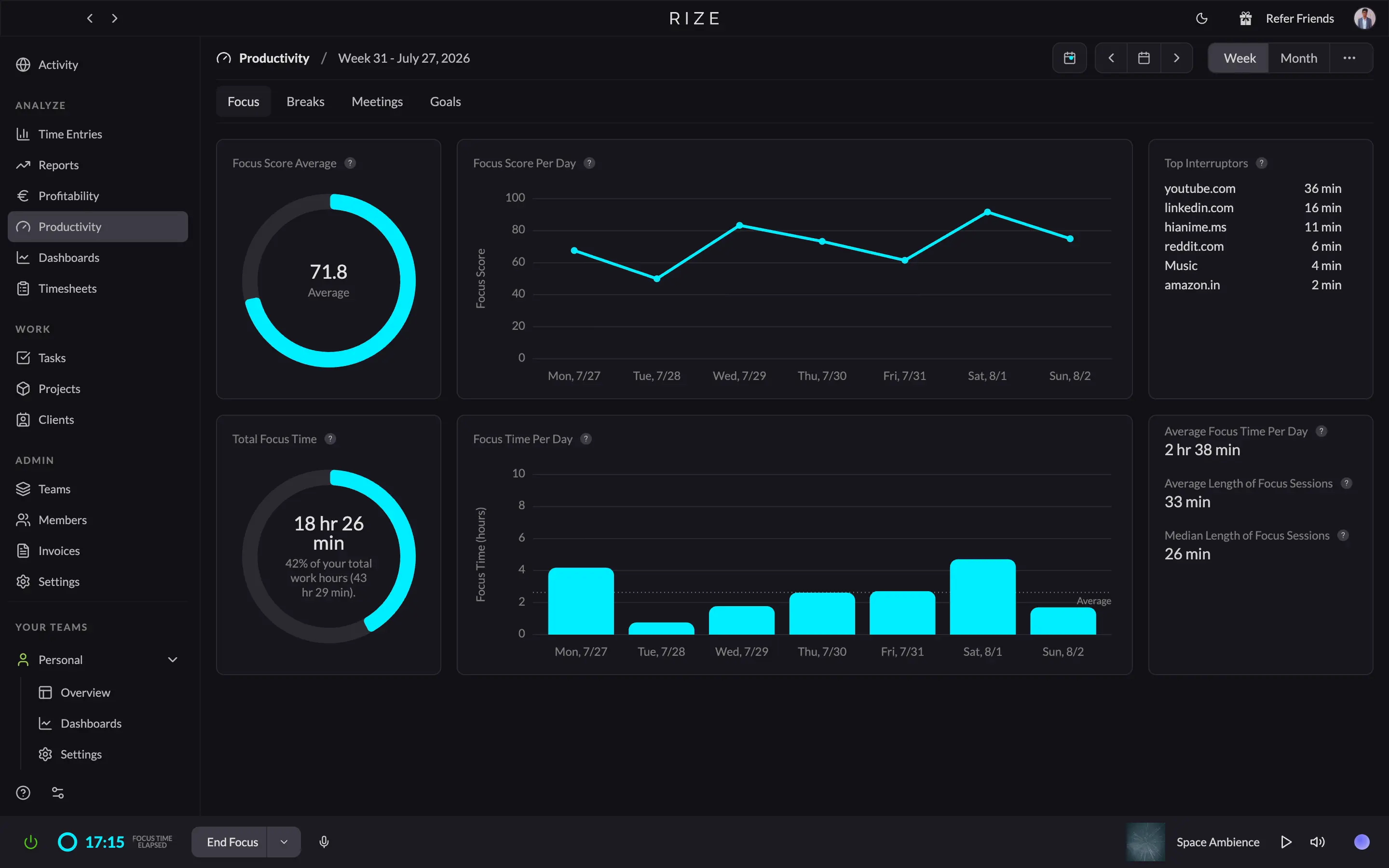
Rize's productivity layer runs on your Focus Quality Score, a single number built from more than twenty signals about how you work: how long your focus sessions run, how often you app-switch, how much of your day was deep work versus noise. It's a genuinely useful number, because it tells you something about your own day that you didn't already know.
The part that changes behavior, though, is the Distraction Blocker. You tell Rize which sites and apps count as a distraction for you (YouTube, in my case, every single time), and the moment it catches you drifting into one mid-focus-session, it fires a pop-up or a quiet system notification pulling you back.
Rize also runs AI-powered break suggestions timed to when your focus is genuinely dipping, instead of a rigid clock, plus a built-in focus music library if you'd rather not leave the app to look for a lo-fi playlist. None of it asks you to review anything later. It just quietly keeps you from drifting or burning out while it's happening, which is the entire point.
Time Doctor doesn't do any of that, because "productivity" means something different here. It means data. The desktop app counts your keystrokes and mouse movements (not what you typed, just how much of it) and turns that into an Activity Level percentage for every tracked interval. Fall below the threshold for too long, and that stretch gets flagged as low activity in a report someone else reads later.
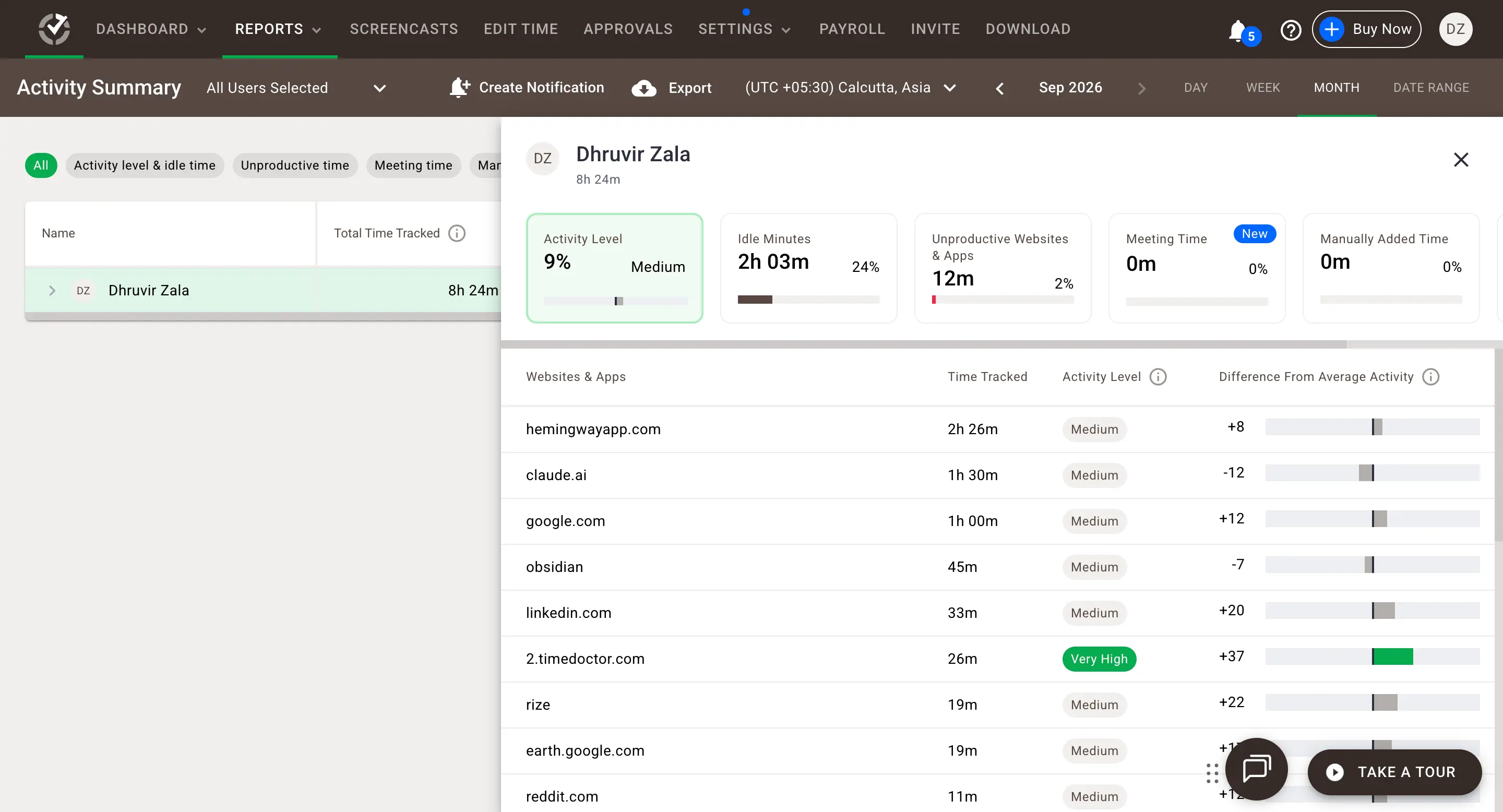
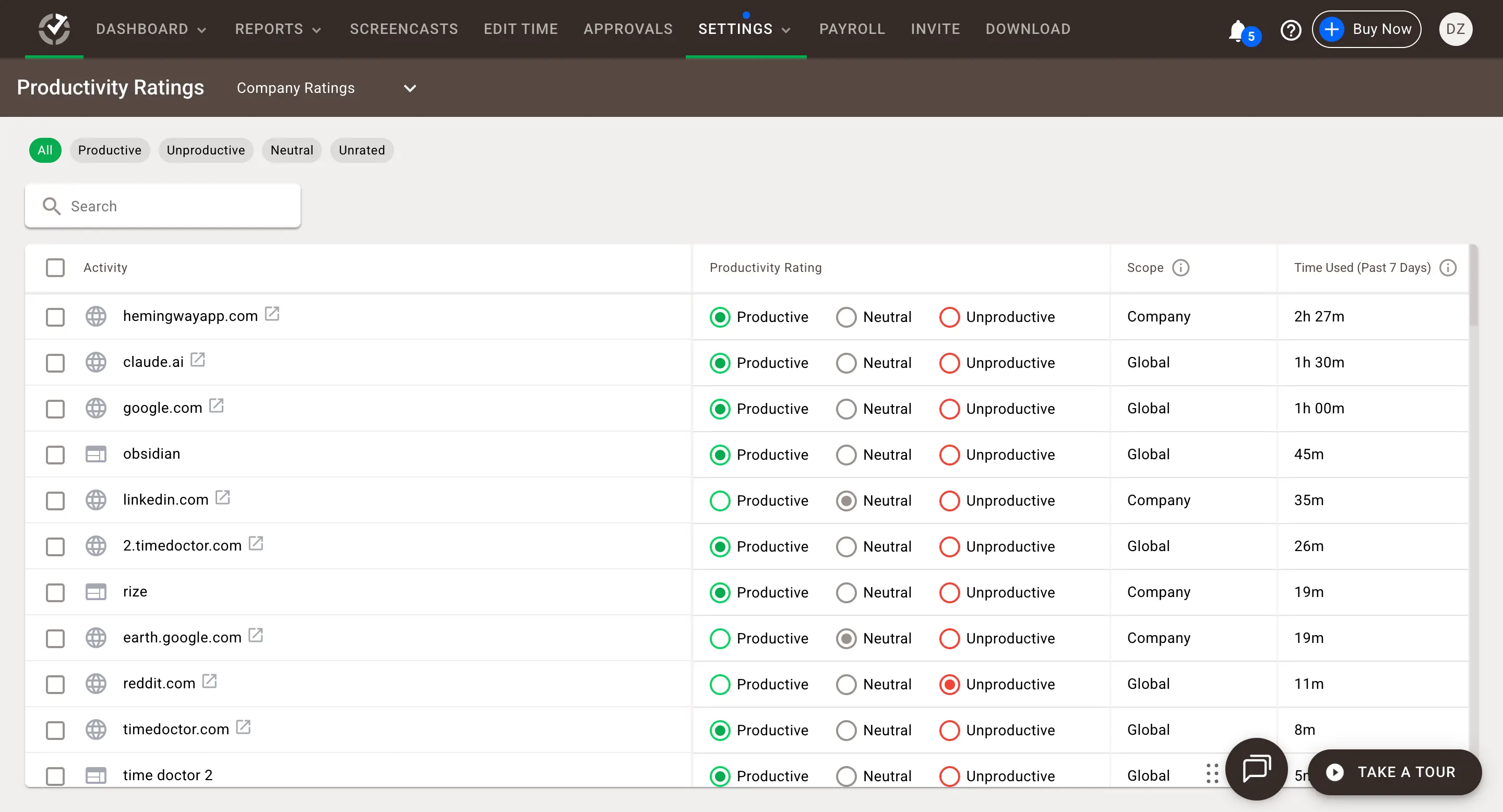
That percentage feeds Productivity Ratings, a settings page where every site and app you touch gets sorted into Productive, Neutral, or Unproductive, and an Unusual Activity Report that flags suspiciously consistent mouse movement or keystrokes (the kind a mouse jiggler produces) so managers can catch people gaming their own numbers. Layer Benchmarks AI on top, and you can compare your team's activity against real industry peers, a genuinely clever feature if a peer group is the thing you're missing.
To be fair, Time Doctor does have idle alerts and distraction reminders of its own. But they exist to keep the activity numbers honest, not to help you personally work better in the moment. Every feature Time Doctor ships here answers "did they work," never "how do I help them work better," and that's a different question, written for a different reader. That reader isn't you.
If you want software actively trying to keep you focused while you work, Rize is built for exactly that. If you want proof of how focused your team was after the fact, Time Doctor's entire productivity stack exists to generate exactly that report.
Rize's integrations end at a paid invoice. Time Doctor's integrations end at a paid payroll run.
Count the apps each tool connects to, and you'll miss the real story. Rize's integrations exist to turn a tracked hour into an invoice your client pays. Time Doctor's exist to turn an activity report into a payroll run you send out. Same paycheck, opposite direction.
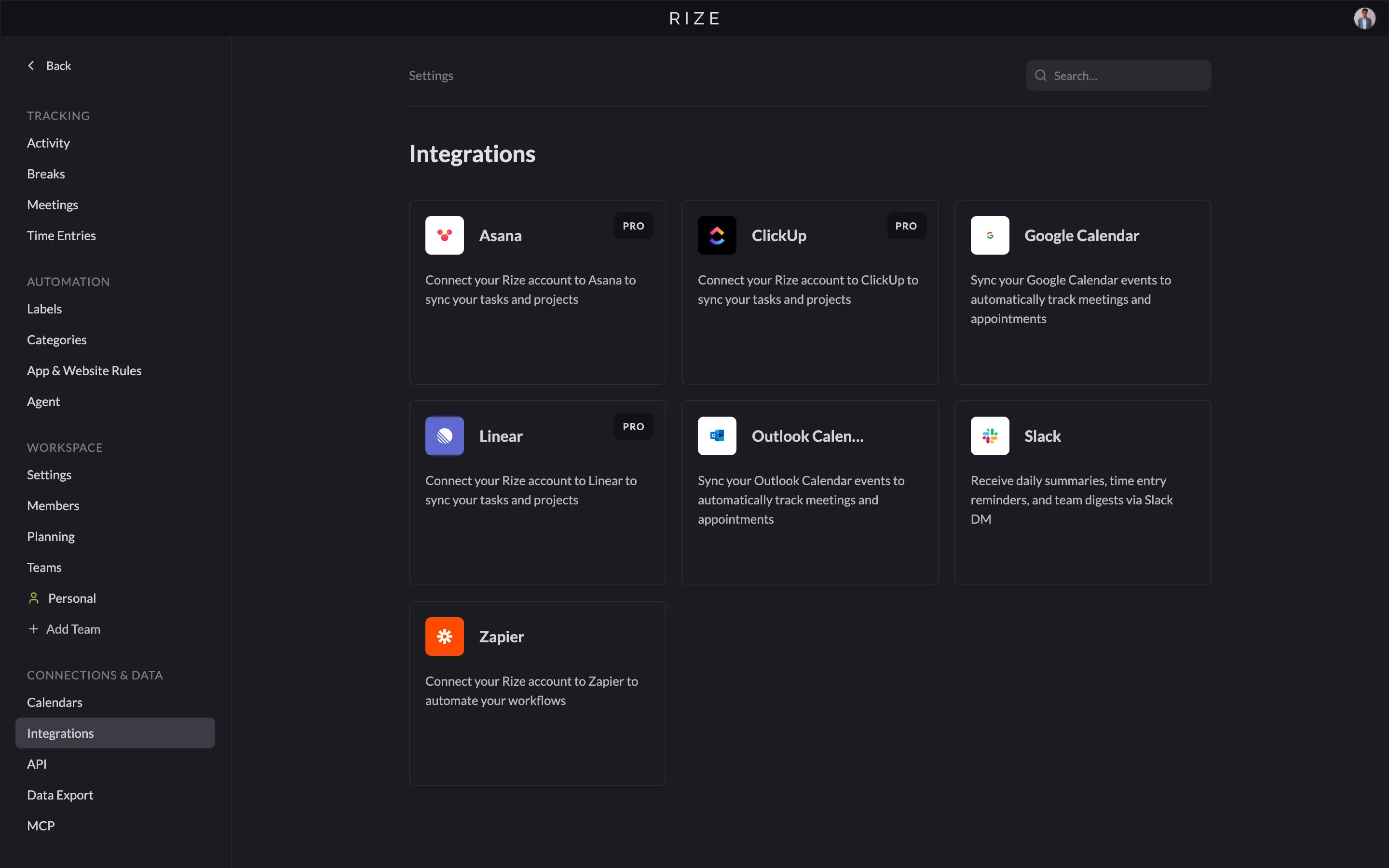
Rize keeps its native list short on purpose. ClickUp, Linear, Asana, Slack, Google Calendar, and Outlook sync tasks and meetings so the AI has real project names to guess from instead of raw window titles. The more useful additions are Zoom, Fathom, Fireflies, Granola, and Google Meet, which turn your meeting recordings into time entries with actual context attached. Add Zapier, and the list runs into the thousands: QuickBooks, Trello, Notion, HubSpot, Jira, and plenty more. There's even an MCP server now, so Claude or ChatGPT can query your tracked time directly.
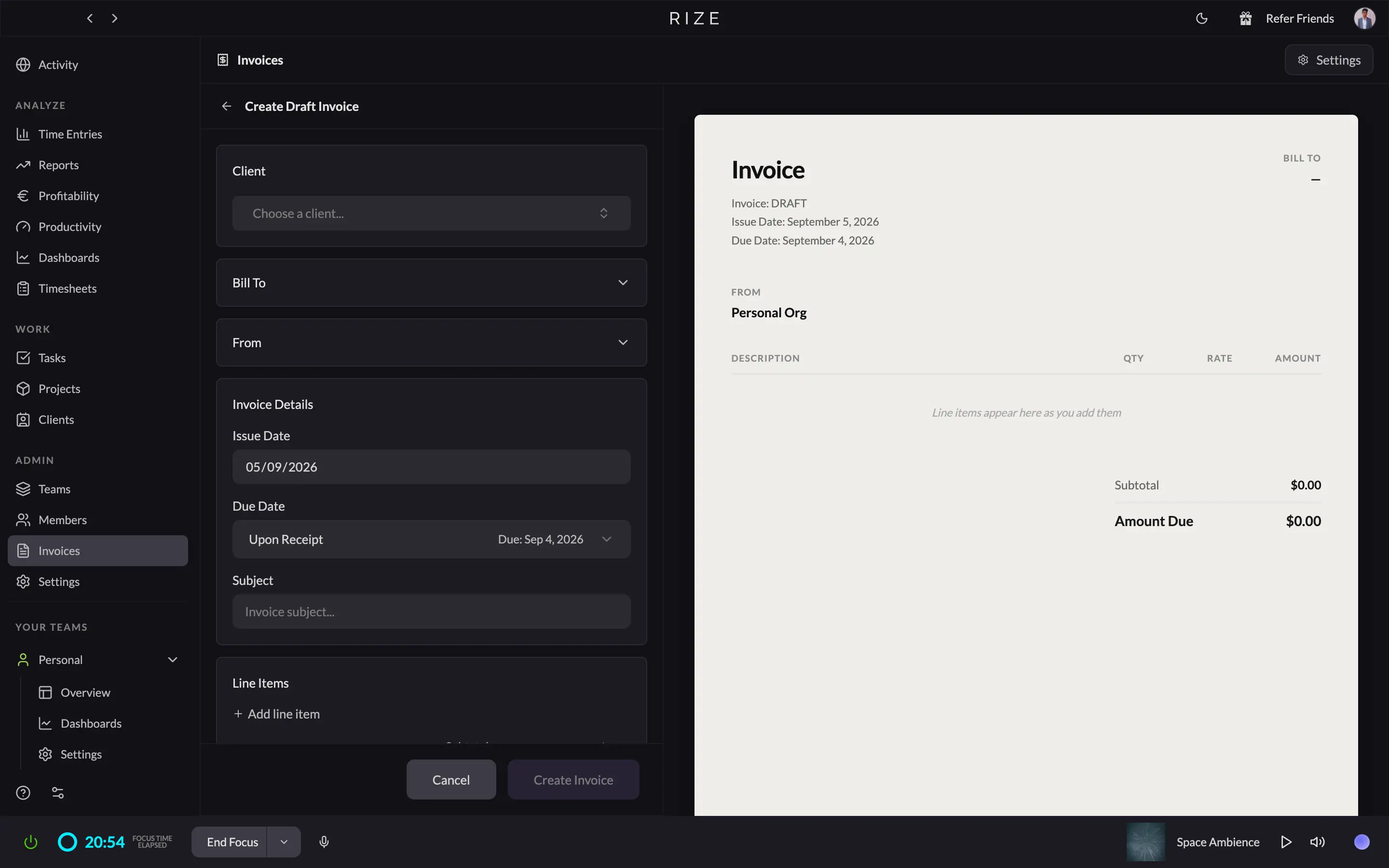
Invoicing is also built straight into Rize. Pick a client and a date range, and Rize turns hours it already captured into invoice line items. Set a line item format once, using tokens for date, project, and task, and every invoice after that reads the same way. Send it as a PDF, log full or partial payments as they land, bill different clients in different currencies, and if you void one by mistake, it stays voided instead of vanishing, so your numbering doesn't confuse your accountant later.
Time Doctor's integration story splits into two tiers. The free tier runs through a browser extension: over sixty apps spanning project management, help desk, CRM, and communication (Trello, Zendesk, Salesforce, HubSpot, Slack). Turn it on for your whole team, and anyone can start a Time Doctor timer from inside Jira or Trello without switching tabs.
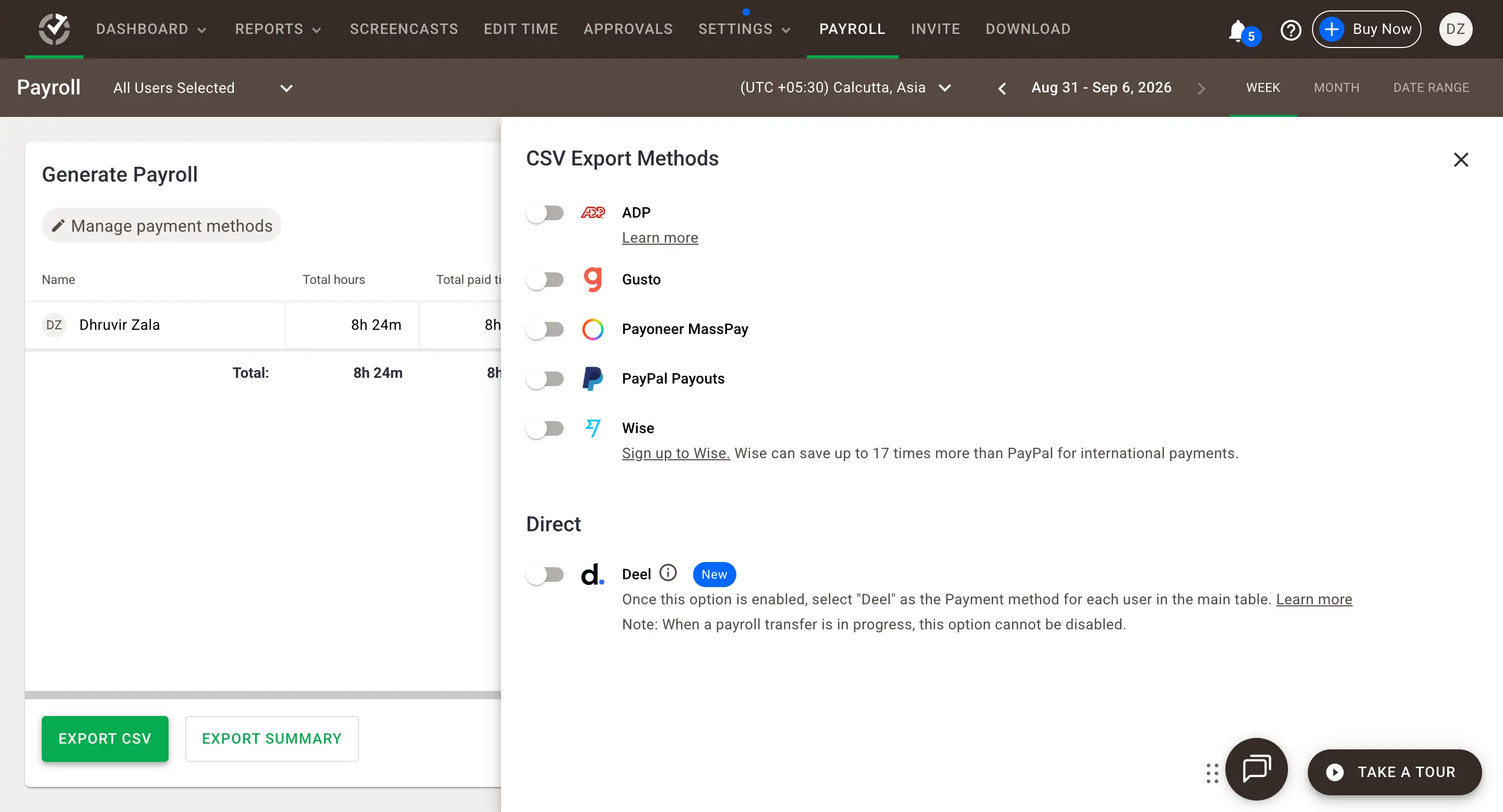
Native is the other tier, and it's where the real HR and payroll work happens. BambooHR, Zoho People, Rippling, and PeopleForce sync employee records and PTO straight into Time Doctor, and the Payroll tab exports approved hours to ADP, Gusto, Wise, PayPal Payouts, or a direct transfer through Deel. The catch: every one of those native syncs costs an extra $200 per account per month, stacked on top of whatever plan you're already paying for.
If a client is waiting on your invoice, Rize now takes tracked time all the way to a sent, paid PDF without a spreadsheet in sight. If it's your team waiting to get paid across a real HR and payroll stack, Time Doctor's native integrations do that job well; you just pay extra for it.
Rize can't watch you working. Time Doctor can, and it doesn't have to tell you.
Rize was built so nobody has to trust anybody, because there's nothing sensitive being captured to begin with. Time Doctor was built on the opposite bet: that trust alone isn't proof, so it gives you a screen recording to fall back on.
Which philosophy sounds reasonable to you depends entirely on who's on your team and what you're on the hook for.
Rize's privacy policy has an actual sentence in it that says no keystrokes, period. What it reads by default is metadata: the app you're in, the window title, the URL if you're in a browser. No pixels, no recording of your actual screen, ever.
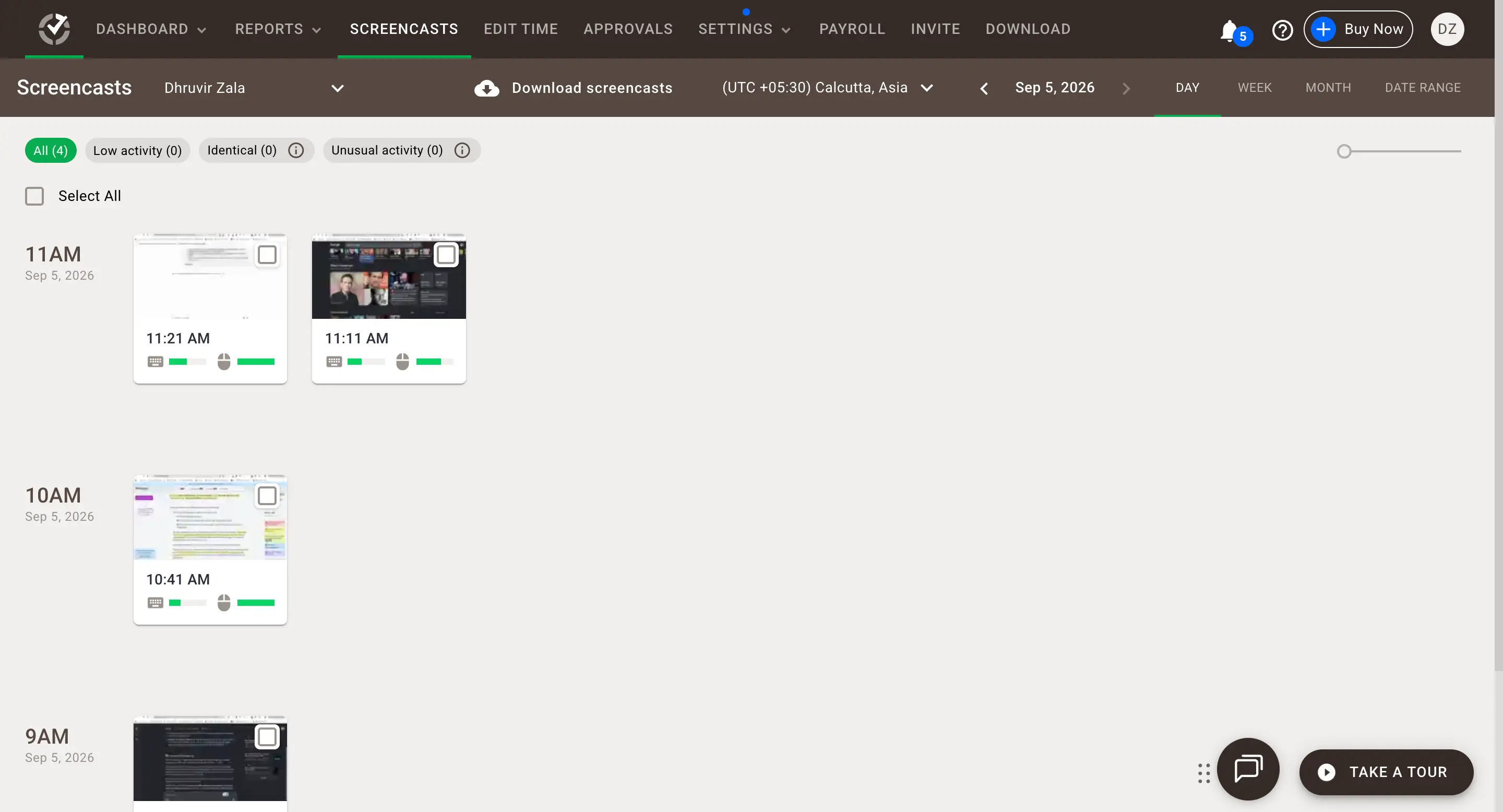
Time Doctor's screenshots aren't hiding in a settings menu somewhere; they're the actual product. Turn the feature on, and it captures real images of the screen at whatever frequency you set, sitting in the Screencasts tab next to a bar showing how much keyboard and mouse activity happened in that stretch, whether that activity was real work or someone frantically wiggling the mouse to look busy.
If your team runs on trust, Rize's approach means the question of surveillance never comes up in the first place.
Rize charges you once for the whole product. Time Doctor charges you again for the reasons you bought it.
Individual Rize plans run $9.99 to $39.99 a month, billed annually, Basic, Pro, and Max, and the gap between them is mostly AI credit allotment. The real gate worth knowing: client and scheduled reports, the PDF and CSV kind you'd hand a client, along with Zapier, API, and MCP access, don't show up until Pro at $23.99/mo annually, a tier Rize itself labels "for freelancers and consultants." If you're only tracking your own time, Basic covers it. Billing anyone else? Budget for Pro.
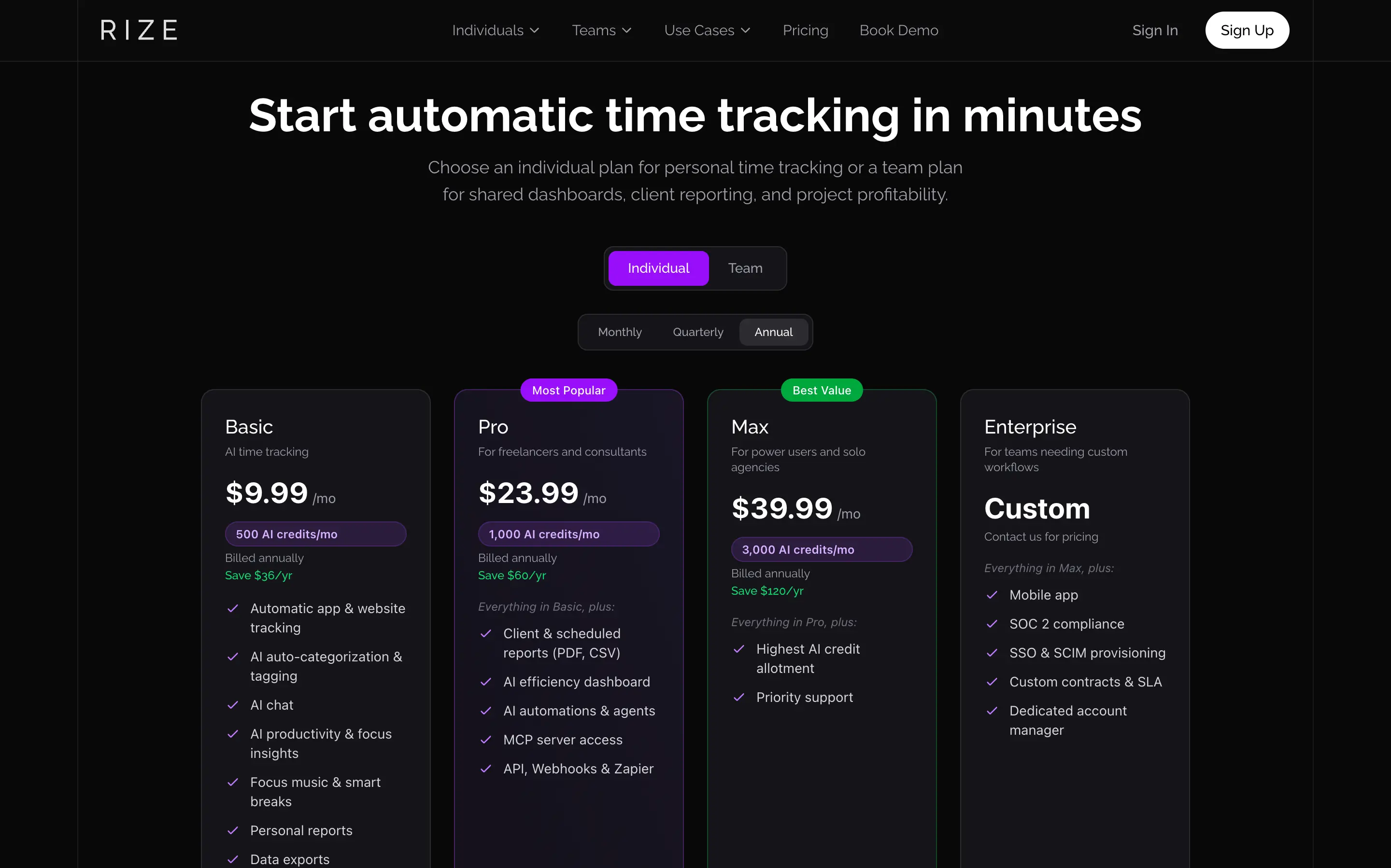
Teams pay per seat instead. $29.99/seat/mo annually or $39.99 monthly, one price that includes the shared dashboards, profitability tab, and client reporting the rest of this article has been describing. The trial runs for 7 days with full access and no credit card required, so what you test is what you'd pay for.
Time Doctor's Basic looks like the deal at roughly $6.67/user/month annually ($8 month-to-month), and to be fair, it does include screenshots. What it doesn't include is Payroll, which needs Standard at $11.67/user/month.
It also skips Benchmarks AI, the Unusual Activity Report, and video screen recording, all locked behind Premium at $16.70/user/month, more than double Basic's price for the features that justify buying employee monitoring software in the first place.
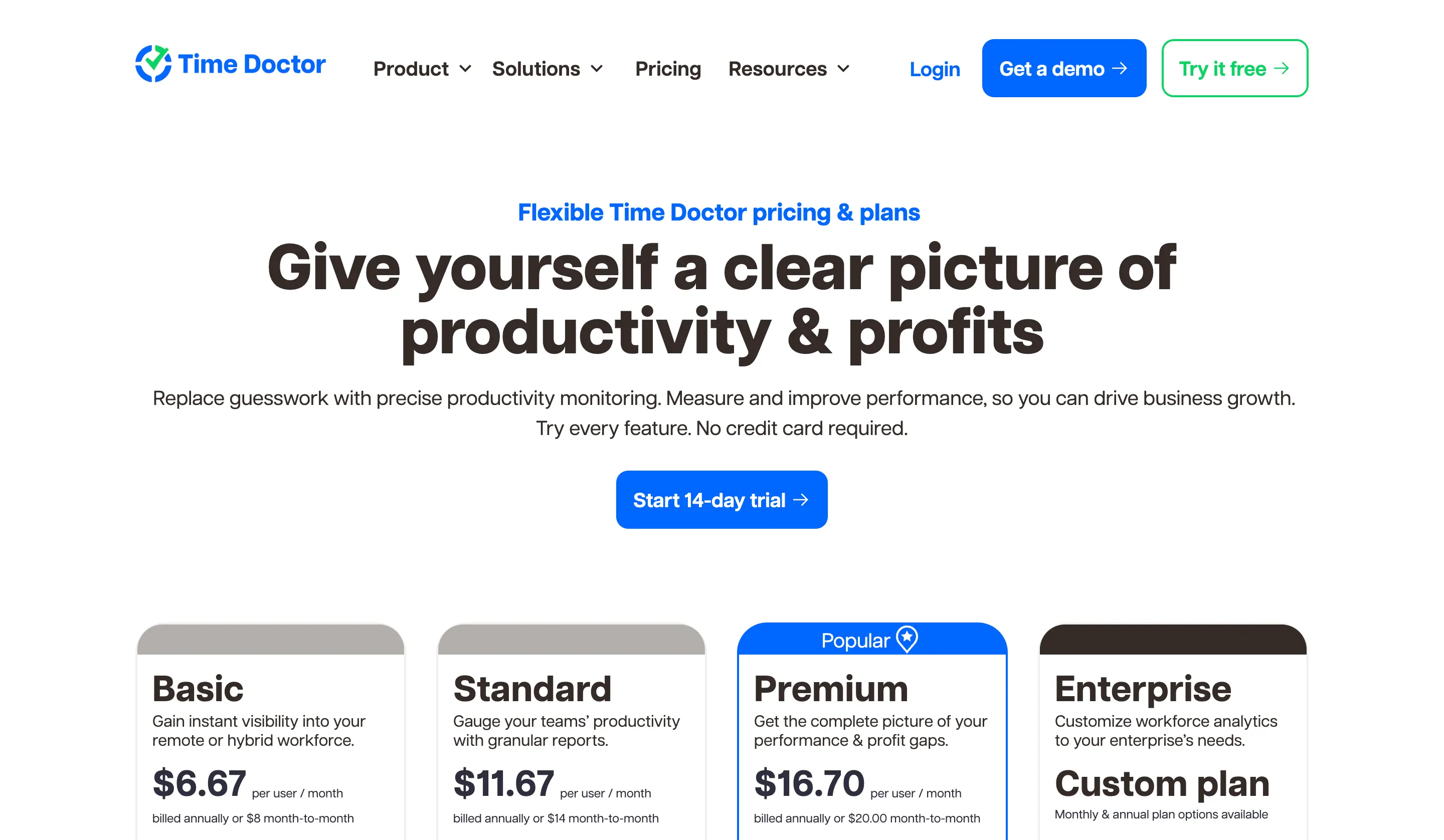
Then there's the add-on layer. Native payroll and HRIS syncs to ADP, Gusto, or BambooHR cost an extra $200 per integration per month on any tier, Premium included.
If you bill your own hours and want one number that never surprises you later, Rize's flat structure gets you there, with Pro as the real floor once a client sees your reports.
Rize vs. Time Doctor: Which should you use?
Choose Rize if:
- You bill hours to clients and want the number to be right without remembering to hit play
- You manage people you already trust, and buy-in matters more to you than proof
- Your team works from a laptop, not a phone, and would rather approve their own time than have it discovered
- You want a flat price today that isn't quietly building toward a bigger one later
Choose Time Doctor if:
- Screenshots and activity levels need to exist as evidence
- Your team runs on Linux and Android as much as Mac and Windows
For most people reading this, though, Rize is the right default. You're probably not running a 40-person BPO account. You're a freelancer, a consultant, or a small agency owner who wants tracked hours to turn into revenue without spending your morning telling software which project you're on.
I've run Rize every single day for over three years now, and the only thing it's ever asked of me is to open my laptop and get on with my life. It did the rest. That's just what happened, repeatedly, for three years.
If that's the problem you're trying to solve, Rize's 7-day trial doesn't even ask for a credit card. Start it, let it run quietly in the background, and see if your timesheet writes itself before you've made up your mind about anything.
Skip the manual timer
Rize tracks your work automatically and builds invoice-ready time entries in the background. Try it free for 7 days — no credit card required.
Start Free TrialRelated reading
See how Rize compares to other time trackers:
- Rize vs Clockify
- Rize vs Timely
- Rize vs Everhour
- Rize vs Hubstaff
- Rize vs Memtime
- Rize vs RescueTime
- Rize vs Harvest
Or browse all options on the comparisons page.
Start tracking time automatically
Join thousands of professionals who stopped guessing where their time goes. Free for 7 days.
“Rize has been a no-brainer for me.” — Ali Abdaal Read more →