![Rize vs Timely: Which Time Tracker Is Best? [2026]](/_next/image?url=%2Fassets%2Fblog%2Fhero%2Frize-vs-timely.webp&w=3840&q=75)
You have already tried timers. Toggl, Harvest, the whole category. And you already know why they failed: you forgot to start one, forgot to stop another, and ended a Tuesday guessing how you spent six billable hours.
So you have shortlisted two tools that promise to skip the timer altogether: Rize and Timely. Both call themselves automatic. Only one of them means it the way you are hoping. I ran both daily, side by side, to find out where each one wins, where each one falls short, and which one fits you, whether you are solo, running a small agency, or scaling toward fifty seats.
Quick Answer
Choose Rize if you want zero-touch tracking that builds an approved timesheet without a daily review step, plus focus tools included in the price. Choose Timely if you run a team of 10 or more that needs SSO, ISO 27001 compliance, recurring client reports, or a two-way sync with Jira, Trello, or monday.com.
Rize vs Timely at a Glance
Rize is a single app that captures, categorizes, and files your time automatically, with focus tools built in. Timely captures everything too, but you sort it into a timesheet by hand the next day, and it adds mobile access, more native integrations, and a compliance certification Rize does not have.
| Feature | Rize | Timely |
|---|---|---|
| Ease of use | One app, zero setup, nothing to review | Split across desktop and browser, plus a mobile app that crashes |
| Automatic tracking | AI categorizes and builds your timesheet live | Records everything, but you sort it manually the next day |
| Team size and scalability | Scales to 100 seats, admin overhead stays flat | Scales fine, but daily approval work multiplies per hire |
| Focus and productivity tools | Auto-detects focus, blocks distractions, plans tomorrow overnight | No focus tools of any kind |
| Client and project reporting | Built-in views, ready instantly, no setup | Custom report builder, made for recurring client deliverables |
| Privacy and data handling | Granular toggles, redact your history on demand | ISO 27001 certified, private by default, EU-hosted |
| Integrations | Fewer native apps, but deeper two-way syncs plus an MCP server | More native apps (Gmail, Zoom, Teams) plus SSO |
| Pricing | $9.99 to $39.99/mo solo (annual); Team $29.99/seat/mo with a 2-seat minimum | $9 to $22/user/mo (annual), no seat minimums |
| Best for | Solo freelancers and teams that want zero-touch tracking and focus tools included | Consultancies and agencies of 10+ that need mobile access, compliance certs, and client reports |
Rize's Zero-Touch Tracking Beats Timely's Daily Approval
Rize builds your timesheet without asking, while Timely leaves entries as drafts you approve every day. Both ship as dedicated Mac and Windows apps, but how you use each one is where they split. Rize is a single app: tracking, reports, and invoices all live in one place with no separate login.
Timely splits the job in two. Its desktop app, called Memory, tracks activity in the background and does almost nothing else. It is a toggle and a settings pane, not much more.
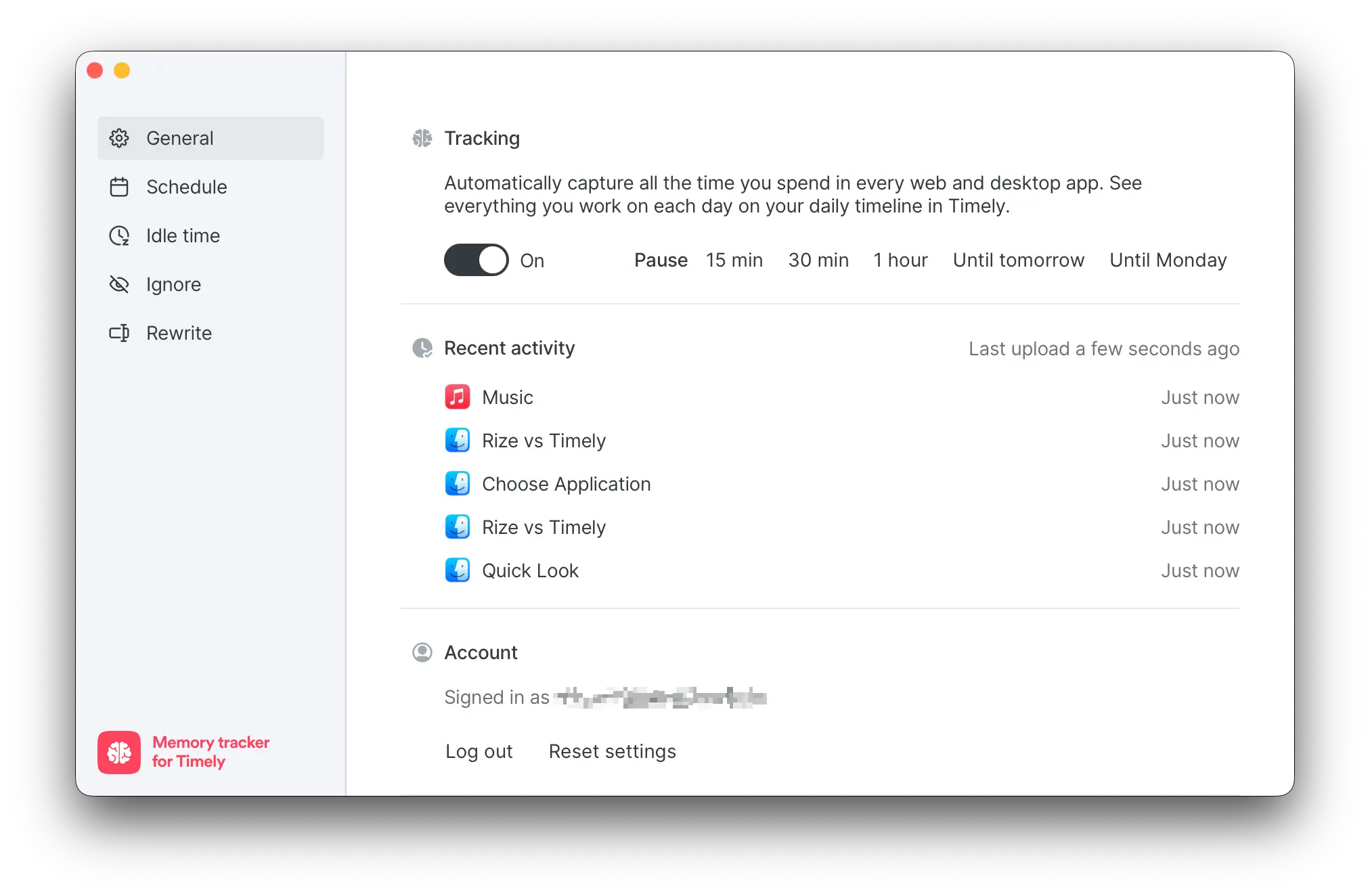
Everything you would actually call "using Timely" happens in the browser: reviewing entries, building timesheets, running reports. That is a tab you need open most of the day. Timely also lists a mobile app, but do not count on it. Tested on an iPhone 14 Pro, it crashed every time it opened. Rize does not offer a mobile app at all, so if mobile access matters, neither tool delivers right now.
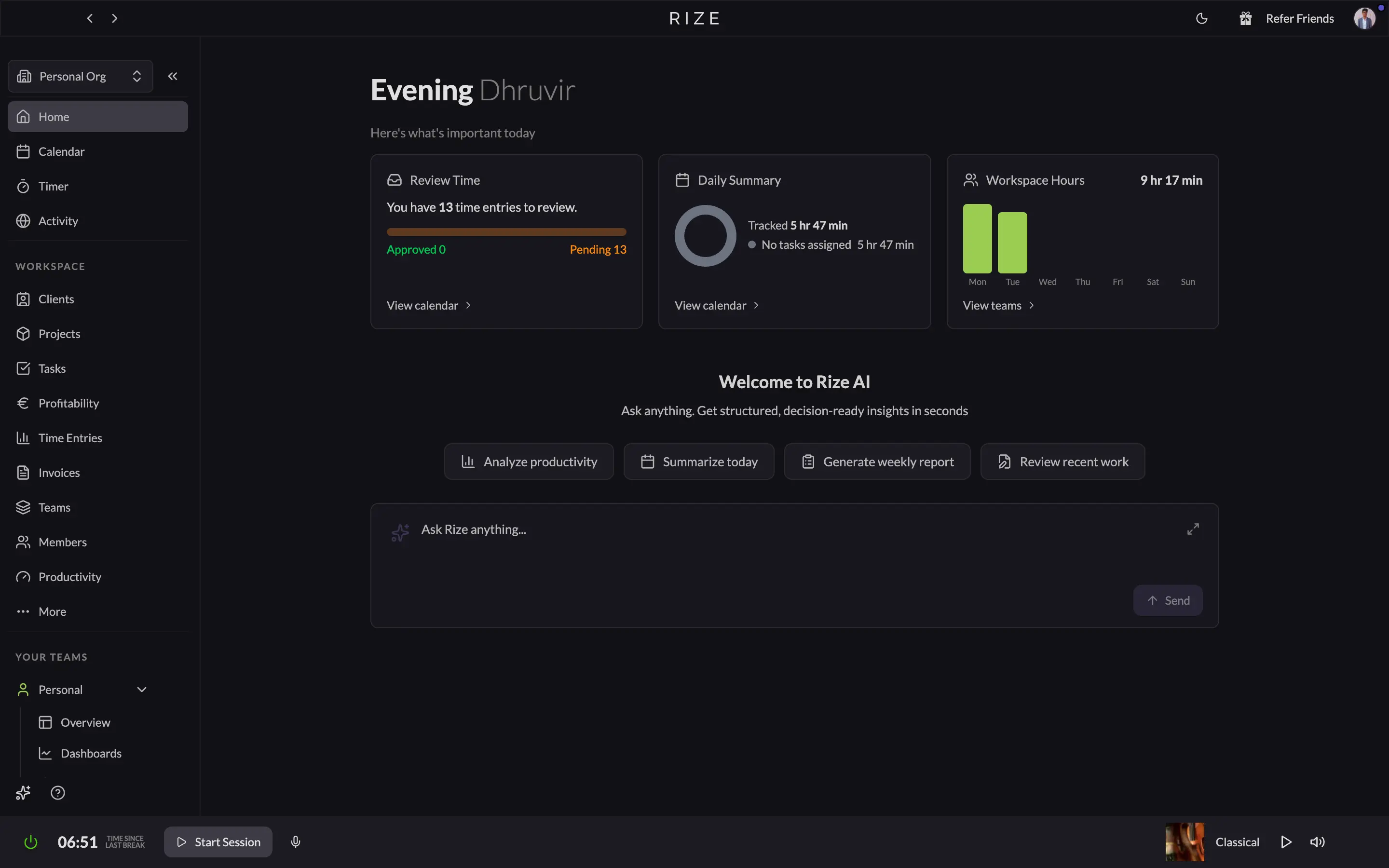
On the interface, both are clean enough that neither slows you down once you learn it. Rize opens to a morning summary: hours tracked, a green "all caught up" checkmark if nothing needs review, and an AI box you can ask to summarize your day or pull a weekly report.
Timely's web app is just as clean, organized around a single day, showing what it logged and letting you approve it into a timesheet. Open it midday and you will likely see an empty timesheet with a note that it will be "ready tomorrow morning."
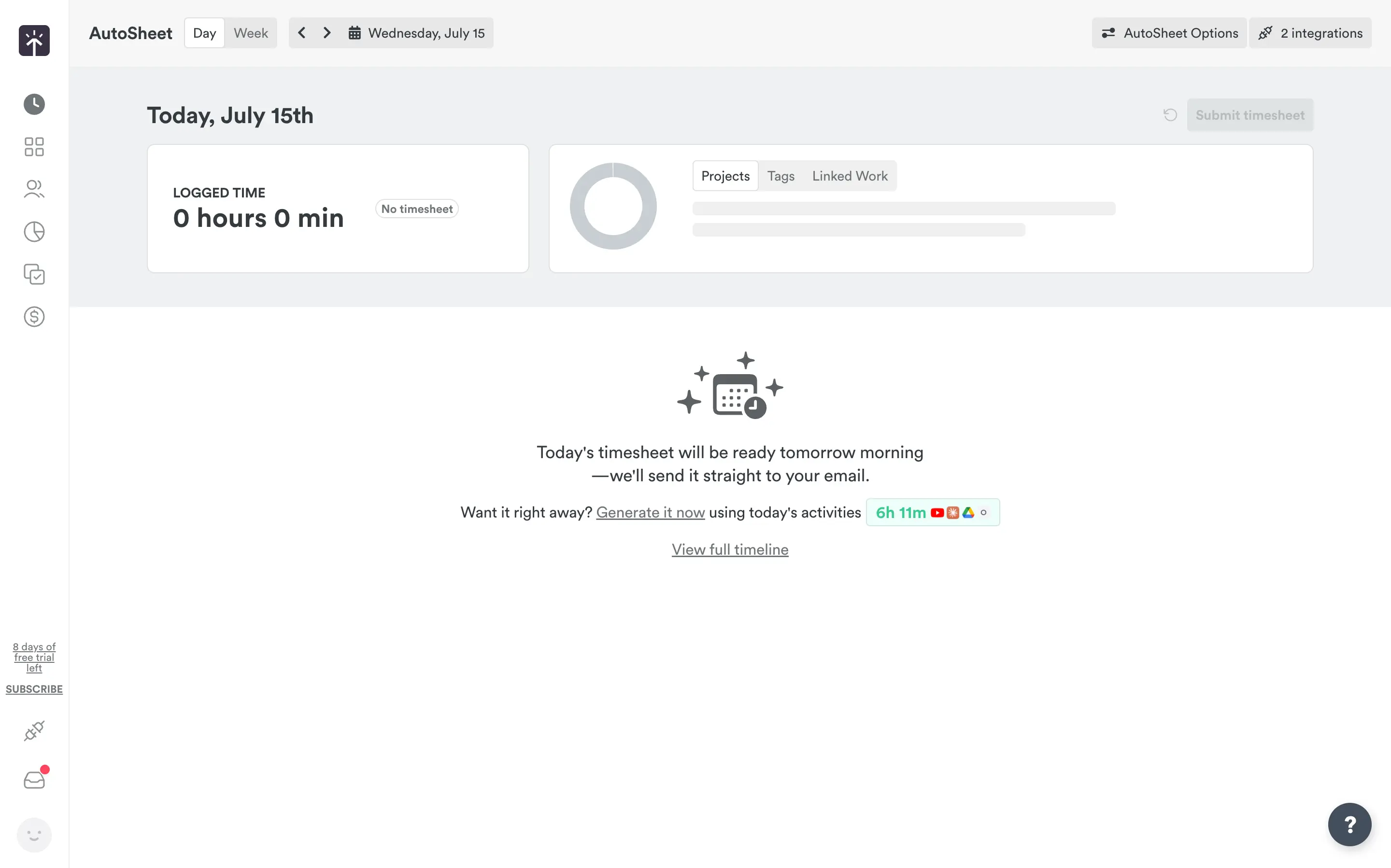
That approval step is the real gap. Rize tracks, categorizes, and builds your timesheet without asking. Timely's Memory entries sit as drafts until you review them, every day, for as long as you use it. If your ideal tracker is one you forget exists, Rize wins this round easily.
Rize's AI Categorizes Automatically. Timely's Memory Just Records
"Automatic" means two different things here: Rize identifies, categorizes, and labels every app, tab, and document while you work, and Timely records the same activity but leaves categorizing to you. Rize builds live time entries in real time.
Open the Time Entry Suggestion panel on any entry, and you see exactly what Rize saw: the specific apps and tabs, an AI-written description of what you were doing, a suggested project, and a confidence score next to that suggestion.
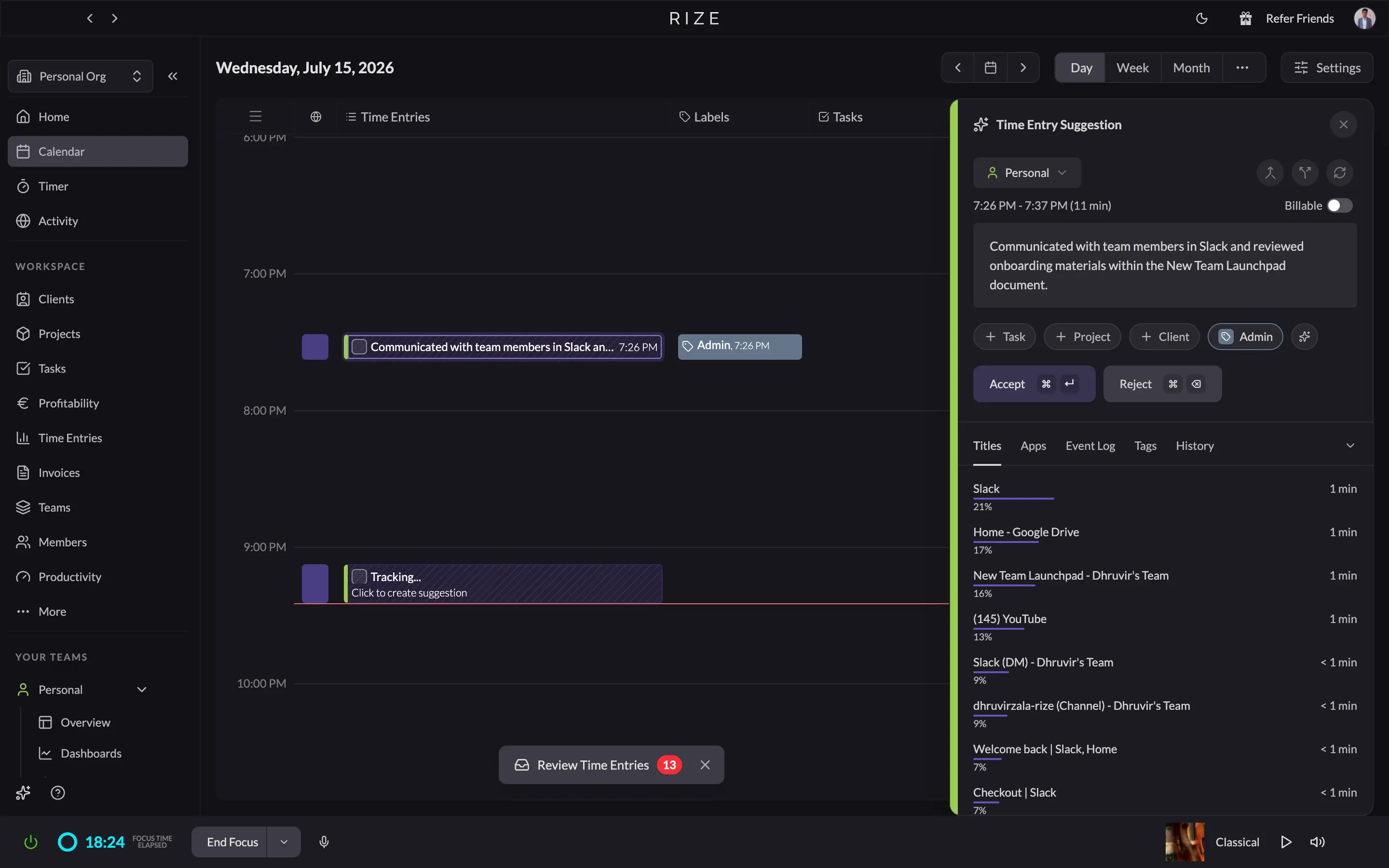
That categorization runs deeper than projects and clients. Rize sorts every minute into a category too (Writing, Research, Entertainment, Social Media, and so on), and under Tracking Rules you can override any default: assign a specific website, app, or keyword-matched title to whatever category you want. It is also where Rize doubles as a distraction blocker, so you can flag youtube.com as off-limits during a focus session instead of just logging the time you lost to it.
None of this is perfectly hands-off. Rize still surfaced a handful of low-confidence entries to confirm at the end of the day (3, out of dozens tracked), but that is a final glance, not a review shift. Timely's Memory tracks with the same granularity, arguably more, since every few minutes gets its own logged block. But it does not categorize any of it. Log in midday, and you will see "today's timesheet will be ready tomorrow morning" unless you click "Generate it now" to force it early.
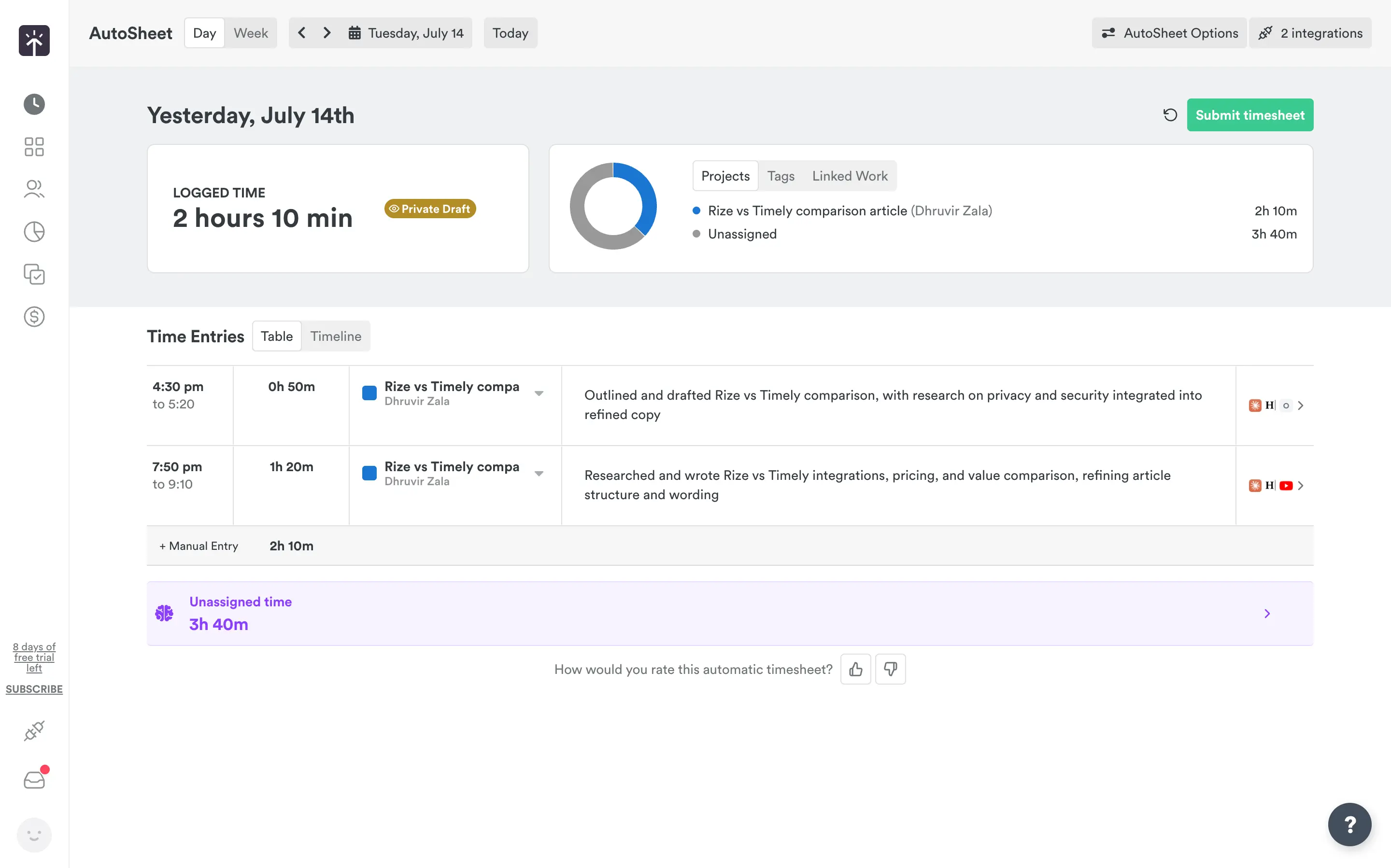
The real work happens the next day in the AutoSheet, where you go block by block, assign each stretch of time to a project, and approve it. Once submitted, the entry locks and cannot be edited. Both tools capture time with real accuracy. The difference is what they hand you: Rize hands you a finished, labeled timesheet to skim and approve, and Timely hands you raw activity you still have to turn into a timesheet yourself, one day behind, every day you use it.
See the difference
Try Rize free for 7 days and compare your auto-generated time entries against what you'd log manually. No credit card required.
Start Free TrialAutomatic Tracking Lets Rize Scale to Any Team Size
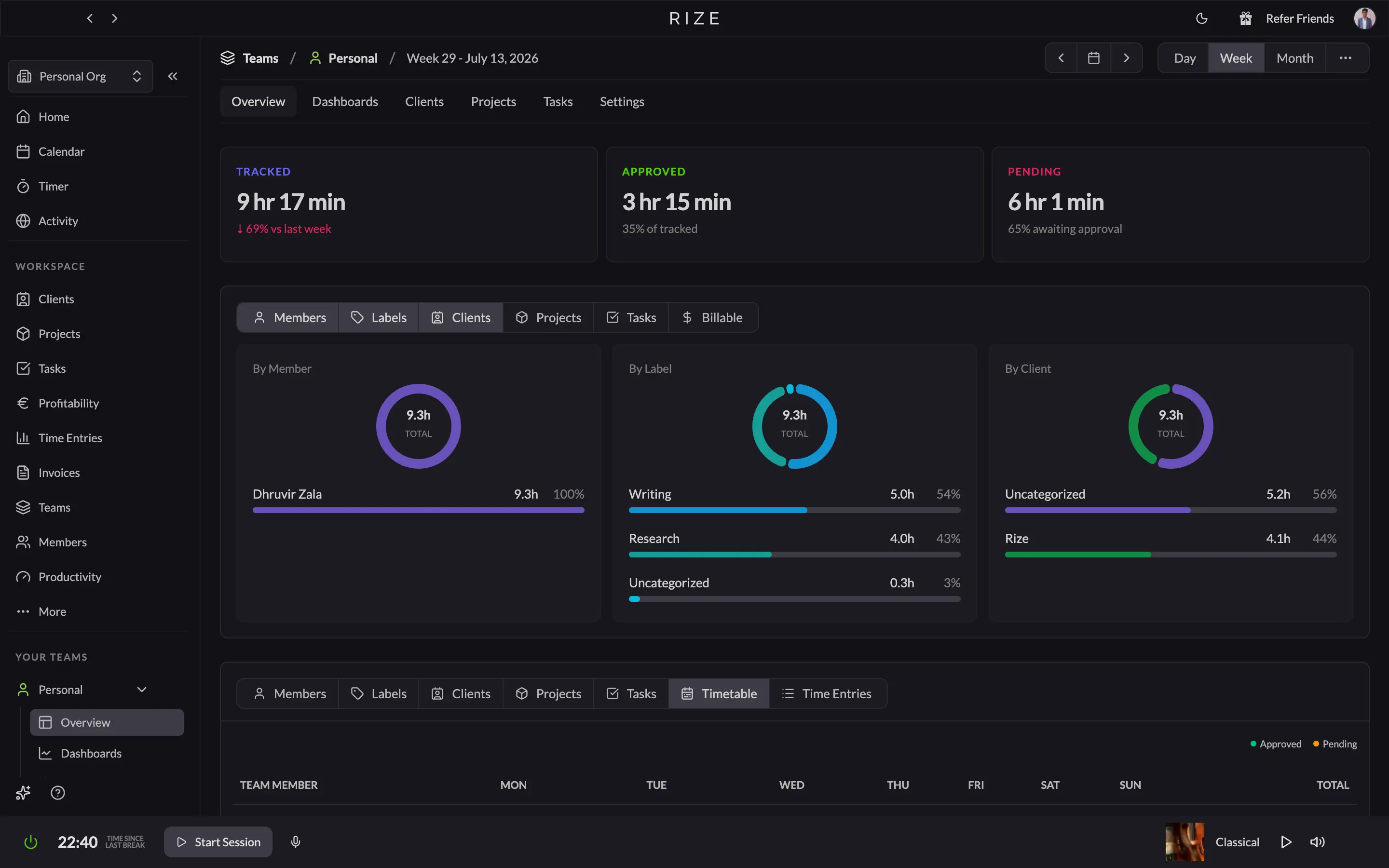
Rize's automatic tracking gets more valuable as a team grows, because it does not depend on anyone remembering to start a timer. Manual tracking loses accuracy with every person you add. Rize sidesteps that: every member's time is captured automatically and rolled into a live Team Analytics dashboard, hours by person, client, and project, without asking anyone to work differently as headcount rises.
Rize is not just a solo tool that tolerates teams. Its newer features (Team Analytics, agency-specific profitability tracking, and admin controls that toggle Tasks, Projects, Clients, and Billable Hours on or off for the whole org) show a company building for teams. The Teams plan holds up to 100 seats before you would need to think about Enterprise.
Timely's daily approval step multiplies with the team instead. Every person still has to open Memory each day and turn drafts into a timesheet, and a manager now has to make sure they all did. That is why Timely's People dashboard needs a "Missing hours" filter and an overtime alert: they patch a gap that only opens because the tracking depends on people. A team of 20 means 20 daily approval habits to enforce instead of one.
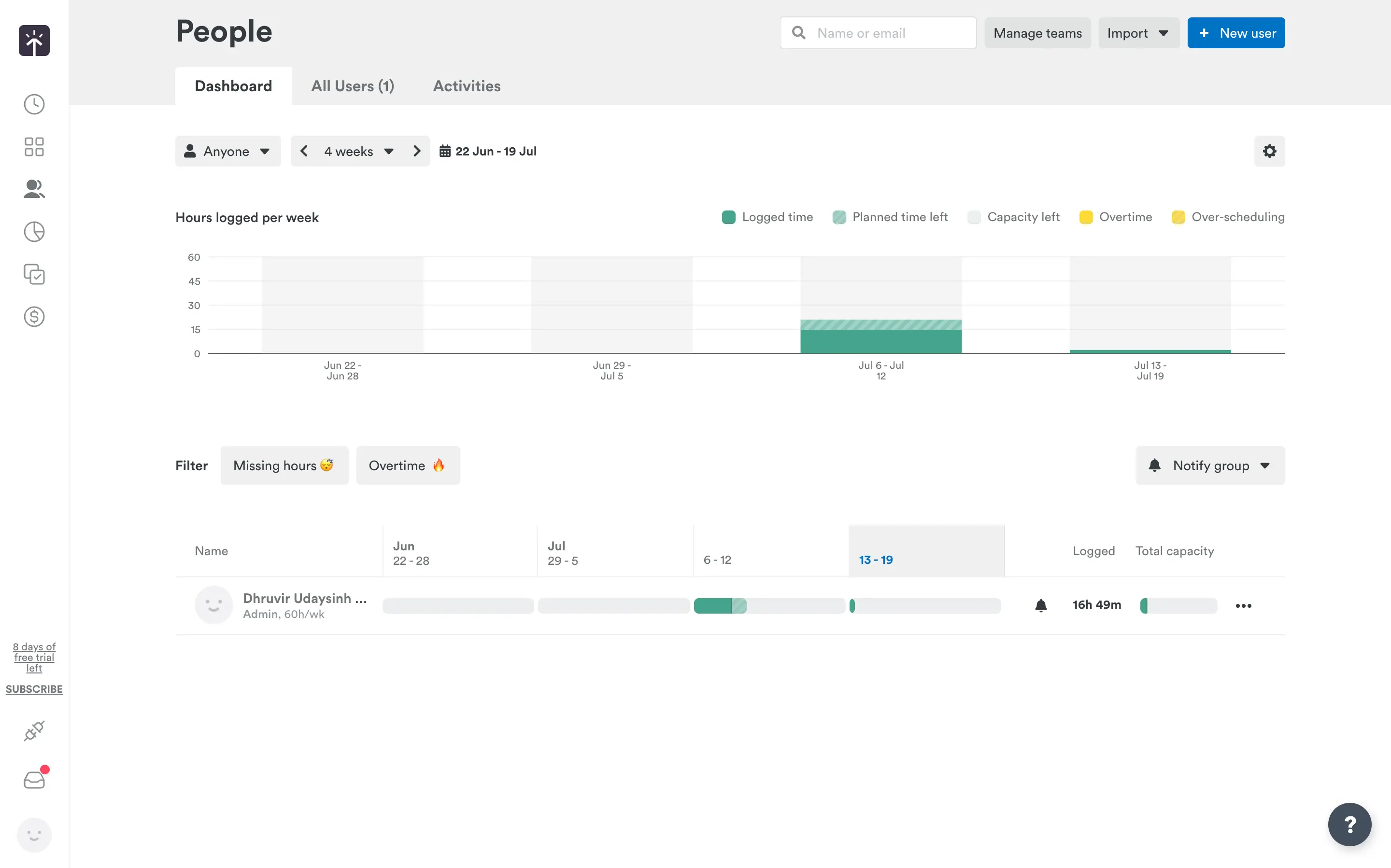
For most teams reading this, Rize is the right default. It captures accurate data automatically, scales to 100 seats without changing how anyone works, and keeps admin overhead flat as you grow. Reach for Timely only if you have a specific need Rize does not cover yet, like granular role-based permissions across a distributed team or SSO well before you are near 100 seats.
Rize Coaches Your Focus. Timely Only Tracks Time
Rize actively manages your day where Timely only logs it: Rize starts focus sessions on its own, blocks your distractions, plans tomorrow overnight, and reports on it with real numbers. Timely has no equivalent to any of this. According to research by Gloria Mark at UC Irvine, it takes roughly 23 minutes to refocus after a context switch, so tools that protect focus, not just measure it, save real hours.
Turn on Automatic Focus Detection, and Rize starts a session the moment you open the app where you usually do deep work, no timer required. Open a distracting site mid-session, and the Distraction Blocker locks your screen for a set number of seconds before you can dismiss it, a technique called urge surfing, built to break the impulse rather than just flag it.
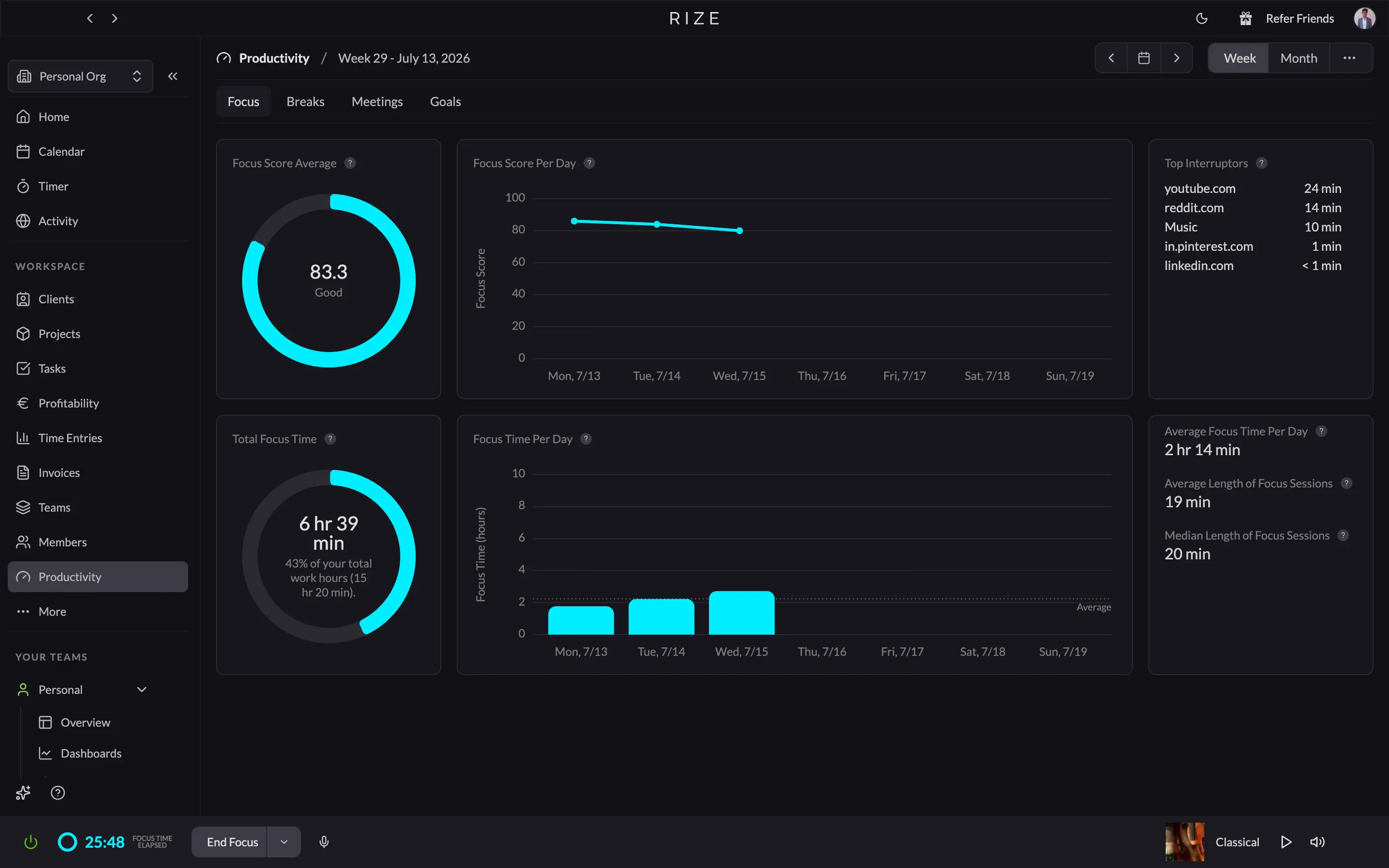
That data rolls into the Productivity tab, a reporting layer Timely does not have. Pick a week or month, and you get a focus score, total focus time as a percent of hours worked, average session length, and your top interrupters ranked by minutes lost. Turn on Automatically Plan Focus Sessions and Breaks, and Rize's AI builds tomorrow's schedule overnight, then auto-starts each block when the time comes.
Timely has no automatic detection, no blocker, no coach, and no reporting beyond the hours it logs. If you want software that works for you instead of just watching you, Rize is the clear pick.
Timely Builds Custom Client Reports. Rize Keeps the Numbers Built In
Rize's reporting is instant and built in, while Timely's is a flexible builder made for recurring client deliverables. Rize's Time Entries page shows time spent, billable amount, and billable and non-billable hours, and lets you filter by client, project, task, member, or label, then group results by day, week, or month.
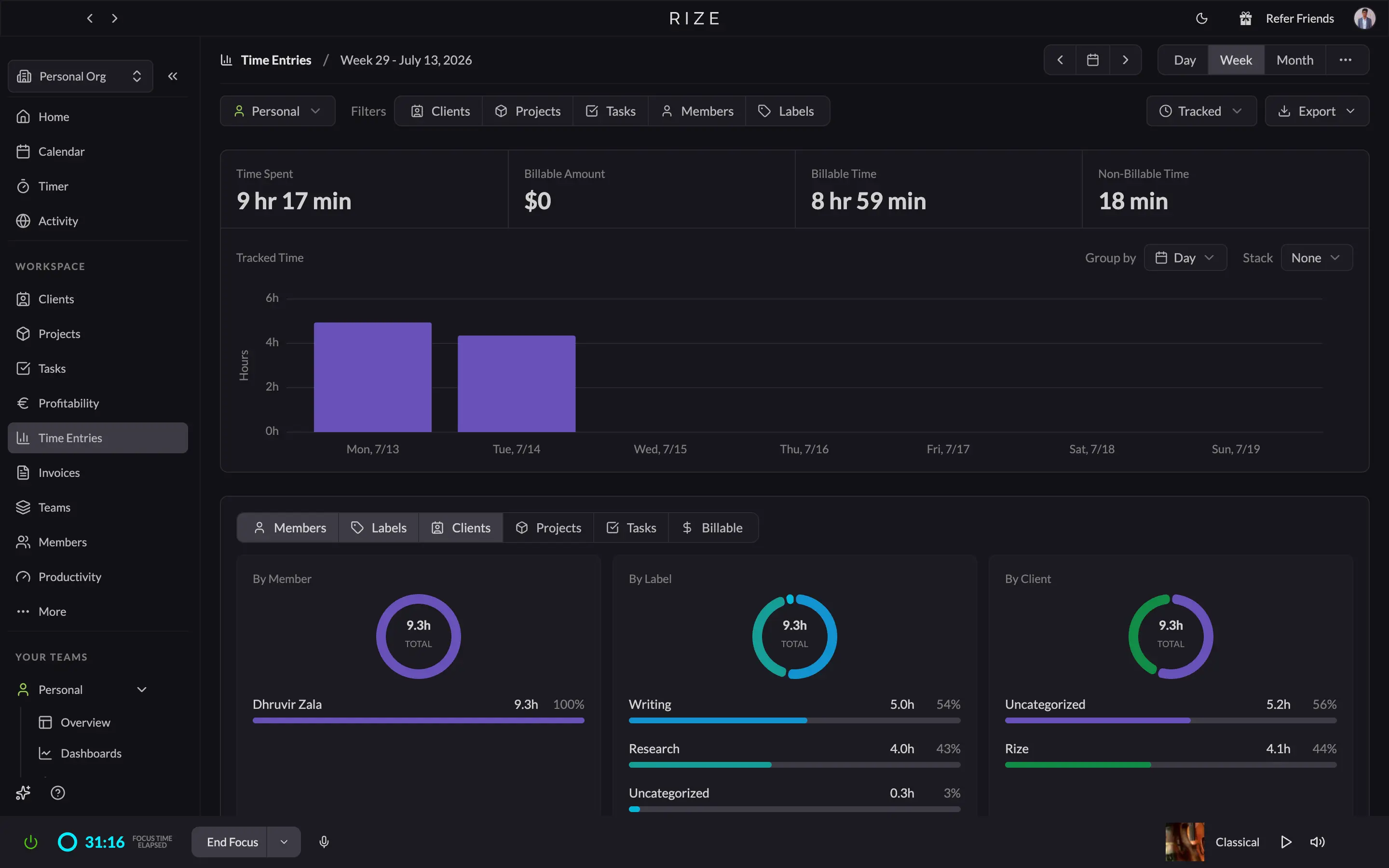
For invoicing, Rize's Invoices tab builds a bill straight from tracked time or from a blank template, and Settings lets you turn on daily and weekly email summaries of your metrics. The profitability data is already sitting there when you open Time Entries or Clients, with no setup.
Timely takes a different approach. Its Reports tab is a builder: start a template, choose from Hours, Clients, Projects, People, Tags, Teams, or Linked Work, and assemble a custom report, kept live or shared as a snapshot with a client or teammate.
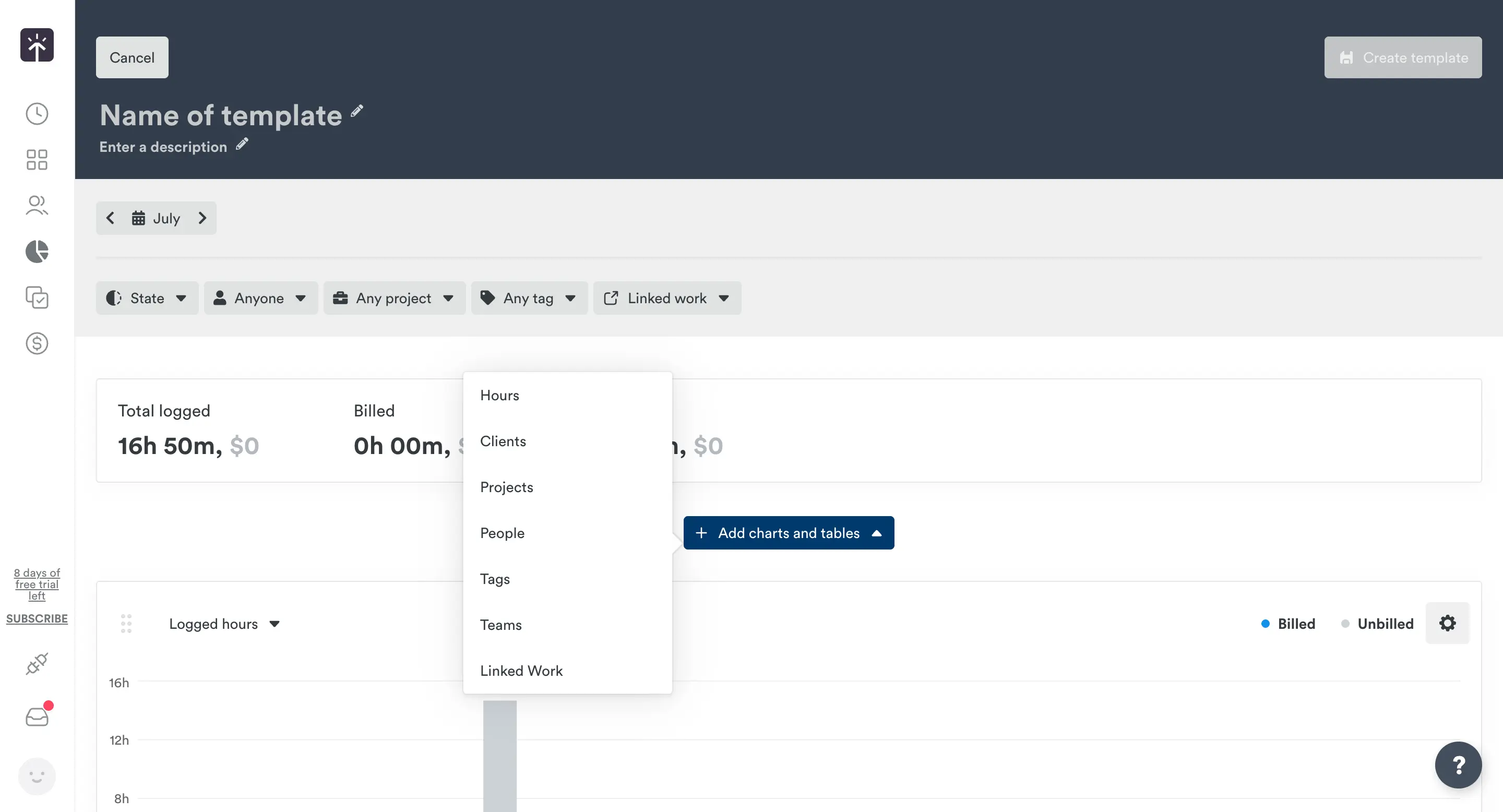
Two templates ship by default and cover most of what a freelancer or agency needs. The Client and Projects report totals time per client across weekly columns, and the Monthly Project Report splits logged hours into billed and unbilled. Timely's Invoices tab syncs with QuickBooks Online and bills by budget or by hours worked. For most solo users and small teams, Rize gets you to the numbers faster. Timely earns its keep if you hand a client a custom report on a recurring basis.
Privacy: Rize Hands You the Dials, Timely Hands You the Audit
Both tools track metadata only, with no screenshots, no keystrokes, and nothing pulled from inside your documents. The split is control versus certification: Rize gives you granular capture controls, and Timely backs a stricter private-by-default model with an independent audit.
In Rize's Privacy settings, URL Tracking can drop to domain-only or off, Title Tracking has its own toggle, and Redact Tracked Data wipes your app, title, and URL history on demand (or on a schedule) while keeping your categories and hours-tracked totals intact.
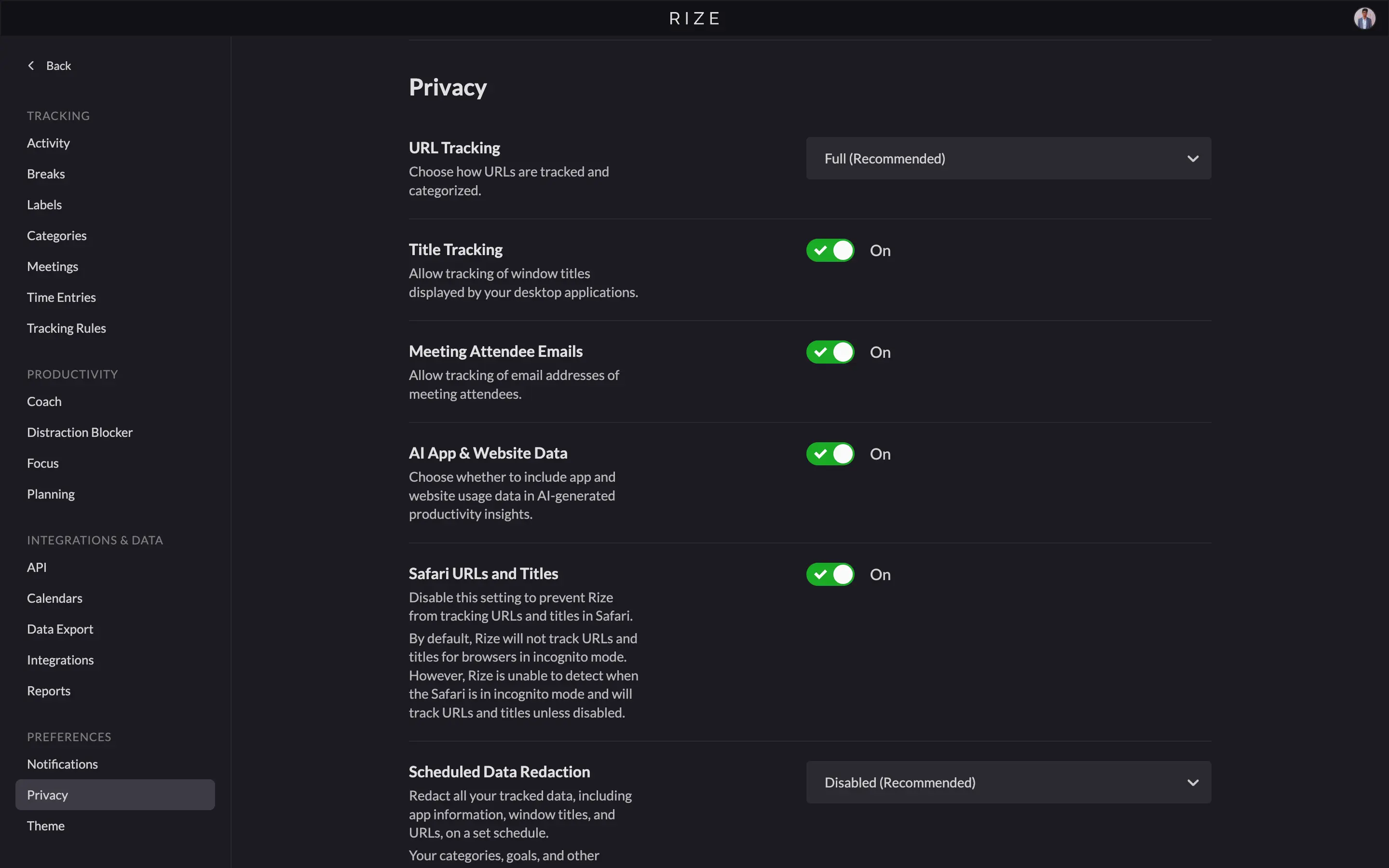
On team workspaces, entries need your approval before an admin can see them, and even then admins only see approved entries and reports, never raw activity. Rize does not sell data and will not let third parties train on it. This aligns with the data-minimization principle set out in the EU General Data Protection Regulation (GDPR).
Timely takes a stricter default: your Memory timeline is private until you personally share it, invisible even to your own admin. It is ISO 27001:2022 certified, independently audited, with data encrypted and hosted exclusively on EU-based AWS servers. Rize's privacy pages do not mention an equivalent certification. If you want maximum say over what gets captured in the first place, Rize's toggles and redact button do more for you. If a formal compliance cert is on your checklist, Timely has the paperwork.
Integrations: Timely Wins on Count, Rize Wins on What Syncs
Timely lists more native integrations, but Rize's shorter list syncs more deeply. Most of Timely's integrations page is passive: Memory recognizes an app by name and logs the time, but nothing pulls in or pushes out. Timely's real two-way syncs, what it calls Deep Sync, cover six tools: Linear, Asana, ClickUp, monday.com, Trello, and Jira.
Rize's native list is shorter (ClickUp, Linear, Asana, Slack, Google Calendar, Outlook), but each one actually syncs, and two things go further than anything Timely offers. You can create a ClickUp, Linear, or Jira task straight from Rize's review panel, and the Slack integration is a conversational agent you can ask about your hours. Rize also runs an MCP server, so Claude or ChatGPT can query your automatic time tracking data directly.
Timely covers ground Rize does not: native Gmail, Zoom, Microsoft Teams, and SSO through Okta and Azure AD, which matters for teams with a compliance checklist. Rize leans on Zapier for everything outside its native six. If your team runs on monday.com, Trello, or Jira, or needs SSO, Timely connects natively where Rize cannot. If your stack is ClickUp, Linear, Asana, Slack, and a calendar, Rize's shorter list already has you covered.
Rize vs Timely: Pricing and Value
Solo pricing is close, but team pricing splits hard: Timely is cheaper per seat once you cross five people, while Rize includes focus tools that Timely never offers. Both bill by subscription, both save roughly 20% annually, and neither has a permanent free plan. Prices as of August 2026:
| Plan | Rize (annual) | Timely (annual) |
|---|---|---|
| Entry | $9.99/mo Basic | $9/user/mo Starter |
| Mid-tier | $23.99/mo Pro | $16/user/mo Premium |
| Top tier | $39.99/mo Max | $22/user/mo Unlimited |
| Team (5 seats) | $149.95/mo Team | $80/mo Premium |
| Team (10 seats) | $299.90/mo Team | $220/mo Unlimited |
| Focus tools included | Yes, from Basic up | None at any tier |
| Free trial | 7 days, no card | 14 days, no card |
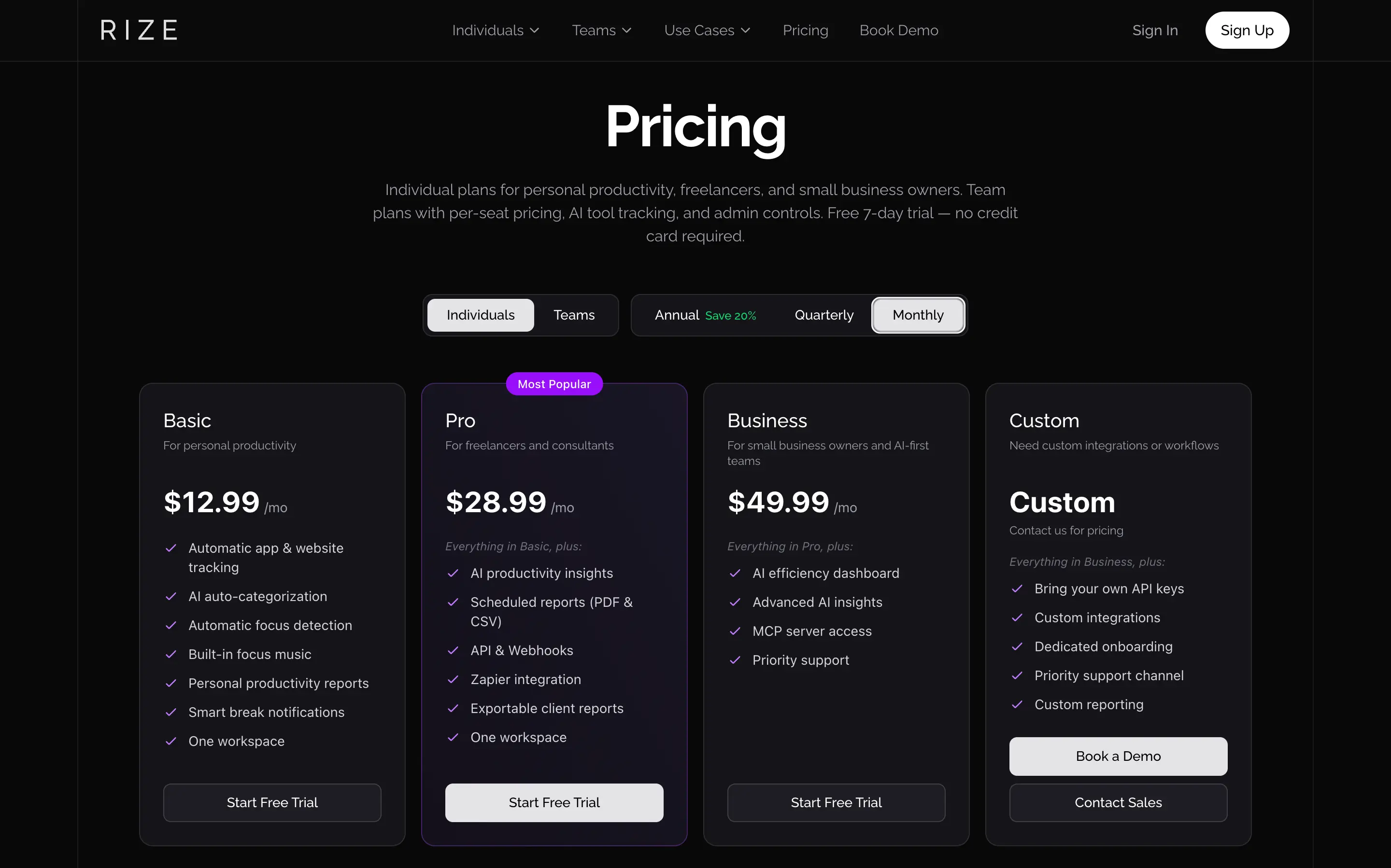
Rize's Basic and Timely's Starter land within a dollar of each other annually, but Rize's price includes Automatic Focus Detection, the Distraction Blocker, and focus music, none of which Timely offers at any tier. One tier up, Timely's Premium ($16 annually) undercuts Rize's Pro ($23.99 annually) by about $8, if integrations matter more to you than focus tools.
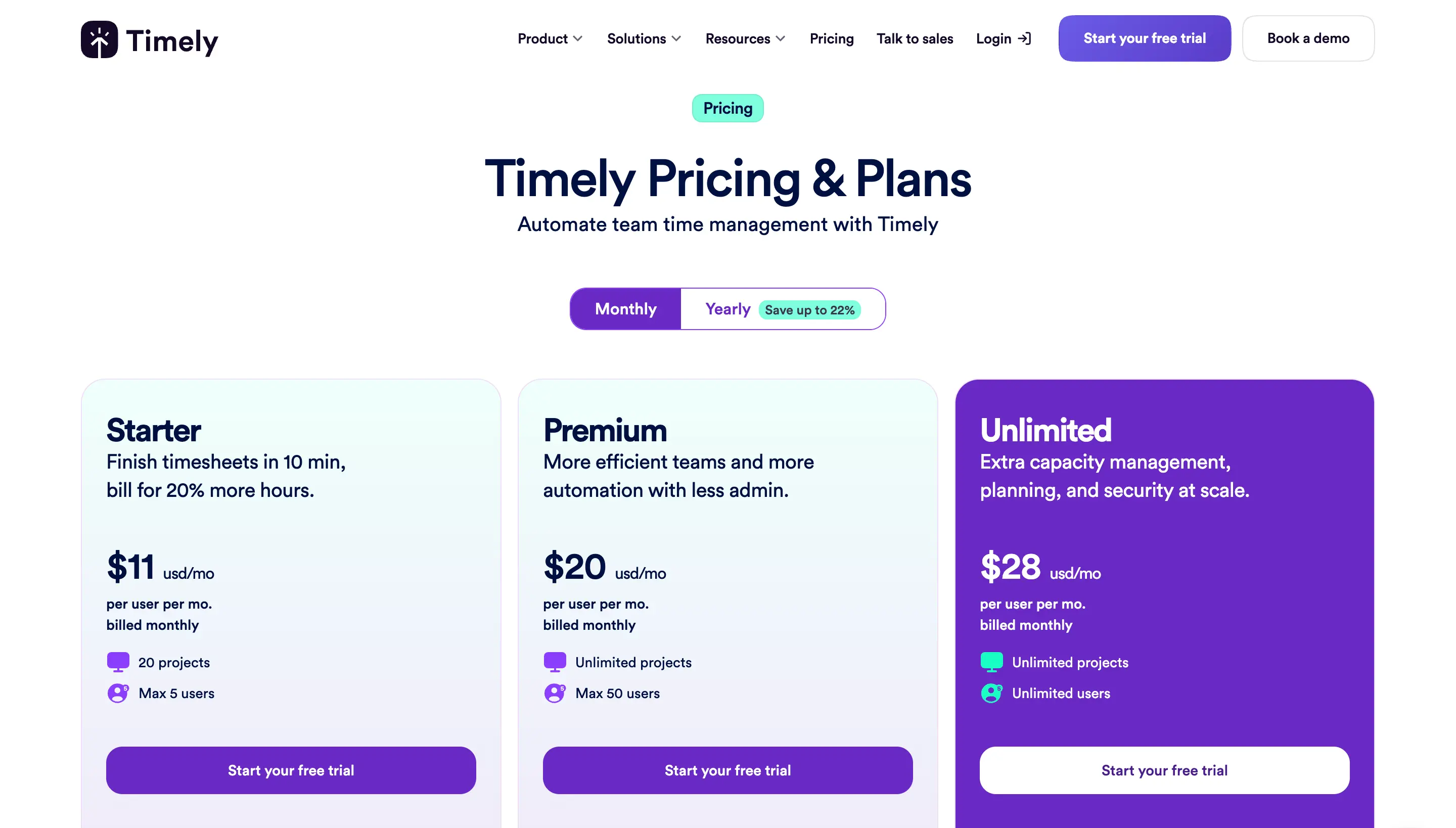
Team pricing is where they split hard. Rize's Team plan is $29.99/seat/mo annually with a 2-seat minimum, while Timely charges per user, capped at 5, 50, or unlimited. At 5 seats, Rize Team runs $149.95/mo annually versus Timely's Premium at $80/mo. At 10 seats, Rize Team runs $299.90/mo versus Timely's Unlimited at $220/mo. That gap buys AI efficiency dashboards, audits, and frontier model access Timely does not offer. Check Rize's pricing page for current plans. If you are solo or a team of 2 to 5 who want focus tools built in, the price is close enough that features should decide it, not cost.
Which Is Better for You?
Rize fits solo professionals and teams that want zero-daily-upkeep tracking with focus tools included. Timely fits teams of 10 or more that need compliance, mobile access, or recurring custom client reports. Here is the decision framework.
Choose Rize if: you are solo, freelance, or running a team of up to 100 people that wants tracking with zero daily upkeep. You care about deep work as much as billable hours and want a tool that blocks distractions and plans tomorrow for you. You work on Mac or Windows, do not need a native mobile app, and want admin overhead to stay flat as you hire. We built Rize because we were tired of tools that created more work than they saved.
Choose Timely if: you run a team of 10 to 50+ people that needs SSO and ISO 27001 certified compliance. You regularly hand clients or stakeholders custom, recurring reports built from a template. Your team already runs on Jira, Trello, monday.com, Asana, ClickUp, or Linear and needs a true two-way sync. You are fine trading a quick daily approval step for meaningfully lower per-seat pricing once you cross five people.
For most people reading this, Rize is the right default. You did not come here looking for a new tool to manage. You came to stop losing track of your own hours, and Rize is the one built to disappear into your day: no review queue, no approval habit to enforce as your team grows, and no separate subscription for the focus tools you would otherwise buy elsewhere. Timely earns its place once you are past 10 people and compliance or client reporting outweighs everything else.
Related Comparisons
See how Rize compares to other time trackers: Rize vs Clockify, Rize vs Everhour, Rize vs Toggl for agencies, Rize vs Hubstaff, Rize vs Memtime, Rize vs RescueTime, and Rize vs Harvest. For a three-way accuracy deep dive, read our Rize vs Timely vs Toggl comparison, or see how Rize works for agency teams.
Start tracking time automatically
Join thousands of professionals who stopped guessing where their time goes. Free for 7 days.
“Rize has been a no-brainer for me.” — Ali Abdaal Read more →