![Rize vs Toggl: Which time tracker is best? [2026]](/_next/image?url=%2Fassets%2Fblog%2Fhero%2Frize-vs-toggl-for-agencies.webp&w=3840&q=75)
Introduction
You bill by the hour. You've probably used Toggl before, since almost everyone starts there, and it worked fine for the first few weeks. Then a client call ran long, or you got pulled into Slack, and you forgot to hit start. Forty minutes vanished. Not tracked, not billed, gone. It happened again the next week. At some point, you stop wondering if you're being careless and start wondering if the timer itself is the problem.
That's usually the exact moment people search to see whether there's something better than Toggl for them.
I've used Rize daily since 2022. For this comparison, I ran Toggl alongside it on actual client work, same invoices, same deadlines, to see whether paying more for a tool that runs itself beats a free timer you already know how to use.
Here's exactly how they stack up.
Rize vs. Toggl at a glance
If you're only going to read one part of this article, read this.
| What matters | Rize | Toggl |
|---|---|---|
| Setup and everyday ease of use | Five minutes to set up, a week to stop feeling overwhelmed by the sidebar | It's a stopwatch. You'll understand it in thirty seconds |
| Automatic vs. manual tracking | Nothing to start, nothing to forget, ever | You're the tracking system. Forget to hit play, lose the time |
| Focus and deep work tools | Focus score, distraction blocker, urge surfing. An actual coach | A Pomodoro timer and idle detection. That's the whole toolkit |
| Team features and admin control | Live team dashboards from day one | Approvals, SSO, audit logs. Built for this for years |
| Client billing and profitability | The number is just sitting there. Nothing to build | Same answer, but you're generating the report yourself first |
| Privacy | No screenshots, no keystrokes | Manual by default. Background tracking stays opt-in and yours alone |
| Integrations | Six native apps, but the only one with an MCP server for AI | 100+ apps through the browser extension alone |
| Pricing and value | No free tier, but $9.99 buys tracking you never have to think about | Free forever for solo use, paid tiers start at $9 |
Toggl is easier to open. Rize is easier to live with.
Ease of use is personal, and I've said as much in other pieces until it started sounding like a cliche. My bar for it stays simple, though: how much does the software bother me while I'm trying to work. Judged by that, Toggl wins the first week. Rize wins every week after, once it stops needing you to notice it's even running.
Open Rize for the first time, and you land on a chat window. It says, "Morning Dhruvir, here's what matters right now," and offers to review your day or generate a weekly report before you've typed a word.
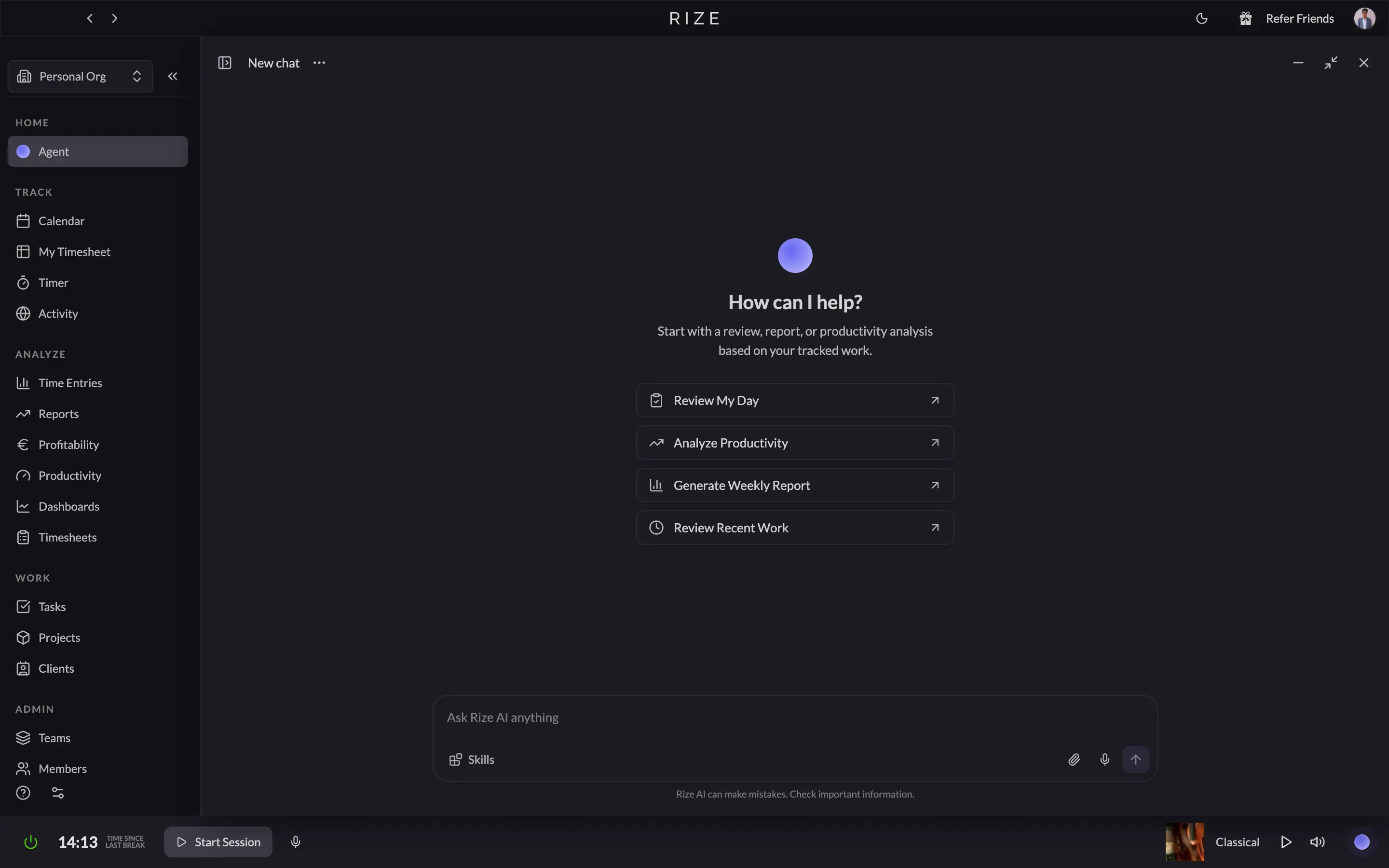
The sidebar next to it is where the intimidation actually comes from. Five sections and sixteen items between them, everything from Calendar and Activity down to Profitability and Invoices. I touched maybe five of those in my first week. Rize's own site promises setup in under five minutes, and connecting your account really does take minutes. Getting comfortable with everything sitting in that sidebar takes longer.
That first impression fades fast once you're actually in a work day, though. Open the calendar view mid afternoon and Rize has already filled in blocks you never created: what you worked on, which app it happened in, how long it lasted, whether it counted as focus time or a break.
I didn't title a single one of those entries myself. On the "does this bother me" scale, that scores close to zero, and it's the entire reason people pay for Rize in the first place.
The one everyday friction point is platform coverage. Rize runs on Mac and Windows, full stop. No phone unless you're on the Enterprise plan, which most freelancers and solo consultants reading this aren't paying for. Step away from your laptop and Rize stops seeing you.
Toggl goes the opposite direction on all of it. Onboarding is a literal checklist: create a project, invite your team, assign people, watch the dashboard.
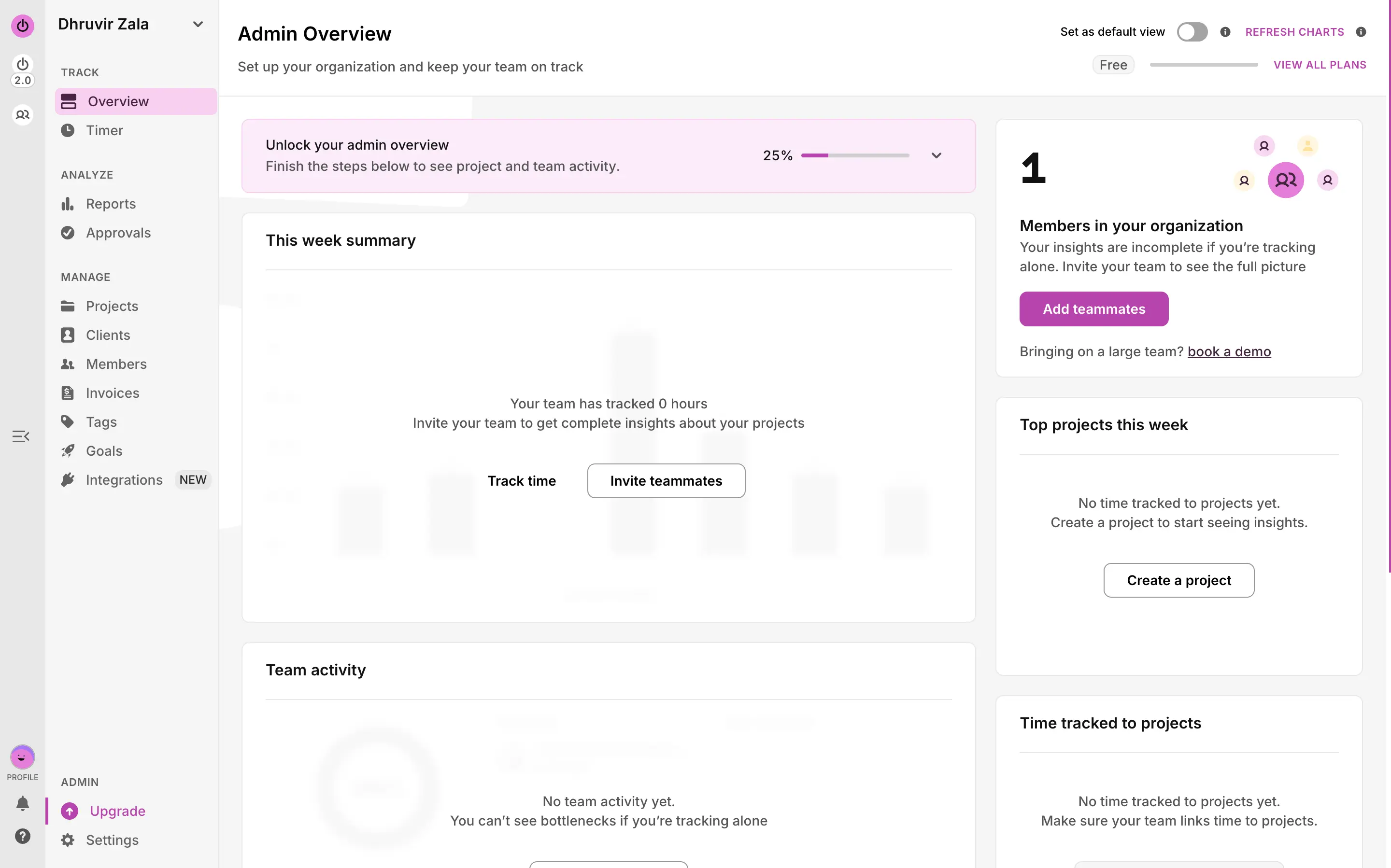
No AI greeting, no sixteen menu items to make sense of. The sidebar has eleven items across three sections, and a few of them, Approvals, Goals, Tags, you'll probably never touch as a solo freelancer.
The timer itself is the whole product distilled into one screen. A text field asking what you're working on, a play button, a running clock.
Anyone who has used a stopwatch app understands Toggl inside thirty seconds. That low a bar genuinely matters if software with any learning curve at all annoys you.
What did surprise me is that Toggl's desktop app has its own version of background activity tracking, just opt-in and more cautious about what it does with it. Click into a block on the Timeline view, and it shows you exactly what got caught, with a button that says "Copy as Time Entry."
It never turns that into billable time on its own. It shows you the evidence and waits for you to say yes. Worth knowing, since most comparisons treat Toggl as a pure manual stopwatch and skip this part entirely.
For what it's worth, I default to Rize, not because it's objectively easier, but because I've stopped noticing it's there, and that's the kind of easy I actually care about. Your answer might be the opposite, and that's a fine answer too.
Rize builds the timesheet. Toggl gives you the raw material.
This is the fork that decides which tool is right for you, more than any other section in this comparison.
Every block Rize creates comes with more than a time range. It writes a full sentence description of what you did, and takes its own guess at the project, the client, and whether the time is billable.
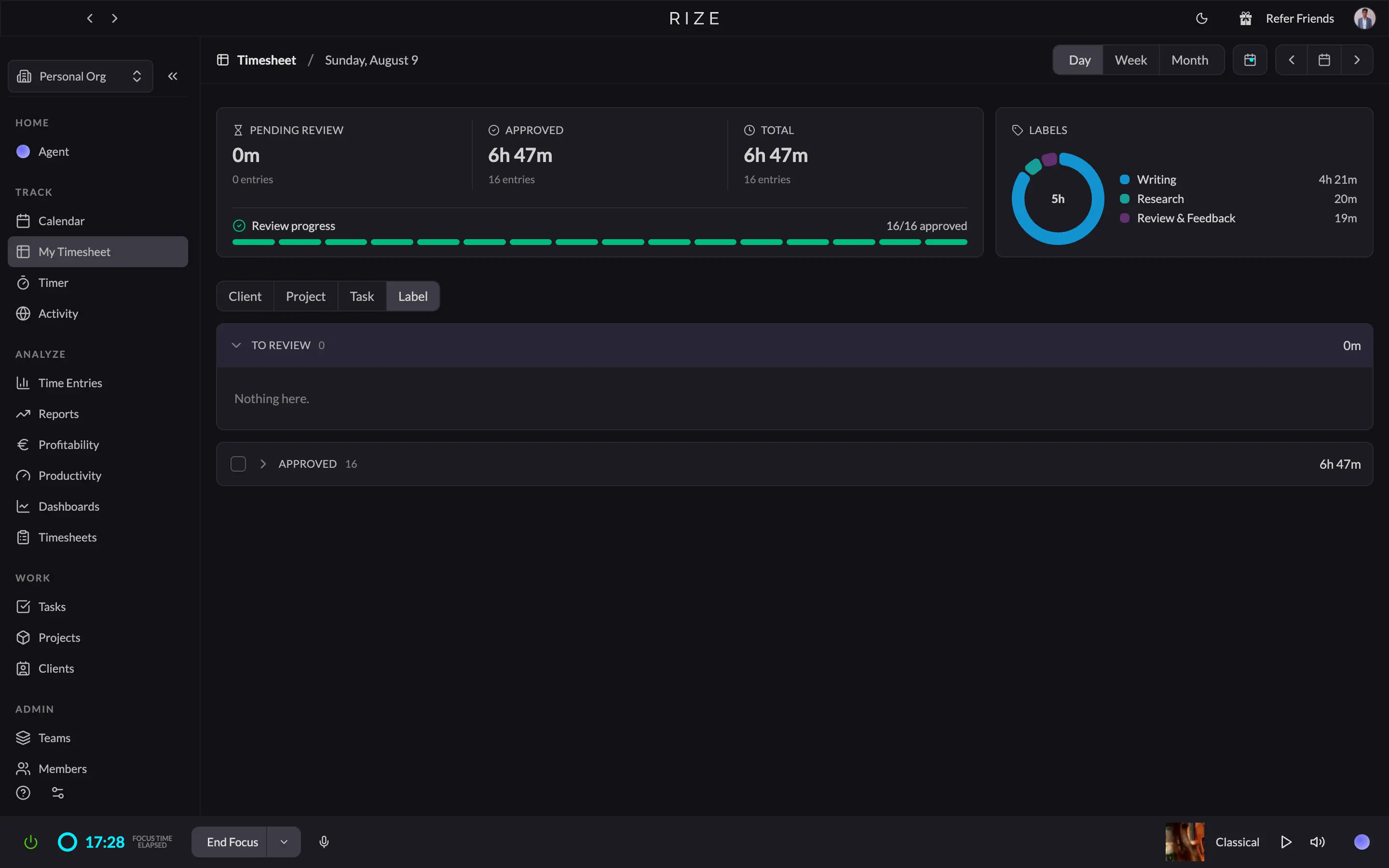
Here's why I think that setup is the better default for most people reading this, not just my own preference talking.
The logic is simple. A system that depends on you remembering to do something every time will eventually fail. Not because you're careless, but because that's what happens to memory and discipline under real working conditions. A client call runs long. You get pulled into a Slack thread. You're finally in flow, and the last thing on your mind is a timer. Manual tracking asks you to win that fight every single time you switch tasks, all day, every day, forever. Automatic tracking just removes the fight. There's nothing to forget, because there's nothing you had to remember to do.
There's an emotional side to this, too. The dread of sitting down at the end of a long day and trying to reconstruct where three hours went, guessing at start times, second-guessing whether a block was billable, is a genuinely bad feeling. A lot of freelancers carry it quietly without ever naming it. Knowing your day is already captured, and all that's left is a quick review, swaps that low-grade dread for something closer to relief.
You still get a say in how much you trust the system, which matters. Turn the AI down in Settings, and it suggests less on its own. Raise the confidence threshold, and it stops auto-filling anything it isn't sure about. Head to Settings, then Automation, then Tracking Rules, and you can tell it exactly how to treat a specific app or site going forward, so you're not correcting the same guess twice.
Toggl is built on the opposite belief, and it's a legitimate one. It assumes you'd rather be the one deciding what counts as work, every time, than hand that decision to software. The activity timeline on its desktop app gets you partway there. It logs the apps and sites you touched in the background, but it has no idea which client that belongs to, which project, or whether it's billable. You make every one of those calls yourself, every entry, every day.
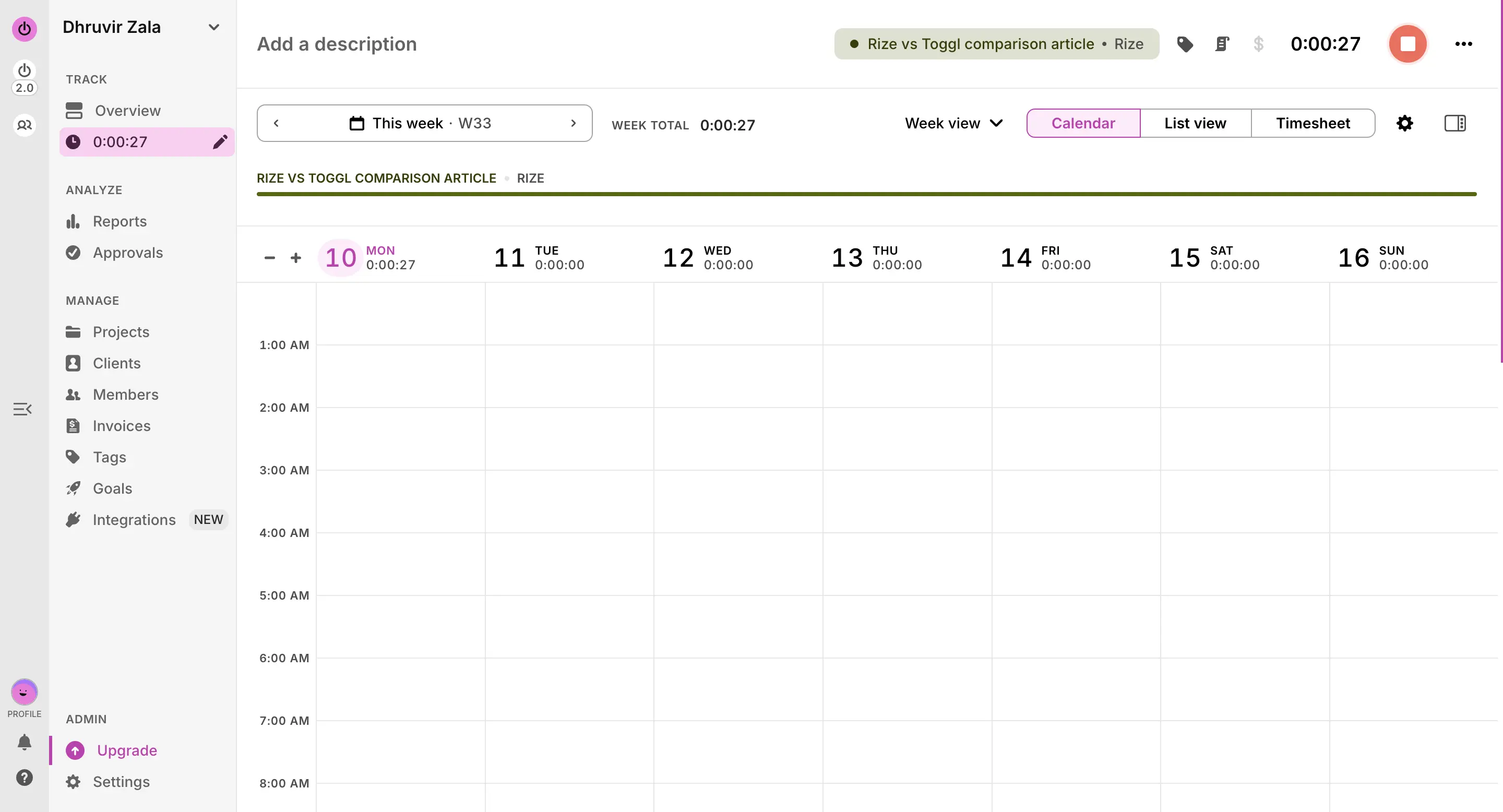
If you value not having to think about tracking at all, and you'd rather review a finished draft than build one from scratch, Rize is built for exactly that, and it's the better default for most people who've made it this far into a comparison article.
If you value staying hands-on, deciding for yourself what counts as billable in the moment, and you're genuinely fine interacting with your tracker every day, Toggl is the honest choice here.
Toggl has a timer for breaks. Rize has a coach for your whole day.
This is the one section in this whole comparison where I don't feel the need to hedge. Rize wins, and it's not close.
Toggl gives you two things here: a Pomodoro timer for break reminders, and idle detection that flags the time you spent away from your desk so you can decide whether to keep it or toss it. That's the whole toolkit. Useful, but reactive.
Rize is built around the opposite idea, that the point of tracking time isn't just knowing where it went, it's changing where it goes next.
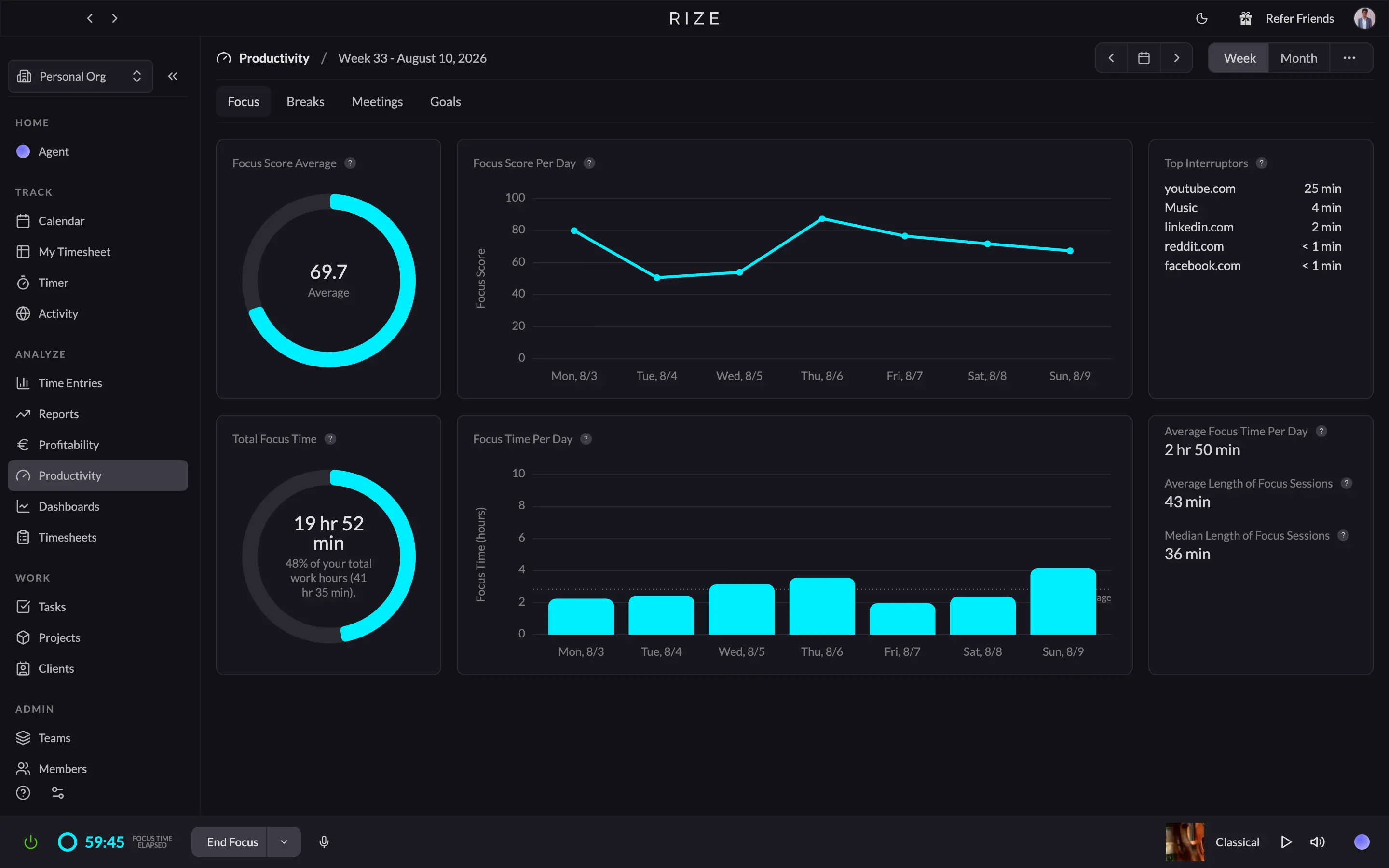
Head to the Productivity tab and Rize hands you a Focus Score out of 100 for every day, built from more than 20 different signals.
The automatic focus detection is the part that actually changes behavior, though. Open something Rize has categorized as work, a doc, your code editor, whatever, and it quietly starts a focus session behind the scenes. No button. Wander into a flagged distraction category mid-session (social media, shopping, gaming, entertainment) and the Distraction Blocker steps in. Mine's set to a pop-up that trips after 15 seconds on a flagged site. Turn on Urge Surfing, and it won't even let you dismiss that pop-up for 10 seconds.
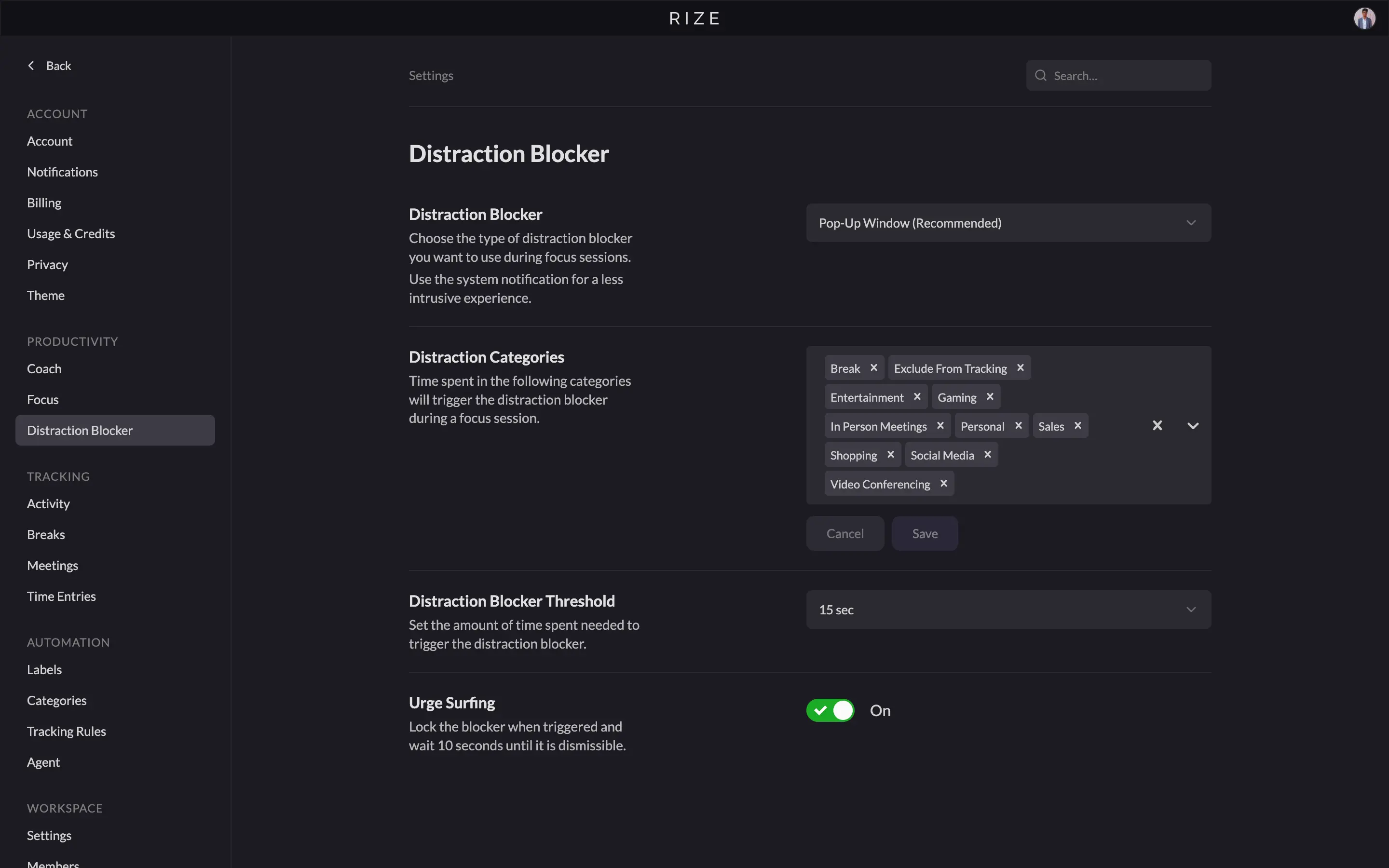
Stack the AI-suggested breaks, the built-in focus music, and a heads up before meetings with a one-click way to join if you've connected your calendar, and Rize stops being a time tracker. It starts acting like an actual coach.
The newest piece is the Agent, a chat window where you can type something like "summarize everything I worked on today" and get a real answer pulled from your actual tracked entries. I've used it mostly to sanity check a day I couldn't fully remember, and it's saved me from digging through my own timesheet more than once.
None of this is free of friction. The categorization has to be right for any of it to work well. Mislabel an app, and Rize will either start a focus session on the wrong thing or miss a real distraction entirely. The first week involves some tuning in Settings before it fades into the background.
Toggl controls a team with a process. Rize controls it with data.
Both are real team tools. They just get there differently. Toggl uses structure: roles, approvals, and audit trails. Rize uses the same automatic capture that makes it strong for one person, rolled up into org-wide dashboards the day a second person joins.
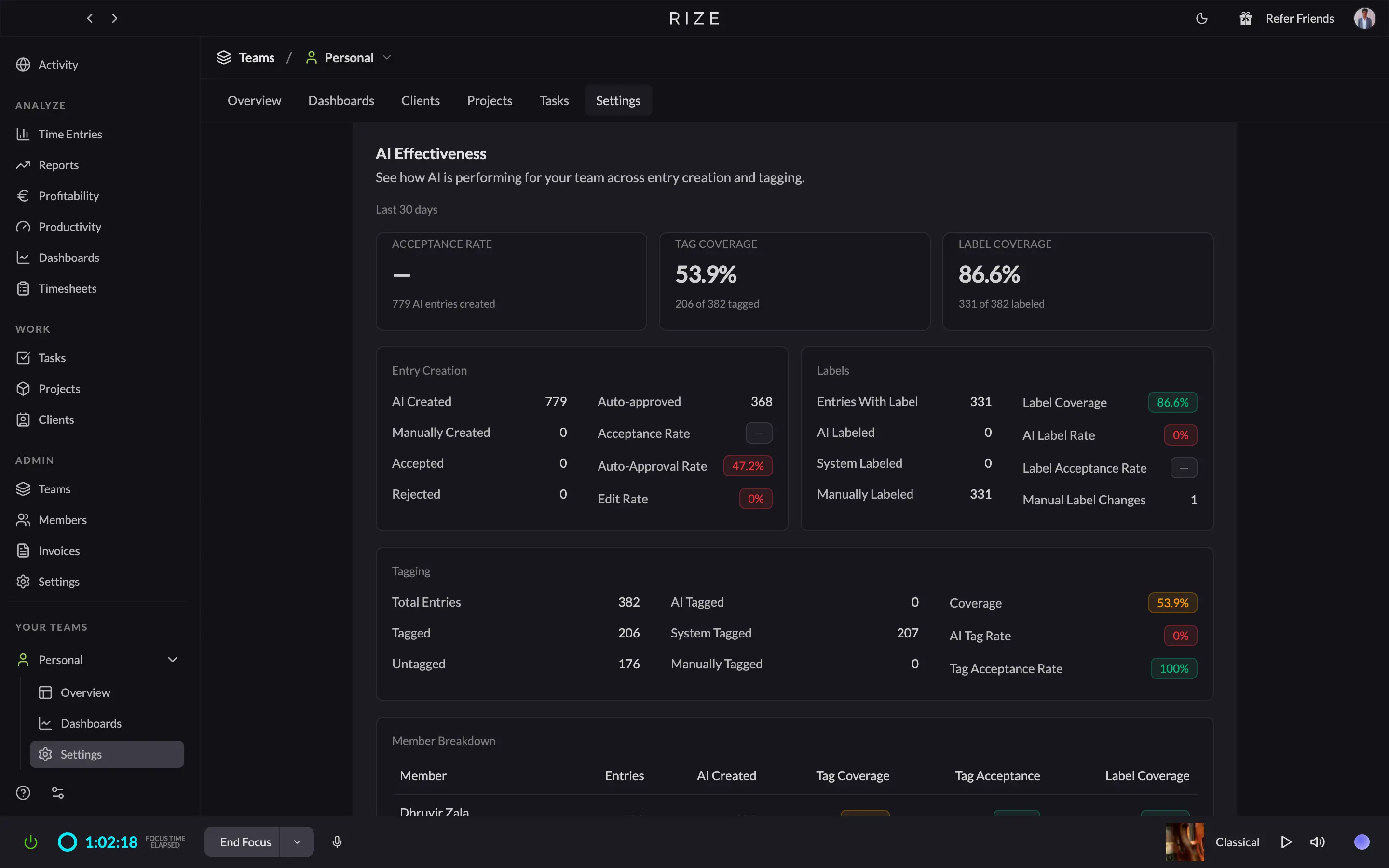
Rize lets admins toggle Tasks, Projects, Clients, Categories, and Billable Hours for the whole org from one screen. The team Overview tab shows by-member, by-label, and by-client breakdowns already populated, live, because nothing needed submitting first. Add the AI Effectiveness dashboard tracking tag and label coverage across the team, and you've got real oversight, just aimed at accuracy instead of compliance. Rize's Team plans ($29.99 to $39.99 a seat) are built for exactly this: agencies and firms managing more than one person's billable time.
Toggl's control is procedural, and it's deep once you pay for it. Roles scale from Regular Member through Workspace Admin, with finer roles added on Premium. A filter flags anyone who hasn't tracked time, with automated reminders to chase them. But Timesheet approvals, SSO, and the audit log all sit behind the $14 a seat Premium tier, not Free or Starter.
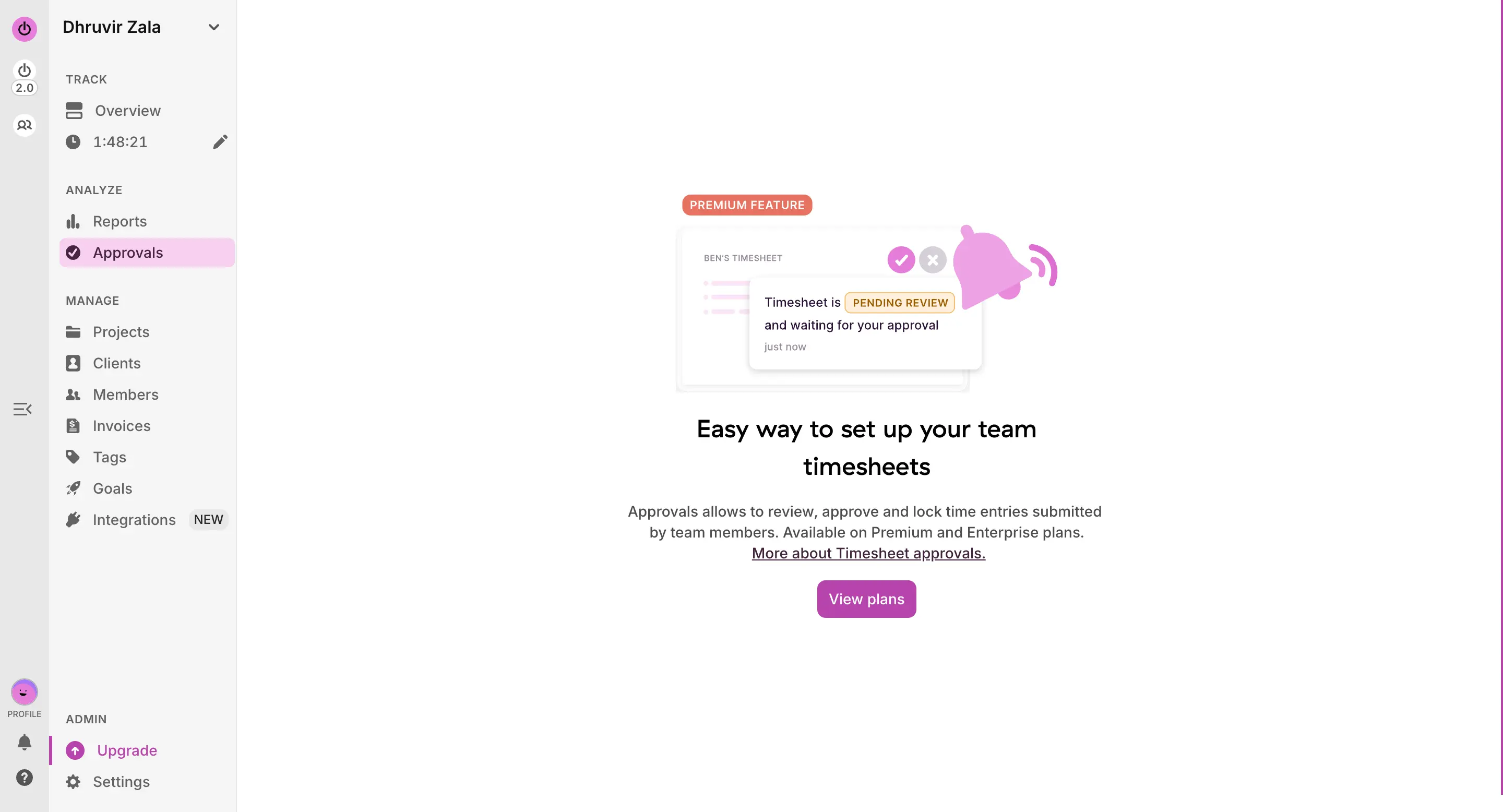
So it comes down to what you're actually controlling for. Need a formal approval step, SSO, and an audit trail for compliance? Toggl's built that for years. Need a growing team's time data to already be accurate and visible without anyone complying with anything first? Rize does that today, at a price close enough to Toggl's Premium tier that neither one is the obvious budget pick once you're managing people instead of just yourself.
Both can create an invoice for you, but neither one gets you paid.
I went into this section expecting to write "too close to call" and move on. That's not quite where I landed. The math both tools do is fine. The difference is how much work you do to see it, and which one is actually ready to hand a finished invoice to a client today.
Open Rize's Profitability tab, and the number is just sitting there. Revenue, cost, and margin for the month, broken down by contract, calculated from the time I never manually logged. I didn't build that view. I opened the tab, and it was already there.
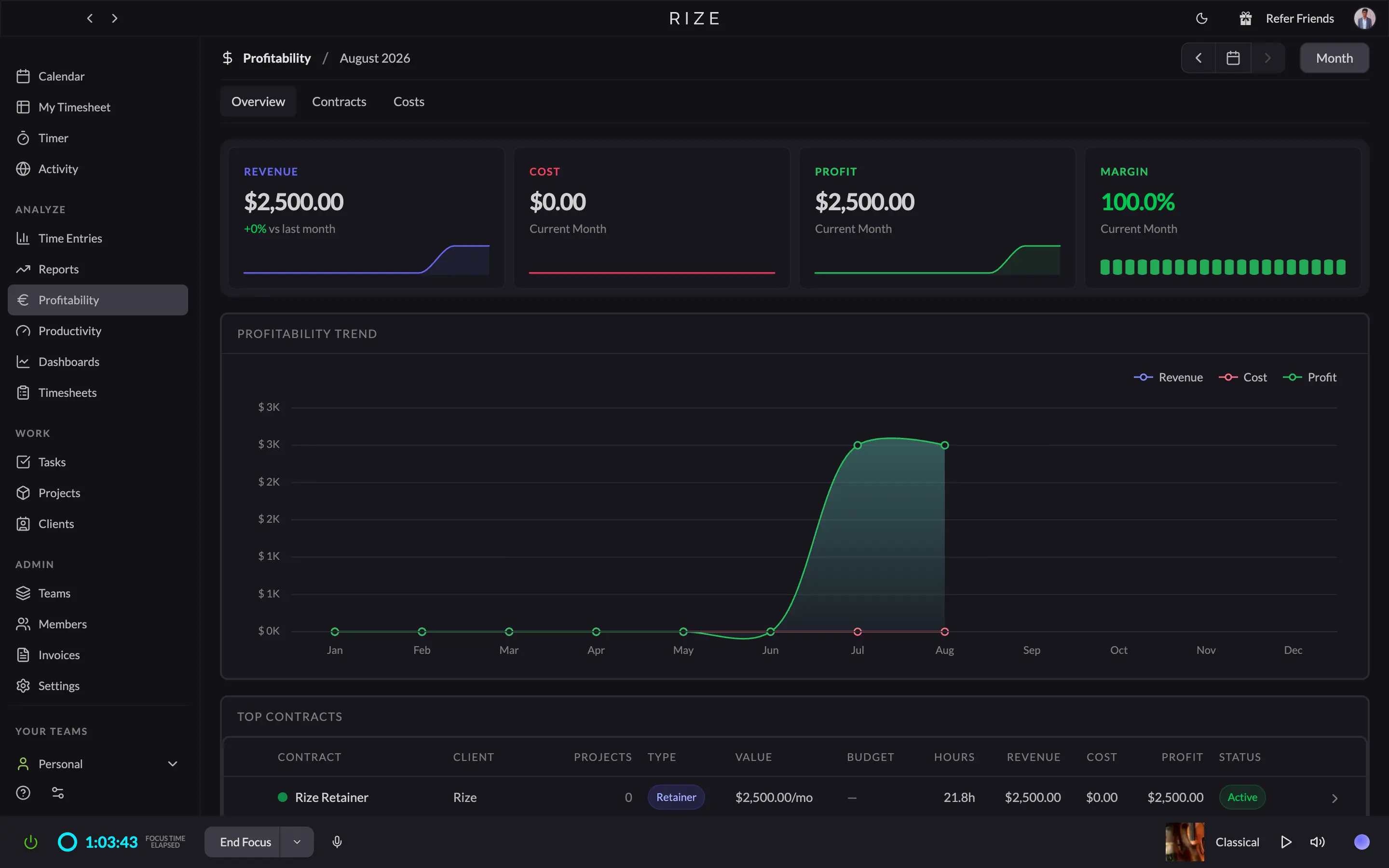
Click into Clients, and you get the same thing again, broken out per client this time: revenue, cost, margin, and lifetime hours, with nothing to filter or configure first.
Toggl gets you to the same answer; you just have to go build it. Reports has its own Profitability tab sitting next to Summary, Detailed, and Workload, and getting a client-level number means setting a date range and filters yourself in Summary first.
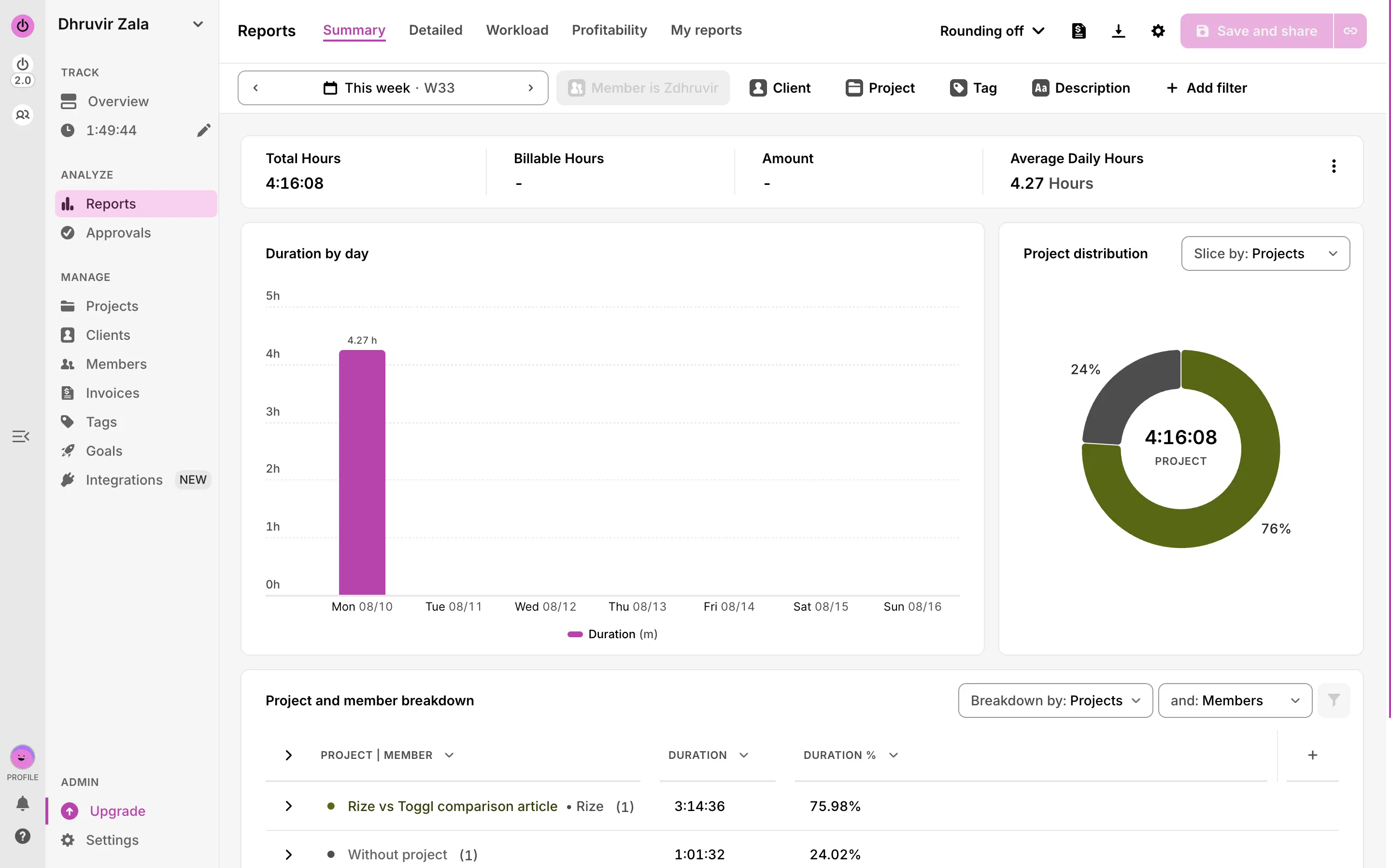
That's the real gap for a solo consultant. Rize's number is a fact on a page. Toggl's number is a report you generate, even if it only takes a minute.
Invoicing is even more interesting. In Rize, you can pick a client and a date range, and it turns already-tracked time straight into a draft. On paper, it already handles draft, sent, and paid status, voids instead of deletes, and bills each client in their own currency, per Rize's own changelog, though I haven't had an invoice go unpaid yet to actually test that part.
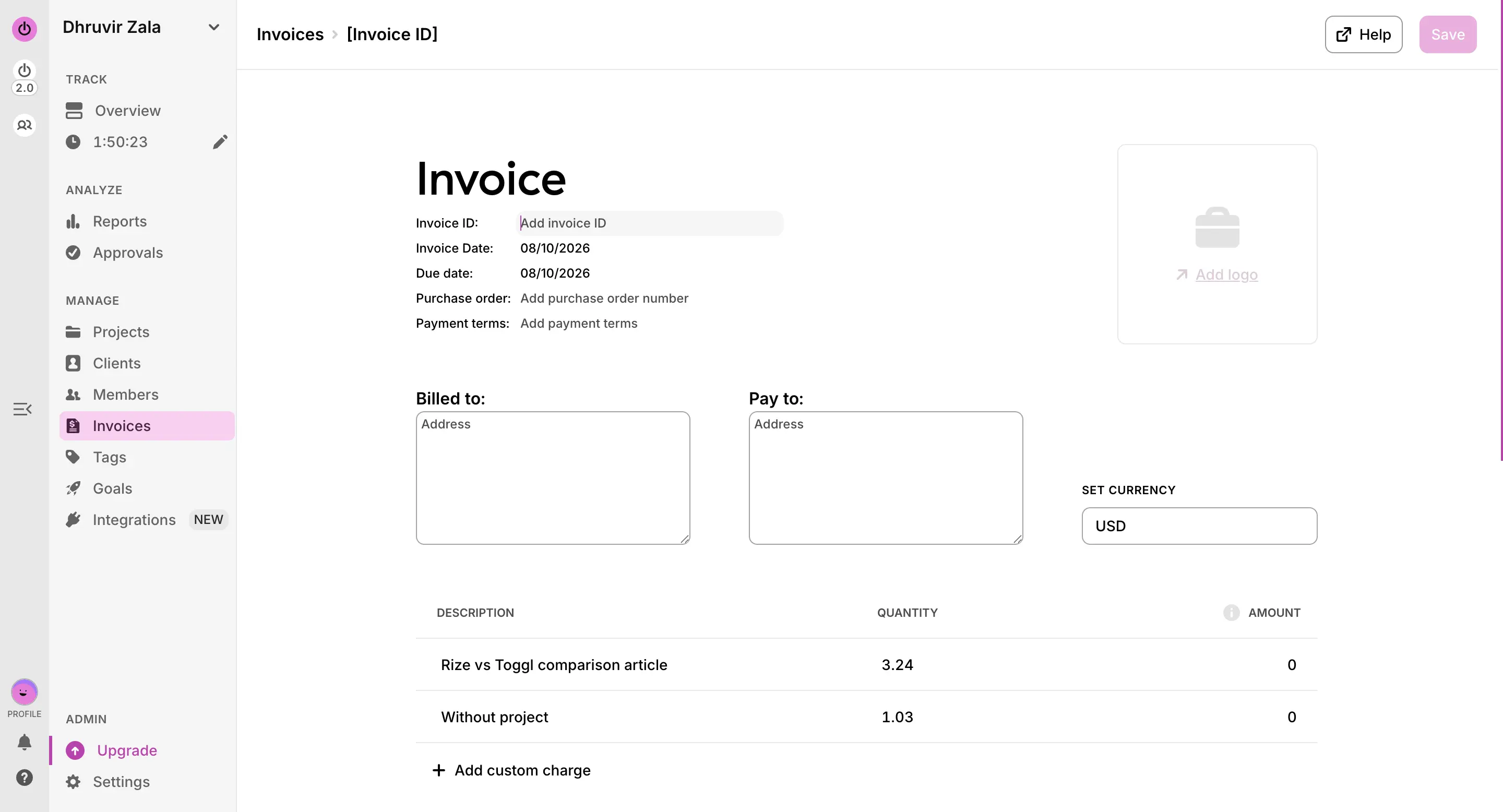
Toggl's version is older, and it shows. You build it from the Reports summary tab instead of a standalone Invoices page, one extra hop, but it ships with an invoice ID field, PO number, payment terms, tax, and a direct QuickBooks send. What tripped me up: it pulled my tracked hours over as the quantity, but priced the line at $0, because I hadn't set a billable rate on the project first. A five-second fix once you know to check for it. Easy to miss the first time.
Worth knowing either way: neither tool actually collects the payment. Both stop at sending and hand off to an accounting tool from there, so don't expect either one to replace QuickBooks or Stripe.
Both are privacy-friendly time trackers. They just earn it in different ways.
The reason automatic time trackers make people nervous is a fair one. Employee monitoring software built on screenshots, keystroke logs, and even webcam snapshots is common enough that "automatic" and "surveillance" got tangled together in most people's heads. That's the bar Rize has to clear, and it's worth saying plainly: it clears it. No screenshots, no keystroke logging, no screen recording, on any plan. In over three years of daily use, I haven't caught it doing anything close.
How does a tool categorize your entire day without you touching anything, then? It reads metadata instead of content. App name, window title, the URL if you're in a browser. That's the raw material its AI uses to guess what you're doing and label it.
Toggl solves the same problem by mostly not needing to answer it. It's manual by default, so there's nothing running in the background unless you turn something on. Its Timeline and Autotracker features, which log apps and sites the same way Rize does, are opt-in and switched off out of the box, and even once enabled, they're visible only to you, never shared to a team.
Toggl connects wide. Rize connects deep, and talks to your AI assistant.
Toggl wins this one on raw numbers. Native integrations cover Asana, Google Calendar, Outlook Calendar, Slack, Salesforce, Jira, and QuickBooks. On top of that, the browser extension embeds a Toggl timer directly inside 100+ other apps and sites, such as Notion, Trello, GitHub, Basecamp, and dozens you've probably never heard of, so you can start a timer from wherever you already are without switching tabs.
Not all of that is free. Click into the actual integrations page, and a few of Toggl's best native connections sit behind a lock icon. iCalendar and QuickBooks say "Starter feature." Salesforce and Jira say "Premium feature." Google Calendar, Outlook, Slack, and Asana are open on every plan, Free included, but the two integrations a freelancer actually bills through, QuickBooks and a real CRM, are not.
Rize plays a smaller, different game. Its native list is Linear, ClickUp, Asana, Google Calendar, Outlook Calendar, and Slack, six total. Three of those, Asana, ClickUp, and Linear, are tagged Pro, so Basic doesn't get them.
So both companies gate their best native integrations behind a paid tier. They just disagree on which ones count as "best." Toggl protects its accounting and CRM connections. Rize protects its project management ones.
The one thing Toggl doesn't have at all is Rize's MCP server. Connect it to Claude Desktop or ChatGPT, and you can ask something like "what did my focus time look like the last three days," and get an answer pulled from your tracked entries.
How do Rize and Toggl differ on pricing and value?
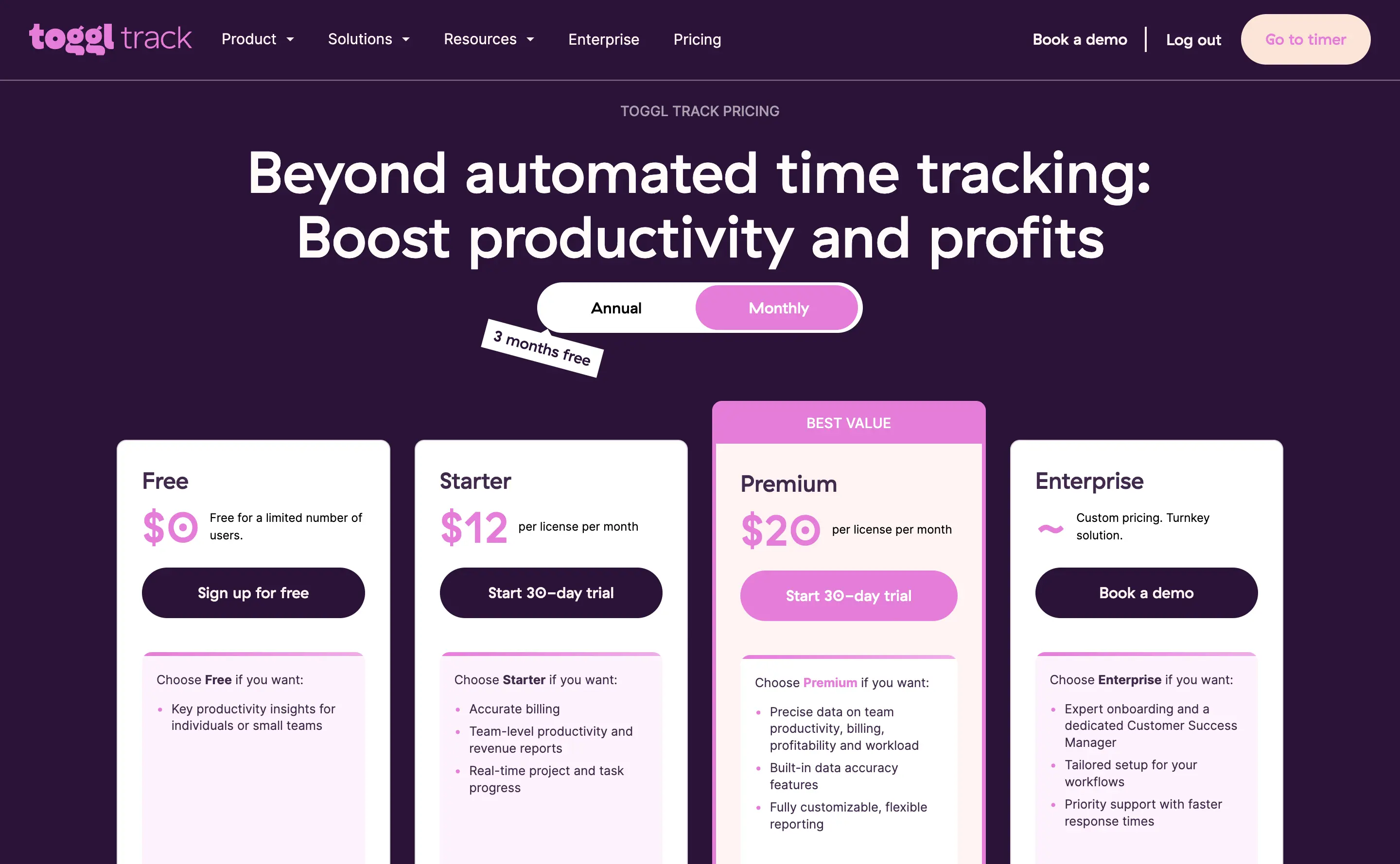
Toggl Free costs nothing, forever, for a limited number of seats. Starter is $9 a license a month, annually ($12 monthly), the first tier worth paying for once you're billing clients. Premium is $14 a month for year one, renewing at $18 ($20 monthly), and that's where profitability reports, approvals, and SSO live. Paid tiers get a 30-day trial, no card.
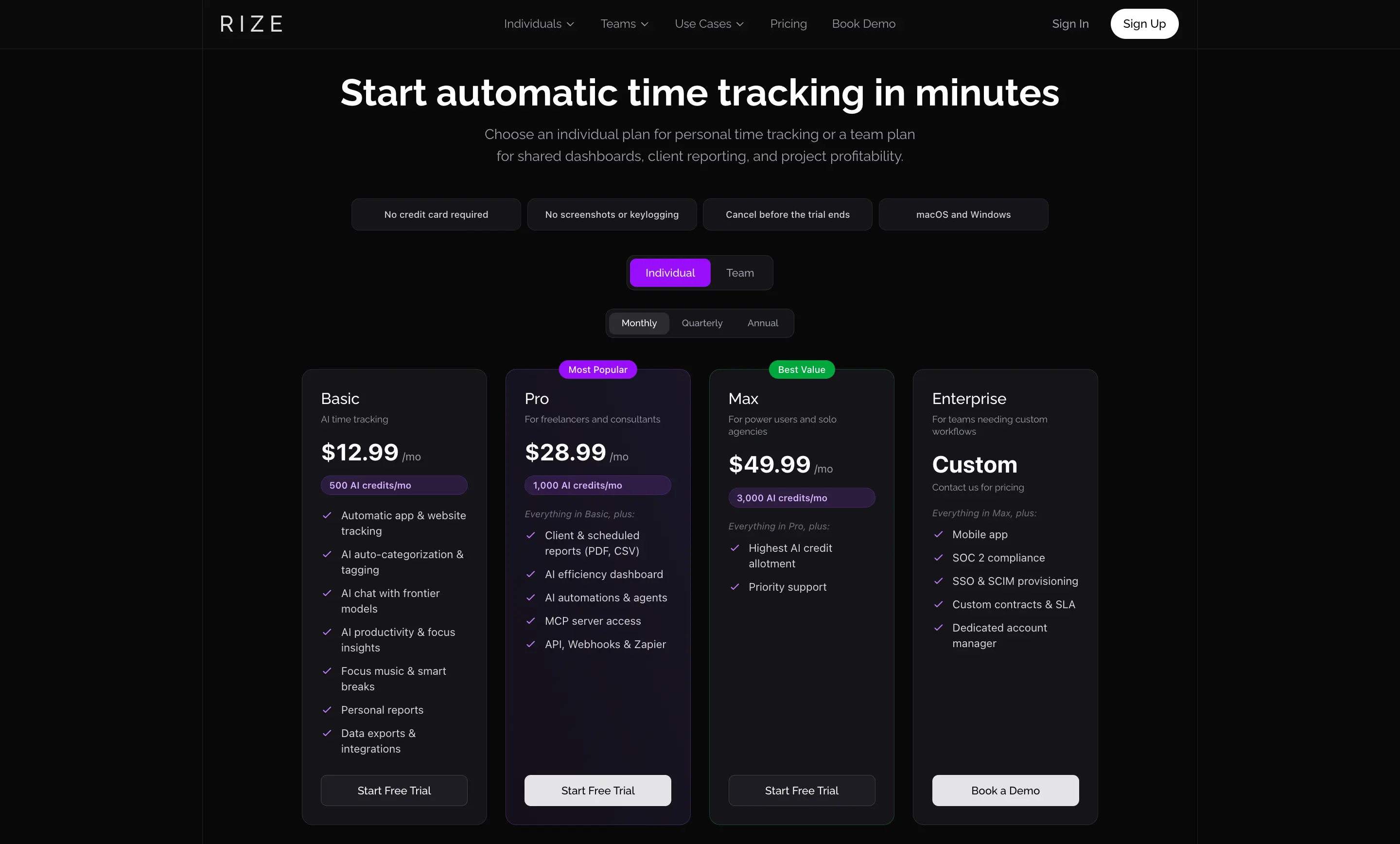
Rize has no free tier, just a 7-day trial, no card required. Basic is $9.99 a month annually ($12.99 monthly), 500 AI credits. Pro, pitched at freelancers, is $23.99 annually (1,000 credits), plus client reports and MCP access. Max is $39.99 annually (3,000 credits), built for people who'll actually use that many. Team runs $29.99 to $39.99 a seat, and mobile stays locked behind Enterprise.
Here's the number worth sitting with. Toggl Starter, the tier that gets you billable rates, is $9 a month. Rize Basic, fully automatic tracking with AI categorization, is $9.99. At nearly identical prices, one still asks you to press play and set your own rate. The other doesn't ask you for anything.
On credits: every Rize plan gets the same features, Basic and Max included. Tiers only differ in how many credits you get to spend. A credit gets spent when the AI actually does something, categorizing a new app for the first time, chatting with the Agent, or generating a report.
Is $9.99 to $39.99 expensive next to $0?
On paper, yes. But one forgotten billable hour a week, at $50 an hour, is over $200 a month you never invoice. Rize isn't competing with Toggl's free tier. It's competing with the hours you've already lost to a manual timer. If that math is real for you, Rize wins easily. If you're actually disciplined about starting timers, Toggl's price tag wins outright.
Rize vs. Toggl: Which should you use?
Go back to the start of this article for a second. The forgotten timer, the forty minutes gone, the moment you started wondering if the tool itself was the problem. If that's ever happened to you, you already know which side of this comparison you're on.
For most people reading this, Rize is the pick.
Not because Toggl is worse. It isn't, and I've tried to be honest about that in every section above. It's because the one thing Toggl asks of you, remembering to press play, is the exact thing that got you here in the first place. No amount of good reporting or Pomodoro timers fixes that. Automatic tracking does so simply by removing the thing you had to remember.
Start your free 7-day Rize trial, no credit card required.
Related reading
See how Rize compares to other time trackers:
- Rize vs Clockify
- Rize vs Timely
- Rize vs Everhour
- Rize vs Hubstaff
- Rize vs Memtime
- Rize vs RescueTime
- Rize vs Harvest
Or browse all options on the comparisons page.
Start tracking time automatically
Join thousands of professionals who stopped guessing where their time goes. Free for 7 days.
“Rize has been a no-brainer for me.” — Ali Abdaal Read more →