![Rize vs Everhour: Which time tracker is best? [2026]](/_next/image?url=%2Fassets%2Fblog%2Fhero%2Frize-vs-everhour.webp&w=3840&q=75)
Rize and Everhour are both time trackers, but that's about where the similarities stop.
One tracks your day automatically in the background. The other asks you to start and stop timers yourself, every single time. One is priced for individuals and teams who want AI built into their workflow. The other is priced per seat for teams who want manual control and a deep admin toolkit. One runs on Mac and Windows only. The other runs almost everywhere, phone included.
Add in how differently each one handles reporting, invoicing, and who they're actually built for, and you've got two tools that look like they solve the same problem but pull your day in two different directions.
That's exactly why picking between them isn't as simple as it should be. Get it wrong, and you're either stuck doing manual work you were trying to avoid or paying for automation you never needed.
This article breaks down where Rize and Everhour actually differ, so you leave knowing which one fits how you work.
Quick Answer
Choose Rize if you want an accurate record of your day without starting or stopping a single timer. Choose Everhour if you're managing a team that needs PTO tracking, timesheet locking, and invoicing that syncs straight to QuickBooks or Xero.
Rize vs Everhour at a glance
If you read nothing past this table, you'll still leave knowing which one fits how you work. Here's the whole comparison in eight rows.
| Feature category | Rize | Everhour |
|---|---|---|
| Ease of use | Disappears into your day. Fully automatic, nothing to start or stop. | Clean, but hands-on. Manual timers, a daily habit to keep up. |
| Time tracking | Automatic capture. Tracks apps and sites in the background, Mac and Windows only. | Manual and mobile. You track it yourself, but from anywhere, phone included. |
| AI features | Three layers deep. Auto-tagging, proactive coaching, and an AI chat assistant. | Barely there. One feature, still in private beta, is Mac-only. |
| Reporting | Accurate by default. Every report reflects your actual tracked day. | Built to spec. 30-plus columns and custom dashboards, if the data behind them is complete. |
| Team features | Visibility with zero setup. Team hours fill in automatically, no PTO tools. | Built for HR. PTO, timesheet locking, and role-based access baked in. |
| Invoicing | Fast and simple. Retainer or free-form invoices in under a minute. | Built for accounting. Tax, discounts, and direct sync to QuickBooks and Xero. |
| Integrations | Deep, not wide. Two-way sync with ClickUp and Linear, Zapier for the rest. | Wide, not deep. 40-plus native and extension-based integrations. |
| Pricing | $12.99/mo, no seat minimum. Priced for individuals, 7-day free trial. | Free for 5 seats, then $10/seat/mo. The 5-seat minimum applies even solo. |
Rize wins on ease of use by disappearing into your day
"Easy to use" is subjective. Ask two people to rank ice cream flavors, and you won't get an answer that either of us can build an article on. So instead of asking whether Rize or Everhour is "easier," I rely on two questions I have used since 2021 to judge time tracking software specifically:
- How long did it take you to get the hang of the UI?
- How long did it take before the software became invisible, something you stopped actively thinking about, like brushing your teeth?
Software that clears both bars usually shares the same traits: a clean, minimal, modern UI, fast load times, and it eventually disappears into your workflow.
On the first question, Rize and Everhour are tied. Both dashboards are clean, modern, and load fast. Neither made me hunt for a button or squint at clutter.
The second question is where the two pull apart. Everhour is a fully manual time tracker. You start timers, you stop timers, you show up every day to get value out of it.
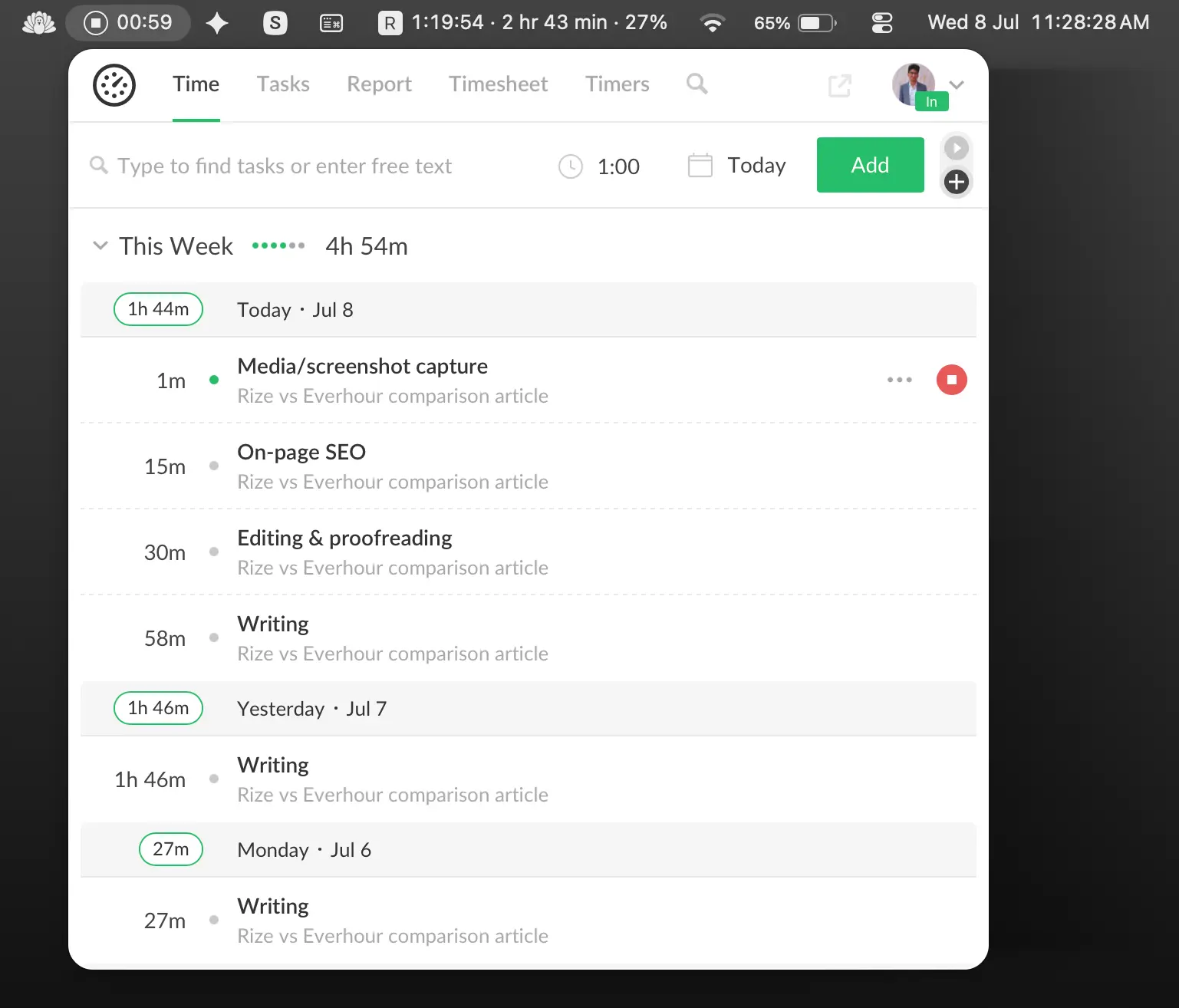
Rize is fully automatic. After the initial setup, which takes barely longer than Everhour's, it tracks your time in the background and gets smarter the longer you use it. I have been using Rize since early 2022, and I genuinely don't remember the last time I opened the app just to log something. Outside the occasional feature tweak, it is plug and play. At the end of each day and week, Rize emails me a detailed breakdown of exactly what I worked on, without me lifting a finger.
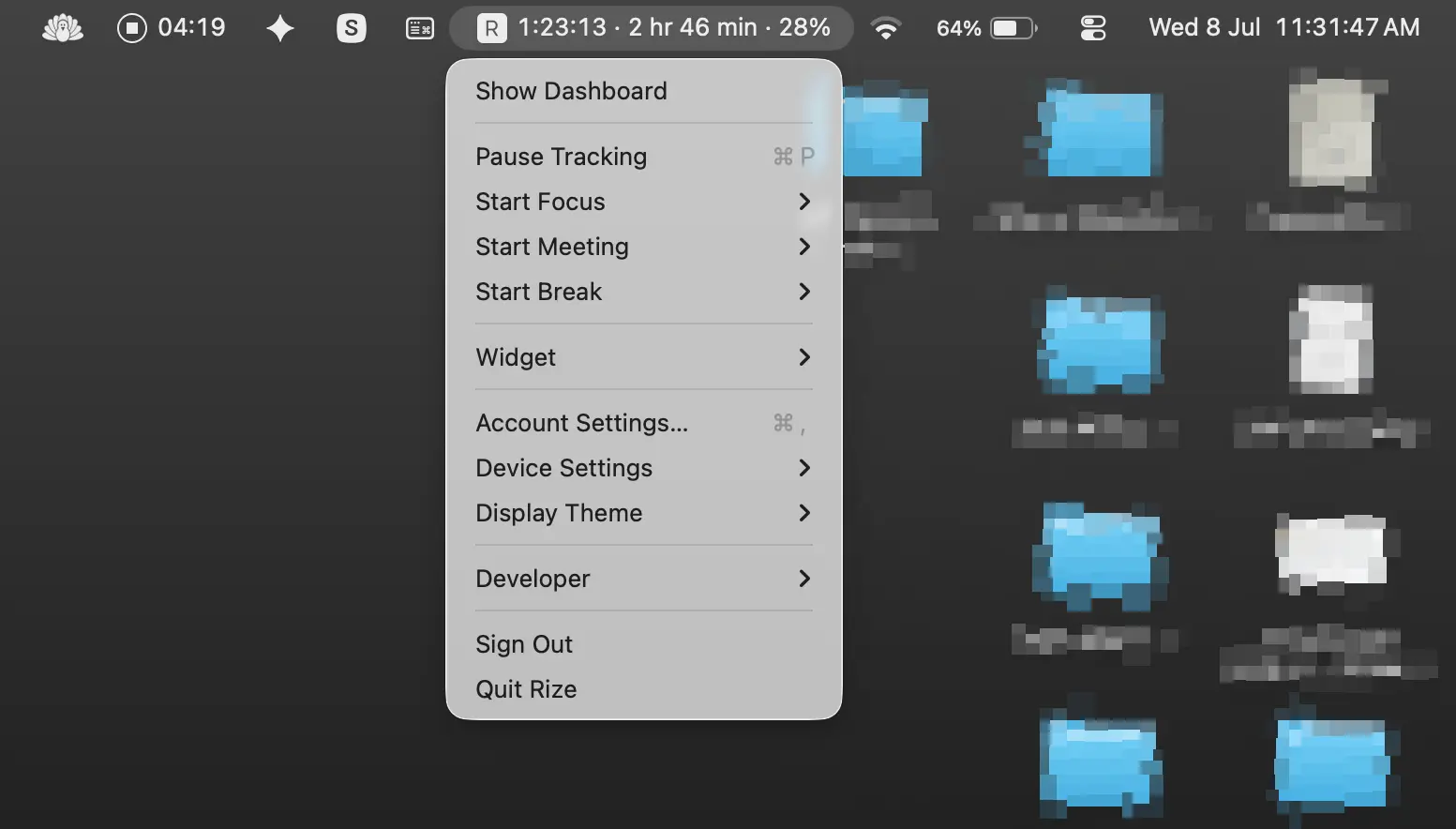
That is the real test of "easy to use" for a time tracker. Not how fast you learn the interface, but how fast the software gets out of your way. On that measure, Rize wins by a wide margin.
If you forget to start and stop timers, or you simply don't want to think about tracking your time at all, go with Rize. If you like being in full control of every entry and don't mind the daily habit that comes with it, Everhour won't slow you down either. It is just as clean as Rize day to day. It just asks something of you that Rize never does.
Rize captures your day automatically, and Everhour asks you to build it first
Rize tracks the moment you sit down. It records every app, window, and website in the background and sorts them into labels like Coding, Meetings, Research, and Admin. Rize turns tracked time into a finished time entry and suggests the task, project, or client it belongs to, based on your own patterns.
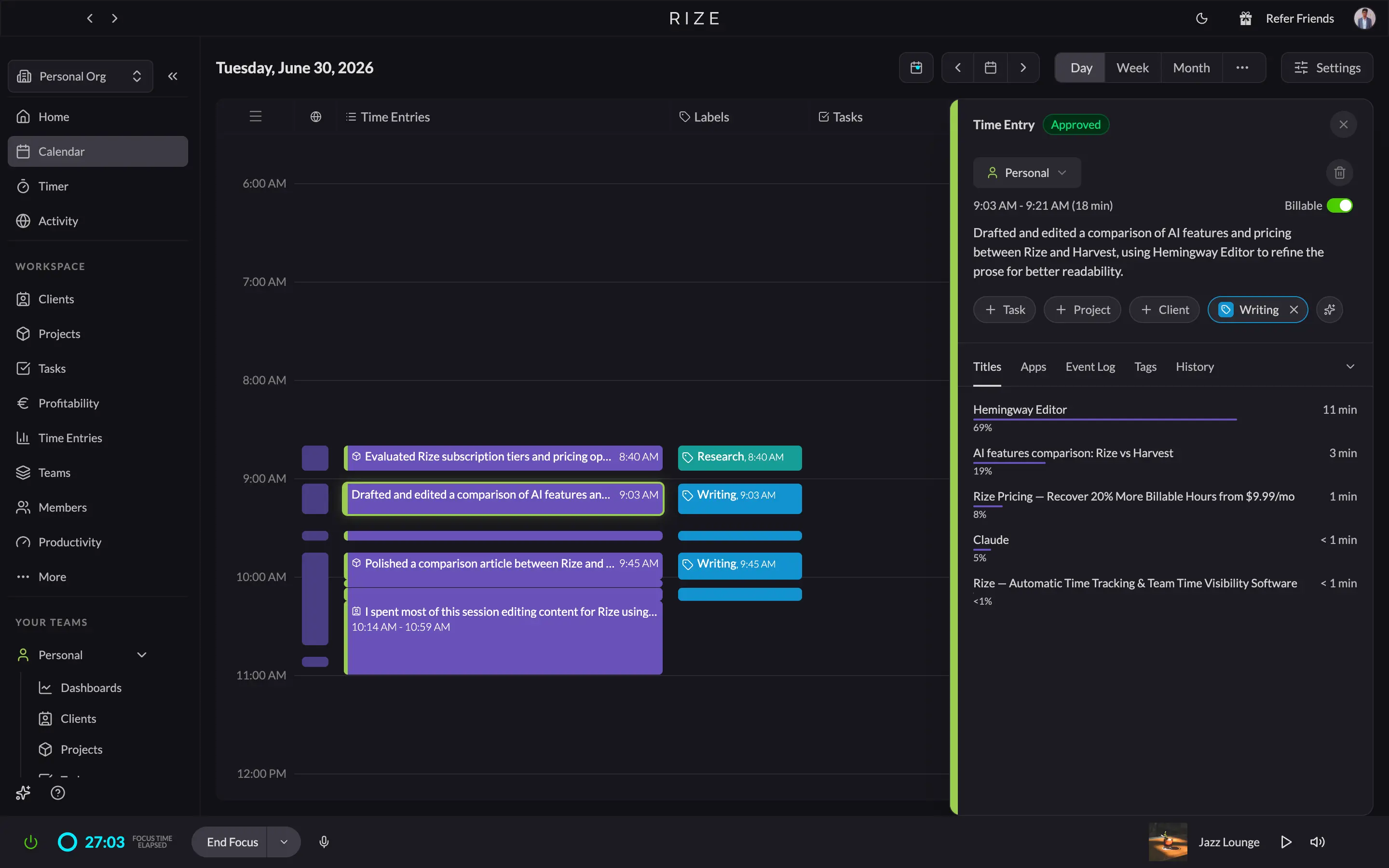
You can shape how it behaves, too. Settings lets you mark categories as idle exempt so meetings and calls never get flagged as inactivity, set automatic break detection, and control how meeting time gets categorized. My favorite part is Tracking Rules. It lists every app or site Rize has ever seen you use and lets you assign a category to any of them by app, URL, or keyword. Rize can also log a manual entry for anything offline, like an in-person meeting, but that is the backup, not the main workflow. The real limit is the platform. Rize's automatic time tracking only runs on Mac and Windows, with no mobile app.
Everhour works the opposite way. Nothing gets tracked until you build a project, assign it a client, and add tasks under it. Only then can you start a timer against a specific task, with its own assignee, tag, due date, and estimate, closer to a project manager than a tracker.
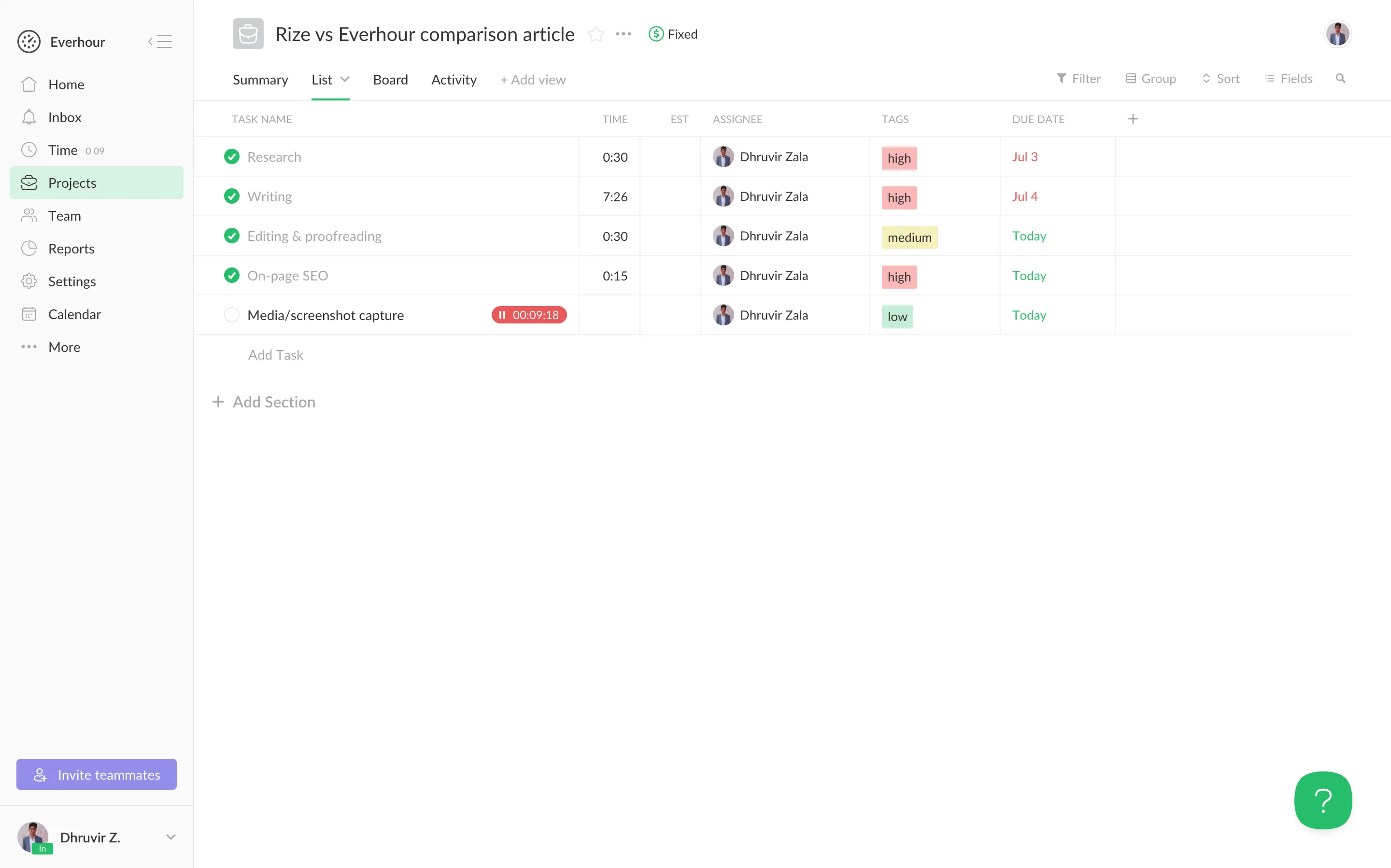
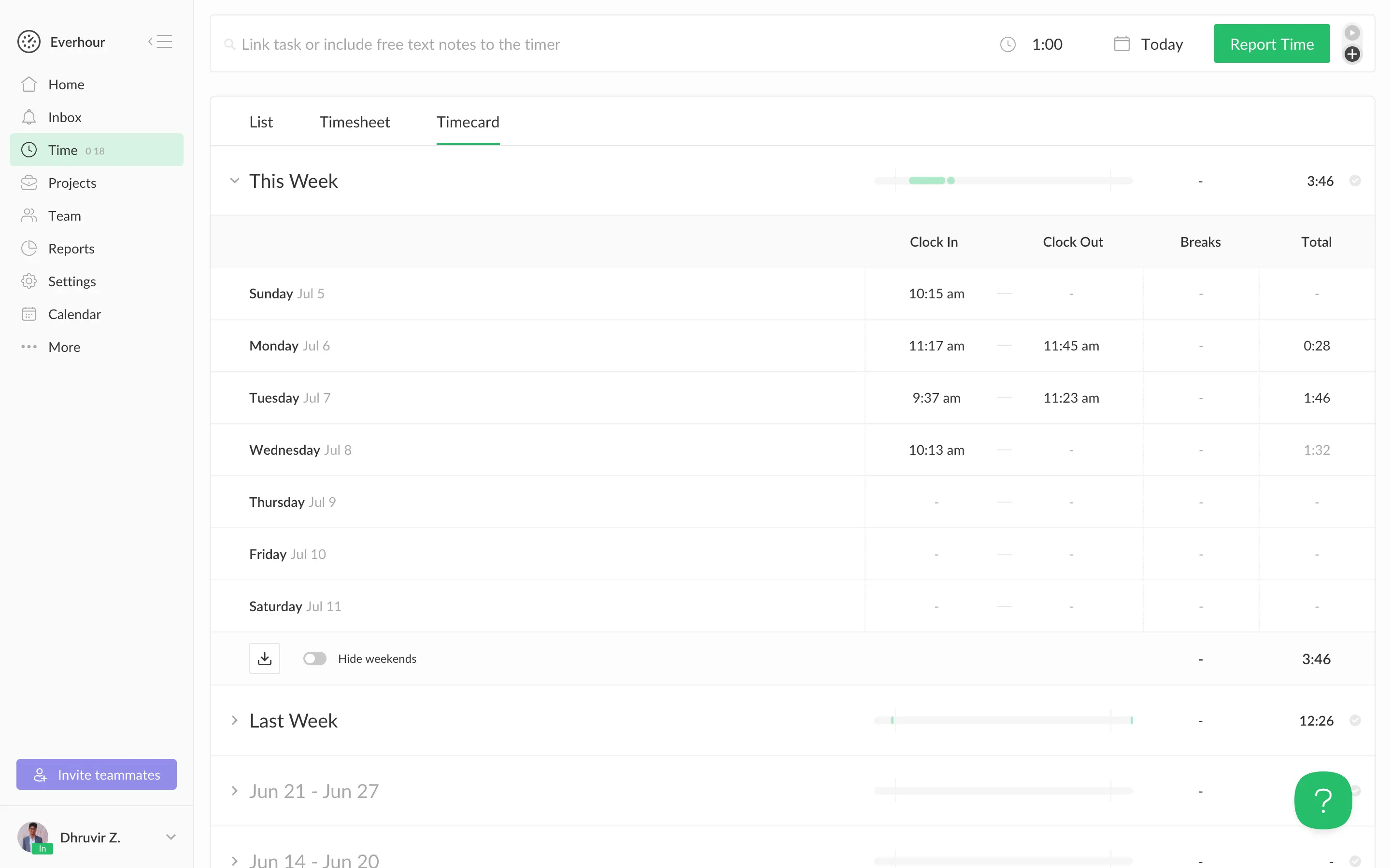
Logged time then shows up in List, Timesheet, and Timecard views, the last one formatted like an actual time clock with clock-in and clock-out columns. Everhour's real advantage is reach. It runs on web, iOS, Android, and Mac, with Windows on the way, so you can log time from anywhere. But every minute depends on you remembering to track it.
If you want an accurate record of your day with zero manual work, Rize is already building it before you ask. If you think in projects, tasks, and client hours, and need to log time from your phone, Everhour fits that job better.
Rize wins on AI, and it isn't close
Rize's AI works across three layers. Everhour has none live yet, with one in private beta.
Auto-tagging and time entries. Rize matches every tracked block to a client, project, and task using your tracking rules, calendar events, and synced tasks from tools like ClickUp or Asana, each with a confidence score. It also writes a plain description of what you actually did in that block. I stopped writing my own time entry descriptions months ago because Rize's are accurate enough to trust.
Proactive coaching. No other tracker I've tested does this. Mark a category like Social Media as a distraction, and once you cross a time threshold you set, Rize locks your screen for 10 seconds before you can dismiss it. It does the same for overdue breaks and upcoming meetings if you connect your calendar, and it can plan your next day's focus sessions overnight. All of it rolls into a Productivity tab: Focus Score out of 100, focus time per day, and a Top Interruptors list. There's real research behind treating interruptions this seriously: according to Gloria Mark's research at UC Irvine, it takes about 23 minutes to fully refocus after an interruption.
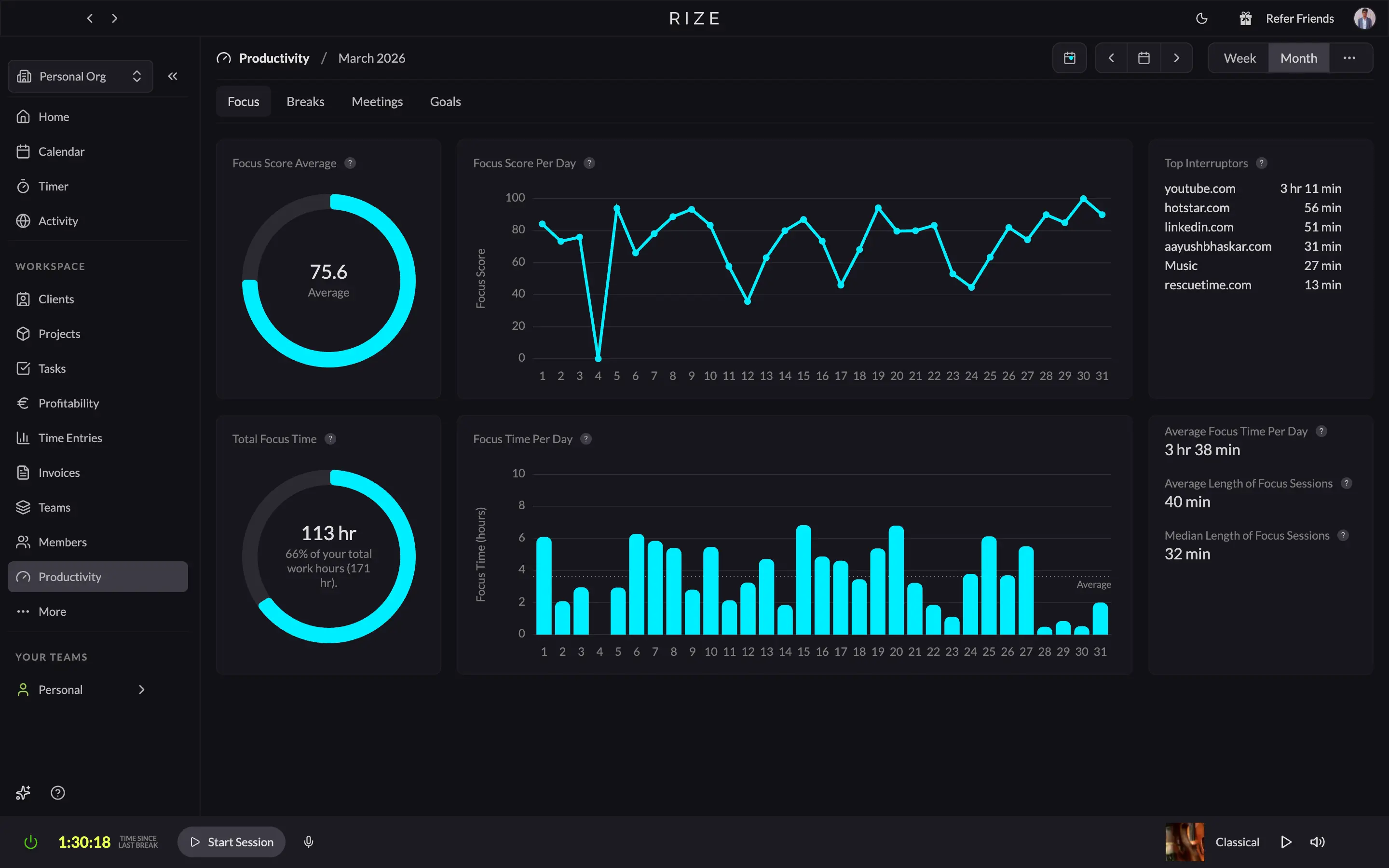
AI chat assistant. Ask it, "Where did my time go this week" and it answers from your actual tracked data, not a guess, so there's nothing for it to hallucinate.
The tradeoff is that this runs on Rize's servers, not fully on your device, and suggestions need occasional correction early on.
Everhour's AI is a single feature, still in private beta, Mac only, invite-based. It promises to auto-assign tracked time to the right task, essentially Rize's auto-tagging idea, with no coaching or chat assistant mentioned anywhere. It's also a little odd that Everhour's one AI feature is Mac-only, given that their whole pitch elsewhere is being available everywhere.
If you want a tracker that also helps you work better, Rize is the only one doing that today. If AI isn't a priority, Everhour's lack of it costs you nothing.
Rize's reports are more accurate, Everhour's are more customizable
A report is only as good as the data behind it. That's the real tradeoff between these two, and it's worth being upfront about it.
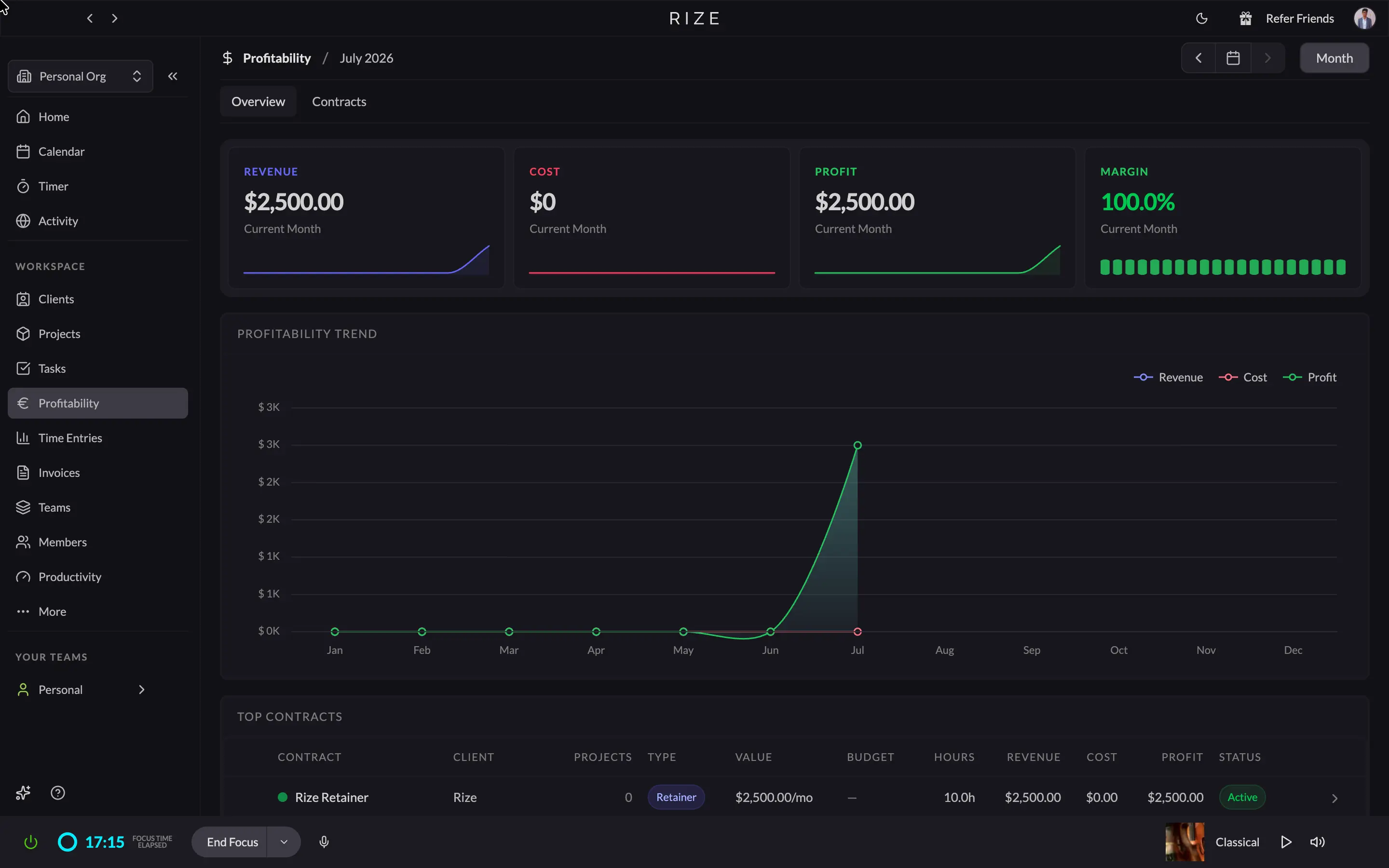
Rize's Client, Project, and Task Reports pull straight from what actually happened at your desk. Since tracking is automatic, the total time, billable amount, and entry descriptions in every report reflect your full day, not just what you remembered to log. The Time Entries and Profitability pages add quick breakdowns by client, label, and margin. Export to CSV or PDF, or let Daily and Weekly emails land in your inbox without asking.
Everhour is the more flexible tool on paper. Seven pre-built dashboards, plus a custom report builder with 30-plus columns, filters, saved layouts, and scheduled email delivery to whoever needs them. But every number in that report is only as complete as what got manually tracked. Forget to start a timer, and no amount of columns fixes the hole in that day's data.
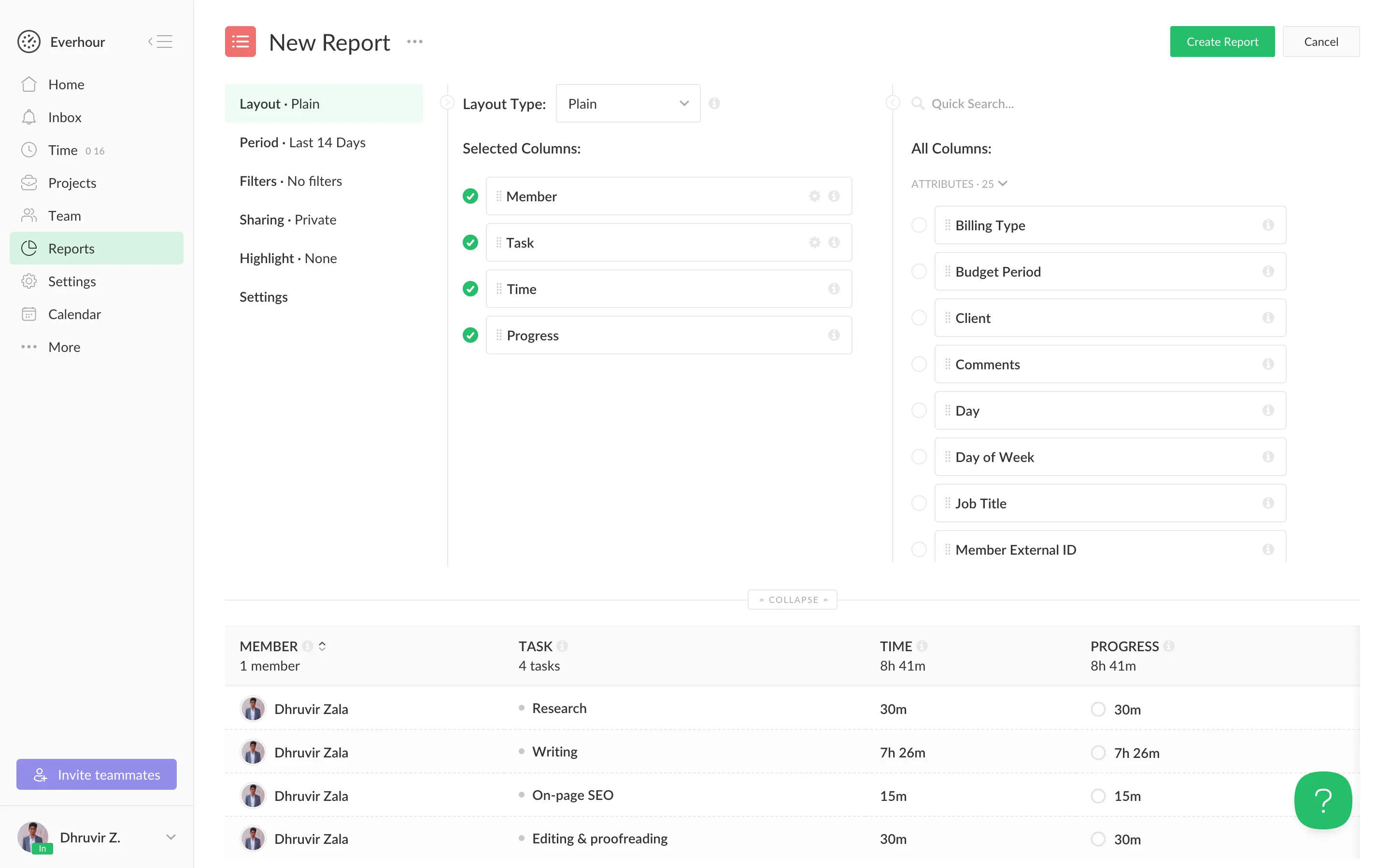
If you want reports that already reflect reality with no effort on your part, Rize gives you that by default. If you need a report built to an exact spec for a client or a payroll run, and you trust your team to track diligently, Everhour's builder gets you there.
See what manual tracking misses
Try Rize free for 7 days. Compare your auto-captured hours against what your team logs manually. No credit card required.
Start Free TrialEverhour wins on team management, Rize wins on team visibility
Are you trying to see where the hours went, or are you trying to run payroll, approvals, and PTO for a group of people? Rize and Everhour each bet hard on one of those jobs, not both.
Rize's team side lives under Teams in the sidebar. You create a team, invite members, and assign each one a role. Because tracking is automatic for every person from day one, the team dashboard fills itself in without anyone submitting anything: Total Time, Billable Time, and Non-Billable Time for the week, each showing the percent change from last week, plus a Team Activity card with today, week, and month totals. Nobody built that report. It's just what happened.
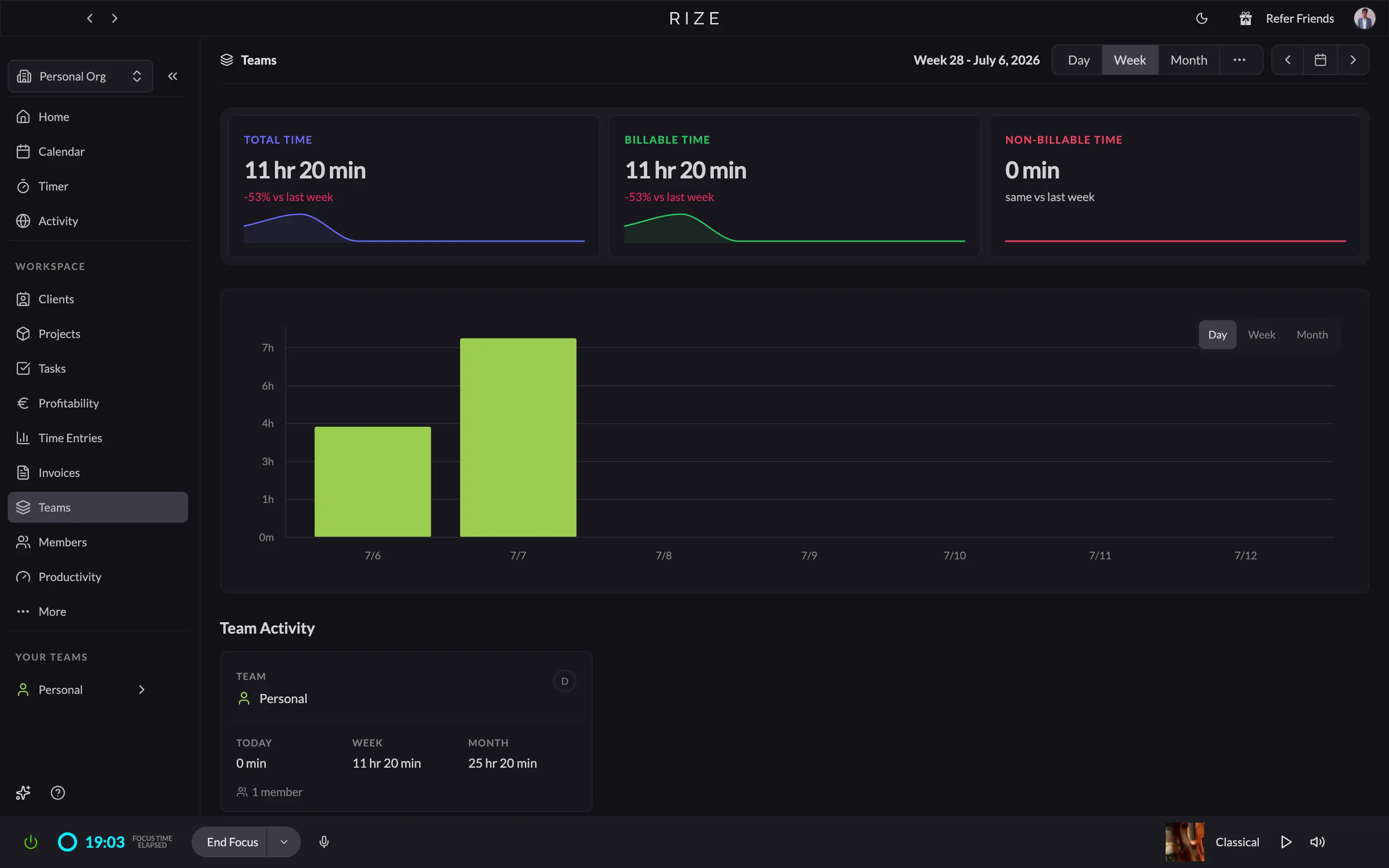
What Rize doesn't have is the rest of what "team management" usually means. No PTO or time off tracking. No leave accrual. No locking timesheets after a payroll cutoff. No team groups, no per-person hour caps.
Everhour makes the opposite bet: manual capture, wrapped in a genuinely deep admin toolkit. The Team section splits into seven tabs. Timers show exactly who's clocked in right now and what they're tagged as doing. Timecards read like an actual punch clock, with clock-in, clock-out, and break columns for every day of the week.
Time Off and Allocations are where Everhour pulls ahead hardest. You can set up leave types, import public holidays, and let people request time off with a document attached. Allocations handles the accrual math: how many days a person earns, how often, what carries over, and whether over-allocation is restricted.
If you're running a team that needs PTO tracked, timesheets locked after payroll, and role-based access, Everhour has already built the toolkit for that.
If you just want an honest picture of where the team's hours went, without turning time tracking into an HR project, Rize gets you there the moment you turn it on, and asks nothing else of you.
Everhour wins on invoicing, Rize keeps it simple
If you send one flat invoice to a retainer client each month, Rize gets you there fast. If you bill by the hour across several clients and need tax, discounts, or a straight line into your accounting software, Everhour is built for that job instead.
Rize's Invoices page opens with Open, Overdue, and Paid totals up top. New Invoice gives you two types: Retainer, a fixed amount on a repeating schedule, or Free form, a blank invoice where you type the description, quantity, and rate yourself.
Once created, you send it by email, export a PDF, and every action lands in an Activity Log. Company details and payment terms are set once in Invoice Settings and carry over from there. There's no tax field, no discounts, no expense line items, and no direct export to QuickBooks or Xero from the invoice itself.
Everhour asks for a client and a project, then fills in the amount on its own, calculated straight from tracked hours at the configured rate.
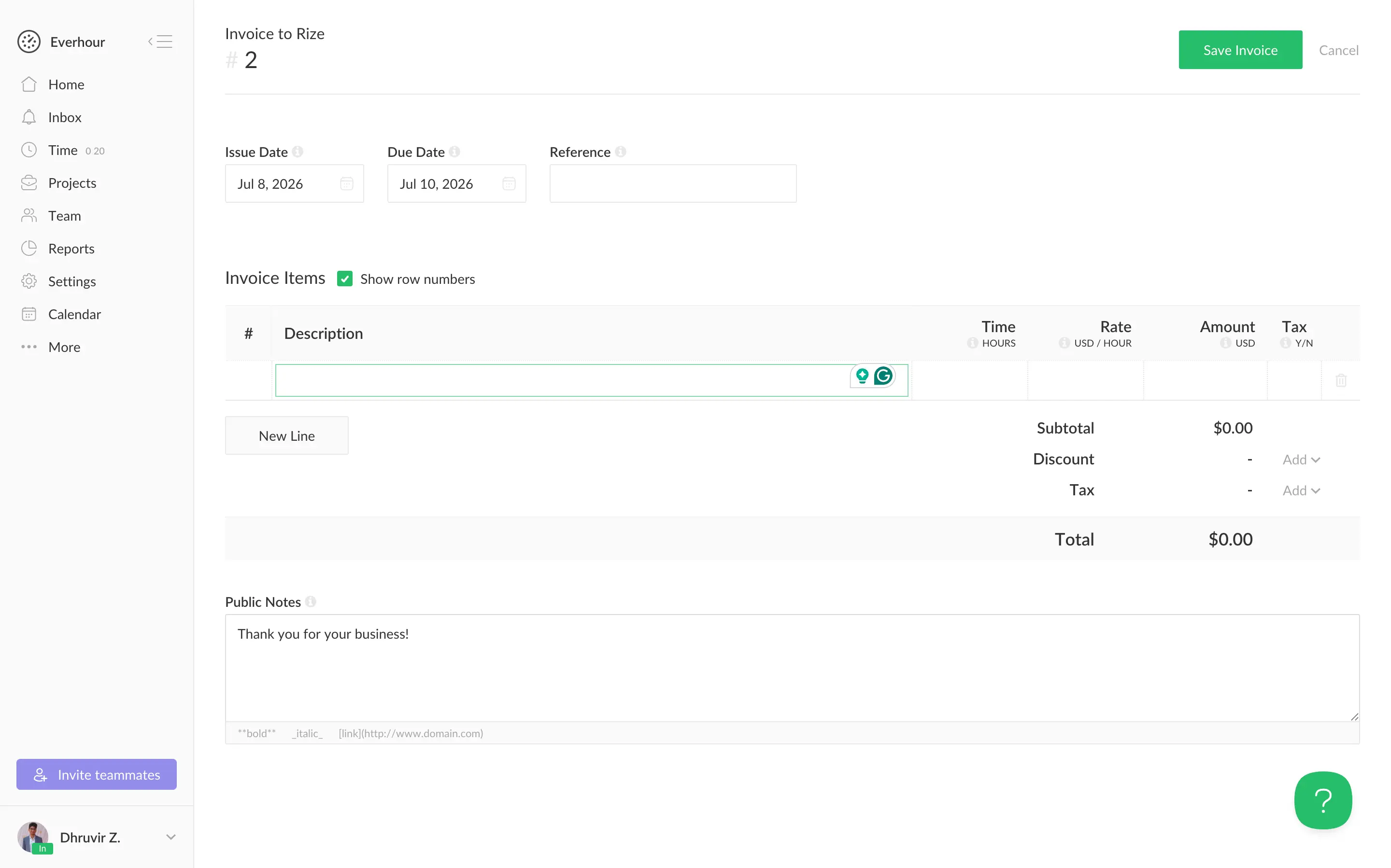
From there, you get a full editor with tax, discounts, and a running total. Rates can be set per project, per person, or per task. Expenses can ride on the same invoice as tracked time. Fixed-fee projects invoice for the agreed amount instead of hours worked. And one click pushes the finished invoice into QuickBooks, Xero, or FreshBooks, with payment status syncing back automatically.
If invoicing is one predictable line a month, Rize does it in under a minute, and you won't miss what it doesn't have. If invoicing is a real workflow with rates, tax, and accounting sync, Everhour is the only one of the two built for it.
Everhour wins on quantity, Rize wins on ClickUp and Linear
Rize connects natively to seven tools: ClickUp, Linear, Google Calendar, Outlook Calendar, Asana, Slack, and Zapier. Only ClickUp and Linear sync both ways, pulling in your tasks and pushing tracked time back out automatically.
Everything else, from Trello to Xero to HubSpot, needs Zapier instead of a direct Rize connection, though that does open the door to thousands of other apps.
Everhour's native list alone covers over 20 tools: Asana, Basecamp, ClickUp, GitHub, GitLab, Jira, Linear, Monday, Notion, Trello, Wrike, Teamwork, QuickBooks, Xero, FreshBooks, and Deel for payroll.
Its browser extension goes further, embedding a timer directly inside 20-plus more apps like Figma, Salesforce, and Zendesk, so you track time without leaving the page. That's over 40 integrations total, and Everhour calls itself the third most popular app on the Asana Marketplace.
If ClickUp or Linear is where your team already works, Rize's two-way sync there is hard to beat. For everything else, Everhour simply covers more ground natively, and its browser extension gets you tracking without leaving the tool you're already in.
Rize vs Everhour: Pricing and value comparison
Rize and Everhour aren't pricing the same thing. Rize charges upfront for automation. Everhour is free until you need more than basic tracking, then it charges per seat with a 5-seat minimum that applies no matter how many people you actually have.
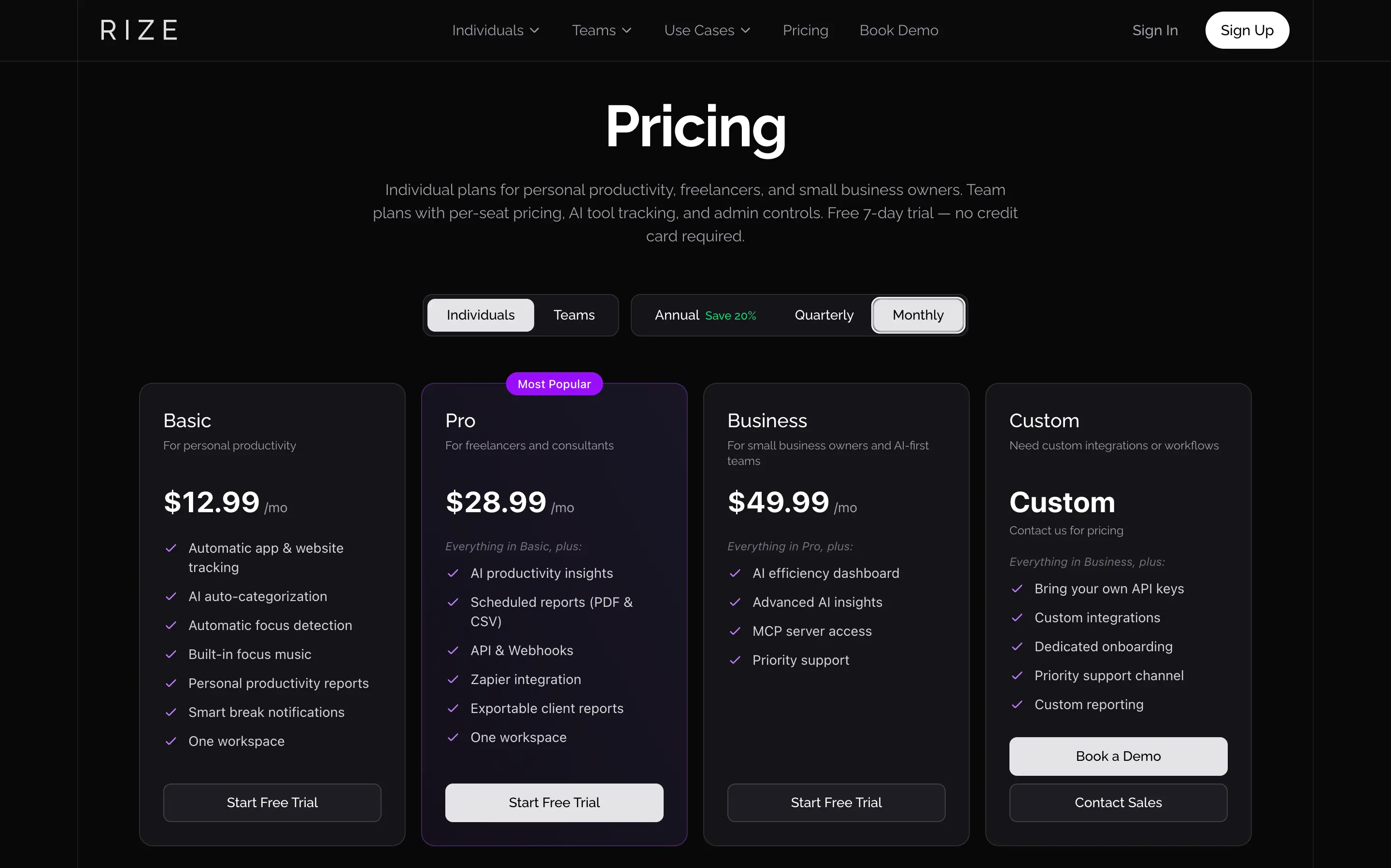
Rize's individual plans start at $12.99/mo for Basic, which already includes automatic tracking and AI categorization. Pro, built for freelancers, is $28.99/mo ($23.99 billed annually) and adds AI insights, client reports, and API access. See Rize's full pricing for the Max, Team, and Enterprise tiers.
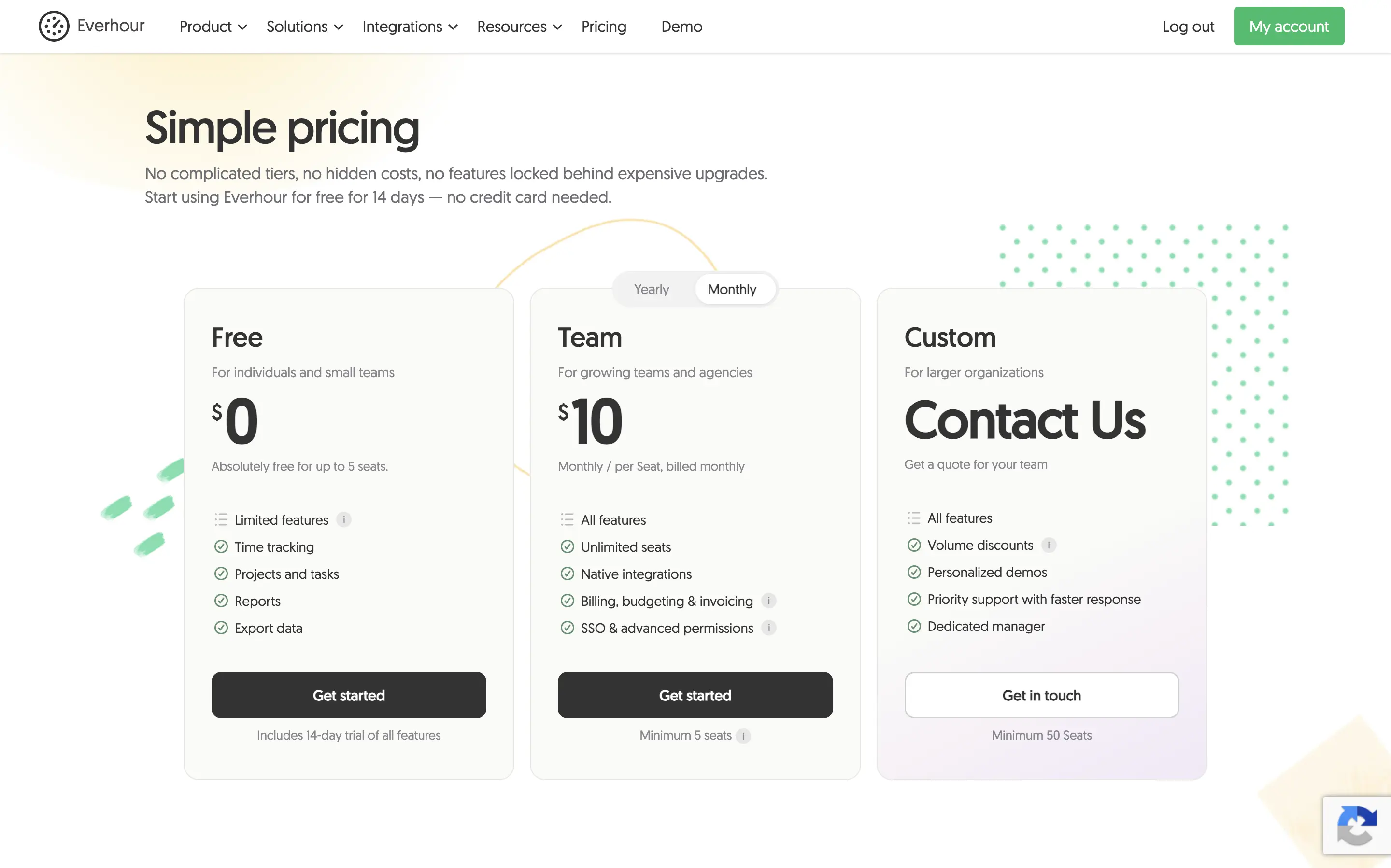
Everhour's Free plan covers time tracking, tasks, and reports for up to 5 seats, at $0. Everything else, integrations, invoicing, SSO, sits behind the Team plan at $10/seat/mo ($8.50 annually), and that 5-seat minimum applies even to a solo user. A freelancer who wants Everhour's paid features pays for 5 seats whether they need them or not, at least $42.50 to $50 a month.
That's roughly 70 to 80 percent more than Rize's Pro plan for genuinely more capability. Check Everhour's pricing page for the Custom tier.
For most people reading this, individuals, freelancers, and small teams, Rize is the stronger default. You get more capability for less money, and nobody has to remember to start a timer. Everhour earns its place once you're provisioning a large team and want per seat cost to stay flat as headcount grows. Both offer a free trial with no card required, 7 days for Rize, 14 for Everhour.
My final verdict: Which is better for you?
Choose Rize if:
- You want an accurate record of your day without starting or stopping a single timer
- You're an individual, freelancer, or small team that values AI coaching and insights over admin tooling
- You don't need accounting integrations like QuickBooks or Xero baked into your invoicing
- You work on Mac or Windows and don't need to track time from your phone
Choose Everhour if:
- You're managing a team that needs PTO tracking, timesheet locking, and role-based access
- You bill hourly across several clients and need tax, discounts, and a direct sync to QuickBooks or Xero
- You need to track time from your phone or embed a timer inside tools like Figma or Salesforce
- You don't mind building the daily habit of starting and stopping timers yourself
For most folks reading this, Rize is the better choice. Every dimension in this comparison comes back to the same trade: Everhour asks for your discipline, Rize asks for none.
That difference alone is worth more than a longer feature list or a free tier with a 5-seat catch. Accurate data beats customizable data if the customizable version depends on you remembering to track it in the first place.
If you're ready to stop managing your time tracker and let it manage itself, start your free 7-day trial with Rize. No card required.
Related reading
See how Rize compares to other time trackers: Rize vs Clockify, Rize vs Timely, Rize vs Toggl for agencies, Rize vs Hubstaff, Rize vs Memtime, Rize vs RescueTime, and Rize vs Harvest, or browse all options on the comparisons page.
Start tracking time automatically
Join thousands of professionals who stopped guessing where their time goes. Free for 7 days.
“Rize has been a no-brainer for me.” — Ali Abdaal Read more →