![Rize vs Clockify: Which Time Tracker Is Best? [2026]](/assets/blog/hero/rize-vs-clockify.svg)
Rize and Clockify are both well-established time trackers with large user bases and active development. That's where the similarity ends.
Rize is built around full automation and AI, while Clockify is built around platform breadth and a low price floor.
I've used Rize daily since May 2022. For this comparison, I spent several weeks testing Clockify across its web app, desktop app, and browser extension on real client work.
The short version: Rize is the better time tracker. Clockify is the better budget option. Whether that trade-off matters depends on how you work. That's what this article is for.
Quick Answer
Choose Rize if you want time tracking that runs itself — fully automatic, AI-powered, with built-in invoicing and team dashboards. Choose Clockify if budget is the deciding factor and you need a free plan with broad platform support and structured admin tools.
Rize vs. Clockify at a Glance
| Feature | Rize | Clockify |
|---|---|---|
| Time tracking | Fully automatic. No timers, no entries, no logging. | Auto tracker documents your apps. You still convert them into entries manually. |
| AI features | AI productivity coach, auto-generated time entries, and a chatbot that queries your own tracked data. | None. |
| Ease of use | Gets smarter every week. Fades into the background for good. | Clean and simple. Still needs your attention every time you work. |
| Platform support | Mac and Windows only. | Web, iOS, Android, Linux, Mac, Windows, and browser extensions for Chrome, Firefox, and Edge. |
| Team features | Utilization data built from what people actually did, not what they remembered to submit. | Approvals, scheduling, kiosk mode, and solid admin controls. Accuracy depends entirely on manual input. |
| Invoicing | Billable hours auto-populate invoice line items. Covers most freelancers and agencies cleanly. | Recurring invoices, expenses, and multi-currency billing. More configurable, same manual foundation. |
| Integrations | Deep two-way sync with ClickUp and Linear. 8,000+ apps via Zapier. | One-click timer button in 100+ web apps. 2,900+ via Zapier. Wider coverage, shallower depth. |
| Pricing | From $12.99/mo. No free plan. 7-day trial, no credit card required. | Free for up to 5 users. Paid plans from $4.99/mo. |
Rize Is Easy to Use. Clockify Still Has Friction
Ease of use is subjective, so here's my definition: how quickly does a tool's UI click for me, and does it eventually fade into the background of my life?
The best software becomes invisible. If it becomes like brushing your teeth, automatic and unthought-about, that's the gold standard.
Rize clears that bar. It's truly automatic, unlike most time trackers that claim to be but surprise you when it's time to actually fill in a timesheet. Open your laptop, start working, and Rize handles the rest. It tracks everything, builds time entries automatically, and surfaces suggestions for description, project, client, task, and billable status that you review and accept.
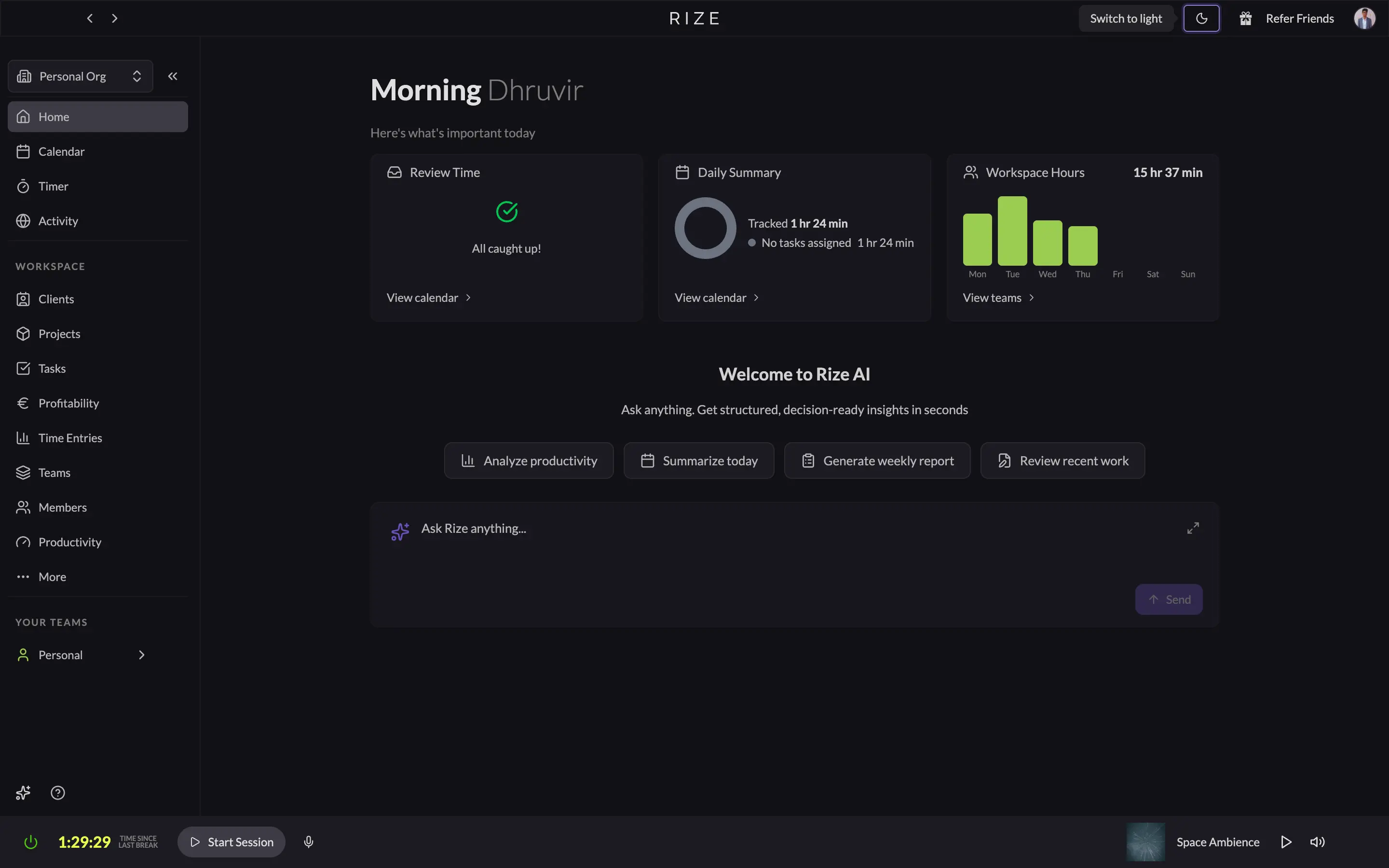
It also gets smarter over time. Tell Rize once that YouTube is a distraction, and it remembers. Pull up YouTube during a deep work session, and the AI coach nudges you back. You configure things less and less as the weeks pass. Despite being the most feature-complete time tracker I've used, Rize eventually fades into your day.
Clockify has one ease-of-use advantage over Rize: it works everywhere. Rize is Mac and Windows only. Clockify runs on the web, Android, iOS, Mac, Windows, Linux, plus browser extensions for Chrome, Firefox, and Edge. If you work across multiple devices, that gap is real.
But it's not truly automatic. Clockify's Auto Tracker records background app activity, but only if you have the desktop app installed, and you still have to manually create a time entry for each app session. That's not what "Auto Tracker" implies.
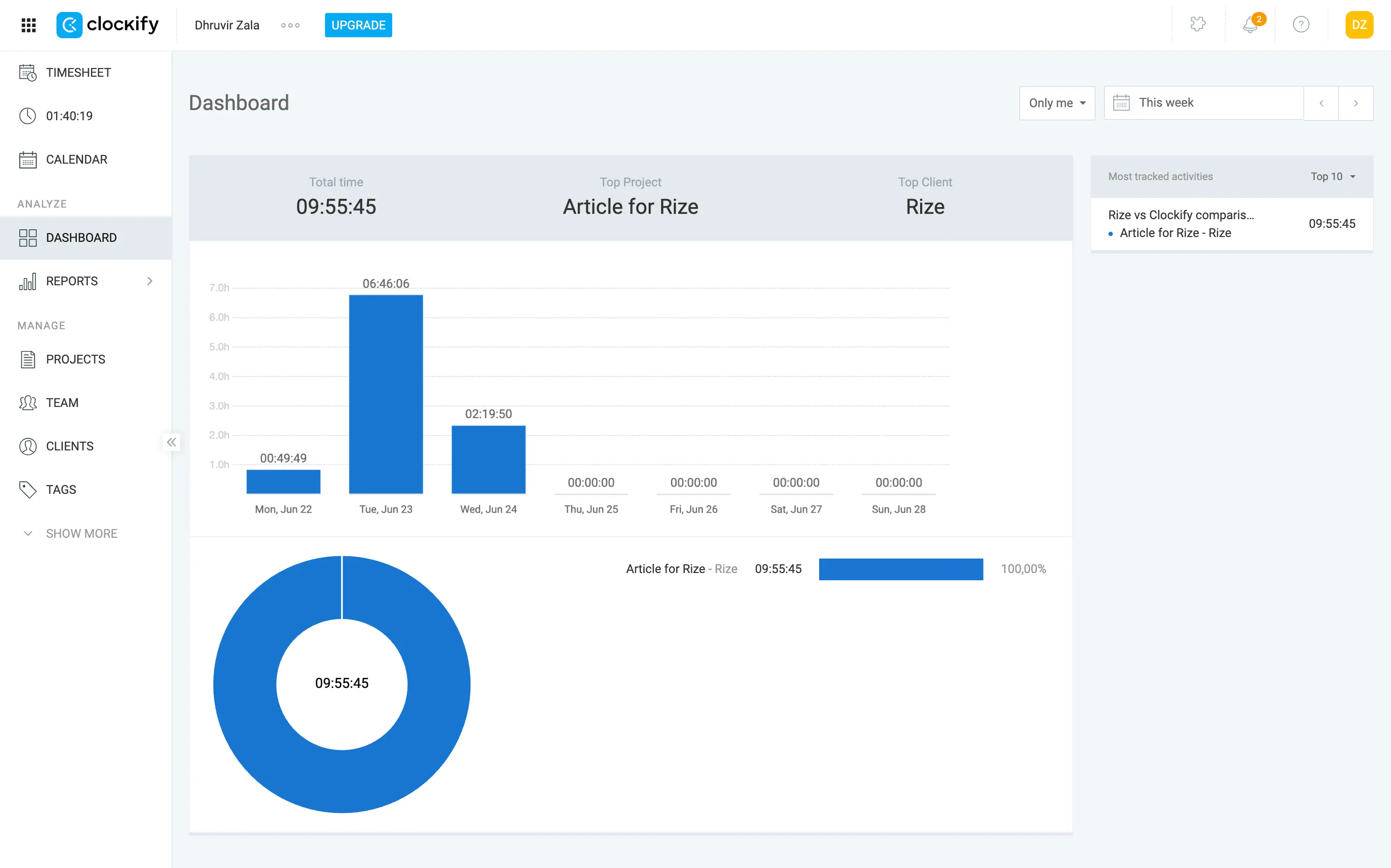
The desktop app is also more limited than the web version. For anything beyond basic tracking, you end up bouncing between the two.
Aesthetically, Rize is clean and modern with a solid dark/light mode. Clockify gives off legacy tool vibes: lots of whitespace, boxy placeholders, functional but dated.
If you want to track your time without thinking about tracking your time, Rize is the only one of these two that actually delivers. It's not close.
Rize Tracks Everything Automatically. Clockify Makes You Do the Work
The core difference is simple: Rize is fully automatic and AI-powered. Clockify is neither. That distinction explains most of the price gap between them, which we'll cover later in the pricing section.
Rize starts tracking the moment you open your laptop. It categorizes your activity automatically, distinguishes between focus work, meetings, and distractions, and scores each session out of 100. You don't log anything. You work, and a full picture of your day builds itself.
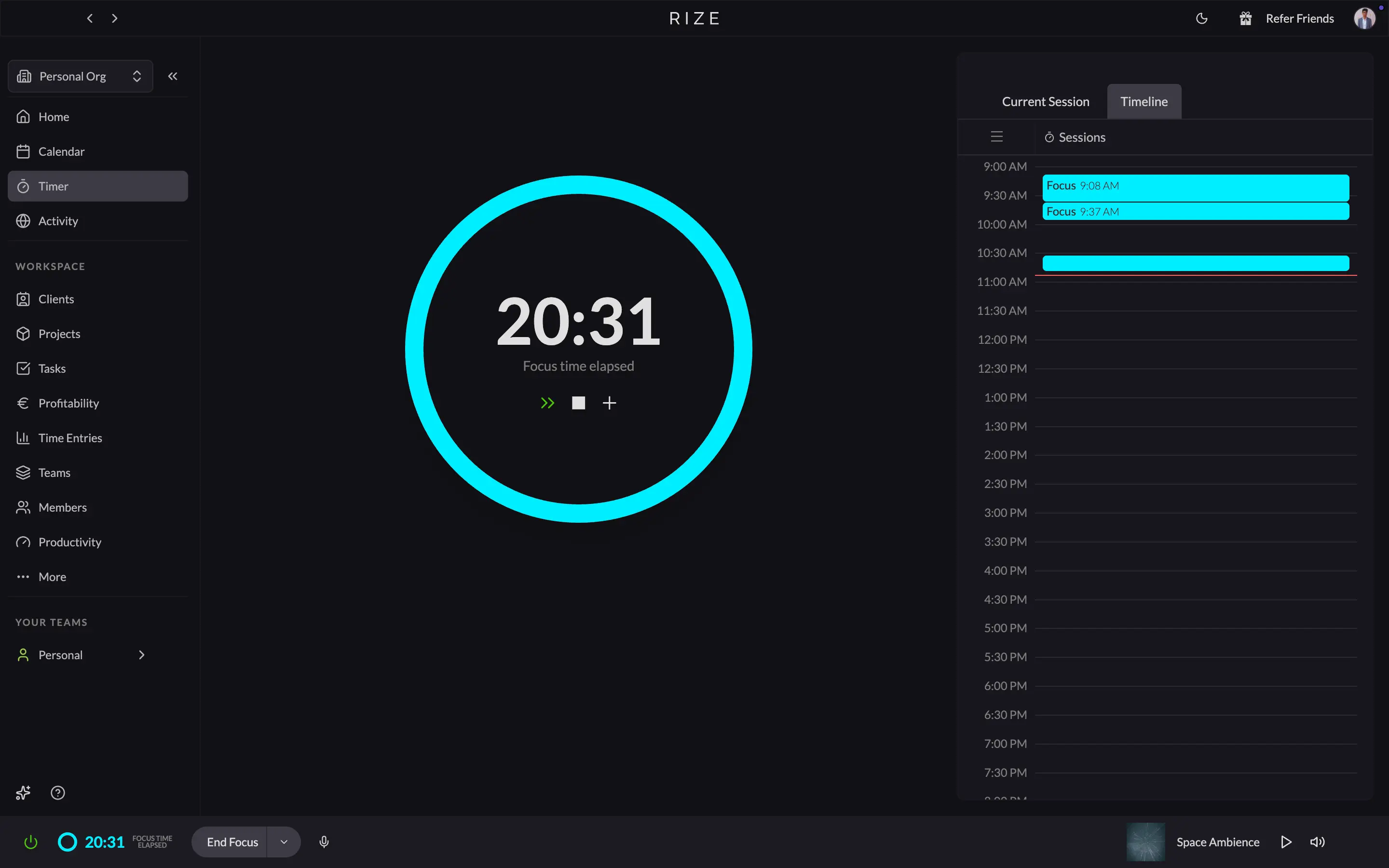
On Mac, Rize lives in the menu bar. Basic time data is visible without opening the app, and you can manually trigger a session type if Rize needs correcting. Small thing, but it's what good software actually looks like in practice.
Before starting, spend ten minutes in the Tracking Rules tab. That's where Rize learns which apps and sites belong in which category for you. Do it once, done forever.
Clockify's approach is the opposite. The Auto Tracker logs your activity, but it stops at documentation. You get a timeline of every app you opened. Then you build time entries from it manually: date, time, description, project, tags. Clockify just starts a timer and tells you to figure out the rest.
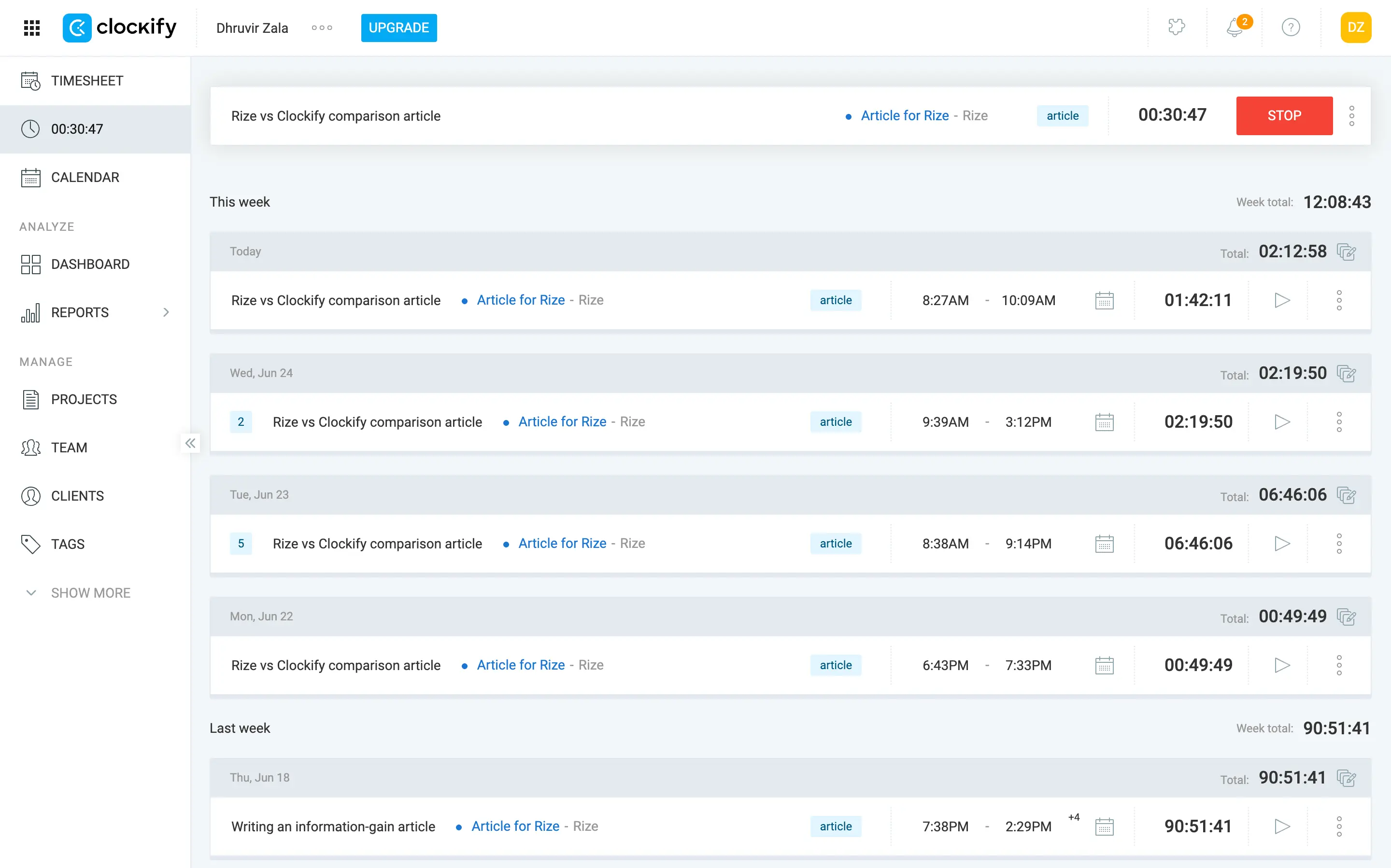
With Rize, you're the observer correcting the occasional mistake. With Clockify, you're doing the work the software should be doing.
If automatic time tracking is what you want, Rize wins big time. If your workflow genuinely requires manual entry for accuracy, Rize still makes the case: the context it builds automatically is richer than anything you'd log by hand.
Rize Has AI Where It Counts. Clockify Has None
Rize is big on AI. Clockify is not. That gap explains most of the price difference between them.
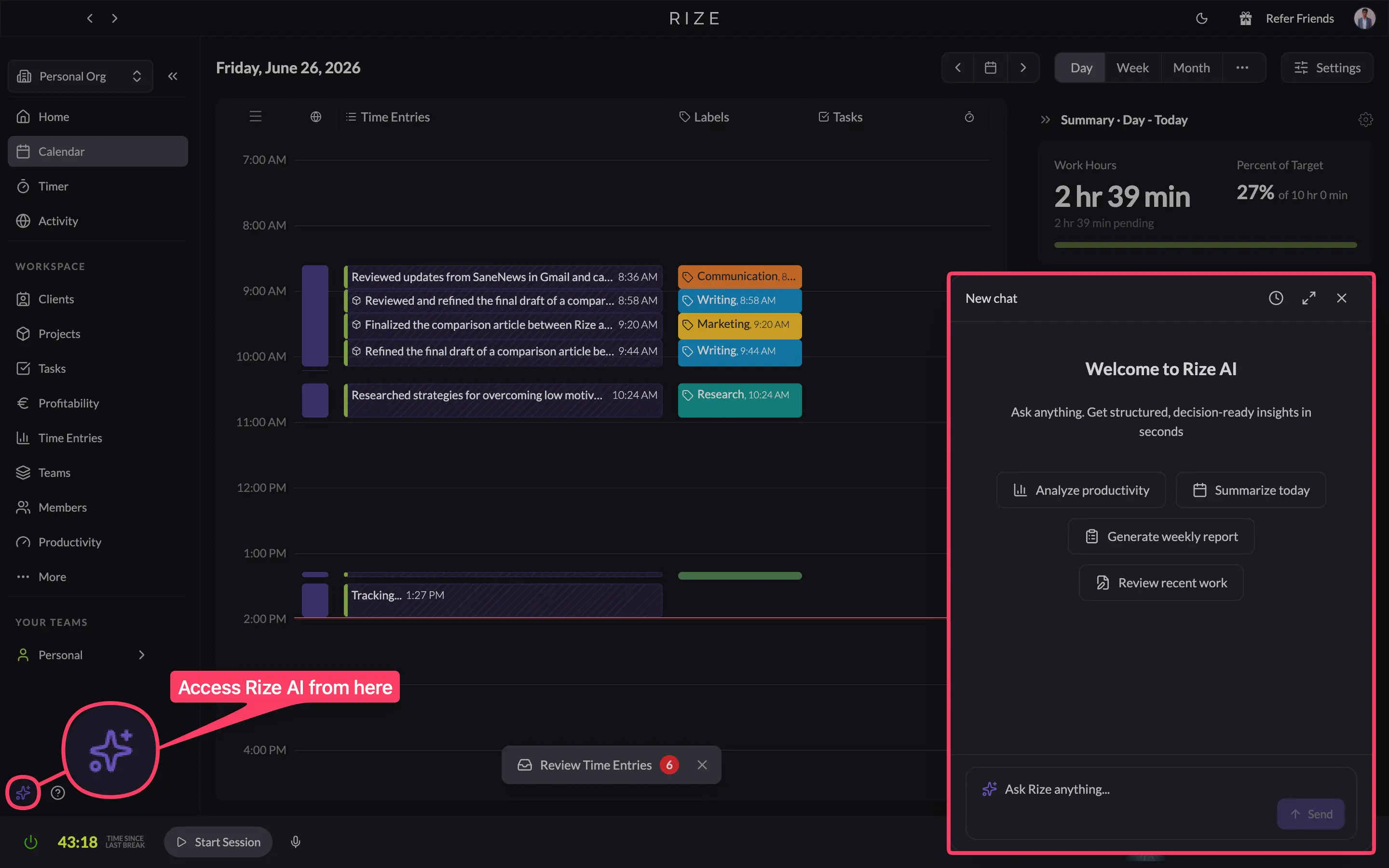
The Rize AI chatbot is the newest addition. Chat with it and get accurate answers from your own tracked data. The value is in how specific your questions can get: "Compare my overall productivity between this Friday and last Friday." That's a real answer on demand, instead of digging through a reporting dashboard or parsing a summary email. Clockify has nothing like it.
Time entries are where I've yet to see another time tracker come close to Rize, and I'm not exaggerating. Keep working, and Rize automatically generates your time entries with everything filled in. At the end of the day, you review and approve or reject them.
Rize also doubles as a proactive productivity coach for knowledge workers who depend on focus. It runs in real-time: notifying you to start deep work when you're drifting, reminding you to take a break when you're overworking, pulling you back when a distraction takes hold.
Clockify has, and I repeat this because it's important, none of these features. That's why, when someone tells me to pick Clockify because it's cheap, I push back: price gives an incomplete picture of a software's usefulness. Clockify costs less because it does less.
See the AI difference
Try Rize free for 7 days. Watch it auto-create time entries from your actual work — no timers, no manual entry. No credit card required.
Start Free TrialRize Gives Real Team Visibility. Clockify Gives Team Administration
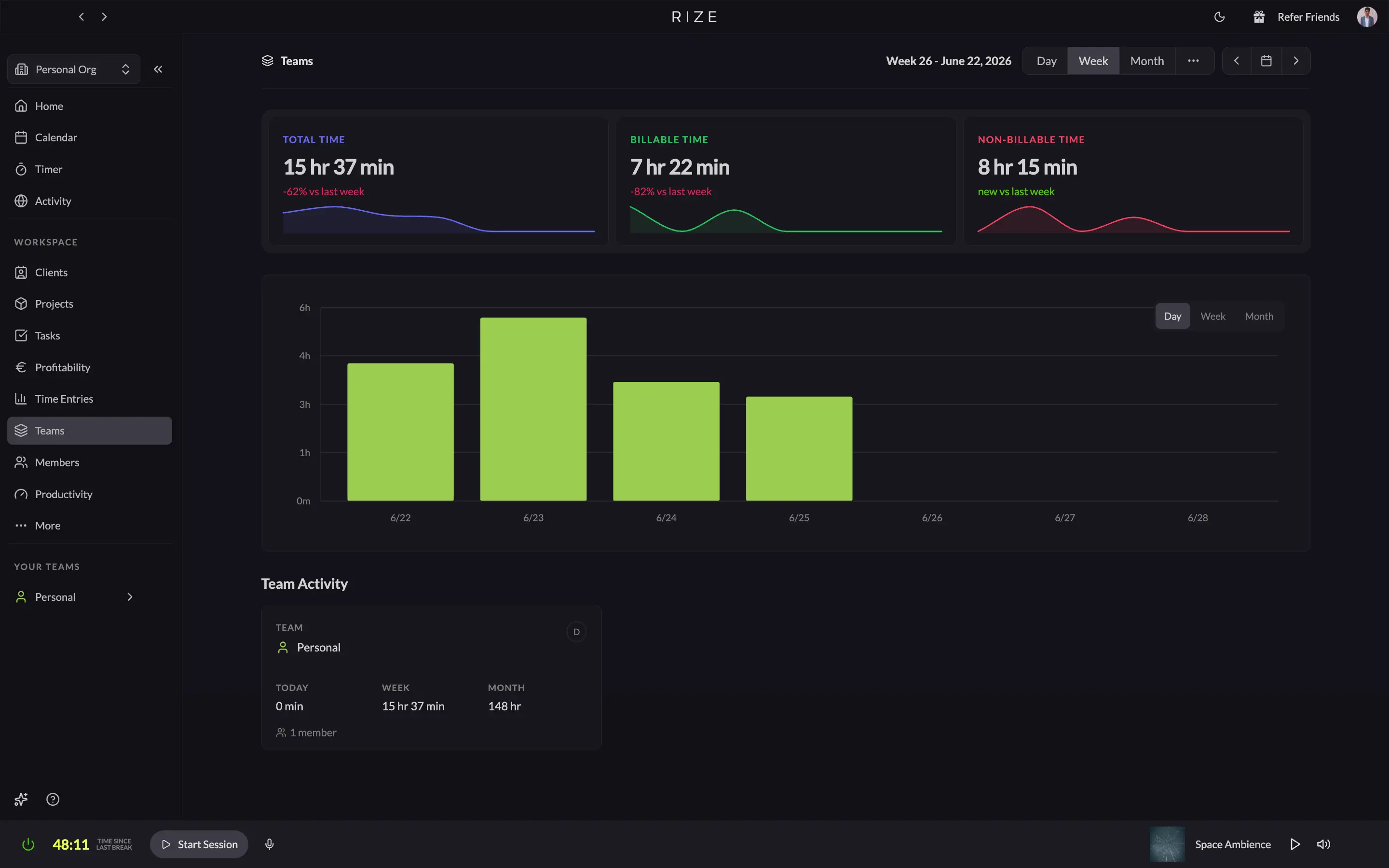
Rize's team dashboard runs on automatically captured data. Open it, and you see total hours, billable hours, and non-billable hours across your team, compared week over week, updated live as work happens. Drill down, and you get utilization by person, hours by client and project, and workload distribution across the team. Scope creep shows up before the project ends. The data is just there because no one had to log anything.
Team members review their time in a side panel docked to the day calendar. They see the exact apps and documents behind each entry, then approve or reject the AI's categorization before anything gets shared. Managers see only team-level summaries. No screenshots. No keylogging. Individual activity stays on each person's device, which matters for team buy-in.
Clockify goes deeper into administration. User groups, roles, and permissions, timesheet approvals, time off policies, team scheduling, and kiosk mode for frontline or hourly workers. If you need structured team management features alongside time tracking, that breadth is a genuine argument.
But the reports run on what people submitted, not what they actually did. The team dashboard shows timer compliance, not reality. Even timesheet reminders require upgrading to the Standard plan, which tells you everything about how Clockify approaches teams: the entire workflow is built around chasing entries, not generating them.
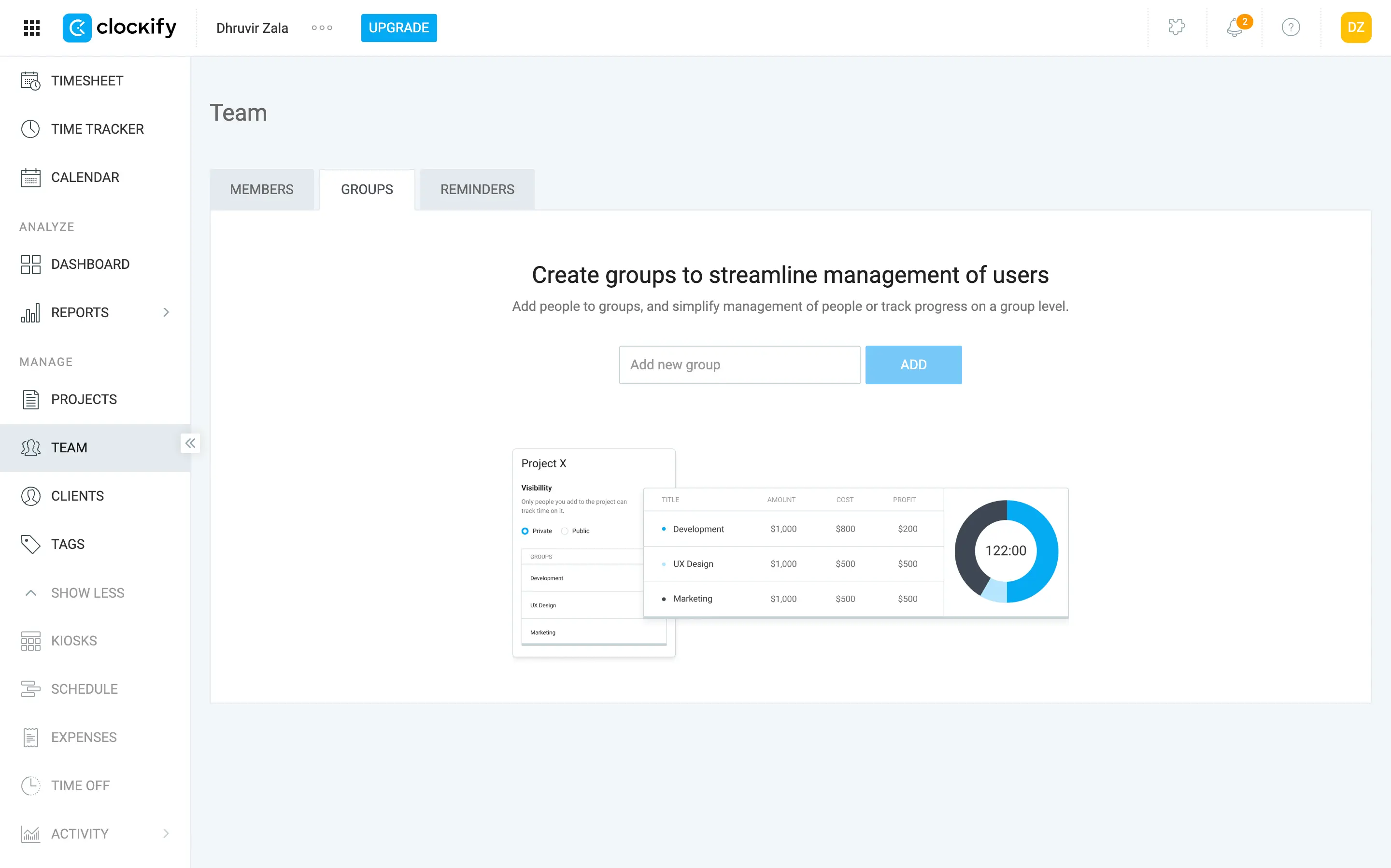
If your team is disciplined about starting timers, Clockify's admin toolset covers most bases at a fraction of Rize's team pricing. If they're not, the reports are fiction.
Agencies and teams where billing accuracy is the whole point: Rize. Small teams that need a lightweight management tool without the overhead: Clockify.
Rize Turns Tracked Hours into Invoices. Clockify's Invoicing Goes Deeper
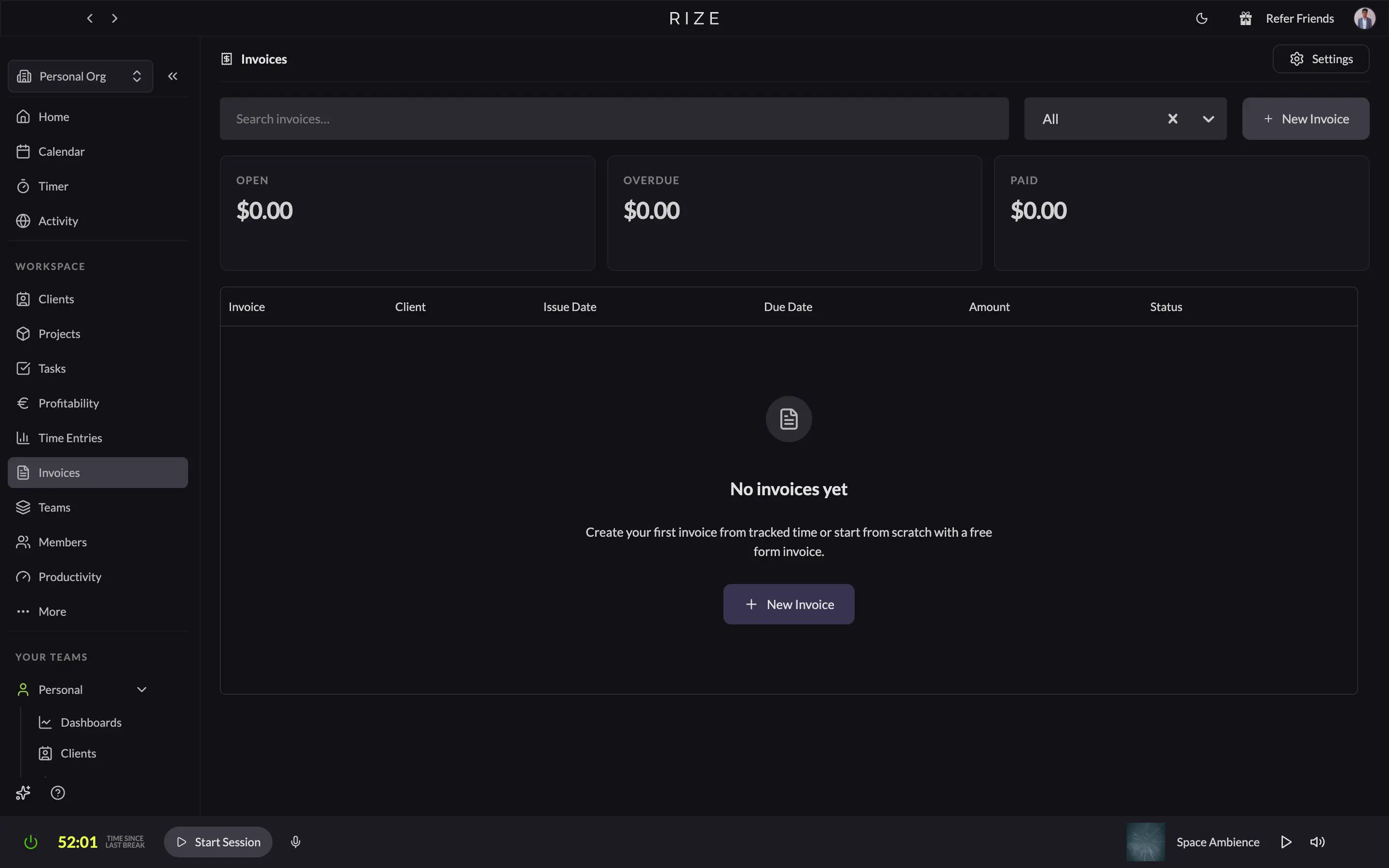
Rize invoices from automatically tracked time. Clockify invoices from whatever your team manually submitted.
With Rize, billable hours are already categorized before you open the invoice screen. Set your clients, per-client rates and billable categories once, and those hours populate invoice line items when you're ready to bill. Select a client, pick a date range, review the pre-filled entries, and send as PDF or direct email. Payment status tracks through the full lifecycle, from draft to paid to overdue, without touching another tool.
Clockify's invoicing goes deeper. You get recurring invoices on a custom schedule, taxes and discounts on line items, expense inclusion alongside tracked time, multiple billing contacts, and invoice translations for clients who need documents in other languages. That depth is real, and it covers billing scenarios Rize doesn't.
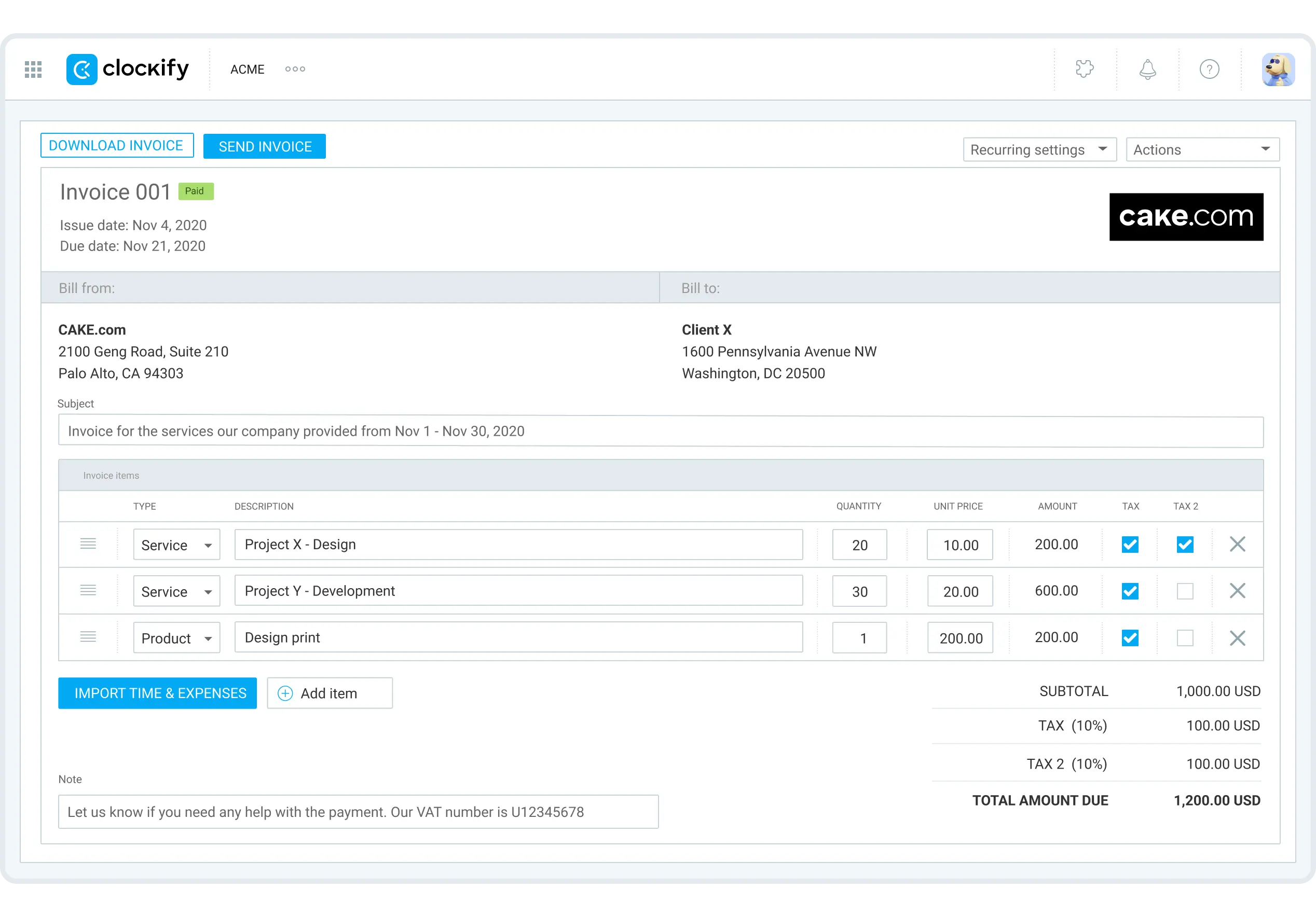
But the foundation is still manual. Importing time into a Clockify invoice only works if that time was tracked. The quick client call without a timer, the 20-minute review that slipped by: those never make it onto the invoice. Clockify's invoicing is more configurable. It isn't more complete.
If under-billing is your problem because time slips through the cracks, Rize is the fix. If you need recurring invoices, expense line items, or complex tax configurations and your team reliably tracks time, Clockify's Standard plan is the better fit.
Rize Integrates Deeper. Clockify Integrates Wider
Clockify's integration model is a browser extension that drops a "Start timer" button inside over 100 web apps. Open Asana, Notion, Jira, GitHub, Salesforce, or most other tools you use in a browser, and the button is just there. Click it, and the timer runs. It works on every plan, including free.
Rize has seven native integrations: Asana, ClickUp, Linear, Google Calendar, Outlook Calendar, Slack, and Zapier. Short list. But the depth is different. ClickUp and Linear get two-way sync: Rize imports your tasks, tracks time automatically against them, and pushes completed entries back. You can also create tasks in ClickUp, Linear, or Jira directly from the time entry review panel without leaving Rize. Clockify puts a timer button in those same apps. That's not the same thing.
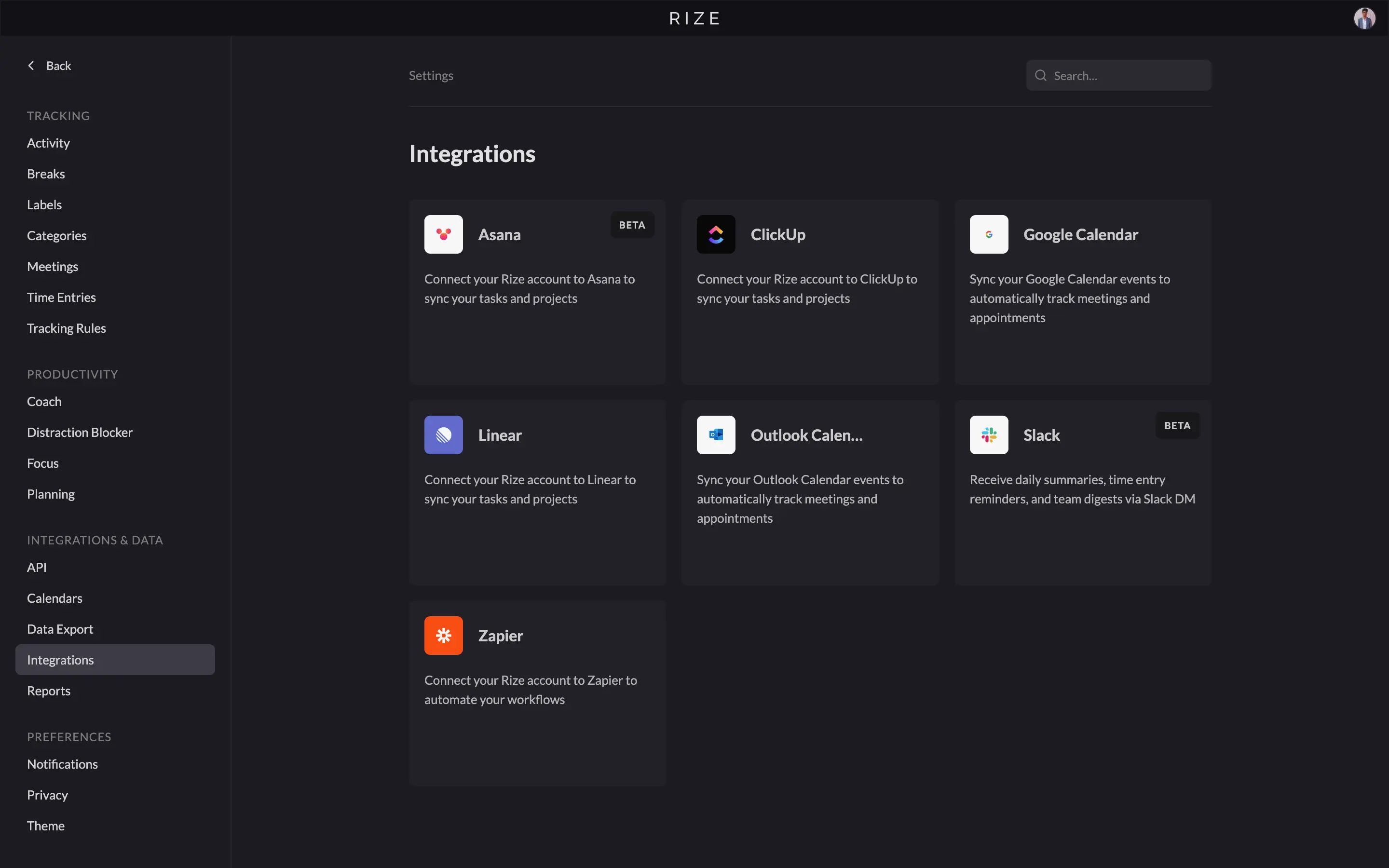
For everything beyond those seven, Rize goes through Zapier and connects to 8,000+ apps. Clockify's Zapier connector reaches 2,900+.
One caveat: Rize integrations require the Pro plan or above. The Basic plan doesn't include them. Clockify's extension works on every plan, including free.
The Slack integrations are also very different. Rize sends daily summaries, time entry reminders, and team digests to Slack DM. Clockify adds a timer button inside Slack. Same integration name, completely different utility.
If your workflow is spread across many browser-based tools and you want the simplest setup, Clockify's extension wins. If you work inside ClickUp or Linear and want time to sync both ways automatically, Rize does something Clockify can't.
Rize Keeps Your Activity Private. Clockify Gives Admins More Options
Rize captures more of your day automatically, but limits what your manager can see by design. Clockify tracks less by default, but gives admins the option to go further.
Rize reads only window-level metadata: the app name, URL, and window title. Not the keystrokes, screenshots, or the app content. Managers see approved time entries and reports, nothing else. The raw activity log stays on your device, and no admin setting changes that.
Clockify has optional screenshot and location tracking. Both are off by default, and users get notified when an admin enables them. That notification is a real safeguard. But it's still an admin's call. If you're an employee on a Clockify workspace, someone else holds that switch.
Both tools encrypt data in transit, let you export everything at any time, and comply with standard privacy regulations.
If you want a tool where the privacy boundary is fixed by design, Rize gives you that. If you're an admin who needs screenshot or location tracking as an option, Clockify supports it. Just be transparent with your team when you turn it on.
Rize vs Clockify: The Pricing and Value Comparison
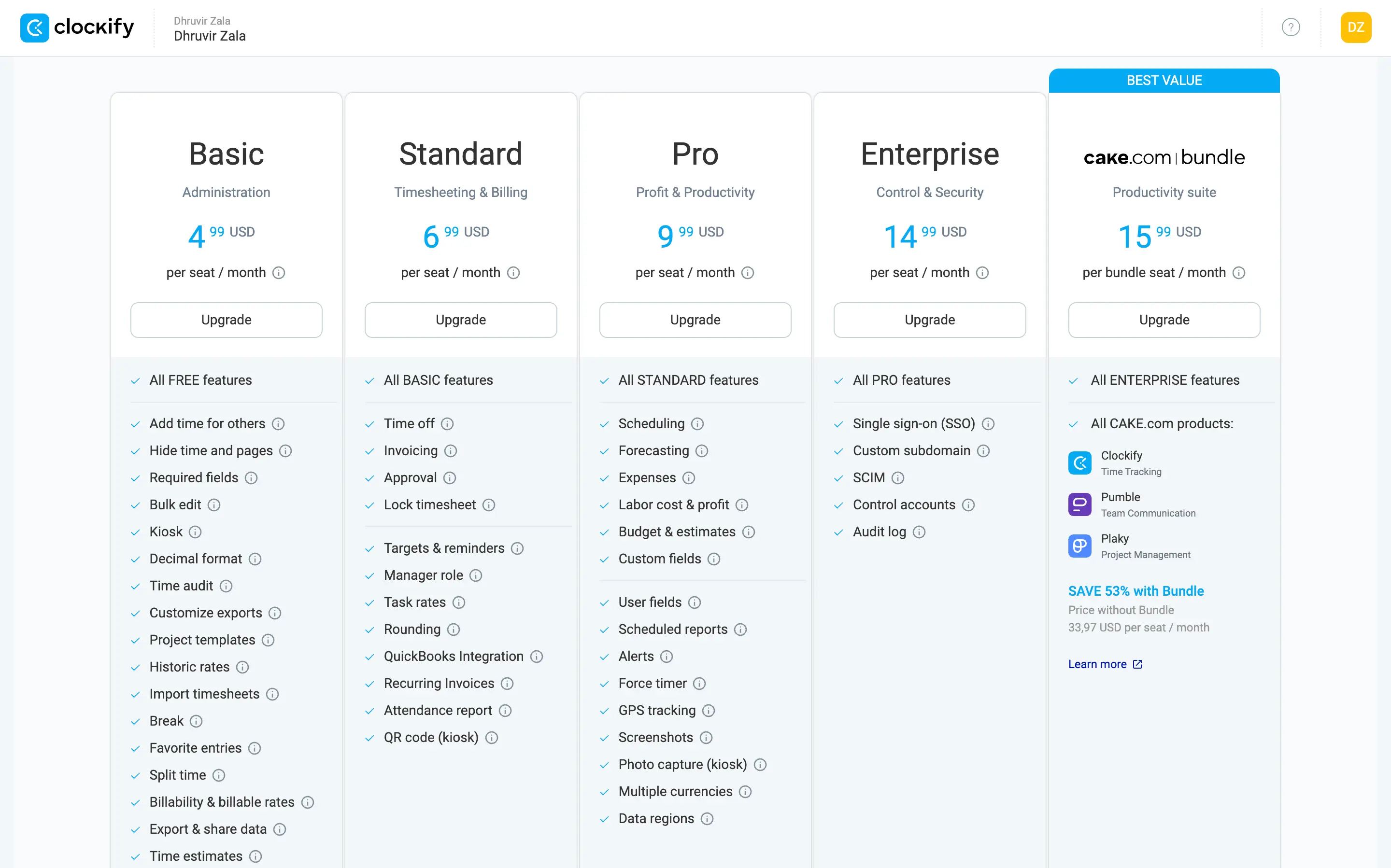
Clockify's free plan covers up to five users: unlimited tracking, auto tracker, basic reports with PDF export, and browser integrations. Billable rates, CSV/Excel exports, and shared report links moved to paid plans in April 2026, so for anyone not billing by the hour, free is enough.
Rize has no free plan. Individual plans run $12.99-$49.99/month, or $9.99-$39.99/month billed annually. You're paying for full automation and AI: no timers to start, no entries to fill in, a proactive productivity coach running in the background, and AI-generated time entries reviewed at day's end. Clockify is a manual tool at its core. Rize isn't. That difference is what you're buying.
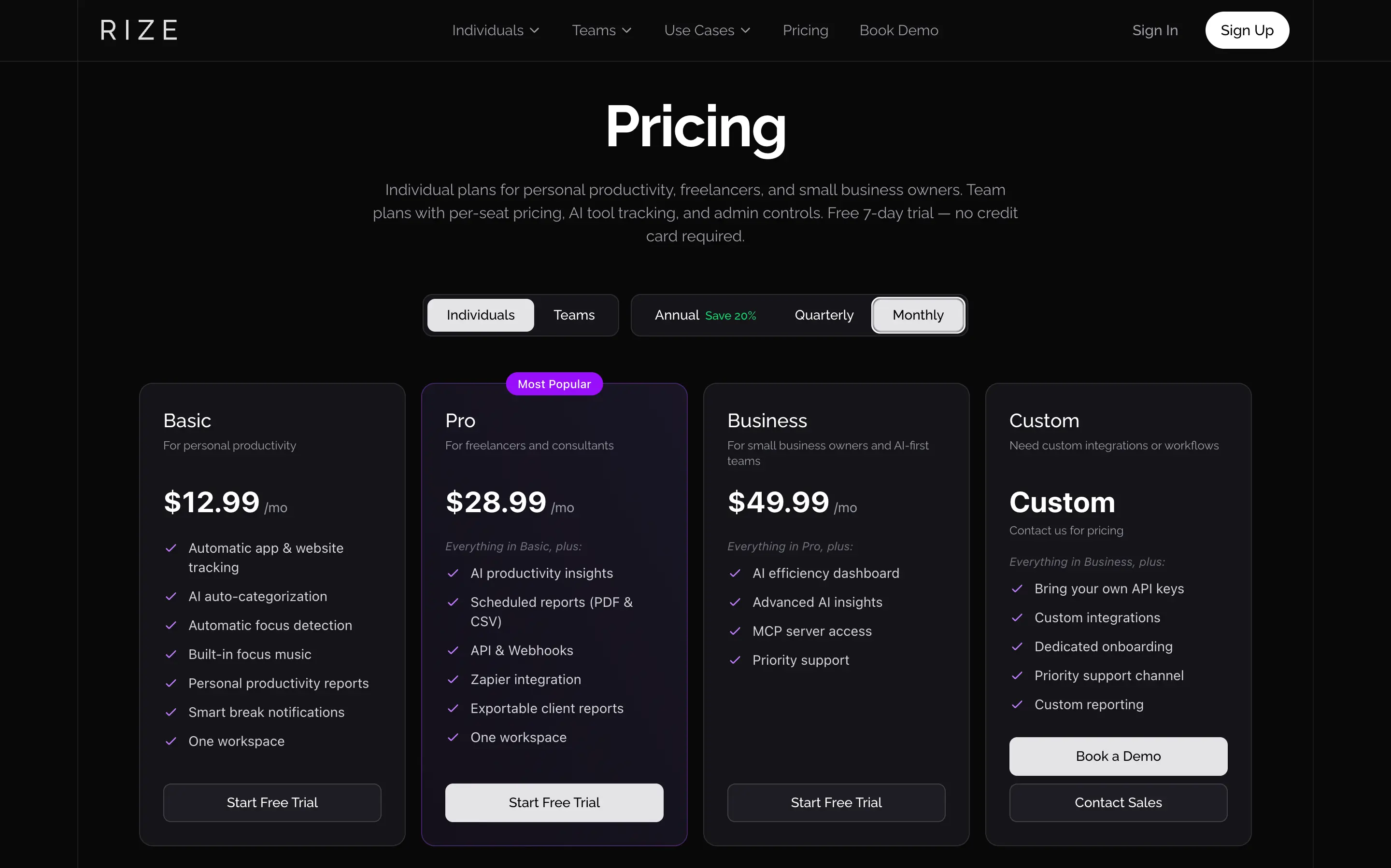
For teams, the gap widens. A five-person team on Clockify Standard pays $27.45/month annually. The same team on Rize Team pays $149.95/month billed annually ($29.99/seat). Clockify's plans have no seat minimums. Rize Team starts at $59.98/month for its two-seat minimum.
Clockify's Pro plan at $7.99/seat does offer things Rize doesn't: expense tracking, project scheduling, multi-currency billing, and GPS tracking. If your team needs those alongside time data, Clockify Pro is the better value per dollar.
If you lose billable hours to slipped timers, Rize Pro at $23.99/month billed annually or the higher plans pays for itself. Check Rize's current pricing for the latest plans and team discounts.
My Final Verdict: Which Should You Use?
Choose Rize if:
- You want time tracking that runs itself.
- You lose billable hours to client calls, quick reviews, and context switches you forget to log.
- You're a knowledge worker who depends on deep focus and wants a productivity coach running quietly in the background.
- You manage a team and need utilization data built from what people actually did, not what they remembered to submit.
Choose Clockify if:
- Budget is the deciding factor. The free plan covers five users and handles most basic needs without a credit card.
- You work on Linux, mobile, or across devices that Rize doesn't support.
- Your team needs structured admin tools alongside time tracking: approvals, scheduling, permissions, or kiosk mode for hourly workers.
- You need recurring invoices, expense line items, or multi-currency billing, and your team reliably tracks their time.
Rize costs more because it does more. If you've looked at your time reports and suspected they weren't complete, they probably weren't. That's a manual-tracking problem, and Clockify can't fix it.
I've used Rize every day for a couple of years now. I've never once started a timer. That's what automatic time tracking actually looks like.
If you're an operations leader evaluating time tracking for your team, the core question is simpler than features and pricing: do you want a tool that depends on your team remembering to track, or one that captures everything without them doing anything? Clockify is the former. Rize is the latter. Your utilization data, capacity forecasts, and pricing decisions are only as good as the time data feeding them.
Related Reading
See how Rize compares to other time trackers: Rize vs Timely, Rize vs Harvest, Rize vs Toggl, Rize vs Hubstaff, Rize vs Memtime, and Rize vs RescueTime. Browse the full comparisons page for more.
Start tracking time automatically
Join thousands of professionals who stopped guessing where their time goes. Free for 7 days.
“Rize has been a no-brainer for me.” — Ali Abdaal Read more →