Timely earned its reputation the hard way. The Memory Tracker is one of the few "automatic" trackers that behaves like one. The privacy-first pitch is real too, as there are no screenshots and no keystroke logging, which matters if you've ever worked somewhere that treated tracking like surveillance. And the integration list runs deep: Asana, ClickUp, Jira, Linear, Google Calendar, more than 25 others. None of that reputation is marketing. People who use Timely daily generally mean it when they say they like it.
But "automatic" and "done" turned out to be two different promises. Memory drafts your day; it doesn't finish it, so most people still lose 5 to 15 minutes every morning dragging yesterday's entries into a timesheet before any of it counts as billable. The pricing doesn't help once you outgrow the basics either. Starter caps out at 5 users with zero PM integrations, so connecting Asana or ClickUp means jumping straight to Premium at $20/user a month.
Those are the two real reasons most people land on this article, not because Timely is bad, but because the review step and the price wall are genuinely annoying.
I ran my own client work through every serious Timely alternative I could find, a dozen or so. Six made the cut. Each one earned its spot because it solves the review problem or the pricing problem better than Timely does, for a specific kind of person.
What makes the best Timely alternative?
Every tool on this list claims some version of "automatic tracking." That word means something different depending on who's selling it. Before you switch, here's what needs to be true for it to feel like an upgrade.
The best Timely alternative should:
- Finish your day, not just draft it. Timely's Memory tags your activity and hands you a draft to approve. If your alternative still has you dragging entries into a timesheet every morning, you've switched apps, not solved anything.
- Handle messy, multi-tab days without guessing wrong. Client work rarely happens in one clean block. Your alternative needs to sort a chaotic afternoon of switching between clients and tabs at least as well as Timely does, without the mis-sorts reviewers keep reporting.
- Not wall off integrations behind a price jump. Timely's Starter plan gives you zero PM tool connections until you're paying $20/user a month for Premium. If your alternative does the same thing at a different price, you haven't fixed anything.
- Keep tracking private. No screenshots, no keystroke logging, no GPS unless you want it. Timely already gets this right. Don't trade it away for a tool that watches more of your activity than you're comfortable with.
- Work without a constant connection. Timely has no offline mode. If your alternative drops the same ball, you're solving one problem and keeping the other.
Keeping these factors in mind, along with a few smaller ones we'll flag tool by tool, here's how the six alternatives on this list stack up.
The best Timely alternatives at a glance
Scanning before you commit? Here's where everything lands.
If you already know what's bugging you about Timely, this table should get you to the right pick without reading all six breakdowns. If you want the reasoning behind each one, that's still coming below.
| Tool | Best for | Standout feature | Pricing |
|---|---|---|---|
| Rize | Zero-touch tracking and real focus coaching (Best overall ⭐️) | Writes and tags your timesheet on its own, then tells you where your focus went | $9.99 to $39.99/mo individual, $29.99 to $39.99/seat/mo team, billed annually |
| Toggl Track | Teams who'd rather run their own timer | Manual start/stop means every entry is accurate the moment you log it | Free up to 5 users, then $9 to $18/user/mo billed annually |
| Clockify | Bootstrapped teams on a budget | 100+ integrations on every plan, Free included | Free up to 5 users, then $3.99 to $11.99/user/mo billed annually |
| Memtime | Privacy-conscious teams who want automatic tracking without cloud AI | 100% offline, your activity never leaves your machine | No free plan, $14 to $29/user/mo billed annually |
| TimeCamp | Budget teams who want automatic tracking with rule-based categorization | Keyword rules sort your day into the right project on their own | Free for unlimited users, then $2.49 to $4.99/user/mo billed annually |
| Harvest | Time tracking that flows straight into invoicing | One click turns tracked hours into a sendable invoice | Free for solo use, then $9 to $14/user/mo billed annually, plus usage fees |
1. Rize — best overall Timely alternative for zero-touch tracking and real focus coaching
Available on Mac, Windows.
Rize pros:
- AI tags every entry to the right client and project automatically
- No screenshots, no keystrokes, no monitoring, just app and window metadata
- Also works as a focus coach
- Automatic tracking comes with every plan
Rize cons:
- Desktop only, no real mobile app outside the Enterprise
- Fewer native integrations than Timely; everything else goes through Zapier
- No free tier, and the Team plan costs more per seat than Timely Premium
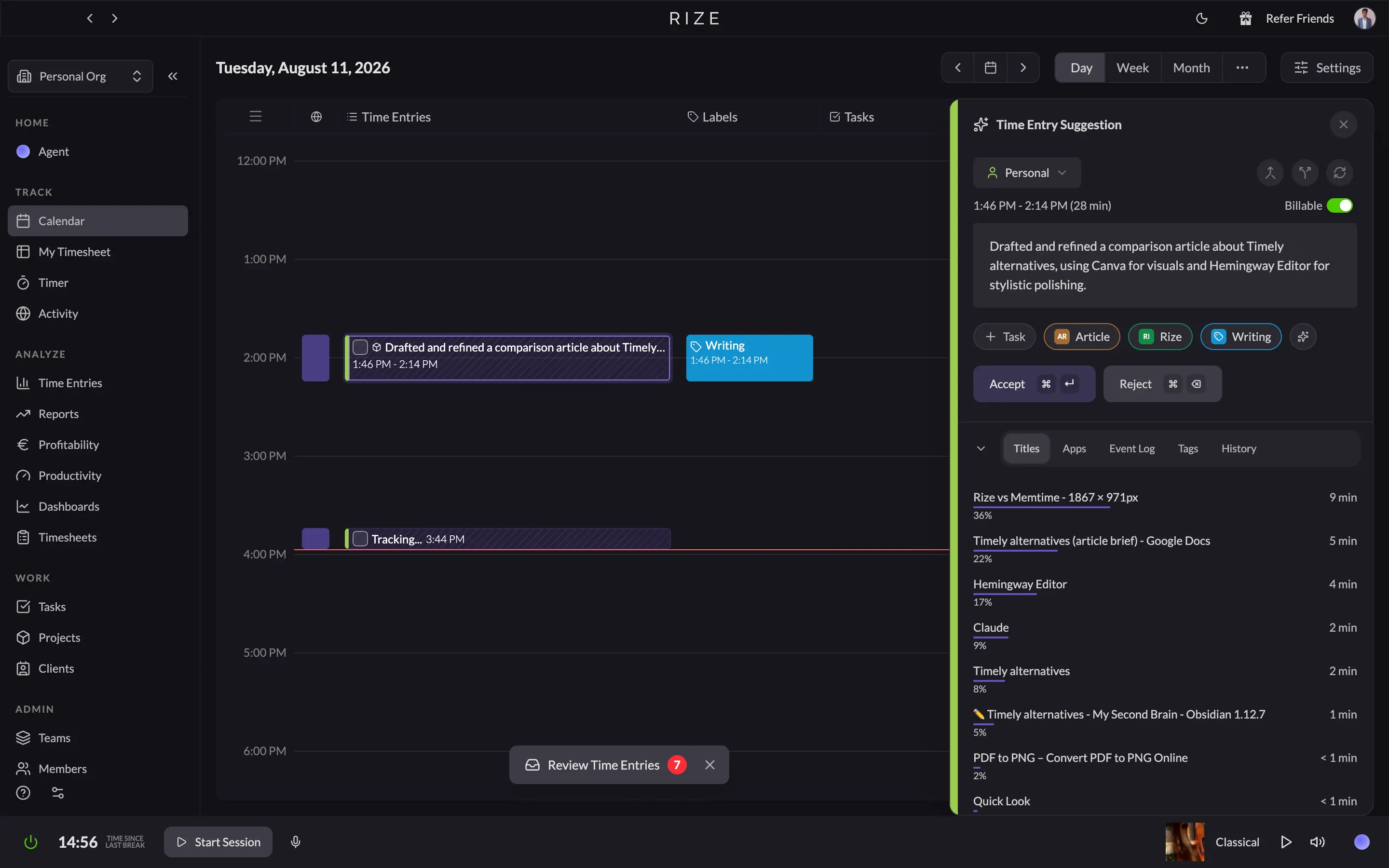
I wrote most of this article inside Rize, so I didn't have to guess at any of this. By the time I finished the intro, my calendar already had an entry sitting there that read, roughly: "drafted and refined a comparison article about Timely alternatives, using Canva for visuals and Hemingway Editor for stylistic polishing". I never typed that. I never picked a client, a project, or a task. Rize watched me bounce between Google Docs, Canva, and Hemingway and wrote its own accurate summary of what I was doing, then tagged it to the right client and project on its own.
That's the whole pitch for Rize over Timely in one sentence. Timely's Memory drafts your day and asks you to review it and drag entries into a timesheet. Rize drafts your day and just finishes it. My timesheet for that same day showed eight entries total, seven of them fully tagged and ready to go, one still auto-processing. Clearing those seven took one click on "Accept All," not the 5 to 15 minutes Timely users describe spending every morning.
Rize gets you most of the way to a finished timesheet automatically. What's left is a much smaller chore than what Timely leaves you with, but it's not nothing.
What actually convinced me that Rize is the strongest pick on this whole list isn't the tracking, though. It's what it does with the data after. Every tool here will eventually tell you that you worked 6 hours today. Only Rize told me my focus score for the week was sitting at 60.3, rated "Mediocre," and that it had dropped from Monday to Tuesday. It showed me that YouTube alone pulled my attention away for 37 minutes that week, more than anything else did. It broke one 26-minute writing session down into a 90 quality score with a single interruption, and asked me to rate how that session felt. None of that is billing data. It's the kind of feedback a good manager gives you, except Rize gives it to you automatically, every day, whether or not anyone's watching your work.
Rize never takes a screenshot, never logs a keystroke, never records your screen. It reads app names, window titles, and URLs, nothing else. So you get that manager-level visibility into your own habits without turning your computer into a surveillance device, which is the exact trade every tool on this list, Timely included, is also trying to make. Rize just does more with the data once it's captured.
If what's driving you off Timely is the daily grind of approving Memory entries and untangling multi-tab days, Rize is the most complete answer here, and the only one that also tries to make you better at your job.
For the full breakdown against Timely specifically, including team features and pricing at scale, see our Rize vs Timely comparison.
Rize pricing: Individual plans run $9.99 to $39.99/mo billed annually, depending on tier, and Team plans run $29.99 to $39.99/seat/mo, depending on whether you pay annually or monthly. Every plan includes a 7-day free trial, no credit card required.
Let your timesheet fill itself
Try Rize free for 7 days. Watch it auto-create and file your time entries from your actual work — no timers, no manual entry. No credit card required.
Start Free Trial2. Toggl Track — best Timely alternative for teams who'd rather run their own timer
Available on Web, Mac, Windows, iOS, Android.
Toggl Track pros:
- Manual start/stop timer, so every entry is accurate the moment you log it
- Track from a timer, calendar, list, or timesheet, whichever view fits your day
- Free plan covers up to 5 users with unlimited projects
- 100+ integrations through the browser extension
Toggl Track cons:
- No AI safety net, forget to hit start, and that time is gone
- Timesheet approvals, SSO, and deeper integrations are Premium-only
- Auto-tracker still needs daily manual review, doesn't remove the cleanup step
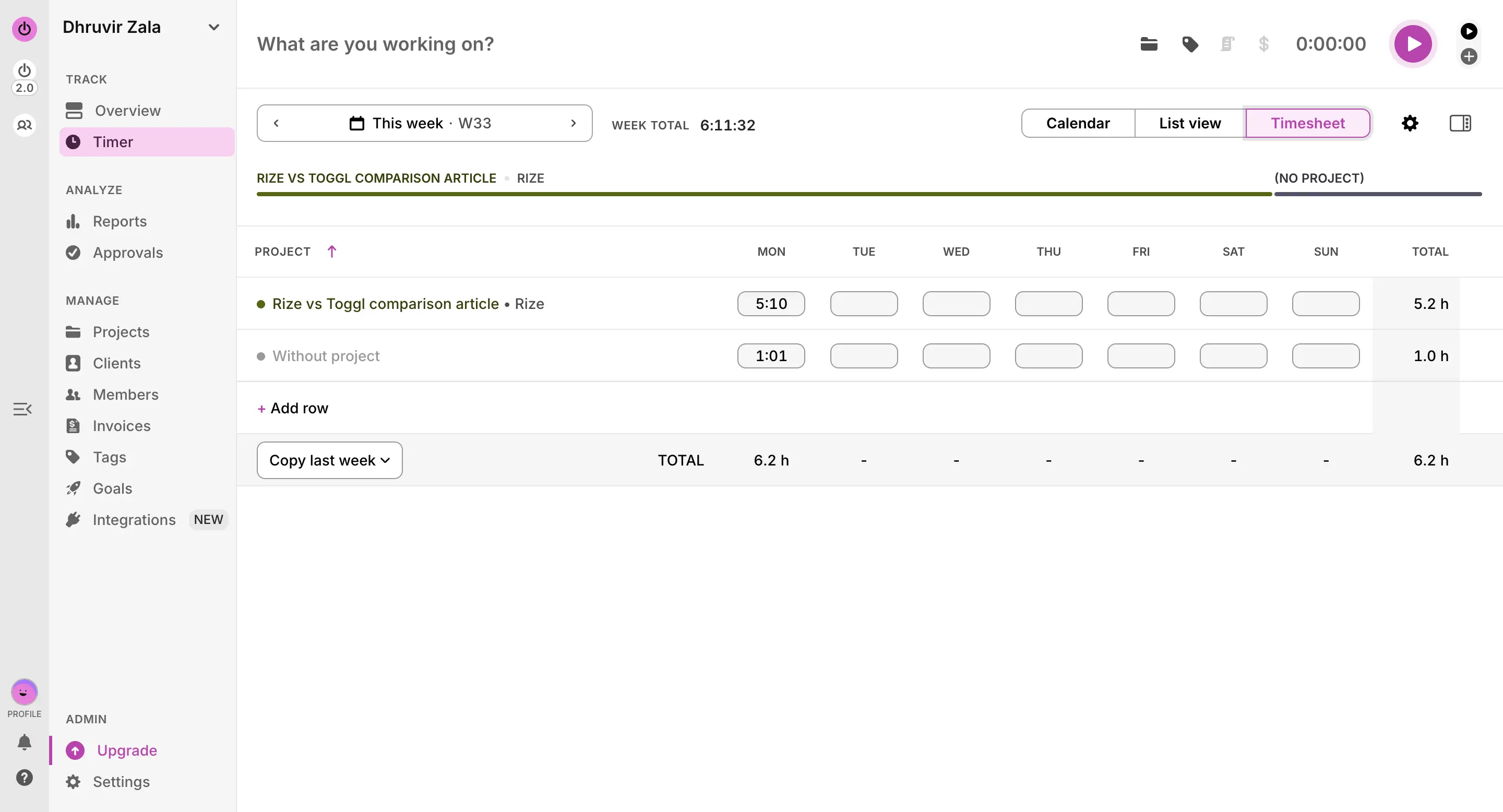
I tracked the writing of this entire comparison in Toggl, the old-fashioned way. Created a project, hit start, wrote. Everything that landed inside that timer showed up exactly where it belonged in the report afterward, tagged correctly. It was correct because I'm the one who typed it in.
But part of that same session showed up filed under "Without project." I'd started a timer before picking a project, got pulled into writing, and only noticed when I checked the report later. Toggl didn't try to guess where that time belonged. It just told me, accurately, that time had passed, and I hadn't said what it was for. No AI stepped in to make an assumption about it. Fixing it took a few seconds, but it's still a chore Timely's Memory would have at least attempted to solve for me, right or wrong.
That's the actual trade you're making. Timely's Memory watches your day and tries to sort it, then hands you a draft to approve, and sometimes gets your multi-tab afternoon wrong in the process. Toggl never tries to sort anything. There's no algorithm making a judgment call about which client that Slack tab belonged to, because you already made that call the moment you picked a project and hit the button.
If what's pushing you off Timely is specifically not trusting the AI's read on a chaotic day, Toggl removes the AI.
It's not entirely hands off, though. Idle detection will catch you if you walk away with the timer still running and prompt you to discard the dead time, which saves you from the worst version of this problem. But it won't catch a forgotten start button, and it won't sort a busy day for you.
If what drains your morning is untangling which client a dozen browser tabs belonged to, moving to Toggl trades one kind of manual work for another. You stop fixing an AI's guesses and start remembering to press a button in the first place. For a lot of consultants, that's a fair trade. For someone who forgets to start timers constantly, it might not be.
If you want to know how our advanced automatic AI time tracker compares with Toggl, including how it handles agency-specific billing and profitability, see our Rize vs Toggl comparison.
Toggl Track pricing: Free plan available for up to 5 users, and paid plans run $9 to $18/user/mo billed annually, depending on tier. Every paid plan includes a 30-day free trial, no credit card required.
3. Clockify — best Timely alternative for bootstrapped teams on a budget
Available on Web, Mac, Windows, Linux, iOS, Android.
Clockify pros:
- Free plan covers up to 5 users with unlimited projects, tasks, and clients
- 100+ integrations included on every plan, even Free
- Offline tracking on desktop and mobile apps
- Basic plan starts at $3.99/user/mo, cheapest upgrade on this list
Clockify cons:
- Free plan capped at 5 users in 2026, down from unlimited
- Auto tracker captures activity but doesn't categorize it for you
- Pro tier adds screenshots and GPS tracking, unlike Timely
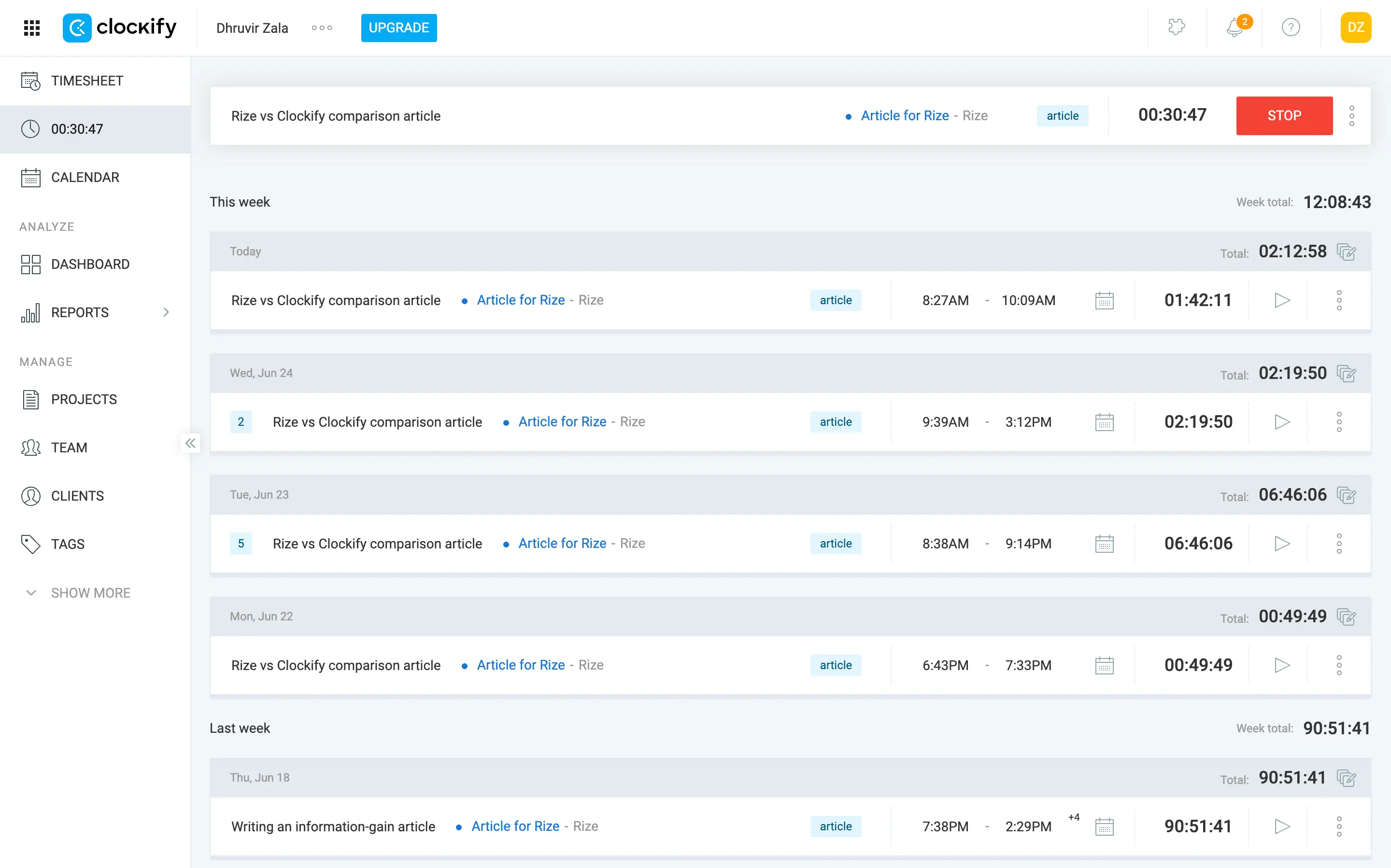
Clockify is the plainest tool on this list, and that's the whole appeal. I tracked this whole section in it, and there's nothing dramatic to report. It logged exactly what I typed in, nothing more, nothing less.
Timely's Starter plan is $9/user a month and comes with zero integrations. You don't get to connect Asana or ClickUp until you're on Premium, $20/user a month if you're billing monthly. Clockify gives you all 100+ of its integrations, including the ones you'd use, on every plan it has, including Free. You're not paying extra for the privilege of a PM tool integration existing. You're paying for admin features like locking timesheets, not for the connection itself.
Clockify does have an Auto tracker, and it logs the apps, windows, and URLs you spend time in, the same background capture Timely's Memory does. The difference is Clockify doesn't try to guess where any of it belongs. It just hands you a raw activity list, and you're the one converting it into billable entries, project by project. If the review step is exactly what's driving you off Timely, know that Clockify doesn't remove that step. It's arguably a rawer version of the same chore, since there's no AI even taking a first pass at it.
Two small things worth knowing if you're comparing feature for feature. Clockify's apps track offline and sync once you're back online, which Timely can't do at all. And the Standard plan and up lets you turn tracked hours straight into a line-itemed invoice with tax fields built in, so billing doesn't require a separate tool.
If what you want is Timely's automatic promise without the daily cleanup, that's still Rize's job, not Clockify's. Clockify's real strength is depth per dollar, not zero-touch tracking.
For the full side-by-side on tracking method, team tools, and pricing at scale, see our Rize vs Clockify comparison.
Clockify pricing: Free plan available for up to 5 users, and paid plans run $3.99 to $11.99/user/mo billed annually, depending on tier. No credit card required to start.
4. Memtime — best Timely alternative for privacy-conscious teams who want automatic tracking without cloud AI
Available on Mac, Windows, Linux.
Memtime pros:
- Records the exact URL, file name, or window title
- 100% offline, activity data never touches Memtime's servers
- Time entry automation runs on rules you write
- Increments down to 1 minute, with a 6-minute preset for legal billing
Memtime cons:
- No AI categorization, you still sort captured blocks yourself
- Desktop only, no mobile app at all
- Basic plan can't export to project software, only your calendar syncs
- No free plan, just a 14-day trial
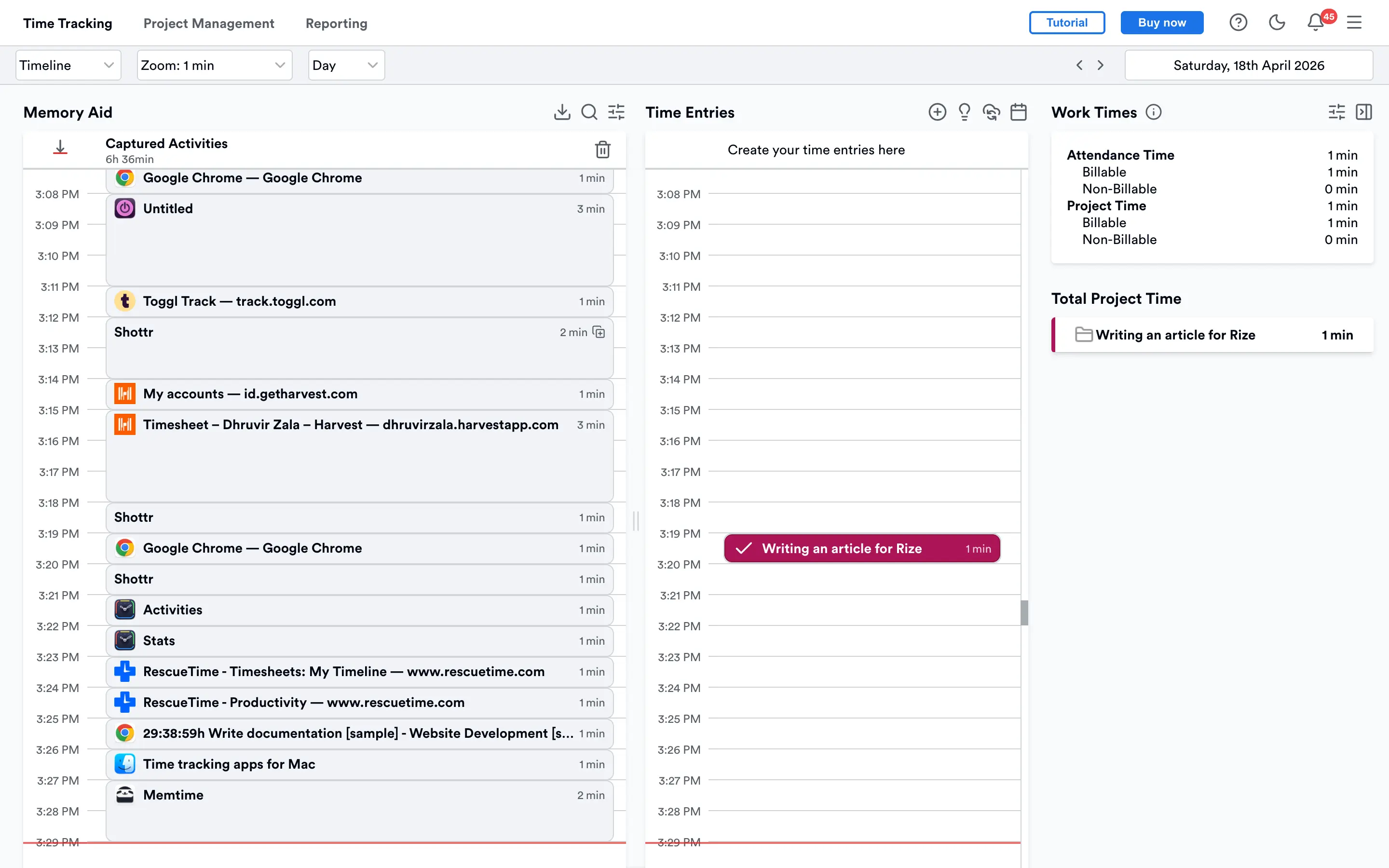
I turned off my WiFi halfway through writing this section, just to see if Memtime's offline claim was real. It didn't skip a beat. Every tab I'd had open was still there afterward, tagged with the actual URL, and every document kept its real filename. Unlike Timely's Memory, it never needed a connection to work in the first place.
That's the whole trade with Memtime. Timely's Memory watches your day and has an AI take a guess at what happened, then hands you a draft to fix. Memtime doesn't guess at anything. It tells you exactly which window was open and for how long, and leaves the interpretation to you.
Turning that raw timeline into a billable entry is where Memtime asks more of you than Rize does, and about the same as Timely on a bad day, unless you set it up first. There's no algorithm reading a URL and knowing which client to bill it to. You either drag each block onto a project by hand, the same review Timely users are trying to escape, or you spend a few minutes writing rules yourself: if a URL, folder, or email address matches, draft an entry for this project. Once those rules exist, Memtime drafts entries automatically and you just approve them, similar to Timely's flow, minus the mis-sorted afternoons, because a rule either matches or it doesn't.
The privacy story is the real reason to pick this one over anything else on this list. Every other automatic tracker here, Timely and Rize included, at least processes your activity to make sense of it, even though neither takes a screenshot. Memtime doesn't send anything anywhere. Your Memory Aid timeline lives on your machine and stays there unless you personally build a time entry from it and export that one entry.
If what's pushing you off Timely is specifically not trusting an AI with your client data, Memtime is the most private answer on this list. If what you want is less daily work, not just less AI, Rize will get you there faster.
For the full side-by-side on tracking philosophy and pricing at scale, see our Rize vs Memtime comparison.
Memtime pricing: No free plan, paid plans run $14 to $29/user/mo billed annually, depending on tier (Enterprise is custom for 50+ seats). Every plan includes a 14-day free trial, no credit card required.
5. TimeCamp — best Timely alternative for budget teams who want automatic tracking with rule-based categorization
Available on Web, Mac, Windows, Linux, iOS, Android.
TimeCamp pros:
- Keyword rules sort activity into the right project automatically
- Cheapest entry point on this list, Starter runs $2.49/user/mo
- Invoicing and expense tracking built into the app
- Offline desktop app with idle detection
TimeCamp cons:
- Real automatic tracking needs Premium or higher, not Free or Starter
- PM tool sync caps at one integration until you hit Ultimate
- The AI-guessing version of tracking costs extra, billed by usage
- Screenshots and GPS tracking exist here, unlike Timely
TimeCamp is an automatic time tracker built on keyword rules, with a full billing setup, invoicing, expenses, budgets, all on the same account. It's one of the older tools on this list, live since 2009, and it shows in how much comes bundled into every plan compared to some of the newer names here.
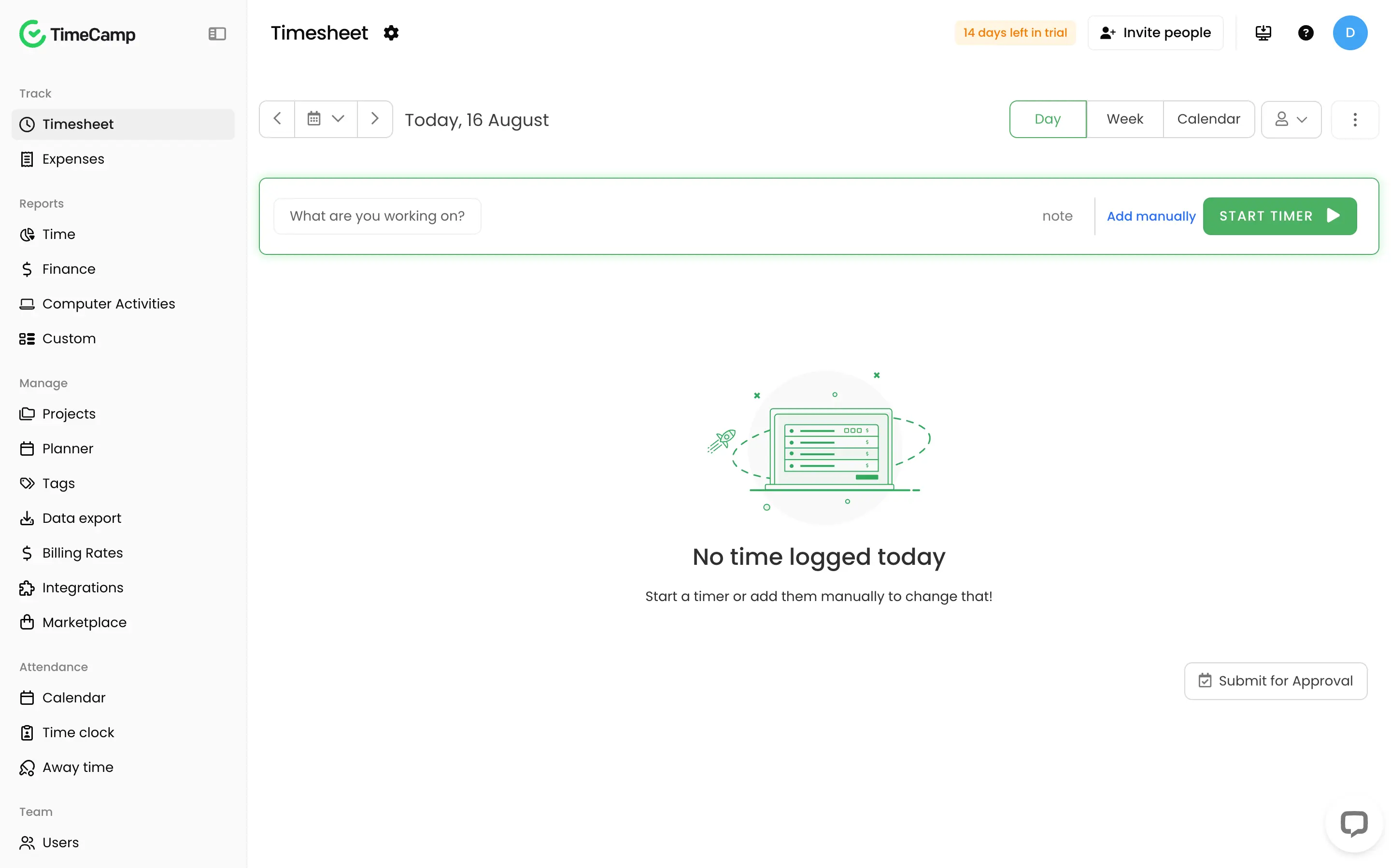
Setting up my account, TimeCamp asked if I wanted to load in sample data, a couple of fully reported projects with hours and numbers already attached, just to preview what a finished report looks like before you've tracked anything real. It's a genuinely useful option if you're still deciding whether the reporting is worth the switch.
Getting it to automate anything took some setup of my own. I downloaded the desktop app and let it run through a normal writing session untouched. It logged everything the same way Timely's Memory does: tabs, docs, apps, sorted by window title. None of it was tagged to a project, though, because I hadn't told TimeCamp what to look for. Capturing your day and categorizing it are two separate jobs here, and only the first one happens automatically out of the box.
Categorizing it took about ten minutes of rule writing, once. I told TimeCamp that anything with "Docs," "Canva," or "Hemingway" in the window title belongs to this article. From then on, every new block of time that matched a keyword filed itself under the right project with zero input from me. It didn't touch anything I'd tracked before writing the rule, so forget to set this up on day one, and you're still cleaning up day one by hand. After that, though, the daily review Timely users complain about basically disappears. A rule either matches or it doesn't.
Invoicing and expenses are baked in too, and I tested both. Logging an expense against a project took a few seconds. Generating an invoice from tracked hours took one click, no QuickBooks connection needed just to get a first draft out.
None of this is free at every tier, though. Free and Starter don't include the automatic tracking module; you need Premium for that. And if you want TimeCamp's AI agent, the close equivalent to Timely's Memory, that's billed separately by usage on top of whatever plan you're on. The keyword-based tracker I set up doesn't cost extra. The AI-guessing version does.
One more thing worth knowing. Real two-way sync with tools like Asana or ClickUp caps at one integration on Premium; you need Ultimate for more, a smaller version of the same wall Timely puts up.
TimeCamp pricing: Free plan available for unlimited users, and paid plans run $2.49 to $4.99/user/mo billed annually, depending on tier (Enterprise is custom). Every plan includes a 14-day free trial, no credit card required.
6. Harvest — best Timely alternative for time tracking that flows straight into invoicing
Available on Web, Mac, Windows, iOS, Android.
Harvest pros:
- Turns tracked hours into a sendable invoice without leaving the app
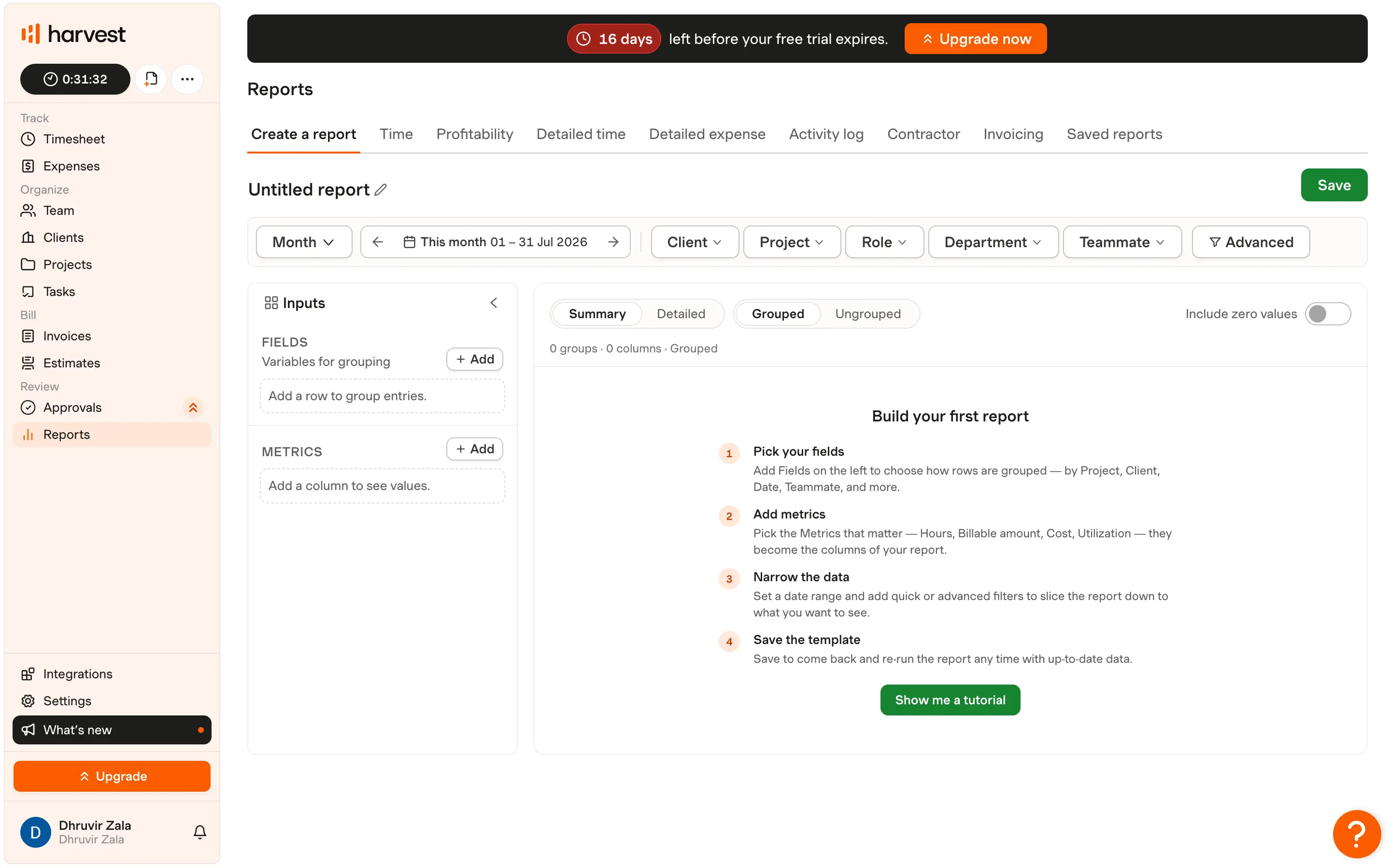
- Custom report builder groups by client, project, role, department, or teammate
- Mobile timer works properly and syncs to the desktop app instantly
- 70+ integrations, including QuickBooks, Xero, Stripe, and Asana
Harvest cons:
- No automatic tracking at all, same manual timer trade as Toggl
- Custom reports capped at 4 unless you're on Enterprise
- Team capacity and utilization reporting sits behind the Teams tier, not Free
Harvest has been doing this since 2006, longer than almost anything else on this list. The whole tool is built around one loop: track hours with a timer or a weekly timesheet, then turn those hours straight into an invoice you can send. You hit start, you hit stop, that's the entire tracking model, same as Toggl.
If you're leaving Timely because you don't trust an AI reading your day, and you've already made peace with running your own timer, Harvest gets you there. What it adds on top of Toggl is the part Toggl hands off to a separate tool: invoicing.
Turning your own tracked time into a real invoice takes that same one click. That's the actual argument for Harvest over everything else on this list. You track it, you bill it, in the same app, no exporting to QuickBooks or Wave required unless you also want the accounting sync.
The custom report builder backs that up. Group by client, project, role, department, or teammate, stack metrics like hours or billable amount as columns, and you've got a profitability view without touching a spreadsheet. There's also a newer Bulk Actions panel tucked into Settings that lets you set rates or reassign a batch of people to projects all at once instead of one at a time.
If invoicing is genuinely the reason you're leaving Timely, and you're fine running your own timer, Harvest still does that job well. Just read the renewal terms first, something you don't have to worry about with anything else on this list.
For the full side-by-side on the pricing risk and invoicing depth, see our Rize vs Harvest comparison.
Harvest pricing: Free for solo use. Paid plans run $9 to $14/user/mo billed annually ($11 to $17.50/user/mo billed monthly), plus usage fees stacked on top.
Find the right Timely alternative for you
You've read six breakdowns by now, and you probably already know which one fits. Trust that instinct. But if you're stuck between two or three, here's the push.
Rize is the one I'd tell a friend to get, and it's the one I kept using after I finished testing all six for this article. Not because it's the newest or flashiest name here; Toggl and Harvest have been around far longer. It's because Rize is the only tool on this list that solves both things that probably brought you here in the first place. The review step doesn't shrink; it disappears. And the price wall Timely puts up around integrations doesn't exist; automatic tracking ships on every plan, no jump to a $20/user tier required just to unlock it.
Everything past that is what sold me. The focus scores, the weekly reports, the fact that it told me YouTube alone had pulled my attention for 37 minutes that week before I'd even noticed it myself. None of that is billing data. Nobody's making you look at it. But once a tool starts telling you where your attention went instead of just where your billable hours went, a plain timesheet starts feeling like it's not doing enough for you.
It won't be right for everyone reading this, and I'd rather say that than oversell it. If you need a real mobile app, or you're already sold on running your own timer and don't want a new habit, go back to whichever section matched your actual complaint about Timely and start there instead. That answer is probably a better fit for you than mine is.
But if you're a solo consultant or a small team trying to get from worked to billed without touching a timesheet every morning, that's exactly the reader Rize was built for. Start the free trial, run it for a real week, and check what's left in your timesheet on Friday. Mine had nothing left to clean up.
Related Reading
See how Rize compares to other time trackers: Rize vs Timely, Rize vs Toggl, Rize vs Clockify, Rize vs Memtime, and Rize vs Harvest. Browse the full comparisons page for more.
Start tracking time automatically
Join thousands of professionals who stopped guessing where their time goes. Free for 7 days.
“Rize has been a no-brainer for me.” — Ali Abdaal Read more →