![Clockify vs. Toggl: Which time tracker is best? [2026]](/_next/image?url=%2Fassets%2Fblog%2Fclockify-vs-toggl%2Fclockify-vs-toggl.webp&w=3840&q=75)
Clockify and Toggl are the two names every “best time tracker” roundup throws at you. Both have earned the spot: they're two of the only tools in this category that hand you a free plan worth using.
Look past that overlap, though, and the two are solving different problems. Toggl is focused purely on time tracking and reporting, while Clockify takes an all-in-one approach, gluing together attendance, scheduling, and kiosk clock-ins for teams that need more than a timer.
I tracked this exact article on both tools at once: web app, desktop app, and the mobile app on my iPhone, timing everything from the first outline to the final edit.
I also dug into project setup, invoicing, monitoring, integrations, and pricing on both, the stuff that decides which one you keep.
If you'd rather skip straight to the verdict, here's the whole comparison squeezed into one table, before I make you read a few thousand words to get there.
Clockify vs. Toggl at a glance
Quick Answer
Choose Clockify if you want the cheapest option, unlimited tasks on the free plan, kiosk or GPS clock-ins, and an all-in-one team tool. Choose Toggl if you want a polished interface, free invoicing, native Slack or Asana connections, and would rather not pay for team-monitoring features.
| Comparison metric | Clockify | Toggl |
|---|---|---|
| Ease of use & platform availability | Works everywhere, looks like 2015. | Same functionality, dressed to be stared at for 8 hours a day. |
| Time tracking & automation | Free Pomodoro and idle detection, but Auto Tracker still leaves you sorting entries by hand. | One click turns a tracked block into a logged entry. |
| Clients, projects & tasks | Unlimited tasks, free, no upgrade prompt in sight. | Tasks sit behind a "Starter feature" badge. You're paying to organize your own project. |
| Reporting & invoicing | Billable rates unlock for $3.99/seat, cheapest in this comparison. Invoicing still costs extra. | Real invoices, free, today. Billable rates cost more than double Clockify's. |
| Team & monitoring features | Kiosk, GPS clock-ins, screenshots. Built for hourly staff, not just billable consultants. | No kiosk, no GPS, on principle. Audits and reminders are the ceiling. |
| Privacy & security | Same certifications as Toggl, vaguer about what's behind them. | Same certifications, plus exact encryption standards and data retention windows spelled out. |
| Integrations | 100+ integrations, but its own apps get top billing over Slack. | Native Slack, Asana, and Salesforce, plus 7 automation platforms beyond Zapier. |
| Pricing | Cheaper at every tier. Free stays free, no asterisk that bites later. | Starts at more than double Clockify's entry price, then jumps again after year one. |
Clockify and Toggl are both easy to use. Only one of them looks like it.
Both trackers are easy to use and run on every platform you'd need: web, desktop for Mac and Windows, mobile for iPhone and Android. The real difference shows up in what it feels like to have either one open for eight hours a day, and that's a fight Toggl wins outright.
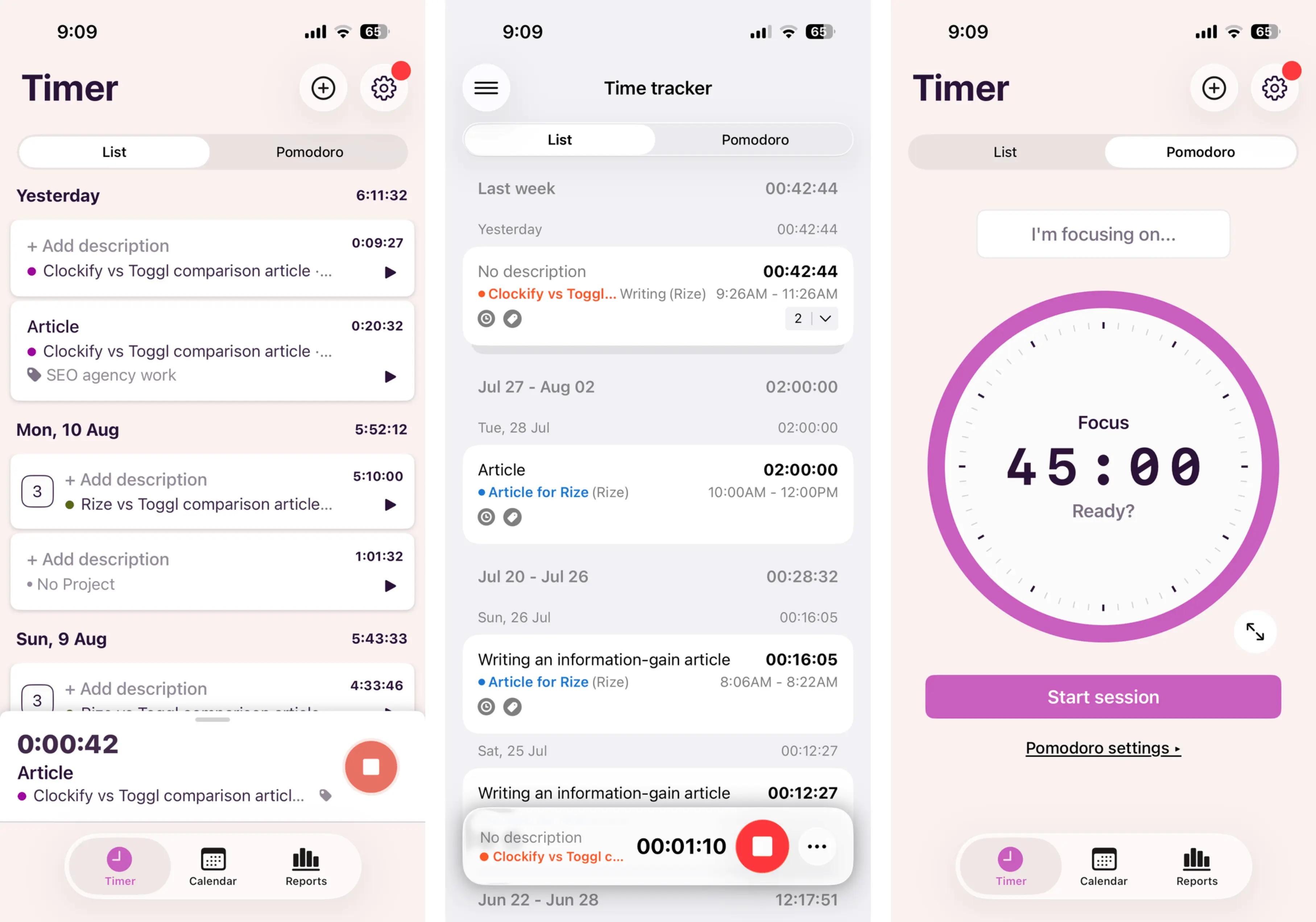
I tested this the honest way: tracking this very article's writing time on both trackers, side by side. Web app, desktop app (mainly to poke at their private auto-trackers), and the mobile app on my iPhone to see how cleanly things synced across devices. Account creation to a running timer took under two minutes on both, so if fast onboarding is your bar, they tie. Here's where they split.
Clockify's web app is a spreadsheet wearing a SaaS costume. The sidebar splits things into Timesheet, Calendar, Analyze (Dashboard and Reports), and Manage (Projects, Team, Clients, Tags), which is sensible enough. But the interface itself — the pill-shaped project tags, the boxy timesheet grid, the flat blue accents — reads like a tool that got built in 2015 and never got the memo everyone else did. It's not broken. It's not confusing. It's just beige, in software form.
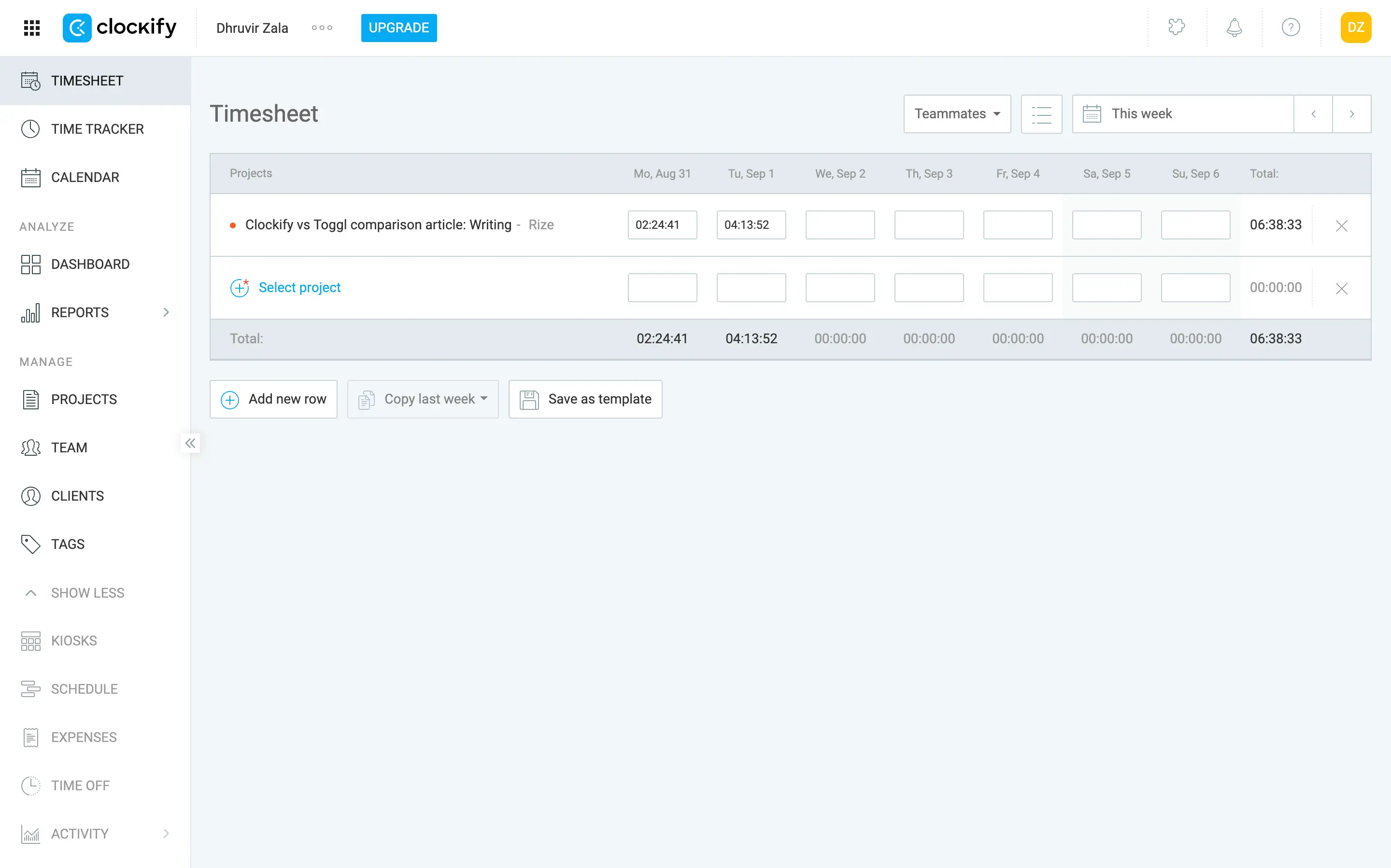
The mobile app carries the same visual language over, plain, a little dated, entirely usable. Syncing between devices worked without any drama in my testing; a timer started on desktop showed up on my phone within seconds. Clockify isn't hard to use anywhere. It's just never trying to be delightful anywhere either.
Open Toggl's web app and the difference is immediate. Same rough sidebar logic (Track, Analyze, Manage), but everything about the execution, the purple-and-white palette, the generous white space, the rounded corners, reads like a product someone designed on purpose rather than assembled out of necessity. The standout is the calendar view: you drag directly on a weekly grid to lay down a time block, click it, and a small card pops up letting you adjust the project, tags, and exact start and end times without ever leaving the page. It's a genuinely satisfying way to interact with what is, underneath it all, billing software.
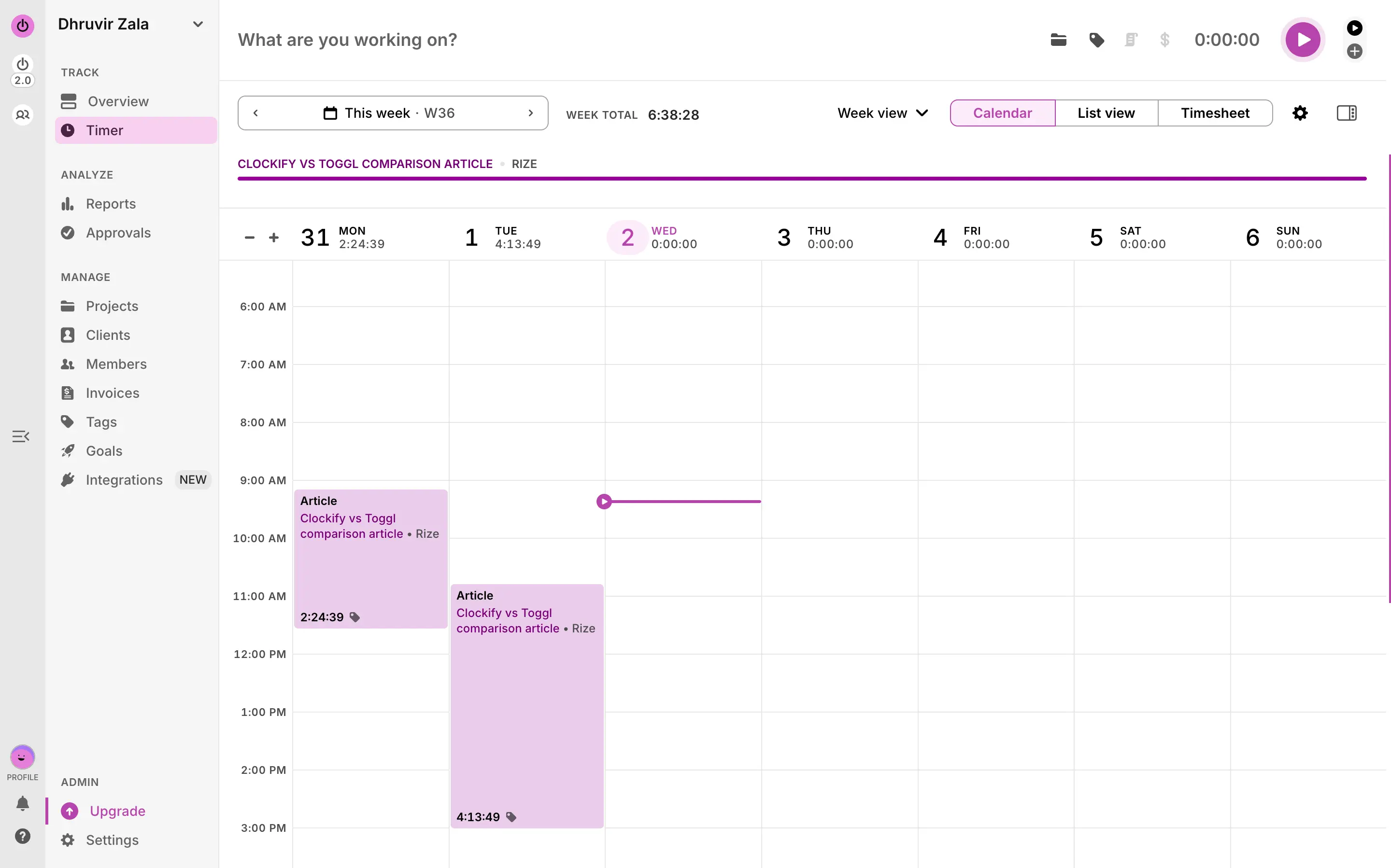
The mobile and desktop apps both carry Toggl's visual language over cleanly. I tested syncing the same way, starting a timer on my laptop and checking my phone, and it showed up just as fast as Clockify's did. The interface is the whole reason Toggl gets recommended in every “prettiest time tracker” roundup, and having lived inside it for a week, I get why.
If all you need is a timer that works without a learning curve, Clockify and Toggl both clear that bar, on every platform, without complaint. If you want the app itself to be something you don't mind staring at for eight hours a day, Toggl wins.
Toggl's background tracking asks less of you than Clockify's. Neither one is actually automatic.
The click-to-start, click-to-stop timer works the same on both tools, so that part's a wash. The real difference is the “automatic” tracking layer both market as a safety net for the days you forget to hit the button, which, if you're anything like me, is most days. Toggl's version does more of the sorting before it hands you the result. Clockify's mostly hands you a longer list.
Clockify's timer sits at the top of the Timesheet view: a “What are you working on?” field, a project tag, a running clock, a red STOP button once you've hit go. Type a description, and it autocompletes from past entries. Every entry you stop drops into a timesheet grid below, grouped by day and week, each row showing the project, the client, the exact start and end time, and a play button to resume it. Unexciting, and correctly so. It's a spreadsheet that happens to have a stopwatch attached, which, as established, is the whole Clockify experience in one sentence.
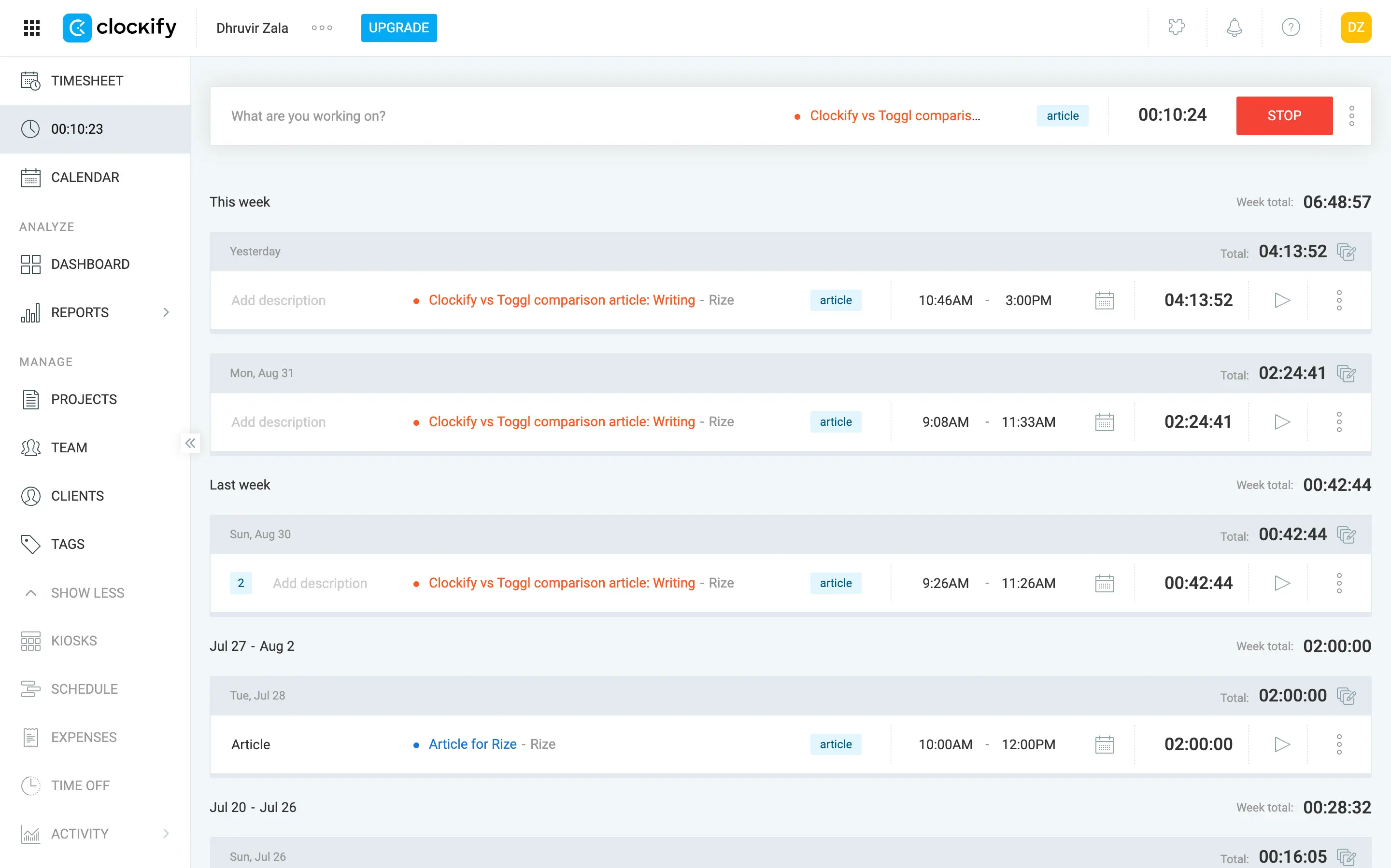
What earns Clockify credit is what's included at zero dollars: a built-in Pomodoro mode, one-click Favorite entries for tasks you log every day, idle detection, and reminders that nag you when you've been working without the timer running. All of that sits on the free plan.
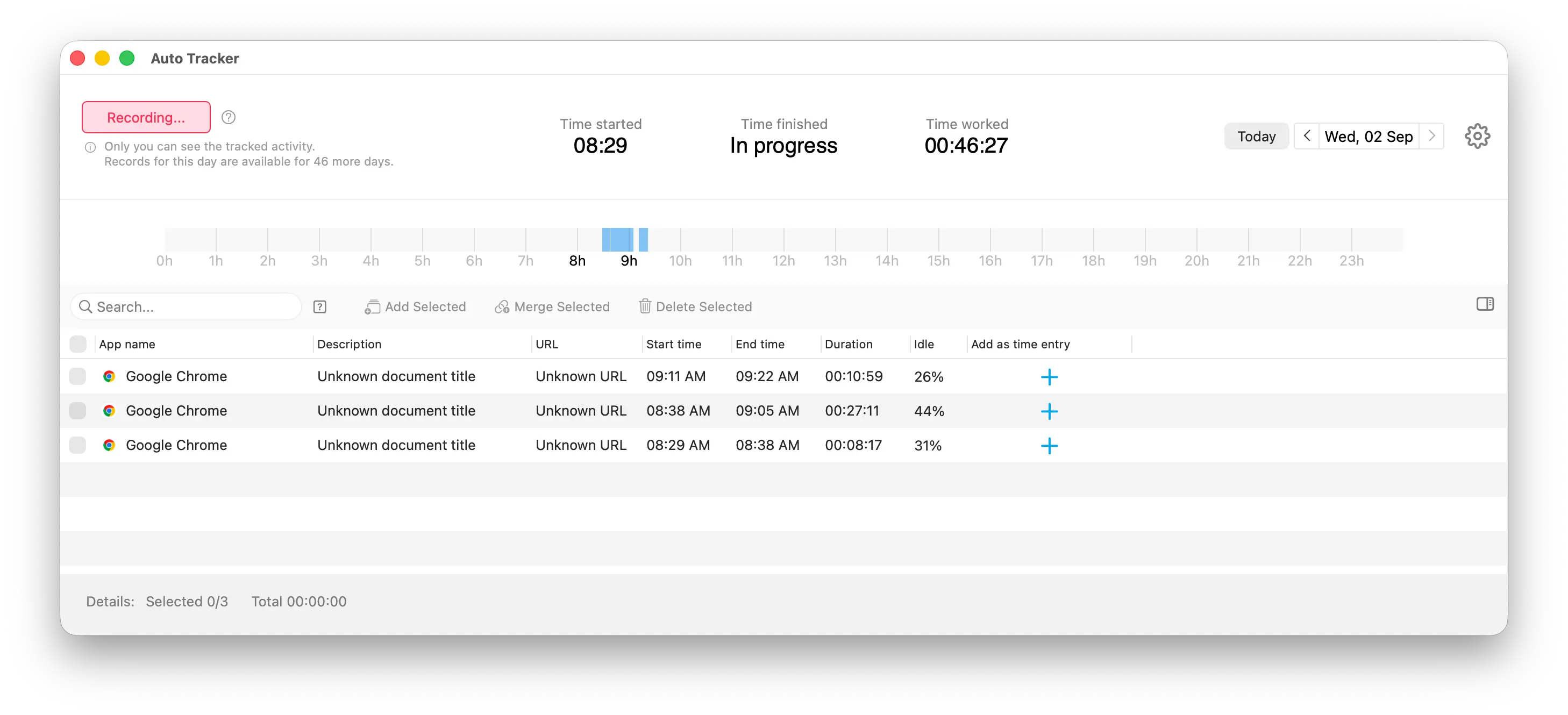
Then there's the Auto Tracker. Install Clockify's desktop app, and it quietly logs every app and website you touch in the background, entirely on your device, which I'll give Clockify full credit for. Nothing leaves your computer until you decide it should. But “logs” is the operative word. What you get back is a list: app name, start time, end time, duration, an idle percentage, and a plus button next to each row. Click the plus, and Clockify opens a "New time entry" popup asking you to confirm the date, the time range, and, mandatory, a project. Do that for every random tab switch your browser racked up during a writing session, and you'll understand why “auto” felt like a stretch. You can select multiple rows and batch-add them, which helps, but you're still the one doing the sorting.
Toggl's timer is the same basic idea. Type the activity, pick a project or client, mark it billable, click once to start, click again to stop. Toggl's background tracking runs on the same basic principle as Clockify's Auto Tracker: install the desktop app, turn on activity recording, and it logs the apps and websites you had open for ten seconds or longer, stored locally, visible only to you. Where it pulls ahead is what happens when you go to actually use that data. Click into a tracked block on Toggl's calendar timeline and a small “Activity” popup breaks down exactly which apps made up that stretch, then gives you one button: Copy as Time Entry. One click, and it's logged.
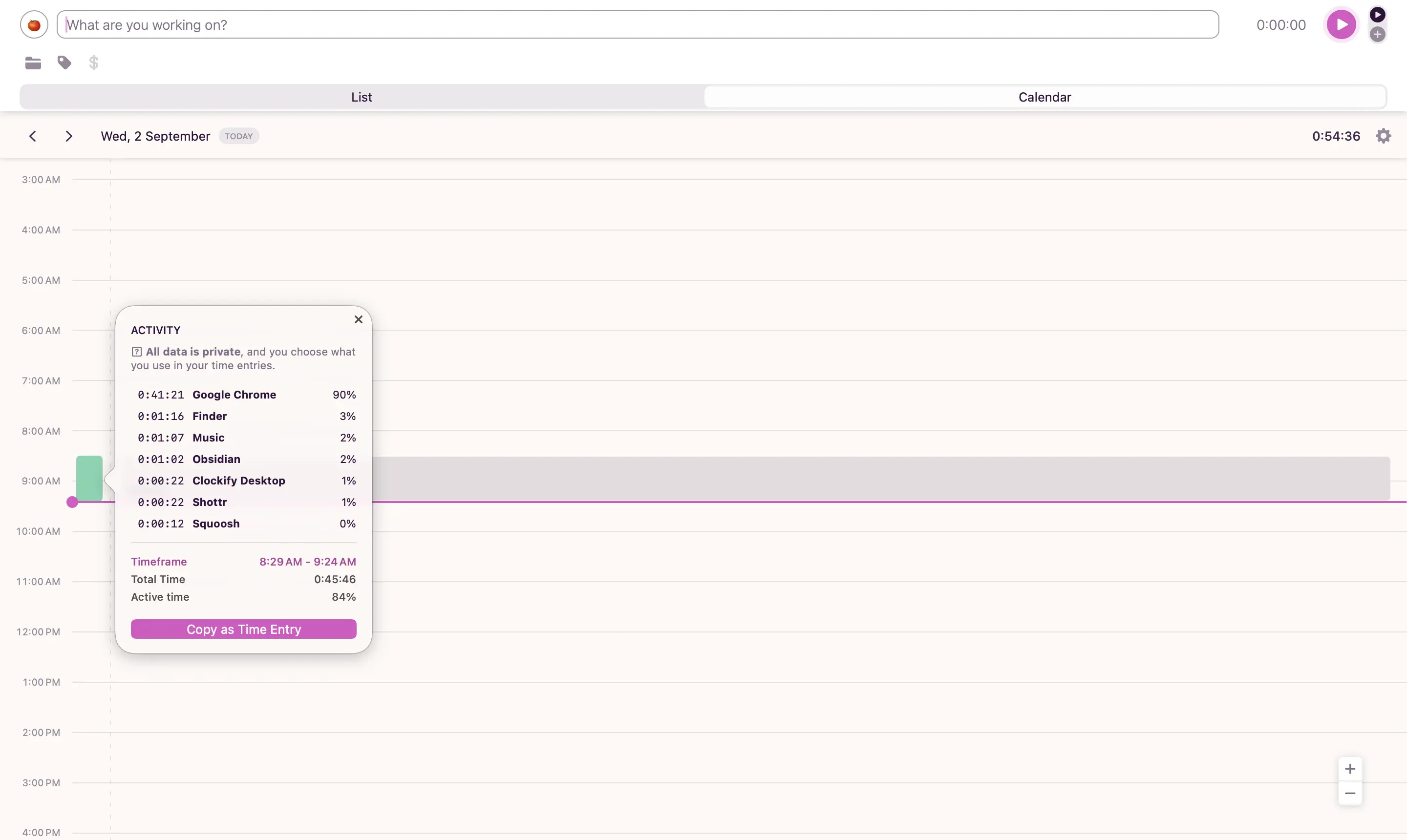
Toggl also does something Clockify's Auto Tracker doesn't attempt: you can map specific keywords in an app or window title to a project, and Toggl will notify you to start that project's timer the moment a matching window opens. It's not full automation; you still have to accept the notification, but it's a genuine step toward a tracker that meets you halfway instead of waiting for you to sort everything out after the fact.
Clockify gives you a full client-project-task structure for free. Toggl makes you pay just to add a task.
Both tools let you create clients and projects for free, unlimited, no catch there. The catch is when you try to break a project into tasks: Clockify lets you do that before you've paid a cent, and Toggl doesn't let you do it at all.
I tested this the same way I tested everything else so far: by building this exact article as a project in both trackers, tagged to a client, broken into five tasks: Research, Writing, Editing and proofreading, On-page SEO, Screenshot/media capture. In Clockify, that took under a minute. In Toggl, I got as far as naming the project and then hit a wall with a price tag on it.
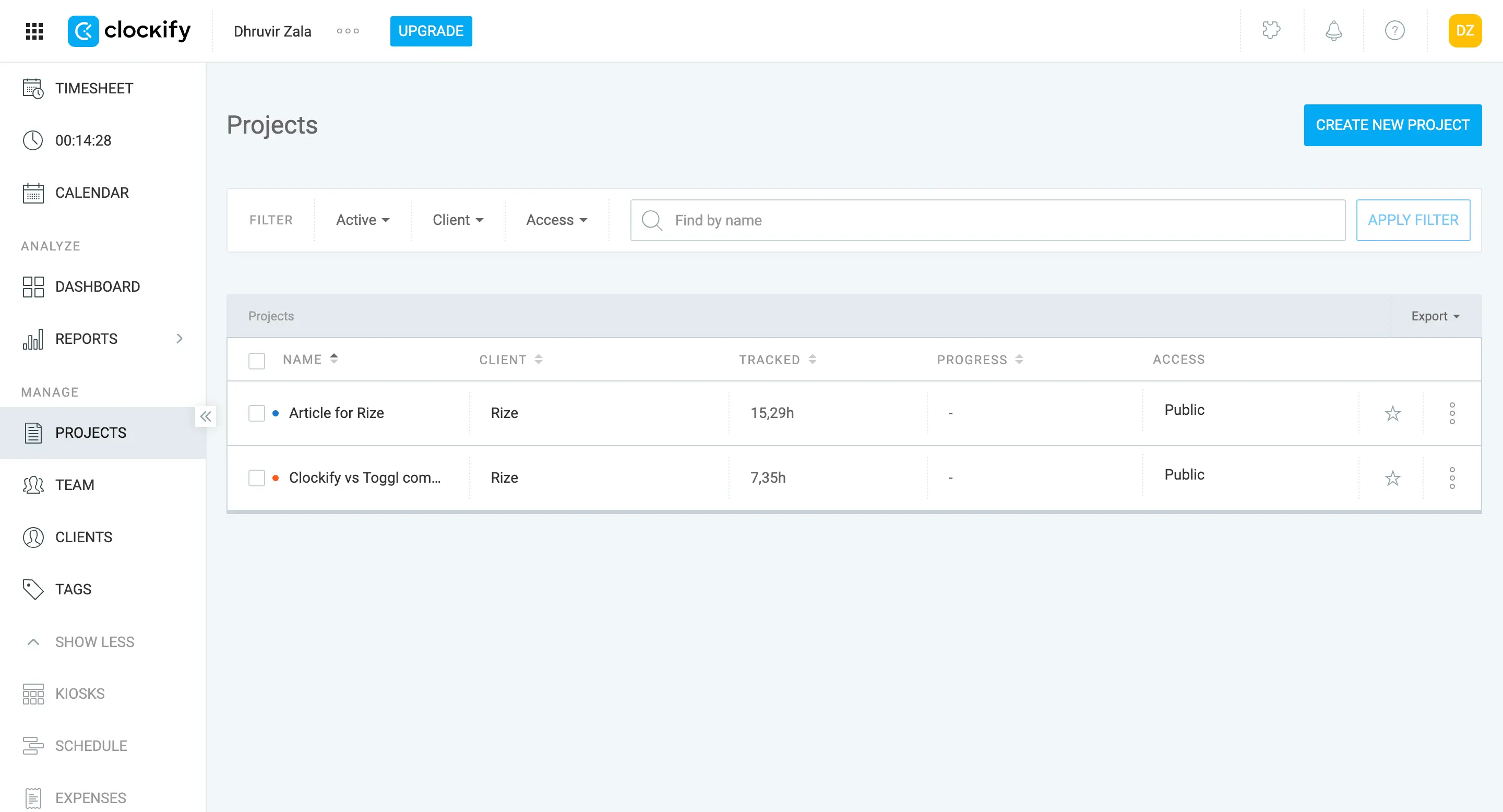
Clockify's Projects page ties every project to a client the same way a spreadsheet ties a row to a column: Name, Client, Tracked, Progress, Access. Click into any project, and you land on six tabs across the top: Tasks, Access, Status, Forecast, Note, Settings. That's a lot of vocabulary for a product that costs nothing, and to Clockify's credit, most of it works the way it reads.
The Tasks tab is where the real organizing happens, and it's genuinely unlimited on the free plan. Add a task, name it, assign it to “Anyone” or a specific teammate, repeat as many times as the project needs. I added all five of my article's tasks without a single upgrade prompt in the way. Clockify's whole pitch is unlimited projects, tasks, and clients at zero dollars.
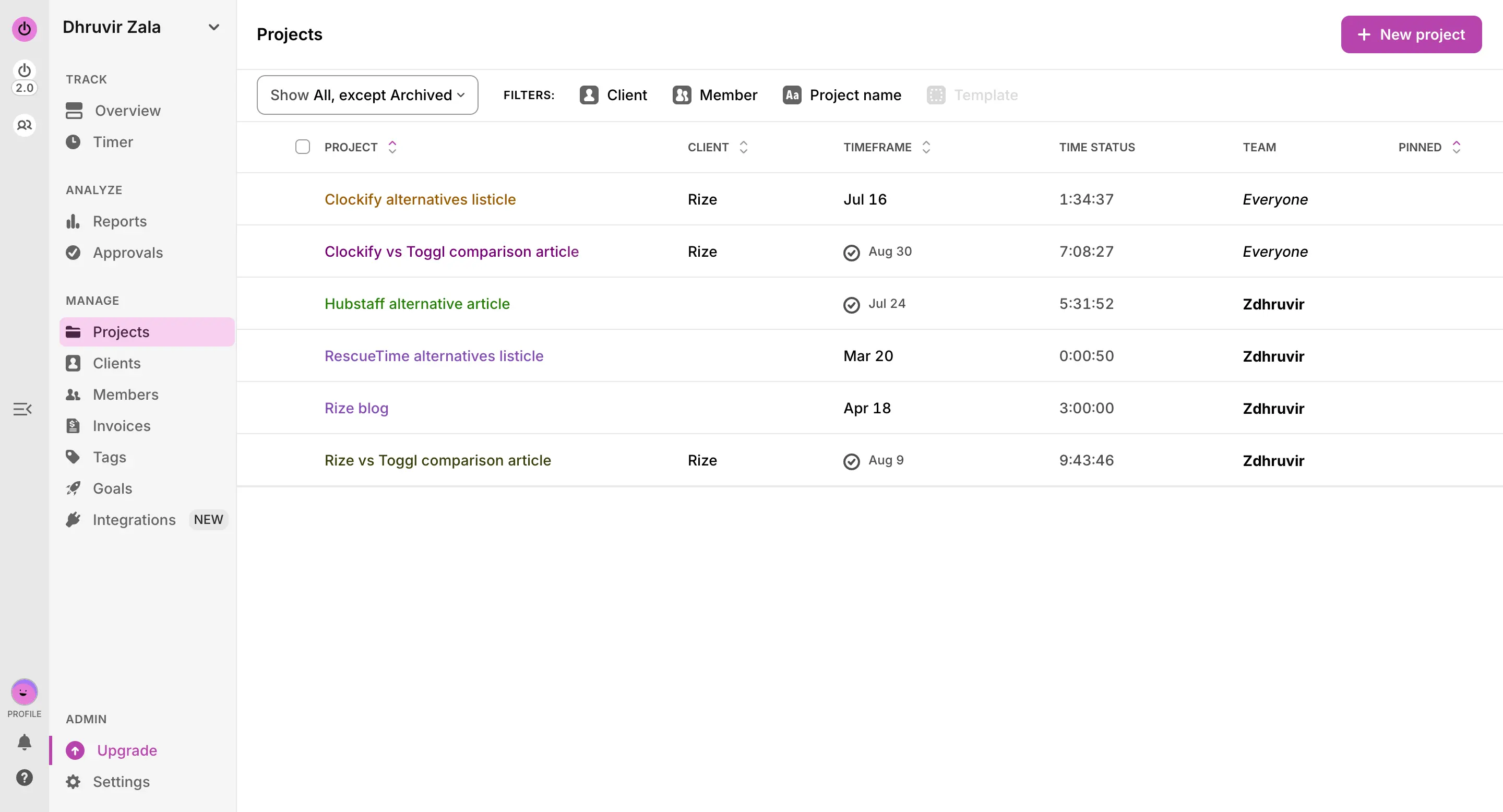
Toggl's Projects page is more useful at a glance: Project, Client, Timeframe, Time Status, Team, all in one row, which genuinely beats Clockify's version if you're managing deadlines across several clients. Click into a project, and you get three tabs instead of six: Dashboard, Tasks, Team. Fewer tabs isn't automatically worse. What's worse is what's sitting behind two of them.
Click Tasks, the exact feature that let me break my article down inside Clockify, and Toggl shows you a mockup instead: three fake rows labeled things like “A/B Tests” and “Content outline,” sitting under a pink “STARTER FEATURE” badge and a “View plans” button. Tasks, what Toggl calls sub-projects, don't exist on the free plan. You're paying for the privilege of breaking your own project into more than one piece.
Dashboard is worse. It sits behind a “PREMIUM FEATURE” badge showing off a preview of profitability charts you can't touch: project earnings against labor costs, a pie chart of where the money went. Even the one tab Toggl leaves open, Team, shows Rate and Cost columns sitting there grayed out with their own Starter and Premium badges, like a menu with the prices blacked out until you pay to read them. What free Toggl hands you for managing client work is a project name, a client tag, and a list of who's on it. Everything that turns that into a project instead of a label costs money.
If you need to organize a project into real tasks before you've spent a dollar, Clockify wins this one.
Toggl will let you invoice for free today. Clockify makes you wait and pay first.
If you need to bill a client this week and have nothing to spend, this decision makes itself: Toggl gets you a real invoice, Clockify gets you a paywall.
Clockify's free reports track your hours accurately but can't tell you what they're worth because billable rates don't exist until you pay. If all you need is proof of where your time went, the free plan is fine. But the second you need those hours to mean money, you're paying $3.99 a seat a month, which gets you billable rates. Remember that figure, because Toggl charges more than double for the same unlock.
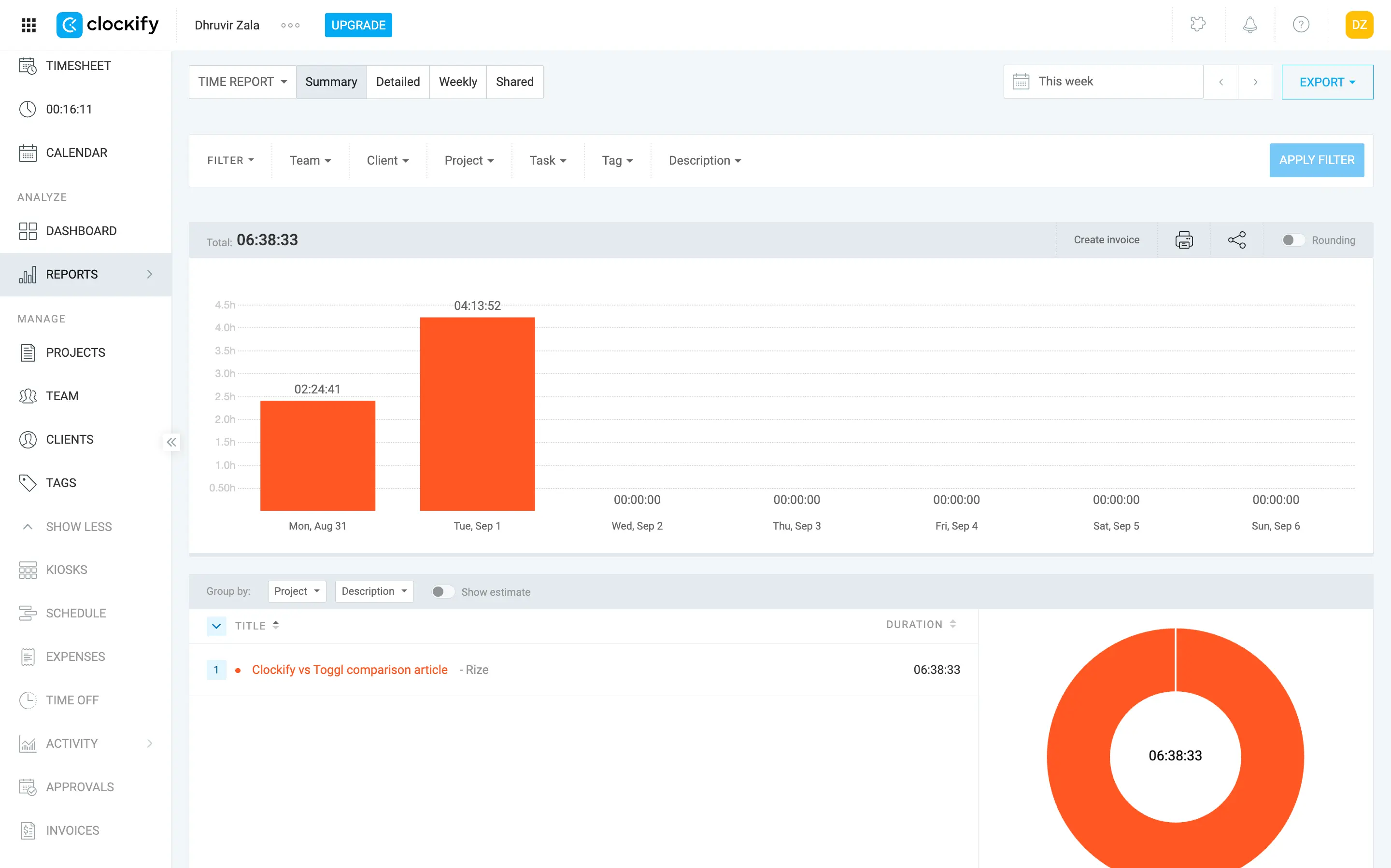
Invoicing is where Clockify will actually cost you something you didn't budget for. There's a “Create invoice” button sitting right on your free report, and it does nothing; it exists purely to remind you what you don't have. If you're planning to bill your first client off the free plan, you won't find out invoicing doesn't exist below Standard until the day you actually need to send a bill, which is the worst possible time to discover a $5.49-a-seat paywall. If you know you'll be invoicing anyone, ever, budget for Standard from the start. Don't sign up for Clockify Free assuming it'll let you get paid.
Toggl has the identical reports gap, hours without dollars, but the fix costs more: $9 a seat. If seeing real numbers in your reports is the priority and price is tight, Clockify wins this specific comparison outright; don't let Toggl's nicer charts talk you out of that math.
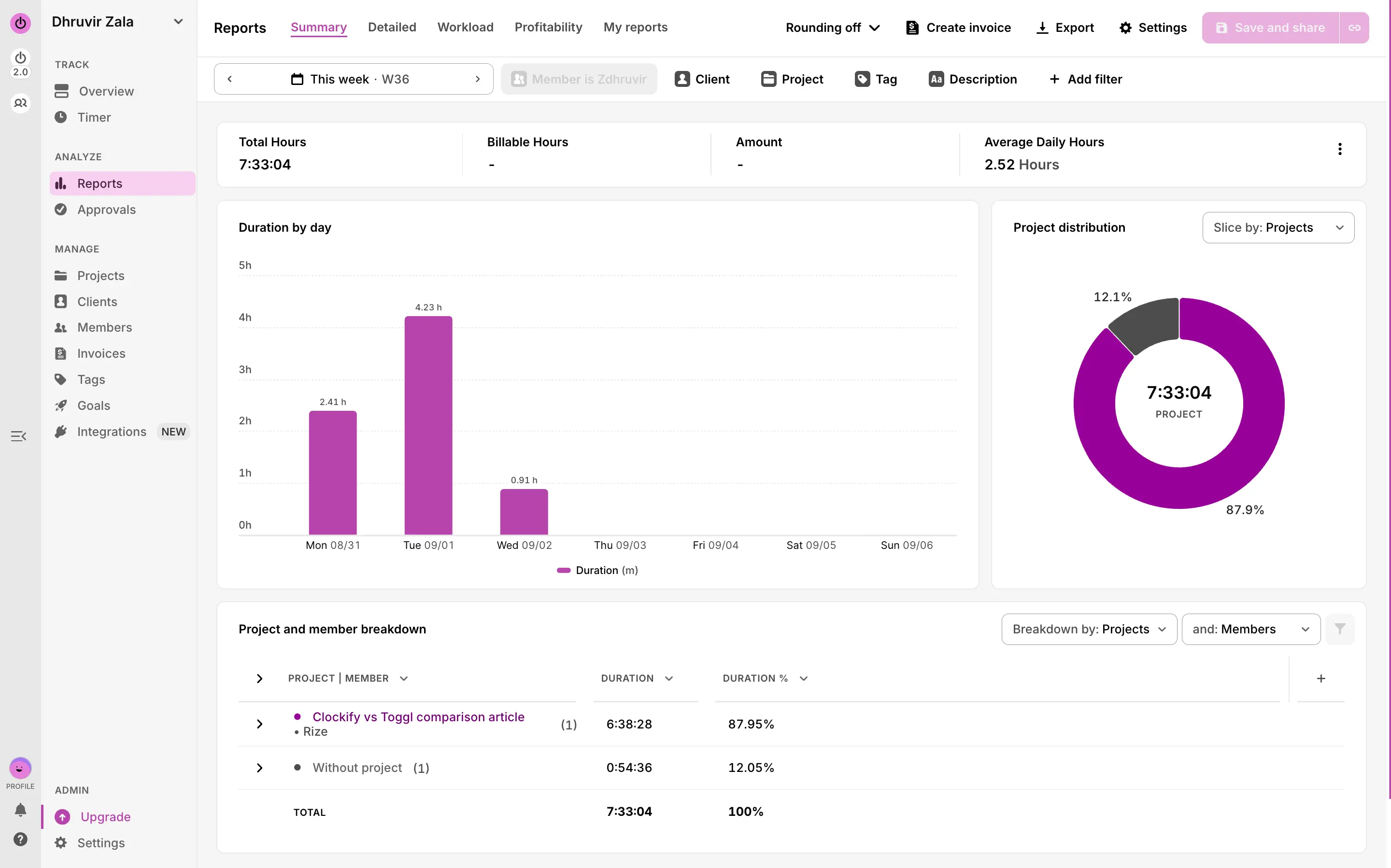
Where Toggl beats Clockify is the one that matters most for a reader with no budget: you can build and send a real invoice on the free plan, today. If invoicing a client this week is the actual reason you're choosing a tool right now, this is the single fact that should decide it for you.
Clockify gives you the tools to watch your team. Toggl was built specifically so you can't.
If your team clocks in somewhere other than a laptop, Clockify has real tools for that. If your team is you, or three people who bill on trust, everything below is a feature you'll pay for and never open.
Clockify's Kiosk turns a shared tablet into a physical time clock: PIN, QR code, or photo capture to clock in, built for hourly staff who aren't at a desk. I hit an UPGRADE wall on my free account before I could even create one, gated behind Basic. Past that, the Activity tab screenshots your team's screen every five minutes while the timer runs and logs GPS location on mobile clock-ins, Pro plan only, $7.99 a seat. It's opt-in and notified; screenshots start blurred, but an admin still holds the switch. Then there's Activity Monitoring, a separate product entirely: a background Agent app that sorts every site and app your team touches into Productive, Neutral, or Unproductive and spits out a "Utilization" score only admins can see.
Toggl's answer is that it doesn't build any of this, on principle. The closest it gets is Team member audits (flag who hasn't tracked time, or tracked suspiciously little or much) and Team reminders (a nudge email if someone's under target hours). It also means no Kiosk and no GPS, so if your team includes hourly or field staff you'd normally verify by location or photo, Toggl has nothing for you, at any price.
Toggl connects natively to Slack. Clockify would rather you use its own chat app.
Both claim 100+ integrations, so that number won't decide anything for you. What decides it is which ones are real two-way syncs and which just glue a timer button to someone else's website. I tested this by connecting Google Calendar on both, then trying to get a finished entry to notify Slack, since that's the integration most small teams reach for first.
Clockify's own "Featured integrations" leads with Pumble and Plaky, its own chat and project tools, before you even get to QuickBooks, Jira, or Zapier. Slack isn't on that list at all. If your team already runs on Slack, and most do, you're stuck routing through Zapier or Make just to post a message there, or switching your whole team's chat app to please Clockify. The one place Clockify wins clean is Xero: it's a real two-way sync, so if you already invoice through Xero, that alone might settle this for you.
Toggl labels every integration by type before you click it: native, extension, or automation, so you're not guessing what you're getting until it's too late to matter. Slack, Salesforce, and Asana are all native there, not just extension buttons, which matters if that's your actual stack. Toggl also doesn't force Zapier on you as the only door in. It plugs into seven automation platforms, Make included, so you're not paying for a subscription you don't already have just to connect a timer.
If your team runs on Slack and Asana, Toggl wins this one without much debate. If you already bill through Xero, that single integration might be worth picking Clockify anyway.
Clockify costs less everywhere you look. Toggl saves the expensive part for later.
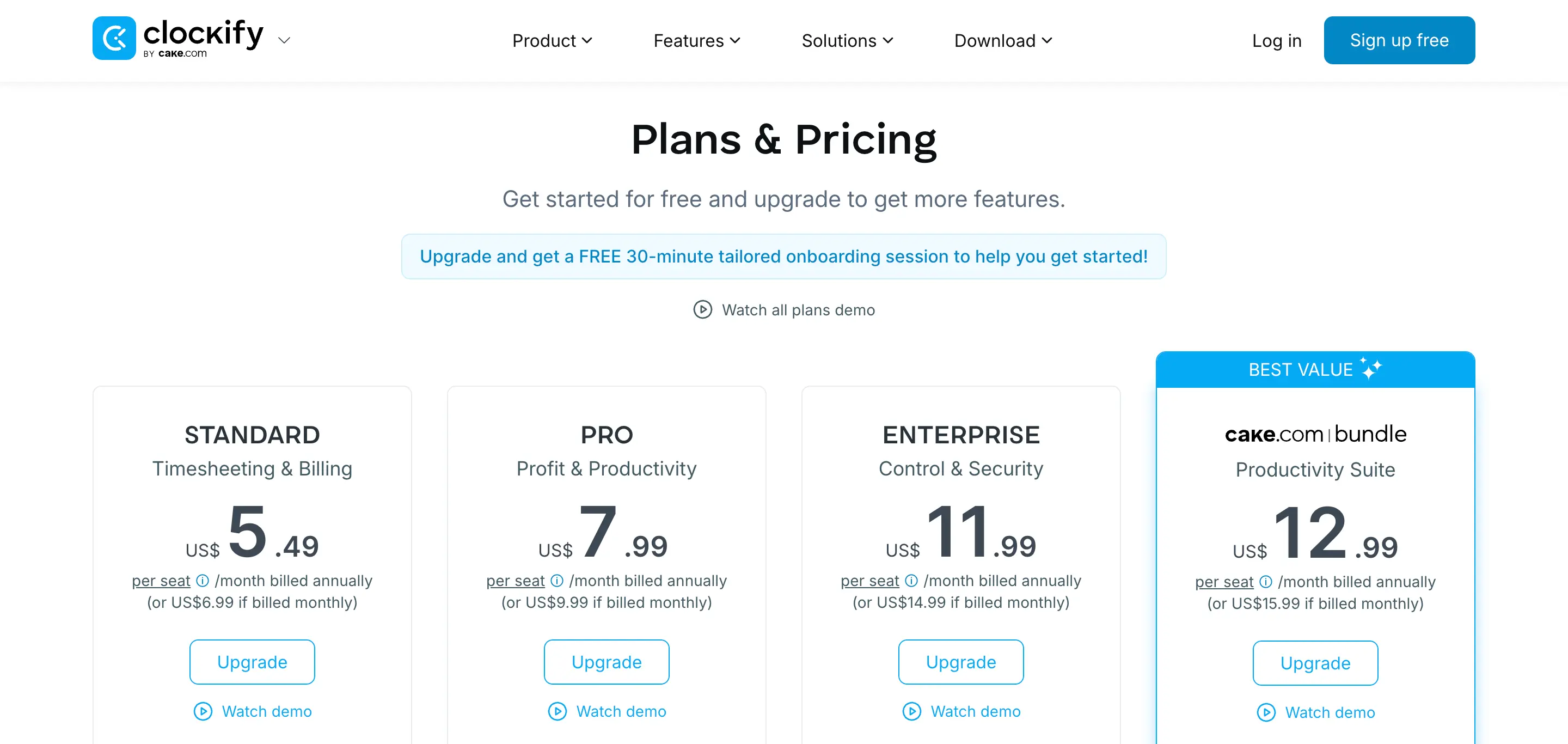
If price is the whole decision, Clockify wins it outright: every tier costs less than Toggl's, and free stays free. Toggl's issue isn't what you pay today. It's what you get charged automatically a year in.
Clockify's Free plan is $0, officially for up to 5 users. Every paid tier undercuts Toggl too: Basic is $3.99 a seat a month billed annually ($4.99 monthly), Standard $5.49, Pro $7.99, Enterprise $11.99.
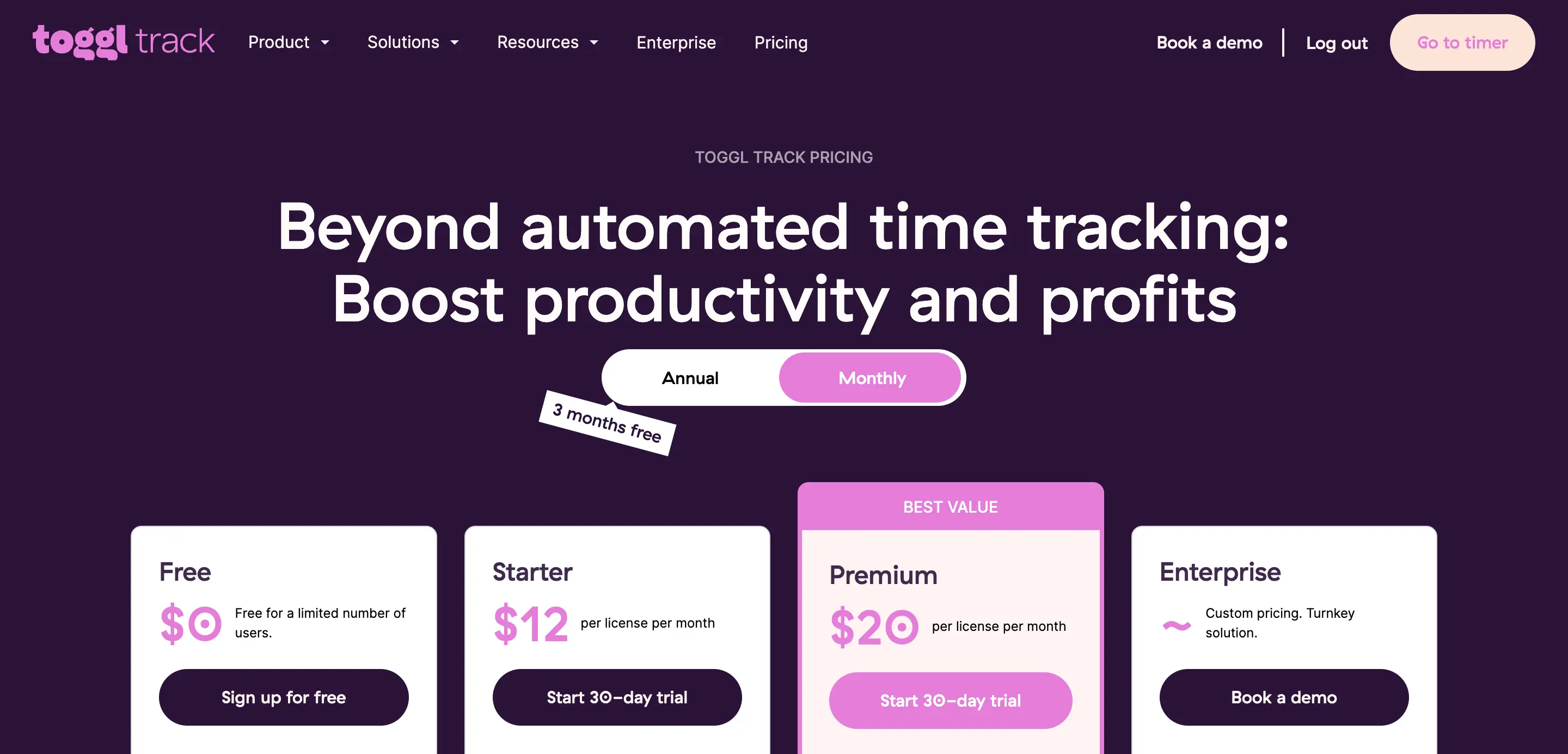
Toggl's Free plan is simpler, at least: capped at 5 users, no asterisk. Starter costs $9 a seat a month billed annually ($12 monthly), more than double Clockify's entry tier, and still won't unlock tasks, as covered earlier.
Premium is the one to watch. It lists at $14 a seat a month, but only for your first year on annual billing. Renew, and it jumps to $18, a 29% hike that lands on your card on its own. Pay monthly, and you're at $20 from day one. Clockify has no such surprise anywhere in its pricing.
Clockify wins on price at every tier; if you do land on Toggl Premium, budget for $18 a seat, not $14.
Clockify vs. Toggl: Which should you use?
Choose Clockify if:
- You've got more than 2 or 3 people and don't want to pay for a single one of them
- Your team clocks in from a job site or a warehouse, and you need GPS or a kiosk for that
- You want unlimited tasks and a real project structure before spending a dollar
- Price decides this for you, full stop
Choose Toggl if:
- You're staring at this app for 8 hours a day and refuse to make that ugly
- You need to send a real invoice this week, and the budget is zero
- Your team already lives in Slack and Asana, and you're done routing everything through Zapier
- You'd rather pay more per seat than give any tool the option to screenshot your team's screen
Both of these are genuinely good tools, built by people who care about getting time tracking right.
Here's what neither one fixes: you still have to remember to hit start, and you still have to type out what you were doing. Rize skips both. It tracks your work automatically in the background, tags the project and client with AI, and by the time you open the app, the entry's already sitting there, invoice-ready. If the real reason you're reading a “vs” article is that you keep forgetting to press play at all, try Rize free for 7 days and watch this entire decision stop mattering.
Related reading
See how Rize compares to other time trackers:
- Rize vs Clockify
- Rize vs Timely
- Rize vs Everhour
- Rize vs Hubstaff
- Rize vs Memtime
- Rize vs RescueTime
- Rize vs Harvest
Or browse all options on the comparisons page.
Skip the timer decision entirely
Rize tracks your work automatically and builds invoice-ready entries in the background. Try it free for 7 days — no credit card required.
Start Free Trial