Rize and Float both have real agencies running client work through them every week.
Float is focused purely on resource scheduling, while Rize takes an all-in-one approach. Float decides who works on what next month. Rize writes down what actually happened, and then does the planning, the budgets, and the margins in the same app.
I've used Rize every single day since May 2022. For the last 30 days or so, I ran Float next to it on the same work. I was testing the question you ask right after a retainer you swore was fine goes over: does the plan match the hours, and do you really need two tools to find out?
Rize vs. Float at a glance
| Feature category | Rize | Float |
|---|---|---|
| Time tracking | Automatic. You work, and a Pending entry shows up with the client and project already filled in. | Pro only. Timesheets prefill from the schedule, so they tend to agree with it. |
| Capacity planning | Handles known work well, and Utilization shows planned, tracked, and capacity side by side. | Its home turf. Tentative bookings, roles, rate cards, milestones. Fifteen years of practice shows. |
| Team trust and privacy | Reads app names, window titles, and URLs. The detail stays private to each person. | Nobody flinches. There's no app on anyone's laptop, just their name on a schedule. |
| Day-to-day ease | Nothing to remember. A red badge tells you entries are waiting, and Approve all clears them. | Nothing to install. But somebody builds the grid, then rebuilds it whenever the week falls apart. |
| Mobile | Tracking runs on Mac and Windows. No native mobile app; some accounts have a mobile web beta. | Plain iOS and Android apps for logging hours. |
| Profitability and reporting | Margin by client, built on hours that happened. Every retainer gets an Effective hourly rate. Brace yourself. | Deep on the money side: fixed fee by phase, cost and bill rates, expense markups. Great before the work starts, less useful once it has. |
| Integrations | Native ClickUp, Asana, Linear, and Notion, and hours land on the actual task. Accounting goes through Zapier or CSV. | Native Karbon, Aprimo, calendars, and Slack. ClickUp, Asana, and Jira go through Zapier. |
| Pricing | $29.99 per seat per month, billed annually, 2-seat minimum. Not cheap. But you're not buying a second tool to check the first one. | $7 on Starter, $12 on Pro, billed annually. Time tracking is Pro only, so plan on $12. |
| Best for | Teams whose timesheets are a mess. Late, copied forward, or rebuilt from memory. | Teams whose plan is a mess. Lots of maybes, lots of people to juggle, or everyone's on their phone. |
Rize tracks the hours people worked; Float tracks the hours they were scheduled for
Rize wins this one. Float's timesheets start from the plan, which means the plan gets to grade its own homework.
I started Rize, did my actual job, and opened the Calendar view. A draft time entry was already sitting there, marked Pending, with Accept and Reject buttons. The client, project, and label were filled in, a description had been written for me, and every app and tab behind it was listed. A Google Doc, my notes app, and a LinkedIn detour I'd rather not discuss. Rize wrote that down too. That's the whole point.
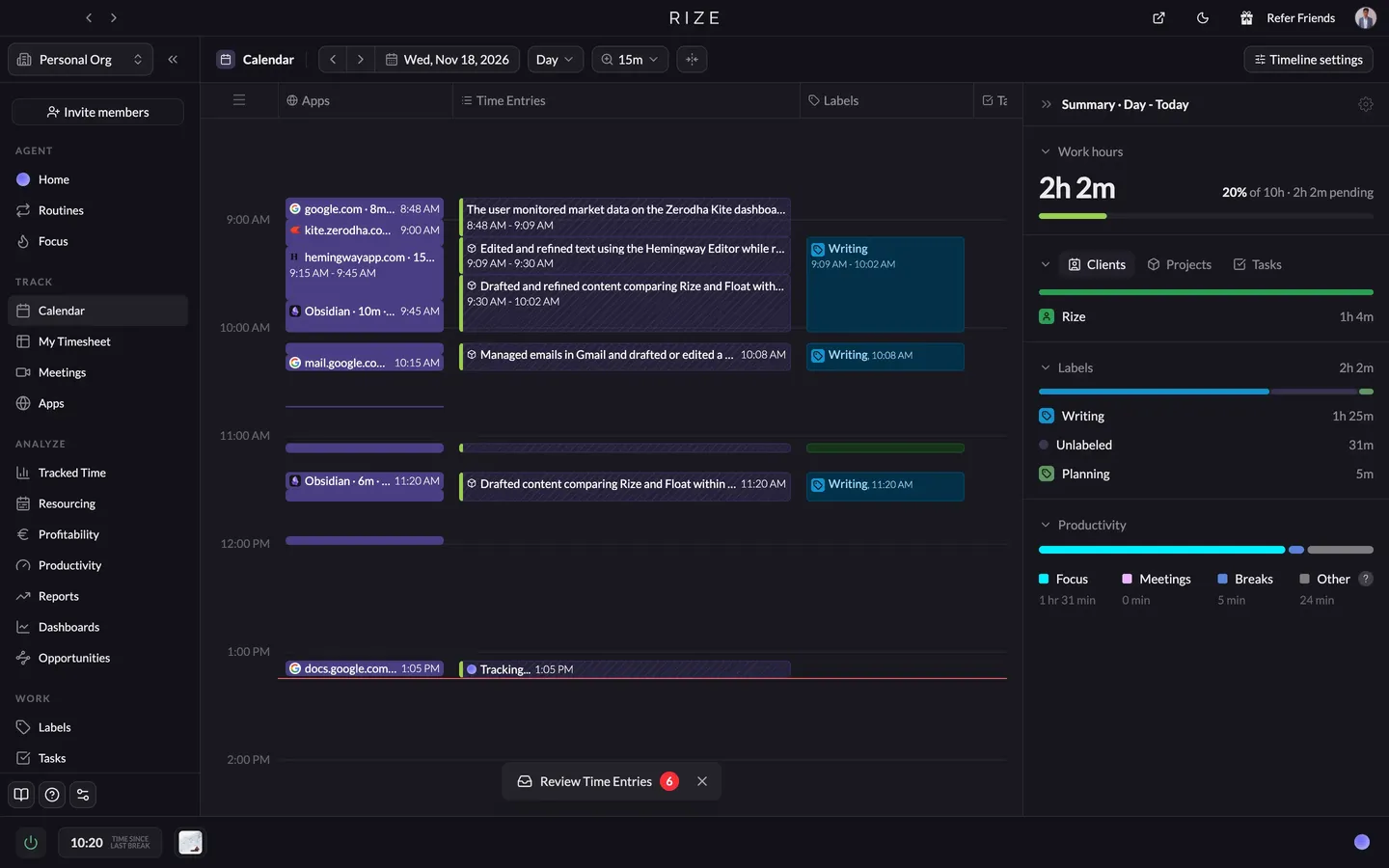
It's not zero effort. You still click Accept, and some of my day landed in Unlabeled, which is Rize saying it saw the work but doesn't know whose it was. You fix that with rules. But what you're accepting is a record of what the laptop saw, which is a different thing than approving a guess.
Float's Log time panel is easy. Pick a project, pick a task, type your hours, or start the timer. Next to the Logged box there's a Suggested box, and that's the schedule talking. Float pre-fills the timesheet from what you planned, and the person clicks to confirm. The pitch is that the timesheet nearly fills itself out. True. It's just filling itself out with your hopes.
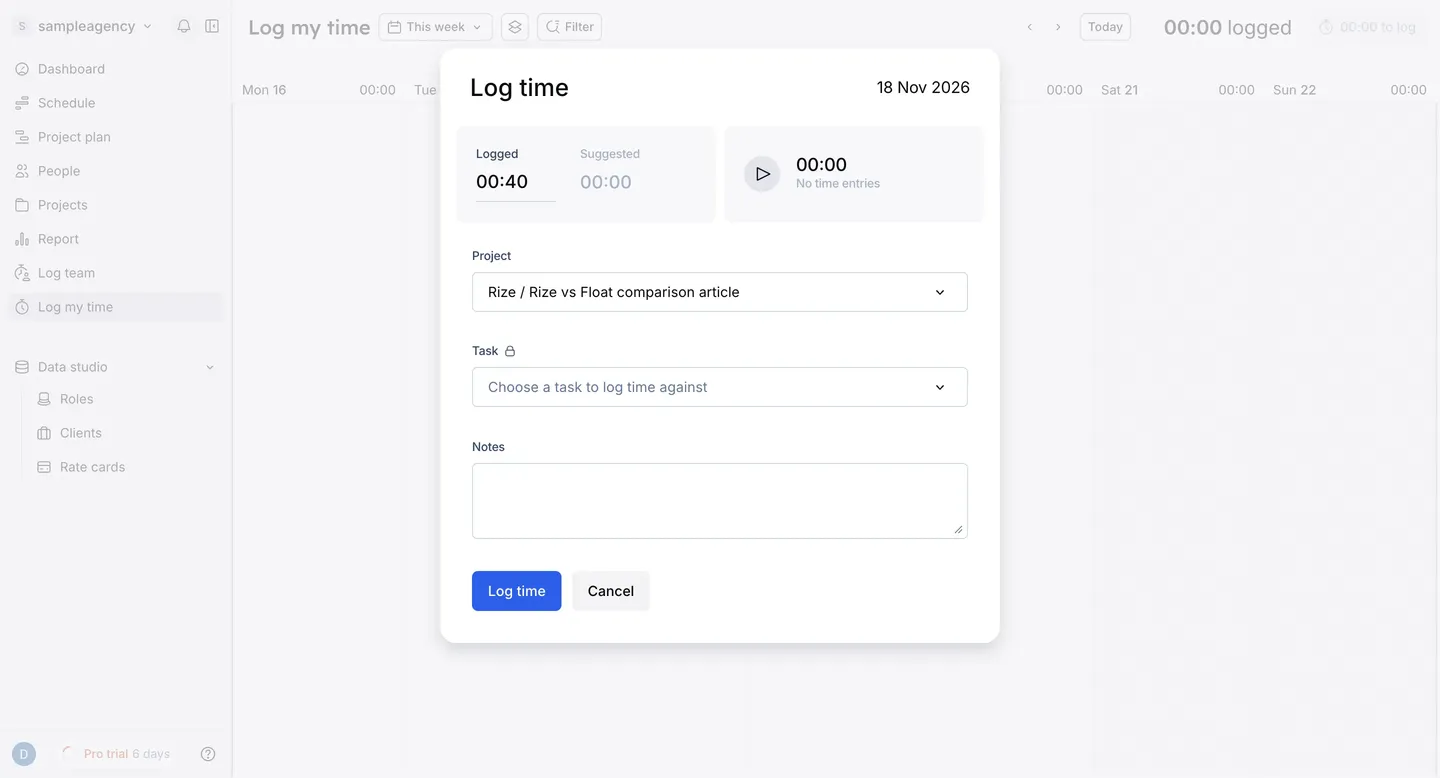
If the plan said 20 hours on Client A, the timesheet says 20 hours on Client A. Whether anyone actually spent 20 hours is a separate question nobody asked. The timer is there if you want real numbers, but then you're back to hoping someone hits start, which is Harvest and Toggl territory. Float's fix for late timesheets is deadlines and automated reminders. Rize's fix is not needing them.
Mini-verdict: Rize wins on where hours come from, because its numbers start with what happened and Float's start with what you hoped would happen.
Both tools are good at capacity planning
Float's Allocate time panel asks for what a Monday plan is made of: person, project, hours per day, dates. Then comes the part agencies actually need: an Allocation Status with a Tentative button, so the pitch you might win doesn't sit on the schedule pretending to be real. The time off panel has a Tentative button too. Somebody at Float has clearly survived a staffing meeting.
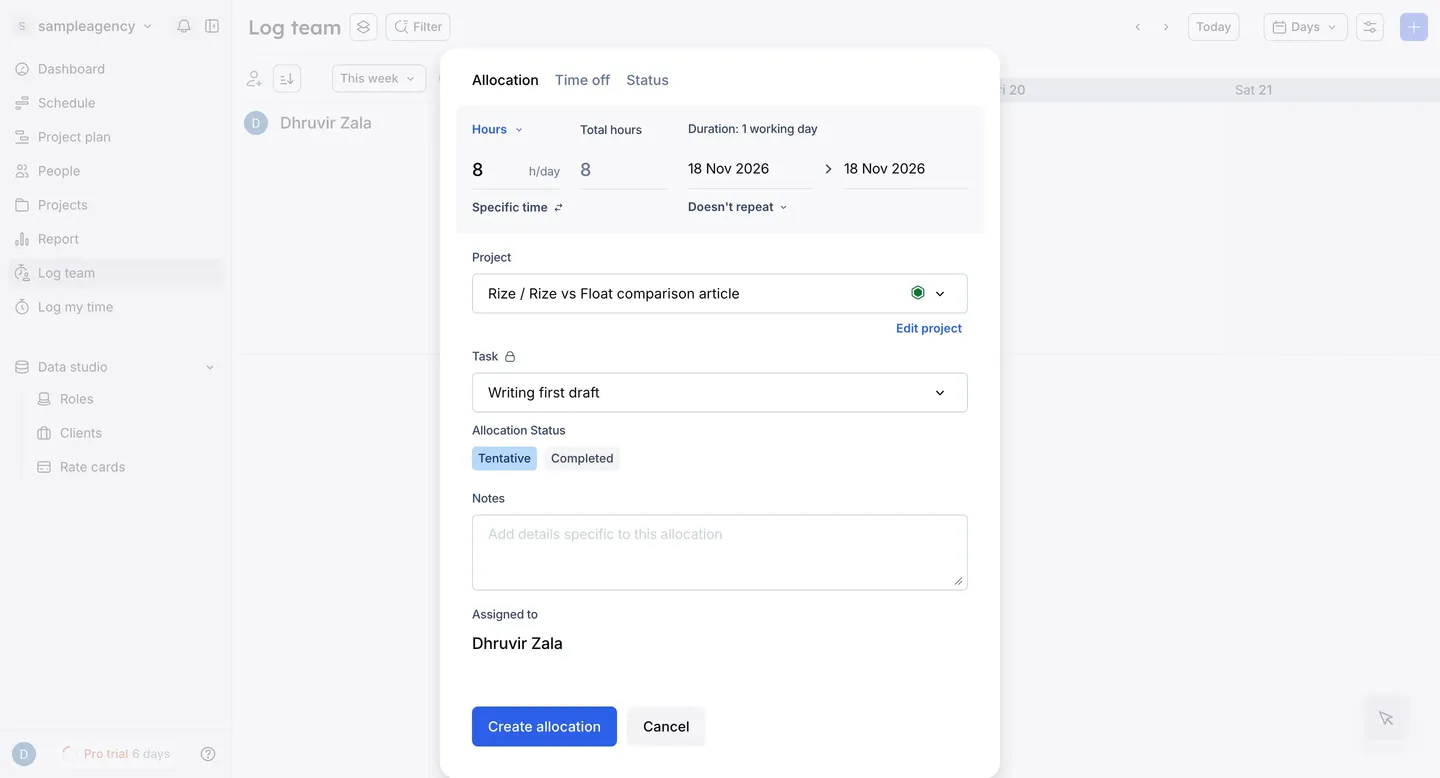
The rest of it goes in the same direction. Project plan lets you drop milestones on a project's timeline, and Roles and Rate cards sit in the sidebar, so you can staff by role and see what the month costs before it starts.
The catch is where the check happens. Float plans in one place and learns what happened through timesheets that, as the last section covered, start from the plan. The plan is still grading its own homework.
Rize's Resourcing is more than a grid. It has three tabs: Plan, Utilization, and Budgets. On Plan, the Add Plan form lets you stack several projects onto one person in a single go, which suits the person whose week is split across three clients. PTO is its own small form with Assign and Clear. There's a History button and a CSV Import in the header, so moving a Float plan over isn't a rebuild from scratch.
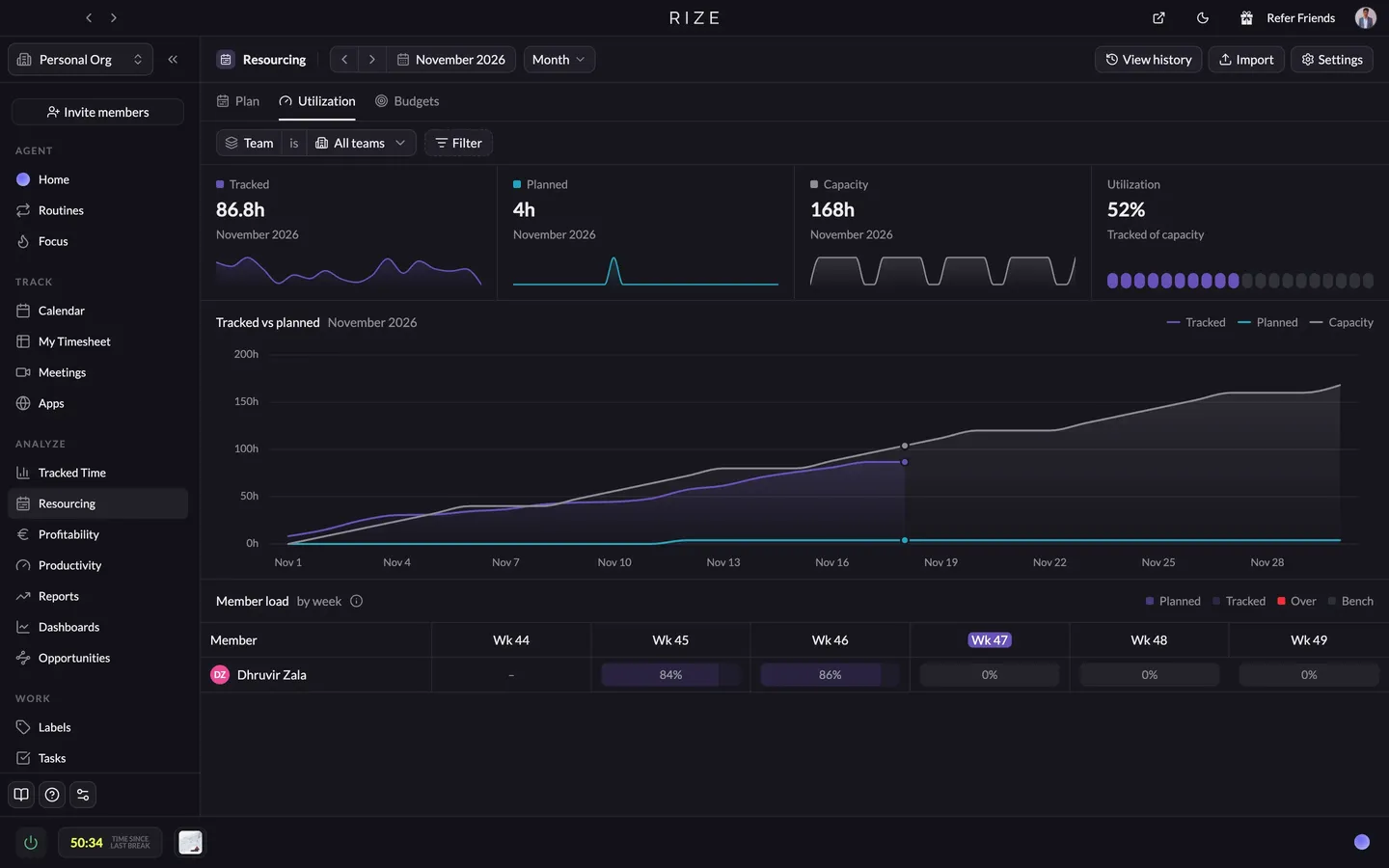
The next two tabs are the point. Utilization puts planned hours, tracked hours, and capacity on one screen, and the member load table shows who's Over and who's on the Bench. Budgets sets an hours budget by client, project, or task, with remaining hours shown.
Mini-verdict: Float wins if your month is full of maybes, and Rize wins if your month is mostly known work, because it plans it well enough and checks it against real hours without a second tool.
Float is the easier sell to your team; Rize is the easier tool to live with
Float can't spy on anyone, and it's not out of principle. It's a calendar. Calendars have never caught anyone doing anything. It only knows what somebody entered into it, which is a schedule, some names, and some hours. Open Access rights, and you can see how little there is to worry about: Admin, Resource Manager, Project Manager, and Member, and the Member's whole job description is "Works from their own schedule." So the question your team asks on day one isn't "what is this watching?" It's "why did you put me on Client B?"
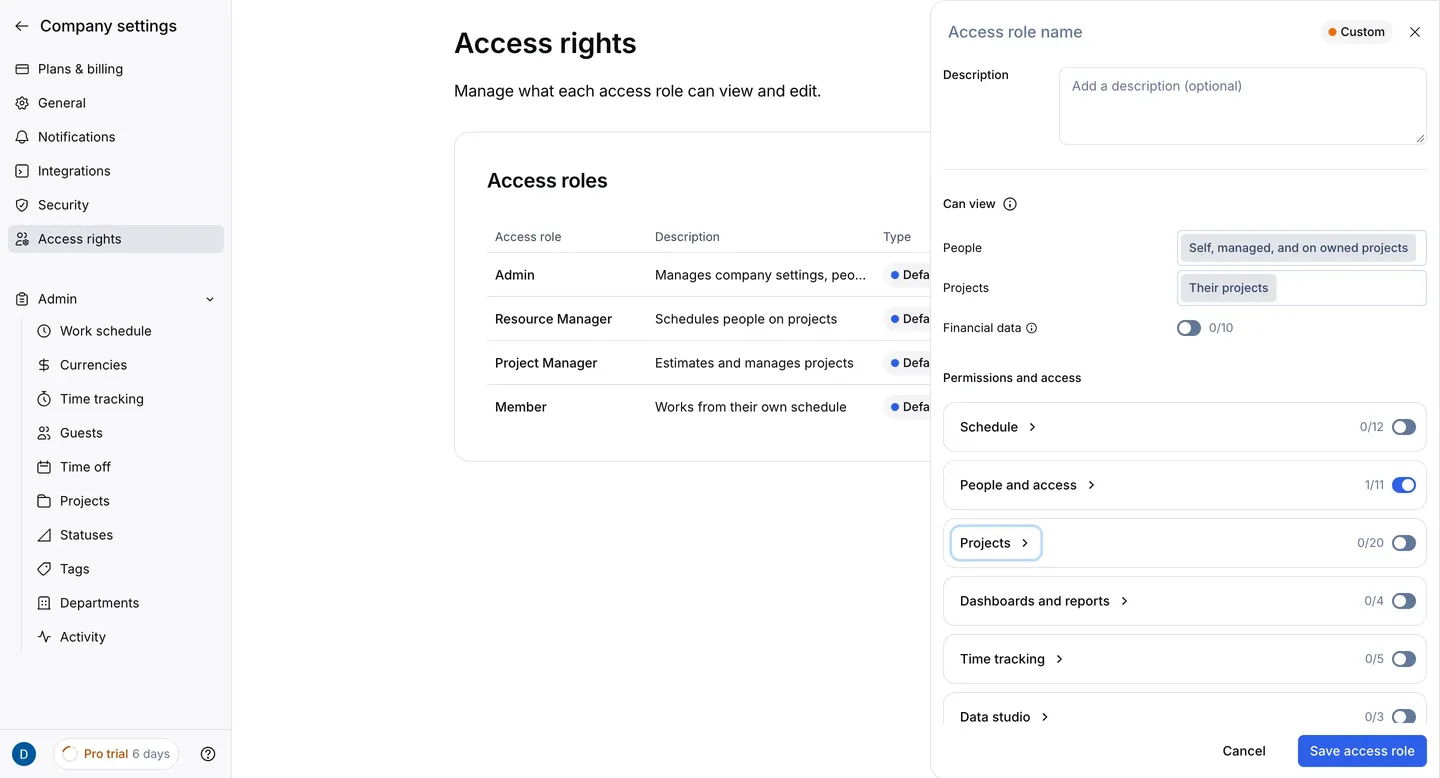
The catch is that Float is comfortable because it never looks. As covered earlier, a timesheet prefilled from the schedule can't surprise anyone, which is exactly why it can't catch anything. And you're still the person sending the Friday reminder. Float automates that part, so at least the nag can be a robot.
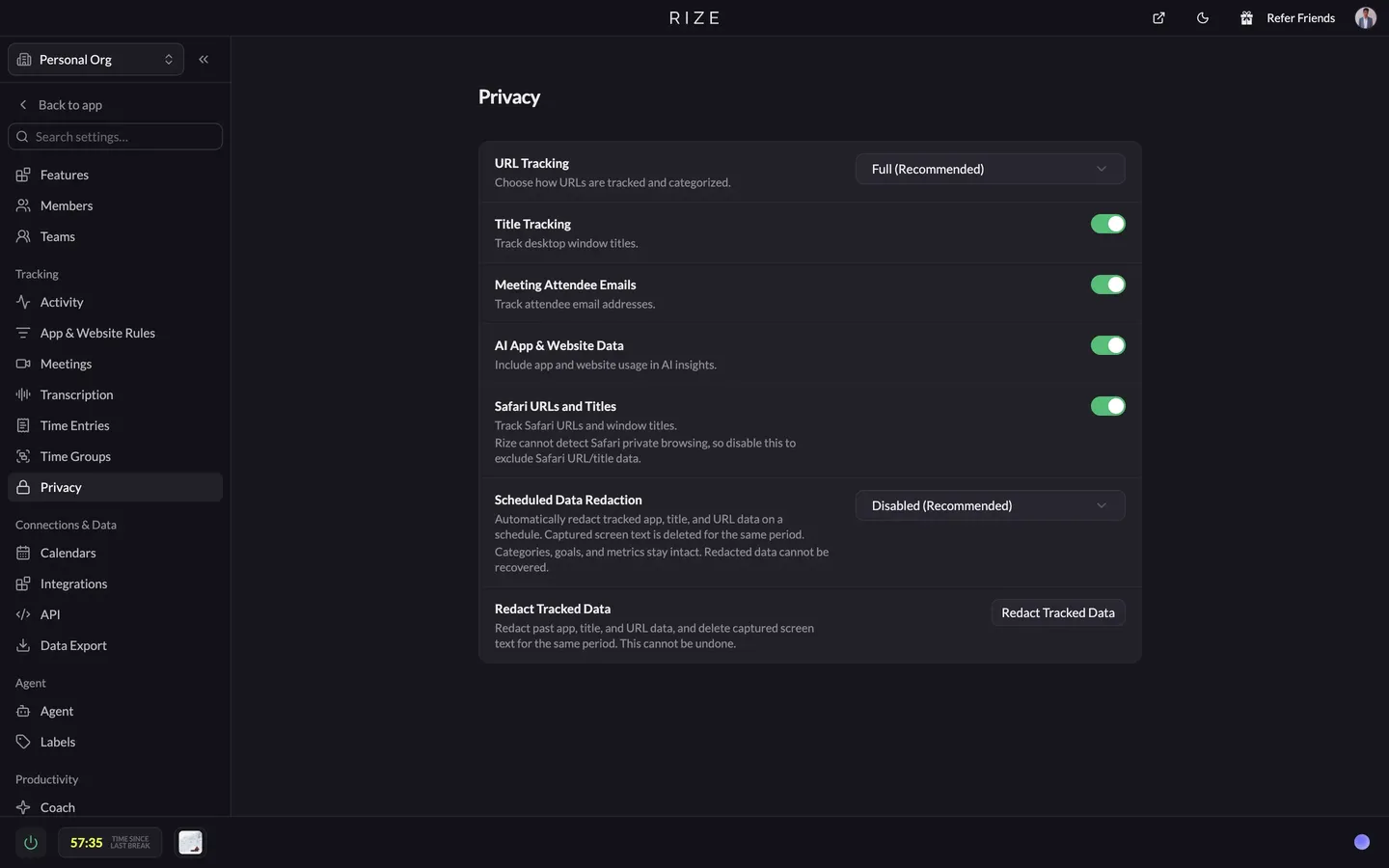
Rize has to earn what Float gets for free. It's a desktop app reading app names, window titles, and URLs, and if my boss told me that, I'd assume the worst before he finished the sentence. But look at where the data goes. Remember the Pending entry from the first section, the one with my LinkedIn detour in it? That list of apps and tabs is private to me. Even after I hit Accept, what a team would see is the description and the tags. Admins get hours by client and project, not a feed of anyone's day.
Rize sits in the menu bar or system tray in plain view; there's no hidden mode, it pauses with one click, and a schedule keeps it off outside work hours.
Mini-verdict: Float wins the trust conversation, and Rize wins the weekly grind, so pick Float if your team would revolt over an app on their laptops, and Rize if they'd just want to know what it sees.
Float looks easy, Rize is easy, and Float is better on a phone
Rize wins this one. Float looks easy to use, Rize is easy to use, and you'll feel the difference around the second Friday.
I'm not a disciplined person, so any tool that needs my discipline has already lost. Rize doesn't ask for any. My daily routine is: work. The only other thing is a Review Time Entries chip with a red badge at the bottom of the Calendar, counting the Pending entries waiting on me. I open them, hit Accept, and move to the next one. Or I click Approve all on the timesheet and go eat something.
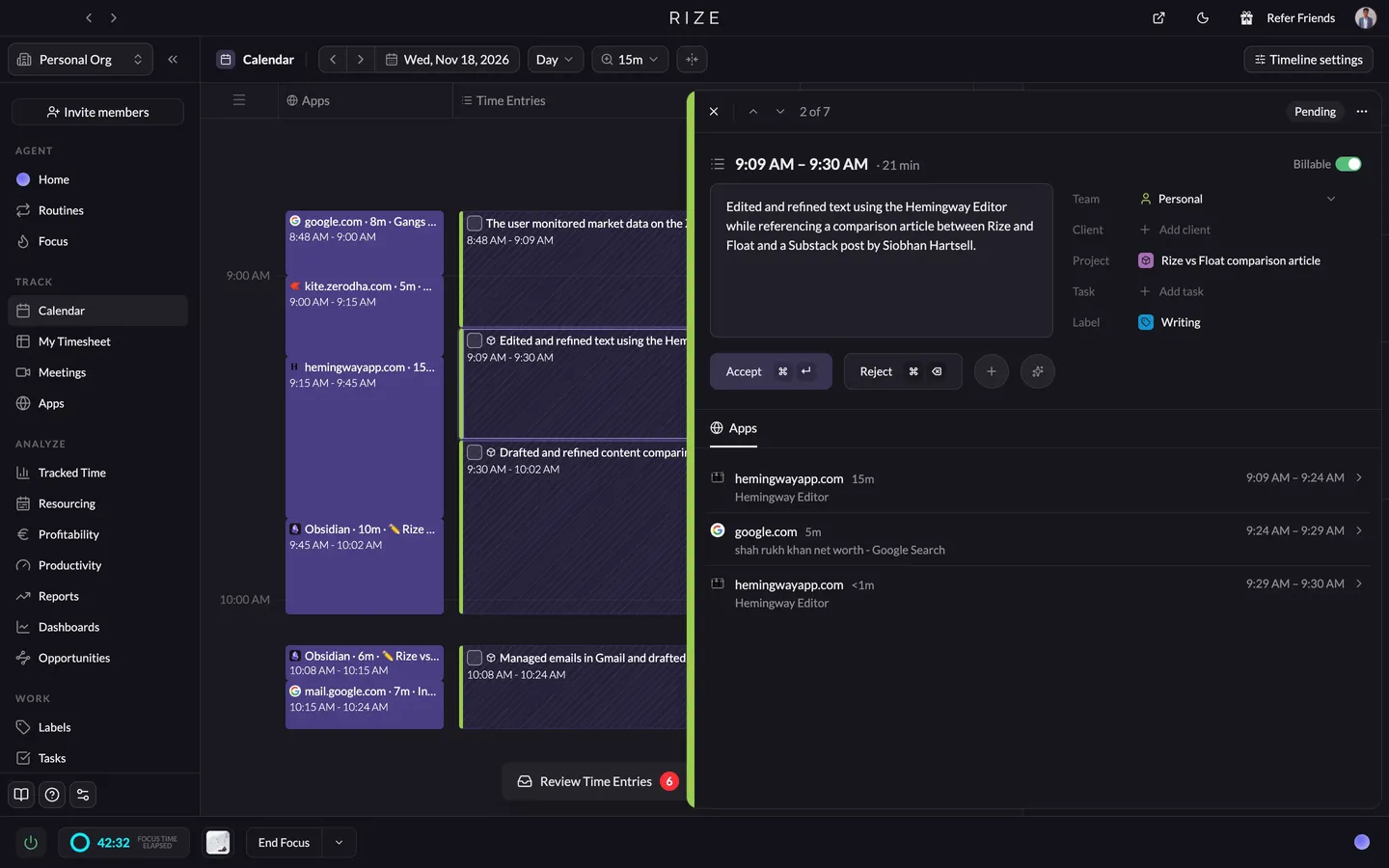
The price of all that is the desktop. Mac and Windows only, with no native iOS or Android app — the closest thing is a restricted mobile web beta some accounts have. The new web app looks and works exactly like the desktop app, so it's a second door into the same room. Good for reviewing, but tracking still only runs from the desktop. If your people work from a van, a client's site, or a phone, Rize sees none of it.
Float's setup is the mirror image. Nobody installs anything; people just open a link. But day one is an empty grid that only knows what somebody typed in: people, projects, roles, rate cards. That somebody is usually you. It's not a flaw; it's what a planning tool is. It's just work up front, and the plan changes every Monday.
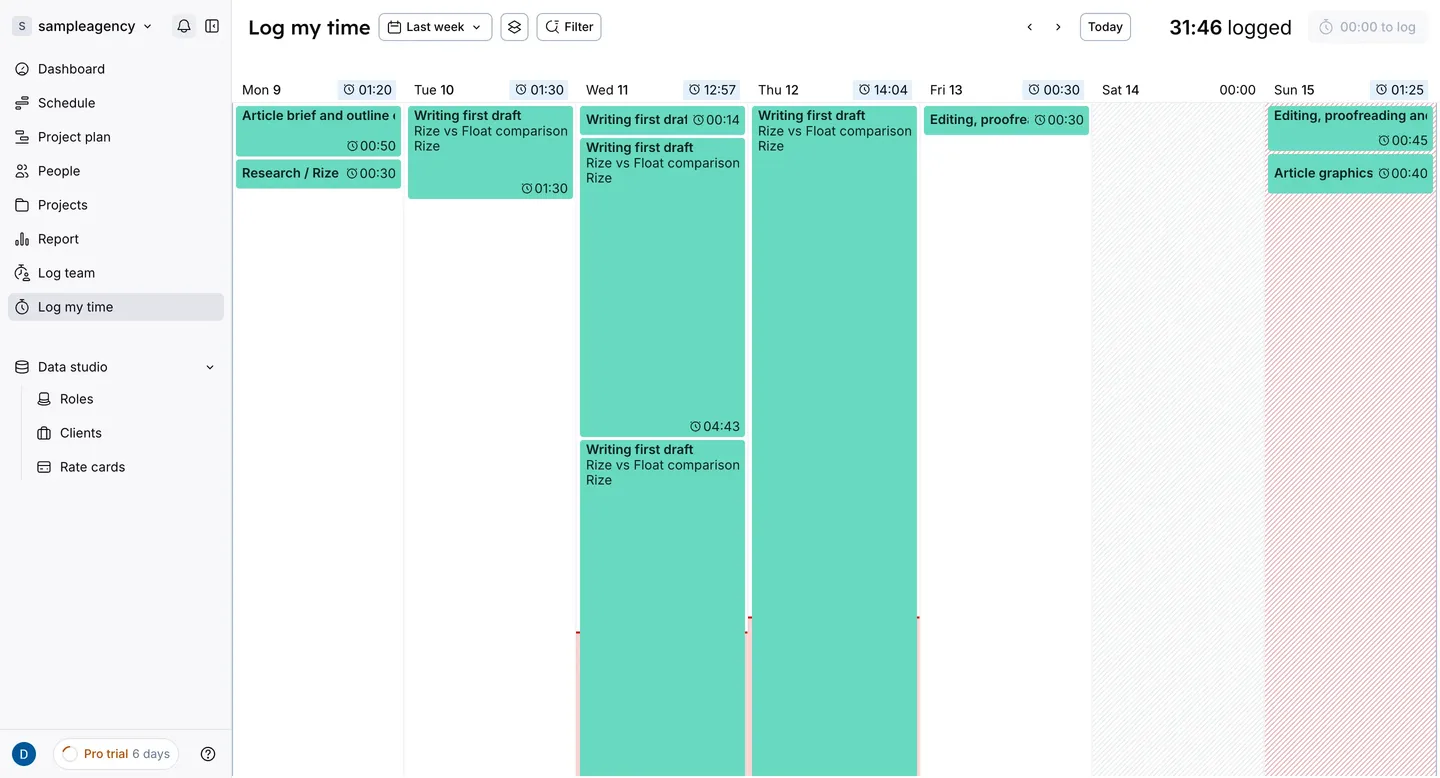
Float's iOS and Android apps are basic, and I mean that as a compliment. Pick a project, tap in your hours, close it. You can't build projects or pull reports from the phone, and you wouldn't want to. If half your team's week happens away from a laptop, this is the app that does the job.
Mini-verdict: Rize wins on everyday ease because the work gets recorded without you, but if your people live on their phones, Float does the job.
See what actually happened this week
Try Rize free for 7 days. It records the hours your plan forgot to check. No credit card required.
Start Free TrialRize is the better profitability tool, unless you bid fixed-fee work by phase
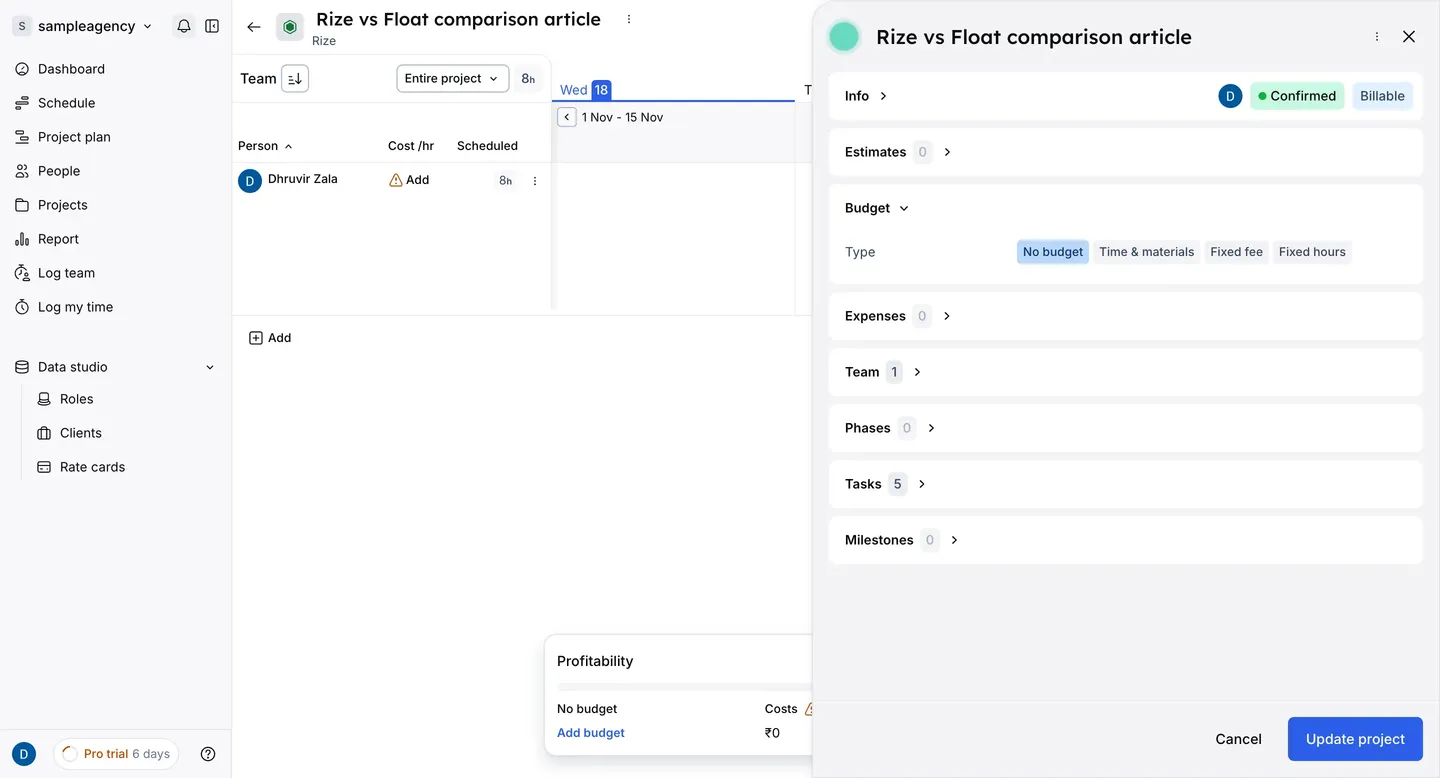
Float's Budget tab is where the money gets serious. Every project picks a type: Time & materials, Fixed fee, or Fixed hours. Fixed fee can be split by project, phase, or task. Cost rates go on a role or a person; bill rates go on a role, person, project, or phase, and on Time & materials projects, billable expenses can carry a markup. If you quote fixed-fee work in phases, Float can hold your pricing in the same shape you quoted it.
Rize starts from the contract. You pick a client, then Retainer, Hourly, Hybrid, or Fixed Fee, set the budget, and whatever gets tracked against that client rolls up into revenue, cost, and margin. Retainers are where agencies quietly give the store away and call it client service, so that's where this matters. Rize books the revenue a day at a time and sets it against hours that happened for sure. The contract page has an Effective hourly rate, which is the retainer divided by the hours it ate. You won't enjoy that number. Look at it anyway.
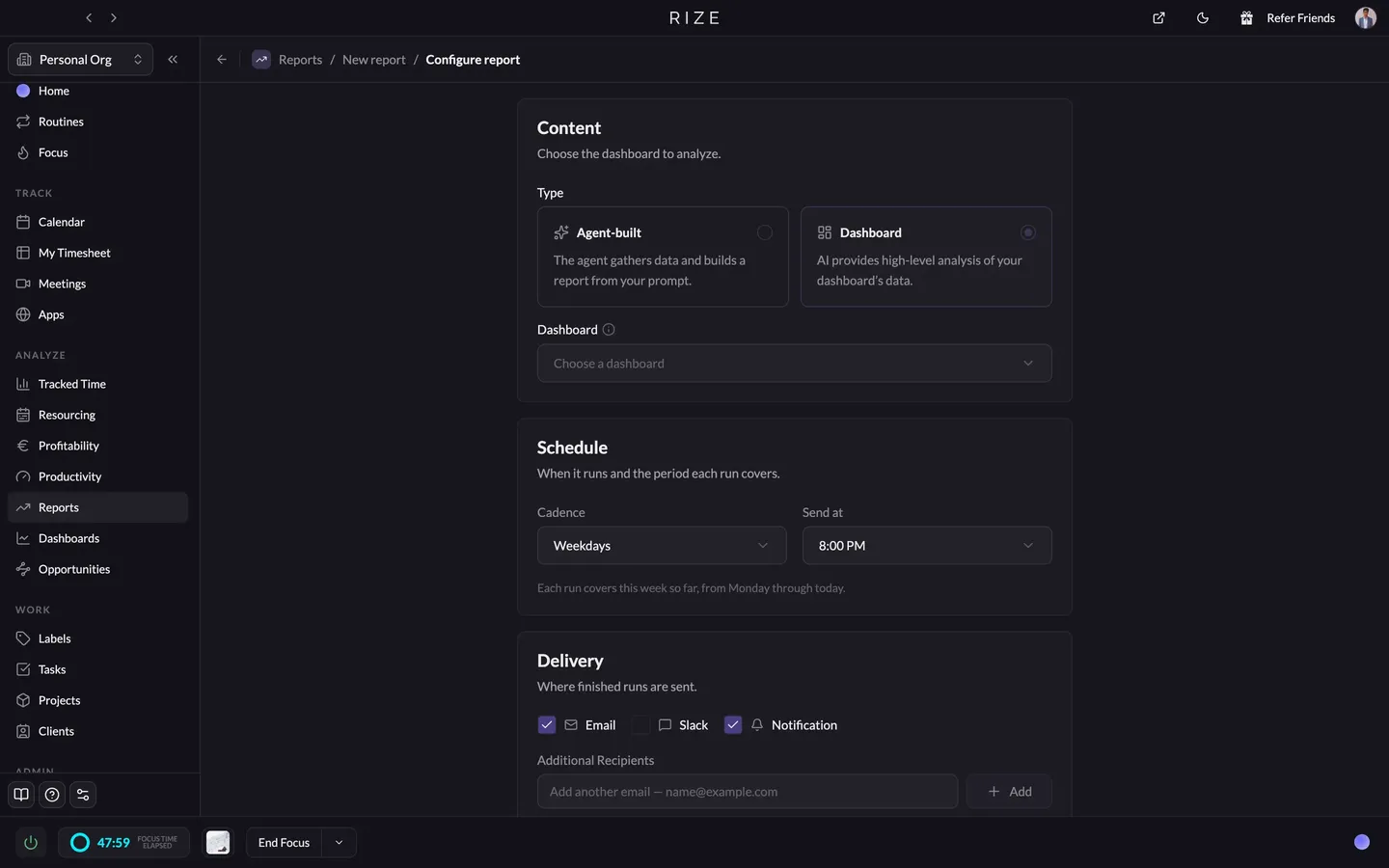
Reports is built for people who don't want to build reports. You point it at a saved dashboard, Rize tags that path Recommended, and I'd take the hint. It runs an AI analysis on a schedule (weekdays at 8 PM by default), sends it to Email, Slack, or a notification, and lets you chat with the run if a client looks bad and you want to know why.
Mini-verdict: Rize wins because its margins come from hours that happened, and Float wins only if you bid fixed-fee work by phase and need the forecast before anyone clocks in.
Rize wins for ClickUp, Asana, and Linear shops; Float wins for accounting firms on Karbon
If your team runs its work in ClickUp, Asana, Linear, or Notion, Rize wins, because it puts real hours on the actual tasks in there. Float reaches ClickUp and Asana only through Zapier.
Rize connects natively to ClickUp, Asana, Linear, Notion, Google Calendar, Outlook, Slack, and Zoom. Approved entries post back to the matching task with the description and billable flag, so your project manager sees real hours without anyone touching a timer. The catch is billing. QuickBooks, Xero, and FreshBooks get your hours through Zapier or a CSV, and Jira and HubSpot go through Zapier too.
Float connects natively to Google Calendar, Outlook, Slack, Karbon, and Aprimo, and sends Asana, ClickUp, Jira, Basecamp, and HubSpot through Zapier. Most of it is about getting work onto the schedule, not hours off it.
Mini-verdict: Rize wins if your work lives in ClickUp, Asana, Linear, or Notion, because real hours land on the actual tasks, and Float wins if you're an accounting firm on Karbon.
Float wins on price; Rize wins on what the price buys
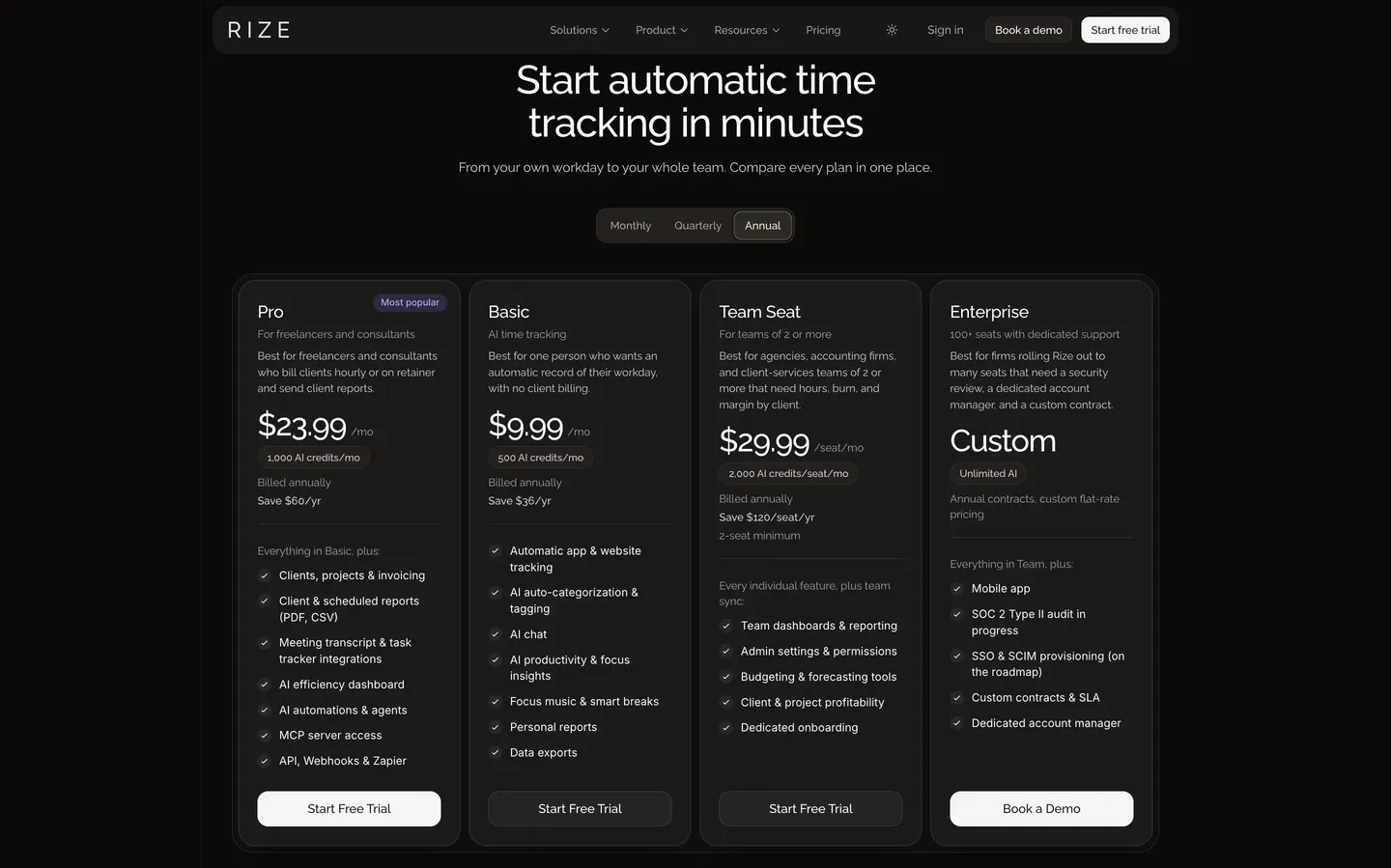
Rize's Team Seat is $29.99 a seat a month billed annually, or $39.99 month-to-month, with a 2-seat minimum and a 7-day trial. That one seat covers the tracking, budgets, forecasting, and client profitability.
Float is $7 per scheduled person on Starter and $12 on Pro, billed annually ($8.50 and $14 monthly), with free guests and a 30-day trial, per Float's pricing page. The catch is that time tracking is Pro only, so if you want planned against actual, your real number is $12, and what it buys is timesheets that start from the plan.
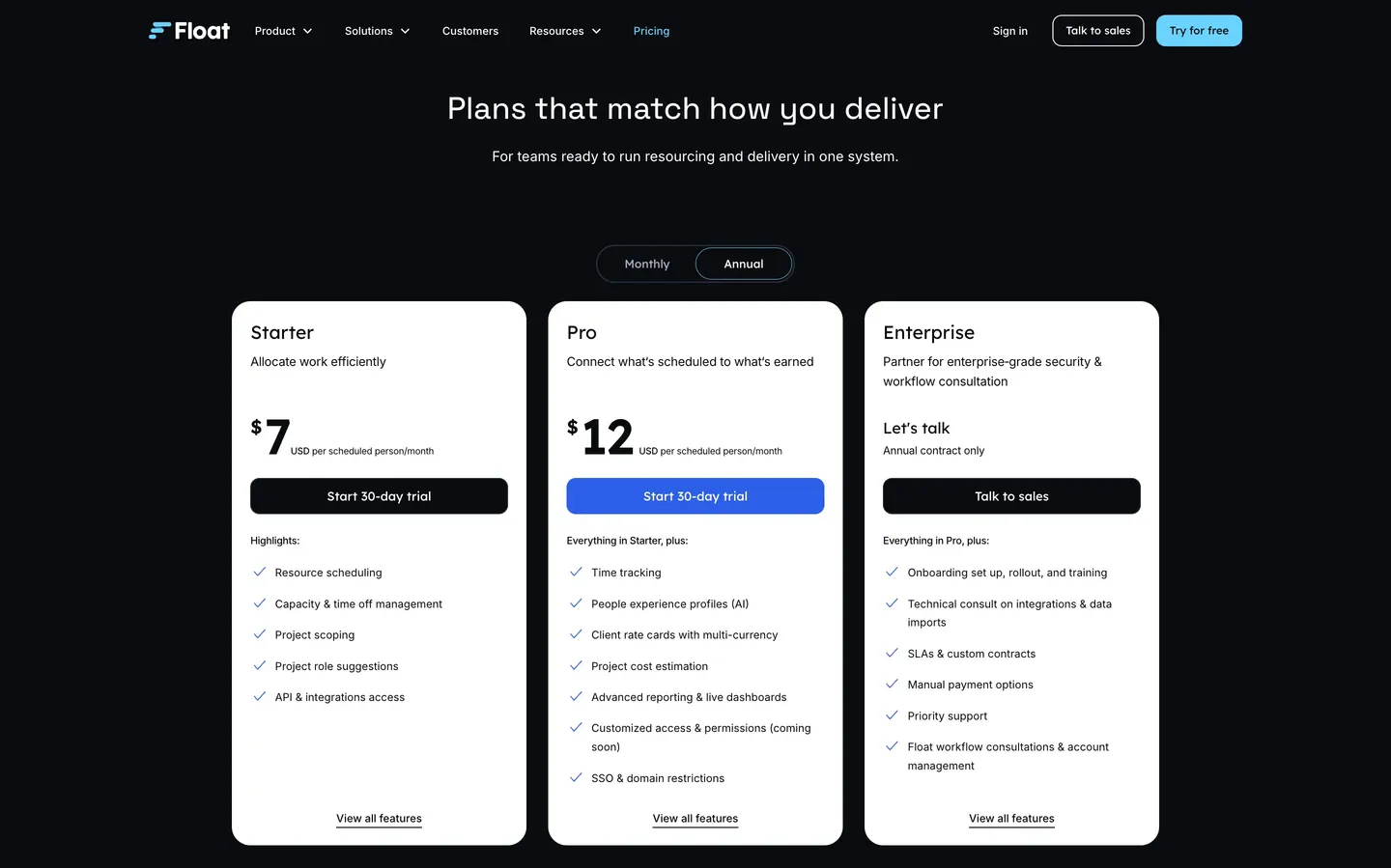
Mini-verdict: Float wins on price, and Rize wins if you need hours that actually happened instead of hours that were planned.
Rize vs Float: Which should you use?
Rize. Unless the plan itself is what's broken.
Choose Rize if:
- Your timesheets come in late, or look a lot like last week's.
- Your people are salaried and won't run a timer.
- You run retainers and keep finding out they went over after the month closed.
- Your team works on Mac or Windows, and the work lives in ClickUp, Asana, Linear, or Notion.
Choose Float if:
- Your designers keep getting double-booked, and nobody knows who's free in three weeks.
- You pitch a lot and need tentative work that doesn't block the real stuff.
- Half your team logs hours from a phone.
- You quote fixed-fee work by phase, or you're an accounting firm on Karbon.
You probably already have a plan. What you don't have is proof the plan happened. Most agency months are the same clients as last month, so the plan is rarely the hard part. Knowing where the hours went is. Float can show you what you meant to do. It can't show you what you did unless everyone remembers to hit a timer, and you've met everyone. Rize plans known work well enough and checks it against real hours.
Rize's trial is seven days. Run it next to Float for a week and compare one client's hours in each.
Related reading
See how Rize compares to other tools agencies use:
- Rize vs Harvest
- Rize vs Toggl for agencies
- Rize vs Timely
- Rize vs Clockify
- PSA software vs automatic time tracking
Start tracking time automatically
Join thousands of professionals who stopped guessing where their time goes. Free for 7 days.
“Rize has been a no-brainer for me.” — Ali Abdaal Read more →