Rize now connects automatic time capture, timesheet review, custom tagging guidance, and AI reporting in one workflow. You review the work once, then use the same organized data for team oversight, client analysis, and recurring reports.
The hard part of time tracking is rarely collecting another timestamp. It is turning a scattered workday into a record that a person can approve, a manager can understand, and a business can use. That job gets harder when work is split across email, Slack, meetings, documents, and project tools.
A 2025 Microsoft Work Trend Index analysis found that Microsoft 365 users were interrupted every two minutes during core work hours, or 275 times per day. In the same study, 48% of employees and 52% of leaders described their work as chaotic and fragmented. Reconstructing those fragments on Friday is a memory test, not a reliable operating process.
Quick answer
Use My Timesheet to review and approve your own entries, Team Timesheets to inspect coverage and capacity, Agent Context and Skills to standardize categorization, and AI Reports to turn the reviewed data into recurring analysis.
What changed in Rize's timesheet workflow?
Rize's timesheet workflow now separates personal review, team oversight, AI guidance, and recurring analysis into connected surfaces.
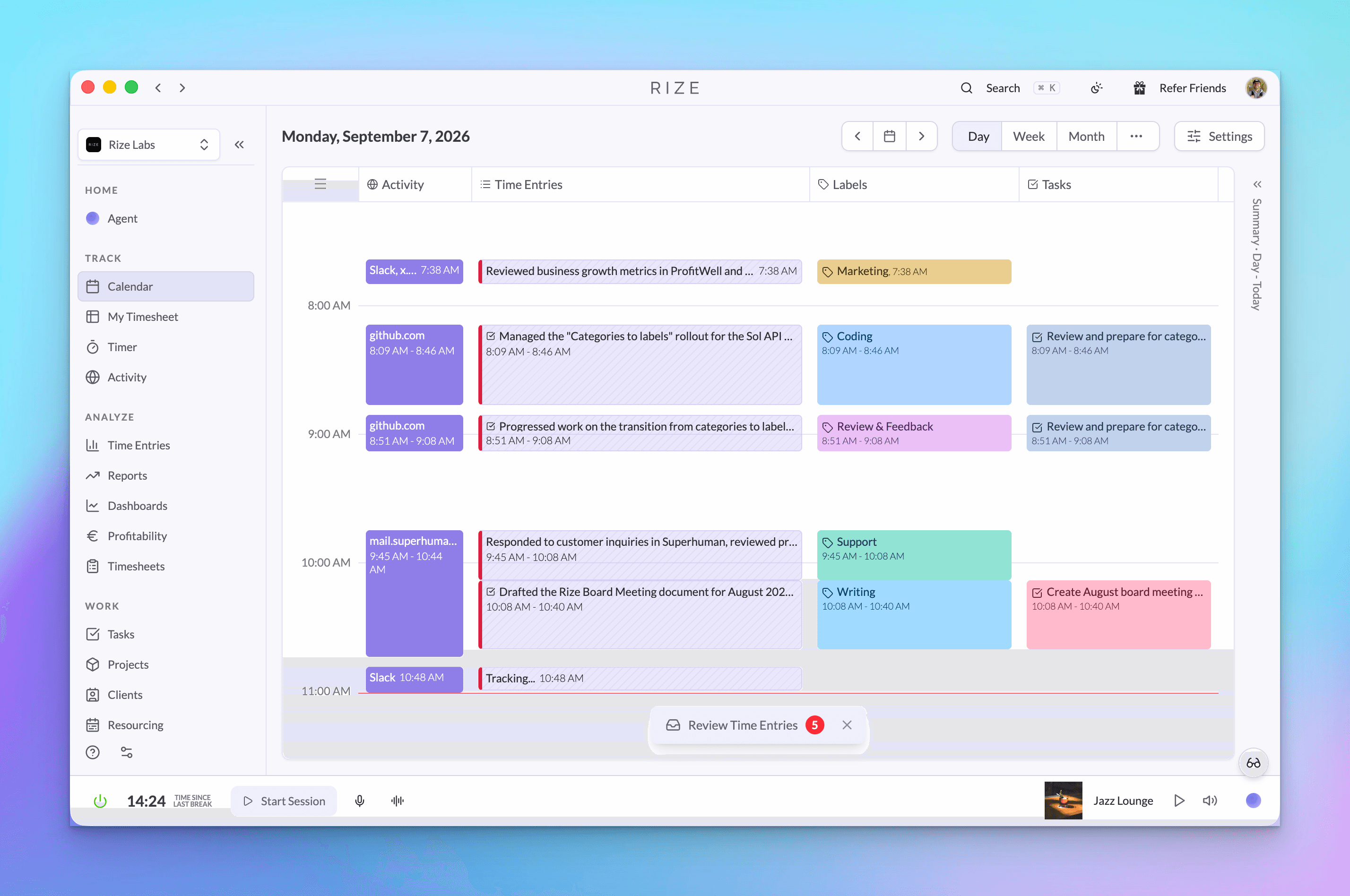
You can still tag time from the Calendar. The new My Timesheet page adds a focused place to clear pending entries, inspect approved time, and see how the day breaks down. Managers and admins get a separate Team Timesheets view for team totals, pending time, utilization, and capacity.
The review process no longer ends with an approved row. Agent Context can tell Rize how your organization assigns work. Shared AI Skills reuse those rules across people and workflows. AI Reports can then run the same client, project, or team analysis once or on a schedule.
Timesheet review: the step where captured activity becomes an approved work record with the correct client, project, task, and label.
How does My Timesheet speed up daily review?
My Timesheet groups pending work by business context so you can correct and approve entries without scanning the Calendar minute by minute.
Open My Timesheet to see pending, approved, and total time for a day, week, or month. Switch the grouping between client, project, task, label, or team. Entries that still need a project or client stay visible instead of disappearing inside a weekly total.
Rize places AI suggestions and commonly used tags beside the entries. Drag an entry into the right group, open its detail menu for a specific correction, or select multiple clean entries and approve them together. When the review is complete, Accept all clears the remaining approved set in one action.
The workflow is designed for short, frequent review. A Harvard Business Review analysis reported that people who completed timesheets daily described their records as more accurate than people who waited a week or longer. The same article estimated that unrecorded work cost the U.S. economy 50 million hours, or $7.4 billion, per day.
What can managers see in Team Timesheets?
Team Timesheets show hours, pending review, utilization, and capacity across a team without requiring a spreadsheet export.
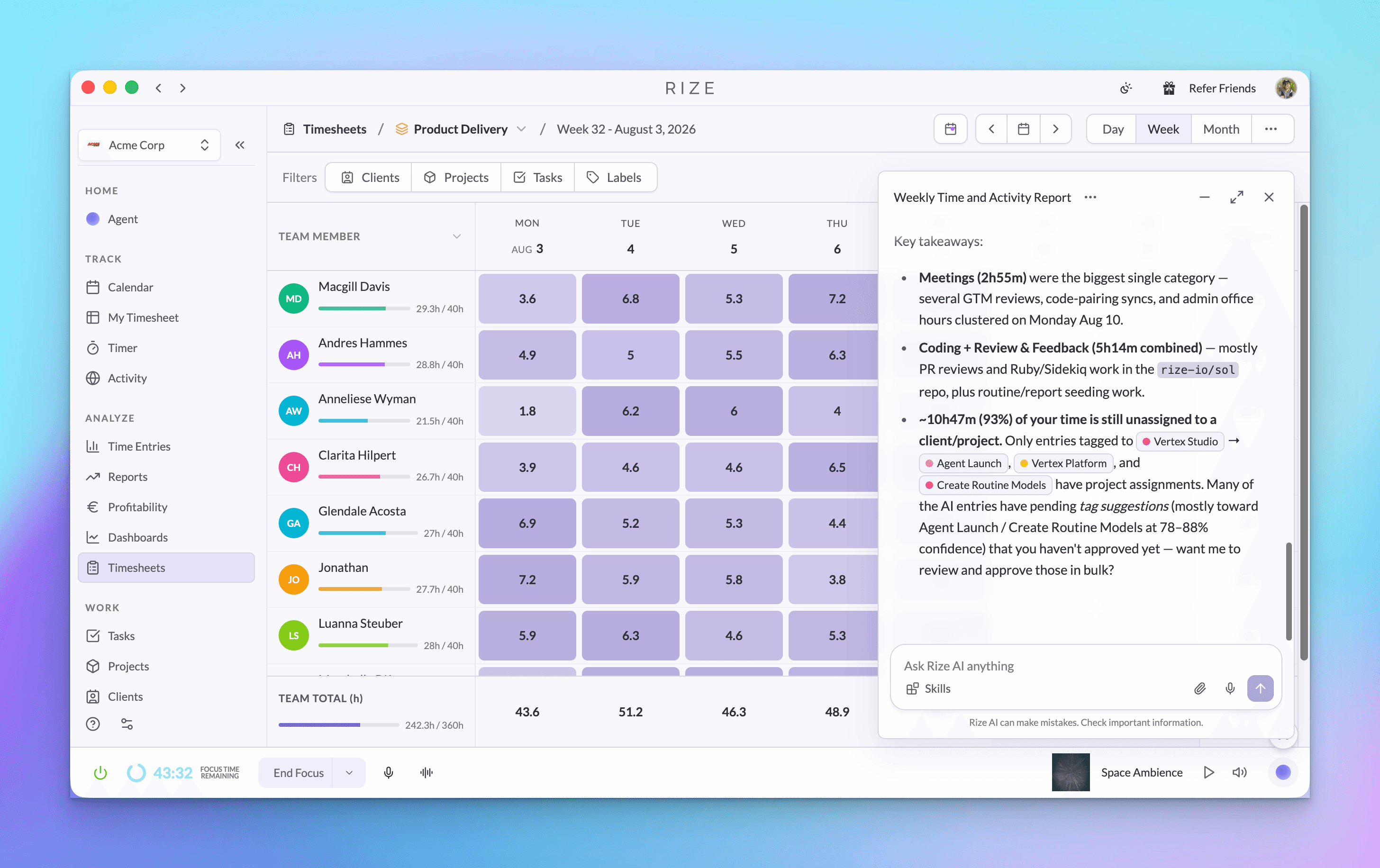
The team view rolls each member into a weekly or monthly grid. Managers can compare total time with capacity, spot days that still contain pending entries, and filter the grid by member, team, client, project, task, or label. Clicking a day opens the underlying detail when the viewer has access.
That separation matters. Each person remains responsible for reviewing the context of their own work, while managers can find incomplete records and uneven coverage without asking everyone for a manual status update. The full Timesheets release note shows both views and their role-based behavior.
Accurate records also support basic payroll and labor reporting. The U.S. Department of Labor's FLSA recordkeeping guidance says covered employers must preserve hours worked each day and total hours worked each workweek for nonexempt workers. Rize does not decide a team's legal obligations, but a consistent review process makes required records easier to maintain.
How does Agent Context make time tagging more accurate?
Agent Context gives Rize standing instructions about your role, team, naming rules, tagging system, and preferred activity summaries.
Generic AI has to infer what a client code, Linear issue, or internal nickname means. Agent Context lets you supply that missing operating knowledge at three levels: personal, team, and workspace. You can write the guidance yourself, attach a Skill, or generate a draft from how you already use Rize.
Custom tagging instructions focus that guidance on clients, projects, and tasks. For example, an agency can tell Rize to look for a client ID in a Linear issue, map a recurring meeting to a specific engagement, or keep internal research separate from billable delivery. Activity summary instructions control how Rize describes the work after it is captured.
Admins can configure member Agent settings before a rollout. That gives new members useful defaults on day one and removes the need for every person to invent the same tagging instructions independently.
How do Shared AI Skills keep a team consistent?
Shared AI Skills save a reusable instruction once, then apply it across chat, Routines, reports, and Agent Context.
A Shared AI Skill is a saved prompt with personal, team, or workspace visibility. A person might save a daily review format. A delivery team might save its client update rules. A workspace might save the tagging policy that every report should follow.
The useful part is reference, not copying. When a Skill is attached to several reports or member settings, changing that Skill updates the instruction everywhere it is used. One process change no longer creates five stale prompt copies.
Ben Jackson, CEO of Momentum Studio, explains why the review burden cannot rest on memory: "I don't trust myself to remember two days ago. So how can I expect my designers to?" Shared instructions give the whole team the same categorization rules, while My Timesheet gives each person a fast place to confirm the result.
What happens after timesheets are approved?
Reviewed time becomes a cleaner input for client profitability, team overview, project status, and other recurring AI Reports.
AI Reports start with a template or custom prompt. Choose whether the report should analyze you, one team, or the workspace. Add relevant Skills, set a schedule, and choose delivery in Rize, Slack, or email. You can also run any report once from the report list.
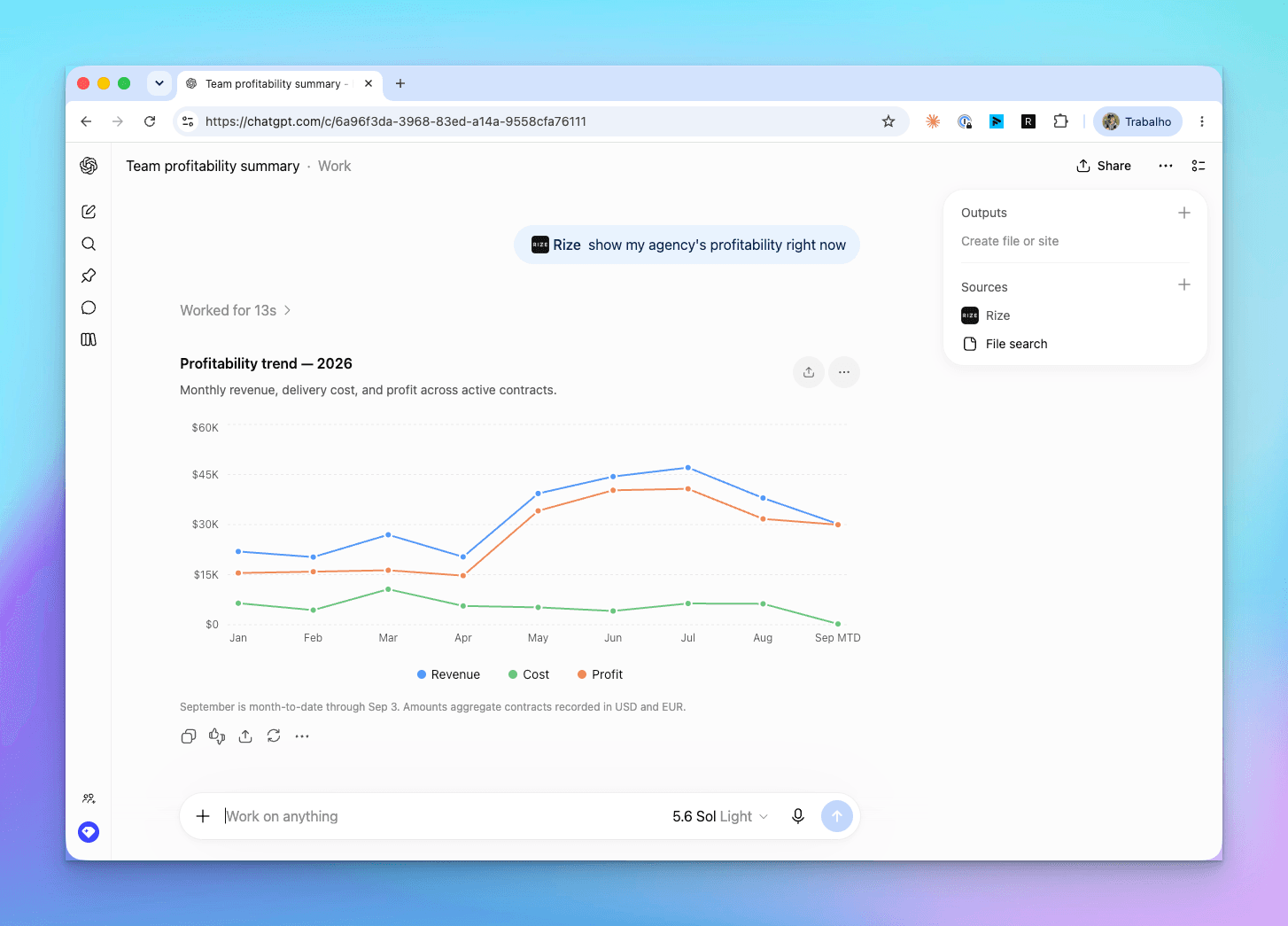
The result is not limited to a text summary. A report can contain revenue, cost, margin, hours, charts, and linked Rize entities based on the prompt and available data. Export it to PDF, or open the report in Agent chat to ask why a number changed and inspect the underlying work.
AI Report: reusable analysis that runs against live Rize data for a selected person, team, or workspace, once or on a schedule.
How does the Rize Agent connect the workflow?
The Rize Agent connects questions, reports, Routines, Skills, context, and follow-up actions through one conversational interface.
The Rize Agent can answer questions such as which clients took the most time, who is over capacity, and what work still needs review. Responses can include charts, linked records, and action chips. You can minimize the conversation while it runs, continue working elsewhere in Rize, and return when the answer is ready.
Routines extend the same model to scheduled tasks. A start-of-day Routine can combine yesterday's time, today's calendar, and due tasks into a brief. A follow-up action can then open Agent chat with the Routine's context already attached.
The same report runs and agent capabilities are available through the Rize API and MCP. That lets teams connect reviewed time and generated analysis to Claude, ChatGPT, or an internal agent while keeping Rize as the source of work context.
How should you set up the workflow?
Start with one team's tagging rules and one recurring report, then expand after the first week of reviewed time.
- Review one day in My Timesheet. Correct missing clients, projects, and tasks, then approve the entries while the context is fresh.
- Write down repeated corrections. If the same Linear pattern or meeting name is fixed more than once, turn the rule into custom tagging guidance.
- Save shared rules as Skills. Choose team or workspace visibility only when the instruction should apply beyond one person.
- Check Team Timesheets weekly. Look for pending time, gaps against capacity, and client or project totals that need attention.
- Schedule one AI Report. Start with a weekly team overview or client profitability report, inspect its output, then refine the prompt and Skills.
This sequence keeps setup grounded in real corrections. You are not guessing which prompt the team might need. You are turning observed review work into reusable guidance, then using reviewed data for analysis.
Is Rize still a time tracker?
Rize is an automatic time tracker that now carries captured work through review, team oversight, and AI-assisted operations.
Automatic capture remains the foundation. My Timesheet makes the record easier to verify. Team Timesheets show what needs attention across the group. Context and Skills teach the system how your organization works. Reports, Routines, and Agent chat turn that organized time into decisions and follow-up actions.
The result is a shorter path between doing the work and understanding the business. Your team reviews time while it is fresh, managers see gaps before billing, and recurring analysis runs from the same source instead of a separate spreadsheet.
Turn reviewed time into useful answers
Start a free 7-day trial and see how Rize connects automatic capture, timesheet review, and AI reporting.
“Rize has been a no-brainer for me.” — Ali Abdaal Read more →