You're probably here for one of three reasons. A client pushed back on an invoice and the numbers behind it didn't hold up. Harvest's pricing changed this year, and you're doing the math on whether to stay. Or the tool your team was supposed to be using quietly stopped happening a few months back, and hours are getting logged from memory, which is really just a guess with a client's name attached.
None of that gets fixed by grabbing whatever tops a search result. It gets fixed by matching the tool to your team's size, how much tracking-by-surveillance they'll tolerate, and whether invoicing needs to live in the same login as the timer.
I opened all six of these myself, ran real projects through them, and clicked into the settings pages most roundups never bother with, so you can cross a few off before you burn a trial period finding out the hard way.
What makes the best time tracking software for an agency?
Here's what I checked for on every tool, and what decided where it landed on this list:
- How much of the tracked time is genuinely automatic. This is the whole game. A timer that only logs time when someone remembers to click it is one bad Tuesday away from an invoice that's wrong.
- Profitability by client, not just a pile of logged hours. Knowing the team billed 40 hours to a client is useless on its own. What matters is whether that client is still worth keeping at the rate you're charging, and how many clicks it takes to find that out.
- How fast a timesheet turns into a sent, paid invoice. I checked whether tracked time flows straight into an invoice or needs an export-and-reupload detour, and whether the connection to QuickBooks, Xero, or Stripe is a real two-way sync or a one-time CSV handoff.
- Whether the team will keep using it. This comes down to trust as much as habit. A tool that quietly tracks your day in the background asks something different of your team than one that takes screenshots and scores how much your mouse moved, and I paid attention to which one each tool is once you get past the marketing page.
- What it costs once you're buying it for a real team, not a demo account. I priced every tool at the size an actual agency would need, not the cheapest plan on the page.
- Whether it lives inside the project management tool your team already has open. I checked which tools embed directly into Asana, ClickUp, or Trello, and which ones just link out to them.
Keep those six in the back of your mind, because here's how all six tools stack up against them before we get into the weeds on each one.
The best time tracking software for agencies at a glance
If you only read one section of this article, make it this one. Here's all six side by side, so you can cross off three of these before your coffee gets cold and spend your actual attention on the two that fit your team.
| Tool | Best for | Standout feature | Pricing |
|---|---|---|---|
| Rize | Automatic tracking without surveillance | Zero timers, AI auto-tags time to the right client | $29.99–$39.99/seat/mo (7-day trial) |
| Harvest | All-in-one manual tracking and invoicing | Real two-way sync to QuickBooks and Xero | Free solo; $9–$17.50/seat/mo |
| Toggl Track | Most generous free plan | 5 free seats, unlimited projects and clients | Free for 5 users; $9–$24/seat/mo |
| Clockify | Cheapest plan and broadest device support | Only tool on this list that runs on Linux | Free for 5 users; $3.99–$14.99/seat/mo |
| Everhour | Time tracking built into your PM tool | Start button lives inside Asana, ClickUp, Trello, and more | Free for 5 seats; $8.50–$10/seat/mo |
| Time Doctor | Proof of work from outsourced teams | Unusual Activity AI flags mouse jigglers before payroll | No free tier; $6.70–$20/seat/mo |
Best for agencies that want accurate hours without timers or surveillance
Rize (Mac, Windows)
Rize pros:
- Fully automatic, zero timers
- AI auto-tags time to the right client and project
- Live profitability by client and retainer
- No screenshots, no keystroke logging
- Doubles as a proactive focus and break coach
Rize cons:
- No mobile app outside Enterprise
- Pricier than free manual trackers
- AI features capped by monthly credits
- Deeper QuickBooks/Xero sync still needs Zapier
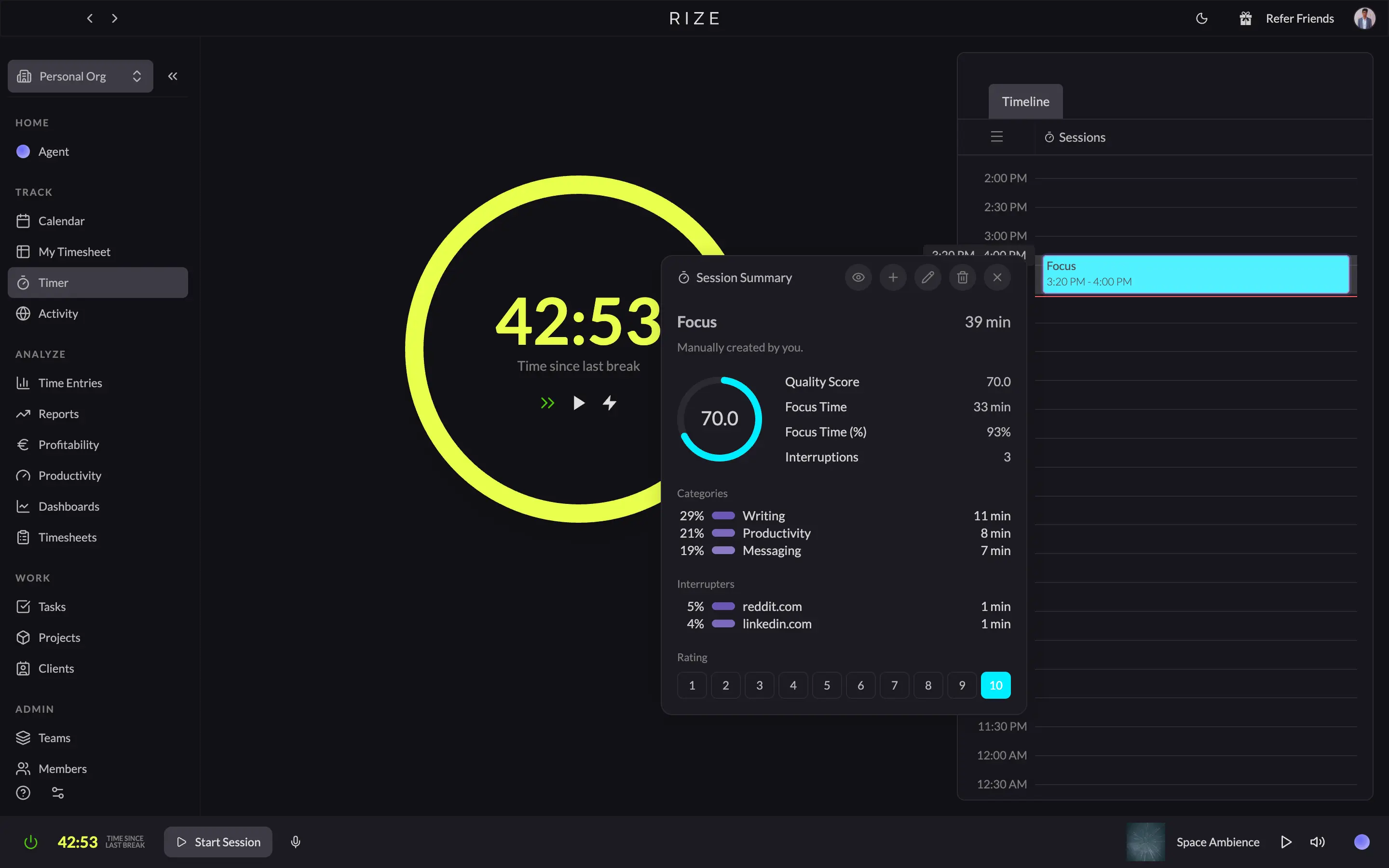
I've had Rize running on my Mac since May 2022, and the number of times I've manually started a timer is two, both by accident. You open your laptop, and Rize is already logging the day. No button to hit, no project dropdown to pick before you can start typing. By the time you sit down to review the timeline, most blocks already have a client, project, and task attached, guessed from the app you had open, the file you were in, or what your calendar said you were doing. Most of what's left to do is click accept.
That matters a lot because a timesheet nobody has to remember to fill out is a timesheet that's telling the truth. Rize turns that into a number you can act on too: every client and retainer gets a live profitability view, hours delivered, effective hourly rate, margin, updating as the work happens instead of three weeks later when the invoice finally goes out. It can also build that invoice now, picking a client and date range, laying out the line items, and letting you send the PDF and log payments without leaving the app. The one piece still routed through Zapier is a deeper two-way QuickBooks or Xero sync, but the invoicing itself doesn't wait on that anymore.
What I didn't expect is that Rize would end up managing my energy as much as my hours. It nudges me back to the screen when I've drifted, starts a focus session the moment I'm locked in, and tells me to take a break before I've noticed I need one. If your agency means it when it says it cares about protecting people's time, nothing else on this list does that.
None of this costs you trust, either. No screenshots, no keystrokes logged, and your team approves what gets shared before a manager ever sees it. The real trade-off is platform. Rize only runs on Mac and Windows, so if a chunk of your team is on Linux, or people need to check time from their phones, you'll want a second tool in the stack.
Rize pricing: Team plans, the ones most agencies will buy, run $29.99 to $39.99 per seat/month depending on annual or monthly billing, with shared dashboards, profitability, and admin roles included. Solo operators can start on an individual plan from $9.99/month. Every tier includes a 7-day free trial.
Best for agencies that want manual time tracking and complete invoicing under one roof
Harvest (Web, Mac, Windows, iOS, Android)
Harvest pros:
- Time tracking and invoicing in one tool
- Long integration list: QuickBooks, Xero, Stripe, Slack, and more
- Calendar view for reconstructing a forgotten day
- Report builder that goes beyond hours logged
- Clean mobile apps for iOS and Android
Harvest cons:
- Still a manual timer at its core
- Profitability reporting locked behind the Enterprise plan
- Real agency pricing costs more than the homepage number
- No automatic capture or AI tagging
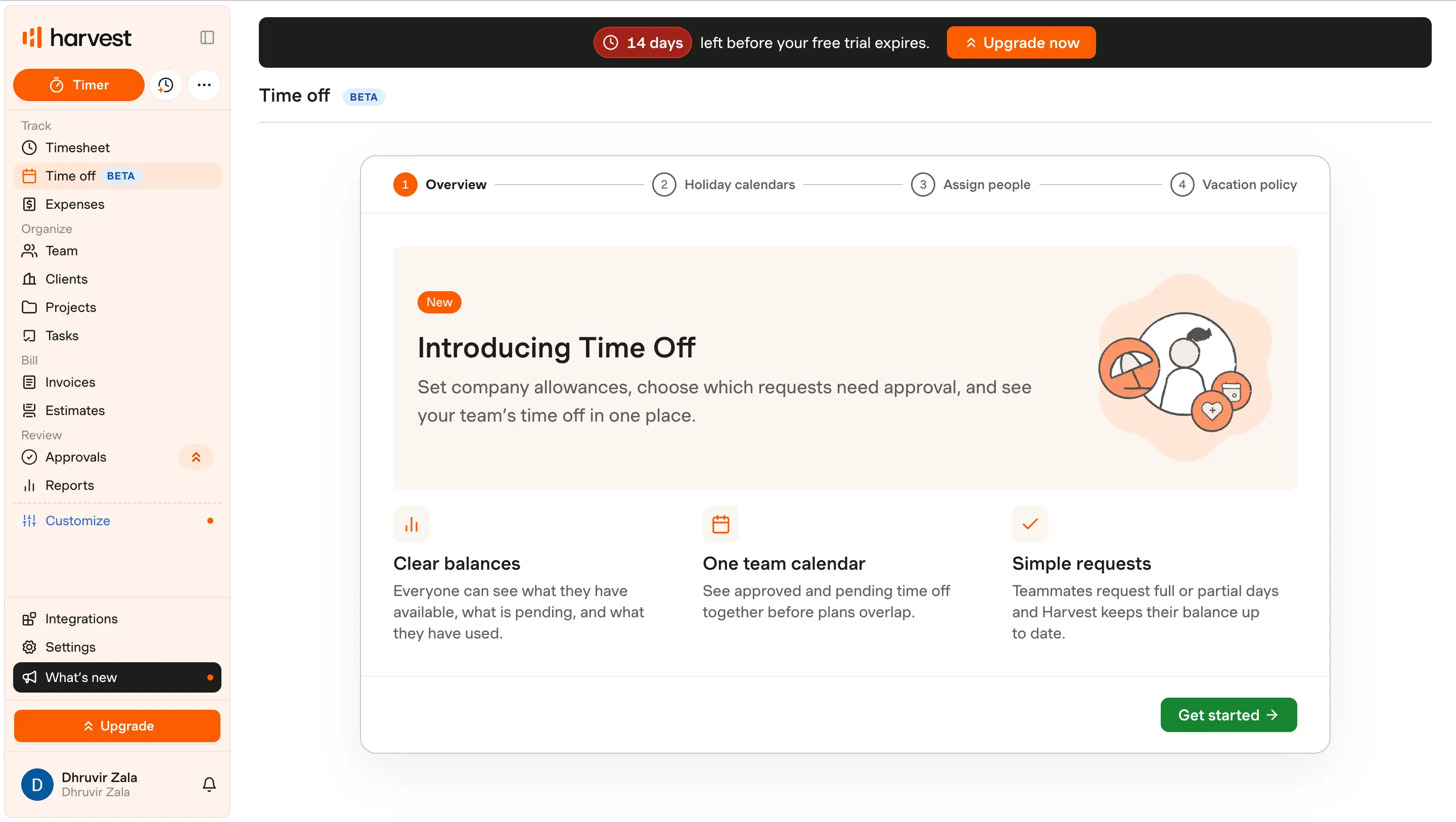
The first screen that told me Harvest is built for agencies, not freelancers, was a Bulk actions page buried in Settings. It lets you reassign tasks, archive a batch of clients, or change how a dozen projects bill, all in one pass. That's not a feature you build for a five-person team.
That maturity doesn't carry over to how hours get logged, though. Harvest is still a start-stop timer at heart, with a day, week, and calendar view for catching up on what you forgot. The mobile app keeps it just as simple: one button, a running timer, nothing else to think about. Simple, yes. Automatic, no. If nobody remembers to hit start, Harvest's fix is an email reminder to fill in a timesheet later, not a way to know what actually happened while you forgot to track it.
Where Harvest earns its reputation is invoicing. Tracked and expensed time turns into a real invoice in a few clicks, PayPal and Stripe handle online payment, and the sync to QuickBooks Online or Xero is a genuine sync, not an export you upload somewhere else. This part feels built by people who've actually had to chase a client for payment.
Profitability reporting is where I have to push back on how Harvest markets itself. The report builder groups by client, project, role, or teammate and stacks whatever metrics you want, which looks exactly like margin by client instead of just hours logged. Except that view sits behind the Enterprise plan, not the Teams plan most agencies will buy. Compare Harvest on the headline price alone, and you'll miss that the feature you came for costs more than advertised.
Integrations are the strongest case for Harvest on this list: Asana, ClickUp, Basecamp, Slack, Deel, Google and Outlook calendars, on top of the accounting tools already mentioned. If your team's tracking habit dies because everyone has to open a second tab, Harvest closes that gap better than almost anything else here.
Harvest is the right call if your team already has decent timer discipline and wants tracking and invoicing under one login.
It's the wrong call if the reason you're reading this article is that your team quietly stopped filling out timesheets three months ago, because nothing here fixes that. I went deeper on this exact tradeoff in my Rize vs Harvest comparison.
Harvest pricing: Free for solo use (1 seat, 2 projects). Teams runs $9 to $11 per seat/month depending on billing, plus usage fees for extra invoices, projects, and clients. Profitability reporting, approvals, and SSO require Enterprise at $14 to $17.50 per seat/month. Every paid plan includes a 30-day free trial.
Best for agencies that want the most usable free plan in this category
Toggl Track (Web, Mac, Windows, iOS, Android)
Toggl Track pros:
- Free plan generous enough for teams up to 5 people
- One-click timer plus a background autotracker as backup
- 100+ integrations, including native Asana, Jira, and Slack
- No screenshots, no keystroke logging, ever
Toggl Track cons:
- Autotracker still needs a manual "copy as time entry" click
- Profitability reports and approvals locked behind Premium
- Basic invoicing, no online payments or recurring bills
- Xero is no longer a native integration; Zapier only
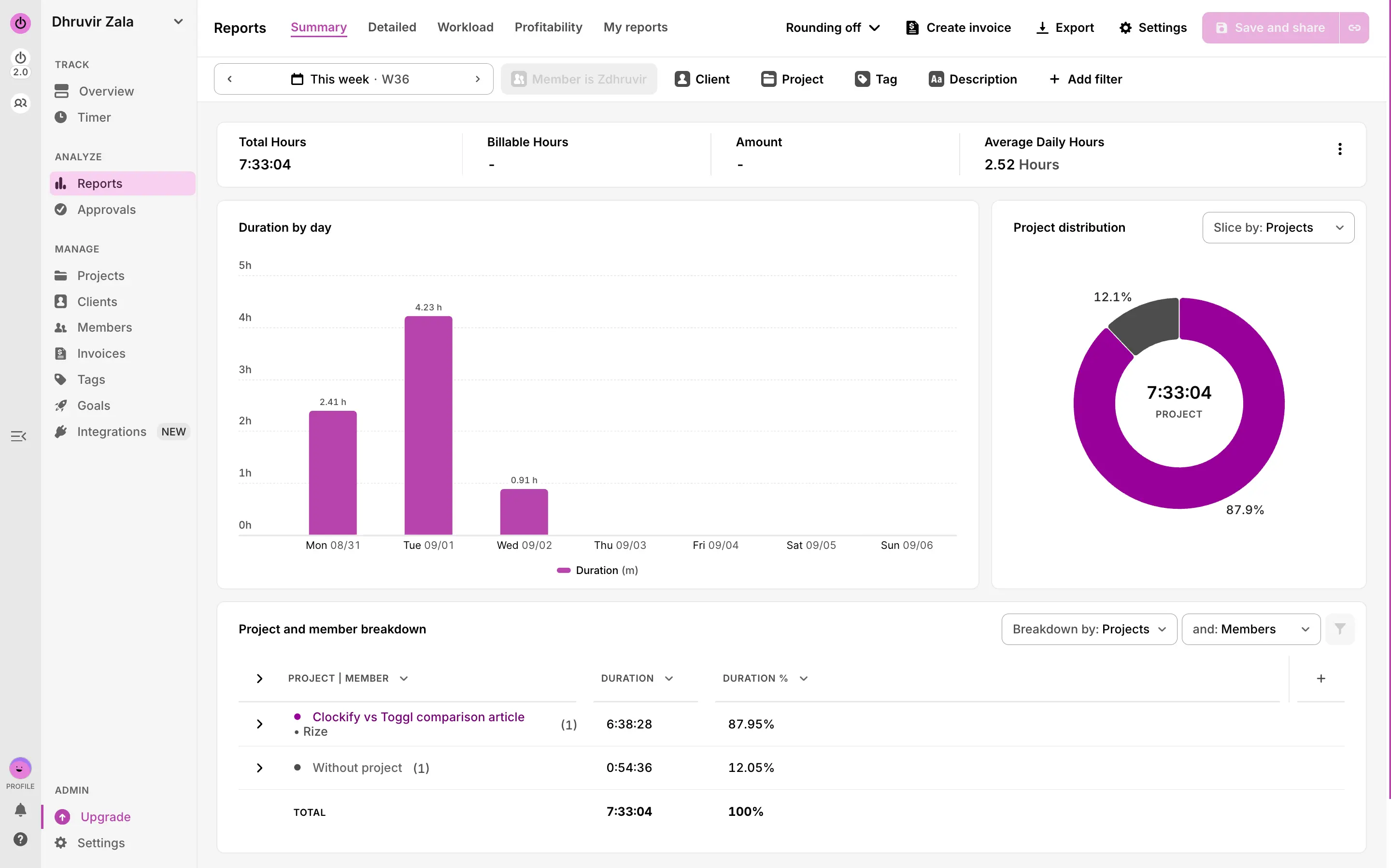
I forgot to start a timer for the better part of an hour while testing Toggl. I expected a blank hole in my report. Instead, I found a pop-up called Activity waiting for me, already sorted by app: mostly the browser, a stretch in my notes app, one line for something I don't even remember opening. All I had to do was click "Copy as Time Entry," and the gap filled itself in. That's Toggl's real answer to the forgotten timer, and it's a good one. It's just not automatic. Somebody still has to notice the gap and make the call.
Starting a timer itself is as simple as a stopwatch. Type what you're doing, pick a project if you remember to, hit the button. That "if you remember to" is doing the heavy lifting. Three client fires burning at once and nobody tags the entry, and you're right back to reconstructing a day from memory, just inside a nicer interface.
Where Toggl earns its keep is the free plan. Five people, unlimited projects and clients, the autotracker, calendar view, and a real report builder, all included at no cost. That's more generous than most tools on this list. The catch shows up the moment you need to prove a client is still profitable. That report sits behind Premium, and so does timesheet approval, the workflow that lets a manager lock a week's entries before they turn into an invoice. I hit a "Premium feature" wall trying to open Approvals on the lower tier. It's dressed up as a feature. It's really a paywall.
Invoicing exists now too, pulling tracked hours into a line-item PDF you can send. Fine for a straightforward time-and-materials bill. It won't collect a payment for you, and it won't run on a recurring schedule, so agencies with real billing needs end up piping the data into QuickBooks (a native sync) or Xero, which has quietly stopped being a native integration and now needs Zapier to bridge it.
Toggl is the right pick if your team already has decent timer habits and just wants a wider tool stack wrapped around it, especially one that plugs into whatever PM tool you already live in. It's the wrong pick if forgetting to hit start is the actual reason you clicked on this article. The autotracker helps, but it still hands the decision back to a person.
I go deeper on exactly where that breaks down for agency billing in my Rize vs Toggl comparison.
Toggl Track pricing: Free forever for up to 5 users, with unlimited projects and clients. Starter runs $9 to $12 per seat/month depending on billing. Premium, which adds profitability reports and approvals, runs $16 to $24 per seat/month. Enterprise pricing is custom, and every paid plan includes a 30-day free trial.
Best for agencies that want the cheapest plan and support for every device
Clockify (Web, Mac, Windows, Linux, iOS, Android)
Clockify pros:
- Free plan works for teams up to 5
- Only tool on this list that runs on Linux
- Native QuickBooks and Xero
- Cheapest paid tier of anything in this roundup
- Kiosk mode for on-site, shift-based teams
Clockify cons:
- "Auto Tracker" still needs a manual click per entry
- Profitability reporting locked behind the Pro plan
- Invoicing not available until Standard
- Interface feels a generation behind its competitors
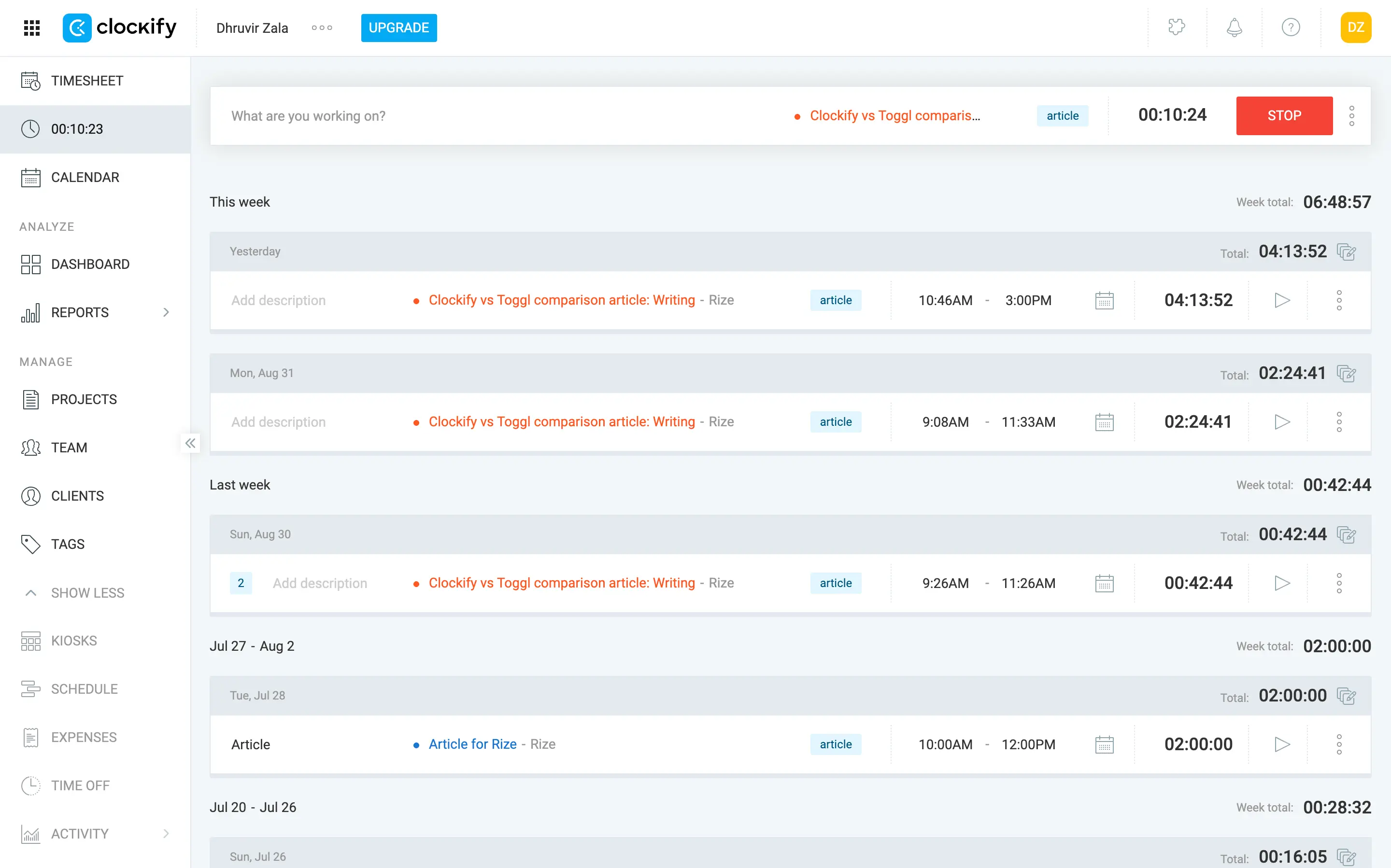
Clockify's timesheet view is a literal grid: projects running down the left, days of the week across the top, empty boxes waiting for a number. If your agency runs on a spreadsheet right now, this will feel less like new software and more like a nicer version of what you already have.
That's not automatically a knock. It's honest about what Clockify is: a manual timer with a lot of admin structure built around it, at a price nobody else here gets close to. I tested it across the web app, the Mac desktop app, and the Chrome extension, and the core mechanics never change: type what you're doing, pick a project, hit start.
Clockify tries to have it both ways with the Auto Tracker, which runs in the background and logs the apps and windows you had open. That sounds like real automatic capture. It isn't. Each app session shows up as its own row, and you still have to click a plus sign next to every single one to turn it into a real-time entry.
Where Clockify wins is coverage. It's the only tool here that runs on Linux, on top of the usual web, Mac, Windows, iOS, and Android apps, plus Chrome, Firefox, and Edge extensions. For an agency with a mixed hardware fleet, a Linux developer, a Mac designer, an account manager living in a browser tab, that breadth is a real reason to pick it.
One more thing worth flagging: Clockify's Pro plan can turn on screenshots, GPS location tracking, and kiosk photo capture, all optional. That's a real fork in the road for how much surveillance your agency wants to signal to its own people, and the answer ends up depending on which admin has access to the settings page, not on the product itself.
I go deeper on this exact tradeoff in my Rize vs Clockify comparison.
If budget is the deciding factor and your team's devices don't all match, Clockify is worth the look.
Clockify pricing: Free forever for up to 5 users. Paid plans run $3.99 to $11.99 per seat/month billed annually (up to $14.99 monthly on Enterprise), across Basic, Standard, Pro, and Enterprise tiers, with a 7-day free trial on any paid plan.
Best for agencies that want time tracking built into the project management tool they already use
Everhour (Web, Mac, iOS, Android)
Everhour pros:
- Timer embeds directly inside Asana, ClickUp, Jira, Trello, and dozens more
- Report builder with 20+ selectable columns instead of a handful of presets
- Time off tracking, approvals, and timesheet locking built for managing a team
- Profitability reporting and invoicing included on the one paid plan, no upsell tier
- Native QuickBooks, Xero, and FreshBooks sync
Everhour cons:
- Still a start-stop timer, just relocated to a better spot
- 5-seat minimum on the paid plan, so a 3-person shop pays for 5
- No Stripe or any built-in way for a client to pay from the invoice
- Desktop app is Mac only
The first thing I noticed when testing Everhour wasn't inside Everhour at all. It was inside Trello, where a small Start button had shown up right next to my task, as if it had always been there. That's the whole bet this tool makes: don't be a tab someone has to switch to; live inside Asana, ClickUp, Jira, Trello, or wherever else it plugs in. Everhour lists more than 40 integrations in total.
What it doesn't skip is the click. I ran a test project inside Everhour for a week, and the honest truth is it's still a manual timer wearing a better outfit. Moving the Start button into the task means people forget it less, sure. But three client fires at once and nobody hits Start is still three client fires at once, and nobody hits Start.
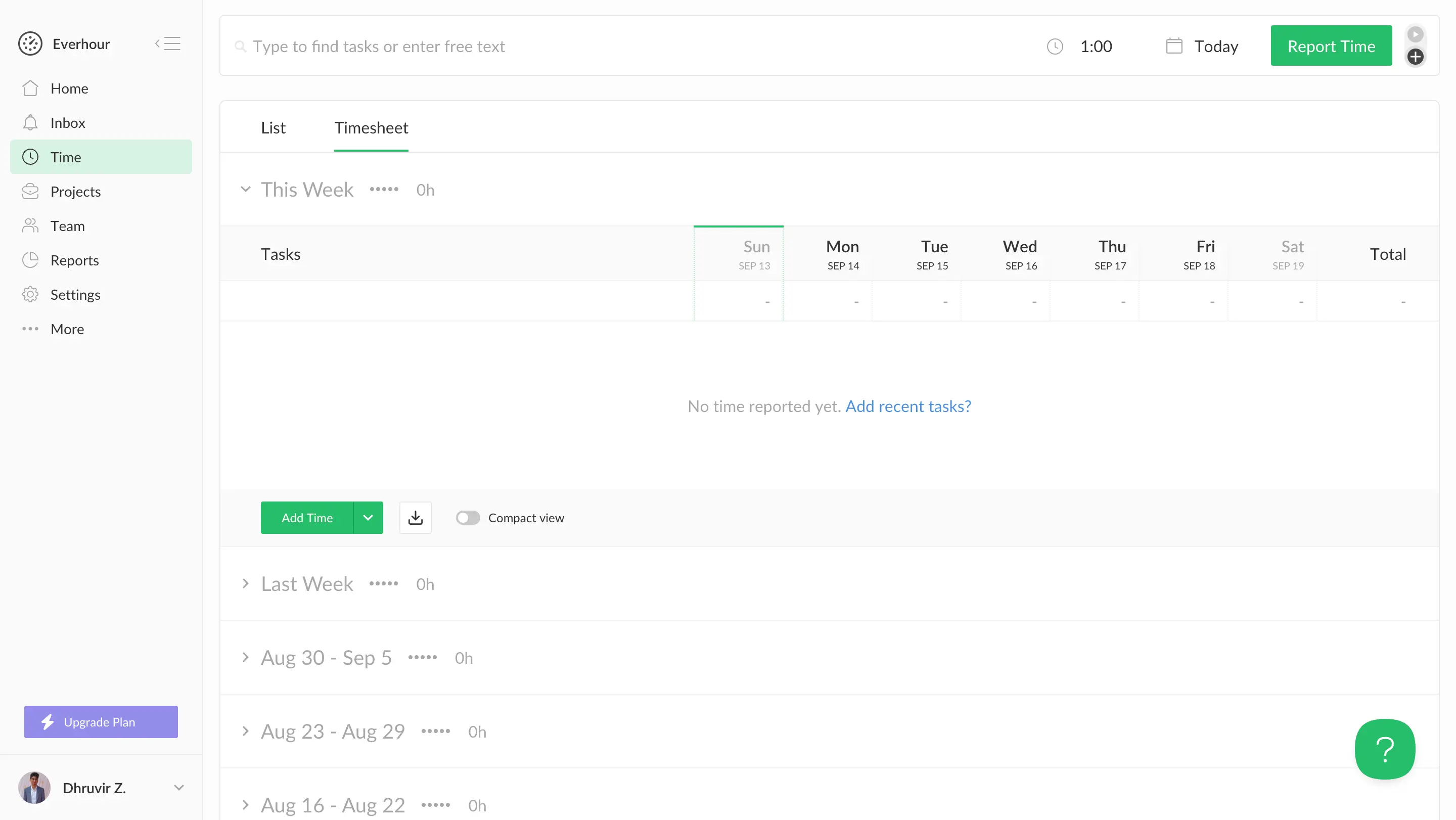
Where Everhour earned real respect is the report builder. You choose from 20-plus columns, billing type, budget period, client, whatever matters, instead of picking from a fixed set of templates. Better still, none of it sits behind a pricier tier. Team is Everhour's only real paid plan, and profitability reporting, invoicing, and time-off tracking come switched on by default.
Invoicing is where I'd temper expectations. Building one off tracked hours takes a few clicks, and pushing it to QuickBooks or Xero works cleanly. What's missing is a way for the client to pay from it. There is no Stripe and certainly no payment link, just a PDF and a polite thank-you note.
The team side is built for agencies with real HR overhead: PTO requests, approvals, and the ability to lock a week's entries before payroll runs. That's also why the 5-seat minimum stings. A 3-person shop still pays for 5 seats just to unlock a single integration.
Everhour is the right call if your team already lives inside a PM tool and wants billing and reporting layered on top without leaving it. Learn more about how Everhour compares to our fully-automatic tracker in my Rize vs Everhour comparison.
Everhour pricing: Free for up to 5 seats. Team runs $8.50 to $10 per seat/month depending on billing, with a 5-seat minimum and every feature included, no add-on tiers.
Best for agencies that want proof of work from outsourced or offshore teams
Time Doctor (Web, Mac, Windows, Linux, iOS, Android)
Time Doctor pros:
- Screenshots and activity levels give outsourced teams provable proof of work
- Runs on Windows, Mac, Linux, Chrome, and mobile, the widest platform reach on this list
- Payroll-ready reports with direct payouts through Gusto, ADP, PayPal, Wise, and Deel
- 60+ integrations including Asana, Jira, ClickUp, and Basecamp
- Unusual Activity AI flags mouse jigglers and clicker cheats before they hit payroll
Time Doctor cons:
- Still a manual timer; a task gets picked from a list before tracking starts
- Screenshots and activity scoring read as surveillance, not trust
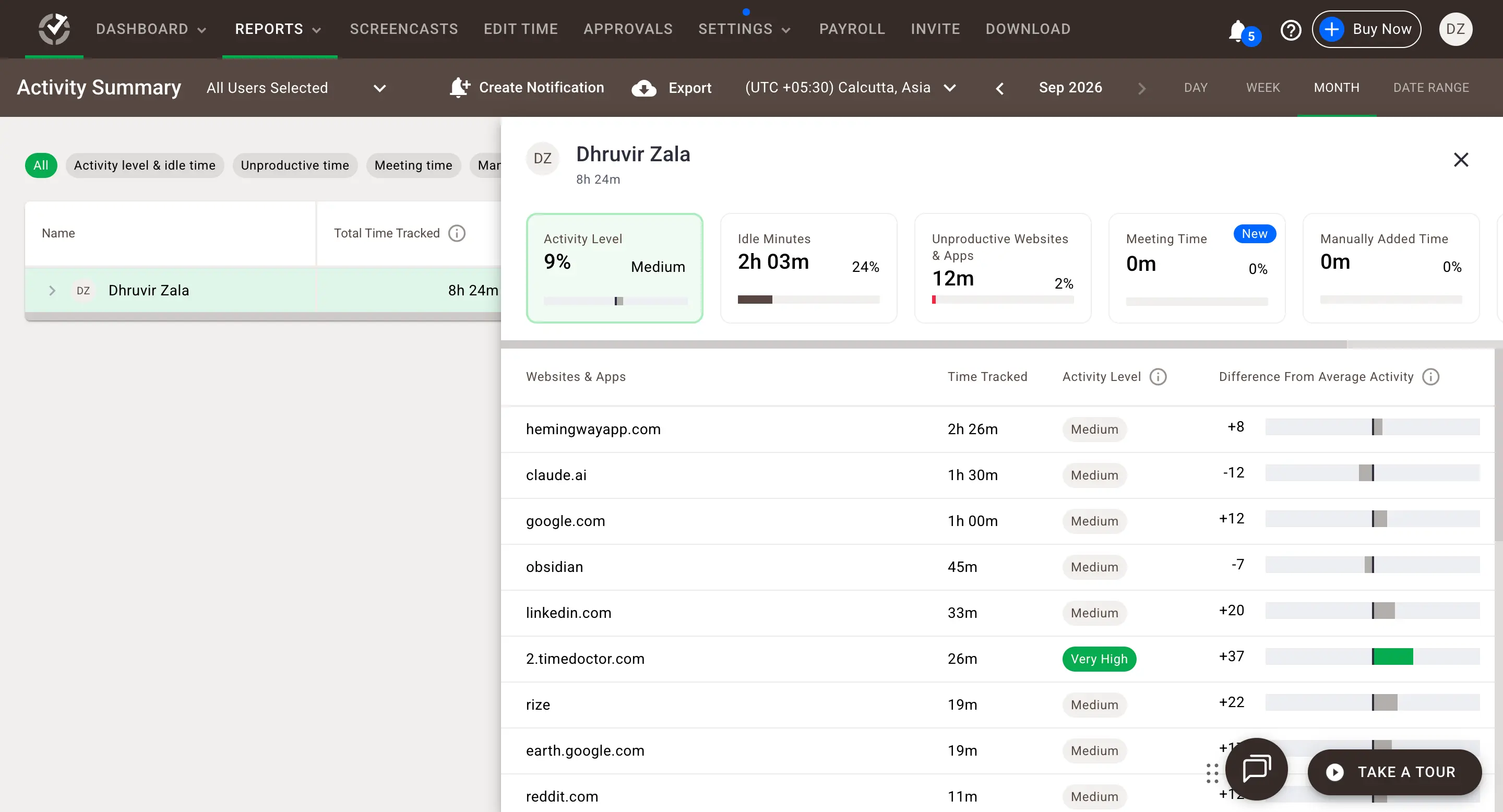
Time Doctor scores how hard you're working by how much your mouse moves. Watch the Activity Level meter during a real heads-down hour, writing, reading a brief twice, thinking before typing, and it barely registers, because thinking doesn't shake a cursor the way clicking through a spreadsheet does.
Time Doctor measures input, not output, and any agency work that looks like sitting still (strategy, copy, a design review) will occasionally get flagged as barely productive while it's actually the best hour of someone's week.
The tracking underneath is still a manual timer. Open the desktop app, and you pick a project, then a task, from a list before anything starts logging. Same click-first structure as Harvest or Clockify, with a screenshot camera on top. Those screenshots fire on a set interval by default on every paid tier, and a separate settings page lets an admin mark specific websites and apps as Productive, Neutral, or Unproductive, company-wide or per person.
Where it does earn a look is reach. Sixty-plus integrations cover Asana, Jira, ClickUp, and Basecamp through a Chrome extension, and it's the only tool here running natively on Linux, Windows, Mac, and both major mobile platforms at once.
Time Doctor is the right call if your agency leans on offshore or contract talent and screenshots are a trade you're willing to make for proof of work. It's the wrong call if your team is in-house and would rightly bristle at being rated Productive for opening Slack.
I go deeper on this exact trade-off in my Rize vs Time Doctor comparison.
Time Doctor pricing: No free tier. Basic runs $6.70 to $8 per seat/month, Standard $11.67 to $14, and Premium $16.70 to $20, depending on annual or monthly billing, plus Enterprise at custom pricing. Every plan starts with the same 14-day free trial of the full Premium tier.
How to choose the right agency time tracking tool?
Be honest with yourself about why you clicked on an article like this one in the first place. It's rarely "I want a nicer timer." It's usually closer to "a client questioned an invoice and I couldn't fully defend the number," or "I know for a fact Friday's hours were logged from memory."
Every tool above, even the good ones, is still built around someone remembering to press a button. Harvest just makes that button prettier. Everhour just moves it closer to the task. Time Doctor watches you to make sure you pressed it. None of them fix the actual failure point, which is the moment nobody hits start.
That's the whole case for Rize. It doesn't compete with the other five on features. It skips the premise they're all built on. You open your laptop, and it's already working, tagging time to a client based on what app you had open, so the hours in your invoice match the hours you worked instead of the hours someone remembered. And because it's tracking in the background instead of taking screenshots or scoring your mouse movement, your team isn't trading their privacy for your accuracy. You get both.
Try Rize for 7 days. Do one normal, chaotic workday with it running, and then just look at what it caught without you doing anything. That's the whole pitch, and it's a lot more convincing on your own calendar than in a paragraph like this one.
Skip the manual timer
Rize tracks your agency's work automatically and tags it to the right client in the background. Try it free for 7 days — no credit card required.
Start Free TrialRelated reading
- Rize vs Harvest
- Rize vs Toggl for agencies
- Rize vs Clockify
- Rize vs Everhour
- Rize vs Time Doctor
- Agency profitability tracking guide
Start tracking time automatically
Join thousands of professionals who stopped guessing where their time goes. Free for 7 days.
“Rize has been a no-brainer for me.” — Ali Abdaal Read more →