Clockify earned its reputation honestly. The free plan was generous enough that entire agencies ran their business on it, the interface didn't need a manual, and even free users got 80+ integrations and real human support instead of a chatbot. For a decade, "unlimited seats" was part of the pitch.
Then, in April 2026, Clockify capped the free plan at 5 active users. If you're reading this because a "user limit exceeded" message just showed up on your dashboard, you already know exactly why you're here. That's the fresh reason. It's not the only one.
Even before the cap, Clockify's free Auto tracker only worked for one person at a time; it never fed into team reports, so accuracy still came down to someone remembering to hit start. The mobile app shows up as slow or buggy across enough reviews to count as a pattern. And invoicing, billable rates, and approvals all sit behind a paid tier, which stings if you assumed a "time tracker" would let you bill a client without an upgrade first.
None of that makes Clockify a bad tool, and I'm not going to pretend it does. If you're running 5 people or fewer and all you need is a timer, projects, and clean PDF exports, the free plan still does the job.
For everyone else, the seven alternatives below were tested against the actual reasons people leave Clockify: the seat cap, the manual tracking, the mobile app, the paywalled invoicing, and more.
What makes the best alternative to Clockify?
Every alternative on this list earns its spot for one reason: it fixes something specific that's broken for people leaving Clockify. Before you compare seven tools feature by feature, here's what "better" needs to mean.
- Automatic tracking that reaches your team's reports. Clockify's free Auto tracker only shows data to the person who ran it. A real upgrade needs to capture time automatically and roll it straight into reports that your whole team and your clients can actually see.
- Pricing that doesn't punish growth. The moment you cross five people, the alternative needs either a free tier generous enough to matter or per-seat pricing that stays sane well past 15 users.
- Invoicing you don't pay extra to unlock. If billing a client today means exporting a CSV and building an invoice by hand, the switch only counts if invoicing and billable rates come standard, not gated behind a mid-tier upgrade.
- A mobile app you can trust (optional). If you're the one person responsible for remembering to hit start, a slow or crashing app is a dealbreaker. Test it on your own phone before you commit.
- Data you actually own. Clockify already changed its free plan rules once. The strongest alternatives let you export everything or self-host outright, so a future pricing decision can't strand you again.
Keeping all of that in mind, I tested each of the seven alternatives below against these exact criteria. Here's what held up.
The best Clockify alternatives at a glance
If you already know what's broken for you — seat cap, manual tracking, mobile app, paywalled invoicing — this table gets you to the right section faster than reading all seven end-to-end.
| Tool | Best for | Standout feature | Pricing |
|---|---|---|---|
| Rize | Automatic, privacy-first time tracking | Tracks every app, tab, and document automatically | $12.99 to $49.99/mo individual; team plans from $29.99/seat/mo (annual), 2-seat minimum |
| Toggl Track | A familiar, low-risk switch | The same basic idea as Clockify, done with a cleaner interface and native calendar view | Free up to 5 users; Starter $9/seat/mo annual ($12 monthly) |
| TimeCamp | Unlimited free seats | No user cap on the free plan, and never has been | Free, unlimited users; paid plans $3.49 to $6.99/seat/mo |
| Harvest | Built-in invoicing and online payments | Invoicing and online payments ship standard, even on the free plan | Free for 1 seat; Teams $9/seat/mo annual, plus usage-based fees |
| Hubstaff | GPS tracking and screenshot monitoring | GPS geofencing clocks a field team in and out automatically | $4.99 to $12/seat/mo (Enterprise custom); free plan is 1 seat only |
| Everhour | Tracking time inside Asana, ClickUp, or Jira | Timer embeds directly inside the PM tool your team already has open | $8.50 to $10/seat/mo, 5-seat minimum |
| Solidtime | Self-hosting your own data | Self-host it yourself for free, forever, with no user cap at all | Free for 1 cloud user, unlimited if self-hosted; Professional €8 to €9/seat/mo |
Full breakdown for each one, including what I actually tested, starts below.
1. Rize — best Clockify alternative for automatic, privacy-first time tracking
Best for most people leaving Clockify who want their timesheet to fill itself, and for teams that want accurate billable data without asking anyone to remember a timer. Available on macOS and Windows.
Rize pros:
- Tracks every app, tab, and document automatically, no timer to start or stop, ever
- AI drafts the time entry description for you and asks you to accept or reject it
- Auto-categorizes time by client, project, and activity with zero manual tagging
- Never takes a screenshot or logs a keystroke, only reads app names, window titles, and URLs
- Built-in focus timer, distraction blocking, and burnout nudges live in the same app
- The MCP server lets you ask Claude or ChatGPT questions about your own tracked time
- Generates client-ready reports and invoices straight from tracked hours
Rize cons:
- No permanent free plan, just a 7-day trial before you have to pay
- Mac and Windows only, no web app, no phone app, Linux is "coming soon"
- Costs more than Clockify
- No kiosk mode or GPS, so field teams clocking in on-site should look elsewhere
As someone who's been working remotely since COVID, I've used Rize every day since May 2022. I watched it grow from a personal focus tracker into what I'd now call the most complete zero-touch time tracker to exist, for both individual productivity and team billable tracking.
For most people asking what should replace Clockify, Rize is my default answer. The exception is when you need one specific niche feature, like GPS, kiosk mode, or 80-plus integrations, that only a certain tracker on this list actually has.
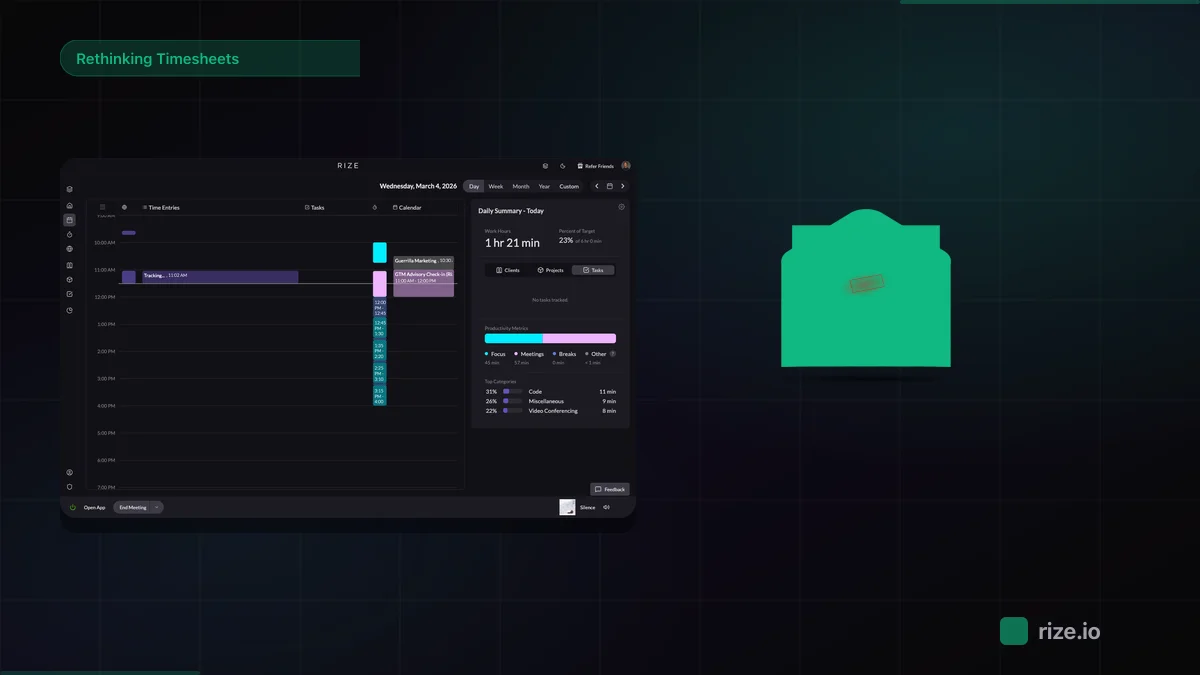
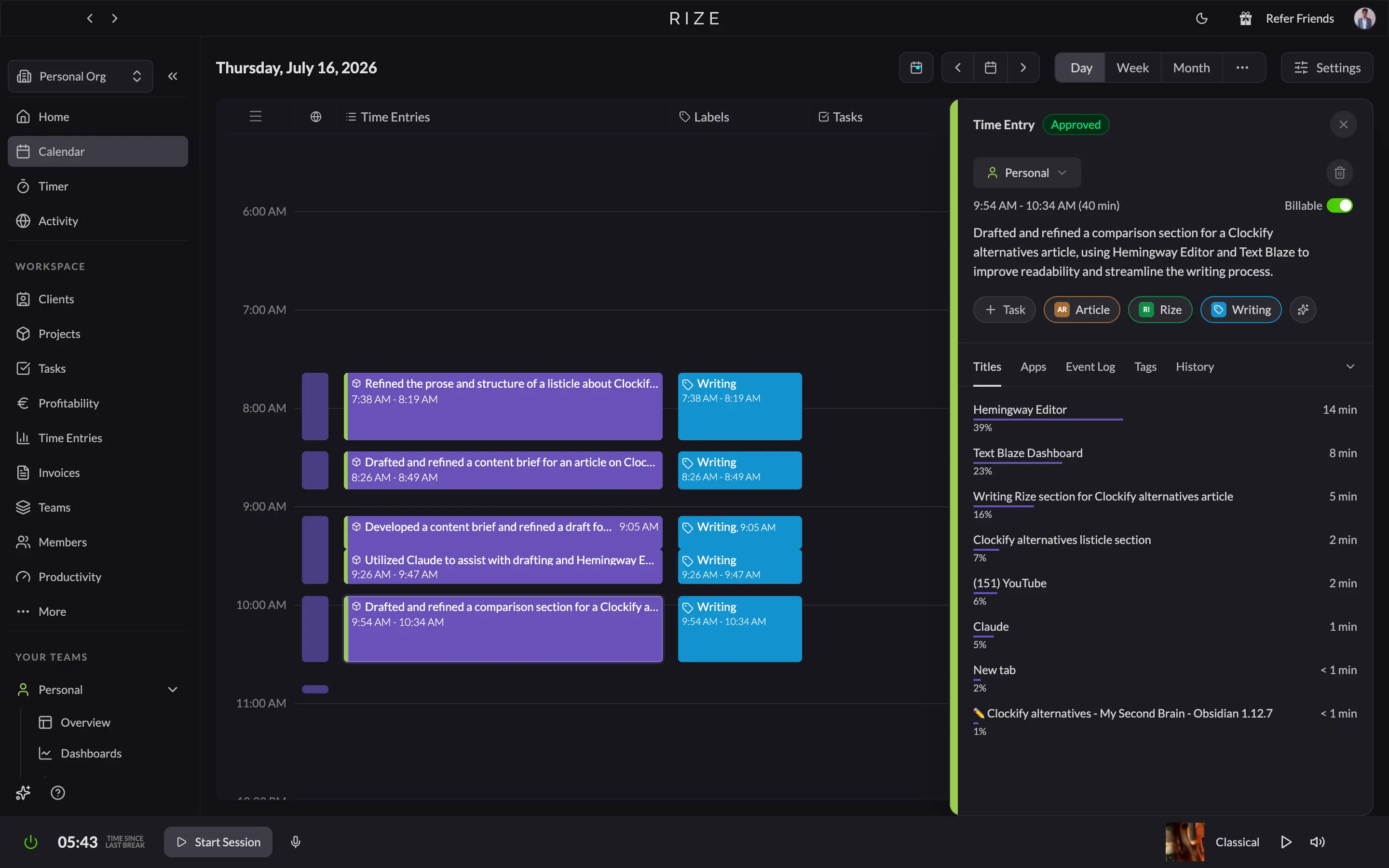
Here's what "automatic" looks like day to day. While drafting the intro to this article, I never touched a timer. Rize logged the session on its own, then its AI wrote the entry description for me: it named the article I was working on, credited Hemingway Editor for the readability pass and Claude for the drafting help, and dropped it into a review panel with one button to accept and one to reject. Clockify's free Auto tracker gets you a raw list of app names you still have to turn into an entry by hand. Rize gets you the entry.
The categorization goes deeper than a timer ever could. My Activity tab broke one work session down to 26% in Hemingway App, 15% in Claude, and even 3 minutes on Clockify itself while I was researching competitors for this very article, all without me tagging one thing. It scored the day a blunt 62.2, "Mediocre." No sugarcoating. On a slower afternoon, it named my top interruptor down to the exact site, YouTube, 25 minutes, so I knew precisely what to block next time.
On the team side, that same automatic capture rolls straight into a manager's dashboard. Clockify shows you what people typed into a timesheet. Rize shows you what people actually did, then lets each person approve their own entries before a manager ever sees them, which solves the trust problem screenshot monitoring creates without asking anyone to give up their privacy.
Rize runs on Mac and Windows only, so if part of your team is on Linux or needs a phone app for field work, that's a real gap. If your team clocks in from a job site, skip ahead to the Hubstaff section. But if the problem that brought you here is a teammate forgetting to start a timer for the third time this month, that's exactly the problem Rize exists to remove.
I ran a full two-week head-to-head between the two, same client work, same days, tracked side by side. For the complete breakdown on interface, integrations, and the pricing math, read the full Rize vs Clockify comparison.
Rize pricing: Rize has a 7-day trial on every tier. Individual plans run $12.99 to $49.99 per month, depending on how much AI you want, from Basic to Max. Team plans start at $29.99 per seat per month billed annually ($39.99 monthly), with a 2-seat minimum. Annual billing cuts up to 25% off any plan.
Let your timesheet fill itself
Try Rize free for 7 days. Watch it auto-create and file your time entries from your actual work — no timers, no manual entry. No credit card required.
Start Free Trial2. Toggl Track — best Clockify alternative for a familiar, low-risk switch
Best for teams that mostly want Clockify's interface complaints fixed. Available on Web, Mac, Windows, iOS, and Android.
Toggl Track pros:
- Free plan works well for teams of 5 or fewer, with unlimited tracking, projects, and clients
- The cleanest, least cluttered interface on this list, easy to get a whole team using
- Native Google and Outlook calendar view turns meetings straight into logged time entries
- Generates simple PDF invoices from your reports, even on the free plan
- 100+ integrations via browser extension, plus native Slack, Asana, and QuickBooks
Toggl Track cons:
- Free plan is capped at 5 users too now, so it won't fix the exact problem that likely brought you here
- The background "Timeline" tracker logs your activity, but you still have to manually turn each block into a time entry
- Starter jumps to $9/seat ($12/month on monthly billing), more than double Clockify's cheapest paid tier
- Native Jira and Salesforce sync require the $20/seat Premium plan
If you're leaving Clockify because the interface feels dated and table-heavy, Toggl solves that in about five minutes: the timer, the calendar view, and the reports all feel like they were built in the same decade. But if you're here because Clockify just charged you for the sixth user you used to get free, know this before you switch. Toggl's free plan caps out at 5 users, too. You'd be trading one ceiling for a nearly identical one, just with a nicer coat of paint on top.
The other thing worth knowing going in: Toggl's Timeline feature, the closest thing it has to automatic tracking, logs which apps and websites you had open, but it stops short of actually creating a time entry for you. You still have to open it and manually assign each block to a project. It's a better babysitter than Clockify's solo-only Auto Tracker, but it's still babysitting. If forgotten timers, not just Clockify's UI, are the real problem you're trying to solve, it's worth seeing how Toggl compares to Rize's fully automatic tracking before you commit to another manual tool.
For agencies specifically, the calculus is mostly billable-hour math. Toggl is cheaper per seat than most of the tools on this list, but every minute someone forgets to log gets billed at zero. We ran those numbers directly in our Rize vs Toggl for agencies breakdown, worth a look if that tradeoff affects your margins.
Where Toggl legitimately beats Clockify: reporting depth, native Slack and calendar integrations, and a UI your whole team will actually want to open. If none of Clockify's other complaints apply to you (the new seat cap, the manual tracking) and you just want the same basic idea done better, Toggl is the lowest-risk switch on this list.
Toggl Track pricing: Toggl Track's free plan covers up to 5 users with unlimited tracking, projects, and clients, the same ceiling as Clockify now has. Starter runs $9 per seat per month, billed annually ($12 monthly) and unlocks billable rates, project estimates, and templates. Premium jumps to $14 per seat per month annually (about $20 monthly) and adds profitability reports, timesheet approvals, and native Jira and Salesforce sync.
3. TimeCamp — best Clockify alternative for unlimited free seats
Best for teams over 5 who need to escape the seat cap without paying a cent. Available on Web, Mac, Windows, Linux, iOS, and Android.
TimeCamp pros:
- The free plan is unlimited for users and projects
- The newer AI Time Tracker (desktop app) builds a full activity timeline and drafts day and week recaps through an Assistant tab
- Invoicing, attendance, and time off unlock at the cheapest paid tier, $3.49 a seat
- Attendance calendar, resource planner, and a real-time team dashboard all live in the same account
TimeCamp cons:
- AI Time Tracker is noticeably newer and less refined than Rize's, no percentage breakdowns or productivity scoring, just an activity log and a chat assistant
- The AI Time Tracker's auto-drafted entries and Assistant run on token billing, about $6 a user a month, once your trial credit runs out
- Keyword-based auto tracking misfires on ambiguous terms and needs the occasional manual cleanup
- More tabs and views to learn than Toggl's cleaner layout, closer to Clockify's density than a fresh start
TimeCamp answers the headline problem in this article without qualification. The free plan has no user cap and never did. Unlimited users, unlimited projects, forever, is still the actual pitch. If the only reason you're reading this is a seat-limit email from Clockify, TimeCamp fixes that on day one and costs nothing.
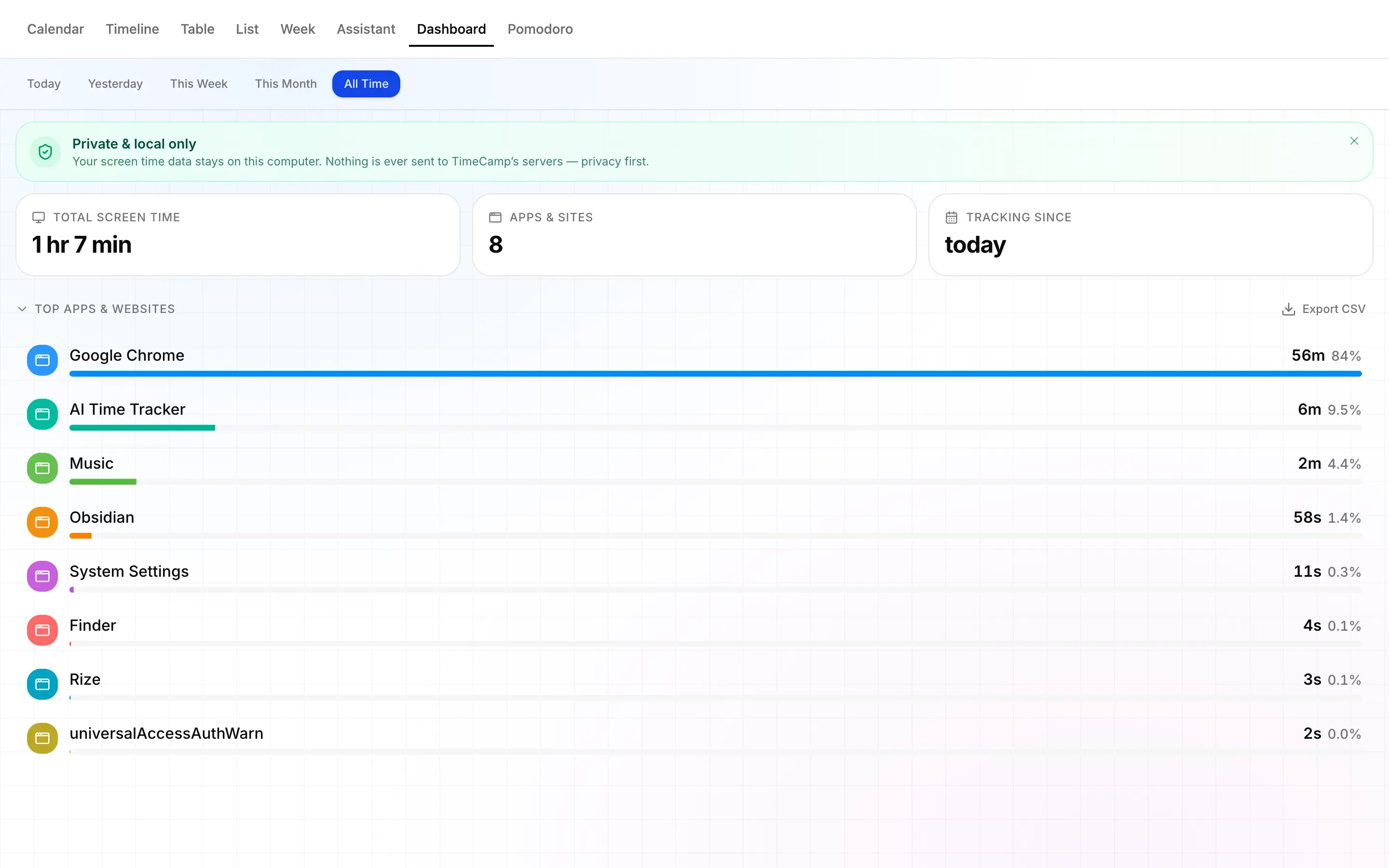
I ran TimeCamp's newer AI Time Tracker while writing this exact section, the same way I tested Rize earlier in this article. A small floating timer sat in the corner of my screen tracking a task named "Clockify alternatives," and it quietly logged what I'd actually been doing: which windows, which sites, even specific browser tab titles, 24 separate activities by the time I checked, all without me tagging one of them by hand. That timeline fed straight into the same account's full Timesheet, where the entry showed up ready to submit for approval.
Here's how that stacks up against Rize. If AI quality is genuinely why you're reading this, Rize wins, and it isn't close. Rize's automatic tracking has been the entire product before anyone else. It breaks a single session into exact percentages by app and client, scores your whole day on a blunt numeric scale, names your biggest time-sink down to the specific site and the minutes lost, and lets you ask Claude or ChatGPT questions about your own tracked time through its MCP server.
TimeCamp's AI Time Tracker hands you a timeline of what happened, not a scored analysis of it. Its Assistant is useful, just for a different job: turning a week of tracked hours into a status update you'd otherwise write by hand, not helping you understand your own focus patterns.
Where TimeCamp pulls ahead of Clockify is that everything is wrapped around the timer. An Assistant tab can generate a daily recap or a Friday-at-5 pm weekly report on a schedule, so you're not manually building status updates for clients. A built-in Pomodoro timer, an attendance calendar, a resource planner, and a real-time dashboard with a top-workers leaderboard all live in the same account that a small agency owner is already paying for.
TimeCamp pricing: Free covers unlimited users and projects forever. Paid plans range from $3.49 to $6.99 a seat per month, billed monthly, scaling from invoicing and attendance up to full automatic tracking, screenshots, and approvals. The AI Time Tracker runs on separate token billing on any plan, roughly $6 a user a month, past your trial credit.
4. Harvest — best Clockify alternative for built-in invoicing and online payments
Best for agencies and client-service teams that need tracked hours to become a paid invoice without a second tool. Available on Web, Mac, Windows, iOS, and Android.
Harvest pros:
- Invoicing, online payments, and expense tracking come standard on every plan, including free
- Custom report builder groups by client, project, role, department, or teammate, with metrics you choose yourself
- New Bulk Actions panel updates rates, project assignments, and client status for your whole team in one pass
- Mobile app mirrors the desktop exactly, same projects, same client tags, nothing missing
- 70+ integrations, including Asana, Slack, QuickBooks, Xero, and Jira
Harvest cons:
- No automatic tracking of any kind, every entry still depends on someone clicking start
- The 2025 acquisition by Bending Spoons added usage-based fees on top of the per-seat rate
- Free plan caps at 1 seat and 2 projects, tighter than Clockify's free tier
- Profitability reporting and timesheet approvals sit behind the pricier Enterprise tier
- Forecast, Harvest's resource-scheduling tool, is a separate paid add-on, not bundled in
Harvest solves a different problem than the rest of this list. It isn't chasing automatic tracking or a bigger free tier; it's built to turn tracked hours into an invoice a client will actually pay. If the real reason you're leaving Clockify is that invoicing sits behind a paid tier, Harvest is worth a look, since invoicing ships on every plan, free included.
I ran the same two-week head-to-head with Harvest that I ran with Rize: same client work, same days, logged side by side in Harvest's calendar-view timesheet. The Invoices tab is where it earns its reputation. Overview, Recurring, Retainers, and Uninvoiced sit as separate tabs, and I built a draft invoice from tracked hours in under two minutes, payable directly through Stripe, PayPal, or ACH.
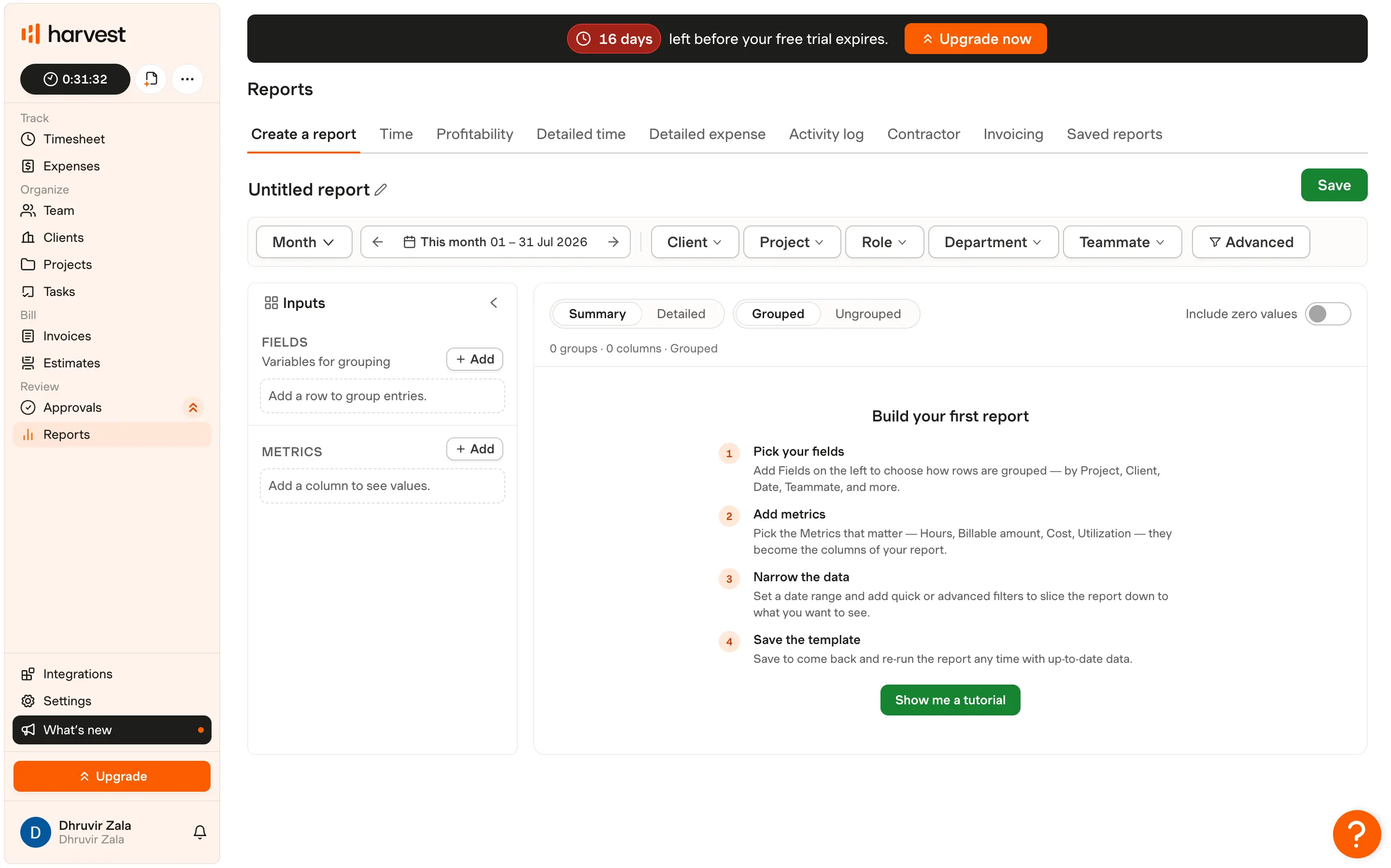
The reporting runs deeper than I expected. The Reports tab isn't one canned report; it's a builder: pick which fields group your rows (client, project, role, teammate), choose your metrics (hours, billable amount, utilization), then flip between summary and detailed views.
One thing worth knowing before you commit. Bending Spoons, the company behind Evernote and WeTransfer, acquired Harvest in 2025, and pricing has since split into a per-seat base rate plus usage-based fees on invoices, projects, clients, and tasks. Harvest doesn't publish those per-unit rates, so the pricing page shows a floor, not your actual bill.
If Clockify just changed the rules on your free plan without warning, it's worth knowing Harvest's new parent company has a pattern of doing the same. That's not a dealbreaker; thousands of agencies still run on Harvest happily, but it belongs in your decision, not a footnote after you've signed up.
Rize and Harvest solve different halves of the same problem: capturing time accurately and turning it into a paid invoice. See how Rize compares with Harvest for the full breakdown.
Harvest pricing: Free covers 1 seat and 2 projects with invoicing included. Teams runs $9 per seat per month annually ($11 monthly). Enterprise runs $14 per seat per month annually ($17.50 monthly). Both paid tiers also charge usage-based fees on top of the seat price for invoices, projects, clients, and tasks.
5. Hubstaff — best Clockify alternative for GPS tracking and screenshot monitoring
Best for field and deskless teams that need GPS clock-in and proof-of-work monitoring. Available on Web, Mac, Windows, Linux, iOS, and Android.
Hubstaff pros:
- GPS creates job sites that clock a field team in and out automatically
- Screenshots can be blurred, disabled, or capped to certain hours per project, not all-or-nothing
- 20+ built-in reports cover approvals, expenses, work breaks, and a full audit log
- Payroll pushes approved timesheets straight into Wise, PayPal, Payoneer, Deel, or Gusto
Hubstaff cons:
- The free plan is one seat, the owner only, so it never works for an actual team
- GPS (Locations) and Insights cost extra on every plan except Enterprise
- Every paid plan has a 2-seat minimum
- Activity percentages and screenshots still read as monitoring, just with better controls around them
If Clockify's Pro-tier monitoring, GPS, screenshots, and a timer your team can't skip was the feature you actually wanted, Hubstaff is built for that job, with more configuration than Clockify gives you.
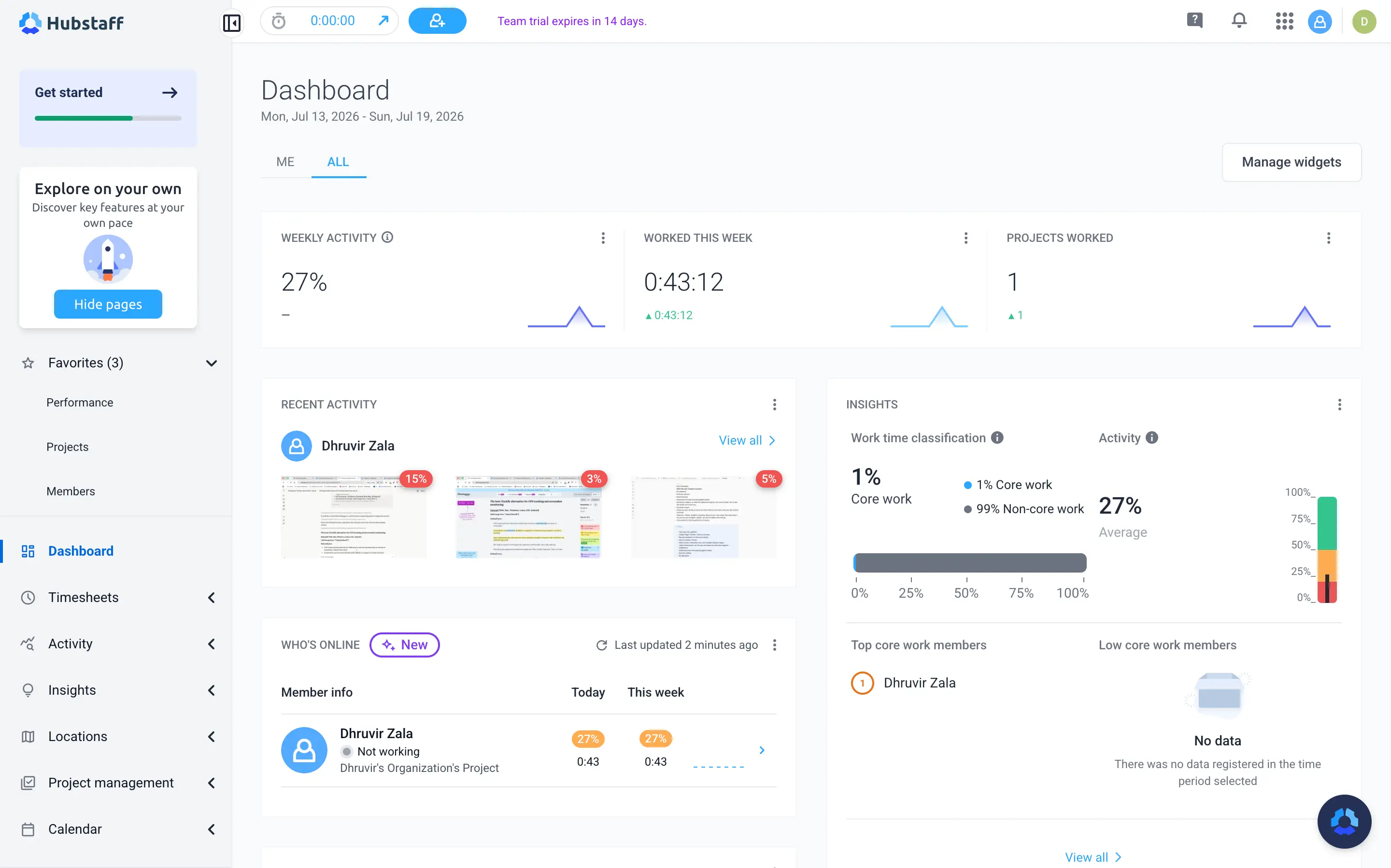
I ran Hubstaff's 14-day trial and tracked a short session while writing this. The dashboard logged 0:01:31 worked at 71% average activity, Hubstaff's blend of mouse and keyboard frequency, never keystrokes. The screenshot told me more: one image per 10-minute block, shown as a small thumbnail, paired with the activity score for that exact window. You can blur screenshots permanently or cap them to certain hours per project, a dial Clockify's Pro tier doesn't have.
GPS is why Hubstaff exists for Clockify's former Pro audience. Turn on Locations and the mobile app drops a pin, tracks a route to a job site, and clocks a crew in the moment they cross a geofence. Clockify has nothing like it.
Payroll is where Hubstaff pulls furthest ahead: approve a timesheet and push it straight to Wise, PayPal, Payoneer, Deel, or Gusto.
Hubstaff pricing: $4.99 to $12 per seat per month depending on plan and billing cycle, with Enterprise custom-priced, plus paid add-ons for GPS and deeper insights. Free plan covers 1 seat only.
6. Everhour — best Clockify alternative for tracking time inside Asana, ClickUp, or Jira
Best for teams that already live inside a project-management tool and want the timer to live there too. Available on Web, Mac, iOS, and Android.
Everhour pros:
- Timer embeds directly inside Asana, ClickUp, Jira, Trello, Linear, and 40-plus other tools
- Budget alerts trigger at 75%, 90%, and 100%, and timers can auto-stop once a project runs dry
- Every task shows its time estimate against actual hours logged
- Invoicing, expenses, time off, and resource planning all ship on the one paid plan
- Seven prebuilt report dashboards (budget, costing, payroll, utilization), ready on day one
Everhour cons:
- Free plan blocks every integration, so free really means solo and standalone only
- Team plan has a 5-seat minimum, so a 2 or 3-person shop still pays for 5
- No true automatic tracking, someone still has to remember to click Start
- The desktop app is Mac only; Windows users are limited to the browser extension
Everhour is solving a different problem than everything else on this list. It is trying to disappear inside the app your team already has open.
Where Clockify, Toggl, and TimeCamp all ask your team to remember a separate login and a separate tab, Everhour's timer sits as a small control right next to the task, inside Asana, ClickUp, Jira, Trello, Basecamp, Linear, Monday, Notion, or GitHub. Nothing else on this list is built around that idea.
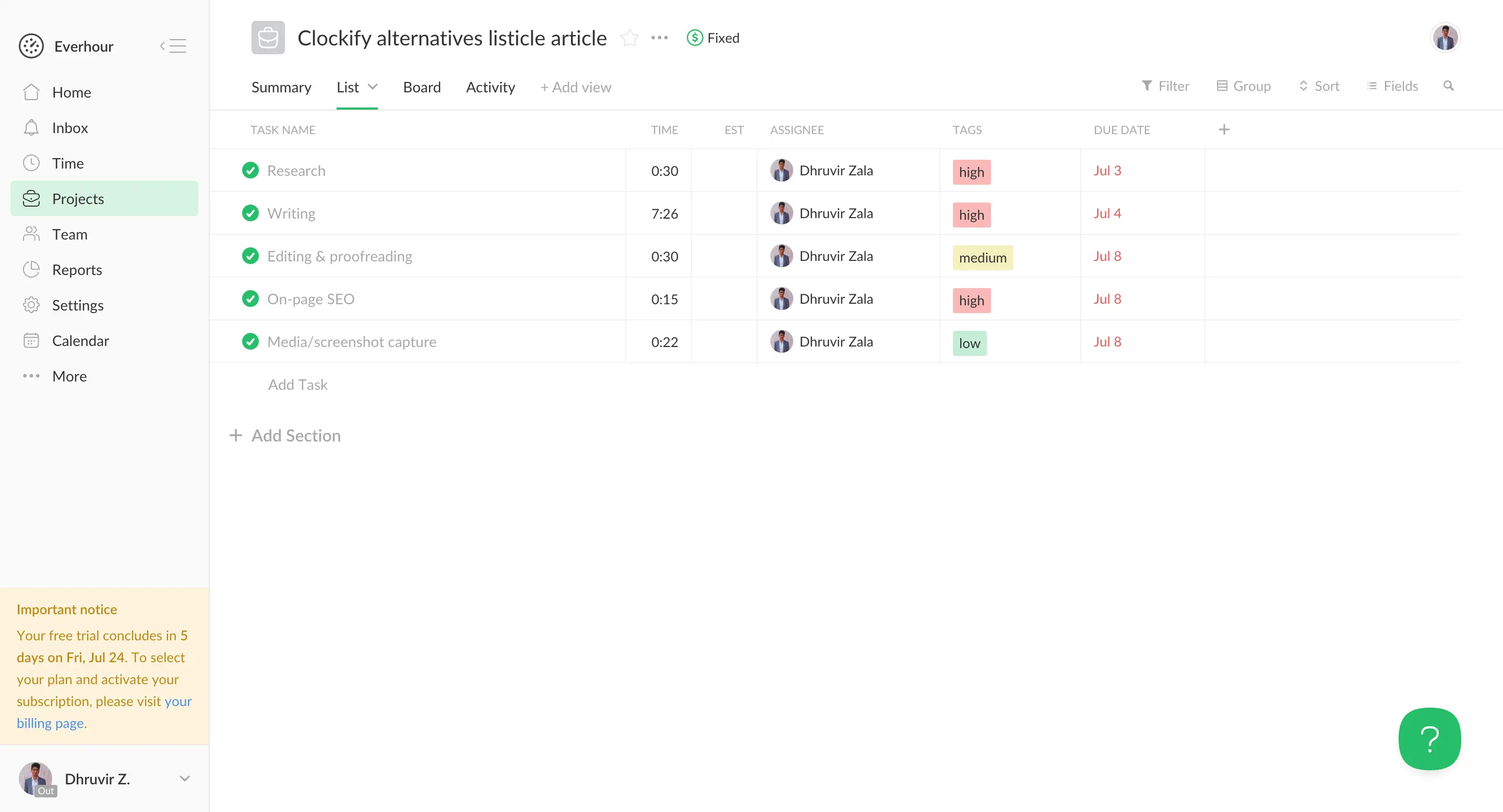
I ran Everhour's 14-day trial the same way I tested every other tool here, logging real hours while writing this section. The trial doesn't require connecting a PM tool first, so I used Everhour's own native project view instead, creating a project called "Rize vs Everhour comparison article" under a client I named Rize, then logging real blocks: Writing, On-page SEO, Editing and proofreading, Media, and screenshot capture.
The Time tab splits into List, Timesheet, and Timecard views. Timecard was the one that surprised me. It logs actual clock-in and clock-out timestamps down to the minute, Monday 11:17 am to 11:45 am, Tuesday 9:37 am to 11:23 am, Wednesday 10:13 am to 11:49 am, a real attendance record with zero extra setup. Clockify's free Auto tracker hands you a raw list of app names that you still have to convert into an entry by hand. Everhour's Timecard already did the converting.
None of these fixes the manual timer problem. Someone still has to hit Start, the same complaint that likely brought you to this article. If a forgotten timer is your actual issue, Rize solves that directly.
If your team already lives inside Asana, ClickUp, Jira, or Trello, Everhour removes an app from the daily routine instead of adding one, which counts for more than most side-by-side feature charts show. If none of those tools are already in your stack, that edge disappears, and $8.50 a seat buys less than Clockify's own Standard tier at $5.49.
The full breakdown on interface, pricing, and where the automatic-tracking gap actually shows up lives in our Rize vs Everhour comparison.
Everhour pricing: $8.50 to $10 per seat per month, 5-seat minimum. Free plan covers up to 5 users but skips every integration.
7. Solidtime — best Clockify alternative for self-hosting your own data
Best for teams that cannot have time and billing data on a third-party SaaS. Available on Web, Mac, Windows, and Linux.
Solidtime pros:
- Open source under AGPL-3.0, so you can self-host it for free forever, with no cap on users
- A built-in importer pulls your history straight from a Toggl or Clockify export
- The desktop app tracks window activity and flags idle time locally
- Invoicing ships with VAT handling, EU e-invoices, and reusable company templates on the paid tier
Solidtime cons:
- The cloud's free plan caps out at 1 user, tighter than Clockify's new 5-user limit
- No native iOS or Android app, only a browser-based PWA
- No built-in Slack, Asana, or QuickBooks integrations, just an open API and a few community-built plugins
- Running the truly free, unlimited-user version means self-hosting with Docker yourself
- Invoicing and team features sit behind either the paid Professional cloud plan or a paid on-premise license
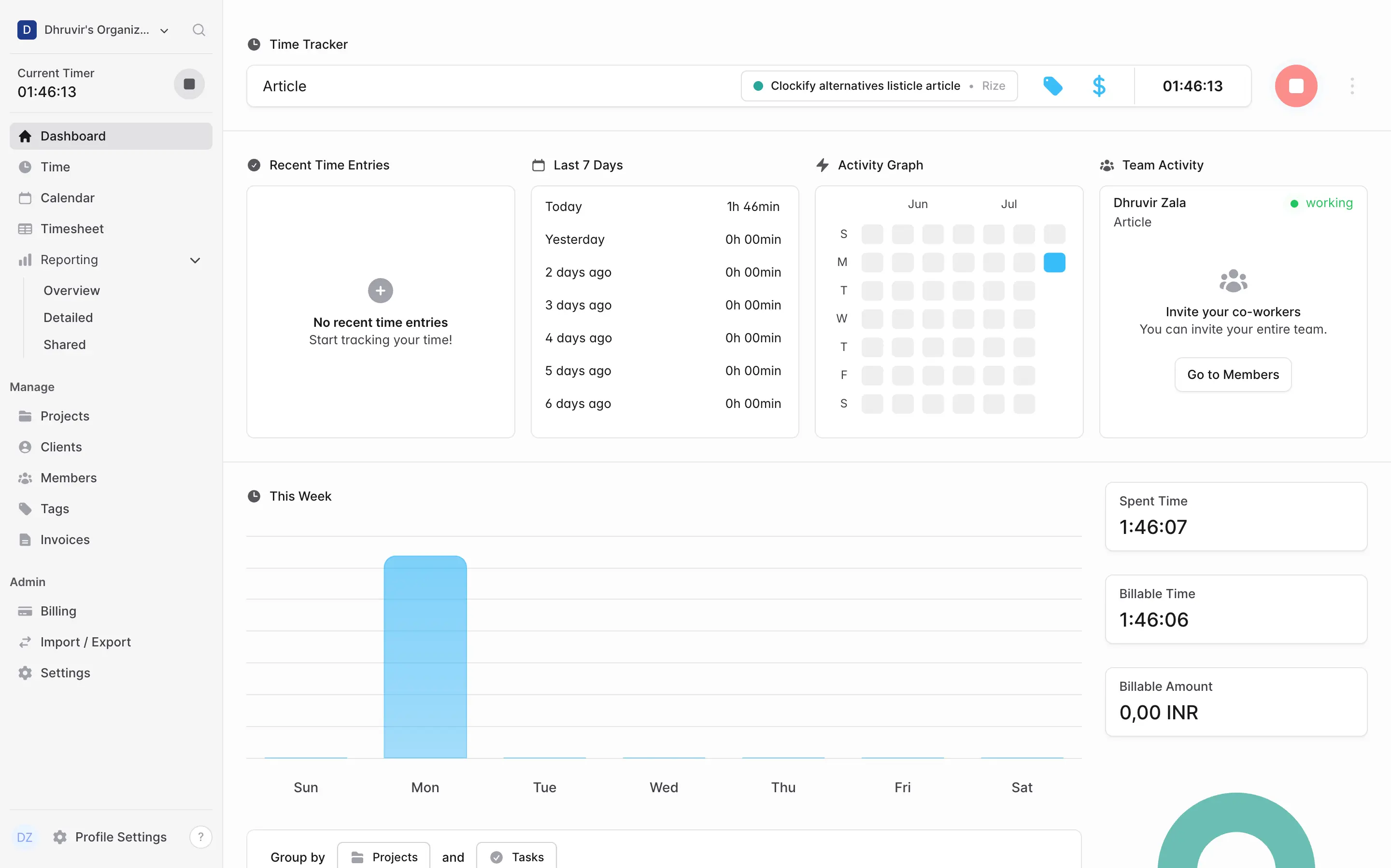
I tested Solidtime's cloud app the same way I tested everything else in this piece, tracking real time while writing this exact section. I created a project called "Clockify alternatives listicle article," started the timer from the dashboard, and had it running next to a tag icon and a dollar sign for billable rate, both one click away without leaving the entry.
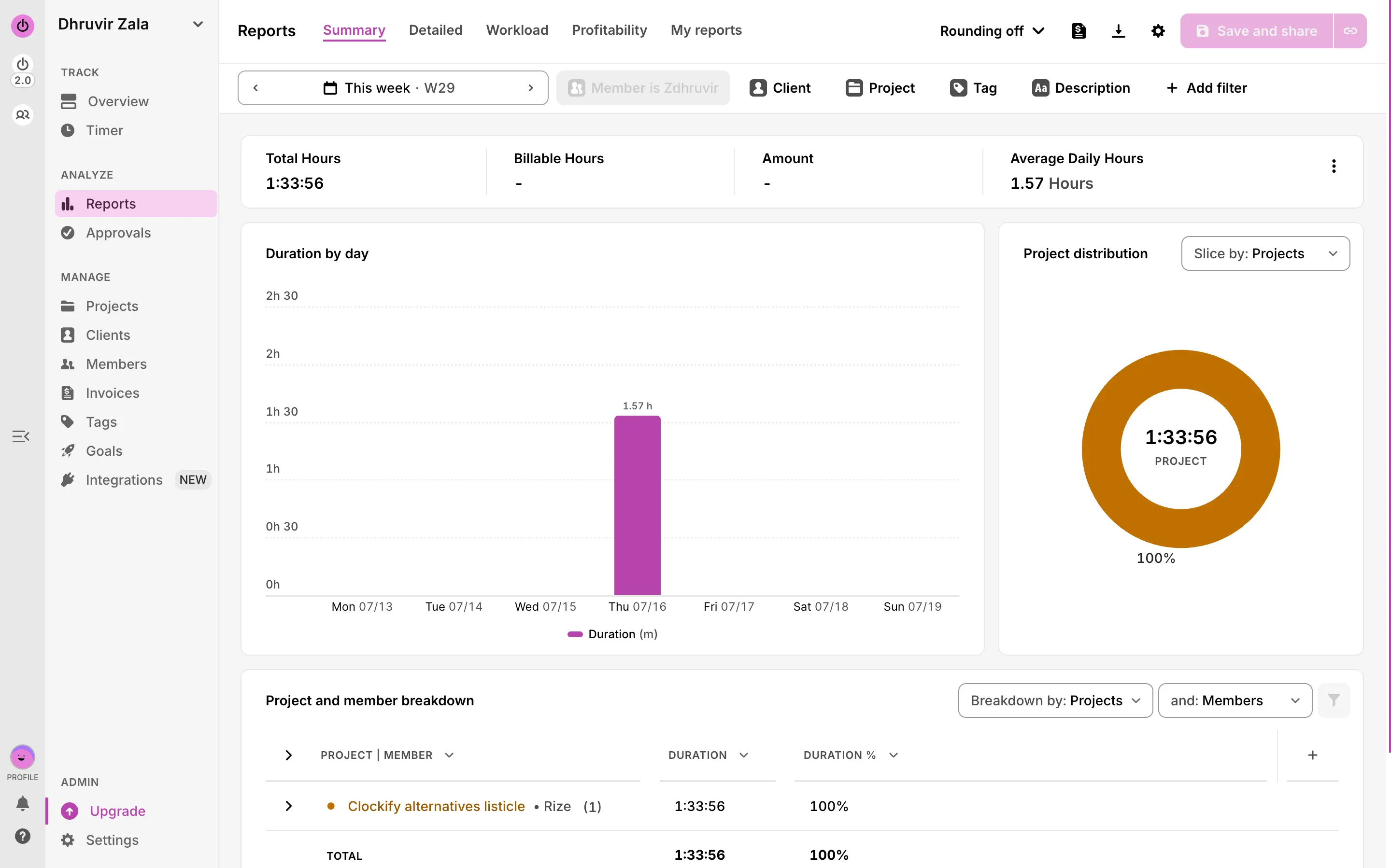
The calendar and timesheet views split the same three minutes two different ways. The weekly calendar showed Monday's total in its column header and let me trim the block by the minute when I dragged its edge. The timesheet is a flat spreadsheet instead, one row per project and one column per day, with a "copy last week" shortcut for repeating work. Neither view is more automatic than Toggl's; someone still has to press start, but the layout gets out of the way faster than Clockify's denser grid does.
The Reporting Overview is where the pricing story actually shows up. I set the date range to July 6 through July 20, grouped by Projects and Tasks, and watched a single bar climb on the one day I'd tracked. The table below it splits duration from cost, and cost came back blank until I went in and set a billable rate on the project, a small reminder that Solidtime won't guess a number for you.
What you trade is the ecosystem. Clockify ships 80-plus integrations out of the box. Solidtime ships an open API, a browser extension, and a handful of community-built plugins for tools like Obsidian and Raycast that the team endorses but didn't build.
Solidtime pricing: Free covers 1 user on the cloud, or unlimited users if you self-host the open source edition. Professional runs €8 to €9 per seat per month for invoicing and team features, and self-hosted Business licenses start at €49 a year per seat.
Find the right Clockify alternative for you
Seven tools, one real question: what's actually broken for you?
If it's the seat cap, TimeCamp fixes it today for free. If it's invoicing, Harvest ships it standard. If it's GPS or screenshots, Hubstaff was built for exactly that. If your team already lives inside Asana or ClickUp, Everhour disappears into it. And if you never want a company to change the rules on you again, Solidtime lets you own the whole thing.
But if your honest answer is the same one that brought most of you here, tired of chasing a teammate to start a timer, nothing else on this list actually fixes that. Rize doesn't ask anyone to remember anything. It tracks the work, writes the entry, and hands you a report you didn't have to build.
Most of the tools above have a free plan worth testing first. Use it. Run your own two-week trial the way I ran mine, then decide with real data instead of a features page.
If forgotten timers are your actual problem, start your free Rize trial and stop starting timers for good.
Related Reading
See how Rize compares to other time trackers: Rize vs Clockify, Rize vs Toggl, Rize vs Harvest, Rize vs Everhour, and Rize vs Timely. Browse the full comparisons page for more.
Start tracking time automatically
Join thousands of professionals who stopped guessing where their time goes. Free for 7 days.
“Rize has been a no-brainer for me.” — Ali Abdaal Read more →