I run a SaaS SEO agency and spend a good chunk of my working life testing exactly this kind of software for pieces like this one, so "does this thing actually hold up once real people touch it" isn't a hypothetical for me.
A good timesheet tool is the difference between billing a client with a straight face and guessing, then hoping nobody asks you to prove it.
I tested a dozen of these tools to write this, including one kiosk app that wanted a webcam selfie before it would let me clock in, like I was boarding a flight instead of starting a shift.
After testing, I've narrowed it down to the 5 best timesheet tools for small teams (5 to 50 people) who are done tracking hours on paper or a spreadsheet that's one bad formula away from a bad week.
What makes the best timesheet tool?
I judged all five tools against the same things.
- Clocking in and out. Tested from the employee's side. If it takes more than one tap, or a small negotiation with your phone, that's a mark against it.
- Manager approvals. How fast you can open a messy week, fix what's wrong, and lock it before someone bills a client for hours that never happened.
- Payroll export. Whether hours land in QuickBooks or Gusto on their own, or whether you're exporting a CSV and hoping nobody notices the gaps.
- Real cost at 10 people. Not the "starting at" number on the pricing page. What ten actual humans cost once every required fee gets added, because there's always a required fee.
- GPS and monitoring. How it would feel if your own manager tracked you the exact same way, since someone on your team is going to ask.
- Free plan, long term. Whether it still holds up in month four, not just whether it exists on the pricing page to get you in the door.
That list also explains a few tools you won't find below, so let's get the "why not" out of the way before the actual rankings.
What I didn't include (and why)
Before the rankings, a quick word on who didn't make the cut and why, since half of you are already Googling to see if I forgot your current tool.
Time Doctor didn't make it. Its screenshot and activity monitoring features are the kind of thing that makes an employee start drafting a resignation letter mid-shift, and this whole list runs on trust, not surveillance.
Hubstaff got cut too, mostly because it's chasing the same GPS and field-tracking job as Buddy Punch, just with less charm, and two tools fighting over one "best for" slot helps nobody.
Deputy is a scheduling tool wearing a timesheet as a costume, and I stopped pretending otherwise the second I found the shift builder was the actual main event.
Monday.com and Asana's time tracking add-ons didn't survive either. Those are project management platforms with a timer welded on, and that answers a different question than the one you typed into Google.
That leaves five tools that earned their spot, and the fastest way to see how they compare is the table right below this.
The best timesheet software at a glance
| Tool | Best for | Standout feature | Pricing |
|---|---|---|---|
| Rize | Teams whose timesheet should fill itself | No timer to start; entries show up on their own, correctly | From $29.99/seat/mo (2-seat min), no free plan |
| Clockify | Small teams juggling a mix of devices | Kiosk mode turns any shared screen into a punch clock | Free for up to 5 users, paid from $3.99/seat/mo |
| Toggl Track | Teams that bill by the project and hate friction | One-click timer, with zero screenshots or GPS | Free for up to 3 users, paid from $9/user/mo |
| Buddy Punch | Hourly crews clocking in on-site or in the field | Payroll syncs to QuickBooks, Gusto, and ADP on every plan | $4.99 to $12.99/user/mo, plus a $19/mo base fee |
| Harvest | Teams that bill clients and want to get paid faster | Clients pay the invoice on the spot via Stripe or PayPal | Free for 1 seat, paid from $9/seat/mo |
Best automatic timesheet tool for desk-based teams that bill clients
Rize (macOS, Windows)
Pros:
- Timesheet fills itself; no timers to start or forget
- No screenshots, keystroke logging, or GPS
- Builds invoices from approved hours in the same app
Cons:
- Desktop only, with mobile locked to the Enterprise plan
- No payroll integration, and no way for clients to pay invoices
I never pressed start in Rize, and my timesheet still had entries waiting, each with a client, project, task, and label already attached, plus a plain sentence about what I'd been doing. It was right, too. That's the whole pitch, and it holds up.
The timesheet page says your team reviews instead of typing, and that one's true. Entries land in a 'To Review' tab and you approve, edit, or reject them. I'm glad, because a timesheet nobody has checked is a guess with nice formatting. It still beats rebuilding a week from memory.
There are no screenshots, no keystroke logging, and no GPS, which is a relief, since most people don't love being tracked. It isn't invisible, though. Open any entry, and a Titles tab lists the window titles behind it. Gentler than screenshots, but I'd tell your team it's happening.
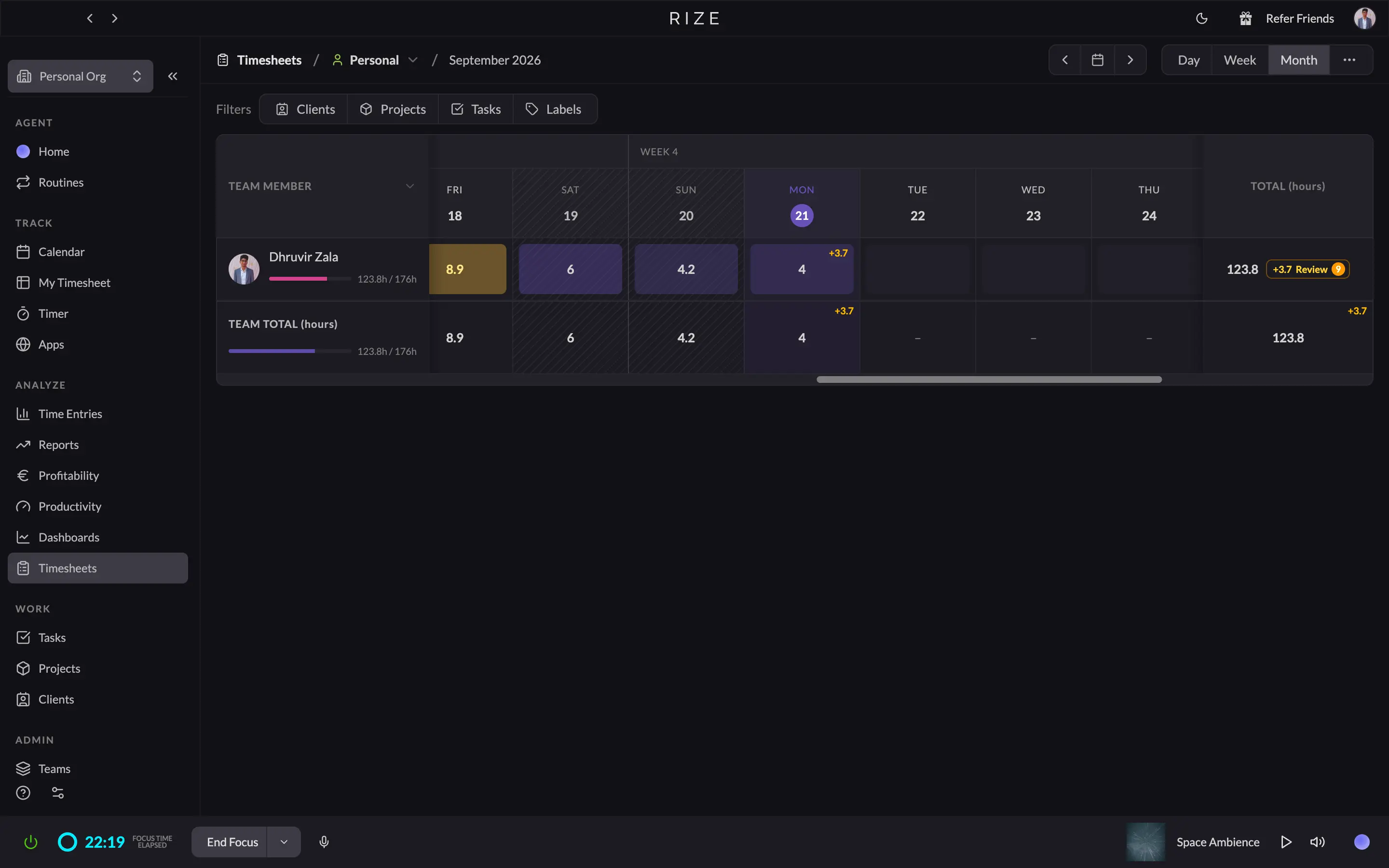
Managers get a good-looking Timesheets grid: everyone's week in one table, filterable by client, project, task, and label. But the teammate's day opens read-only, so people approve their own hours, and you can't fix their week for them. If your payroll needs a manager to edit and sign off on timecards, that's a different kind of tool.
My favorite part is what happens after approval. Pick a client and a date range, and your approved hours become invoice line items, right inside Rize. The invoicing page promises you can send, track, and get paid. You can send, and you can track. Clients can't pay there, so the money chase happens elsewhere (Harvest does that part better). Hours also export as CSV, and QuickBooks, Xero, and FreshBooks connect through Zapier.
It also connects natively to Asana, ClickUp, Linear, and Slack, and it has an AI layer on top, including scheduled briefs it calls Routines. Handy extras, though you're here for the timesheet.
Skip it if your people don't work at a computer. Rize tracks a Mac or Windows machine, so field crews, shift workers, and anyone who needs a punch clock are out. A client call on a phone won't show up either unless it's on the calendar. It fits best in a studio, agency, or consultancy where everyone's on a laptop, and the timesheet exists to bill clients. For that team, it's the best pick here.
Pricing: The Team plan starts at $29.99 per seat/month on annual billing (2 seats minimum). Individual costs $9.99 to $39.99/month, billed annually. 7-day free trial, no free plan.
Let your timesheet fill itself
Try Rize free for 7 days. Watch it auto-create and file your time entries from your actual work — no timers, no manual entry. No credit card required.
Start Free TrialBest budget timesheet tool for small teams on a mix of devices
Clockify (Web, iOS, Android, macOS, Windows, Linux)
Pros:
- Runs on web, mobile, desktop, and browser extensions
- Approvals, manager roles, and locked timesheets from $5.49 per seat
- Kiosk mode for clocking in from a shared device
Cons:
- Free plan capped at 5 users
- No QuickBooks sync for teams on QuickBooks Payroll
Clockify's free plan used to mean unlimited users, and now it means five. So for a ten-person team, the real question is what the paid tiers cost. Less than you'd guess.
I used it for several weeks on real client work, across the web app, desktop app, and browser extension, and the best thing about it is how many places it runs. A designer on a Mac, a front desk on Windows, a manager on an Android phone: all of them can log hours. The desktop app is thinner than the web version, so I'd point your team to the web app or the extension.
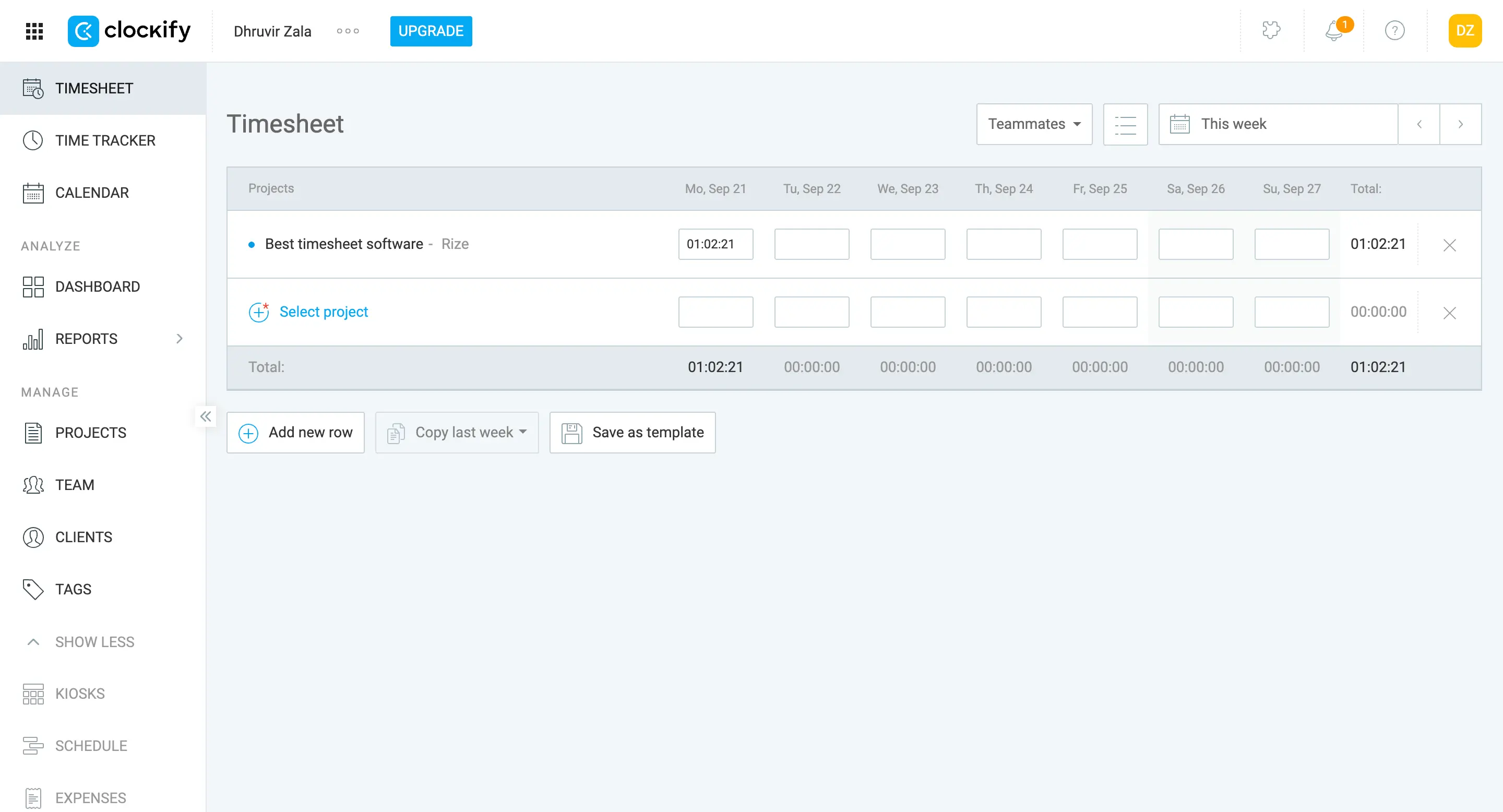
The timesheet is the classic kind. Projects down the side, days across the top, type your hours into the boxes or start a timer to let it add automatically. "Copy last week" and "Save as template" are the two buttons that make it bearable for anyone whose week looks like the last one. It's plain, and plain is fine here.
Standard is the tier you'll likely pay for: $5.49 per seat on annual billing, about $55 a month for ten seats. It's the first tier with approvals, manager roles, locked timesheets, and reminder emails for people who forget to log. Basic is cheaper at $3.99 but has no approvals, and approvals are what a payroll scare makes you want.
Payroll hand-off has its own catch. Standard includes a QuickBooks Online sync, but Clockify's own page says it can't work if payroll is turned on in QuickBooks. The integrations page lists QuickBooks and Xero and no payroll provider like Gusto, so expect a CSV export or Zapier.
Then there's Auto Tracker, which isn't automatic. It records which apps and sites you used, but you still turn each session into a time entry by hand, and only you can see the recording. A manager can't use it to check anyone's week.
Clockify is the wrong pick if your people won't log their own hours. Everything starts with someone pressing start or typing a number; reminders can nag but can't remember for anyone, and the reports only show what got submitted. Screenshots and GPS exist, but they're optional and start on Pro, so you'd have to choose to be that manager.
If forgotten timers are your main worry, I compared it against our fully automatic tracker in my Rize vs Clockify breakdown.
Pricing: Free: $0 for up to 5 users. Paid: $3.99 to $11.99 per seat/month, billed annually. 7-day Pro trial, no card needed.
Best low-friction timesheet tool for teams that bill by the project
Toggl Track (Web, iOS, Android, macOS, Windows)
Pros:
- One-click timer with calendar, list, and timesheet views
- Doesn't watch your team, and says so in writing
- Reports by project, client, and member
Cons:
- Approvals and locked timesheets start on Premium
- No payroll, QuickBooks, or Xero integration
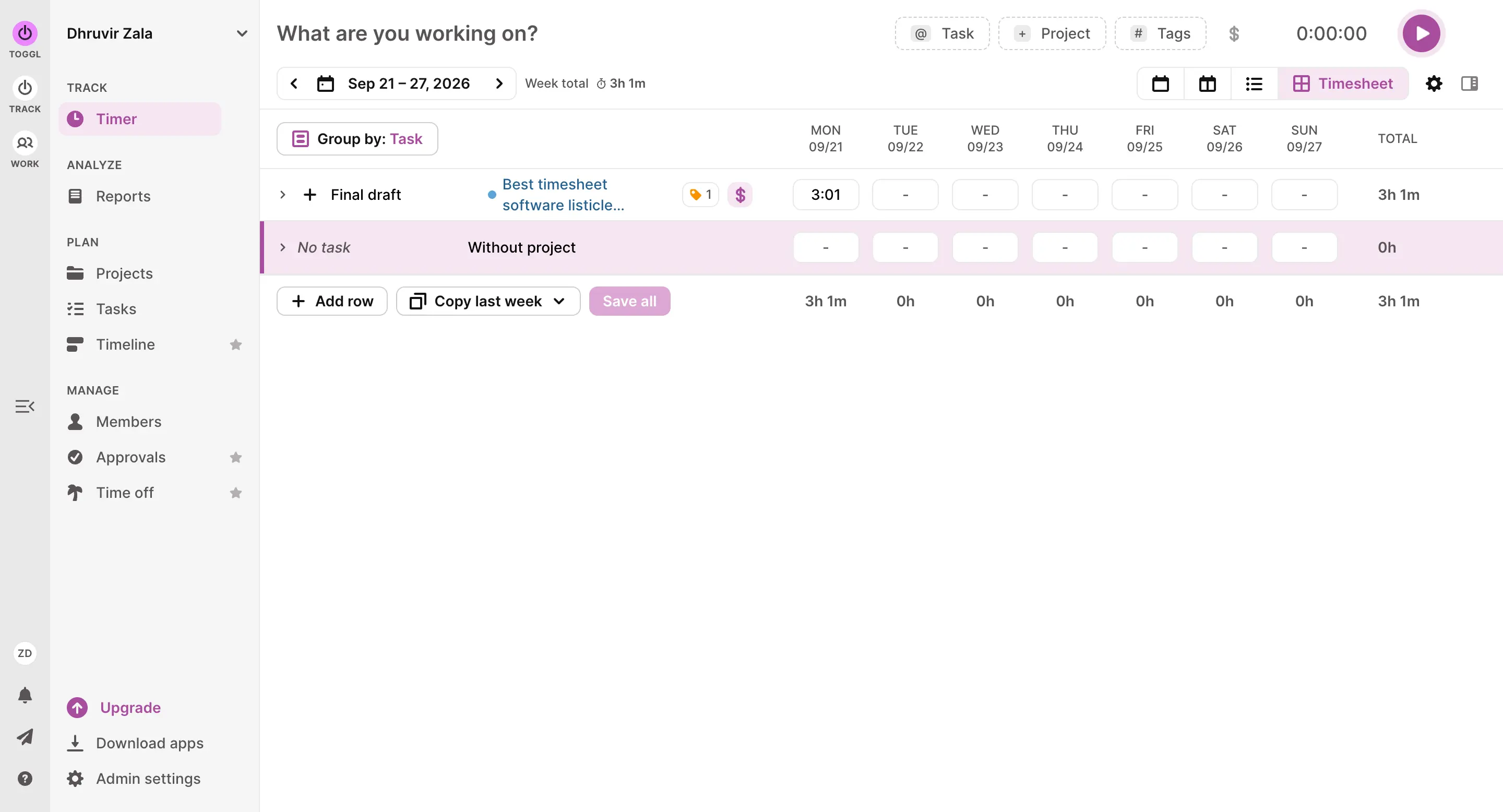
Toggl's sidebar shows an Approvals tab from minute one, and on a free account it opens a sales pitch. That's a little odd, since Toggl's timesheet page sells approvals right next to a free signup button and never mentions they're Premium only. They are. Ten seats on Premium is about $160 a month on annual billing. Starter is $90 for the same ten, but has no approvals, so reviewing a week means opening a report and reading it yourself.
The employee side is the good part. One bar asks what you're working on, you pick a project, and you press play. There's a calendar view, and a timesheet tab if you'd rather type hours into a grid. On the phone, the running timer stays pinned to the bottom of the screen, so stopping it is one tap. Nobody needs training, which matters when the people using it never asked for it. It doesn't watch anyone either. No screenshots, no location, so there's no awkward meeting about what the boss can see.
The homepage now pitches capacity planning too, which is more platform than a timesheet buyer needs. The timer is still front and center, though.
Reports are the other thing I'd miss, with the same catch. The summary view breaks hours down by project and member, but on a free account the member filter is locked to you, so team reports start on Starter. A report can also turn into an invoice draft. Without billable rates (Starter again), there are no dollar amounts, and the form is plain: address boxes, line items, save. It's not billing software.
Skip it if approvals are the whole reason you're shopping and money's tight. Clockify, above, does them for about a third of the price. Toggl fits a small agency or consultancy where people log their own hours and the work is billed by project, as long as you budget for Premium the day someone has to sign off on a week.
For a full side-by-side against Rize, see my Rize vs Toggl breakdown.
Pricing: The free plan is available for up to 3 users. Paid ranges $9 to $16 per user/month, billed annually. 30-day trial, no card needed.
Best time clock tool for hourly teams working on-site or in the field
Buddy Punch (Web, iOS, Android, ChromeOS)
Pros:
- Phone, browser, kiosk, and QR code punching
- Payroll sync to QuickBooks, Gusto, and ADP on every plan
- Deleted time and error reports for a paper trail
Cons:
- $19 monthly base fee on top of per-user pricing
- Offline mode, geofences, and kiosks locked to Pro
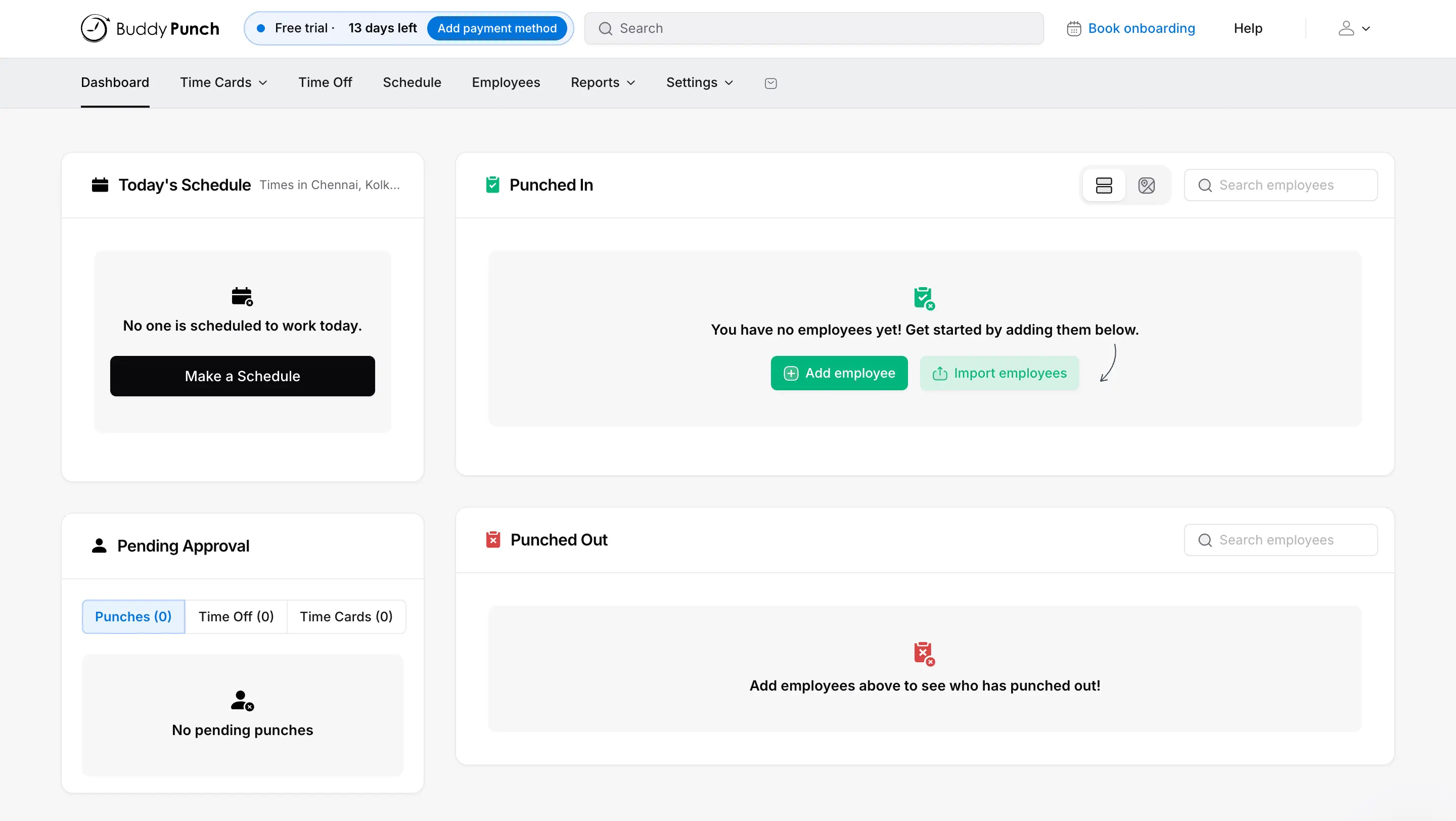
Buddy Punch opens on a Punched In list, a Punched Out list, and a Pending Approval queue. That tells you what it is: a time clock that produces timesheets, not a timesheet app with a clock tacked on. If your people are hourly and work shifts or job sites, that's the right order.
Approvals are what I'd buy it for. The queue splits punches, time off, and time cards into separate tabs, so a fixed punch doesn't get lost in a full week. New employees default to "can edit but requires approval," so people can fix their own slip-ups and you still get the last word. The Reports menu also has a Deleted Time report and an Employee Error Log, which is the paper trail you'll want the next time someone disputes a paycheck.
Setup is a lot of dials. Adding an employee means a long form with per-person overtime, break, rounding, GPS, and webcam settings. The defaults are gentle, at least. Rounding and automatic break deductions start at None, which is right, since both can quietly shave minutes off paychecks. GPS and webcam start at Optional; GPS logs a location at each punch, and live tracking costs extra below the top plan, so nobody gets followed around by default.
Payroll hand-off is well covered. QuickBooks (Online and Desktop), Gusto, ADP, Paychex, and Rippling connect directly on every plan, and reports export to CSV, Excel, or PDF if yours isn't listed. Custom Reports is the odd one out: it sits in the Reports menu like everything else, then drops you on a page selling it as an add-on.
Buddy Punch is not for you if your team is salaried or works at desks and bills clients by the project. It is upfront that it's built for hourly workers at U.S. businesses, and overtime types and state break rules would be dead weight at a design studio. It fits a landscaping crew, a clinic front desk, or a shop floor, where people have to be somewhere at a set time, and payroll has to come out right.
Pricing: $4.99 to $12.99 per user/month, billed annually, plus a $19/month base fee. 14-day free trial, no card needed, no free plan.
Best timesheet tool for billing clients and getting paid
Harvest (Web, iOS, Android, macOS, Windows)
Pros:
- Builds invoices from tracked hours and lets clients pay right there via Stripe or PayPal
- Drag-and-drop calendar view makes backfilling a missed day less painful
- Invoices and payments sync straight to QuickBooks Online and Xero
Cons:
- Timesheet approvals are locked behind the pricier Enterprise plan
- No native Gusto sync, and usage fees stack on top of your seat price
My first day in Harvest, the timesheet page wasn't a timesheet. It was a full-screen pitch for Harvest's own integrations, sitting exactly where my hours should have gone. I dismissed it and got on with logging time, which turned out to be the better use of the screen.
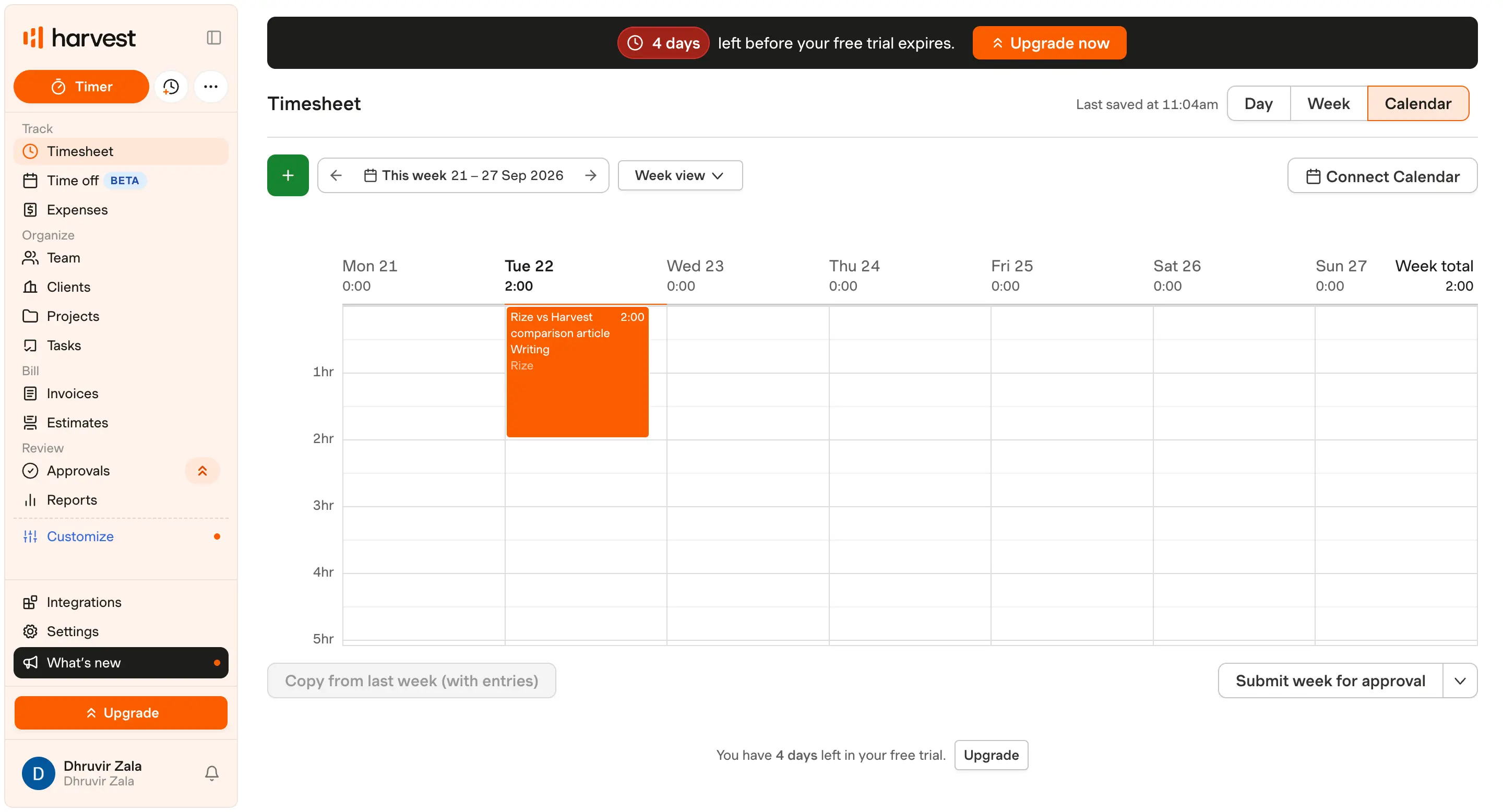
Logging that time is still entirely manual: a timer you start and stop, or a weekly grid you fill in after the fact, same tradeoff as Toggl or Clockify. What Harvest does better is the calendar view. Drag across a block of your day, drop in an entry, resize it if you guessed the length wrong. Small interaction, but it made backfilling a forgotten Monday a lot less annoying than typing numbers into boxes.
A manager can require approval before a week locks in, which matters if a payroll mistake is why you're reading this in the first place. Just know that feature sits on the Enterprise plan, not the cheaper Teams tier, so budget for that if review-and-lock is your whole reason for shopping.
I mentioned in the Rize section that Rize can build an invoice but can't collect the money. Harvest does both: turn tracked time and expenses into an invoice, send it, and let the client pay right there through Stripe or PayPal. It's the only tool here that closes that loop, and it syncs invoices and payments to QuickBooks Online or Xero automatically.
There's no native Gusto connection, though. If Gusto runs your payroll, you're bridging that yourself, whether through Zapier or a plain CSV.
The report builder is more capable than a five-person studio really needs: group by client, project, role, or teammate, add whatever metrics matter, save it as a template you rerun monthly. Free and Teams cap you at four saved reports; unlimited ones are an Enterprise perk too.
You should skip Harvest if nobody on your team bills anyone by the hour. This is built around the track-to-invoice-to-paid pipeline, and hourly staff punching in for payroll don't need any of that invoicing muscle. But if your business runs on billable hours and someone always ends up chasing a client for payment afterward, this is built for exactly that job. For the deeper breakdown against an automatic tracker, see my Rize vs Harvest comparison.
Pricing: Free: $0 for 1 seat, 2 projects. Paid: $9 to $14 per seat/month, billed annually (usage fees apply beyond the base plan). 30-day free trial, no card needed.
How to choose the right timesheet tool?
If you bill clients and hate chasing invoices, Rize handles the tracking and the invoice in one place. If your budget is the whole conversation and your team's under five people, Clockify's free plan will get you further than it has any right to. If you just want people to press play and move on with their lives, Toggl Track is the least annoying option here. If your crew clocks in from a job site instead of a desk, Buddy Punch, GPS and all, is the one built for muddy boots. If getting paid, not just tracking hours, is the actual fire you're putting out, that's Harvest's whole job.
If none of that settles it, go with Rize. I never touched a start button the whole time I used it, and the timesheet filled itself out anyway, correctly, entry after entry. It's not for job sites, we already covered that, but for a desk-based team done guessing at hours, it's the safest first click.
See how Rize compares to other time trackers: Rize vs Toggl, Rize vs Clockify, and Rize vs Harvest. Browse the full comparisons page for more.
Start tracking time automatically
Join thousands of professionals who stopped guessing where their time goes. Free for 7 days.
“Rize has been a no-brainer for me.” — Ali Abdaal Read more →