Hubstaff earns its popularity honestly. One login handles time tracking, payroll, invoicing, and workforce analytics, and it plugs into 35+ tools you're probably already running, including Deel, Wise, and QuickBooks.
If you manage a field team or a BPO, the GPS and geofencing solve a real problem that lighter trackers don't touch. And when procurement asks about GDPR, SOC 2, or HIPAA, Hubstaff has answers most competitors don't.
So that's the good part. Now here's the part where it gets weird.
The pricing page promises $10 a seat on the Team plan, but add Insights once its free trial expires and Locations on top, and you're closer to $15.83 a seat than $10. That gap doesn't show up on the pricing page. It shows up on your invoice, quietly, a few months in.
Around the same time, a contractor or two starts asking why their screen gets screenshotted every ten minutes. What was sold as accountability starts feeling like surveillance to the people living under it.
If either of those sounds familiar, you're not being dramatic. You're paying attention. The good news is, Hubstaff isn't the only serious option for distributed teams anymore. We tested five alternatives built for exactly this: predictable pricing, and monitoring that doesn't feel like a leash. Before you pick one, it's worth asking what actually makes an alternative better, not just different.
What makes the best alternative to Hubstaff?
Before you commit to any tool on this list, run it through the same problem that got you here. It's not enough for an alternative to have more features or a prettier dashboard. It needs to fix the two things Hubstaff didn't: unpredictable costs and monitoring that makes your team feel watched instead of supported. Here's what we checked for.
- Flat, all-in pricing. No plan that looks like $10 a seat until Insights and Locations turn it into $15.83. What you see on the pricing page should be what shows up on your invoice.
- Monitoring your team can live with. Activity tracking framed as visibility, not a leash, with settings your contractors can see and understand, not screenshots firing every ten minutes with no context.
- Payroll and invoicing that still connect. Direct integrations with Deel, Wise, or QuickBooks, so leaving Hubstaff doesn't mean rebuilding your payroll pipeline from scratch.
- GPS and geofencing, if you need it. Field teams and BPOs shouldn't have to trade location tracking for better pricing. If that's your setup, the alternative needs to match it, not skip it.
- Compliance that survives procurement. SOC 2, GDPR, or HIPAA credentials, especially if Hubstaff's compliance stack was part of why you chose it in the first place.
Match a tool to enough of these, and switching stops being a risk. It becomes an upgrade.
The best Hubstaff alternatives at a glance
If you only read this table, Rize is the strongest overall replacement for most teams that don't need GPS. If field tracking or the lowest possible price is non-negotiable, Time Doctor or DeskTime deserve a closer look instead.
| Tool | Best for | Standout feature | Pricing |
|---|---|---|---|
| Rize | Automatic tracking without the surveillance feel | AI tags your time to the right client with a confidence score and a plain-English reason | $29.99/seat/mo (annual) on team plans, 2-seat minimum |
| Time Doctor | Deep analytics without losing your Deel or Wise payroll setup | Benchmarks AI compares your team against 250,000+ real users | $6.67 to $16.70/seat/mo annually |
| Insightful | Consent-based monitoring | Employees on personal computers decide when tracking starts, not just admins | $8 to $16/seat/mo annually |
| DeskTime | Predictable, all-in pricing | AI Summary reads your day back in plain English instead of a raw chart | $6.42 to $9.17/seat/mo annually |
| Toggl Track | Zero monitoring, no exceptions | Timeline tracks your apps privately, staying on your device until you choose to log it | Free up to 5 seats, then $9 to $18/seat/mo annually |
Full breakdown for each one, including what I actually tested, starts below.
1. Rize — best Hubstaff alternative for automatic tracking without the surveillance feel
Best for teams leaving Hubstaff that want their timesheet to fill itself, no screenshots, and profitability reporting built in from day one. Available on macOS and Windows.
Rize pros:
- Tracks time automatically
- Privacy-first, no surveillance or keystroke logging
- Team members review and approve their own entries before managers see them
- Profitability and utilization reporting are built into every team plan
- AI tags time to the right client with a confidence score and a plain-English reason attached
- Live in under 5 minutes, no IT setup or device enrollment
Rize cons:
- No GPS or geofencing for field teams and location-bound BPOs
- Desktop-only, no mobile tracking app
- Deel and Wise connect through Zapier, not natively as they do in Hubstaff
- No permanently free plan, just a 7-day trial
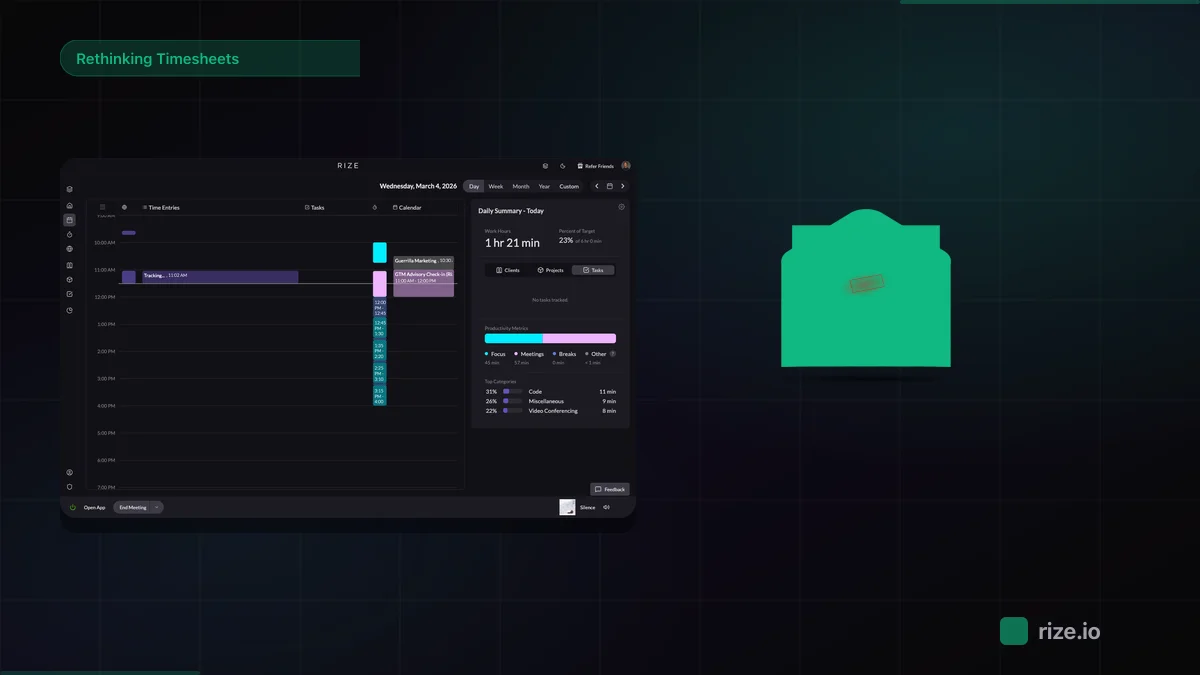
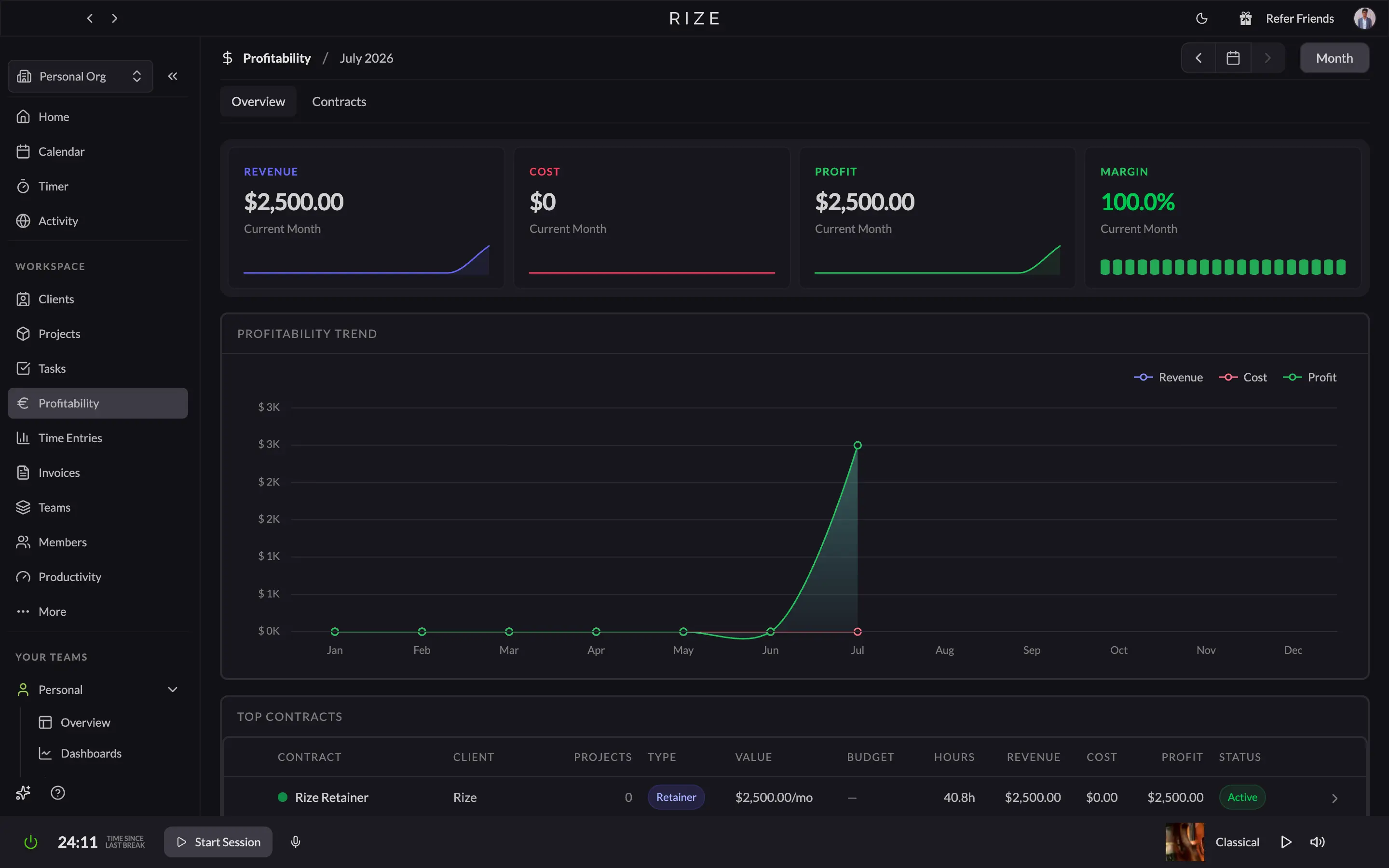
Rize is a fully automatic time tracker for Mac and Windows. It runs in the background, captures every app, website, and document you touch, and uses AI to sort that time into clients, projects, and tasks without timers, manual entries, or screenshots.
I installed it expecting the usual "automatic" tracker that still makes you confirm every entry before it counts for anything. That's not what happened. Within the first hour, the calendar view had already split my morning into labeled blocks, "Research" and "Writing," each with an 80% confidence score and a one-line reason attached: time spent in the Hemingway Editor right after a YouTube detour into long-term investment strategies. I never opened a timer.
That's the whole pitch, and it holds up under actual use. Hubstaff still expects your team to clock in, then adds screenshots and an activity score to catch what manual tracking misses. Rize skips the part that needs catching in the first place. It reads app and window metadata locally, never your screen or your keystrokes, and each person reviews and approves their own entries in a side panel before any of it reaches a manager's dashboard.
The part that actually solves the problem you came here with is the profitability tab. Where Hubstaff sells Insights as a 3-month trial that quietly becomes a line item, Rize ships project profitability, team utilization, and billable-versus-non-billable reporting inside every team plan from day one.
Where Rize genuinely falls short of Hubstaff: there's no GPS or geofencing, so if you run a BPO that needs to confirm agents clocked in from a physical site, stay put. And while Rize connects to QuickBooks and 8,000+ other apps through Zapier, Deel, and Wise aren't native integrations the way they are in Hubstaff, so your payroll pipeline needs an extra hop to get set up.
If your team doesn't need field tracking and you're just tired of asking people to remember a timer, Rize is the one I'd move to. It's the most complete, fully-automatic time tracker I've tested for individuals and teams alike, and it's the alternative I recommend to most people reading this.
If you want the full side-by-side, we broke it down in Rize vs Hubstaff for remote team time tracking.
Rize pricing: $12.99 to $49.99 per month, depending on plan. Team plans start at $29.99 per seat per month billed annually ($39.99 monthly), with a minimum of 2 seats. Save up to 25% on annual billing.
Automatic tracking, zero screenshots
Try Rize free for 7 days. Watch it label your time by client with a confidence score — no timers, no screenshots, no activity policing. No credit card required.
Start Free Trial2. Time Doctor — best Hubstaff alternative for deeper analytics without losing your Deel or Wise payroll
Best for operations teams that want Hubstaff-style analytics while keeping a native Deel or Wise payroll pipeline. Available on Web, Windows, Mac, Linux, Chrome, Android, and iOS.
Time Doctor pros:
- Deel, Wise, PayPal, Payoneer, ADP, and Gusto all connect natively
- Benchmarks AI compares your team against 250,000+ real users
- Premium bundles every advanced report into one flat price
- Work-life balance report flags early signs of overwork
- Separate Executive, Team, and User dashboards
- 60+ native integrations, including Genesys for contact centers
Time Doctor cons:
- Screenshots and activity tracking are on by default from the Basic plan
- No GPS or geofencing
- SSO and automated provisioning cost roughly $200/account/month outside Premium
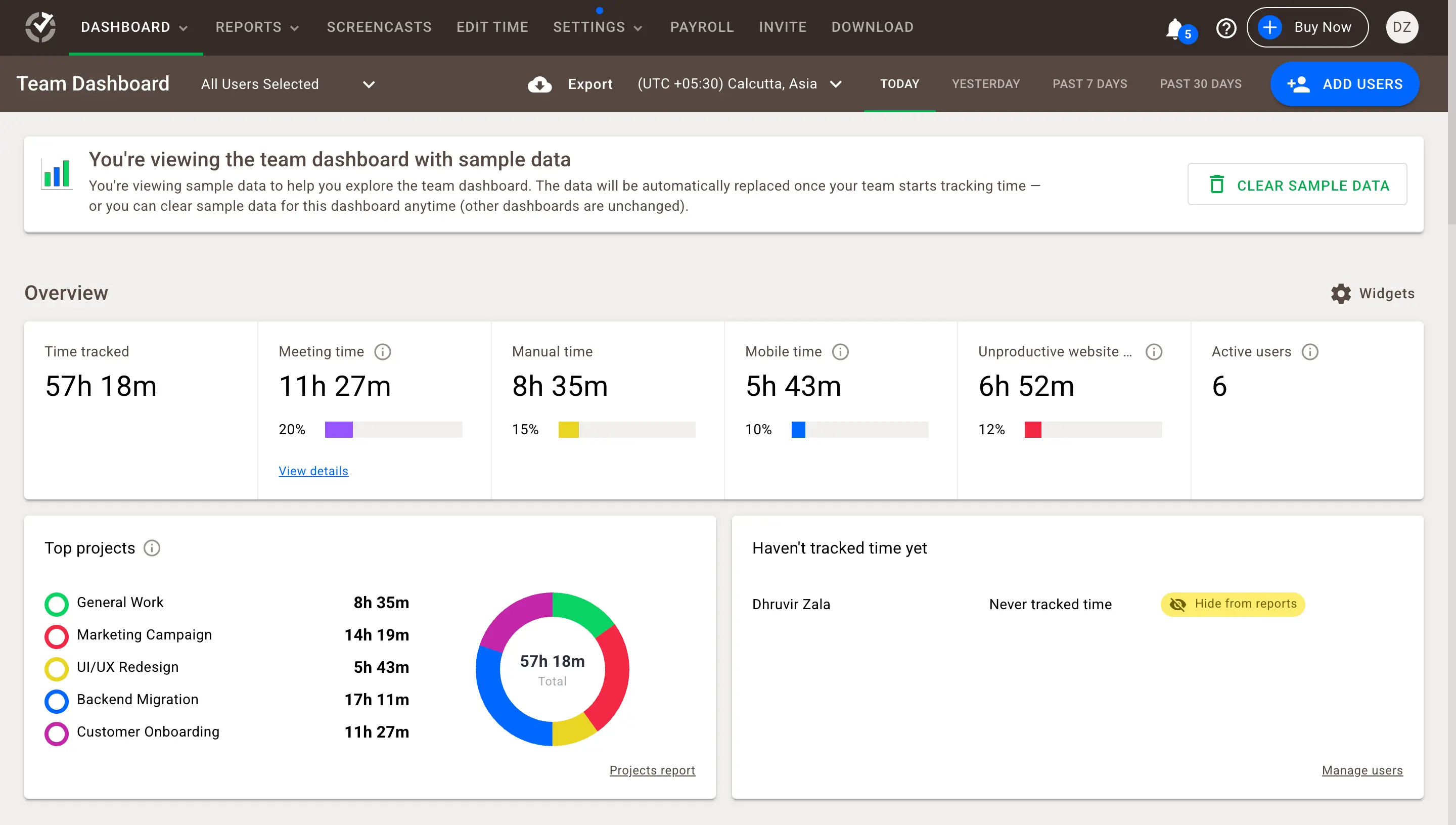
Time Doctor is the tool most operations managers already know by reputation before they know it by name. It's been doing time tracking and workforce analytics about as long as Hubstaff has, and clicking through its dashboards feels like walking through a more instrumented version of the same idea. Screenshots, activity percentages, timelines broken into color-coded blocks for tracked, idle, and manual time, all built for a manager who wants the full picture.
The payroll setup is where Time Doctor actually earns its spot on this list. It connects to Deel and Wise natively, alongside ADP, Gusto, PayPal Payouts, and Payoneer MassPay, all sitting as toggle switches in the same CSV export panel that Hubstaff exposes. If sunk payroll integration cost is the real reason you've stayed on Hubstaff this long, that specific objection disappears here.
The other place Time Doctor pulls ahead is Benchmarks AI, which compares your team's productivity against a pool of 250,000+ users instead of just showing you your own numbers in isolation. Hubstaff's Insights tells you what your team did. Benchmarks AI tells you whether that's actually good, which is the harder and more useful question.
There's also a work-life balance report that assigns each employee a small frown or neutral face icon based on how many overtime or after-hours flags they triggered that week, a genuinely thoughtful attempt to catch burnout before it becomes a resignation letter.
If your team's real complaint is the bill, not the screenshots, Time Doctor's Premium plan is a fair trade: one price, every report, honestly labeled upfront. If your team's real complaint is the screenshots, this isn't the tool that fixes it.
Time Doctor pricing: $6.67 to $16.70 per seat per month annually across Basic, Standard, and Premium ($8 to $20 per seat per month monthly). Enterprise is custom. 14-day free trial, no permanent free plan.
3. Insightful — best Hubstaff alternative for consent-based monitoring
Best for teams that need monitoring but want contractors to see and control exactly what's tracked. Available on Web, Windows, Mac, and Linux.
Insightful pros:
- Employees on personal computers control when tracking starts, not just admins
- Real-time overview, capacity analysis, and screenshots ship in the base plan, not as an add-on
- Alerts are split into Attendance and Security categories, so contractors know exactly what triggered one
- AI Adoption report flags shadow AI use, something Hubstaff doesn't track at all
- Compliant with SOC 2, ISO 27001, HIPAA, GDPR, CCPA, and CSA
- Settings are organized into six clear categories, and nothing about tracking is buried
Insightful cons:
- No GPS, geofencing, or mobile app, so field teams and BPOs are out of luck
- Insider Threat Detection, Audit Logs, and better screenshot coverage still cost extra as add-ons
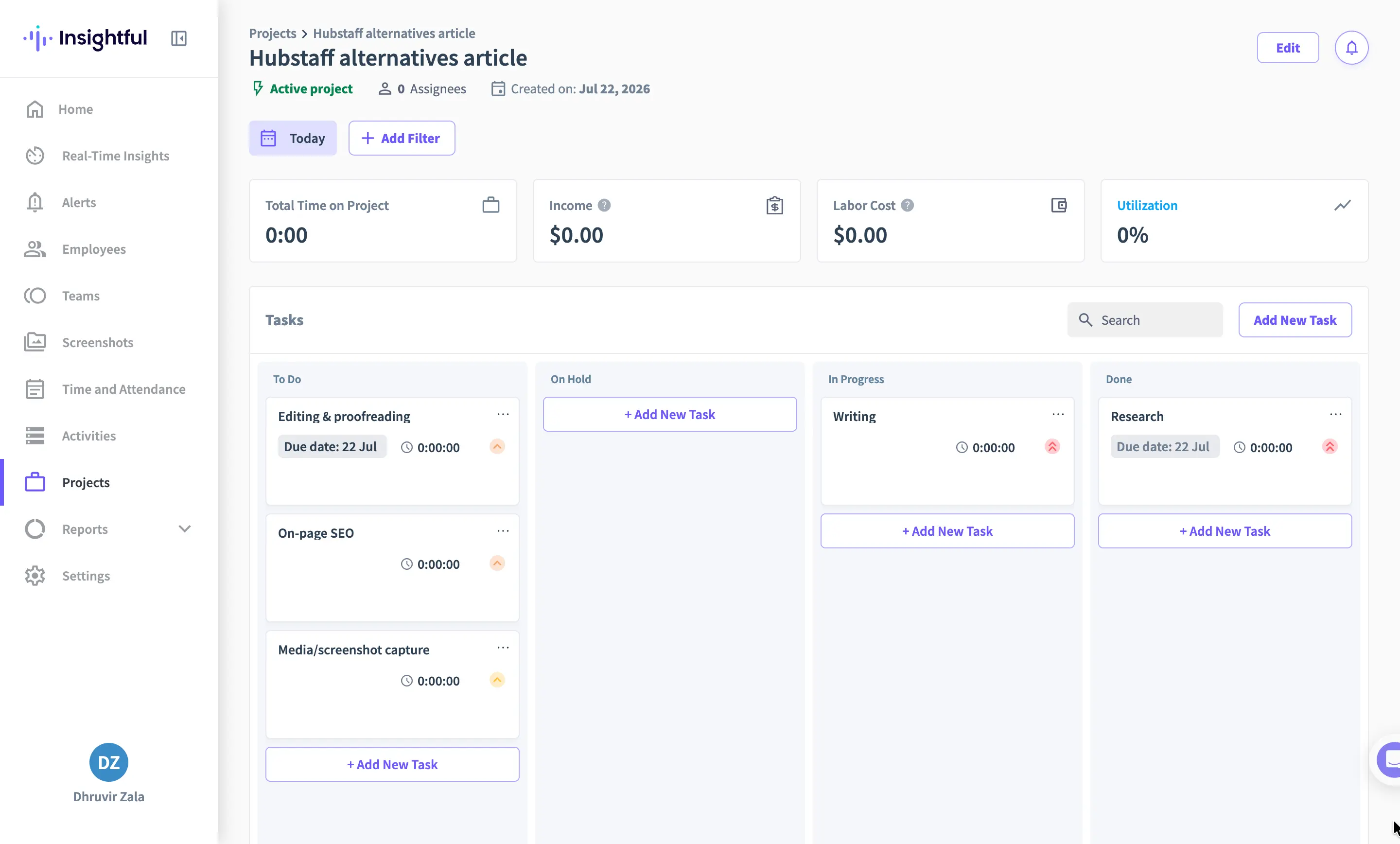
Insightful used to be called Workpuls before it rebranded in 2022, and the rebuild shows in how deliberately it treats consent. The moment you go to add an employee, it asks whether they're on a company computer or a personal one. Company computers let admins lock down every tracking setting. Personal computers hand control to the employee, who decides when Insightful is allowed to watch. Hubstaff never asks this question. Insightful puts it on the very first setup screen.
The dashboard carries the same instinct further. The home screen ships with KPIs and a utilization trend by default, but a Customize button lets you toggle up to ten widgets on or off, from Top Performers to Needs Attention to Schedule Adherence, so a manager only sees what actually matters to how they run their team.
Alerts work the same way. Set one up, and Insightful separates Attendance Alerts from Security Alerts before you even pick a trigger, so nobody's screenshot gets treated like a security incident just because they stepped away for a break.
Where Insightful genuinely comes up short of Hubstaff is anything involving a physical location. There's no GPS, no geofencing, and no app for a phone, so if part of your team needs to prove they clocked in from a job site, Insightful can't do it.
And Insightful hasn't fully escaped the add-on habit either. Insider threat detection, audit logs, and better screenshot coverage all cost extra, so a security-conscious team can still watch their per-seat number climb past $8, just from a lower starting point and with far more transparency about where each dollar goes.
If your team's actual complaint is that the screenshots feel like a leash, and less that you're missing some specific analytics feature, Insightful is built around fixing exactly that objection.
Insightful pricing: $8 to $16 per seat per month billed annually across Workforce Analytics, Workflow Optimization, and Combo. Enterprise is custom, and add-ons run $0.50 to $4 per seat per month extra. 7-day free trial, no credit card required.
4. DeskTime — best Hubstaff alternative for predictable, all-in pricing
Best for teams whose real complaint is the bill, and who want two simple plans instead of a stack of add-ons. Available on Web, Windows, Mac, Linux, Android, and iOS.
DeskTime pros:
- Cheapest plan in this roundup, starting at $6.42/seat/month billed annually
- Premium bundles screenshots, full API integrations, and shift scheduling into one $9.17/seat price, no separate add-ons to track
- AI Summary reads a day of tracked time back to you in plain English instead of a raw chart
- Private Time and break reminders are built in, both one click away from the desktop menu bar
DeskTime cons:
- Screenshots still fire on a timer once you're on Premium, the same complaint that likely pushed you off Hubstaff
- No native Deel, Wise, or QuickBooks integrations, only Zapier, Jira, Asana, Trello, GitLab, and two calendar apps
- IP location tells you office versus remote by comparing IP addresses, not real GPS or geofencing for field teams and BPOs
DeskTime has been run by the Draugiem Group out of Latvia since 2011, and it shows in how settled the product feels. Over 730,000 people use it, and the app runs quietly from the moment you turn on your computer, logging arrival time, breaks, and app usage automatically.
The real reason DeskTime earns a spot here is the pricing model, not any single feature. There are only two paid plans. Pro is $6.42 a seat a month, billed annually, and Premium is $9.17. Compare that to the $15.83 a seat you're actually paying on Hubstaff's Team plan once Insights and Locations stop being free, and a 22-person team saves close to $1,750 a year just by switching, on top of the free month DeskTime already throws in for annual billing.
What stood out during testing is how much control you get over how invasive the tool feels, just by picking a plan. Pro tracks time, apps, URLs, and document titles automatically and calculates a productivity score, but it never takes a screenshot. If the screenshots are your team's actual objection and not the bill, staying on Pro removes them completely while keeping everything else Hubstaff-like intact. Only Premium brings screenshots back, on a randomized 5, 10, 15, or 30-minute interval, the same mechanic that made Hubstaff feel like a leash in the first place.
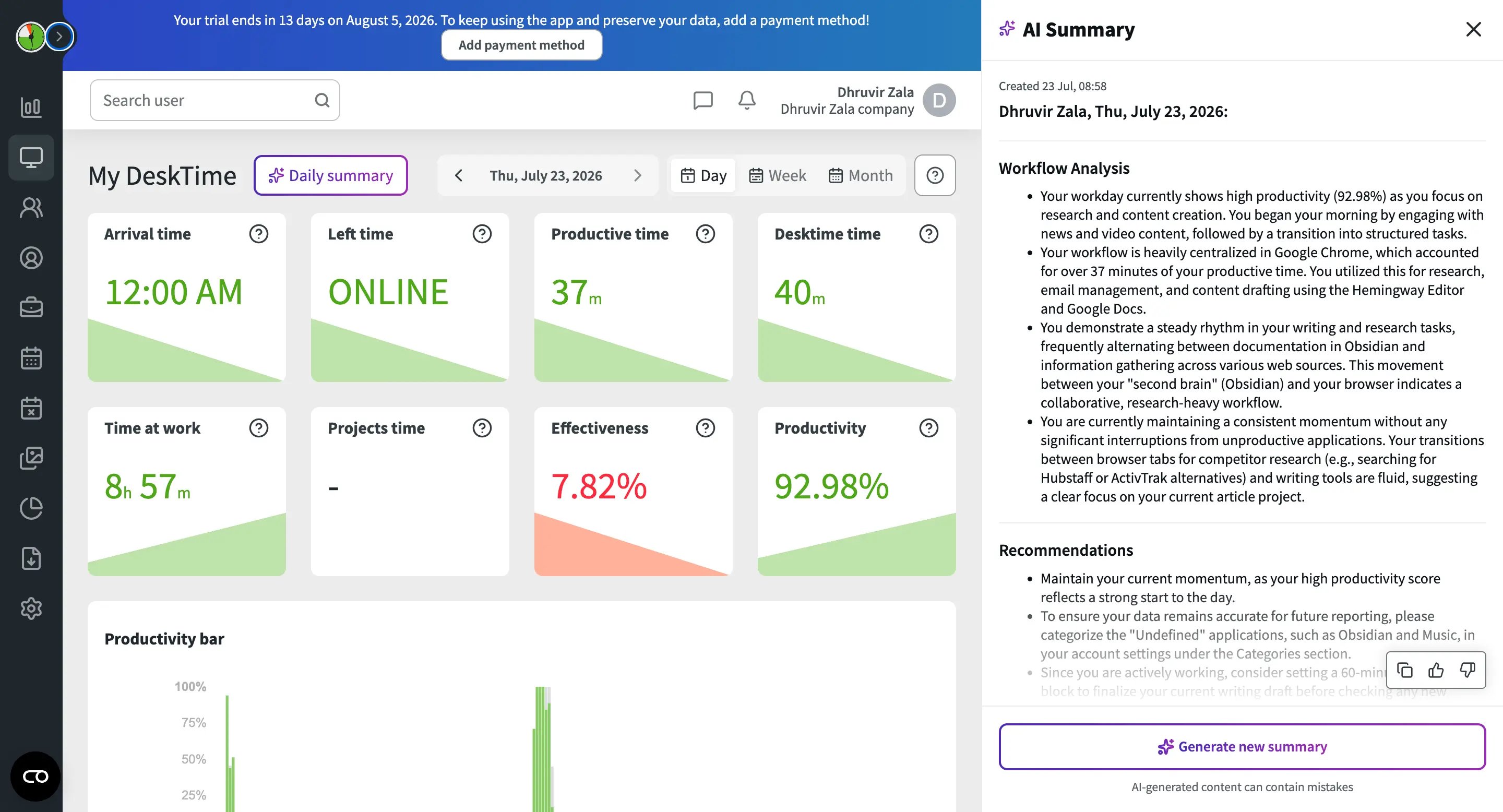
The other feature worth calling out is AI Summary. Once you've logged about 30 minutes of activity, it reads back a plain-English recap of what you focused on, how the day split between deep work and communication, and where things went sideways, instead of leaving you to interpret a productivity bar chart yourself.
If your team's real complaint is the billing and not the screenshots, DeskTime is the most straightforward fix on this list.
DeskTime pricing: $6.42 to $9.17 per seat per month across Pro and Premium, billed annually (monthly billing costs more). Enterprise is custom, for teams of 200+ seats. 14-day free trial, no credit card required to start.
5. Toggl Track — best Hubstaff alternative for teams that want zero monitoring
Best for teams that want a clean, private time tracker with no screenshots or activity scoring anywhere in the product. Available on Web, Windows, Mac, Android, and iOS.
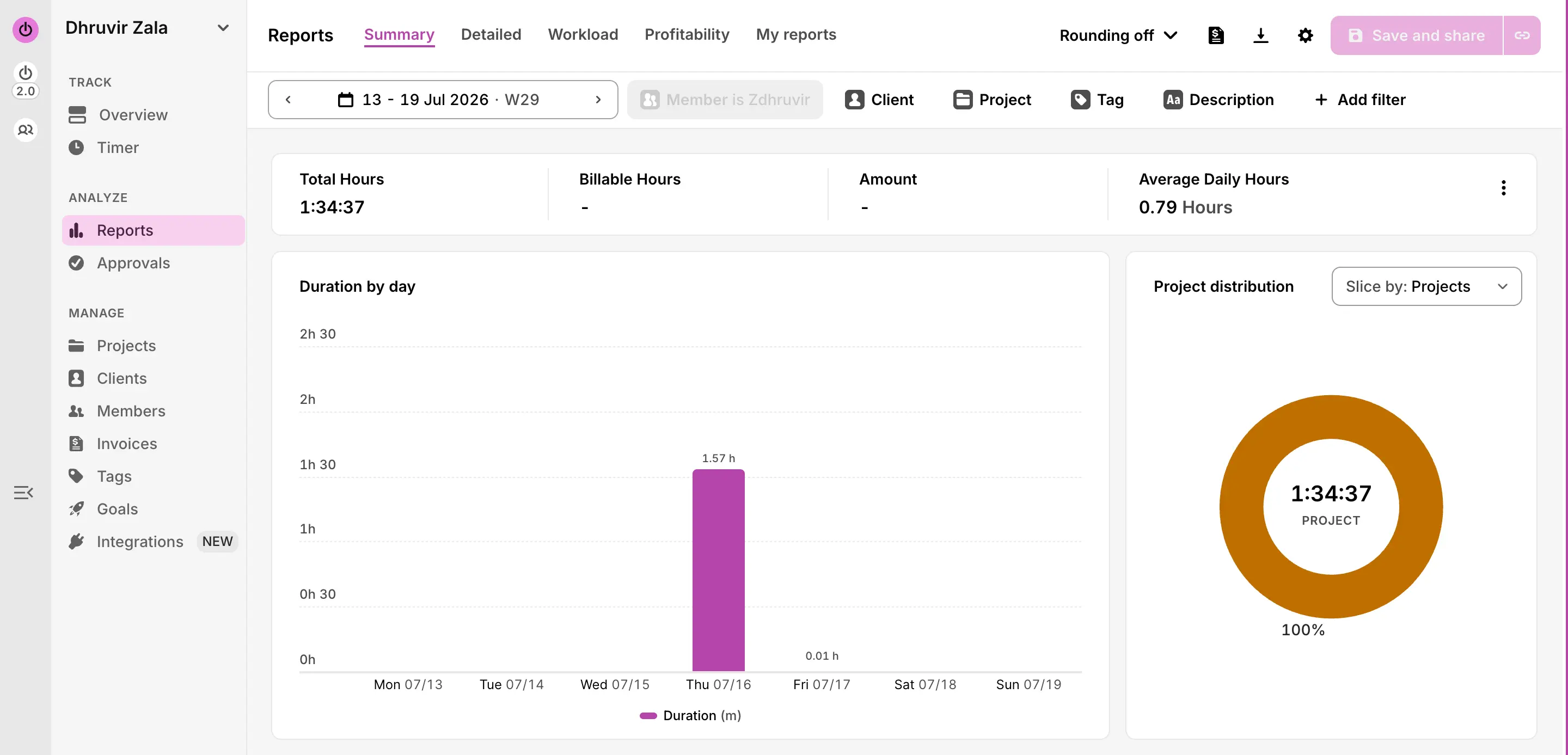
Toggl Track pros:
- No screenshots, keystroke logging, mouse tracking, or activity score on any plan, ever
- Desktop Timeline auto-tracks apps and websites, but the data stays private until you turn it into a logged entry
- Calendar-style Timer view lets you click any block on your week to edit the project, time, and duration in seconds
- Turns a Report straight into a client invoice, no export and re-upload step in between
- 100+ browser-based integrations plus native Slack, Jira, Salesforce, Google Calendar, and QuickBooks connections
- Free plan covers teams up to 5 people, forever
Toggl Track cons:
- No GPS or geofencing at all, so field teams and BPOs get nothing to confirm a physical location
- No native Deel or Wise integration, only Zapier or a manual CSV export
- Zero monitoring cuts both ways, so if unverifiable contractor hours are your actual problem, Toggl hands you nothing to check it with
Toggl Track has been one of the default answers to "what's a simple time tracker" for over a decade, and using it again for this piece reminded me why. I started a timer from the little menu bar app on my Mac, one click, and by the time I checked my phone a minute later, the same entry was already sitting there, synced and editable.
The calendar view is where Toggl earns the rest of its reputation. Your week shows up as a grid, and every tracked block sits on it as a colored bar you can drag to resize or click to open. Clicking one pulls up a small pop-up right on the calendar itself: project tag, start and end time, total duration, and a Save button.
Now, the part that actually answers why you're here. Toggl's desktop app has a feature called Timeline that quietly logs which apps and websites you used and for how long, which sounds a lot like Hubstaff's activity tracking on paper. The difference is where that data goes. It stays on your device, visible only to you, until you personally decide to turn a stretch of it into a time entry. Your manager never sees a screenshot, a raw activity feed, or an activity percentage, not on Free, not on Premium, not on Enterprise. There's no admin setting anywhere to switch that on. Toggl simply doesn't sell that feature.
Reporting holds up well once you're on a paid plan. The Summary report turns a week into a duration chart and a project distribution donut in two clicks, and you can generate an invoice straight from that same report screen. Where Hubstaff makes you pay separately for Insights to get this kind of visibility, Toggl folds profitability analysis into Premium from the start.
That said, Toggl has its own small version of a pricing catch, and its own real gaps against Hubstaff. Toggl genuinely can't do what pulled some of you to Hubstaff in the first place: there's no GPS, no geofencing, and if your payroll already runs through Deel or Wise, you're setting up Zapier or exporting CSVs instead of flipping a native toggle the way you can with Time Doctor.
Toggl Track pricing: Free forever for teams up to 5 seats. Starter is $9 per seat per month billed annually, Premium is $14 per seat per month for your first year, renewing at $18 per seat per month (monthly billing runs higher on both). Enterprise is custom. 30-day free trial on Premium, no credit card required.
Find the right Hubstaff alternative for you
For most teams reading this, Rize is the one to install today. It's the only alternative on this list that fixes both reasons you started looking: no screenshots to make your team feel watched, and profitability reporting built into every team plan instead of an add-on that turns into a bill later. It also takes less than five minutes to set up, with nothing for IT to roll out.
If your team works in the field or needs GPS, skip to Time Doctor, which keeps your Deel or Wise payroll intact, or DeskTime for the lowest possible price. If consent is the sticking point, Insightful puts the tracking switch in your contractors' hands. And if you want no monitoring at all, Toggl Track simply doesn't sell that feature.
Every tool here comes with a free plan or a free trial, including Rize's own 7-day trial. So don't take my word for it. Install two, run them next to Hubstaff for a week, and let your team's reaction settle it.
Related Reading
See how Rize compares to other time trackers: Rize vs Hubstaff, Rize vs Clockify, Rize vs Toggl, and Rize vs Harvest. Browse the full comparisons page for more.
Start tracking time automatically
Join thousands of professionals who stopped guessing where their time goes. Free for 7 days.
“Rize has been a no-brainer for me.” — Ali Abdaal Read more →