
If you're a lawyer, you already know exactly where your money disappears. Maybe it disappears in the six-minute call you forgot to log, the quick email reply you meant to bill for and didn't, the courthouse hallway conversation that never made it onto any timesheet.
By the evening, you're rebuilding your whole day from memory, and when memory comes up short, you guess low. Guessing low feels safer than guessing high, but it also means giving away money you already earned.
Most solo attorneys and small firm partners have tried to fix this already. A sticky note system. An Outlook calendar you block off after the fact. Maybe you grabbed Toggl or Clockify because it was free, then quietly stopped using it because it has no idea what IOLTA is and can't produce a LEDES invoice when a corporate client demands one.
That's exactly why we tested five time tracking tools built for law firms. Here's what works, who each one is really for, and what you'll regret if you pick wrong.
What makes the best time tracking software for lawyers?
Here's exactly what we tested for, and why each one matters specifically to your practice, not just any business that bills by the hour.
- How the timer catches time. Passive, automatic tracking beats a manual start-stop timer every time.
- Trust accounting and IOLTA compliance. If a tool doesn't have this built in, you're managing it in a separate spreadsheet.
- LEDES e-billing support. If even one client requires a specific invoice format, this stops being a nice-to-have.
- Real per-attorney pricing. We list the actual number wherever a company publishes one, and we tell you flat out when they don't. "Contact sales" isn't a price. It's a way to keep you on the phone until you're already invested.
- Firm-wide adoption. The best tool on paper is worthless if the associate who resents new software just quietly stops using it after week two. Easy setup and low friction matter as much as any single feature on this list.
- Reporting for utilization and disputes. If a client ever questions an invoice, you need something better than your memory of that week. Good reporting is what gets you paid without an argument.
Here's how all five stack up against every one of those, at a glance, before we get into the details on each one.
The best time tracking software for lawyers at a glance
If you don't have time to read all five sections (a little ironic, but here we are), this table gets you there in ten seconds. Find your situation in the "best for" column and skip straight to that tool.
| Tool | Best for | Standout feature | Pricing |
|---|---|---|---|
| Rize | Best overall | Zero timers, ever. AI tags time to the right client on its own | $29.99 to $39.99/attorney/mo (Team plan) |
| Clio Manage | Best for trust accounting + LEDES billing | Trust accounting and LEDES built into every plan, even the cheapest | From $49/attorney/mo (Starter), higher tiers are quote only |
| MyCase | Best for real pricing, not a sales call | Smart Time Finder catches billable work you forgot to log | $50 to $60/user/mo (Basic) |
| TimeSolv | Best for insurance defense and corporate e-billing | Supports 4 separate LEDES formats, more than anyone else here | $44 to $45/attorney/mo (Legal plan) |
| Memtime | Best for keeping AI and the cloud away from client data | Captures everything automatically, but nothing ever leaves your device | $12 to $35/user/mo depending on tier |
That's the shortlist. Now let's get into why each one earned its spot.
1. Rize — best overall time tracking software for lawyers
Best for solo attorneys and small firm partners who forget to log billable time. Available on Mac and Windows.
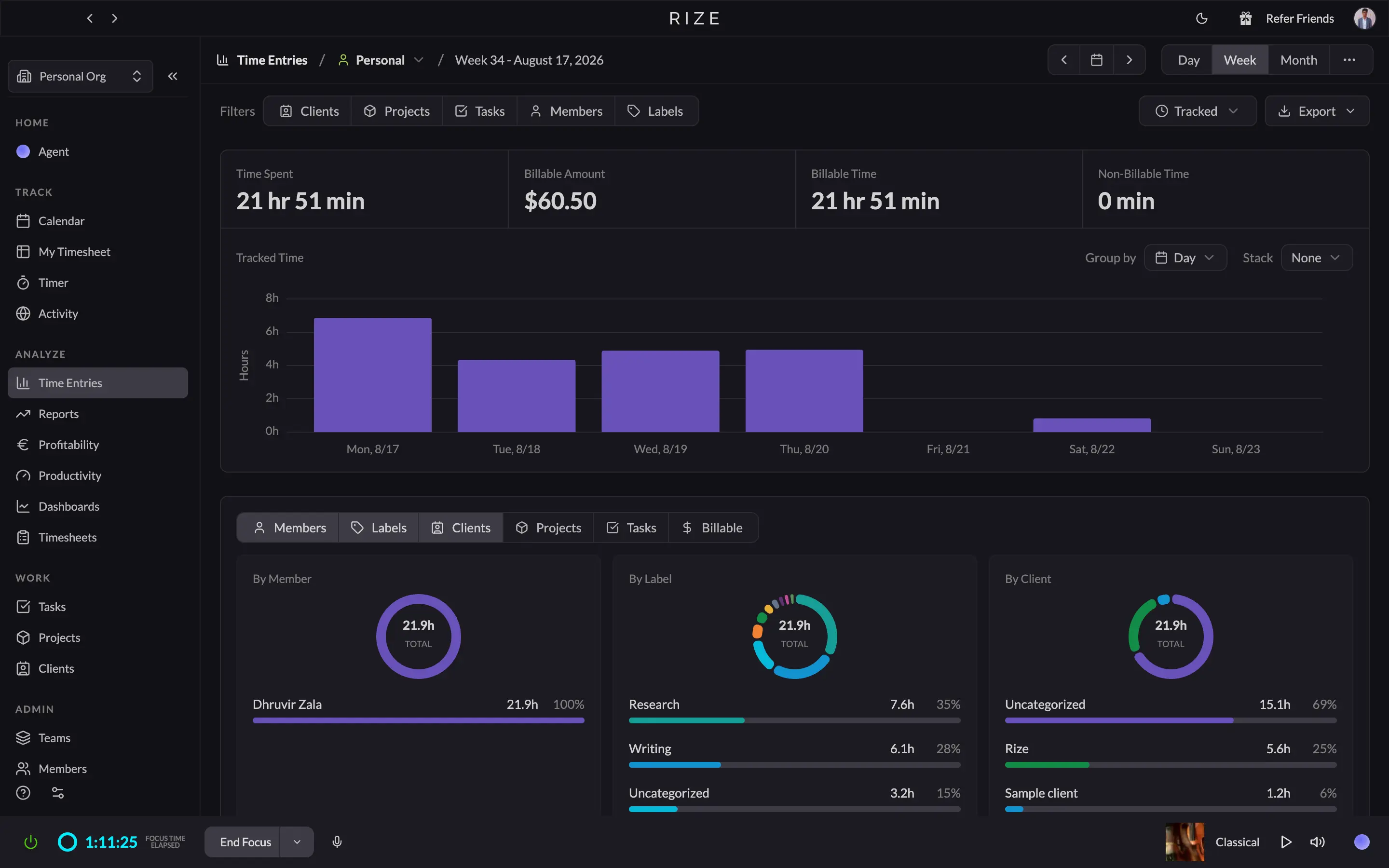
Rize pros:
- Zero timers, ever. It just runs
- AI tags time to the right client and matter on its own
- No screenshots, no keystrokes logged, ever
- Team dashboard shows utilization, not surveillance
- Per-seat pricing, no forced practice management bundle
Rize cons:
- No IOLTA or trust accounting
- No native LEDES export
- No mobile app unless you're on Enterprise
Every other tool on this list was built for lawyers first. Rize wasn't, and that's exactly why it wins the one thing that's bleeding you money: the time you forget to log. It has no bar association endorsement, no legal terminology baked into the UI, nothing. Just a background app that watches what you're doing on your computer and turns it into a timesheet without you touching a single button. If you've tried and quietly abandoned Toggl or Clockify, this is the fix, not because Rize understands law, but because it doesn't need you to remember anything in the first place.
After you install it, Rize sits in your menu bar (or system tray on Windows) and logs every app, document, and website you touch, timestamped, all day. Draft a motion in Word, jump on a client call through your synced calendar, spend 20 minutes on Westlaw, answer three emails on a completely different matter. All of it gets captured with no timer ever started. By evening, you're not staring at a blank timesheet trying to reconstruct your day. You're reviewing one Rize already built.
The part that saves you the nightly 15 to 30 minutes of timesheet reconstruction is the AI tagging. It looks at the document you had open, the calendar event, the app in focus, and suggests which client or matter that block belongs to, with a confidence score attached so you know what to double-check. You're approving entries, not writing them from scratch. And every entry keeps its timestamp and the document trail behind it, so if a client ever disputes an invoice, you're pointing to actual records instead of "about two hours on research."
This matters more for lawyers than almost anyone else, because privilege isn't optional. Rize doesn't take screenshots, doesn't record your screen, doesn't log keystrokes. By default, it only reads the app name and window title, enough to know you were in a client's contract, not enough to see what was in it. And if you're the partner trying to get a two-to-eight person firm onto one system, that default is also your best adoption argument. The team dashboard only shows aggregates: hours by attorney, by matter, billable versus not. Nobody's activity gets piped to a manager. The associate who resents being watched has genuinely nothing to resent here.
Rize is the right pick if your actual problem is simple: you do the work and then forget to bill for a chunk of it. That's most solo attorneys and small firm partners, and nothing here fixes it with less effort on your part. It's the wrong pick if you need trust accounting or LEDES built in from day one, or if most of your billable hours happen away from a laptop.
Rize pricing: Individual plans run $9.99 to $39.99/month billed annually. For a firm, the Team plan is what you want: $29.99 to $39.99 per attorney per month depending on whether you pay annually or monthly, no bundled practice management features you didn't ask for. There's a free 7-day trial, no card required.
2. Clio Manage — best for trust accounting and LEDES billing
Best for firms that need IOLTA compliance and LEDES invoices built into the same system. Available on Web, iOS, and Android.
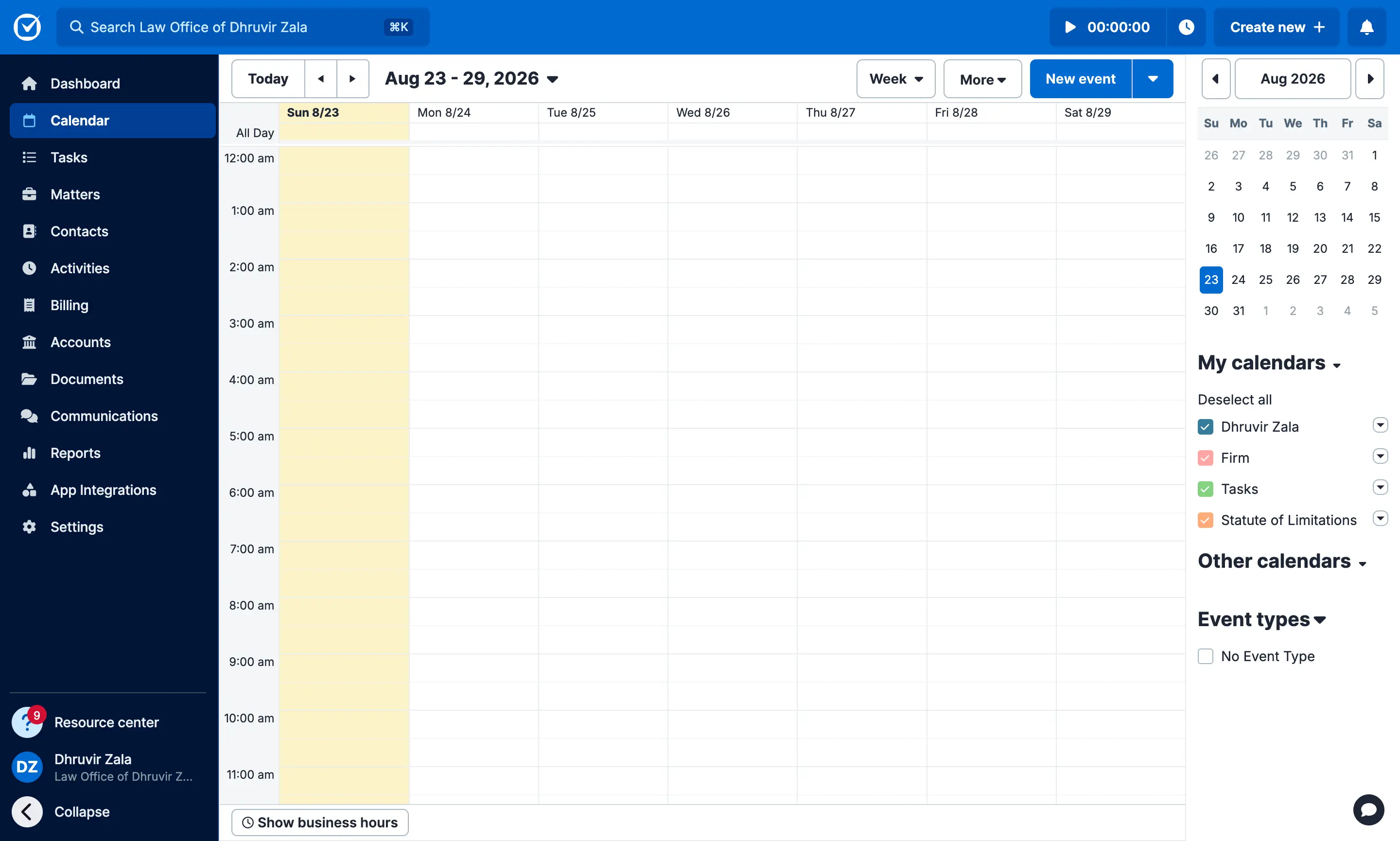
Clio Manage pros:
- Trust accounting and IOLTA compliance on every plan, even the cheapest one
- LEDES e-billing and UTBMS codes built in
- Time entries pull straight from your calendar, tasks, emails, and documents
- Custom rate hierarchy for user, matter, and client billing
- Mobile app built for logging time outside the office
Clio Manage cons:
- Timer is manual first, AI passive capture only on Core plan and up
- Real per-attorney pricing hidden behind "Get pricing" past the entry plan
- You're buying a full practice management system, not a lightweight timer
Clio Manage builds the timer and the trust ledger into the same system, so the six-minute call you just logged and the retainer sitting in your IOLTA account are one click apart. That's the real difference here. It's not trying to catch time better than everyone else on this list. It's trying to make sure the time you do catch turns into a bill you can send to a client who requires LEDES formatting, without you touching a spreadsheet in between.
Start with the trust accounting, because that's the thing a general tool like Toggl genuinely cannot do. Every Clio Manage plan, even the cheapest one, reconciles trust and operating accounts and lets you record a retainer deposit against a matter the same way you'd log a time entry. When a client wires a retainer, it shows up on the same dashboard where you're tracking billable hours. If you've ever had to explain a trust discrepancy to your bar's disciplinary board, that alone is worth the subscription for a lot of firms.
The billing itself is built for the client who won't accept a plain invoice. Every time entry can carry a UTBMS code, and bills export in LEDES format with entries broken out by service, expense, and product, plus a separate line for non-billable work you're disclosing but not charging for. If a corporate client's insurer or in-house counsel demands a specific e-billing format, you're generating it from data you already entered, not reformatting anything by hand.
Where Clio Manage is less impressive is the actual moment of catching time. The default is a start-stop timer sitting in your browser tab, or logging time after the fact from a calendar event, email, or document you already opened. That's fine, and it's honestly how most lawyers already work. But it's not passive. Clio does draft time entries automatically from Outlook, OneDrive, and calls made through the mobile app, and it works the way you'd want: it drafts, you review, you approve. It's just gated to the Core plan, not the entry-level Starter plan most solo attorneys start on.
Clio Manage is the right pick if trust accounting and LEDES compliance are non-negotiable and you're fine running your whole practice through one system to get them. It's the wrong pick if all you want is a better timer, because you're taking on a full practice management platform to get one. And it's the wrong pick if you want to know your real monthly cost before a sales call, because anything past the entry plan is a quote, not a listed price.
Clio Manage pricing: The only number Clio publishes is the Starter plan, $49 per attorney per month billed annually. Core, Signature, and Elite, the tiers that add the client portal, conflict checking, and AI-drafted time entries, are all "Get pricing" quotes, so you won't know your real per-attorney cost until you talk to sales. There's a 7-day free trial, no card required.
3. MyCase — best for real pricing without a sales call
Best for firms that want transparent pricing and practice management under one roof. Available on Web, iOS, and Android.
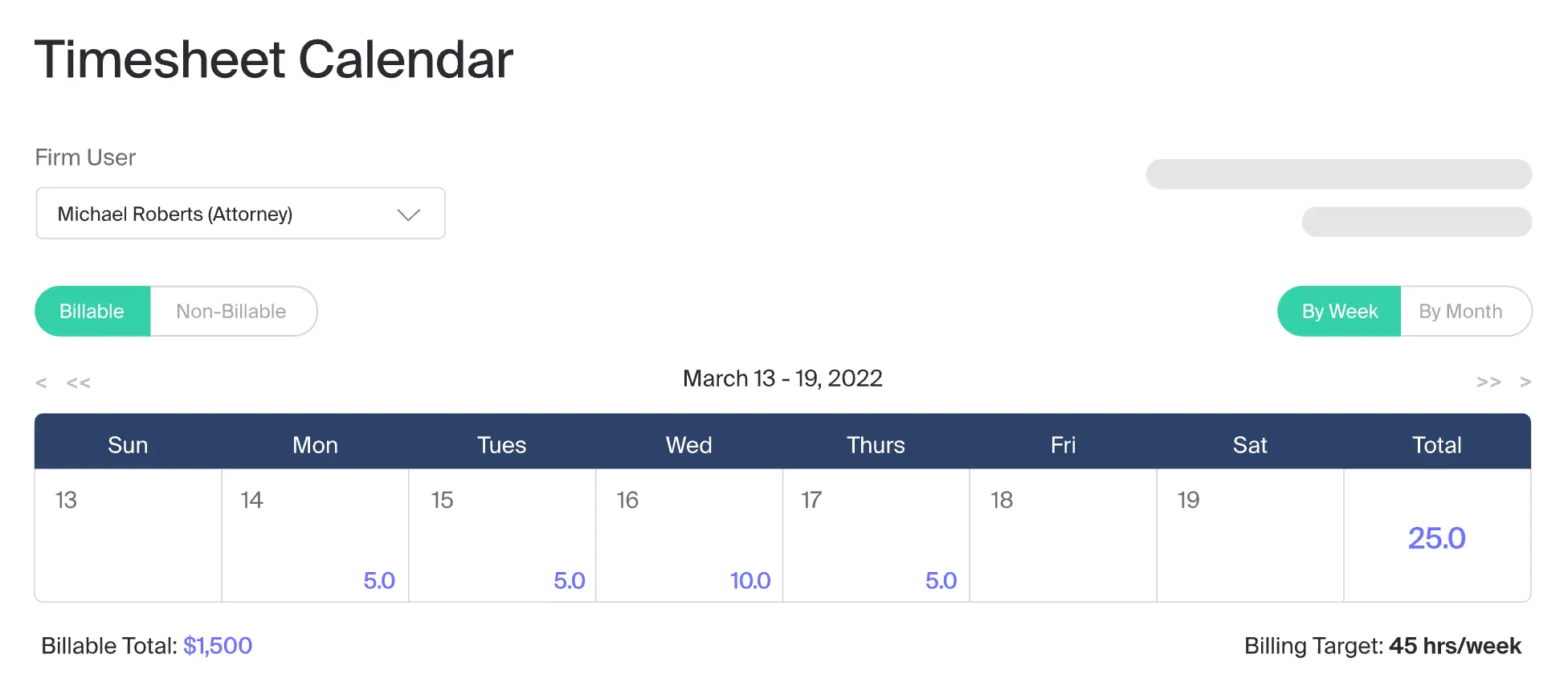
MyCase pros:
- Trust accounting and IOLTA compliance on every plan, even the cheapest
- Smart Time Finder flags billable work you forgot to log
- Up to three timers running at once as you jump between matters
- Among the easiest systems to get a whole firm actually using
MyCase cons:
- Smart Time Finder only sees what happens inside MyCase
- Passive time catching sits behind the Pro plan, not Basic
MyCase is a cloud-based practice management platform built for solo and small firm lawyers. Time tracking is just one piece of it, sitting in the same login as trust accounting, invoicing, client intake, and your actual case files.
The timer itself is nothing special. Start it, stop it, or run three at once if you're bouncing between matters on a busy afternoon. What saves you time is Smart Time Finder. At the end of the day, it looks back through what you did inside MyCase, calls you logged, emails you sent, notes you saved, documents you uploaded, and hands you a list of anything that looks billable but never got a time entry. You approve what's real, skip what isn't. It's a genuinely useful safety net, but it only sees your day through MyCase. Draft a motion in Word or spend twenty minutes on Westlaw without touching the platform, and none of it shows up on that list. You also only get this feature on Pro and up, not the $50 Basic plan most solo attorneys start on.
Trust accounting and IOLTA compliance come standard even on Basic, which is rare for this category. When a client requires LEDES billing, MyCase generates a 1998B invoice with UTBMS codes attached to each entry once you turn it on in settings.
MyCase is the right pick if you want trust accounting, billing, and time tracking under one transparently priced roof, and you're fine starting your own timer. It's the wrong pick if catching every unlogged minute matters more than the price tag, since Rize's passive tracking watches your whole computer instead of just what happens inside one app.
MyCase pricing: Basic runs $50 to $60 per user per month depending on billing cycle, and already includes trust accounting and time tracking. Pro is $100 to $120 per user per month and adds Smart Time Finder, texting, and workflow automation. Advanced runs $130 to $150 per user per month for AI case research and API access. There's a 10-day free trial, no card required.
4. TimeSolv — best for insurance defense and corporate e-billing
Best for firms that bill insurers or corporate legal departments with strict invoice format requirements. Available on Web, iOS, and Android.
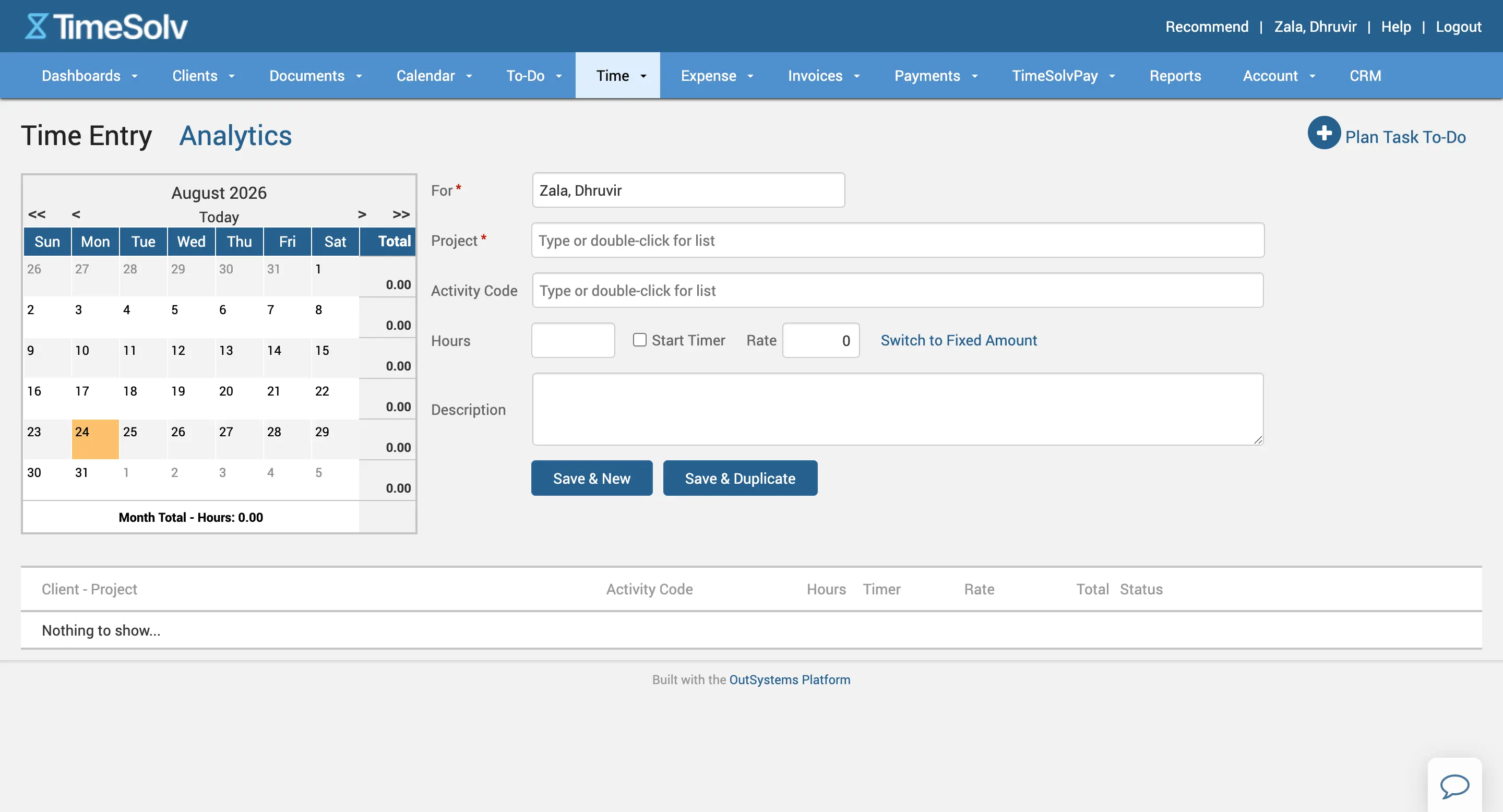
TimeSolv pros:
- Supports four separate LEDES formats
- Trust accounts auto-replenish when a retainer runs low
- Reports export in 10 different formats
- Run several timers at once and jump between matters
TimeSolv cons:
- Timer is fully manual; you have to remember to start it
- Mobile app trails the desktop version on features
- Interface looks noticeably older than the rest of this list
TimeSolv has done nothing but legal billing since 1999, and that focus shows up in exactly the place that matters if you bill insurers or corporate legal departments: the invoice format. Every tool on this list supports LEDES because it's table stakes now. TimeSolv supports four: LEDES 1998B, 1998BI, Chubb, and Litigation Advisor, so when a carrier's billing guidelines call for a format the others don't touch, you're probably still covered.
Trust accounting goes past the minimum here too. Every matter can carry unlimited trust accounts, so multi-matter retainers don't force you into workarounds. Set a minimum balance and TimeSolv flags a client's trust account the moment it drops below that line, and it can pull the replenishment straight onto the next invoice instead of you tracking it in a side spreadsheet.
Catching the time itself is still on you. The timer is manual: start it, stop it, or run a few at once if you're bouncing between matters on a busy afternoon, and TimeSolv pauses whichever one you had running the second you kick off a new task. Both the mobile and desktop apps work offline and sync once you're back online, so a deposition with no signal won't cost you a billable entry. But if your real problem is forgetting to start the timer in the first place, nothing here solves that. Rize's zero-touch tracking does, if that's the bigger issue for you.
Reporting is where TimeSolv earns its reputation with firms that have been burned by a disputed bill before. Time entries, utilization, aged invoices, and trust ledger activity are all available across ten report formats, broken down by staff member or matter in a couple of clicks. If a client ever pushes back on an invoice, you hand them a documented report instead of your memory of that week.
Where TimeSolv shows its age is the interface. It's not broken; it just looks like software built a decade ago and updated rather than redesigned, and firms coming from Clio or MyCase will notice right away.
TimeSolv is the right pick if you bill clients who dictate their own invoice format and you want trust accounting that catches problems before they become violations. It's the wrong pick if you're still relying on memory to catch billable time, and it's the wrong pick if a clean, modern interface matters to you or the associates you're trying to get onboard.
TimeSolv pricing: TimeSolv splits into two plans, Pro and Legal, and Pro isn't really an option for a law firm since it drops trust accounting and LEDES billing entirely. The Legal plan runs $44 per attorney per month billed annually, or $45 month-to-month. There's a 10-day free trial, no card required.
5. Memtime — best for keeping data off the cloud
Best for lawyers who want automatic capture without any data leaving the device. Available on Mac, Windows, and Linux.
Memtime pros:
- 100% offline, no AI touching your data, ever
- Captures every app, doc, call, and email automatically
- Direct Clio integration, plus 100+ others
- Tracks in your firm's exact billing increment
- Delete or exclude anything you don't want logged
Memtime cons:
- No trust accounting or LEDES export, capture only
- You write the tagging rules yourself, not true zero-touch
- Clio and other integrations locked behind Connect, not Basic
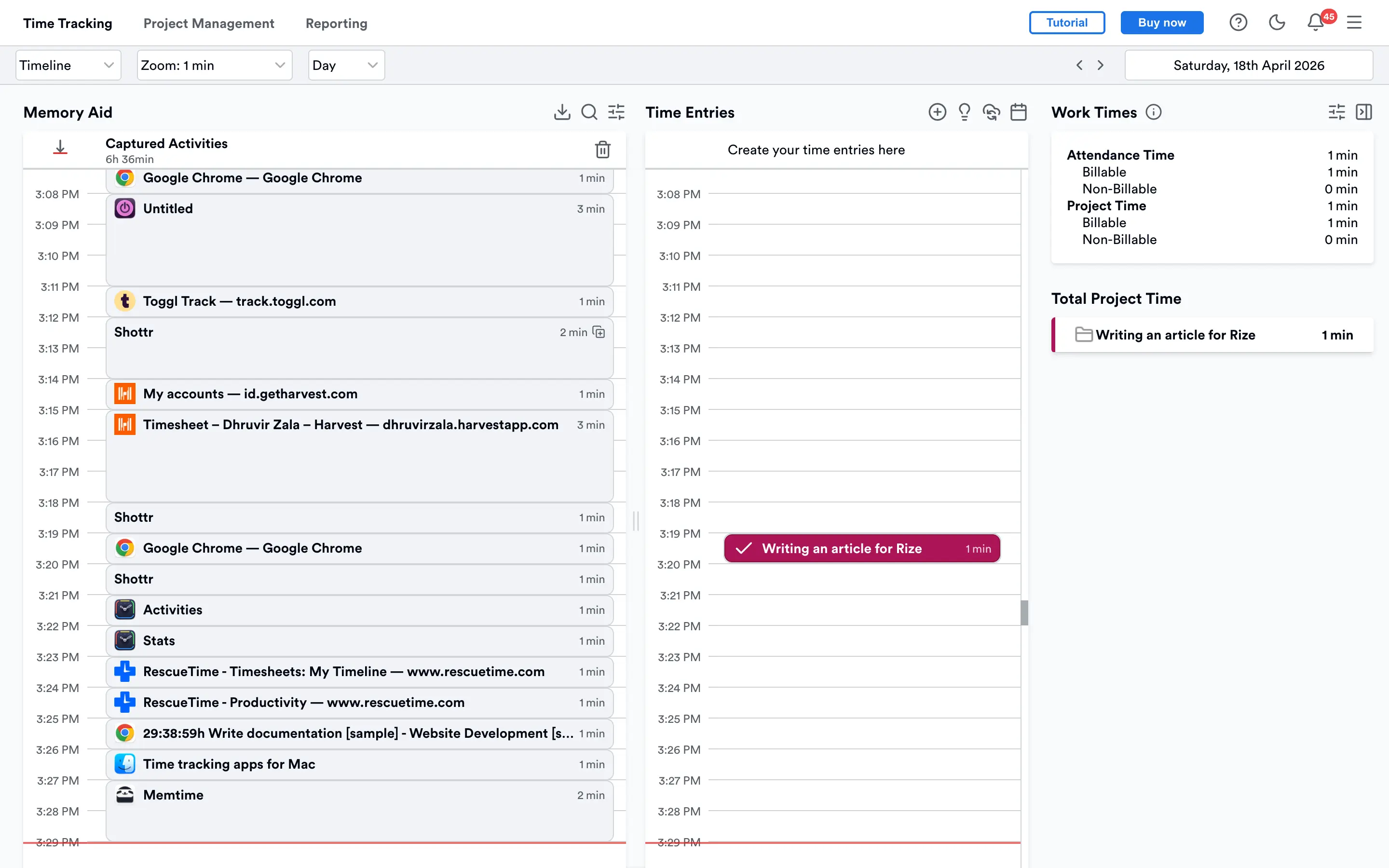
Memtime runs in the background and builds a Memory Aid, a timeline of every program, document, email, and browser tab you touched, timestamped to the minute. The difference is what happens next. Nothing leaves your device unless you export it yourself. Not to Memtime's servers, not to a model, nowhere. If the thought of a vendor's AI "just tagging" your activity data still makes you uneasy, this is the tool built for that exact discomfort.
Where Memtime earns its keep with lawyers specifically is the increments. Set it to 1, 5, or 6 minutes, or jump to 10, 12, 15, 30, or 60 if that's how your firm bills. Most general trackers make you round. Memtime just hands you the day already sorted into the interval you invoice in.
The catch is that Memtime doesn't tag anything for you. Instead of AI deciding which matter a block belongs to, you write the rules yourself, "anything from this client's email goes here," and Memtime drafts the entry for you to approve. That's not starting a timer, but it's not zero-touch either. And for a five-person firm, that means someone, probably you, is building rules for the associate too, not just approving what an AI already figured out.
Memtime also doesn't try to be Clio. No trust accounting, no LEDES built in. What it does instead is feed captured time straight into Clio (and 100+ other tools), so the billing system you already trust for IOLTA compliance gets fed accurate hours instead of your best guess.
Memtime is the right pick if privilege and keeping data off any server matter more to you than full automation. It's the wrong pick if you want AI to write the entries, not just suggest them; that's what Rize does best. We put the two head-to-head in our detailed Rize vs Memtime comparison if you want the full breakdown.
Memtime pricing: Basic runs $12 to $18 per user/month depending on term, but it won't sync to Clio or anything else, just Memtime's own built-in project tool. For that, you need Connect, $18 to $26 per user/month. Premium adds phone call tracking and SSO for $23 to $35 per user/month. There's a 14-day free trial, no card required.
How to choose the right time tracking software for lawyers
If trust accounting and LEDES billing are non-negotiable and you're fine running your whole practice through one system, Clio Manage is the safer bet. If you want real pricing before a sales call, MyCase gets you there. If a client dictates a specific e-billing format, TimeSolv is built for exactly that. And if you don't want AI or the cloud anywhere near client data, Memtime is the only one here that keeps everything local.
For everyone else, and that's most solo attorneys and small firm partners, Rize is where you start.
Here's why. The money you're losing isn't hiding behind a missing feature. It's hiding in the six-minute call you forgot to log and the email reply you meant to bill and never did. No trust accounting module catches that. No LEDES export catches that.
The only thing that catches it is a tool that watches your day automatically, and Rize is the only one on this list that does that without asking you to start a timer, tag anything, or remember a single detail. Keep billing through whatever system already handles your trust accounting. Just let Rize make sure nothing slips through before it gets there.
Try it free for 7 days, no card required. Install it, forget about it, and see how much of your day you've actually been giving away for free.
Stop losing billable hours
Try Rize free for 7 days and see how automatic time tracking captures the billable calls, emails, and research sessions you are forgetting to log. No credit card required.
Start Free Trial