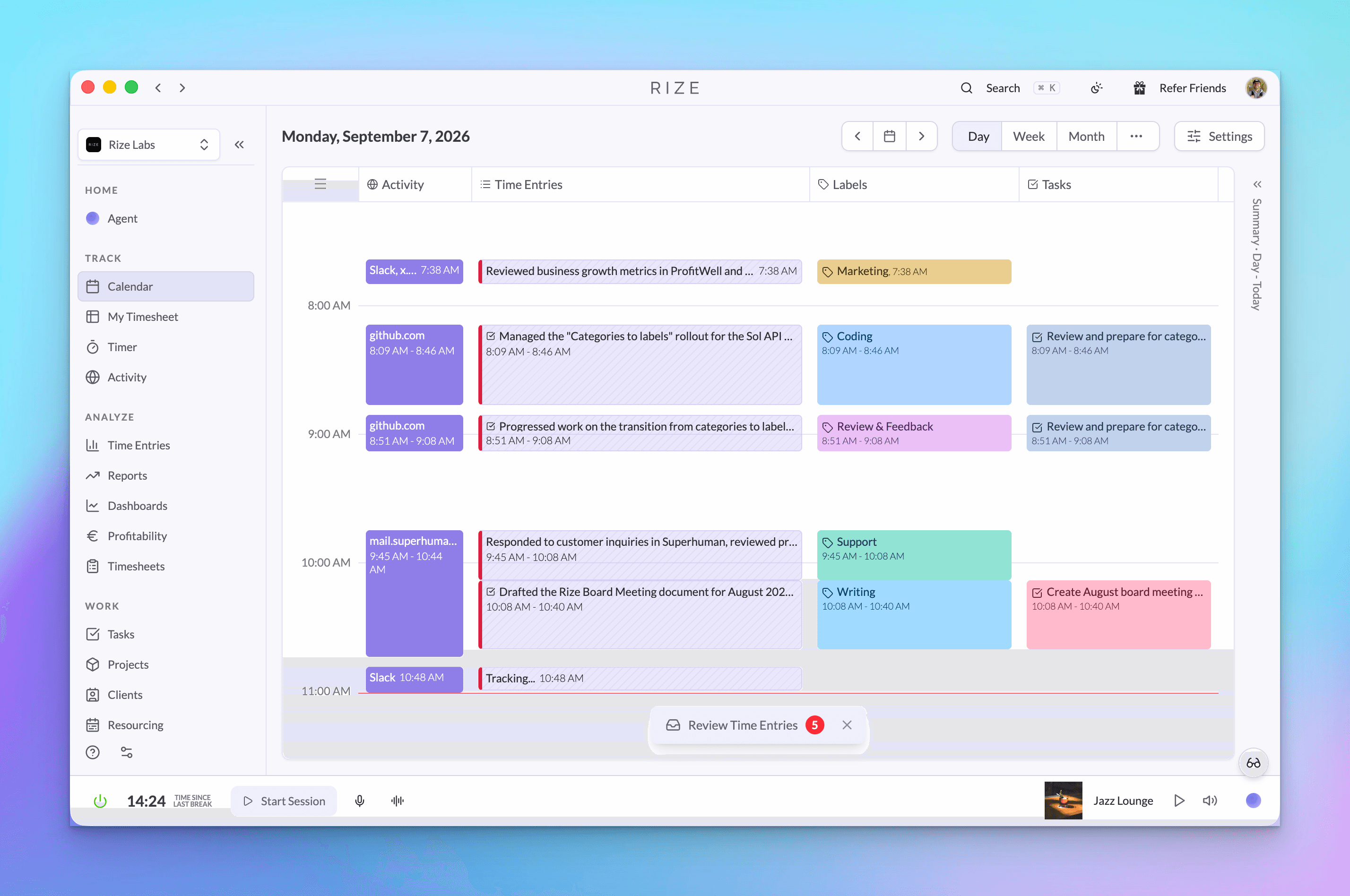
Rize records the metadata of your active window: the app name, the window title, the URL, and the timestamps. By default it does not record what is inside the window: no screenshots, no keystrokes, no screen recording, no clipboard. That one design decision is the difference between an automatic time tracker and an employee monitoring tool, and it is why Rize has never held a password, a bank balance, or a private message.
Thousands of employee surveillance tools already exist. Rize is not trying to be one of them. Below is the exact mechanism: what gets collected, where the filtering happens, who can see the result, and every control you have to shrink or delete it.
Key Takeaway
Rize captures window metadata, not window content. Your raw app and website history is private to you and is never shared at the team level. You can reject any suggested entry before it becomes a timesheet, exclude any app or site so it is never sent at all, and schedule Rize to permanently delete your activity data every week, two weeks, or month while keeping the time entries built from it.
What Rize actually records
Rize records four things per window: the application name, the window title, the URL, and the start and end timestamps. Unless your workspace turns on Vision, nothing else about the window enters the system.
Because the capture stops at metadata, the categories of data that carry real risk never reach Rize in the first place. A password typed into a login form is content. A bank balance on screen is content. The body of a message is content. None of it appears in an app name or a timestamp, so there is no retention policy to trust and no breach scenario that exposes it. It was never collected.
Window metadata is the descriptive layer your operating system already exposes about the window you are working in: which program is in front, what that program has written in its title bar, and which address a browser tab is pointing at. It says where you were working, never what you wrote.
This is the same data model behind every privacy-first time tracker that avoids screenshots. The difference is what Rize does with it: metadata is rich enough for AI to write an accurate time entry, which removes the manual review step that other metadata-only trackers still require.
Where the filtering happens
Privacy controls in Rize run on your computer, before anything is uploaded, not on the server after the fact.
When you set URL tracking to domain only, the desktop app rewrites the URL down to the protocol and hostname and sends that. When you strip window titles, the title field is emptied on your machine. When an app is excluded from tracking, the app is dropped in the tracking loop and no event is created at all.
That ordering matters more than the setting itself. A server-side filter is a promise that data you sent will be discarded. A client-side filter means the data never left. If you set Rize to record domains only, the full URL of the page you were reading is not sitting in a log somewhere waiting to be purged.
Who can see your app and website data
Nobody but you. Raw app and website activity is scoped to the person who generated it and is never shared at the team level.
Rize uses that activity to do one job: build your timesheet automatically. The AI reads the metadata, groups it into sessions, writes a description, and applies tags. What reaches your team's shared reporting is the finished entry: a description, the tags, the duration, and whether it is billable. The underlying app and website history stays on your side of the line.
This is enforced in the data layer, not by hiding a screen. Every query that returns tracking events resolves against the current user's own identity. Team-level reporting queries return approved time entries only. There is no manager view of another person's browsing history because the API has no query that would return one.
Rejecting time before it is ever shared
An AI-suggested entry stays pending and invisible to your team until you approve it, and rejecting it means it never becomes a timesheet.
Pending entries sit in a review window. On a workspace with automatic approval turned on, that window is eight hours from the end of the tracked session, and Rize emails you a review prompt when there is more than one active member on the workspace. Inside that window you can edit the description, retag it, split it, delete it, or reject it outright.
Rejecting is the important one. A rejected suggestion is taken out of your timesheet permanently. It is excluded from every team query, every report, and every export. The decision to share a block of time is yours, and it is a decision you make before anyone else can see it.
Scheduled data redaction
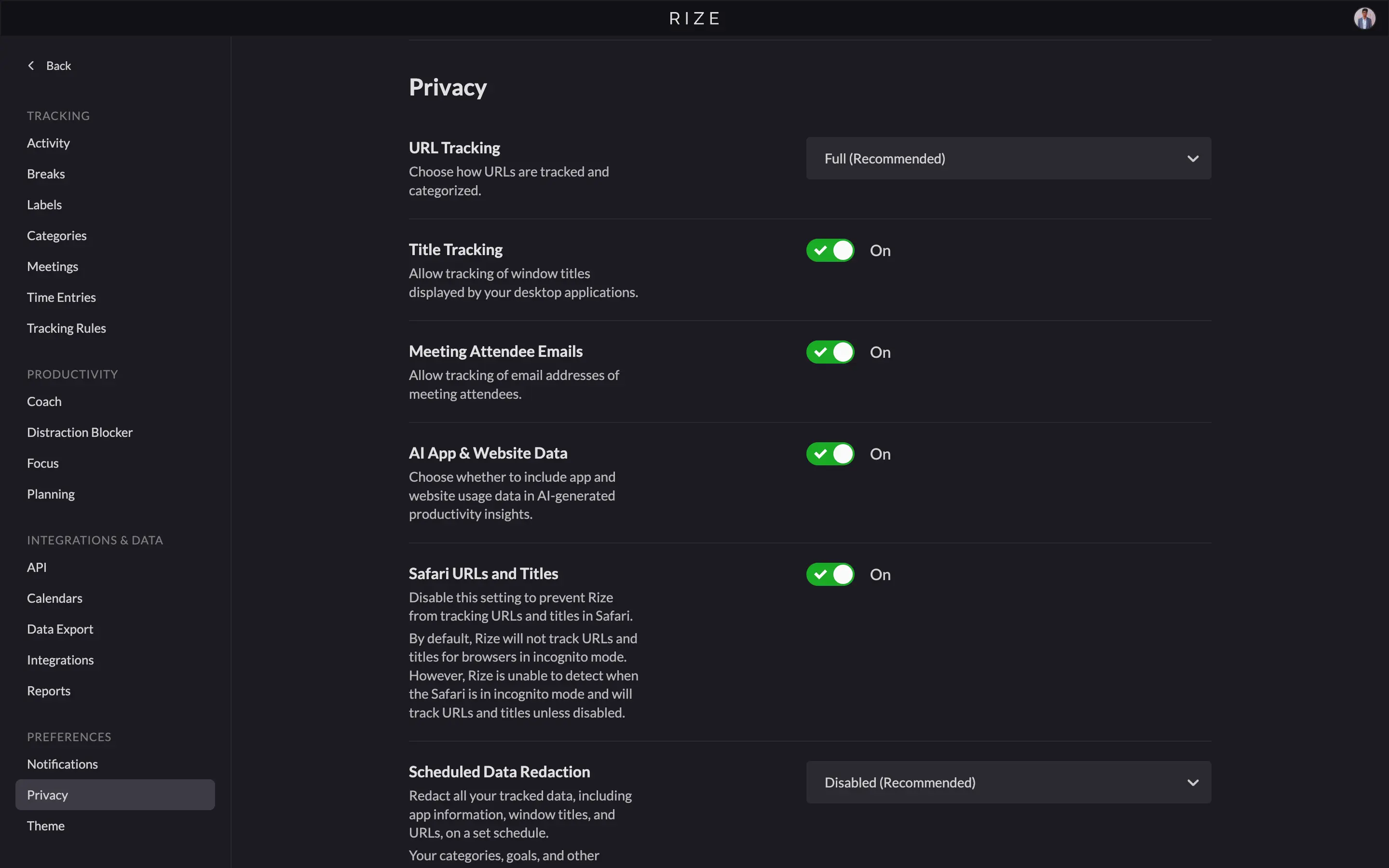
Scheduled data redaction permanently deletes your app and website data on a rolling schedule while keeping the time entries, labels, projects, and clients built from it.
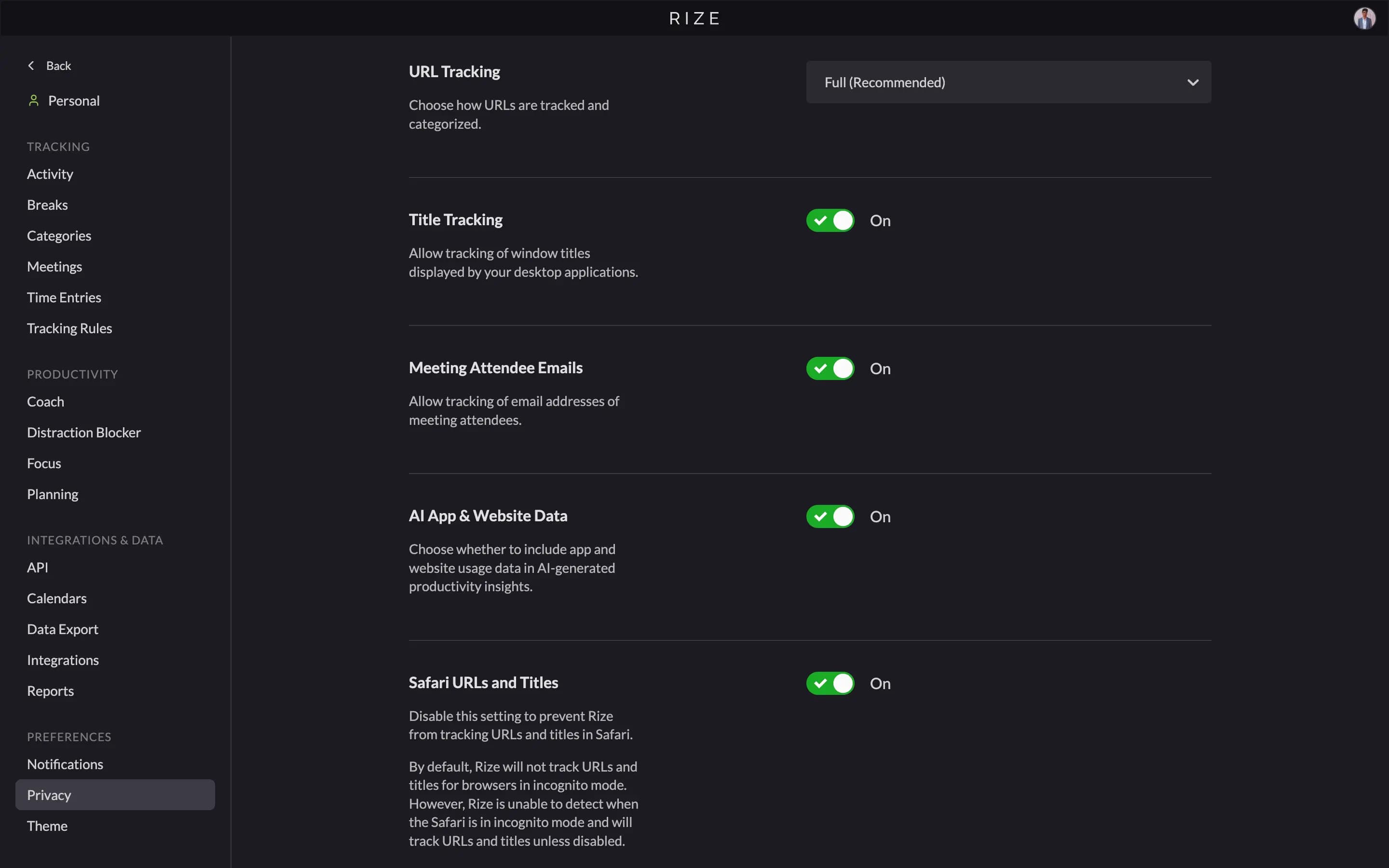
Open Settings, then Privacy. The schedule has four options: disabled, retain the previous week only, retain the previous two weeks only, or retain the previous month only. A nightly job walks your history and wipes everything outside the retention window.
Redaction overwrites the URL, the domain, the window title, the app name, the bundle identifier, and the file path on every affected event. It is not a soft delete or an archive, and there is no undo. The confirmation in the app says so plainly: once this information is removed, it cannot be recovered.
Scheduled data redaction deletes the evidence, not the output. The timesheet Rize wrote from last month's activity survives. The record of which sites produced it does not.
There is a one-off version next to it. The Redact Tracked Data button clears everything tracked to date and takes up to an hour to finish. Teams use it before a compliance review, after finishing a sensitive client engagement, or the first time they turn tracking on and want a clean start.
Limiting URL and title tracking
URL tracking has three settings: full URL, domain only, or do not track. Window titles can be stripped separately, which reduces tracking to app names and timestamps.
Both live in Settings, then Privacy. Setting URL tracking to Domain Only records github.com instead of the full path to the pull request you were reviewing. Setting it to Do Not Track records no URL at all, so browser time is attributed to the browser and nothing more.
Our recommendation is to reach for redaction before you reach for these. The AI writes better time entries when it has more context, and a domain on its own rarely says which client the work belonged to. Scheduling deletion gives you a short retention window with full accuracy inside it. Limiting URLs gives you permanent accuracy loss instead. Both are available, and the second is the right call in a regulated environment where the data cannot exist even briefly.
Excluding an app or website completely
Setting a tracking rule to Exclude From Tracking stops Rize from recording that app or site at all, and the time shows up as a gap on your timeline.
Open Settings, then Tracking Rules, search for the app or domain, and change its category to Exclude From Tracking. From that point the desktop app recognizes the window, drops it, and sends nothing. No event, no title, no URL, no duration.
A gap is the honest outcome here, and it is deliberate. Rize does not invent a placeholder entry or file the time under a vague label, because either would leak the fact that something happened. Personal banking, a medical portal, a job search, a side project: exclude it and the timeline simply has no data there.
What Vision changes
Vision is an optional feature that reads the active window of selected apps and websites to write more accurate time entry descriptions, and it is off unless a workspace admin turns it on.
We ship it because a window title is sometimes too thin to describe the work. It is also the one part of Rize that reads window content, so it is worth being precise about how it is gated.
An admin enables Vision for the workspace, and each member can turn it off for themselves. Turning it off stops capture immediately. Most firms handling regulated data leave it off, and nothing else in Rize depends on it.
When it is on, these constraints hold:
- Images are stored only if an admin turns on Save images. Save images is off by default, and a saved image is visible only to the person it came from. In on-device modes the image never leaves your computer.
- A block list runs before capture. Password managers, authenticator apps, end-to-end encrypted messengers, banks, brokerages, payment and crypto services, health portals, private browsing windows, and any sign-in page are blocked on the device and blocked again on the server. The list is not user configurable, so it cannot be widened by an admin.
- Structured detail is stripped from what remains. Email addresses, phone numbers, postcodes, amounts over $100, and long digit runs are replaced before storage. Text that contains something shaped like a card number is discarded entirely rather than redacted.
- Retention defaults to 30 days. An admin can shorten it to as little as one day or choose Always keep, and a nightly job enforces whichever setting is chosen.
On macOS, Vision also requires the operating system's own Screen Recording permission, which you grant in System Settings and can revoke at any time without going through Rize.
Why this is not employee monitoring
Rize has no screenshot feed, no activity score, no idle shaming, and no manager view of raw app and website history. The data a monitoring product is built to collect is data Rize never has.
The distinction is not a positioning choice, it is an architectural one. Article 5 of the GDPR requires personal data to be adequate, relevant, and limited to what is necessary for the purpose. The purpose here is an accurate timesheet. A timesheet needs to know that you spent ninety minutes in Figma on the Acme rebrand. It does not need the pixels.
The UK Information Commissioner's Office reaches the same place from the employment side. Its guidance on monitoring workers asks employers to show that monitoring is necessary and proportionate to a specific aim, and to be transparent with workers about it. Metadata-only capture with per-person deletion controls is a much shorter argument to make than a screenshot archive. The Electronic Frontier Foundation's work on workplace surveillance documents where the other approach ends up.
The practical test is what happens to the numbers. Screenshot tools produce employees who optimize for looking busy, which is why teams that drop surveillance software usually find their utilization data gets more useful, not less. You cannot game an app name.
Momentum Studio, a 12-person creative agency in Los Angeles, is the version of this we can point at. They replaced manual timesheets with Rize and recovered 20% more billable time, cut 8 hours a week of admin off their project managers, and raised project profitability 15%. Ben Jackson, their CEO, describes what changed for the people doing the work: "Rize allows my team to get deep into work and go where their creativity leads them without really having to think about time tracking."
None of that required a screenshot. It required accurate metadata and a team willing to leave the tracker running, which is the part surveillance software never gets.
See exactly what Rize records
Install Rize, open Settings and Privacy, and look at the data yourself before you roll it out to anyone. Every control in this article is in the app on day one.
Start Free TrialYour controls in one place
| What you want | Where to go | What happens | |---|---|---| | Stop a specific app or site being recorded | Settings, Tracking Rules, Exclude From Tracking | The desktop app drops it before upload. Timeline shows a gap. | | Record domains instead of full URLs | Settings, Privacy, URL tracking | URL is trimmed on your computer to protocol and hostname. | | Remove window titles | Settings, Privacy | Title is emptied on your computer. App name and timestamps remain. | | Delete activity data on a schedule | Settings, Privacy, scheduled data redaction | Weekly, biweekly, or monthly wipe. Time entries survive. Irreversible. | | Delete everything now | Settings, Privacy, Redact Tracked Data | Clears all tracked data to date within about an hour. Irreversible. | | Keep a block of time off the timesheet | Reject the pending entry | Never approved, never counted, never visible to your team. | | Turn off content reading entirely | Settings, Vision | Vision is off unless an admin enables it, and you can turn it off for yourself. |
Start with the defaults
Rize's defaults already keep window content, keystrokes, and screenshots out of the system, so the settings above are for tightening a policy rather than fixing an exposure.
Most people change nothing. Teams in regulated work usually set a redaction schedule and leave the rest alone. If you have a question about how any of this is built, ask us. We would rather explain the mechanism than ask you to trust a claim.
You can read the full privacy overview, review our security practices, or see how automatic time tracking builds a timesheet from metadata alone.
Start a free 7-day trial of Rize, or book a demo if you want to walk through the privacy controls with us before rolling it out to a team.