Rize v3.0.149 is the desktop release behind the October web redesign. The headline is a new widget. The rest is a long list of fixes to tracking, shortcuts, sessions and updates, collected in one update.
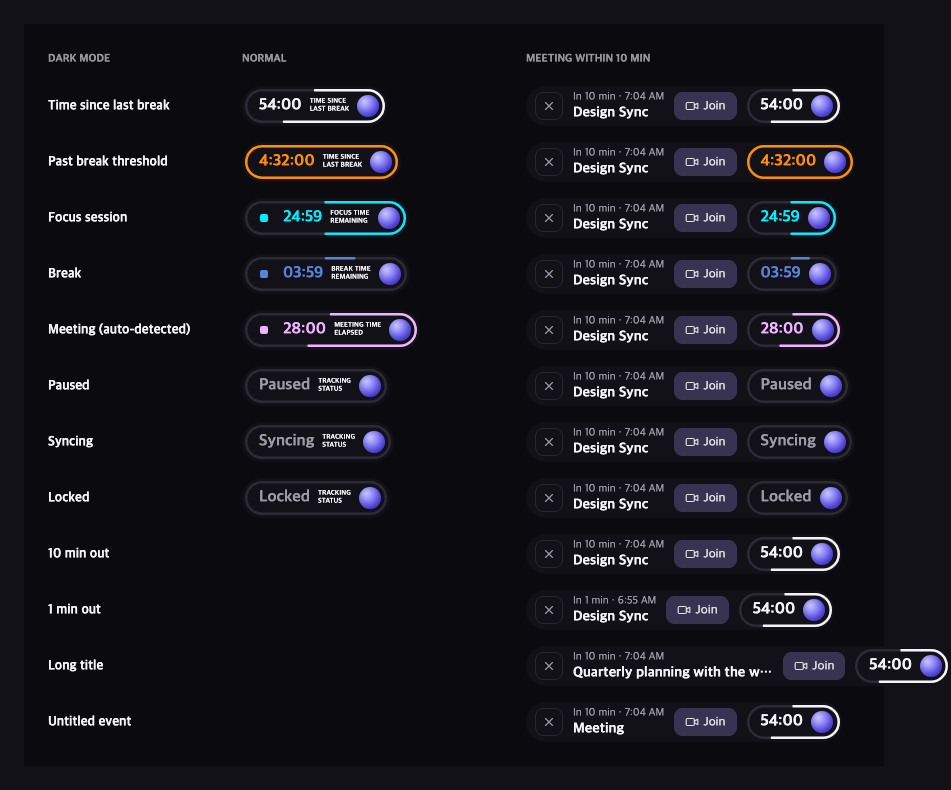
A new desktop widget
The strip that sat at the top of your screen is now a floating pill. It shows one thing at a time: your focus, break or meeting timer with a progress border, or the time since your last break, which turns amber once you are overdue. Paused, syncing and locked states show as a grey pill. Click the pill for the menu, click the stop button to end the running session, and click the agent orb to open the Rize Agent in the dashboard without reloading it.
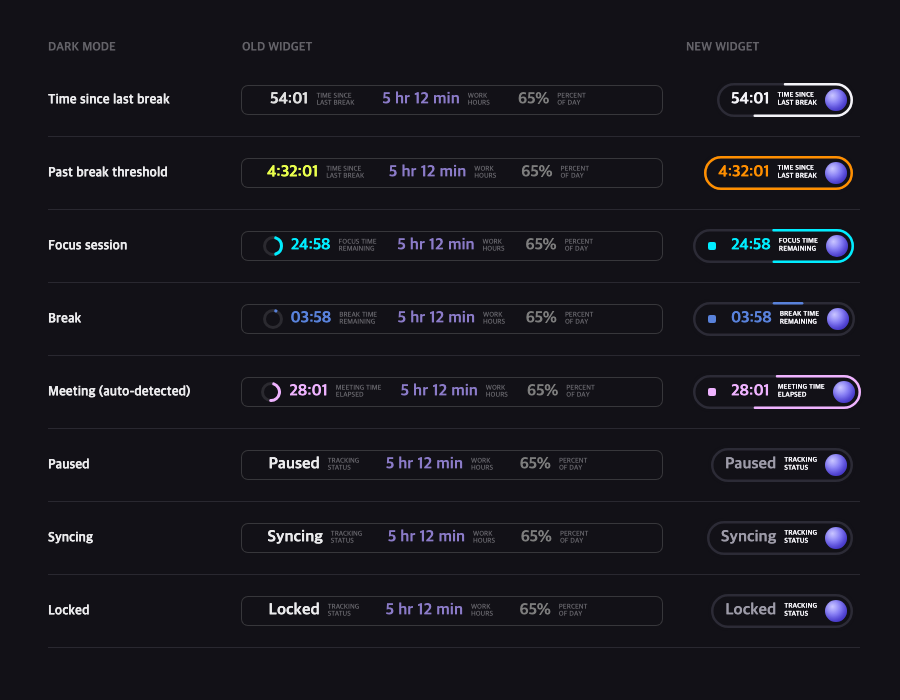
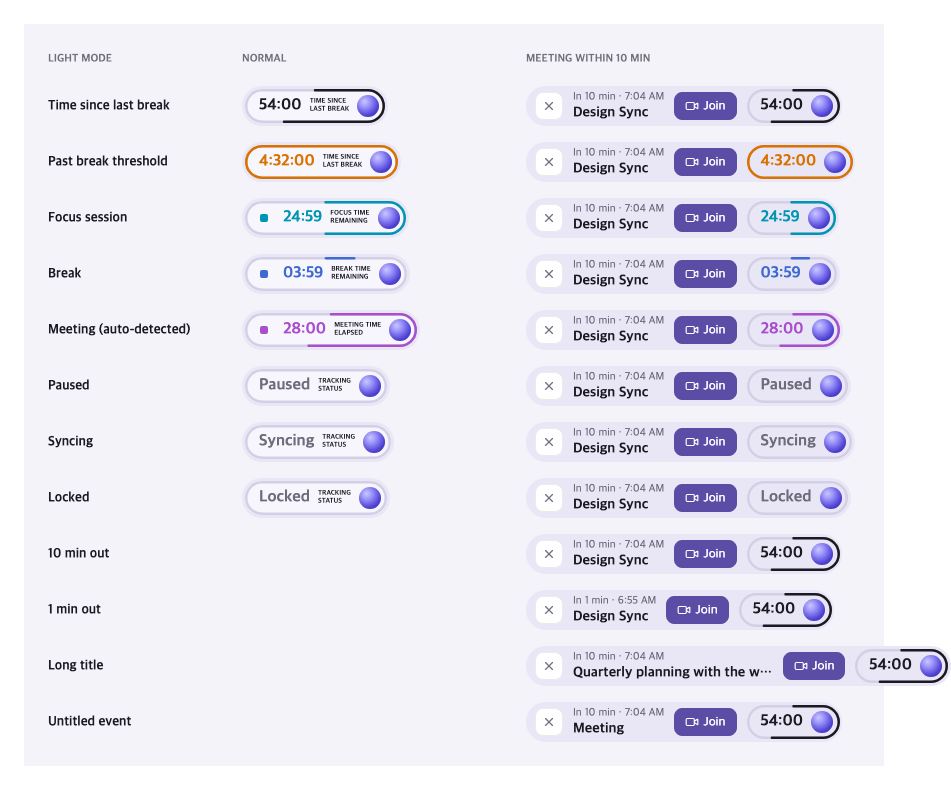
Your next meeting, ten minutes out. When a calendar meeting starts within ten minutes, its title and start time grow in beside the timer, and the timer folds down to just the time and the orb. A Join button opens the video link in your browser. Dismiss it, or let the meeting start, and the pill folds back. The animation respects your system's reduced motion setting.
- Drag it anywhere by the pill or the orb. A press that does not move opens the menu or the agent instead.
- It stays put. The window is a fixed size and clicks pass through its empty area, so the pill no longer jumps a frame when its content changes, and auto-hide no longer collapses it while you are still over it.
- Light and dark. The pill follows your theme. Light, Daylight and Paper get the light pill; everything else gets dark.
- Auto-hide collapses to an orb instead of the old hamburger strip.
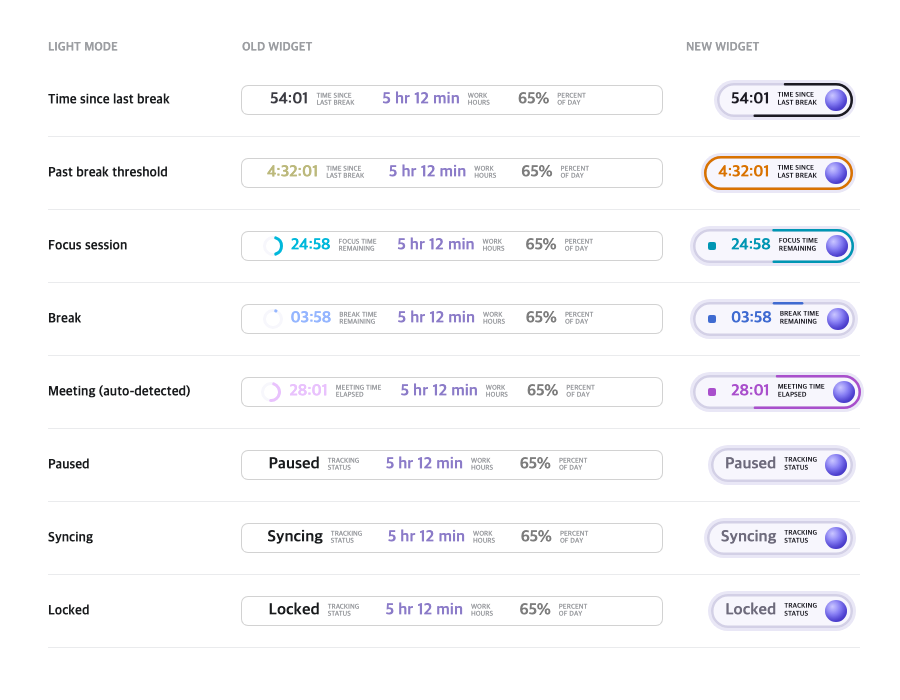
Work hours and percent of day are not in the new pill. Both are still on the Calendar and in the agent.
Small improvements and bug fixes
Tracking
- Browser time goes to the site in your focused window. The URL from the Rize browser extension now wins over the browser's own report, which could point at a tab in a background window or another profile.
- Tracking no longer stops after a lost sync reply. Sync requests time out after 60 seconds and each tracking tick has a 3 minute deadline, so a dropped response no longer freezes tracking until you relaunch.
- Tracking rule sync no longer loops forever when its query keeps failing.
- On Linux, Wayland sessions are stopped in onboarding with an explanation. Before, they tracked nothing and showed no error.
Sessions and notifications
- Planned focus and break sessions no longer pop up or auto-start after their slot has passed, for example when your machine wakes from sleep.
- The distraction blocker's grace timer resets when you dismiss a reminder, and its copy no longer names categories.
- Toasts respect the team setting that stops members from creating new tags.
Settings and shortcuts
- Custom keyboard shortcuts stop reverting to the defaults, including a shortcut set on another device, and Cmd and Ctrl display correctly for your OS.
- Midnight now displays as Dark, and Daylight and Paper display as Light, to match the web redesign. Your saved choice is kept.
- The dashboard error page has an Email report button.
- Show Developer Tools opens only the active window's inspector, with a per-window submenu.
macOS and updates
- The Dock icon hides again when you close the dashboard window.
- Rize no longer asks for screen recording permission on its periodic screenshot check.
- Dictation works in the desktop app again for accounts that have it. The app grants microphone access to the Rize web app only, never to other sites.
- The Update Blocked dialog only appears when a newer version actually exists, and a failed version lookup no longer triggers it.
- Updates finish installing: the dashboard window is allowed to close during update and restart.
- Requests to Microsoft Clarity are blocked.
Restart the desktop app or check for updates to make sure you are on the latest version.