Key Takeaway -- Rize automatically logs every ClickUp task without manual timers, giving project managers a precise record of time estimates vs. actuals. This data feeds post-project reporting, issue documentation, and continuous process improvement -- all without adding administrative overhead to the PM's day.
As a digital project manager constantly task switching, putting out fires, and (of course) managing projects, accurate manual time tracking is more than a hassle -- it's not possible.
Reviewing days and trying to remember exactly where time went between multiple projects, tasks, admin, and meetings is a scramble through various documents, task manager updates, and schedules.
Rize resolves this by automatically tracking where and what time is spent on. It naturally integrates with my main project management tool -- ClickUp. Rize automatically assigns time to tasks, projects, and clients I'm working with, and has dashboards to review at any level of granularity (hourly/daily/weekly/monthly/annually).
Automatic Time Tracking with Context
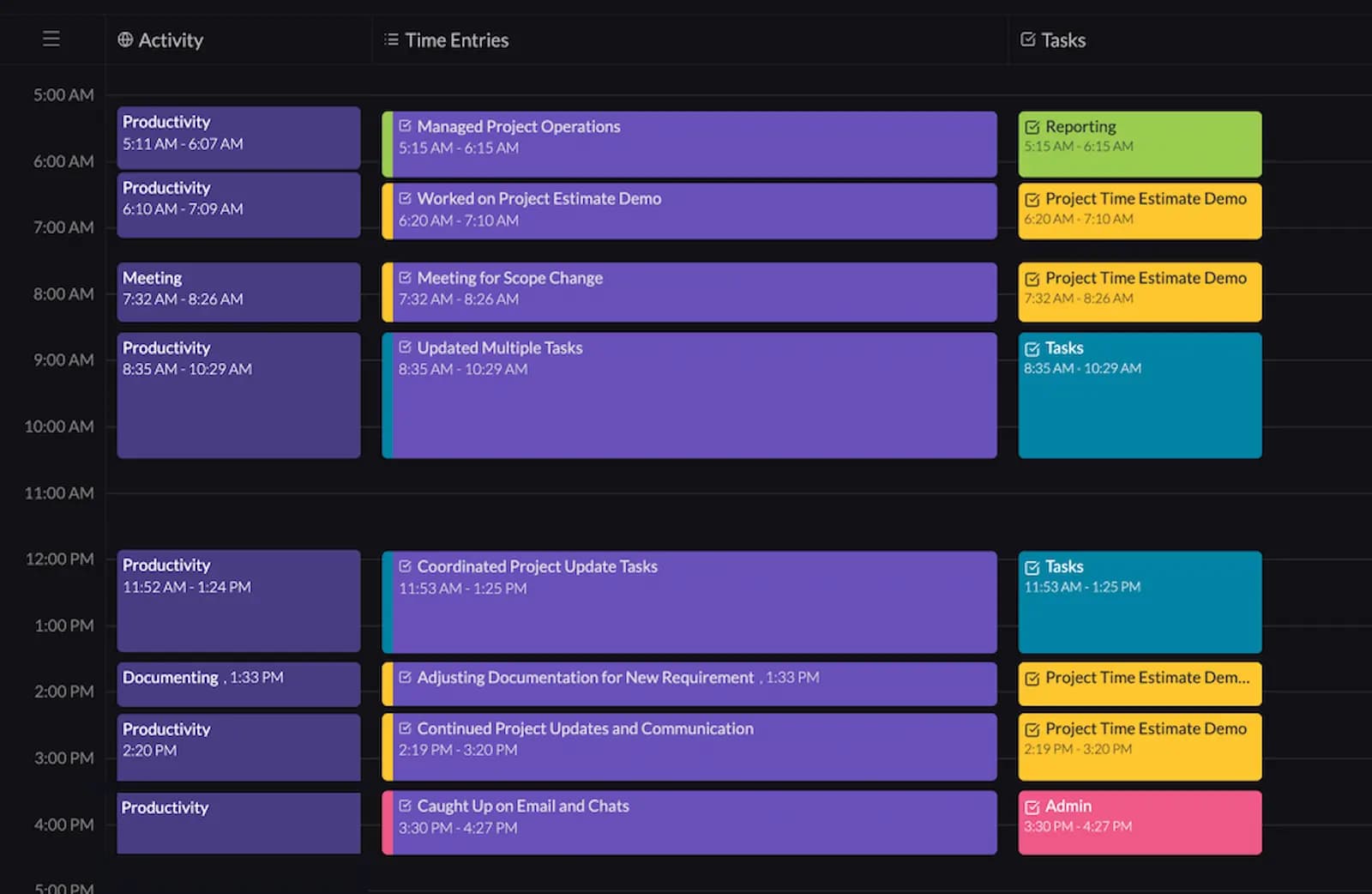
When Rize is synced with your ClickUp workspace, time is automatically tracked for your tasks. These appear as time blocks, where information is loaded for what task or tasks were worked on, along with a summary of the actions taken for those tasks.
You can spend an entire day working in ClickUp, bouncing between various tasks, projects, meetings, and Rize is there capturing all the information on what you're doing. Rize just pulls URL and page info, known only to you and with no other privacy issues like screenshotting, to produce AI context for what is happening.
No need for manual start stops on each individual task and adding notes in ClickUp. It all happens in the background throughout your work day.
After you review and approve each entry, the information is automatically synced to ClickUp's timesheets, and in the tasks themselves. You can easily adjust the information synced before you approve it.
Below is Rize after a typical day.
You can track tasks down to 5 min blocks. For the sake of simplicity, I'm demonstrating larger blocks of time. The Yellow "Project Estimate Demo" task blocks will be used as an example.
Automatic Record of Time Estimates Against Actuals
Rize automatically records estimated and actual time for every ClickUp task -- no manual export required. Both figures are visible in the task view, and the tracked times are the entries automatically synced from Rize.
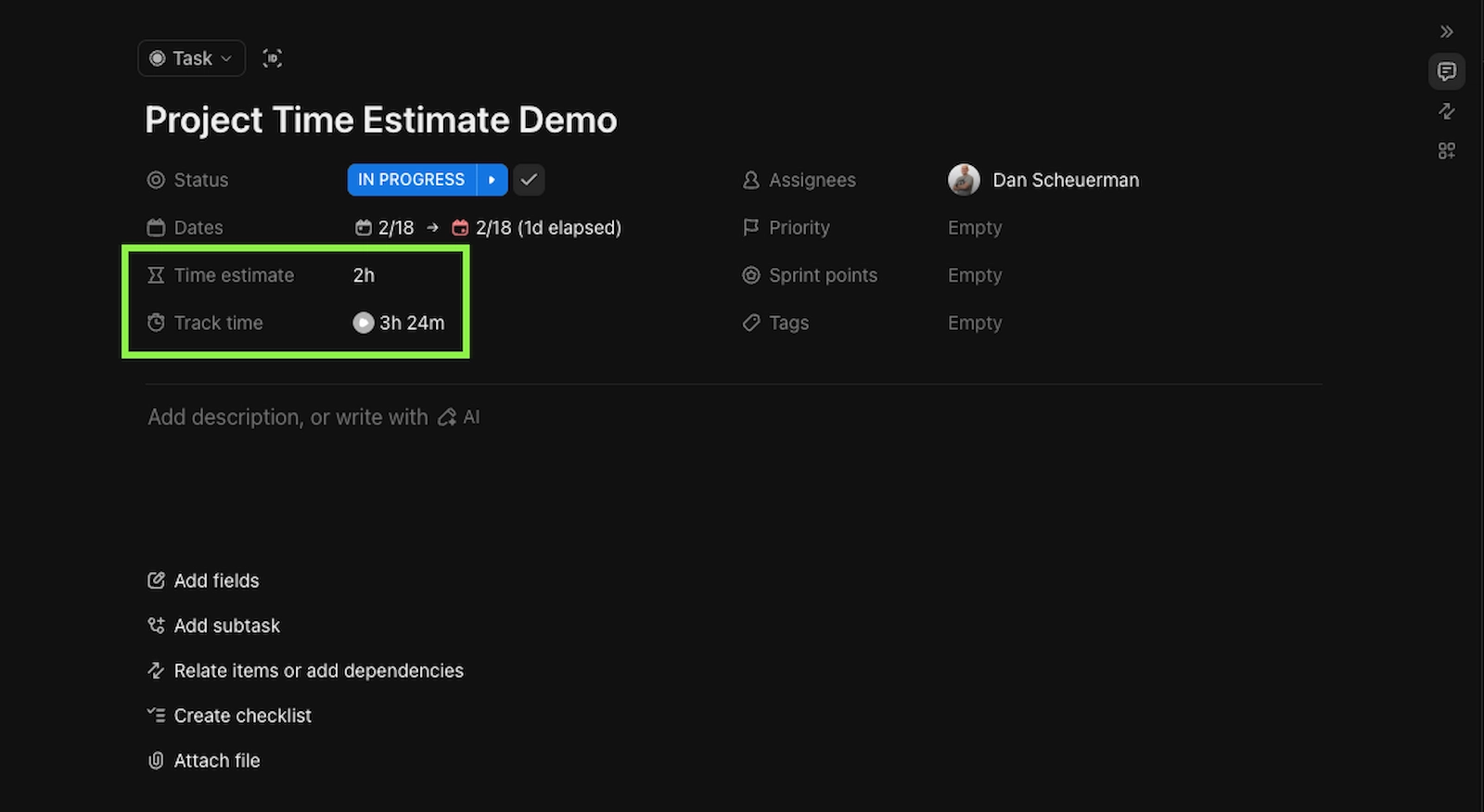
If further context is needed for what time has been spent on, it can be found in the drop down information in the task, or in ClickUp's timesheets.
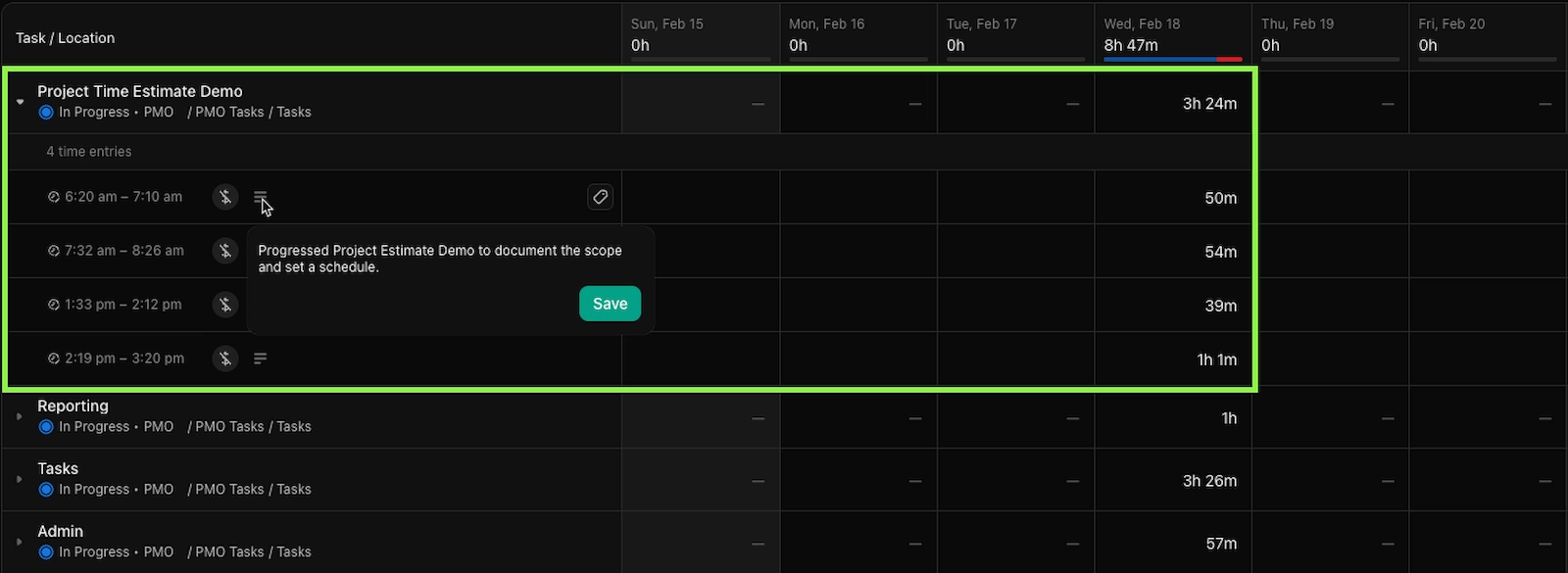
If you need to process this information outside of ClickUp, time data and descriptions are exportable.
If you're using LLMs to process data and accelerate documentation, this can be a useful way to add further context to PM work and help understand where time goes and communicate workloads, bottlenecks, and other project impacts to relevant stakeholders.
Pairing Time Data with Project Documentation
Every Rize time entry includes a description of what was done -- tasks, subtasks, communication, and meetings. This makes it straightforward to cross-reference time data with project documentation like delay logs, risk registers, and schedule change records.
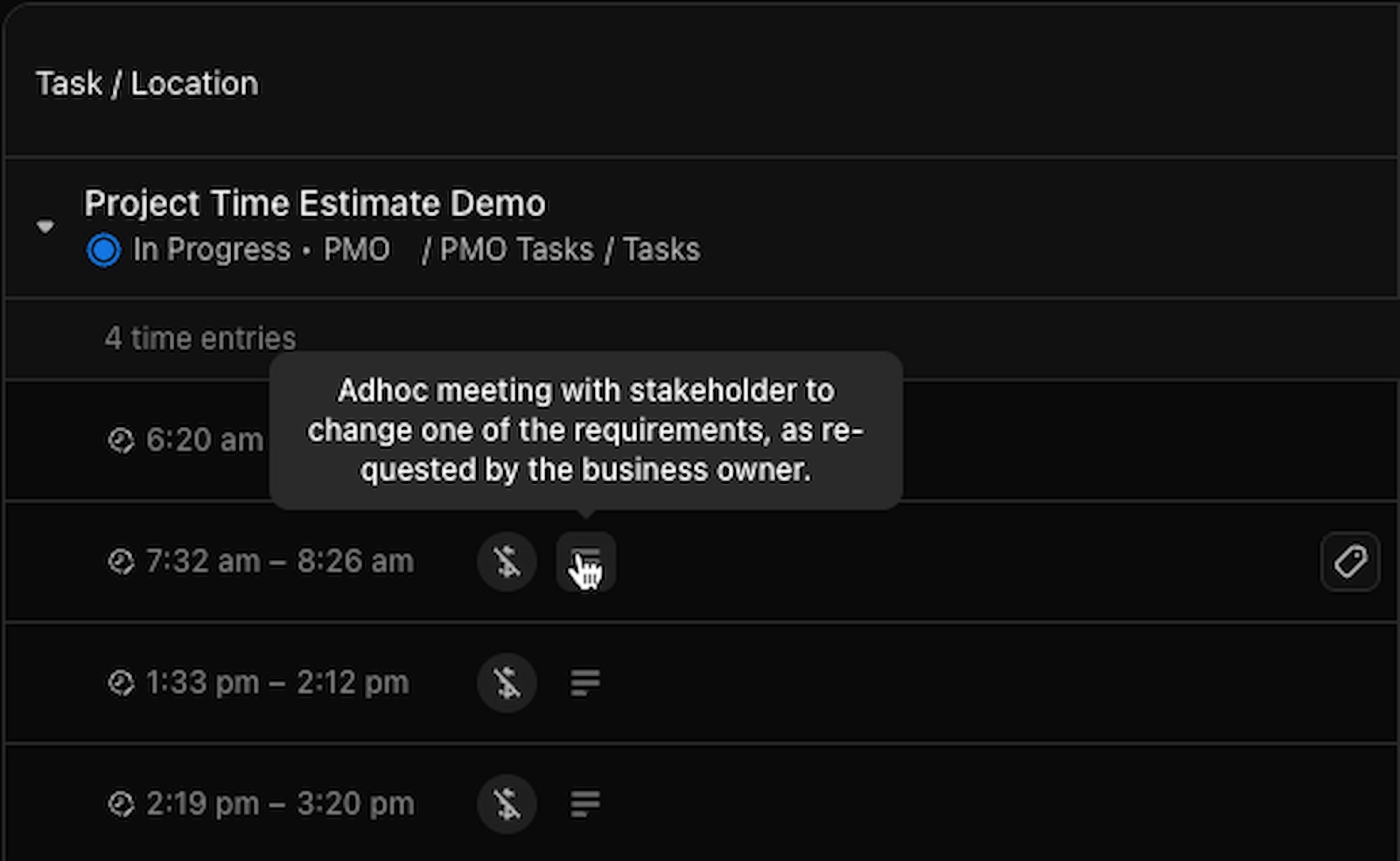
As an ecommerce project manager, this can be cross referenced with the project documentation to contextualize the negative impacts, bottlenecks, conflicts, etc and the amount of PM time spent dealing with them.
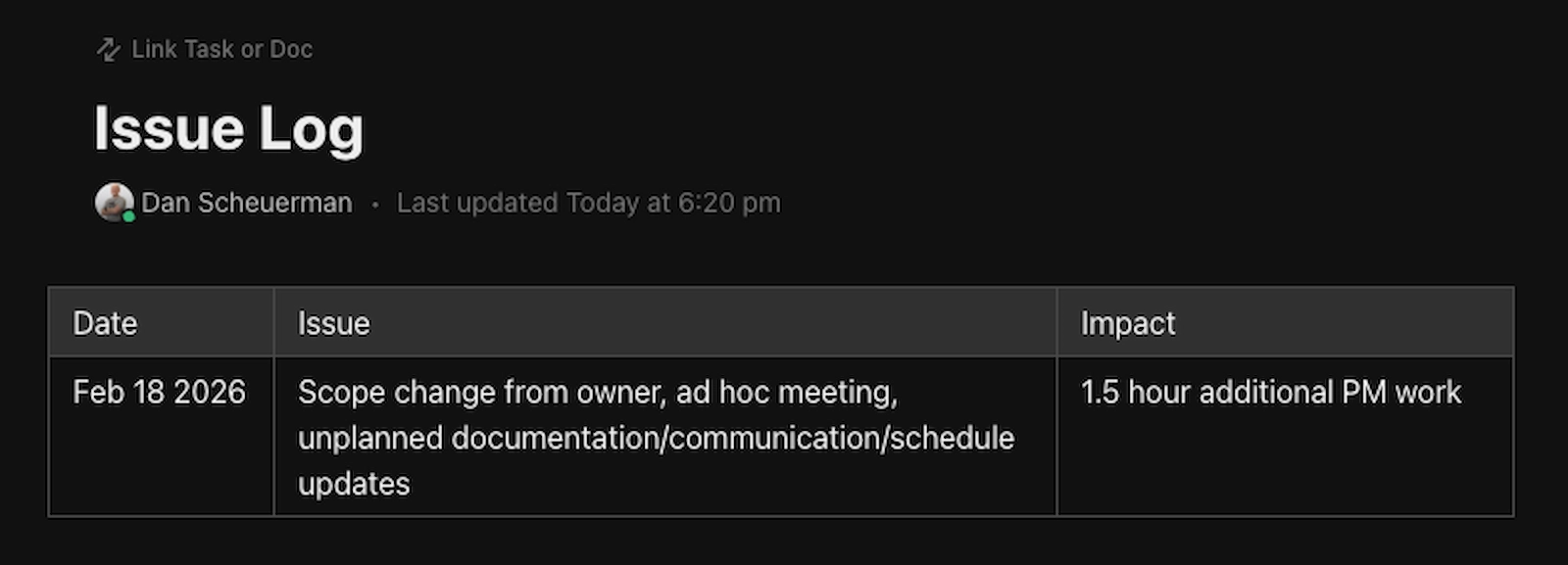
This helps clarify two things which are challenging without data: context to the impact of negative project events on time estimates, and more visibility into the PM's workload.
This firefighting behind the scenes is one of the most invisible things a PM does but Rize helps make it clear. And all of this data is exportable from ClickUp to give enhanced context to issue impacts.
Using Data for Continuous Improvement
With post-project reporting, teams can consolidate time data across multiple projects to identify recurring issues, underestimated workflow types, and the communications overhead that consistently inflates budgets.
This identifies where and what issues occur the most often, and the workflows, communication, and task management that needs to improve. It also helps inform more accurate future time estimates.
Research consistently shows that inaccurate time estimation is among the leading contributors to project delays. Teams using automated time tracking recover hours each week that would otherwise go unlogged -- giving them visibility into real workloads that manual timesheets can't provide. This recovered data leads to faster delivery, better resource allocation, and reduced scope creep.
The Power of Rize Automatic Time Tracking
Rize replaces manual time tracking with automatic, AI-categorized time data for every task, project, and client. For a project manager who constantly task switches, this level of contextual tracking would take hours of manual effort daily -- Rize does it in the background with zero disruption.
Rize sheds light on where PM (and team) time goes, which leads to optimized workloads, resource planning, and refinement for your organization.
Dan Scheuerman is a digital project manager PMP for First Descent Marketing. He works with Shopify stores and growing 7-8 figure organizations to help them get more done, quicker, with better outcomes.