Toggl breaks in one of three ways. The timer you forgot to start. The invoice you can't build without opening a second app. Or the pricing that felt reasonable at 3 users and stopped feeling reasonable at 12.
If you're here, you've already found yours.
My top pick and recommendation for most folks is Rize, and it's not close for most people leaving Toggl. I've used it since May 2022. In that time, I've tested, used, and ultimately left every other time tracker on this list. I haven't left Rize.
The reason is the same reason it's the right call for most freelancers and knowledge workers: it removes the only behavior Toggl requires of you. You open your laptop, start working, and your timesheet fills itself by the end of the day. It also has native invoicing, which closes the billing loop much better than Toggl. For a tool that handles both problems at once, nothing comes closer.
I've been testing productivity software since 2021. For this list, I evaluated more than 20 time tracking tools and put seven alternatives through real workflows. These are the ones worth switching to.
What makes the best Toggl alternative?
A Toggl alternative earns the switch when it solves the specific thing Toggl doesn't. Time tracking alone won't cut it. If the issue is invoicing, the alternative needs to invoice. If the issue is price, it needs to cost meaningfully less. If the issue is forgetting to hit Start, it needs to track automatically.
Here are all the factors I kept in mind while curating the list of the best Toggl alternatives:
- It closes the billing loop Toggl leaves open. The alternative should either generate invoices directly from tracked time or push those hours to QuickBooks, Xero, or FreshBooks without a manual export step in between.
- It costs less at scale. Toggl Premium is $18/user/month. The best alternatives are cheaper at the same headcount, or give you more at a comparable price.
- It captures time without depending on you. Toggl's model requires a timer start. Forget it once, and that hour is gone. An alternative that logs time automatically, either by running in the background or by drafting entries from computer activity, removes the failure mode entirely.
- It includes features Toggl doesn't offer at any tier. GPS clock-in, screenshot capture, timesheet approval, and payroll integration aren't available in Toggl at any price. If one of those is your actual need, the bar is simple: does it have the feature, and does it work reliably?
- It doesn't swap Toggl's simplicity for a two-week learning curve. Toggl is fast. The best alternatives match that ease closely enough that setup is a one-time cost, not a permanent tax on your team's time.
The best Toggl alternatives at a glance
Scanning before you commit? Here's where everything lands.
| Tool | Best for | Standout feature | Pricing |
|---|---|---|---|
| Rize | Most people leaving Toggl: freelancers, knowledge workers, agencies, and SMBs that want automatic tracking and native invoicing in one place | Fully passive tracking: AI writes and files your time entries while you work, no timer required | From $9.99/month; 7-day trial |
| Clockify | Teams that have outgrown Toggl's free tier and need invoicing without the Premium price jump | Invoicing and timesheet approvals at $5.49/user/month vs. $18/user/month on Toggl | Free (up to 5 users); from $3.99/user/month |
| Harvest | Agencies and client-service teams that need tracked hours to become paid invoices without opening a second app | Clients pay via Stripe or PayPal directly from the invoice; hours and expenses tracked in the same place | Free (1 seat, 2 projects); from $9/seat/month |
| TimeCamp | Teams over 5 who need GPS tracking and attendance management in one tool | Unlimited users on the free plan, with GPS tracking included at every tier | Free (unlimited users); from $2.49/user/month |
| My Hours | Consultants and agency teams who log hours at the end of the day, not mid-task | Spreadsheet-style weekly timesheet grid; invoices push directly to QuickBooks or Xero on Pro | Free (up to 5 users); from $8/user/month |
| RescueTime | Remote workers who want to block the distractions they keep logging time for | Focus Sessions block distracting apps and websites automatically; no equivalent in Toggl | Free (limited); from $7/month |
| SolidTime | Toggl users who want a familiar interface with invoicing, or teams that need to own their data | Dedicated Toggl importer transfers your entries, clients, and projects in a few clicks; open-source | Free (1 user); from €9/user/month |
1. Rize — best overall Toggl alternative for automatic, passive time tracking
Best for most people leaving Toggl who want their timesheet to fill itself. Available on macOS and Windows.
Rize pros:
- Fully automatic tracking: no timers, no manual input
- AI writes time entry descriptions and assigns them to projects and clients
- Built-in focus mode, productivity scoring, and break reminders
- Native invoicing built in
- Project profitability tracking
- No screenshots, no keylogging, privacy-first by design
Rize cons:
- Desktop only (macOS, Windows), no mobile app
- No free plan, only a 7-day trial
- No GPS or kiosk clock-in for field teams
I've been using Rize since May 2022. I've never switched away from it, which is something I cannot say about a single other time tracking app I've tested.
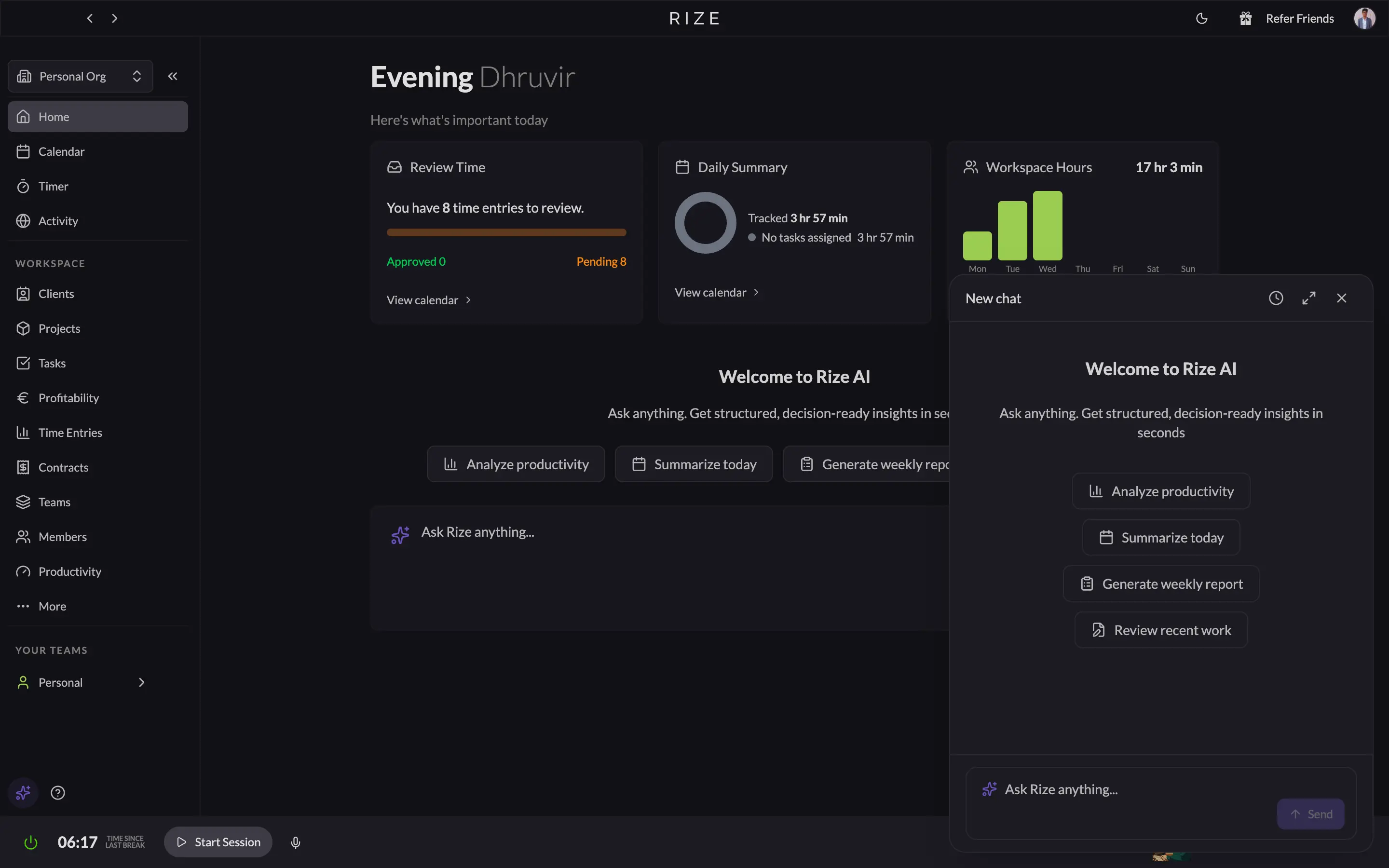
The difference between Rize and Toggl comes down to one thing: Toggl asks you to track your time. Rize just does it. You open your laptop, start working, and Rize runs quietly in the background, capturing every app, every browser tab, every document switch, every meeting. By the end of the day, your timesheet is filled. You didn't start a single timer.
That might not sound transformative until you've spent 20 minutes reconstructing a full day from memory, or discovered a two-hour client call missing from your timesheet. Toggl's best case is that you remember to hit "Start" every time you switch tasks. Rize's worst case is the same as Toggl's best case.
The AI categorization is what separates it from every other automatic tracker I've used. Rize doesn't just log time. It writes the entry for you. While testing, I opened my dashboard and found this already waiting: "Refined a framework in Obsidian for analyzing agency time distribution," logged, tagged to the right client, filed. I hadn't touched the app. Toggl would have logged nothing because no timer was running.
Rize also coaches your productivity while it tracks, which Toggl doesn't attempt. Alongside time entries, Rize tracks your Focus Score, break health, top interruptors, and average focus session length. The Rize AI assistant answers questions like "How was my productivity this week?" and returns structured, decision-ready reports in seconds. Toggl's reporting tells you where your hours went. Rize tells you where they went and whether you were actually focused while you were there.
If you've ever ended a workday with an incomplete timesheet because you forgot to hit Start, Rize fixes that permanently. It's the only tracker that is truly zero-touch.
Rize pricing: Basic from $9.99/month (billed annually) or $12.99/month (billed monthly). Pro from $23.99/month (billed annually) or $28.99/month (billed monthly). Max and Team plans are available as well. 7-day free trial, no credit card required.
Let your timesheet fill itself
Try Rize free for 7 days. Watch it auto-create and file your time entries from your actual work — no timers, no manual entry. No credit card required.
Start Free Trial2. Clockify — best Toggl alternative for teams that need invoicing without the price jump
Best for teams that outgrew Toggl's free tier and want invoicing without paying Premium prices. Available on Web, iOS, Android, Windows, Mac, and Linux.
Clockify pros:
- Native invoicing and recurring invoices
- Timesheet approval on Standard ($5.49/user/month) vs. Toggl's Premium ($18/user/month)
- Kiosk clock-in for deskless teams; Toggl has no equivalent
- GPS tracking and screenshots for field teams and proof-of-work audits
- QuickBooks sync for sending time directly to payroll and billing
Clockify cons:
- Free plan caps at 5 users, same as Toggl; the pricing advantage only kicks in on paid plans
- Still timer-based; Auto Tracker logs app usage privately but won't build timesheets automatically
- Interface is more cluttered than Toggl's
- Free plan limits report history to one month; older billing data requires a paid plan
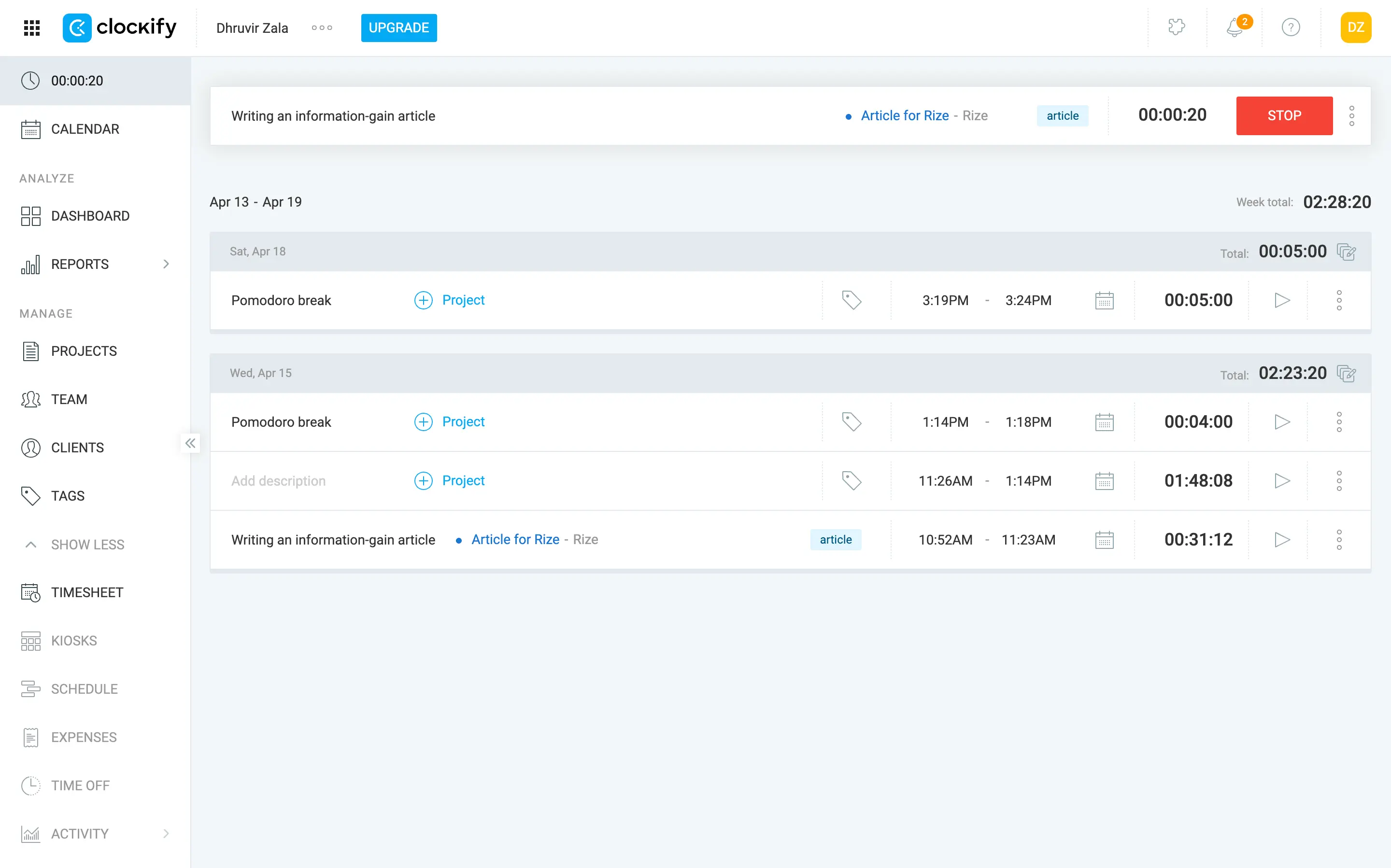
On the free plan, Clockify and Toggl are the same: time tracking, 5-user cap, no invoicing. The gap opens the moment you start paying.
Toggl Starter is $9/user/month and gives you billable rates and project tracking. Clockify Basic is $3.99/user/month and gives you the same core features. For a team of 10, that's $90/month vs. $39.90/month. The sharper comparison is one tier up. Toggl Premium is $18/user/month and still doesn't include invoicing. Clockify Standard is $5.49/user/month and does. For those same 10 users: $180/month to not have invoicing vs. $54.90/month to have it.
Clockify Standard is where it separates from Toggl in a way that the feature list alone doesn't convey. At $5.49/user/month, you get invoicing, recurring invoices, timesheet approval, and QuickBooks sync. If your current workflow ends with exporting a Toggl report and manually building an invoice in a second tool, Clockify Standard collapses that into one.
Timesheet approval is worth a direct comparison. On Toggl, it requires Premium at $18/user. On Clockify, it's Standard at $5.49. If you run an agency where clients require manager-approved timesheets before releasing payment, that's a $12.51 per-user difference, every month.
What Clockify gives up against Toggl is interface simplicity. Toggl is clean and fast. Clockify covers more ground, and you feel it; finding where to edit a single time entry takes more clicks than it should. The free plan also caps report history at one month, which catches users off guard when they need billing data from 60 days ago and realize they need to upgrade to access it.
Clockify's Auto Tracker logs the apps and websites you use throughout the day, but it won't create time entries for you. That data is private to you and exists to help you reconstruct your day when filling out timesheets manually. Toggl's background recording works exactly the same way. If you need a tool that fills the timesheet itself, that's Rize, not Clockify.
If you need invoicing, or your team has grown past 5 users and Toggl's $9/user Starter price isn't justified by what you're getting, Clockify solves both problems for less.
Clockify pricing: Free for up to 5 users (basic tracking; reports limited to one month). Basic at $3.99/user/month (billed annually). Standard at $5.49/user/month (billed annually). Pro at $7.99/user/month (billed annually). An enterprise plan is available as well. 7-day free trial on all paid plans.
3. Harvest — best Toggl alternative for time-based billing and project profitability
Best for agencies and client-service teams that need tracked hours to become paid invoices. Available on Web, iOS, Android, macOS, and Windows.
Harvest pros:
- Invoices built directly from tracked time and expenses, no export required
- Clients pay online via Stripe or PayPal straight from the invoice
- Automatic sync to QuickBooks Online or Xero
- Expense tracking with receipt photos, rolled into client invoices
- Calendar import: pull in a calendar event and log it as a time entry
Harvest cons:
- Fully timer-based; no automatic time capture
- Free plan is near-useless: 1 seat, 2 projects maximum
- No GPS tracking, screenshots, or kiosk clock-in
- Usage-based billing means costs can creep up as projects and clients multiply
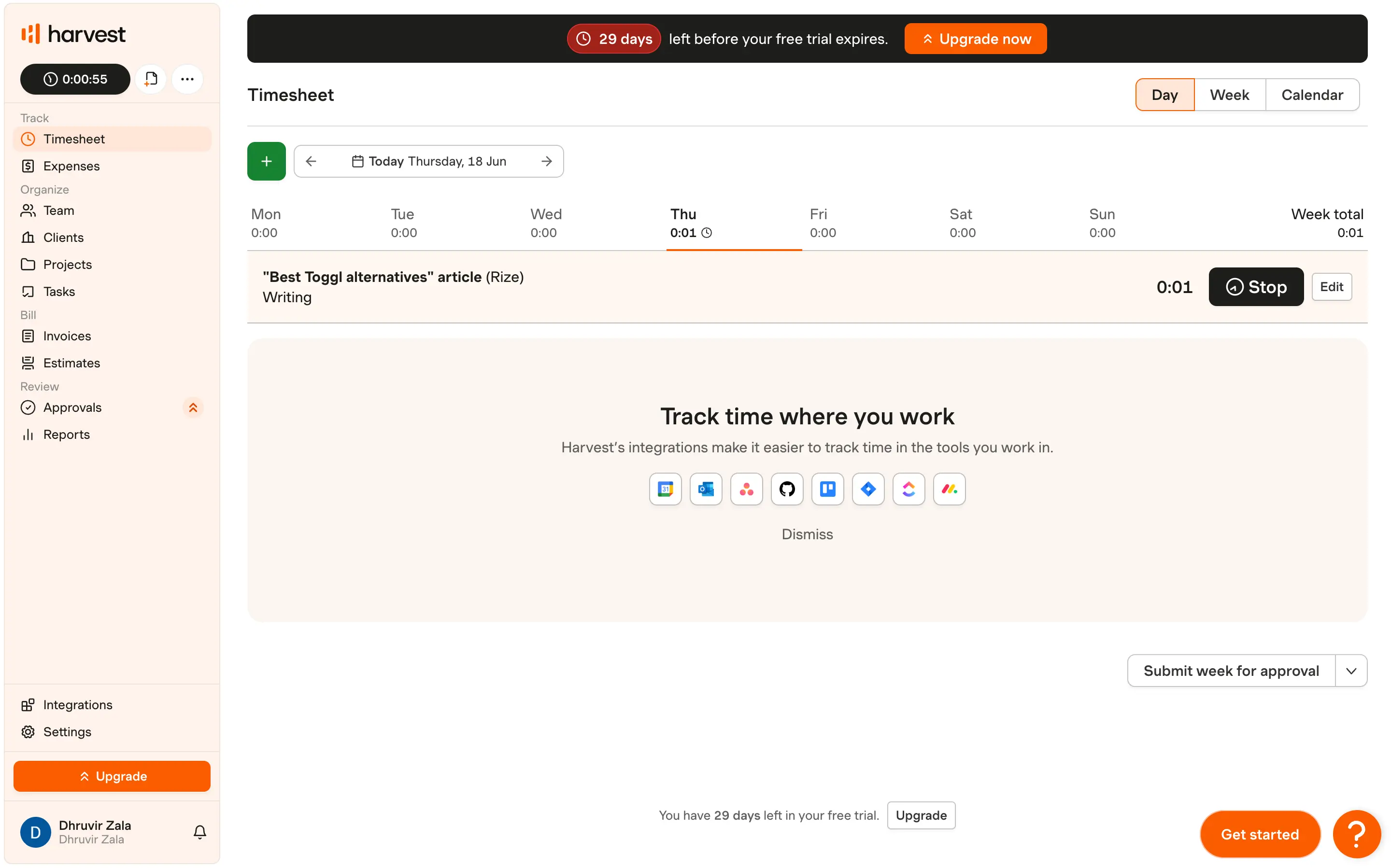
Toggl stops when you stop the timer. Harvest keeps going. You tracked the hours, you logged the expenses, and Harvest builds the invoice for you, pulling everything into one sendable document. Your client pays via Stripe or PayPal directly from that invoice. Harvest logs the payment in QuickBooks. You didn't open a second app. That's the billing loop Toggl has never closed.
Clockify closes part of that loop at a lower price, so if you read the previous section and invoicing was your only frustration with Toggl, Rize or Clockify is the smarter call.
Harvest earns its higher price when the workflow needs to be tighter: billable expenses bundled into the same invoice as hours, online payments built directly into the invoice, accounting sync without any manual steps, and profitability reports that tell you whether each client is actually worth your time. Clockify covers invoicing. Harvest covers billing.
Profitability reporting is the feature Toggl never built, and Harvest built seriously. On Enterprise at $14/seat/month, Harvest shows you margins by client, project, task, and team. After six months of billing, you'll know which clients are profitable and which ones are consuming twice the hours you quoted.
The calendar import is worth mentioning as well. When you create a new time entry, Harvest lets you pull in a calendar event and log it directly, without reconstructing a two-hour client call from memory. Toggl has no equivalent. It's a small feature that saves real time across a week of client meetings.
If your current workflow ends with exporting a Toggl report and manually rebuilding it as an invoice in a separate tool, Harvest cuts that entirely by generating invoices straight from your tracked time and expenses.
Harvest pricing: Free forever (1 seat, 2 projects). Teams from $9/seat/month (billed annually) or $11/seat/month (billed monthly). Enterprise from $14/seat/month (billed annually) or $17.50/seat/month (billed monthly). 30-day free trial on all paid plans, no credit card required.
4. TimeCamp — best Toggl alternative for GPS and attendance without the 5-user cap
Best for teams over 5 that need GPS tracking and attendance management in one tool. Available on Web, iOS, Android, Windows, Mac, and Linux.
TimeCamp pros:
- Free plan has no user cap; Toggl and Clockify both stop at 5 for free
- GPS location tracking on every tier, including free
- Attendance, time-off, and overtime tracking
- AI time entry suggestions built from computer activity
TimeCamp cons:
- AI time tracker drafts entries from computer activity but requires manual confirmation; use Rize if you want zero-touch
- The interface is significantly denser than the other alternatives
- Kiosk clock-in is Enterprise-only
The most important difference between TimeCamp and Toggl is that Toggl's free plan stops at 5 users. TimeCamp's free plan has no limit. For a 15-person team that needs GPS tracking and basic timesheets, TimeCamp Free is a serious option.
GPS is the other place TimeCamp does something Toggl never built at any price. TimeCamp includes GPS on every plan, including free. Clockify has GPS too, but it sits behind higher-priced tiers. If your team works across job sites, field locations, or multiple client offices, GPS gives you a verifiable record of where work happened.
From Starter at $3.49/user/month, TimeCamp adds attendance management: time-off requests, overtime tracking, and an attendance calendar. Toggl doesn't offer any of these at any tier. If you're currently managing time in Toggl and attendance in a second tool, TimeCamp consolidates both for less than half what Toggl Starter costs, which still leaves attendance unsolved.
Toggl's background recording logs apps passively to help you reconstruct your day, but never drafts entries. TimeCamp's AI does: it analyzes your computer activity and writes a first draft you confirm. Not zero-touch like Rize, but more than Toggl's passive log.
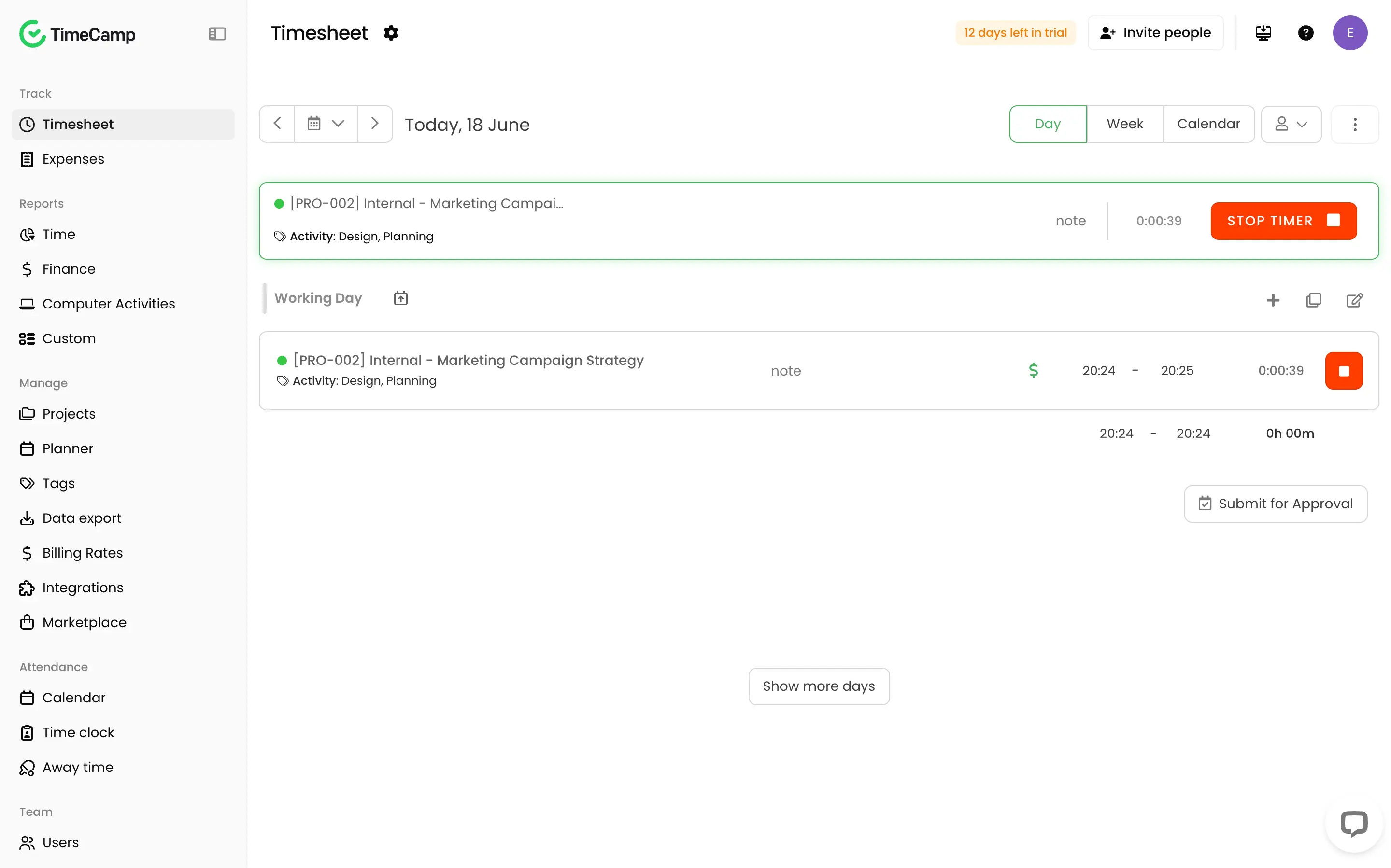
The trade-off is interface complexity. Toggl is clean because it does less. TimeCamp's sidebar splits into Track, Reports, Manage, Attendance, and Team sections, each with subpages. Overkill for a freelancer who just needs a timer. Right for a team managing GPS, attendance, and multiple projects across 10 or 20 people.
If your team is over 5 and you need GPS tracking plus attendance management in one tool, TimeCamp solves both before Toggl's paid pricing even starts.
TimeCamp pricing: Free forever (unlimited users, GPS included). Starter at $2.49/user/month (billed annually) or $3.49/month billed monthly. Premium at $3.99/user/month (billed annually). Ultimate at $4.99/user/month (billed annually). Enterprise pricing on request.
5. My Hours — best Toggl alternative for teams that fill timesheets at the end of the day
Best for consultants and agency teams who log hours at the end of the day, not mid-task. Available on Web, iOS, Android, Windows, and Mac.
My Hours pros:
- Native invoicing built directly from tracked hours (Pro plan)
- QuickBooks and Xero integration: auto-import customers, transfer invoices back automatically
- Project profitability tracking: set labor costs, see margins per client
- Expense tracking with receipt attachments, rolled into invoices
- Jira two-way sync for dev teams logging time against tickets
My Hours cons:
- No automatic time capture; hours still require manual input
- Free plan capped at 5 users, same limit as Toggl
- No GPS or kiosk clock-in for field teams
- Invoice is PDF/XLS export only; no built-in payment links like Harvest's Stripe or PayPal integration
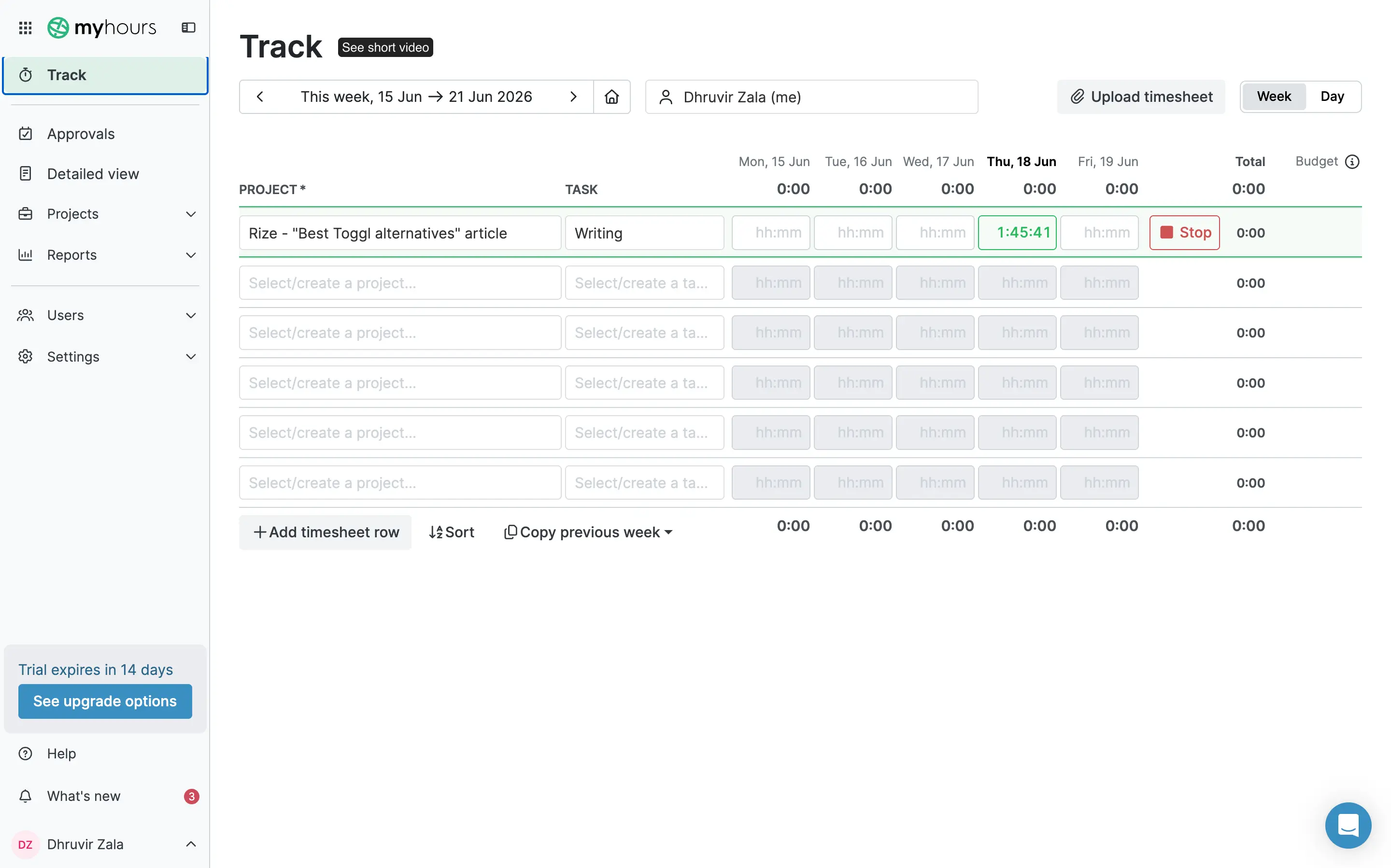
My Hours is built for people who fill in the timesheet when the day is done. Some consultants, agency account managers, and client-service teams work this way: finish a call, handle some emails, revise a deliverable, and log the hours before closing the laptop. My Hours was designed for that workflow. Toggl wasn't.
My Hours tracks time in a spreadsheet-style timesheet: projects down the left, days of the week across the top, hours in each cell. Tab across a row, fill in the hours, and submit. Toggl requires a separate time entry for each individual task. For a consultant splitting Tuesday across three client projects, that's three separate manual entries in Toggl. In My Hours, it's three rows in a grid you fill once before closing the laptop.
After the hours are logged, My Hours does something Toggl never built at any price: it generates invoices directly from your time data. On the Pro plan at $8/user/month (billed annually), you pull the billable hours for a period, apply your rates, and export. Those invoices push directly to QuickBooks or Xero.
My Hours also shows you profitability per project. Set a labor cost per user and a billing rate per project, and you can see the margin on every job. If a client has been consistently consuming more hours than you quoted, this is the report that surfaces it. Toggl tracks the hours but never asks whether those hours were worth it.
The one real gap versus alternatives like Harvest: My Hours invoices are PDF exports. Harvest embeds Stripe and PayPal directly into the invoice, so clients can pay without leaving the document. If collecting payment inside the invoice matters to your workflow, that's Harvest's edge. If your clients pay by bank transfer, or you send invoices through your accounting software anyway, it isn't.
My Hours pricing: Free forever (up to 5 users). Basic at $4/user/month (billed annually) or $5/user/month (billed monthly). Pro at $8/user/month (billed annually) or $9/user/month (billed monthly). Enterprise pricing on request. 14-day free trial on Pro, no credit card required.
6. RescueTime — best Toggl alternative for distraction blocking and understanding when you work best
Best for remote workers who want to block distractions, not just log them. Available on Web, iOS, Android, Windows, Mac, and Linux.
RescueTime pros:
- Fully automatic tracking: runs in the background across every device, no timers
- Focus Sessions block distracting apps and websites; no equivalent exists in Toggl at any tier
- Productivity behavior reports: peak hours, biggest distractors, work category trends
- The Timesheets product builds time entries from tracked activity using autocompletion hints
- Cheaper than Toggl at every comparable paid tier
RescueTime cons:
- No native invoicing at any tier, the same gap as Toggl
- No GPS tracking or kiosk clock-in for field teams
- Timesheets require project setup and a learning period
- The free Lite plan is limited; most of what makes RescueTime valuable requires a paid plan
Toggl records time. RescueTime understands it.
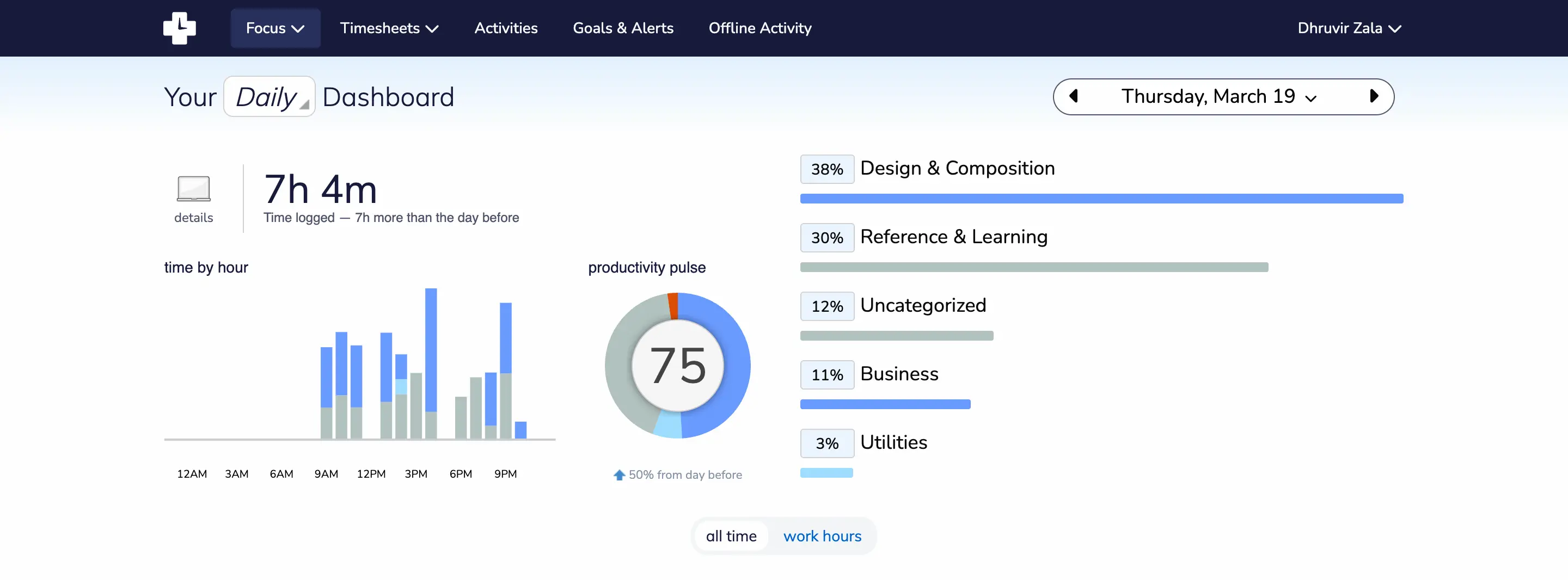
Toggl requires you to press Start and Stop every time you switch tasks. RescueTime runs in the background automatically, logging every app, website, and document you use across all your devices, including your phone. By the end of the day, you have a complete record of exactly what you did, across every screen you touched. You pressed nothing.
RescueTime's productivity reports tell you when you were most focused, which apps pulled you out of flow, and whether your deep work hours are trending up or down week over week.
Focus Sessions are the feature Toggl doesn't have at any price. When you start one, RescueTime blocks every app and website you've marked as distracting, silences notifications, and optionally plays focus music via Spotify. You set a duration, start the session, and the distractions are gone until the timer ends. For a knowledge worker who needs long stretches of uninterrupted work, this is the feature that makes RescueTime genuinely useful as a Toggl replacement, not just an alternative.
The Timesheets product is where RescueTime gets more capable for project-based work. Toggl's background recording passively logs app usage to help you reconstruct your day, but it never turns that data into time entries. RescueTime Timesheets does. You set up projects, tell RescueTime which apps and file names belong to which client, and it starts assigning tracked time automatically using autocompletion hints. The accuracy improves as it learns your patterns. It is not zero-touch like Rize, but it is substantially less work than Toggl's fully manual entries.
RescueTime pricing: Free Lite plan (limited features). Focus Solo at $7/month (billed annually) or $9/month (billed monthly). Solo+ (Timesheets + Focus) at $12/month (billed annually) or $15/month (billed monthly). Team plans are available as well. 14-day free trial on all paid plans.
7. SolidTime — best Toggl alternative for a familiar interface with invoicing and full data control
Best for freelancers who want a Toggl-like interface with invoicing, or teams that need to own their data. Available on Web, iOS, Android, Windows, macOS, and Linux.
SolidTime pros:
- Open-source with a self-hosted option: run it on your own server and own your data completely
- Dedicated Toggl importer: transfers time entries, clients, projects, and tags in a few clicks
SolidTime cons:
- The free plan is limited to 1 user
- Timer-based only; no automatic time capture
- No GPS tracking or kiosk clock-in for field teams
- Self-hosting requires technical setup for on-premise deployment
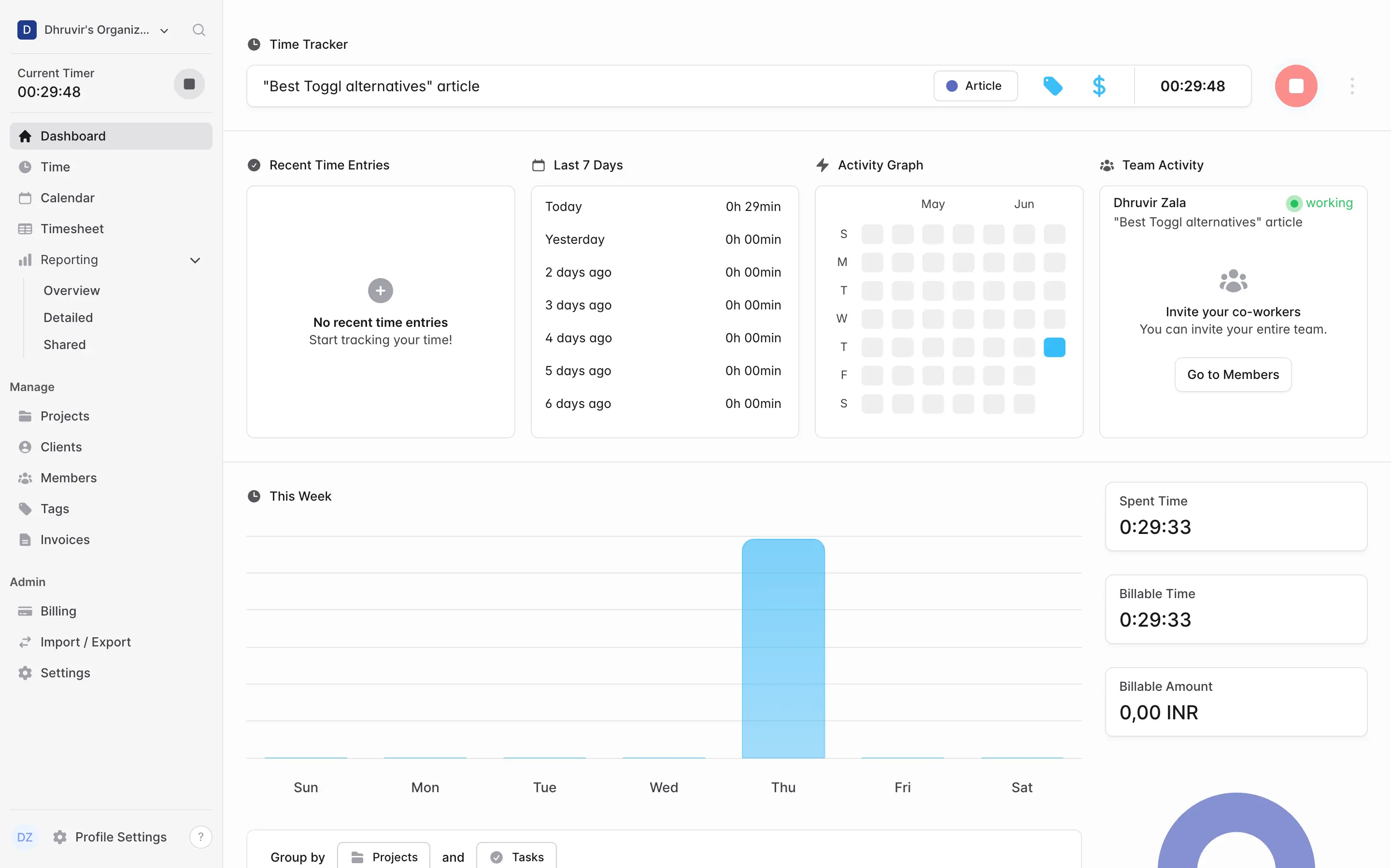
SolidTime is the Toggl alternative that looks and works the most like Toggl. The dashboard layout is nearly identical: timer running at the top, recent entries below, a weekly activity graph, and a sidebar with Projects, Clients, Members, and Tags. Opening it after years in Toggl, your muscle memory takes you most of the way. SolidTime's dedicated Toggl importer brings your time entries, clients, projects, and tags across in a few clicks, no manual CSV wrangling required.
The difference becomes clear once the timer stops. Toggl delivers a report. SolidTime, at the Professional tier, generates an invoice from the tracked time. Billable rates can be set at four levels: organization-wide, per member, per project, and per project member, with each level overwriting the one above it. Set a default rate for your whole organization, override it for a specific client project, override it again for one person on that project. Toggl has a rate configuration, but not this depth of inheritance logic in a single setup flow.
The timesheet view gives you a third input method beyond Toggl's timer and calendar. It lays out the week as a grid: projects down the left, days across the top. The "Copy last week" feature pulls your previous week's row structure into the current week, either with or without the hours. If your weekly project split rarely changes, that feature alone saves real time across a year.
No other alternative on this list offers what SolidTime does here: it is open-source, and you can self-host it. If your business cannot have time tracking and billing data sitting on a third-party SaaS, SolidTime is the only tool here that solves that. The cloud version is EU-hosted. The self-hosted version is free on GitHub for teams that want complete infrastructure control. Invoicing on self-hosted requires the Business plan, not the free open-source tier.
If Toggl Starter's missing invoicing is your specific frustration, SolidTime Professional fills it at nearly the same price per user. If your team needs to own its time data outright, it is the only tracker here that gives you that option.
SolidTime pricing: Free (1 user; basic time tracking, billable rates, reporting). Professional at €9/user/month (billed monthly) or €8/user/month (billed annually). On-premise Business plans from €49/year (1 user) to €1,499/year for up to 50 users. The self-hosted open-source version is free on GitHub.
Find the right Toggl alternative for you
For most people leaving Toggl, the answer is Rize. Not because it's the cheapest option on this list, but because it fixes the one thing Toggl fundamentally cannot: you forget to start the timer. Rize tracks automatically while you work. You open your laptop, do the work, and your timesheet is filled by the end of the day. That's the failure mode Toggl has never solved, and the reason most people end up here.
The other six are for specific needs Rize doesn't cover.
If your team needs GPS clock-in for field work, that's TimeCamp. If you need client payments built directly into the invoice, that's Harvest. If you need to own your time data completely, that's SolidTime. If blocking distractions matters as much as logging them, that's RescueTime.
But if your work happens at a desk and the problem is the timesheet that never fills itself, start with Rize. Most people reading this won't need to look further.
Every tool here has a free trial. Use it before you commit.
Related Reading
See how Rize compares to other time trackers: Rize vs Toggl, Rize vs Clockify, Rize vs Harvest, Rize vs RescueTime, and Rize vs Timely. Browse the full comparisons page for more.
Start tracking time automatically
Join thousands of professionals who stopped guessing where their time goes. Free for 7 days.
“Rize has been a no-brainer for me.” — Ali Abdaal Read more →