I work from home on a Mac. I also have seventeen browser tabs open right now, one of which is a Wikipedia article about the history of concrete that I have no memory of opening. That is the problem.
Quick Answer
The best focus app for Mac is Rize for automatic time tracking with built-in focus coaching. For hard website blocking, Cold Turkey (one-time $45) or SelfControl (free). For daily planning, Sunsama. For task capture, Todoist. Pick one that matches your specific failure mode and use it for a week before adding anything else.
A good focus app does not fix your habits for you. It closes the gap between the person you intend to be at 9 am and the person you actually are at 2 pm when motivation drops and the browser is right there.
The market for these tools is crowded, and the marketing is almost identical across all of them. I have spent the past several years testing all sorts of Mac focus apps across real work sessions, specifically watching for the moment motivation dropped to see which ones held and which ones I quietly bypassed.
After testing more than fifteen options, I have narrowed it down to the nine best focus apps for Mac-dependent remote workers and freelancers who need something that actually sticks.

What makes the best focus software for Mac?
I used each app on this list as my primary tool for at least one full work week, specifically watching for what happened when motivation dropped mid-afternoon and a distraction was one click away. That is the only moment that matters.
No app here paid for its placement. I included tools I use or would use, excluded tools I would not, and called out real weaknesses in both.
Here are the criteria I applied to every app on this list:
Bypass resistance. A blocker that you can easily disable mid-session is useless. I tested every app at the moment motivation dropped and logged which ones I got around, how long it took, and how many steps it required. This is the single most important criterion on the list.
Set up time for the first block. If an app takes forty-five minutes to configure before it does anything useful, most people abandon it before it works. The best tools are blocking within five minutes of installation. I timed this for each one.
Enforcement style. Some apps nudge. Some lock you out completely. Neither is wrong, but they suit different people. I mapped each tool on a spectrum from gentle to nuclear so you can match the app to your actual self-control situation.
Fit with how you actually work. A Pomodoro timer solves a different problem than a website blocker, which solves a different problem than an inbox manager. I looked at whether each app addresses a real workflow failure or just adds another thing to manage.
Pricing honesty. I included current pricing for every app, including what the free plan actually covers, because "free plan available" can mean almost nothing. If a paywall sits between you and the features that matter, I say so.
Mac-first experience. Several tools on this list are cross-platform. A few are Mac-only. I noted where the Mac experience is a genuine priority and where it is an afterthought ported from another OS.
The 9 best focus apps for Mac at a glance
| Tool | Best For | Standout Feature | Pricing |
|---|---|---|---|
| Rize | Automatic time tracking with focus coaching | Classifies deep vs. shallow work automatically | From $9.99/mo |
| Sunsama | Guided daily planning | Morning ritual that shuts down decision fatigue | From $20/mo |
| Todoist | Task capture and management | Natural language input for instant task creation | Free; Pro $5/mo |
| SaneBox | Inbox focus management | Auto-triage inside your existing email client | From $2.42/mo |
| Cold Turkey | Hard blocking when softer tools fail | Sessions hold even after app deletion or restart | One-time ~$45 |
| SelfControl | Free hard blocking | Unbypassable blocks that survive restarts | Free |
| Flow | Clean Pomodoro timer | Menu-bar timer with built-in blocker | Free; Pro $1.49/mo |
| Brain.fm | Focus music for deep work | Neural phase locking audio for sustained attention | From $8.33/mo |
| Obsidian | Distraction-free writing | Bi-directional linking for connected thinking | Free personal |
Best fully automatic and AI time-tracking app for Mac: Rize
Rize pros: Plug and play. Fully automatic time tracking. Proactive AI-powered productivity coaching. Privacy-friendly.
Rize cons: No free plan. Initial learning curve.
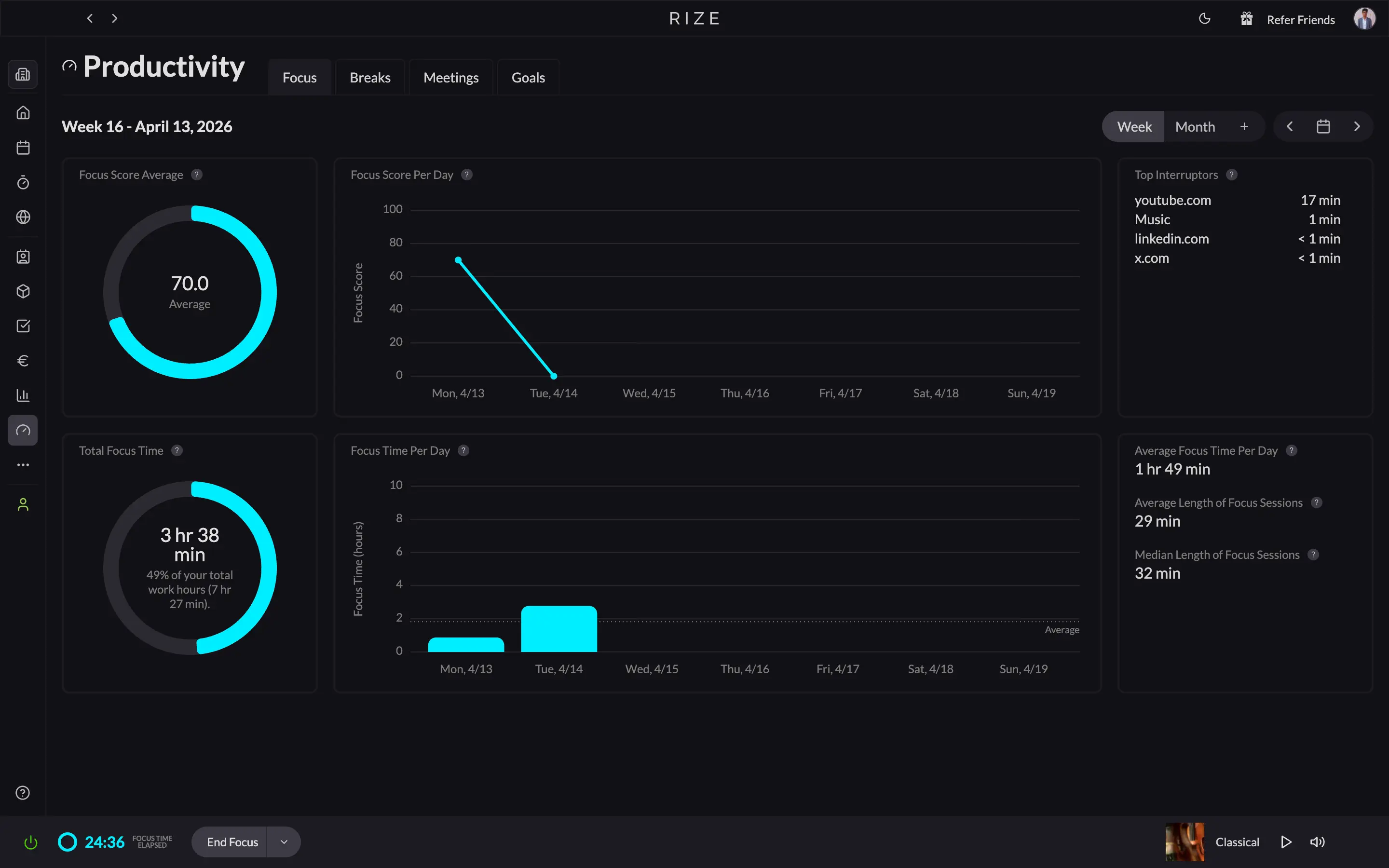
If I had to pick just one focus app for Mac, it would be Rize. Automatic time tracking, AI-powered reminders and alerts, calendar integration, a Pomodoro timer, and built-in focus music. Everything except a mobile app.
Setup takes about five minutes, then it runs itself. Unlike legacy time trackers that need you to manually start a timer per project or task, Rize watches which app or website you are in and classifies it as deep work or shallow work automatically, using a feature called Tracking Rules. You can build custom rules or let Rize generate them based on your job role.
The distraction blocking works the same way. Open YouTube mid-focus session, and a pop-up fires notifying you. Enable urge surfing, and it counts down ten seconds before you can close it. Ten seconds is usually enough to catch yourself and get back to work.
Rize is not just for agencies and teams. Its Basic plan is built for individual knowledge workers, and if you have a team, it scales: client, project, and task-level time tracking for accurate billable hours, plus a no-screenshots policy that makes rollout much easier than most time-tracking tools.
If you work on a computer, Rize will show you where your time actually goes and push you back toward the work that matters.
Rize pricing: 7-day free trial. Individual (Basic) plan: $12.99/month, or $9.99/month billed annually. Team plan: $23.99 per member/month, or $19.99/month billed annually.
Best guided daily planning app for Mac: Sunsama
Sunsama pros: Clean, simple, and easy to use. Proven guided daily planning for focus and clarity.
Sunsama cons: Expensive at $25/month. Not as feature-rich as some competitors.
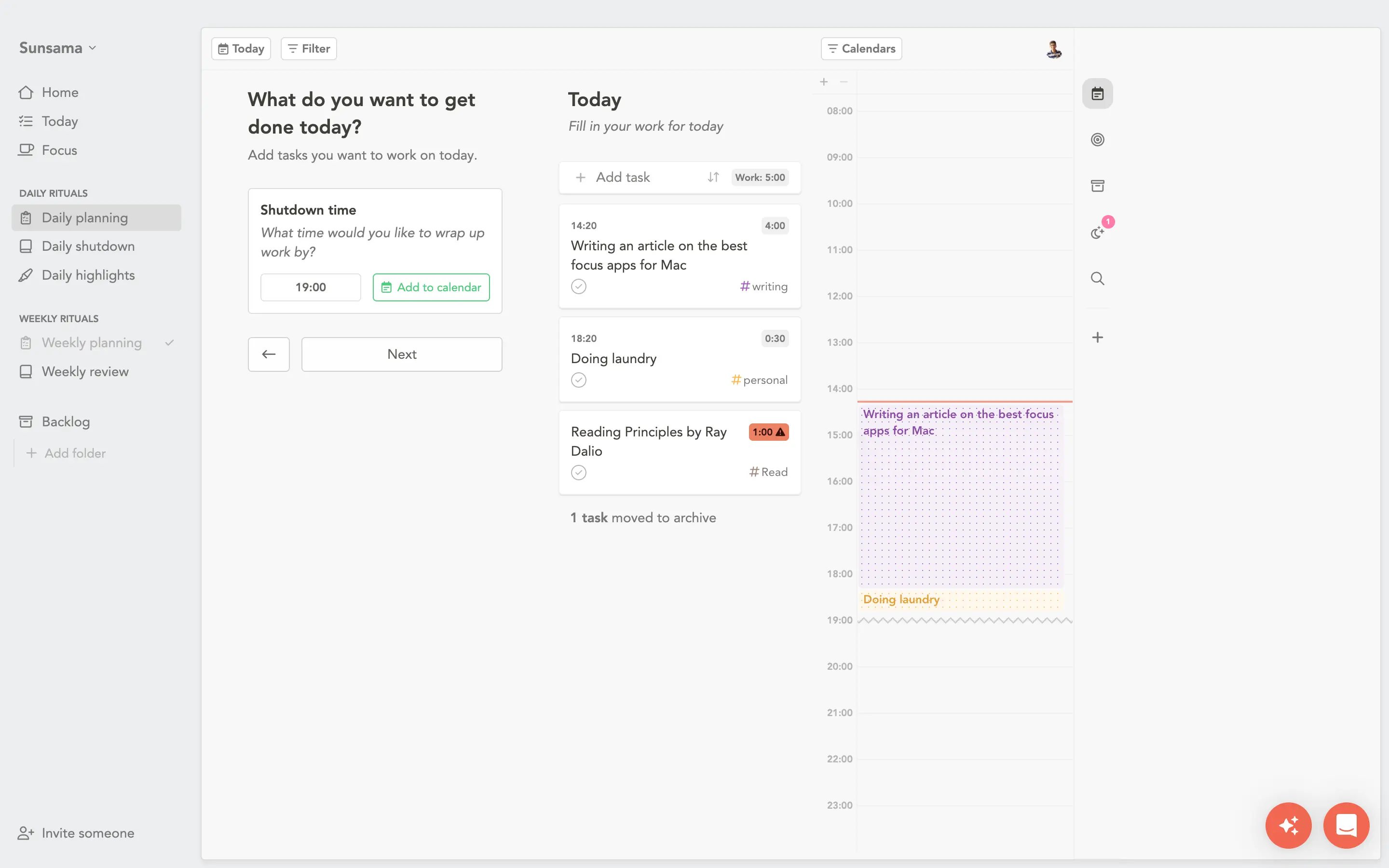
I have tried all the popular daily planner apps. Sunsama is the cleanest. Not the most feature-rich. The most mindful.
What drives focus is not always a blocker. Sometimes it is starting the day knowing exactly what you are doing and when you are allowed to stop. Sunsama's guided daily planning ritual handles that: set a shutdown time, add everything on your mind, prioritize what matters, push the rest to tomorrow or next week, then timeblock what is left into your calendar. Optional journaling before you start. The whole thing takes under ten minutes, and it works.
Their AI assistant, Sunny, handles batch task creation in plain language. Tell it what you need; it does the data entry. Efficient, nothing more.
The dedicated focus mode strips everything away and adds a Pomodoro timer. Press F on any task to trigger it.
Sunsama also integrates with ClickUp, Notion, Gmail, and more, which means it doubles as a task consolidation layer. If your work is scattered across multiple tools, you can act on all of it from one place.
If you lose focus because your day feels chaotic rather than because websites distract you, Sunsama is the pick.
Sunsama pricing: 14-day free trial. Pro plan at $25/month ($20/month billed annually).
Best task management app for Mac: Todoist
Todoist pros: Fastest task capture of any app I have tested. Natural language input that actually works. Integrates with Sunsama, Rize (coming soon), and most tools in your stack. Generous free plan.
Todoist cons: Task management only: no blocking, no time tracking, no calendar. Easy to over-organize instead of actually doing.
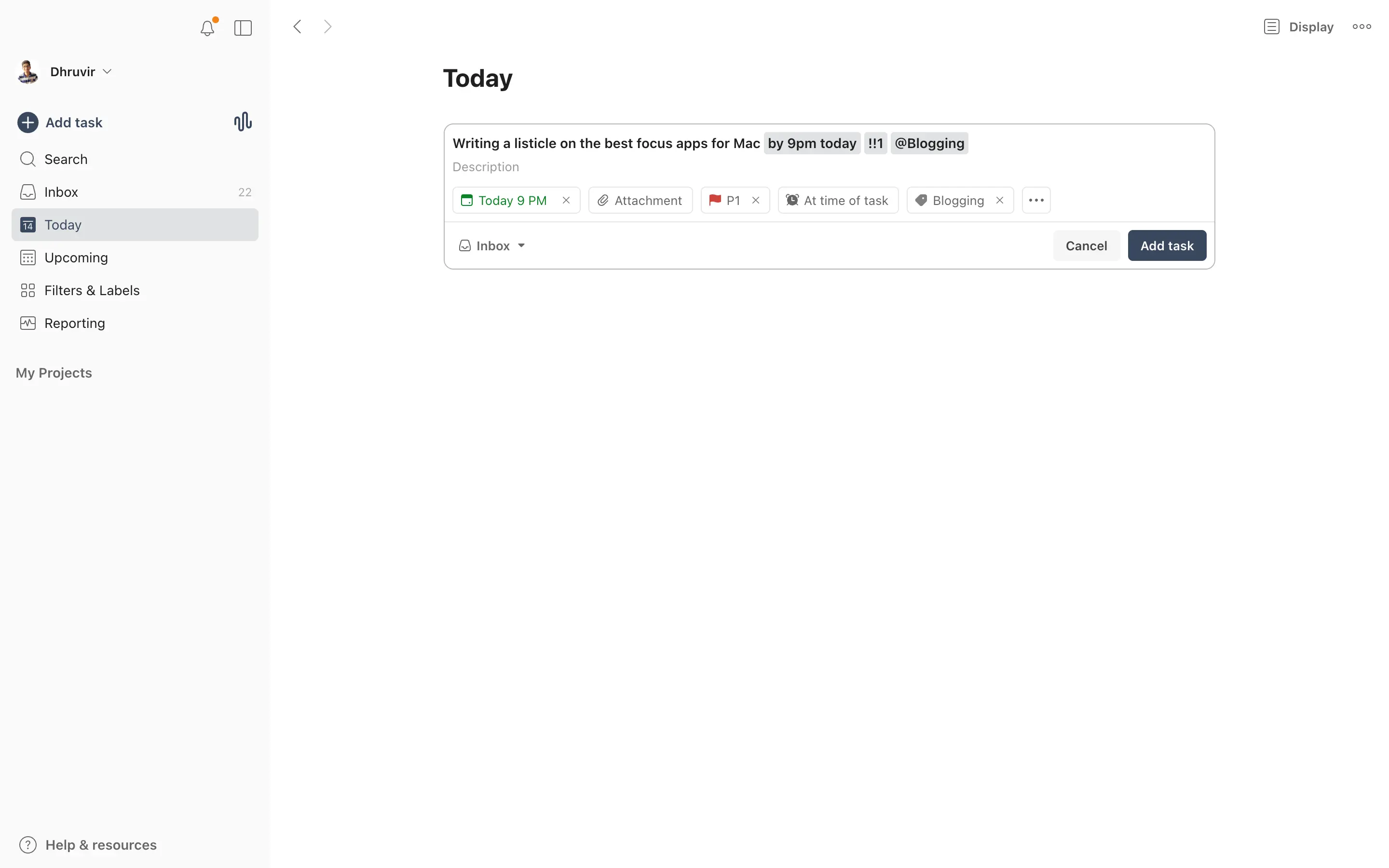
I have used Todoist since university and kept it through every productivity experiment since. Most tools I test, I drop. Todoist stayed because nothing captures a thought and turns it into a task faster.
The natural language processing is the reason. Type "Get a haircut on the 15th of each month," and it creates a recurring monthly task without a single dropdown. You think out loud, and it figures out the structure.
The newer Ramble feature extends this further. Brain-dump into it, scattered Monday morning and all, and it organizes the output into tasks with priority labels and project assignments already applied. It is the most accurate task-extraction I have seen from any app.
It also slots into almost any stack. It already integrates with Sunsama, and a Rize integration is coming that will let you track time directly against your tasks.
If your focus problem is that everything lives in your head and nothing is written down, Todoist solves that faster than anything else I have found.
Todoist pricing: Forever free plan. Pro plan: $7/month ($5/month billed annually).
Best automatic email management tool for Mac: SaneBox
SaneBox pros: Fully automatic. Works inside your existing email client. Best value of any inbox management tool I have tested.
SaneBox cons: Not a native Mac app. No free plan, trial only.
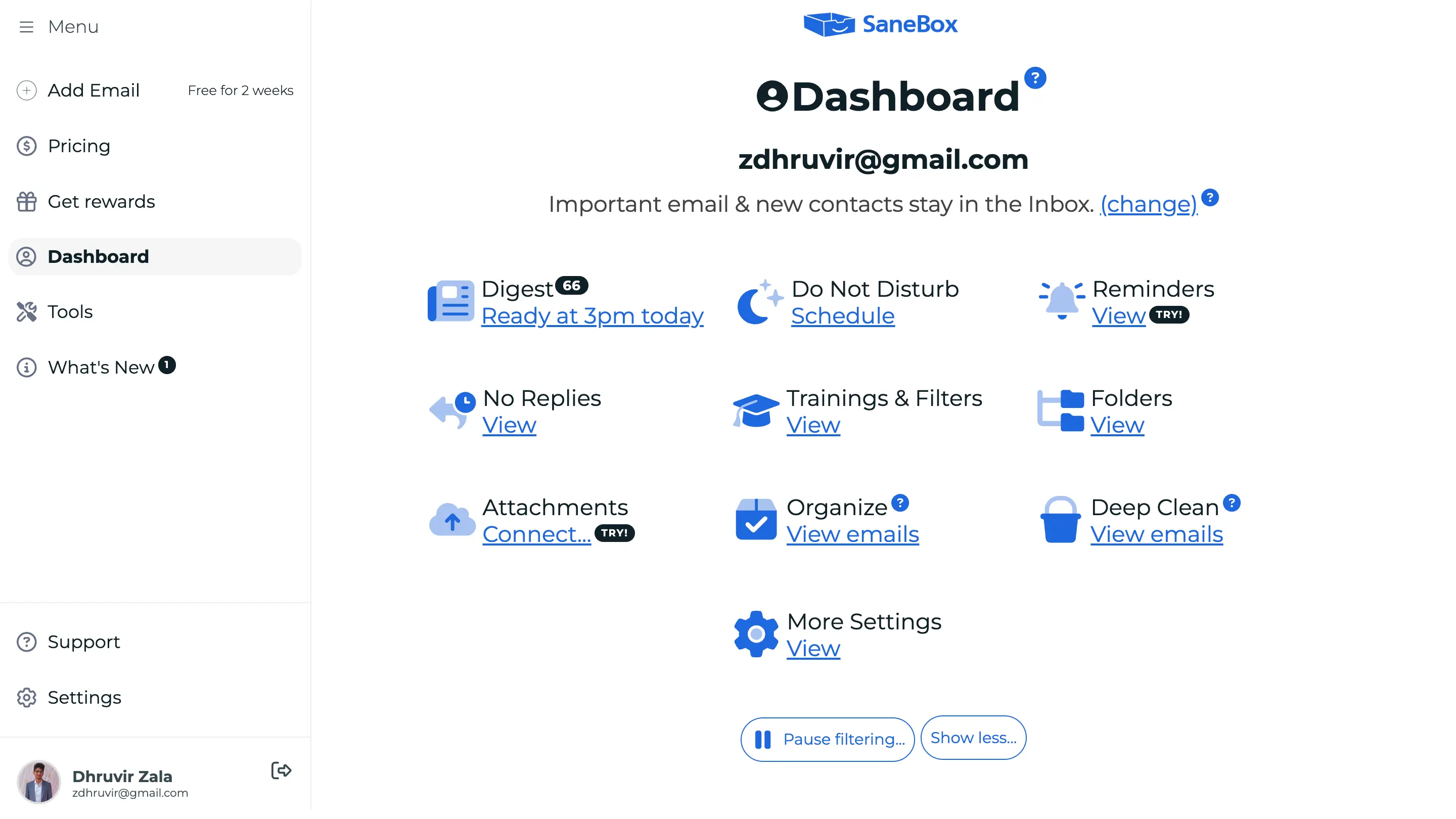
If email is your biggest focus killer, SaneBox is the fix.
It is not a standalone Mac app. It sits on top of whatever email client you already use (Gmail, Outlook, Yahoo), so there is no new interface to learn. Like Rize, set it up once, and it runs itself, getting smarter as it goes.
The whole system works through smart folders. @SaneLater holds everything non-urgent. @SaneNews catches newsletters. Drag anything into @SaneBlackHole, and it is gone permanently. Training it is just dragging: move a sender from @SaneLater to your inbox once, and SaneBox marks them as important going forward. You can also build custom folders for anything the defaults do not catch.
The most focus-relevant feature is @SaneDoNotDisturb. Schedule blocks when email stops arriving entirely, whitelist whoever cannot wait, and set an auto-reply for the window.
If you use Todoist or TickTick, SaneBox integrates with both. Connect either, and a @SaneTodo folder appears in your inbox. Drop any email in, and it converts to a task automatically.
I have tested the alternatives: Clean Email, Mailstrom, Unroll.me, Leave Me Alone. Nothing beats SaneBox on price or effectiveness.
SaneBox pricing: 14-day free trial. Paid plans start at $3.49/month ($2.42/month billed annually).
Best website and app blocker for Mac: Cold Turkey
Cold Turkey pros: One-time purchase, no subscription. Hardest to bypass of any blocker I have tested. Scales from quick-start templates to full device lockdown.
Cold Turkey cons: No free plan beyond the trial. Overkill if you only need gentle nudges.
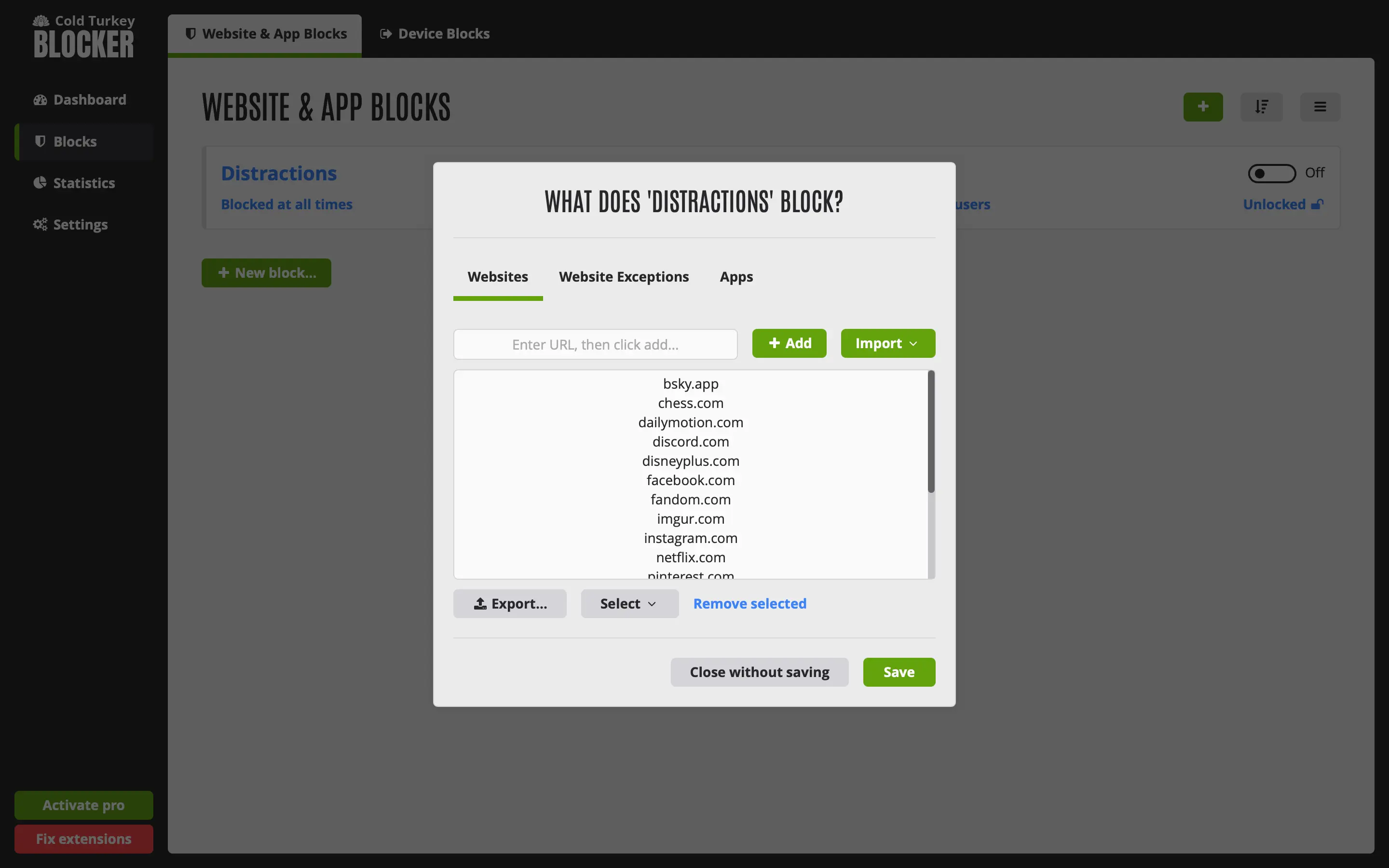
Cold Turkey is the strictest blocker I have tested. The reason I chose it over Freedom for this list comes down to one thing: Freedom is subscription-based and cross-device by design. Cold Turkey is a one-time purchase that runs on Mac and Windows. If you are Mac-first and do not want a recurring bill, the choice makes itself.
Setup is fast. The default Distractions blocklist covers the usual suspects, so you can be blocking within two minutes of installing. From there, whitelist exceptions or add custom apps and sites as needed.
Where Cold Turkey earns its reputation is in enforcement. Lock a session with a timer, a time range, a random text string you have to type to unlock, a delay, a restart requirement, or a password. Stack more than one. I have bypassed most blockers when motivation dropped mid-afternoon. Cold Turkey is the one I could not get around. There is even a full device lockdown for when you need to step away from your computer entirely.
If you have already tried softer blockers and disabled them at 2 pm, Cold Turkey is the next step. It is not for everyone. It is for the person who needs the door to actually lock.
Cold Turkey pricing: 7-day free trial. One-time fee of around $45.
Best free website blocker for Mac: SelfControl
SelfControl pros: Free and open source. Blocks survive app deletion and device restarts. Up and running in under two minutes.
SelfControl cons: No app blocking, scheduling, or mid-session whitelisting. Nothing beyond the core block.
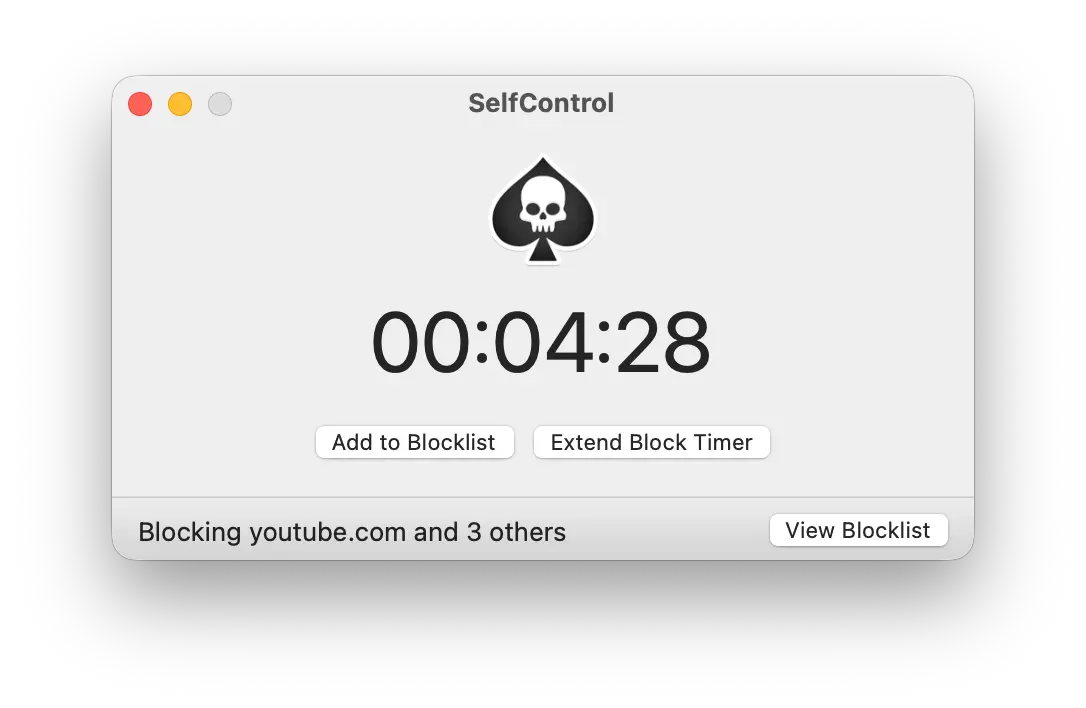
SelfControl is a free, Mac-only website blocker that works in three steps: add sites to your blocklist, set a timer, and click Start Block.
Once you do, nothing gets you back in until the timer runs out. Delete the app or restart the machine. The block holds anyway.
That combination of free, simple, and unbypassable is rarer than it should be. Most free blockers are trivial to circumvent. Most strict blockers cost money.
The built-in import preloads the most common distracting sites and news publications automatically, so you can be blocking in under two minutes without building a list from scratch.
The ceiling is low. No app blocking, no scheduling, no whitelisting mid-session. If you need harder enforcement, Cold Turkey is the step up. If hard blocking was never really the point and you would rather be nudged back to work than locked out, Rize fits better.
SelfControl pricing: Free and open source.
Best Pomodoro timer app for Mac: Flow
Flow pros: Clean, minimal interface that stays out of your way. Built-in app and website blocker. Syncs across all Apple devices. Free plan available.
Flow cons: You can pause the timer at any time, which means the blocker only holds as long as your motivation does. Blocker is inactive outside of a running session.
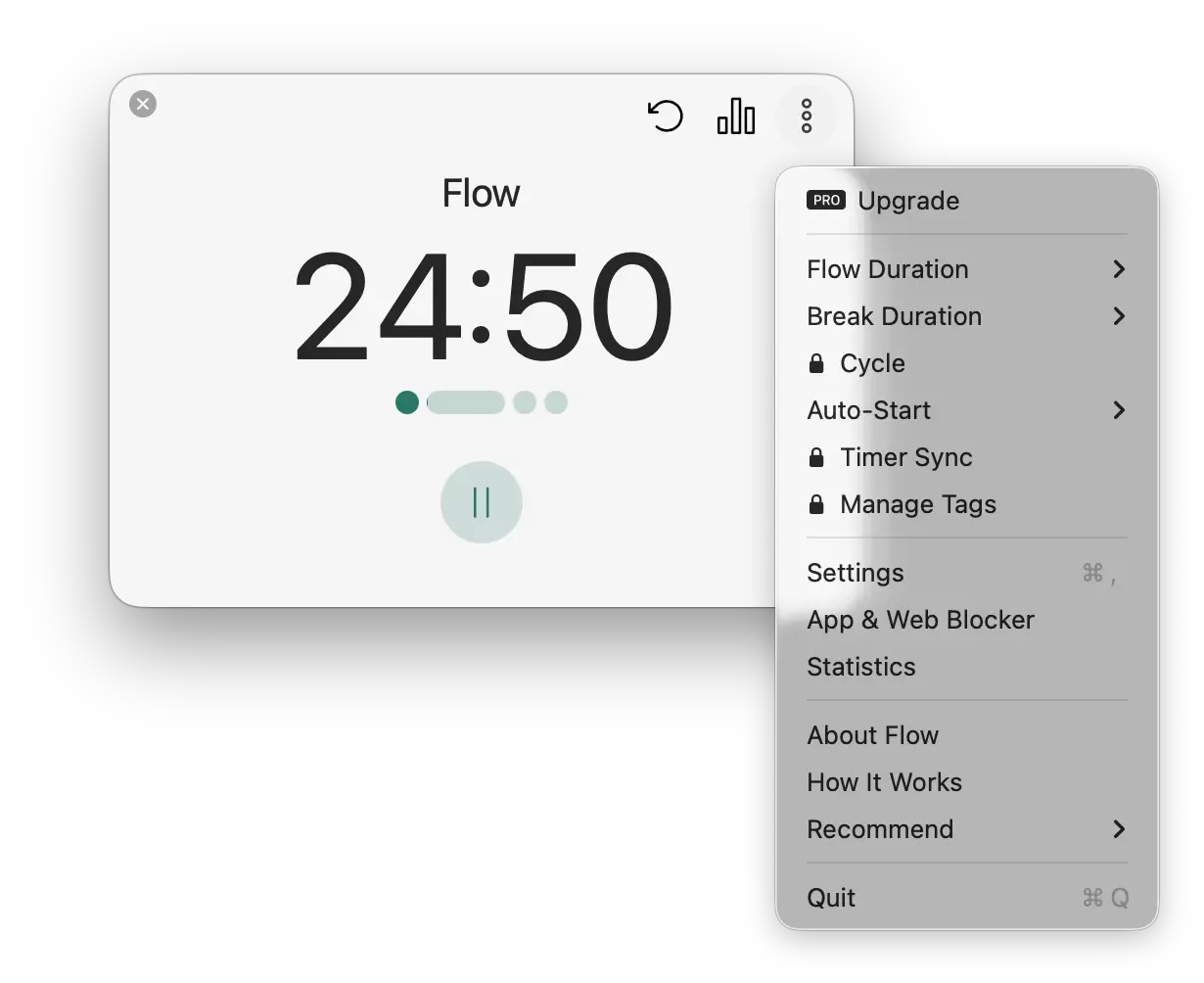
Flow is a Pomodoro timer with a built-in app and website blocker for all Apple devices.
The interface is the standout. Clean, minimal, lives in your menu bar. When the timer runs and you close the pop-up, it keeps counting without pulling your attention back. The blocker follows the same logic: add the apps and sites you want locked out, and they stay locked while the timer is active.
Customization covers the basics: adjust work and break durations, auto-start sessions and breaks, sync across devices.
The catch is enforcement. You can pause the timer whenever you want. That means the blocker only holds as long as your motivation does. If you have been disabling blockers mid-afternoon, Flow will not stop you. Cold Turkey will.
Flow's place is simplicity. If your system already works and you just need a clean timer to structure your sessions, nothing does that better at this price.
Flow pricing: Free plan. Pro plan: $2.99/month ($1.49/month billed annually).
Best focus music app for Mac: Brain.fm
Brain.fm pros: Science-backed music engineered for focus. Four modes covering focus, sleep, relaxation, and meditation. Dedicated ADHD Mode with High Neural Effect Level. Built-in Pomodoro timer with voice and chime prompts.
Brain.fm cons: No free plan, and billing details are required before you access the dashboard. No cross-device syncing between web and mobile. More expensive than a Spotify Premium subscription that may already work for you.
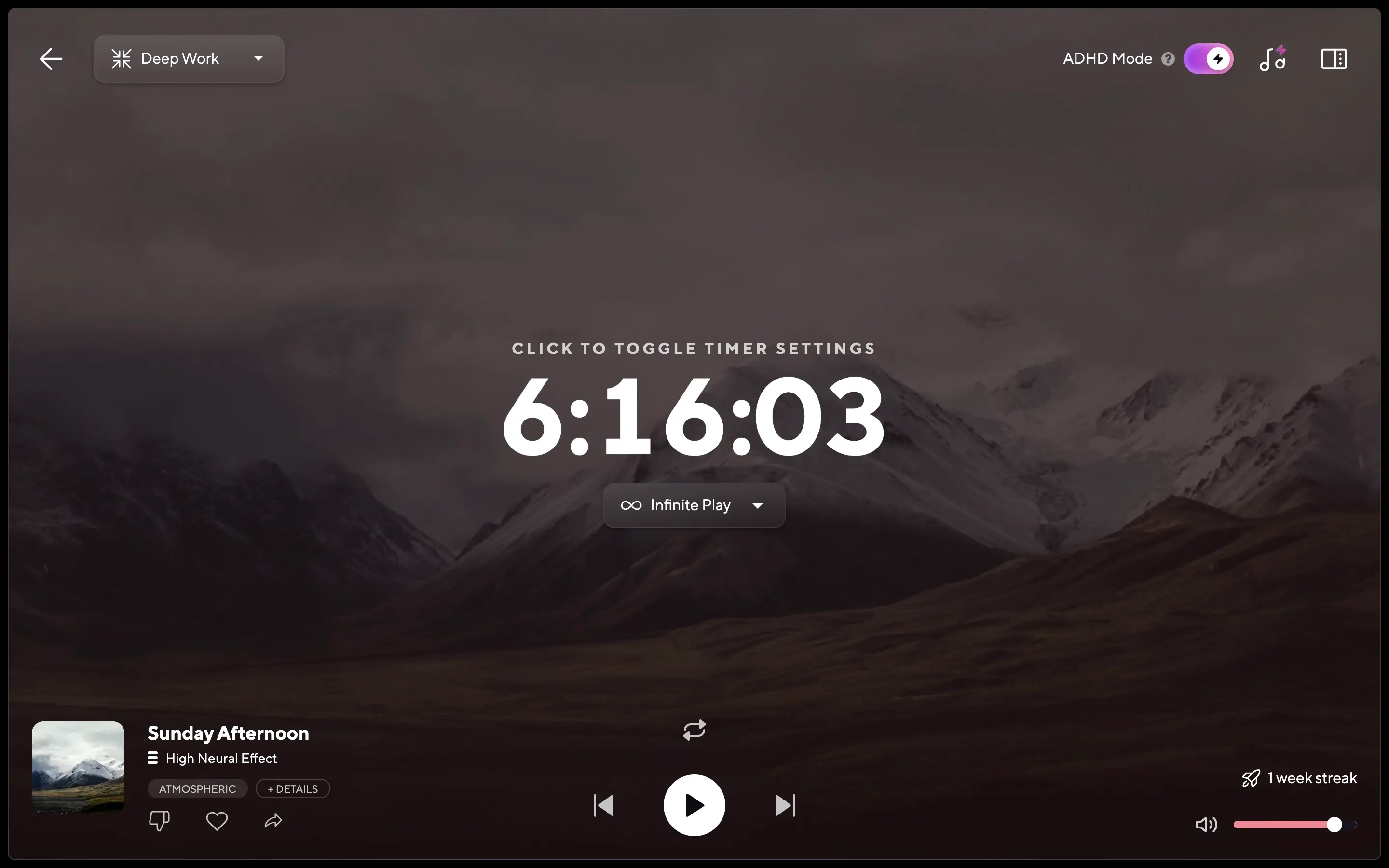
Brain.fm is a science-backed focus music app that uses neural phase locking, music engineered to sync your brain's attention networks with the audio, to keep you in the work longer.
Whether that is the mechanism or a well-designed placebo, the outcome holds up in testing: you start a track, switch tabs, and look up twenty minutes later, having stayed in the work without noticing.
What separates it from a Spotify focus playlist is not just the absence of ads. The Focus mode splits into Deep Work, Motivation, Creativity, Learning, and Light Work. The intensity of music you want during a three-hour writing block is not the same music you want while replying to emails. Brain.fm makes that call for you. Free alternatives do not.
The ADHD Mode is worth calling out. It pushes the Neural Effect Level to High, Brain.fm's strongest setting. If standard playlists have never reliably held your attention, start here.
Brain.fm is a web and mobile app, not a native Mac app. For focused work at your desk, that is the web version: already a browser tab, no download required.
If free alternatives are already working for you, Brain.fm will not justify the cost. If ads are killing your flow, you have lost sessions hunting for the right track, or ADHD makes standard playlists useless, it is the tool that was actually built for your problem.
Brain.fm pricing: Standard free trial (7 days on monthly, 14 days on annual). Monthly plan: $14.99/month. Annual plan: $99.99/year.
Best note-taking and writing app for deep focus: Obsidian
Obsidian pros: Completely offline and private. Distraction-free by default. Bi-directional linking that mirrors how you actually think. Community plugins extend it as far as you want. Free forever for personal use.
Obsidian cons: Real learning curve, especially with markdown. Easy to spend a week customizing plugins instead of writing. Sync requires a paid plan.
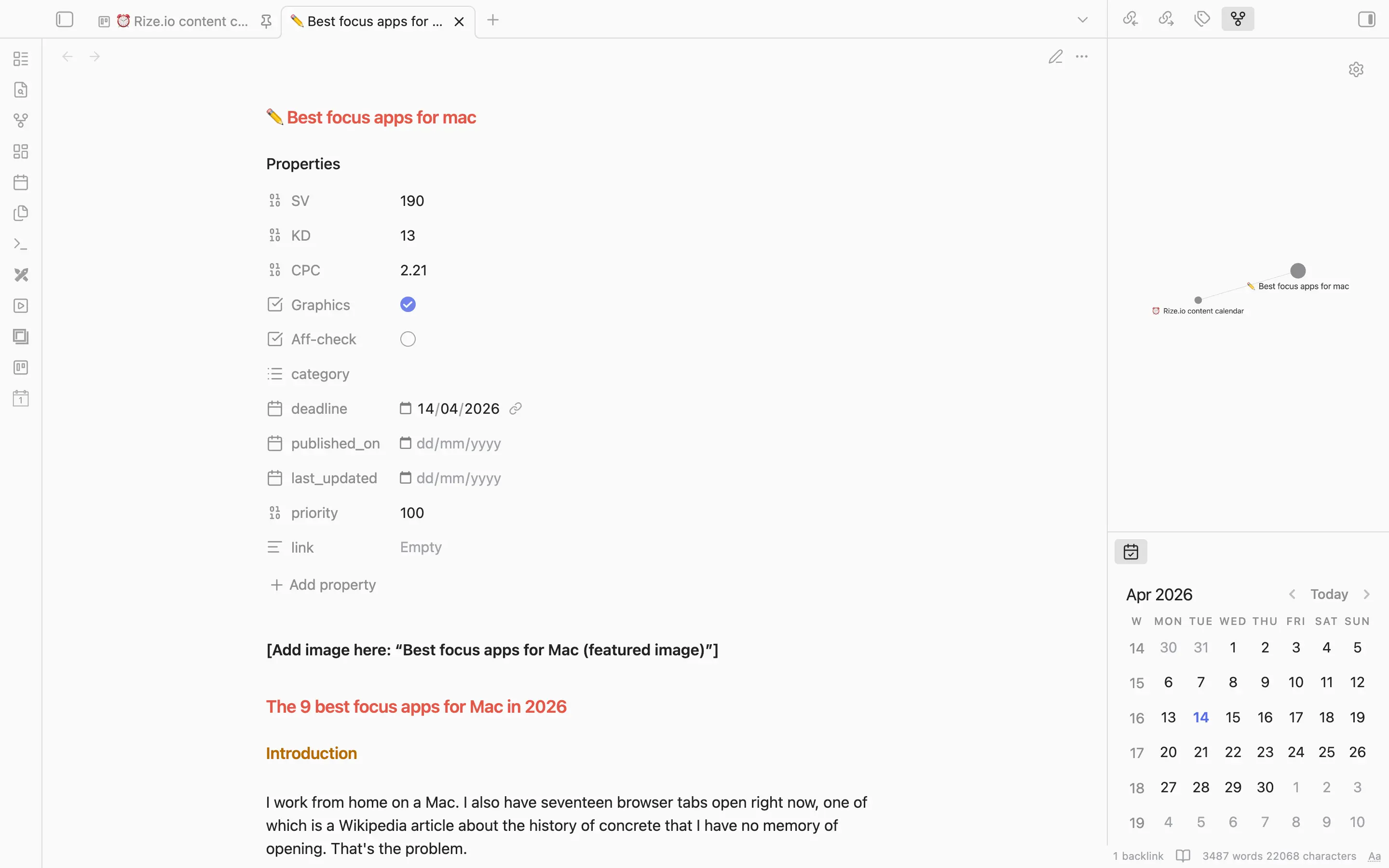
I am writing this article in Obsidian.
It is a markdown-based note-taking app that runs entirely offline. No cloud, no algorithm, no pings. Open a note and write. That is the interface.
The learning curve is front-loaded. Markdown takes a few days. After that, Obsidian gets out of your way faster than anything else I have used for long-form writing.
What separates it from Notion or Evernote is bi-directional linking. Notes connect to each other the way ideas connect in your head, not the way files sit in folders. You are not organizing by hierarchy; you are building a network. The graph view makes this visible. Whether you find it useful or just leave it alone, the underlying structure makes retrieval faster and context-switching rarer.
Community plugins are where Obsidian gets complicated, and that is entirely on you. Task management, kanban boards, habit tracking, calendar integration: all there if you want it. Start with plugins on day one, and you will call it overwhelming. Use it as a writing app first and add one plugin at a time, and it scales exactly as far as you want.
The detail worth knowing for both privacy and longevity: everything you write lives as a plain .md file on your machine. Obsidian shuts down tomorrow; you still have everything, readable in any text editor.
If your focus breaks because writing feels scattered and you are always switching between tools, nothing consolidates that faster.
Obsidian pricing: Free forever for personal use. Paid plans available for commercial use and sync.
How to choose the right Mac focus app
The honest answer is that most people need two tools: one that structures your day, and one that enforces it.
Start with the problem that costs you the most time. If you lose hours because your day has no shape, start with Sunsama. If you lose hours because websites are one click away, and you always click, start with Cold Turkey or SelfControl.
If you want one app that covers the most ground without needing a second, Rize is the pick. It tracks, blocks, and coaches without asking much of you.
For budget constraints, SelfControl and Obsidian are both free and both genuinely good. Flow's free plan is enough if you just need a timer. Todoist's free tier handles task capture better than most paid alternatives.
If softer tools have already failed you, skip them. Go straight to Cold Turkey. The whole point is that it does not negotiate.
If distraction is less about blocked sites and more about a chaotic inbox, SaneBox fixes that faster than anything else. If you have never found a playlist that actually holds your attention through a long session, Brain.fm is worth the trial.
Pick one, use it for a week before adding anything else.