Rize is the best team time tracking dashboard for visibility. It pairs automatic time capture with AI categorization and real-time team dashboards, so managers see live utilization, billable vs. non-billable hours, project allocation, and team capacity without a single manual timer. Most dashboards are only as good as the data feeding them, and manual timers miss 15-40% of actual work time. According to Harvard Business Review research, inaccurate timesheets cost businesses $7.4 billion per day. The best team dashboards remove the manual step entirely, giving managers current data instead of last week's guesses. You can download Rize for macOS or Windows and start a free 7-day trial, or view team pricing before rolling it out.
Quick Answer
Best team time tracking dashboard for visibility: Rize auto-captures every work session and uses AI to assign time to projects. Managers get real-time dashboards showing utilization, billable hours, and capacity across the team. No timers, no timesheets, no manual input. Rize Teams is $29.99/seat/month (billed annually); download the app for macOS or Windows and start a free 7-day trial.
Why Most Team Dashboards Show Incomplete Data
Most team time tracking dashboards depend on manual input, which means they reflect what people remember to log rather than what actually happened. A designer who spends 45 minutes in Figma on a client project but forgets to start a timer creates a gap the dashboard never sees. Multiply that across a 10-person team over a month, and the dashboard is missing hundreds of billable hours.
According to PMI's Pulse of the Profession research, organizations waste 11.4% of every dollar invested due to poor project performance, and inaccurate time data is a primary contributor. When dashboards show incomplete data, managers make staffing decisions based on partial information: underestimating capacity, overloading top performers, and missing the utilization targets that drive profitability.
The fix is not better reminders or stricter timesheet policies. It is removing the manual step entirely. Automatic time capture feeds dashboards with complete data from every team member, every day, without asking anyone to start a timer.
Comparison: Team Time Tracking Dashboard Tools
| Tool | Time Capture | AI Categorization | Real-Time Dashboard | Utilization Tracking | Price (per seat/mo) | Best For |
|---|---|---|---|---|---|---|
| Rize | Fully automatic | Yes | Yes | Billable + non-billable | $29.99 | Agencies, service teams |
| Clockify | Manual timer | No | Yes | Basic (manual data) | Free / $9.99 | Budget-conscious teams |
| Monday.com | Manual log within boards | No | Yes (project-centric) | Estimated vs. actual | $12 | PM-heavy workflows |
| Toggl Track | Manual timer + basic auto-detect | No | Yes | Basic (manual data) | Free / $9 | Small teams, freelancers |
| Harvest | Manual timer + timesheet | No | Yes | Capacity + budgets | $9 + usage fees | Billing-focused teams |
Rize: Automatic Dashboards With AI-Powered Time Data
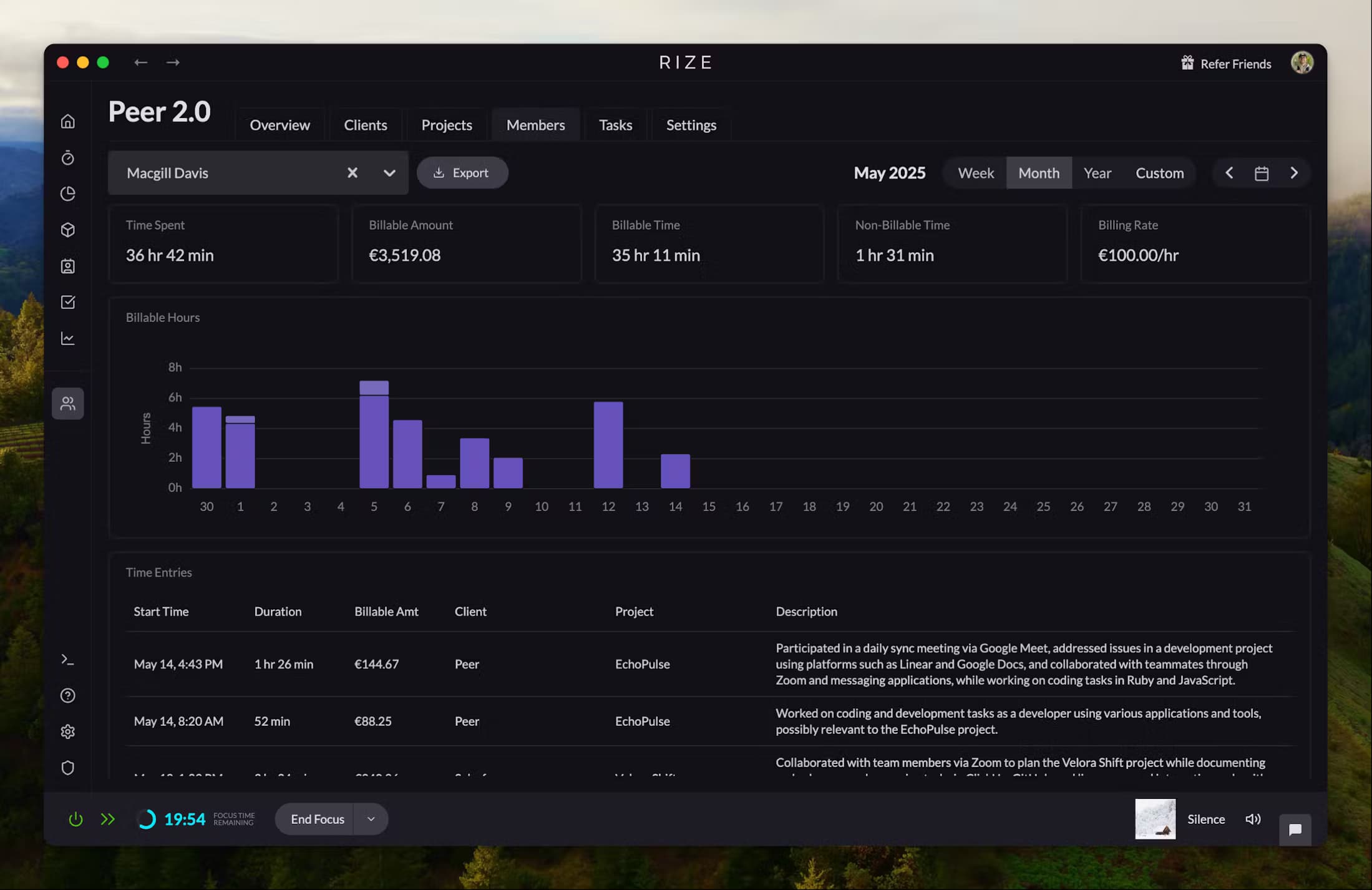
Rize is an automatic time tracker that feeds team dashboards with complete, categorized time data without manual input. It runs in the background on macOS and Windows, reads app names, window titles, and browser URLs, and uses AI to assign every session to the right project and client. Managers see real-time utilization dashboards showing billable vs. non-billable time, project allocation, and individual capacity.
The key difference between Rize's dashboards and competitors' dashboards is data completeness. Clockify and Toggl Track can only show time that someone remembered to log with a manual timer. Rize captures everything, so the dashboard reflects actual work patterns rather than self-reported estimates. For agencies billing by the hour, that gap directly impacts revenue.
Ben Jackson, CEO of 12-person creative agency Momentum Studio, described the problem Rize solved: "I'm a trusting leader, but I don't even trust myself to remember what I worked on two days ago. So how can I expect my designers to?" After adopting Rize, Momentum Studio recovered 20% more billable time and saved 8 hours per week on timesheet administration.
See your team's time in real time
Rize auto-captures every work session and surfaces it in live dashboards. No timers, no timesheets, no chasing your team for hours.
Start Free TrialClockify: Free Team Dashboards With Manual Entry
Clockify offers a free plan for up to 5 users with basic team dashboards (the free tier was capped at 5 users in April 2026), making it a common entry point for small teams trying time tracking for the first time. The dashboard shows project totals, team summaries, and weekly reports. Paid plans add detailed analytics, budgets, and scheduling.
Clockify's limitation is that every data point on the dashboard comes from a manually started timer or a manually entered timesheet row. If someone forgets a timer, the dashboard misses it. There is no automatic capture and no AI categorization. For teams that want a free starting point and are willing to enforce timesheet discipline, Clockify works. For teams that need accurate utilization data without compliance overhead, the manual requirement is a bottleneck.
Pricing: Free (up to 5 users). From $3.99/user/month (paid). $9.99/user/month for Pro analytics.
Monday.com: Project Dashboards With Built-In Time Logging
Monday.com is a project management platform with time tracking built into its board interface. Team members log time against specific tasks within Monday boards, and managers see project-level dashboards showing estimated vs. actual hours, workload distribution, and timeline views.
Monday.com's dashboard strength is project context. Time data lives alongside tasks, statuses, and assignees, so managers see the full picture without switching tools. The weakness is that time data is still manually logged. If your team already lives in Monday.com, the built-in tracker reduces tool sprawl. If you need accurate total hours across all work, not just work managed in Monday boards, you need a dedicated time tracker feeding the dashboard.
Pricing: From $12/seat/month. Time tracking available on Standard plan and above.
Toggl Track: Simple Dashboards With Timer-Based Data
Toggl Track provides clean team dashboards powered by manual start/stop timers. The reporting interface shows time by project, team member, client, and date range. The Timeline feature logs background app usage on desktop, but it does not create time entries automatically.
Toggl's dashboard design is strong: the interface is intuitive, exports are flexible, and the free tier supports up to 5 users. The data accuracy limitation is the same as Clockify. Dashboard quality depends entirely on timer discipline. According to Harvard Business Review research, manual timesheets lose $7.4 billion per day in aggregate across businesses. Even a 10% gap in logged time distorts utilization rates and capacity planning.
Pricing: Free for up to 5 users. From $9/user/month (paid). 30-day free trial.
Harvest: Budget-Focused Dashboards With Invoicing
Harvest combines manual time tracking with project budgeting and invoicing. Dashboards show hours tracked vs. budget by project, team capacity, and billable vs. non-billable breakdowns. The invoicing integration turns tracked hours into client invoices directly.
For billing-focused teams, Harvest's tight connection between time data and invoicing eliminates a manual step. The capacity planning view helps managers see who is overloaded and who has availability. The limitation is the same manual dependency: Harvest dashboards only reflect time that team members actively logged. If your team tracks diligently, Harvest dashboards are reliable. If adoption is uneven, the data gaps compound.
Pricing: Teams $9/seat/month (annual) plus usage-based fees. Free 30-day trial.
What to Look for in a Team Time Tracking Dashboard
The best team time tracking dashboard answers four questions in real time: Where are hours going? Who is at capacity? Which projects are on budget? What is our billable utilization rate? Any dashboard that cannot answer these questions from live data is a reporting tool, not a visibility tool.
1. Automatic data capture. Dashboards that depend on manual timers always have gaps. Rize's automatic time tracking captures every session without input, so the dashboard is always current. Manual tools like Clockify and Toggl only show what people remembered to log.
2. Billable vs. non-billable breakdown. For agencies and service teams, the ratio of billable to non-billable time determines profitability. The dashboard should separate these automatically, not require manual tagging on every entry.
3. Utilization rate by team member. Utilization rate is the percentage of available hours spent on billable work. Agencies typically target 65-75%. The dashboard should show this per person, updated daily, so managers can rebalance before end-of-month surprises.
4. Project burn rate. Hours consumed vs. hours budgeted for each project. When burn outpaces progress, the dashboard should surface it immediately. Waiting for a weekly report means the budget is already gone.
From Dashboard Data to Better Decisions
A dashboard is only useful if it changes decisions. The most common action from a team time tracking dashboard is workload rebalancing: moving tasks from an overloaded team member to someone with capacity before deadlines slip.
The second most common action is scope negotiation. When project burn rate exceeds planned pace, the dashboard gives managers the evidence to renegotiate scope or raise the flag with the client before the margin disappears. Without real-time data, this conversation happens after the damage is done.
Leonard Roussard of Impulse Lab described the shift: "We use Rize to know: 'We spent 30 hours on this client and got this result.' That's powerful when you're working lean and launching quickly." Real-time dashboards turn time data from a billing artifact into an operational tool.
For a deeper look at building team visibility with time tracking, see our complete guide to real-time team visibility, or explore how automatic tracking works on the automatic time tracking feature page. To see what team dashboards look like in practice, visit Rize Teams. For related comparisons, read our guides to team profitability calculator tools and project-based time tracking profitability reporting.
Start tracking time automatically
Join thousands of professionals who stopped guessing where their time goes. Free for 7 days.
“Rize has been a no-brainer for me.” — Ali Abdaal Read more →
Macgill Davis is cofounder of Rize, an automatic time tracker that improves focus and builds better work habits.