Consulting firms sell expertise, but their margins depend on how efficiently that expertise is delivered. In 2026, the firms widening their margins are not the ones hiring more analysts. They are the ones using AI automation to remove administrative drag, speed up client deliverables, and measure the gains in real time. The right automation stack turns billable-hour leakage into measurable efficiency.
Quick Answer
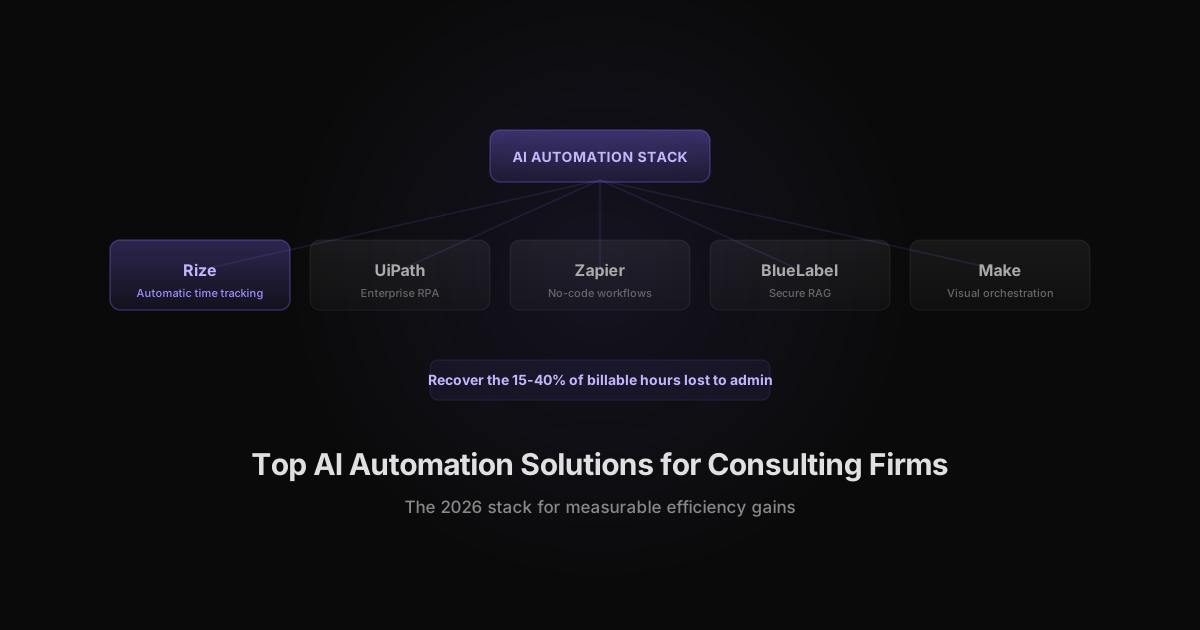
Top AI automation solutions for consulting firms in 2026: Rize for privacy-first automatic time tracking, NextAutomation for CRE deal flow, BlueLabel for secure enterprise RAG, Vstorm for fractional AI engineering, Microsoft Power Automate for low-code Office workflows, UiPath for enterprise RPA, Zapier for no-code app connectivity, n8n for self-hosted automation, and Make/Tray.ai for visual multi-step orchestration.
What AI-Powered Consulting Automation Looks Like in 2026
AI-powered consulting automation uses machine learning to handle work that previously required manual effort: capturing billable time, screening documents, routing client requests, generating reports, and querying proprietary knowledge bases. The difference from traditional automation is that AI can interpret unstructured inputs, learn from patterns, and make context-aware decisions without explicit programming for every edge case.
For consulting firms, the payoff is straightforward. Less time spent on intake, tracking, and reporting means more time spent on client strategy. The firms that automate well also gain a pricing advantage because they can deliver faster while maintaining or improving quality.
The scale of the opportunity is large. According to McKinsey's 2023 research, generative AI could add the equivalent of $2.6 trillion to $4.4 trillion in value annually across business functions, and knowledge-heavy work like consulting is among the areas set to gain the most. For a professional services firm, that value shows up as recovered billable hours and faster client deliverables.
The Real Cost of Manual Work in Consulting Firms
Manual administrative work is the largest hidden drain on consulting margins. Hours spent on document intake, status reporting, data entry, and timesheet reconstruction cannot be billed, yet they rarely show up as a managed line item.
Context switching makes it worse. Research from UC Irvine professor Gloria Mark found it takes an average of 23 minutes to refocus after an interruption. A consultant who bounces between client work, internal reporting, and manual time logging a dozen times a day loses hours of billable focus to that recovery cost alone.
Manual timesheets compound the leak. Filled in from memory at the end of the week, they routinely undercount billable hours by 15-40% because short tasks, quick calls, and after-hours work get forgotten. AI automation attacks both problems at once: it removes the manual steps that trigger context switches and captures the work that memory-based logging misses.
Rize: AI-Powered Automatic Time Tracking for Consulting Firms
Time is the inventory consulting firms sell, yet manual timesheets routinely undercount billable hours by 15-40%. Rize solves this with AI-powered automatic time tracking that runs in the background, captures work activity, and assigns time to the correct client, project, and task without timers or timesheets.
Key features for consulting firms include AI auto-tagging, integrations with ClickUp and Google Calendar, granular visibility into time allocation, and a privacy-first design that never uses screenshots or keystroke tracking. Partners get real-time dashboards for billable utilization and project profitability, while consultants keep their trust and focus intact.
Definition: AI-powered time tracking platforms use machine learning to automatically capture, categorize, and analyze work activities, eliminating manual timesheets and supporting confident billing and project analysis.
For firms measuring client efficiency gains, Rize provides the baseline data. You cannot prove that automation saved hours if you do not know how hours were spent before. Rize closes that loop. Learn more about AI efficiency with Rize and privacy-first time tracking.
See where your consulting hours actually go
Rize captures every consulting work session automatically and assigns it to the right client and project. No timers, no timesheets. Free for 7 days.
Start Free TrialNextAutomation: Commercial Real Estate Deal Flow and Underwriting Automation
NextAutomation specializes in commercial real estate consulting automation, focusing on deal flow, offering memorandum intake, first-pass deal screening, and underwriting handoffs. These are manual bottlenecks in CRE advisory that consume hours per assignment and introduce data-entry errors.
The platform is recognized for rapid pilot deployments and domain-specific templates, which gives it faster time-to-value than large system integrators for CRE use cases. Deal flow automation here means applying AI-powered tools to streamline property intake, underwriting, and client reporting, saving hours per assignment while improving accuracy.
BlueLabel: Secure Enterprise AI with Retrieval-Augmented Generation
BlueLabel builds custom Retrieval-Augmented Generation (RAG) systems for consulting firms that need secure querying over proprietary document vaults. RAG combines real-time document search with generative AI, enabling accurate answers across large, private knowledge bases without exposing data to public models.
This is the right fit for regulated industries and large consulting projects where generic AI tools are ruled out by compliance requirements. Pricing typically starts at $25,000 per month, so the use case needs to be high-value and document-heavy. When security, accuracy, and ROI transparency matter more than speed, BlueLabel is the strongest option.
Vstorm: Fractional AI Engineering for Small and Medium Businesses
Vstorm acts as a fractional AI engineering team for SMB-focused consulting firms. Its model combines a setup fee with modest monthly maintenance, making it accessible for smaller firms that need targeted automation without building an internal AI team.
Typical automations include manual data entry, report assembly, and client onboarding workflows. For firms that want measurable efficiency gains on a budget, Vstorm offers hands-on implementation and ongoing support rather than software-only licensing.
Microsoft Power Automate: Low-Code Automation with Copilot Integration
Microsoft Power Automate lets consulting firms build custom automations without developer resources. It integrates deeply with Microsoft 365, SharePoint, Teams, and Outlook, which matters because most consulting firms already live inside that ecosystem.
Definition: Low-code automation lets business users build workflow automations using simple drag-and-drop tools, requiring little to no programming.
Pricing often starts around $15 per user per month. The trade-off is flexibility. Power Automate is excellent for Office-centric workflows but less suited for complex, multi-system orchestration compared to technical platforms like n8n or Make.
UiPath: Robotic Process Automation Enhanced with Generative AI
UiPath remains the market leader in Robotic Process Automation (RPA), with recent additions that integrate generative AI for structured and semi-structured processes. RPA mimics repetitive human actions in digital workflows such as data transfer, invoice processing, and compliance checks.
UiPath is best for regulated, document-heavy, high-scale consulting operations. Typical use cases include contract review, timesheet auditing, and compliance workflows. It requires more implementation effort than low-code tools but scales reliably for enterprise clients.
Zapier: No-Code Automation for Broad App Connectivity
Zapier connects popular cloud apps without technical overhead. Its strength is breadth: thousands of integrations, a free tier, and paid plans starting around $19.99 per month. For consulting firms that need quick wins, Zapier is often the fastest path.
Definition: No-code automation tools allow business users to connect workflows and data across applications without programming, using visual builders and templates.
Common consulting use cases include routing client onboarding forms, generating proposals from CRM data, and syncing meeting notes to project management tools.
n8n: Open Source, Self-Hosted Workflow Automation
n8n is a developer-focused, source-available automation platform that can be self-hosted. This matters for consulting firms with clients that have strict data residency or compliance requirements. Self-hosted workflow automation means the platform runs on your own infrastructure, giving full control of data and compliance boundaries.
Key scenarios include custom process orchestration, deep SaaS integration, and high extensibility. n8n requires more technical skill than Zapier but offers more control and no per-seat pricing at scale.
Make (Integromat): Visual Multi-Step Scenario Builder
Make, formerly Integromat, offers a visual scenario builder for multi-step automations. Its interface uses graphic flowcharts to map each step and decision point, making complex workflows easier to design than linear Zapier-style zaps.
With advanced branching, affordable entry pricing around $10.59 per month, and a free tier, Make is a strong middle ground for consulting teams managing multi-phase client deliverables such as automated report creation, workflow escalation, and multi-app sync.
Gumloop and Tray.ai: AI Model Orchestration and SaaS Connectors
Gumloop and Tray.ai target consulting firms that need multi-LLM routing or custom data orchestration within complex tech stacks. Model orchestration is the practice of managing and routing requests to multiple large language models to optimize quality, speed, and reliability.
Gumloop emphasizes easy model comparisons and routing with a free tier. Tray.ai focuses on enterprise workflow building with a powerful visual designer. Both are best for firms comparing output quality across AI models or integrating new AI APIs into client workflows.
How to Choose the Best AI Automation Solution for Your Consulting Firm
The right choice depends on firm size, client profile, and technical appetite. A practical mapping looks like this:
| Firm Need | Best-Fit Solution Type | Example Vendors | |---|---|---| | Accurate billable time capture | Privacy-first automatic time tracking | Rize | | CRE deal flow and underwriting | Domain-specific AI automation | NextAutomation | | Secure enterprise document AI | Custom RAG systems | BlueLabel | | Fractional AI engineering | Boutique implementation partner | Vstorm | | Office 365-centric workflows | Low-code automation | Microsoft Power Automate | | High-volume structured processes | Enterprise RPA | UiPath | | Quick cloud app connectivity | No-code automation | Zapier | | Self-hosted or technical control | Open-source automation | n8n | | Visual multi-step workflows | Visual scenario builder | Make | | Multi-LLM orchestration | AI model routing | Gumloop, Tray.ai |
Evaluate vendors on ROI transparency, security certifications, and proven deployment experience in your industry. If a vendor cannot show hours saved, cycle time reduced, or throughput improved, the automation is a cost center, not an investment.
Red Flags When Evaluating AI Automation Vendors
The fastest way to waste an automation budget is to buy on promise instead of proof. A vendor that cannot point to measurable outcomes from past deployments is selling software, not results.
Watch for three warning signs: pricing hidden behind mandatory sales calls, vague answers about where client data is stored and for how long, and no clear path to measure results after rollout. Each one signals a vendor optimizing for contract value over your outcomes.
Ask for a reference customer in your industry, a written data-handling policy, and a 30-day pilot with defined success metrics. Vendors confident in their product agree to all three. The ones that resist are telling you something useful.
Build vs. Buy: Custom Automation or Off-the-Shelf Tools
Most consulting firms do not need to build automation from scratch. Off-the-shelf tools like Zapier, Make, and Power Automate cover the majority of repetitive workflows at a fraction of the cost and time of custom development. Build only when an off-the-shelf tool cannot model your process or meet a client's data-residency requirement.
Custom RAG systems and fractional AI engineering make sense when the work is high-value, document-heavy, and specific to your domain. A boutique CRE advisory automating offering-memorandum intake has a narrow, repeatable problem worth a custom build. A generalist firm syncing CRM and project data does not.
A practical rule: start with no-code tools to prove the workflow and measure the time saved, then move to custom builds only for the processes that show clear, repeatable returns. This keeps spend tied to results and avoids paying to engineer automation that a $20-per-month connector could handle.
How AI Automation Pays for Itself in a Consulting Firm
The payback math is simple when you anchor it to billable time. If automation removes five hours of administrative work per consultant each week and that time shifts to billable client work, a 20-person firm billing $150 an hour recovers roughly $15,000 in weekly capacity. Even a fraction of that reclaimed time covers most automation tooling.
Time savings are only half the return. Faster client deliverables, fewer data-entry errors, and cleaner project records also reduce write-offs and disputes at invoicing. Firms that measure utilization before and after rollout can show clients and partners exactly where the gains came from, which makes the next round of automation easier to fund.
The firms that see the weakest returns treat automation as a one-time purchase. The strongest treat it as a process: pilot, measure, expand, and retire tools that do not earn their keep.
Measuring Client Efficiency Gains with AI Automation Tools
Automation only justifies itself when the gains are visible. The key metrics for consulting firms are hours saved, cycle time reduction, deal or engagement throughput, employee time reallocation, and billable utilization improvement.
Delivery reliability belongs on that list too. According to PMI's Pulse of the Profession research, only about 55-60% of projects finish on time and on budget. Automation that removes manual handoffs and surfaces real-time status data protects the delivery margins those overruns erode.
Set baseline KPIs before rollout, then measure continuously. Rize is built for this: it captures per-project, per-client time data automatically, so firms can produce before-and-after reports without manual data collection. Transparent reporting also strengthens client relationships because efficiency gains can be shared and priced into future engagements.
Integrating AI Automation with Existing Consulting Workflows
The firms that succeed with automation start by mapping current workflows and identifying the highest-friction tasks. They pilot on one process, gather feedback from consultants and project managers, and expand only after proving ROI.
Common first integrations connect CRM, project management, file sharing, and time tracking. The goal is not to replace every tool but to remove the manual handoffs between them. Typical first deployments focus on intake, first-pass screening, and reporting handoffs, where automation produces immediate, measurable relief.
Adoption matters as much as the tooling. Automation that consultants distrust gets bypassed, so involve the people doing the work early, show them the hours it gives back, and choose tools that run quietly in the background instead of adding new manual steps. The strongest rollouts also assign a clear owner for each automated workflow, so when a process changes there is someone accountable for updating it rather than letting it silently break.
Ensuring Data Privacy and Security in AI Automation
Consulting firms handle sensitive client data, so privacy cannot be an afterthought. Data privacy in automation means ensuring any information processed by AI tools is safeguarded against unauthorized access, with clear boundaries on storage, use, and sharing.
Must-have requirements include SOC 2 or FedRAMP compliance, strict access controls, transparent data policies, and full auditability. Be wary of vendors that hide pricing or data practices behind sales consultations. Contractual clarity on data ownership and retention is essential.
Privacy-first tools like Rize take a different approach from legacy surveillance models. Rize captures time data without screenshots or keystroke logging, giving firms accurate visibility while preserving employee trust and culture.
The Bottom Line
Consulting firms in 2026 are automating the work that does not require judgment so their people can focus on the work that does. The right stack depends on the firm, but every stack should include a way to measure time accurately. Without that foundation, efficiency claims are guesses. With it, they become competitive proof.
Start tracking time automatically
Join thousands of professionals who stopped guessing where their time goes. Free for 7 days.
“Rize has been a no-brainer for me.” — Ali Abdaal Read more →