AI usage tracking is the measurement layer that tells a company which AI tools employees use, how often they use them, and whether usage maps to productive work. For teams, the hard part is not counting paid seats. The hard part is finding all the usage that happens outside the approved tool list.
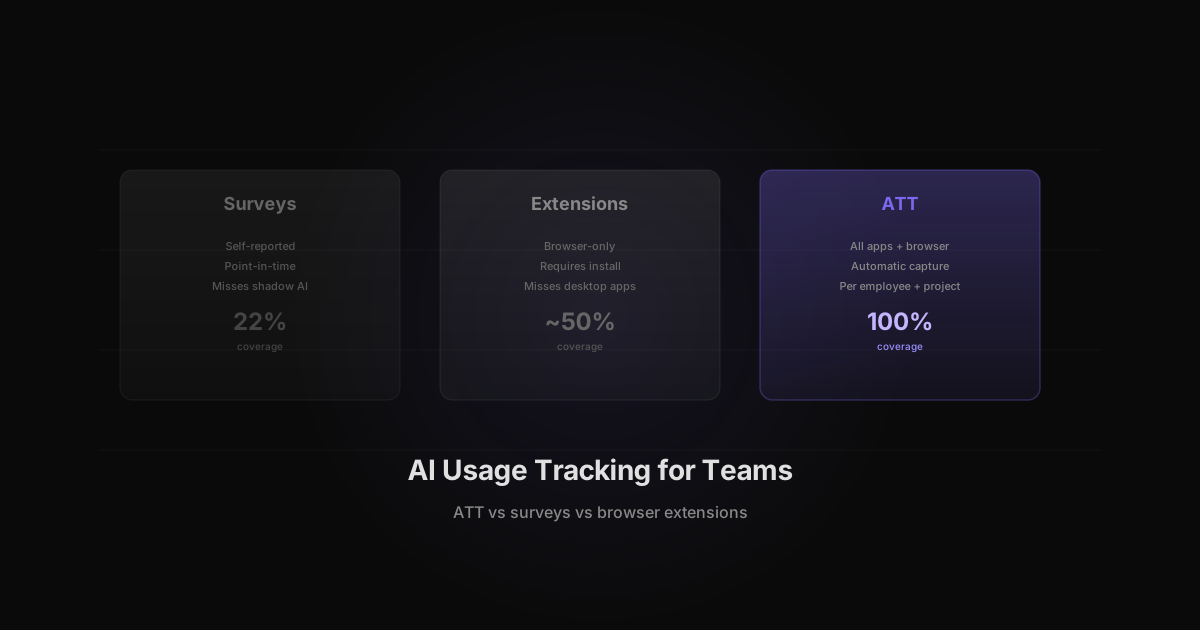
There are three common ways to track AI usage: surveys, browser extensions, and ATT. Surveys are easy but stale. Browser extensions cover only part of the workflow. ATT, or Agent Token Tracking, captures AI tool usage automatically across desktop apps, browser tabs, and project work.
Three Ways to Track AI Usage
Most companies start with manual tracking because it feels simple. The problem is that AI adoption changes faster than survey cycles.
| Method | What it captures | Main gap | |---|---|---| | Manual survey | Self-reported tool usage | Misses shadow AI and underreports hours | | Browser extension | Web AI tools in supported browsers | Misses desktop tools, IDE extensions, and CLI workflows | | ATT with Rize | App, URL, and window metadata across tools | Requires deployment to employee devices |
For a small team, a survey can identify obvious tools. For a 50-person or 500-person organization, self-reported usage breaks down. People forget, understate usage, or avoid reporting tools they are not sure are approved.
Why Surveys Miss 78% of the Picture
HelpNetSecurity reported that 78% of workers use unapproved AI tools. That does not mean 78% of workers are trying to hide something. It usually means AI adoption is moving faster than procurement and IT review.
A survey asks, "Which AI tools do you use?" ATT asks, "Which AI tools were opened, for how long, and on which work?" The second question produces a different quality of data.
Surveys also create a point-in-time snapshot. A team can fill out a form on Monday, try a new AI coding assistant on Wednesday, and change its workflow by Friday. According to McKinsey's State of AI survey, 72% of organizations reported using AI in at least one business function in 2024, up from 55% one year prior. At that adoption velocity, quarterly surveys are already stale by the time results are compiled. Continuous tracking catches those shifts without waiting for the next reporting cycle.
Enterprise Teams Are Building AI Usage Dashboards
The demand is already visible at large companies. UC Today reported that KPMG built an internal AI dashboard for 10,000 employees to track engagement frequency and benchmark adoption.
That kind of dashboard is useful, but adoption is only the first layer. A team still needs to know whether AI time is concentrated in valuable work, spread across low-value experimentation, or duplicating tools the company already buys.
That is the difference between tracking "who tried AI" and tracking "where AI changed work."
Building an AI Usage Dashboard
A useful AI usage dashboard answers four questions in a single view: who is using AI, which tools they use, how much time they spend, and what work the time maps to. Most companies try to build this from procurement data or survey exports. Both miss the actual usage pattern.
According to the Federal Reserve Bank of Atlanta, firms now spend an average of $2,068 per employee on AI tools annually. That number is climbing, and most finance teams cannot tell you which employees drive the spend or which tools deliver returns. A dashboard built on ATT data connects the cost line to the usage line.
The minimum viable AI usage dashboard includes these components:
| Dashboard panel | Data source | Update frequency | |---|---|---| | Tool adoption by team | ATT metadata (app names, URLs) | Real-time | | Hours per tool per week | ATT time allocation | Daily rollup | | Shadow AI detection | ATT vs. approved tool list | Weekly diff | | Spend per employee | License cost / active users | Monthly | | Project attribution | ATT project tagging | Per session |
Rize generates this data automatically. Each employee's AI tool usage flows into team-level reports without manual tagging, survey forms, or browser extension installs. Managers see aggregate dashboards. Employees see their own data. The privacy boundary is built into the data model, not bolted on after the fact.
One pattern that surfaces quickly: tool sprawl. A 50-person engineering team might show usage across ChatGPT, Claude, Copilot, Cursor, Gemini, and three internal tools. Without a dashboard, each tool looks like a small line item. Together, they represent a significant and often redundant spend category.
The dashboard also reveals adoption curves. When a team rolls out a new AI tool, ATT shows whether usage ramps over two weeks or flatlines after day one. That signal tells a team lead whether the tool fits the workflow or needs better onboarding. Procurement gets real data instead of anecdotes when deciding whether to renew a license.
What ATT Captures That Other Methods Miss
ATT captures the tools that survey and browser-extension approaches often miss:
- Desktop AI apps such as Claude Desktop and Cursor
- IDE workflows such as Copilot in VS Code
- Browser AI tools such as ChatGPT, Gemini, and Perplexity (see the full list in the AI tools rankings)
- AI usage connected to client, project, or internal work
- Unapproved tools that never pass through your API gateway
This is why AI productivity metrics need both human time and AI tool usage. A usage dashboard that says "Copilot is active" is not enough. Rize can show whether Copilot time maps to product work, client work, internal tooling, or admin.
Privacy by Design: Metadata Only
AI usage tracking should not become employee surveillance. Rize uses metadata: application names, window titles, URLs, timestamps, and project context. It does not take screenshots, log keystrokes, record screens, or read prompts.
That matters for adoption. Employees are more likely to accept measurement when the system is clear about what it does and does not capture. Managers need aggregate usage, spend, and project attribution. They do not need screen recordings.
The privacy model also keeps the measurement focused on business questions:
| Business question | Data needed | |---|---| | Which teams use AI most? | Tool time by team | | Which tools are shadow AI? | Tool names outside approved list | | Which projects use AI heavily? | Project-level AI hours | | Which seats are wasted? | Paid seat list compared with actual usage |
Privacy-First Usage Tracking: GDPR and CCPA Compliance
Any AI usage tracking system must comply with employee data protection regulations. According to Gartner, by 2026 more than 80% of enterprises will have deployed generative AI applications, but fewer than 30% will have implemented formal governance controls including privacy-compliant tracking. The gap creates legal exposure.
GDPR (General Data Protection Regulation) and CCPA (California Consumer Privacy Act) both set boundaries on what employee data an organization can collect and how it must handle that data. AI usage tracking falls squarely into this scope.
GDPR requirements for AI usage tracking:
| GDPR principle | How ATT complies | |---|---| | Lawful basis | Legitimate interest in managing company-provided tools | | Data minimization | Metadata only, no content capture, no screenshots | | Purpose limitation | Data used for tool management and budget decisions | | Transparency | Employees see their own data in their dashboard | | Right of access | Employees can export their own usage records |
CCPA requirements. CCPA requires businesses to disclose what categories of personal information they collect and the purpose of collection. ATT's metadata-only approach means the data category is limited to application usage metadata, not personal communications or content. Employees must be notified at or before the point of collection, which Rize handles through its onboarding flow.
The critical design decision is metadata vs. content. Screenshot-based monitoring tools capture content, including potentially sensitive conversations, personal browsing, and confidential documents. ATT captures only application names, URLs, window titles, and timestamps. That distinction keeps the system within the narrowest data collection scope while still answering business questions about tool adoption and spend.
According to Forrester, organizations that implement transparent, metadata-only monitoring see 3x higher employee opt-in rates compared to those using screenshot or keystroke capture. Higher opt-in means more complete data, which means better decisions about tool allocation.
Usage Tracking Implementation Timeline
Deploying AI usage tracking does not require months of planning. Most teams can go from zero visibility to actionable data in two weeks using a phased rollout.
Day 1-2: Pilot deployment. Install Rize on 10 to 20 devices across 2 to 3 teams. Choose teams with known AI usage (engineering, marketing, design). ATT begins capturing AI tool metadata immediately. No tagging, no configuration, no SDK integration required.
Day 3-5: Validate data quality. Review the first three days of ATT data. Confirm that known AI tools (Copilot, ChatGPT, Claude) appear correctly. Check project attribution. Identify any tools the system categorizes incorrectly and flag them for review.
Day 6-10: Expand to full team. Roll Rize out to all target employees. By day 10, you have a complete picture of AI tool usage across the organization. According to the Federal Reserve Bank of Atlanta, the average firm spends $2,068 per employee on AI annually. With 10 days of ATT data, you can start identifying where that spend actually goes.
Day 11-14: First review cycle. Build the first AI usage report. Compare discovered tools against the approved list. Identify shadow AI, unused seats, and duplicate tools. Present findings to finance and IT leads. Set a monthly review cadence.
| Phase | Timeline | Outcome | |---|---|---| | Pilot | Day 1-2 | Validate ATT on small group | | Data quality check | Day 3-5 | Confirm tool detection accuracy | | Full deployment | Day 6-10 | Complete AI usage inventory | | First review | Day 11-14 | Actionable report for stakeholders |
The two-week timeline works because ATT requires no per-tool integration. Traditional approaches need API connections to each AI vendor, browser extension installs, or employee self-reporting infrastructure. ATT captures everything at the operating system level, so deployment is a single install per device.
According to Deloitte's State of AI report, organizations that implement AI usage tracking within the first 90 days of a tool rollout are 3x more likely to achieve positive ROI compared to those that deploy tracking retroactively. The reason is simple: early data establishes baselines. Without a baseline, teams cannot measure improvement. A team that deploys Copilot and waits six months to start tracking has no way to compare AI-assisted productivity against the pre-AI baseline.
The implementation timeline also affects employee adoption. Teams that introduce tracking alongside new AI tools frame it as a measurement practice, not surveillance. Teams that add tracking after the fact face resistance because employees perceive it as a reaction to problems rather than a standard operating procedure.
From Tracking to Seat Optimization
The highest-value outcome of AI usage tracking is seat optimization: matching paid licenses to actual usage so every dollar of AI spend produces measurable work. According to Deloitte's State of AI in the Enterprise report, companies allocate 93% of their AI budget to tools and infrastructure, with only 7% going to measurement and optimization. That ratio creates waste.
ATT data exposes three patterns that drive seat optimization decisions:
- Unused seats. Employees with paid licenses who show zero or near-zero usage in ATT data. These are immediate savings. A 200-person company with 30% unused Copilot seats at $19/seat/month recovers $1,140/month by right-sizing.
- Duplicate tools. Teams using both ChatGPT Plus and Claude Pro for the same tasks. ATT shows which tool gets more time per project type, so procurement can standardize without guessing.
- Underutilized power users. Employees who spend significant time in AI tools but apply that time to low-value work like formatting or internal email. Redirecting their AI time toward client work or product development changes the ROI equation.
Research from Anthropic found that AI tools can reduce task completion time by up to 80% for certain knowledge work categories. But that gain only materializes when employees use the right tool for the right task. ATT gives managers the data to identify where AI time converts to output and where it does not.
Scaling AI Usage Tracking Across Departments
AI usage tracking should not stay within engineering. Every department that uses AI tools, marketing, sales, design, finance, legal, needs the same visibility. According to PwC, the top 20% of companies capturing 74% of AI-driven value measure AI usage across the entire organization, not just in the teams that requested AI budgets.
Each department uses AI differently, and the tracking questions change accordingly:
| Department | Primary AI tools | Key tracking question | |---|---|---| | Engineering | Copilot, Cursor, Claude Code | Net hours saved per project after rework | | Marketing | ChatGPT, Jasper, Midjourney | Content output per AI hour | | Sales | AI email assistants, call summarizers | Time saved on admin vs time selling | | Finance | AI data analysis, forecasting tools | Accuracy of AI-assisted projections | | Legal | Contract review AI, research tools | Review time reduction per document | | HR | Resume screening AI, scheduling tools | Time saved per hiring cycle |
According to Deloitte's State of AI report, organizations with cross-functional AI measurement programs are 2.5x more likely to report significant financial returns from AI investments compared to those measuring only within IT or engineering.
The practical rollout: start with the 2 to 3 departments that have the highest known AI spend, deploy ATT, run the first usage report within two weeks, then expand to remaining departments monthly. Within 90 days, the organization has a complete AI usage map that covers every tool, every team, and every project.
From Tracking to Optimization
Tracking is not the end state. The next step is AI Yield Optimization: comparing AI usage against output, project health, and spend.
If one team spends 300 hours a month in AI tools and ships faster with fewer rework cycles, that is a budget signal. If another team spends the same amount of AI time and creates more correction work, that is a workflow signal. According to InformationWeek, while 67% of organizations expect AI to improve efficiency, up to 40% of AI-assisted work requires human rework. ATT gives you the measurement layer to distinguish productive AI time from rework-generating AI time.
Start with usage tracking. Then use the data to right-size licenses, approve the tools people actually use, remove duplicate spend, and build a repeatable AI operating review for every quarter.
Related Reading
- AI Productivity Metrics. How Rize tracks AI tool usage per employee automatically with ATT
- AI Cost Management: ACO to AYO. The full framework for moving from token tracking to productivity ROI
- Shadow AI: The Hidden Cost. Detect the $412K/year in unapproved AI spending your surveys miss
- AI Time Tracking Software. See how automatic AI tracking works inside Rize
Start tracking time automatically
Join thousands of professionals who stopped guessing where their time goes. Free for 7 days.
“Rize has been a no-brainer for me.” — Ali Abdaal Read more →