GitHub Copilot ROI is positive for many engineering teams, but the headline number is usually too simple. The right question is not "does Copilot save time?" The right question is "which developers save time, on which work, after rework is included?"
At $30 per seat per month, Copilot can pay for itself quickly. But the ROI varies by task type, seniority, codebase maturity, and how much AI-generated work needs correction. According to a 2026 PwC analysis, only 20% of companies capture 74% of AI-driven value. The gap is measurement: most teams approve AI budgets without tracking per-seat output.
Rize measures Copilot through ATT, or Agent Token Tracking, so teams can compare Copilot usage with real work time instead of relying only on vendor dashboards.
Microsoft Claims Faster Coding, But Teams Need Net Time
Microsoft's early Copilot research centered on faster task completion, including the widely cited 55% improvement in coding speed. That is useful directional evidence, but completion speed is not the same as net team productivity.
According to Worklytics, Copilot users save about 3 hours per week. That is roughly 10% of a 30-hour focused engineering week. Meanwhile, according to the Federal Reserve Bank of Atlanta, the average firm now spends $2,068 per employee on AI tools annually. Copilot at $360/year is a fraction of that budget, but it still needs to prove its return at the seat level.
The gap matters. A developer may accept more completions, but still spend time reviewing suggestions, cleaning up edge cases, and debugging code that looked right on the first pass. Measuring Copilot ROI requires both the time saved and the correction time.
Apply the 40% Rework Discount
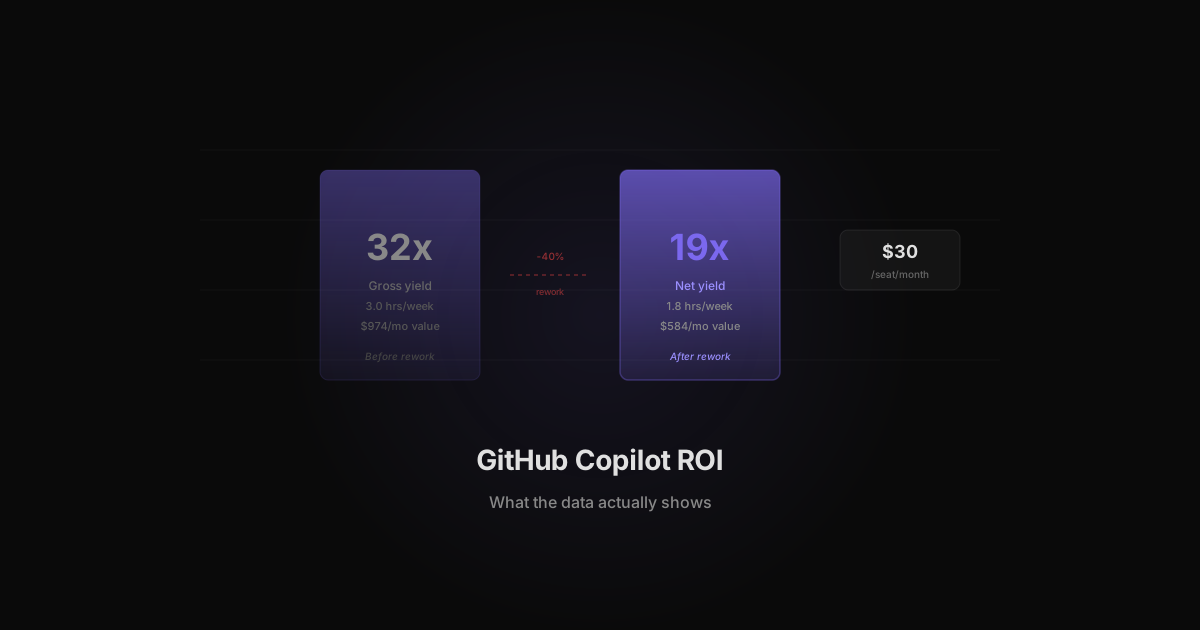
According to InformationWeek, 40% of AI-generated savings can be offset by rework and corrections. For Copilot, that means a gross 3 hours saved per week becomes about 1.8 net hours saved.
That is still meaningful. But it changes the ROI math and keeps teams from overclaiming.
| Metric | Gross claim | Net model | |---|---:|---:| | Weekly time saved | 3.0 hours | 1.8 hours | | Monthly time saved | 12.99 hours | 7.79 hours | | Loaded engineering cost | $75/hour | $75/hour | | Monthly value | $974 | $584 | | Copilot cost | $30 | $30 | | Yield | 32x | 19x |
The net ROI remains strong at a $75/hour loaded cost. The point is that finance and engineering should use the net number when planning budgets. According to Deloitte's State of AI report, enterprises spend 93% of their AI budget on implementation and only 7% on measurement. That imbalance explains why so many Copilot ROI claims fall apart at the team level.
The Real Copilot ROI Formula
Use this simple model:
Monthly ROI = ((net hours saved per month × loaded hourly cost) - seat cost) / seat cost
For a developer saving 1.8 net hours per week:
| Loaded hourly cost | Monthly value | Net ROI after $30 seat | |---:|---:|---:| | $50/hour | $389 | 12x | | $75/hour | $584 | 18x | | $100/hour | $779 | 25x |
This is why blanket Copilot cuts usually make no sense. Even after a 40% rework discount, an actively used Copilot seat can be cheap relative to engineering time.
Not Every Developer Gets the Same Value
The hard part is that "actively used" is not true for every seat. Copilot ROI depends on how the developer works.
Junior developers writing common patterns may get more value from suggestions. Senior developers doing novel architecture may use Copilot less, or use it mainly for boilerplate. Some teams use Copilot in VS Code while others spend more time in Cursor, Claude Code, or ChatGPT.
This is where AI productivity metrics matter. Rize can show Copilot time per developer and per project, then compare that with total coding time and project outcomes. That makes seat decisions based on usage patterns, not job title or manager opinion.
Copilot ROI by Role: Developer vs PM vs Designer
Copilot ROI differs significantly by role because each role uses AI-generated code differently. A developer writes and reviews code directly. A PM uses Copilot for prototyping or scripting automations. A designer might use it for front-end tweaks or CSS adjustments.
According to McKinsey's State of AI survey, software engineering is the business function where generative AI has the highest reported impact, with 35% of respondents citing meaningful productivity gains. But that impact is not uniform across roles that touch code.
| Role | Typical Copilot usage | Primary value | Rework rate | |---|---|---|---| | Backend developer | 4-6 hrs/week | Boilerplate, tests, API endpoints | 20-30% | | Frontend developer | 3-5 hrs/week | Component code, CSS, responsive layouts | 25-35% | | Product manager | 1-2 hrs/week | SQL queries, data scripts, prototypes | 35-45% | | Designer (code-adjacent) | 0.5-1 hr/week | CSS tweaks, animation code, layout fixes | 40-50% | | DevOps engineer | 2-3 hrs/week | Config files, CI/CD scripts, Terraform | 15-25% |
The backend developer at 4 to 6 hours per week with a 25% rework rate produces a net ROI that easily justifies a $30 seat. The designer at 0.5 hours per week with a 45% rework rate might not. But canceling the designer's seat saves $30 per month while potentially costing hours of back-and-forth with engineering for small CSS changes.
According to Gartner, by 2027 over 50% of software engineering leader roles will explicitly require oversight of AI-assisted coding. That means non-developer roles increasingly need access to AI coding tools, and seat allocation decisions must account for non-obvious use cases.
The practical approach: measure usage per role for 30 days with ATT data, then make seat decisions based on actual hours and net value rather than job title assumptions.
Measuring Copilot ROI Beyond GitHub Metrics
GitHub's built-in Copilot metrics track suggestion acceptance rate, lines of code suggested, and active users. Those numbers measure tool engagement, not business value. Real ROI measurement requires connecting Copilot usage to project outcomes.
The metrics that matter are the ones GitHub cannot show you:
Cycle time impact. Does a team ship faster when Copilot usage is high? According to Forrester, the average enterprise development team spends 23% of its time on code review and testing. Copilot can reduce initial coding time, but if review and testing time increases because AI-generated code needs more scrutiny, net cycle time may not improve. ATT measures total coding time per project, including review phases, so the cycle time impact is visible.
Code quality correlation. High Copilot usage with high bug rates suggests the rework discount is larger than 40% for that team. Low Copilot usage with clean deploys suggests the team may not need more AI assistance, or they are doing something that AI tools do not yet handle well. Tracking Copilot hours alongside deployment metrics and bug counts creates a quality-adjusted ROI view.
Context switching cost. Developers who split time between Copilot, Cursor, Claude Code, and manual coding may lose time to context switching. According to a University of California, Irvine study on workplace interruptions, it takes an average of 23 minutes to refocus after a task switch. If a developer toggles between three AI coding tools in a single session, the switching cost may offset part of the time savings. ATT tracks tool transitions within a work session, so the switching pattern is measurable.
| Metric | GitHub shows | ATT adds | |---|---|---| | Acceptance rate | Yes | No (not needed, it is an input metric) | | Time in Copilot by project | No | Yes | | Time in competing tools | No | Yes | | Context switching frequency | No | Yes | | Project cycle time correlation | No | Requires integration with sprint data |
The shift is from measuring "is Copilot being used?" to "is Copilot making this team more productive?" That second question requires per-developer, per-project time data that only independent measurement tools like ATT can provide.
Copilot vs Claude Code vs Cursor
Copilot is no longer the only AI coding tool in the workflow. Developers may use Copilot for inline completions, Cursor for codebase-aware editing, Claude Code for agentic tasks, and ChatGPT for quick explanations.
According to Anthropic's productivity research, AI-assisted work shows large task-time reductions across multiple tool types, but the gains vary by tool and task. A Copilot dashboard will not show Claude Code usage. Cursor will not show personal ChatGPT usage. According to the FinOps Foundation, 98% of organizations have adopted some form of generative AI, yet most lack a unified view of tool-level spending and time allocation. FinOps dashboards will not show desktop tool time unless the API is instrumented.
ATT closes that gap by tracking all AI coding tools at the work-activity layer:
| Tool | Vendor metric | ATT adds | |---|---|---| | Copilot | Suggestions and acceptance | Time in Copilot-assisted coding by developer and project | | Cursor | Editor usage | Project-level time and cross-tool comparison | | Claude Code | Agent sessions | Time spent in agentic coding workflows | | ChatGPT | Account or API usage | Browser usage tied to project work |
The output is a practical seat review. Keep and expand the tools with high usage and clear output. Cancel or reassign seats with low usage. Compare tools across the same team before assuming one vendor dashboard tells the full story. The weekly AI tools rankings show which tools are gaining momentum across the developer ecosystem.
When to Cut Copilot Seats
Cut seats when per-developer usage falls below 2 hours per week for 30+ consecutive days. A $30/month seat costs $360/year. At a $75/hour loaded cost, a developer needs to save at least 0.4 net hours per month (about 6 minutes per week after rework) to break even. That is a low bar, which is why blanket cuts rarely make financial sense.
The real savings come from reallocation, not cancellation. According to PwC, the top 20% of AI-adopting companies capture 74% of the productivity value. The difference is not which tools they buy. The difference is whether they measure tool-level output and shift seats toward high-value use cases.
Here is a practical decision framework:
| Weekly Copilot usage | Net hours saved (after 40% rework) | Action | |---:|---:|---| | 5+ hours | 3.0+ hours | Keep and expand. High-value seat. | | 2-5 hours | 1.2-3.0 hours | Keep. Review quarterly. | | 0.5-2 hours | 0.3-1.2 hours | Investigate. May need training or workflow change. | | Under 0.5 hours | Under 0.3 hours | Reassign or cancel. Seat is idle. |
Most engineering managers make seat decisions based on team-wide averages. That hides the distribution. One developer saving 6 hours per week can mask three developers who open Copilot once a month. ATT surfaces the per-developer breakdown so the reallocation decision is grounded in actual usage data, not averages.
The pattern holds across all AI coding tools, not just Copilot. According to Deloitte, the 93/7 budget split between implementation and measurement means most teams never build the feedback loop needed to optimize seat allocation. Tracking time per tool per developer closes that gap.
From Vendor Dashboard to ATT Data
Vendor dashboards measure what the vendor wants you to see. GitHub's Copilot metrics show suggestion acceptance rates and lines of code suggested. Those numbers tell you the tool is active. They do not tell you whether it made the team faster.
The core problem is that vendor metrics are input metrics. Acceptance rate measures how often a developer pressed Tab, not how much rework followed. Lines suggested measures volume, not quality. A developer who accepts 80% of suggestions but spends 3 hours per week fixing the output may be worse off than one who accepts 40% and ships clean code.
ATT captures the output metric: actual time spent in Copilot-assisted coding, per developer, per project. That means you can answer questions a vendor dashboard cannot:
- Which developers save the most net time with Copilot versus manual coding?
- Which projects see the highest Copilot utilization relative to total coding time?
- Are developers shifting from Copilot to Cursor or Claude Code over time?
- Does Copilot usage correlate with faster project delivery or just faster keystrokes?
According to the Federal Reserve Bank of Atlanta, AI tool spending per employee reached $2,068 in 2026. At that level, companies need per-seat ROI visibility, not just aggregate dashboards. A team of 50 engineers with Copilot, Cursor, and Claude Code access can easily spend $100K+ per year on AI coding tools. ATT gives finance and engineering a shared dataset to evaluate that spend at the individual level.
The shift from vendor dashboards to independent measurement is the same pattern that happened with cloud infrastructure. Early cloud adopters trusted AWS billing dashboards. Mature organizations built FinOps practices with independent tooling. AI tool measurement is following the same curve, and the teams that instrument early will make better allocation decisions than those relying on vendor self-reporting.
Building a Copilot ROI Review Cadence
A one-time Copilot ROI calculation is useful. A recurring review cadence is what changes budget behavior. Run the review monthly for teams spending over $5,000 per month on AI coding tools, quarterly for smaller teams.
The monthly review should answer five questions:
- Which developers used Copilot more than 3 hours per week? These are your high-value seats. Protect them from blanket cost cuts.
- Which developers used Copilot less than 30 minutes per week? These seats may need reassignment, additional training, or cancellation.
- Did any developers shift from Copilot to another tool? Tool migration signals are early indicators of fit problems. If three developers moved from Copilot to Cursor in the same month, investigate why.
- What is the net ROI per team this month vs last month? Trending matters more than absolute numbers. A team whose ROI drops from 15x to 8x over two months is worth investigating.
- Are there new AI coding tools in the ATT data? Shadow AI in engineering is common. A developer trying a new AI assistant for a week is normal experimentation. Five developers using the same unapproved tool for a month is a procurement signal.
According to McKinsey, organizations that conduct regular AI performance reviews are 1.5x more likely to report that their AI investments meet or exceed expectations. The review cadence is what separates companies that spend on AI from companies that invest in AI.
Related Reading
- AI Productivity Metrics. Track Copilot, Claude, Cursor, and every AI tool per developer automatically
- AI Cost Management: ACO to AYO. Move from token-level cost tracking to per-employee productivity ROI
- AI Spending Per Employee Benchmark. The $2,068 benchmark and how to find your real number
- Reduce AI Costs Without Cutting Usage. Right-size Copilot seats and route models by task complexity
Start tracking time automatically
Join thousands of professionals who stopped guessing where their time goes. Free for 7 days.
“Rize has been a no-brainer for me.” — Ali Abdaal Read more →