
I used to end every Friday doing the same thing: opening a spreadsheet and trying to reconstruct a week of client work from memory, calendar events, and Slack threads.
It worked until it didn't, and the month I under-billed a client by six hours because I couldn't account for the time was the month I stopped tolerating it.
A good time tracking app does much more than just logging hours. It removes the reconciliation tax you're quietly paying at the end of every week, and gives you the kind of billing confidence that lets you send invoices without second-guessing yourself.
After testing more than a dozen options across automatic tracking, manual logging, team features, Mac-nativeness, and pricing, I've narrowed it down to the 9 best time tracking apps for Mac.
Rize leads the list for most Mac users because it combines automatic capture, AI categorization that improves as you correct it, invoicing, and team reports in one app. If your activity data has to stay on your Mac, start with Timing or Chronoid instead.
How I tested and priced these apps
Every price in this guide was checked against the vendor's own pricing page on October 12, 2026. Where a vendor publishes both, I list the annual and the monthly rate, because they differ for almost every tool here. Each app was judged on the six criteria below, and each entry ends with the trade-offs that should rule it out for you.
What makes the best time tracking app for Mac?
There are more time tracking apps than you'll ever need, and most of them will technically do the job. The question isn't whether a tool can log hours. It's whether it fits the way you actually work on a Mac, without adding a new layer of admin to manage.
These are the six criteria I used to evaluate every tool in this list:
Mac-nativeness. A real Mac app and a web app stuffed into an Electron shell are not the same thing. I looked at whether each tool has genuine menu bar integration, whether it runs natively on Apple Silicon, and whether the UI feels like it was designed for macOS or ported from somewhere else.
Tracking method: automatic vs. manual. This is the most important split in the category, and it shapes every other decision. Automatic trackers run in the background and log activity without any input from you. Manual trackers require you to start and stop timers or fill in entries after the fact. Neither is objectively better, but they suit very different people, and mixing them up is the fastest way to end up with a tool you resent.
Reporting and insights. I looked at whether each tool lets you filter by client, project, and date range without frustration, and whether you can export something usable for invoicing or analysis without a workaround.
Solo vs. team suitability. Some tools are built for individuals. Others are built for teams from the ground up and feel overpowered for a solo freelancer. I've noted which tools scale cleanly to a small team with shared projects and roles, and which ones you'll outgrow the moment you bring in a second person.
Pricing transparency and value. I didn't include any tool with vague pricing. Every entry in this list has a concrete free tier description and a clear per-user cost for paid plans.
Integrations. Most people considering a time tracker already have a project management tool, an accounting tool, or both. I looked at whether each app connects natively to the tools freelancers and small teams actually use, including Asana, Jira, QuickBooks, and Xero, without needing a paid Zapier bridge to make it work.
The 9 best time tracking apps for Mac at a glance
| Tool | Best for | Standout feature | Pricing | |---|---|---|---| | Rize | Fully automatic, zero-input tracking that learns over time | AI categorization that improves the longer you use it | From $12.99/mo | | Toggl Track | Teams that need the widest native integration ecosystem | Browser extensions that log time inside any web app | Free + from $9/user/mo (annual) | | Harvest | Freelancers billing clients from hours tracked to the invoice paid | Cleanest end-to-end billing workflow of any tool on this list | Free + from $9/seat/mo (annual) | | Clockify | Small teams that need real features without a per-seat bill | Free plan for up to 5 users, with Auto Tracker included | Free + from $3.99/seat/mo | | Timing | Mac-only users who want automatic tracking and local data | Rules engine that categorizes your day without any input after setup | From $9/mo (annual) | | RescueTime | People whose real problem is focus and distraction, not billing | Focus Sessions that actively block distracting apps mid-work | Free + from $7/mo (annual) | | TrackingTime | Small teams consolidating time tracking and task management | Attendance, time-off, and HR tools built into the same dashboard | Free + from $4.50/user/mo (annual) | | Memtime | Privacy-first teams who bill in strict increments (e.g., law, accounting) | Billing increments (6-min, 15-min) that snap to any professional standard | From $12 to $18/user/mo, by billing term | | ActivityWatch | Developers who want fully local tracking and own their data completely | Open-source and free forever, with a local API you can query yourself | Free, open source |
1. Rize
Best for Mac users who want fully automatic, zero-input time tracking that gets smarter over time.
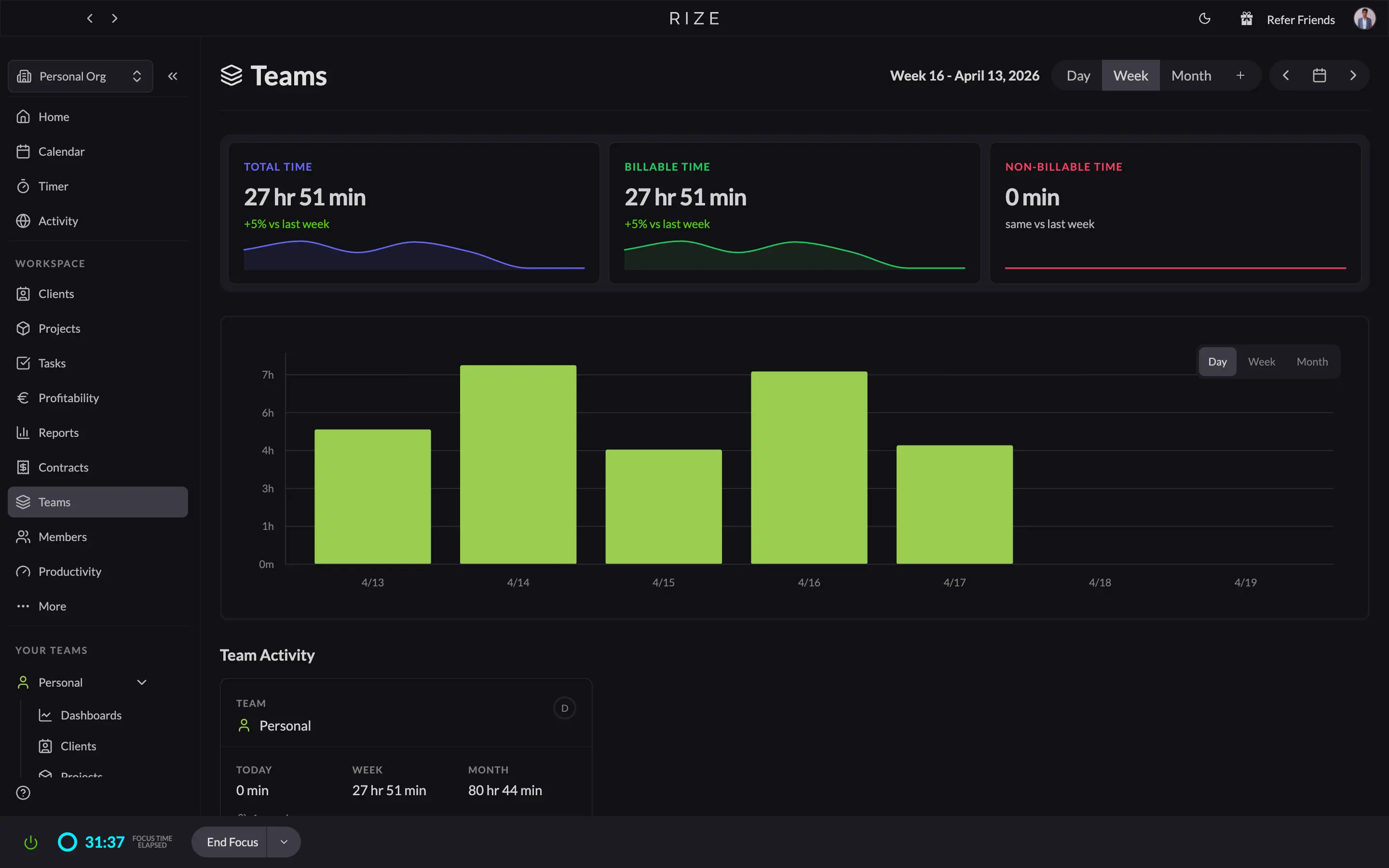
Rize pros:
- Fully automatic and AI-powered
- Focus coaching is built in
- Clean, modern Mac interface
- Team visibility without micromanagement
Rize cons:
- No card payment processing on invoices
- Activity metadata syncs to Rize's cloud for reports, so it does not stay only on your Mac
- Overkill if you need something simple and manual
Rize is my top pick for most Mac users. If you want one tool that handles everything automatically and gets smarter the longer you use it, stop here.
Open your laptop, and Rize starts logging time immediately without you having to start a timer or a manual entry to fill in. It categorizes your activity in the background, and once you assign a time entry to a client or project, it remembers and applies that context going forward. If you bill by the hour, that compounding memory alone saves you meaningful reconciliation time at the end of the week. Coming from Toggl or Clockify's interface, Rize will feel like a different product category.
Rize also works as a productivity coach. It reads your active window and classifies what you're doing (deep work, a meeting, or a distraction) and nudges you accordingly. Get pulled into a browser rabbit hole mid-project, and a notification pulls you back. Hit a long focus session without a break, and Rize flags that too. The daily focus score (out of 100) gives you something concrete to improve on. If your real problem is focus, not just time visibility, Rize handles that better than anything else in this list.
For teams, Rize lets you share tracked time across members without surveillance. No screenshots, no activity logs used to second-guess people. You can track profitability per client by layering in revenue, budget, and expenses against a contract. Invoicing is built in: generate an invoice from tracked time, send it as a PDF, and record payments against it.
On privacy, Rize reads metadata only: the active app name, window title, URL, and timestamps. It does not log keystrokes, record your screen, or store screenshots. An optional Screen Text feature that reads window text is off by default and has to be granted by an admin. The details are on the Rize privacy page. If you need activity data to never leave your Mac, Timing, Chronoid, Memtime, or ActivityWatch are the better fit.
Rize connects with Asana, ClickUp, Linear, Google Calendar, Outlook, Slack, and Zapier. The ClickUp integration, for instance, syncs your tasks and projects directly into Rize, so you're not manually rebuilding your work structure inside a second tool.
Rize pricing: 7-day free trial. Basic (individual productivity) is $12.99/month, or $9.99/month billed annually. Pro (freelancers and consultants) is $28.99/month, or $23.99/month annually. Max (power users and solo agencies) is $49.99/month, or $39.99/month annually. Team (agencies and small teams) is $39.99/seat/month, or $29.99/seat annually.
2. Toggl Track
Best for teams who need semi-automatic time tracking to plug into an existing tool stack.
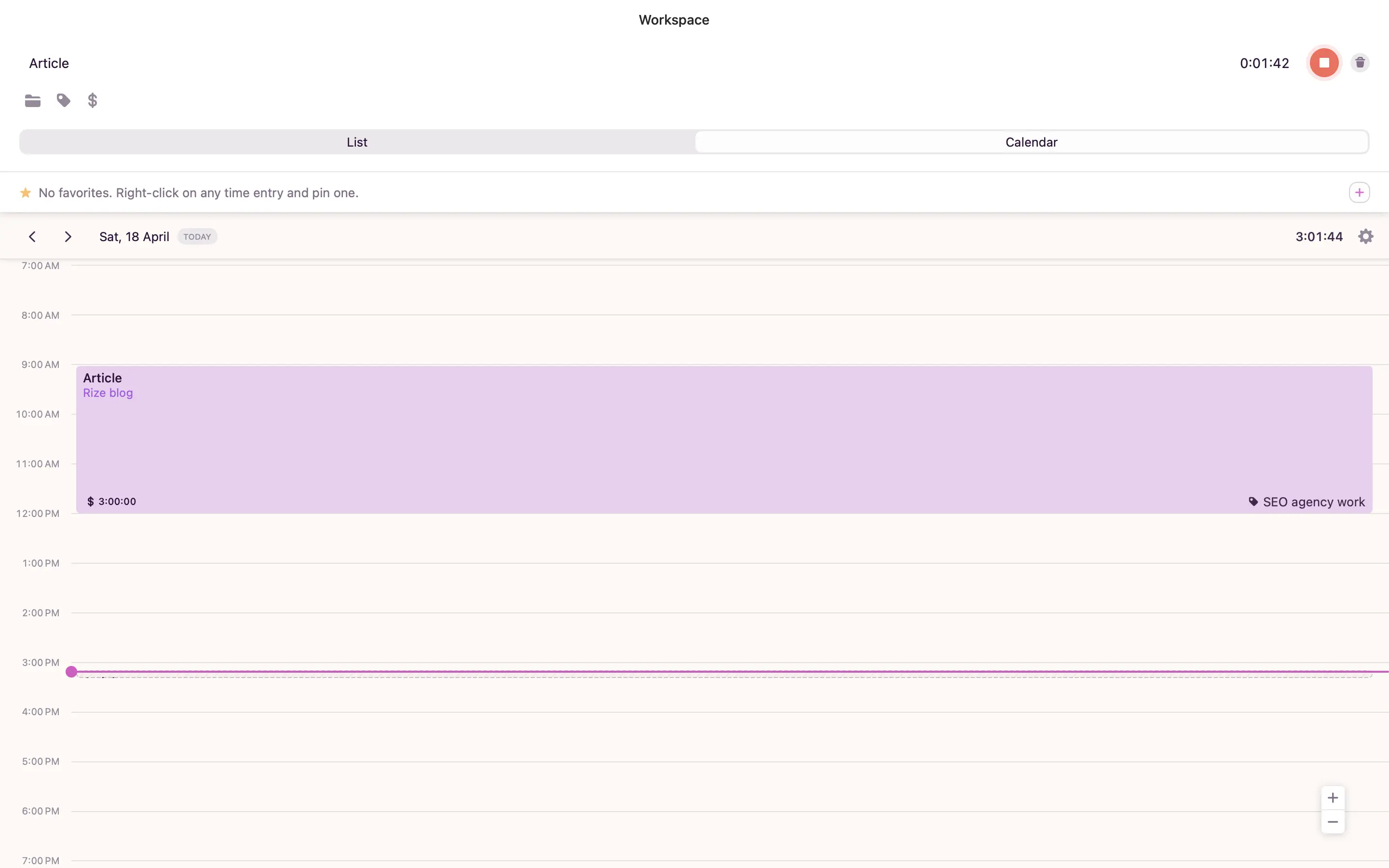
Toggl Track pros:
- Widest native integration ecosystem in this category
- Browser extensions let you track time inside any web app
- Invoicing built in, with direct QuickBooks export
- Free plan available (user limit applies)
Toggl Track cons:
- Still mostly manual, every session requires confirming and assigning entries
- Web app and Mac app look and behave like different products
- Setup is not intuitive; expect a real learning curve
Since this is a Mac-specific article, cross-device sync isn't the headline advantage here. The real reason to choose Toggl Track over Rize is integrations. Six native ones cover the tools most freelancers and small teams already run on: Slack, Toggl Plan, Salesforce, Jira, Asana, and QuickBooks. Browser extensions for Chrome, Firefox, and Edge let you log time directly inside whatever web app you're already in, without switching windows.
Coming from Rize, Toggl Track will feel like a step backward. The web app and the Mac app look like different products, and getting started without a tutorial is genuinely hard. I wasted 30 minutes on YouTube before the basic workflow clicked. If you have initiation anxiety and want something powerful that doesn't punish you for opening it the first time, Rize wins.
The manual workflow is the core trade-off. Toggl Track does have a Timeline feature that logs background app and browser activity on the desktop app, but it only drafts entries; you still have to confirm and assign each one manually. The calendar view lets you drag and drop time blocks retroactively, which helps when you forget to log something mid-day. But once you've used automatic tracking, coming back to this feels like reconciling expenses by hand.
Where Toggl Track earns its place on this list is in invoicing. It generates invoices directly from your time reports, and the QuickBooks export works without extra steps. Rize has built-in invoicing too, but it connects to QuickBooks through Zapier rather than a native export. If billing is the end goal and you already live in QuickBooks, that pipeline alone might settle the decision.
Toggl Track pricing: Free plan available for a limited number of users. Starter is $9/user/month billed annually, or $12 monthly. Premium is $16/user/month billed annually, or $24 monthly. Paid plans include a 30-day free trial, no credit card required.
3. Harvest
Best for client billing from hours tracked to invoice paid.
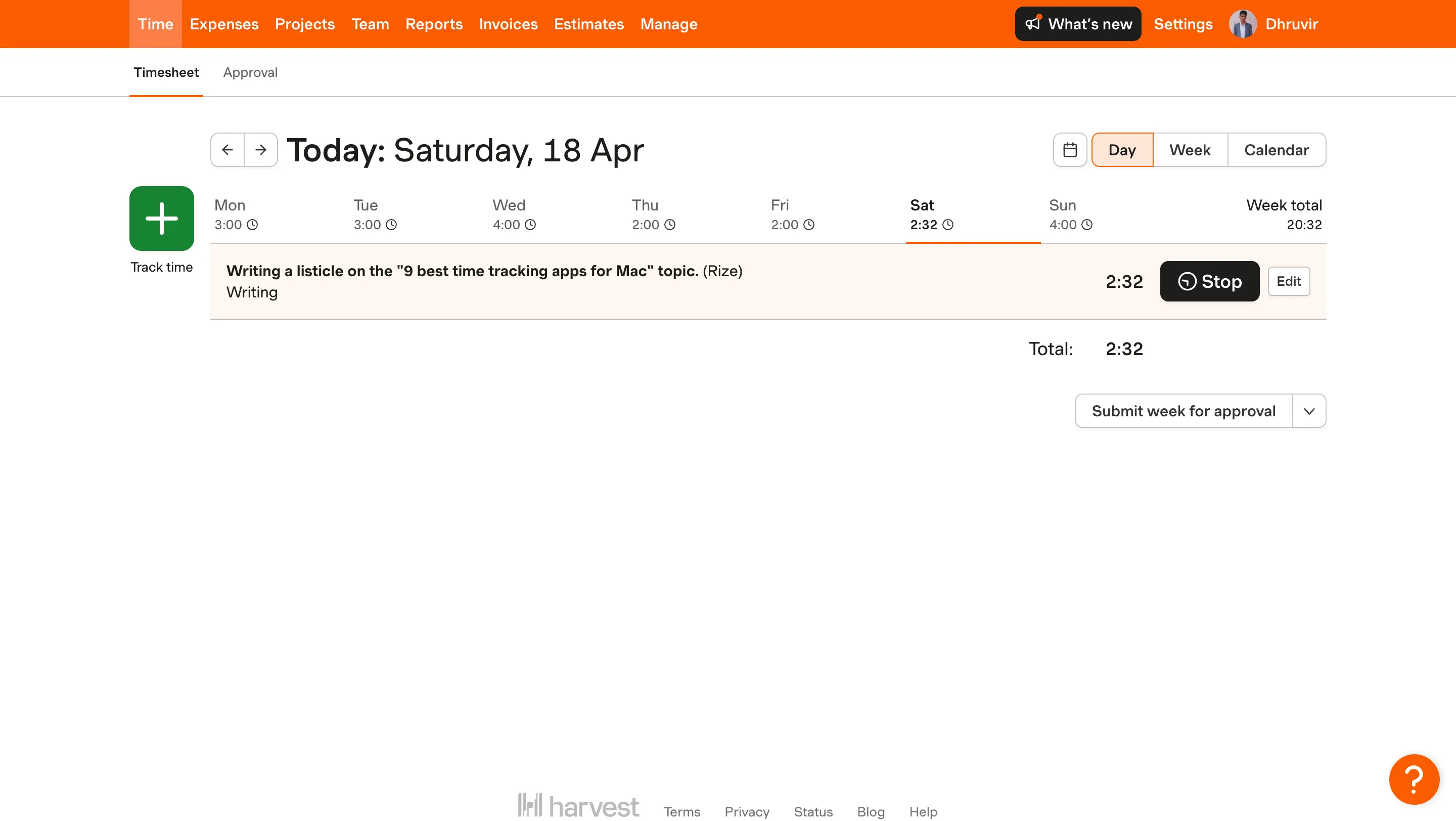
Harvest pros:
- Invoicing, expense tracking, and billing are built into the time tracking workflow
- Widest integration list of any tool on this list
- Clean, deliberate manual workflow that keeps you in full control
- The menu bar app lets you start and stop timers without opening a browser
Harvest cons:
- No automatic tracking; every entry requires manual input
- The Mac app is a menu bar only; real work happens in the browser
- Free plan is capped at 1 seat and 2 projects, too restrictive for most freelancers
- Usage-based charges on top of the per-seat rate can make the final bill harder to predict
Harvest is built for one thing: turning tracked hours into client invoices without friction. It is not trying to coach your focus or log your activity in the background. If that's what you need, go back to Rize.
The workflow is deliberately simple. You set up a client, create and attach a project, assign tasks, and start a timer when you sit down to work. Harvest builds reports and invoices directly from those entries. It also tracks expenses against projects and rolls them into the same invoice, so if you're billing a client for contractor costs or software subscriptions on top of hours, that's one line item away. For freelancers who bill different clients at different rates, or small teams that need a clean paper trail for every hour and every expense, that structure is exactly right.
What earns Harvest a higher spot on this list than its manual-only tracking would normally justify is the integration depth. Of every tool I tested, Harvest connects to the most varied set of tools: project management (Asana, ClickUp, Jira), finance and payments (Stripe, Deel, PayPal), accounting (QuickBooks Online, Xero), communication and CRM (Slack, Zendesk), plus Zapier, IFTTT, Relay, and browser extensions for Chrome, Edge, and Firefox. If your billing workflow already runs across three or four of those tools, Harvest is the only tracker here that plugs into all of them natively.
One pricing caveat worth knowing before you sign up: the per-seat rate is the base, not the ceiling. Additional invoices, projects, clients, and tasks are billed on top based on usage. It won't blindside most solo freelancers, but if you're onboarding a team, run the numbers through their pricing calculator before committing.
Toggl Track also does invoicing, but Harvest's billing workflow is cleaner end-to-end. If getting paid is the job, Harvest does it better.
Harvest pricing: Free plan available (1 seat, 2 projects). Teams starts at $11/seat/month, or $9/seat/month on an annual plan. Enterprise starts at $17/seat/month, or $14/seat/month annually. Both paid tiers come with a 30-day free trial, no credit card required.
4. Clockify
Best time tracker for teams on a budget.
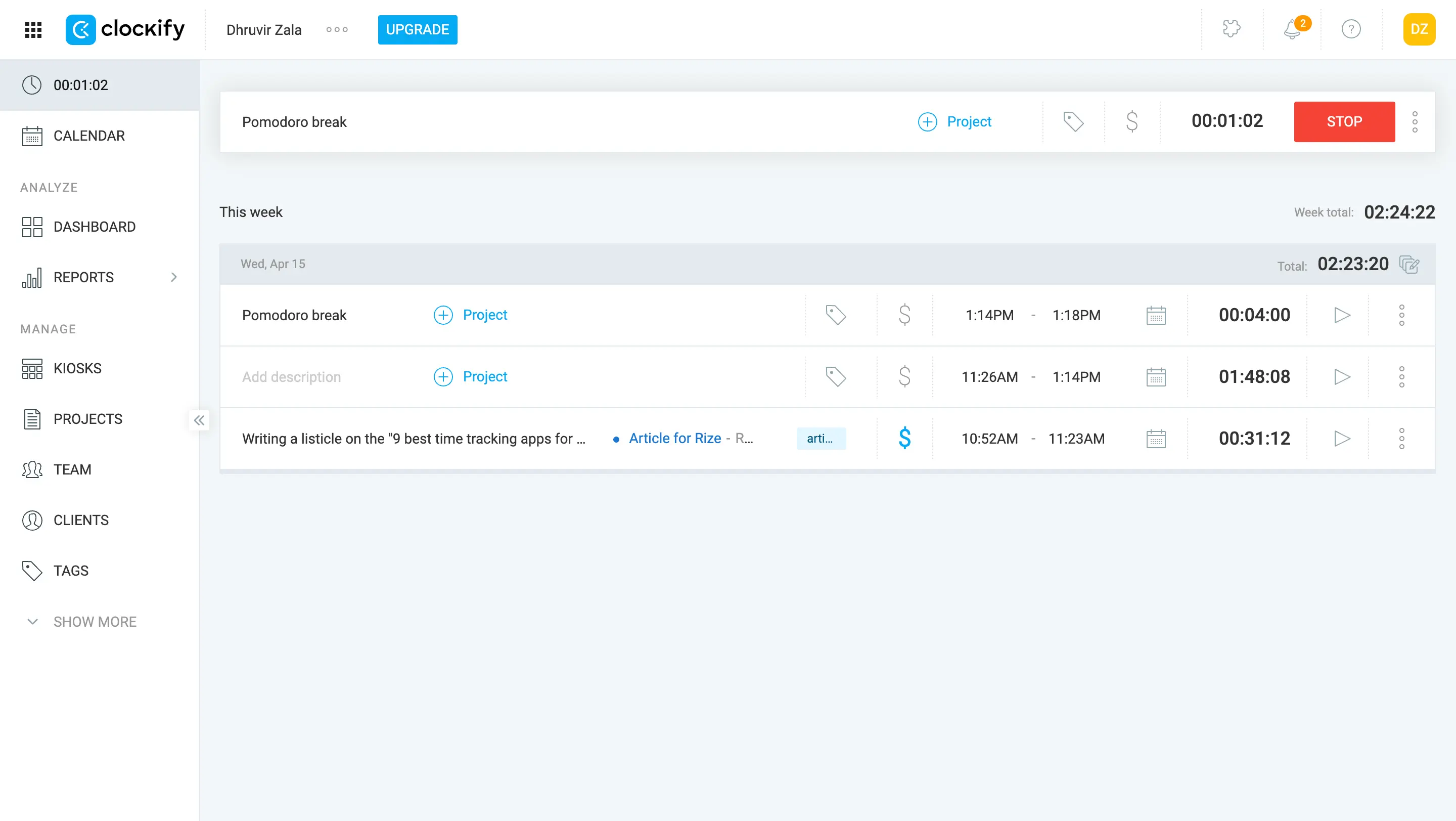
Clockify pros:
- Free plan covers up to 5 users, with Auto Tracker included
- Auto Tracker builds a private activity timeline that you can pull time entries from
- Reports and invoicing are built in
- Integration list matches or beats Harvest
Clockify cons:
- Auto Tracker still requires manual assignment per entry; it's not true automatic tracking
- Invoicing and QuickBooks integration require a paid plan
- Noticeably more manual than Rize
Clockify is a free time tracker built around manual timers, with an Auto Tracker layer that logs your app and website activity in the background so you have a private record to pull entries from.
The tracking workflow is the same as Toggl Track and Harvest: start a timer, assign a project, and stop when done. Where Clockify pulls ahead of Harvest is the Auto Tracker. Enable it in the Mac app, and Clockify builds a private timeline of every app and website you used, including duration, start and end times, and idle periods. You're not tracking passively the way Rize does, but when you sit down to reconcile at the end of the day, the timeline is already there. Click the plus next to any entry, assign it to a project, and you're done. It's still manual, but it's manual with a record to work from.
The real reason Clockify earns the budget label isn't the price of the paid plans. It's what the free plan includes. Since April 2026 the free plan is capped at 5 users (Harvest's free tier caps you at one seat and two projects), but it still covers the Auto Tracker, idle detection, basic reports, and calendar sync with Google Calendar and Outlook. Billable rates and report exports now require a paid plan, so for a small team that just needs to log hours and run basic reports, the free plan may still be all you need.
If you do need invoicing or QuickBooks sync, that's the Standard plan at $5.49/seat/month. It's still cheaper than Harvest, and the billing workflow is comparable.
On integrations, Clockify matches or exceeds Harvest: native connections to QuickBooks, Jira, Google Calendar, Outlook, Zapier, Todoist, and more, plus browser extensions for Chrome, Firefox, and Edge.
Clockify pricing: Free plan available for up to 5 users. Basic is $3.99/seat/month (annual) or $4.99/month. Standard is $5.49/seat/month (annual) or $6.99/month; invoicing and QuickBooks integration start here. Pro is $7.99/seat/month (annual) or $9.99/month. Enterprise is $11.99/seat/month (annual) or $14.99/month. A 7-day free trial of Pro features is available, no credit card required.
5. Timing
Best Mac-native automatic tracker with document-level granularity.
Timing pros:
- Genuinely Mac-native
- Tracks at the document and URL level
- Rules engine learns your patterns and automates categorization over time
- Privacy-first by default: all data stays local unless you opt into sync
Timing cons:
- No built-in invoicing
- Setup takes patience: the rules engine is powerful but not intuitive on day one
- Team features are thin compared to Rize and require the top-tier Connect plan
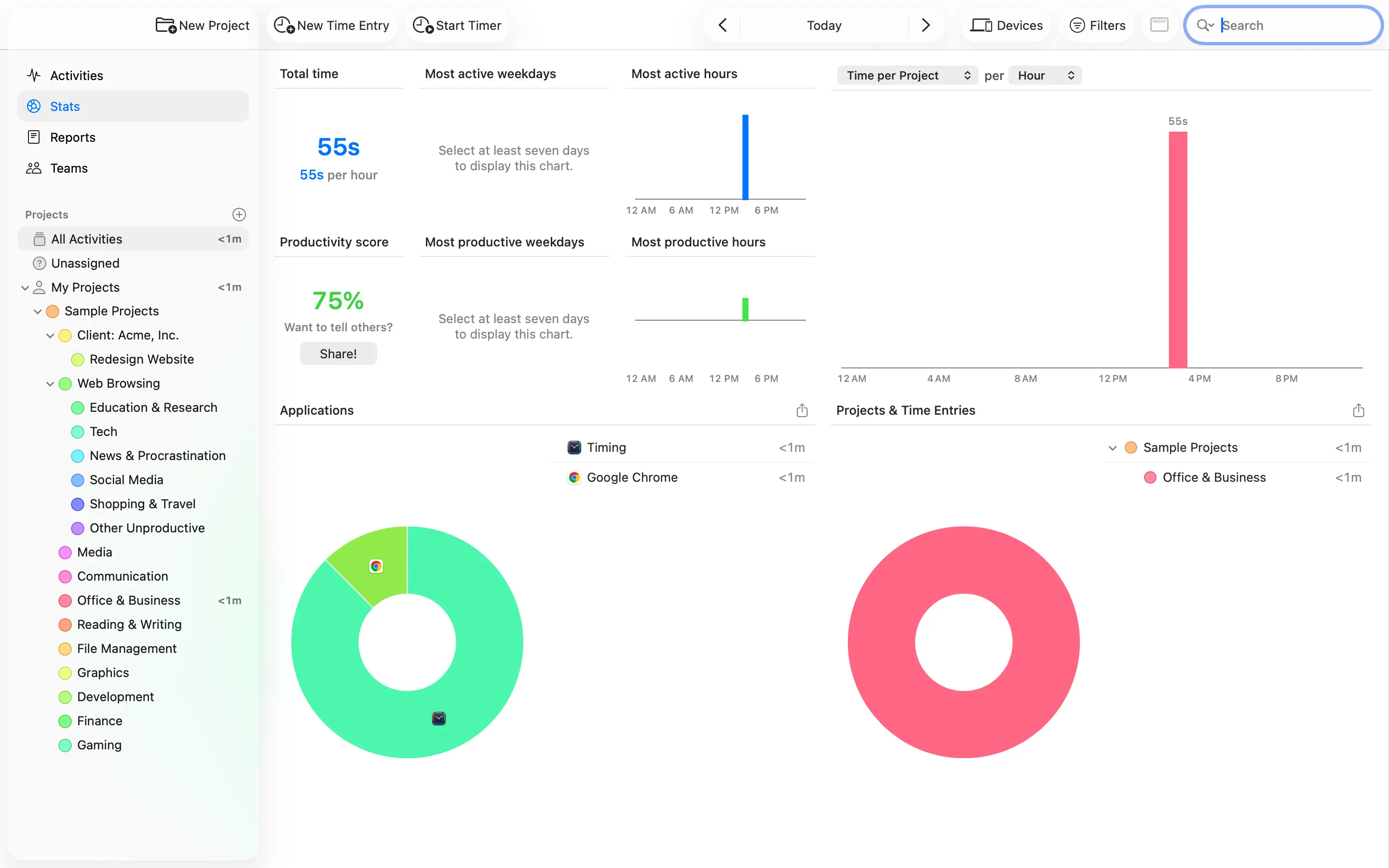
If you looked at Rize and thought, "I want automatic tracking but I don't need the coaching layer, and I want my data to stay on my Mac," Timing is what you're looking for. This is the automatic tracker built specifically for Mac, by a team that has been shipping it since 2011.
The rules engine is what makes the tracking sustainable long-term. In the first week, you drag activities into projects manually. Once you hold Option and drag, Timing creates a rule so it never asks you again. Within a couple of weeks, most of your day categorizes itself. The Rule Order screen, where you drag rules into priority order, is where the real power users live, and where new users may briefly feel lost. Stick with it. The payoff compounds.
Reporting is thorough without being cluttered. The Reports tab ships with presets including Timesheet, Time per App, Time per Document, and Ultra-Detailed, and lets you export to Excel, PDF, CSV, or HTML. If you bill clients and send structured timesheets, this covers you without a third-party export tool. The one gap is invoicing: Timing does not generate invoices natively. If billing is the primary job, Harvest still does it better in a single workflow.
The privacy architecture is worth naming because it's a genuine differentiator. All tracked data lives locally on your Mac. Cloud sync is opt-in, not default. Private or incognito tabs are discarded automatically. If you work with sensitive client information and the idea of an always-on tracker uploading your activity to a cloud server makes you uneasy, Timing is designed with that concern in mind.
The Screen Time import is a sleeper feature. Timing is the only third-party Mac app that can pull iPhone and iPad usage from Apple's Screen Time and layer it into your timeline. If you take client calls from your phone, answer emails on your iPad, or regularly move between devices mid-workday, this closes the gap most trackers leave open.
Team support exists but is intentionally limited. The Teams view requires a Timing Sync account and the Connect plan, and what it gives you is aggregate time against shared projects, nothing more. That constraint is by design, and it reflects Timing's privacy-first philosophy. If your team needs deeper visibility or shared dashboards, Rize is the better fit.
Timing pricing: 30-day free trial, no credit card required. Professional (1 Mac, individual) is $9/month billed annually ($108/year). Expert (2 Macs, power users with full report customization and AI summaries) is $11/month billed annually ($132/year). Connect (3 Macs per user, teams, and AI integration via MCP) is $16/month billed annually ($192/year). Billed monthly, the same plans are $11, $14, and $20.
6. RescueTime
Best for building better focus habits and blocking distractions when billing isn't the goal.
RescueTime pros:
- Automatic background tracking with no setup required
- Focus Sessions actively block distracting apps and websites mid-work
- Free Lite plan with no trial expiry
RescueTime cons:
- Tracking and reporting live in two separate places: a desktop app for one, a browser for the other
- No client or project-level billing without the pricier Timesheets bundle
- Web dashboard feels dated compared to everything else on this list
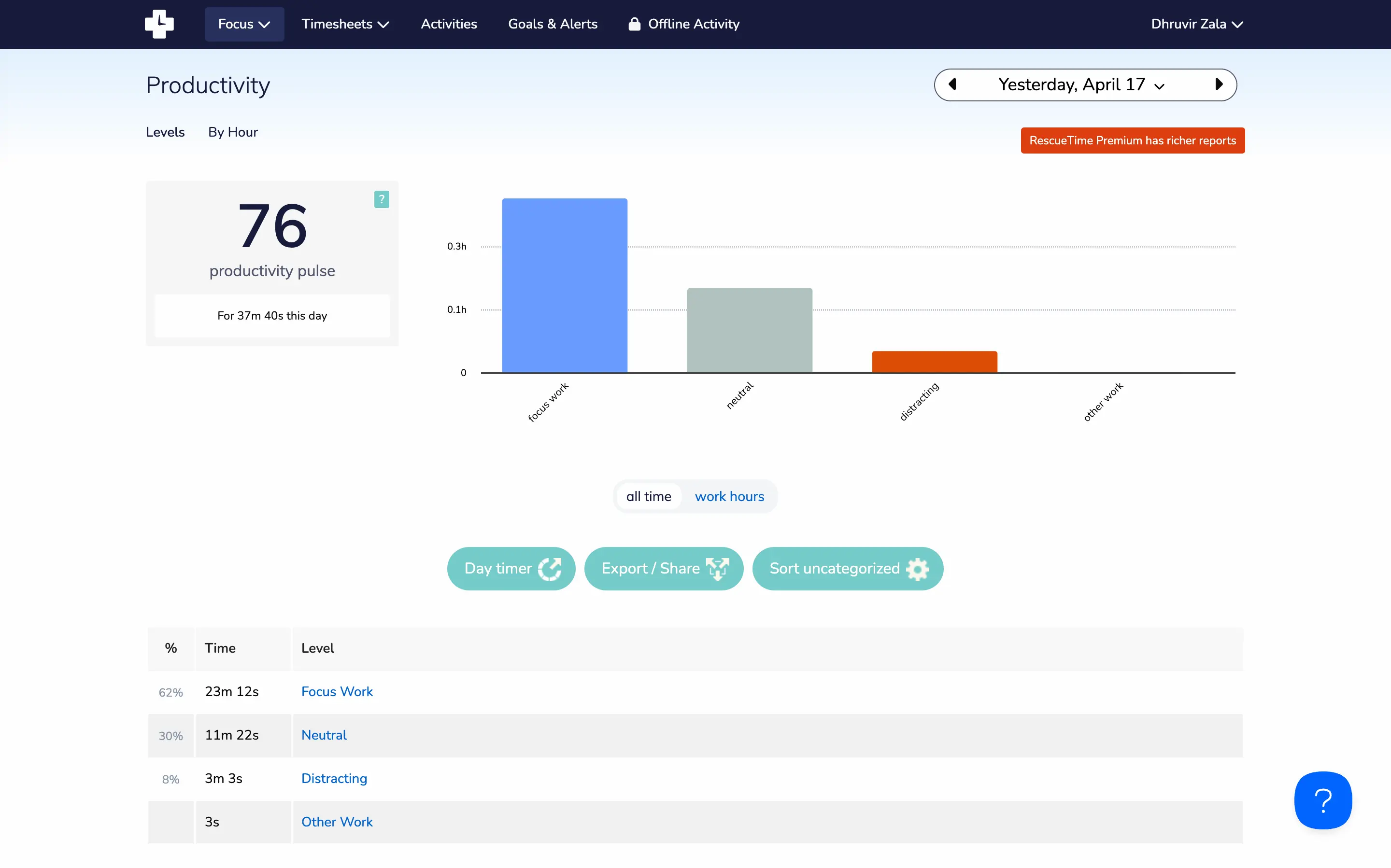
- Productivity scoring tells you what happened, not why
RescueTime has been running in the background since 2007, which makes it the oldest automatic tracker on this list. That longevity shows in both directions. The tracking engine is reliable. The web interface looks like it was built in 2012 and maintained, but not redesigned.
The split between the desktop app and the browser dashboard is the first thing you'll notice. The Mac app does the tracking. Everything else (reports, goals, recategorizing activities) lives at the web version. It's two products stapled together, and that handoff adds friction every time.
Where RescueTime earns its place is in Focus Sessions. Enable one, and RescueTime doesn't just note that you're trying to focus. It locks out every site and app you've flagged as distracting for the full session.
The trade-off is billing. RescueTime's base plans track productivity categories, not clients or projects. The Timesheets bundle adds a manual timeline you can assign to clients after the fact, but it's still a reconciliation step at the end of the day. Rize and Timing handle that automatically. If invoicing is anywhere in your workflow, go back up the list.
The one area where nothing else here competes is cross-device coverage. Mac, Windows, Linux, iOS, and Android. If meaningful work happens on your phone as much as your laptop, RescueTime is the only tool on this list that tracks all of it passively.
RescueTime pricing: Free Lite plan available with no expiry. Solo Focus is $7/month billed annually or $9/month. Solo+ (Timesheets and Focus) is $12/month billed annually or $15/month. Team Focus is $10/user/month annually or $12/user/month. Team+ is $16/user/month annually or $18/user/month. All paid plans include a 14-day free trial, no credit card required.
7. TrackingTime
Best for small teams consolidating time tracking, task management, and attendance into one tool.
TrackingTime pros:
- Task and project management are built directly into the time tracking workflow
- AutoTrack logs background activity with AI-powered one-click suggestions
- Attendance tracking, time cards, and leave management are included at the plan level
- Free plan covers unlimited users with no seat cap
- Invoicing is built in on paid plans
TrackingTime cons:
- AutoTrack is not true automatic tracking; you still review and assign every entry manually
- Invoicing and billing rates require the Pro plan
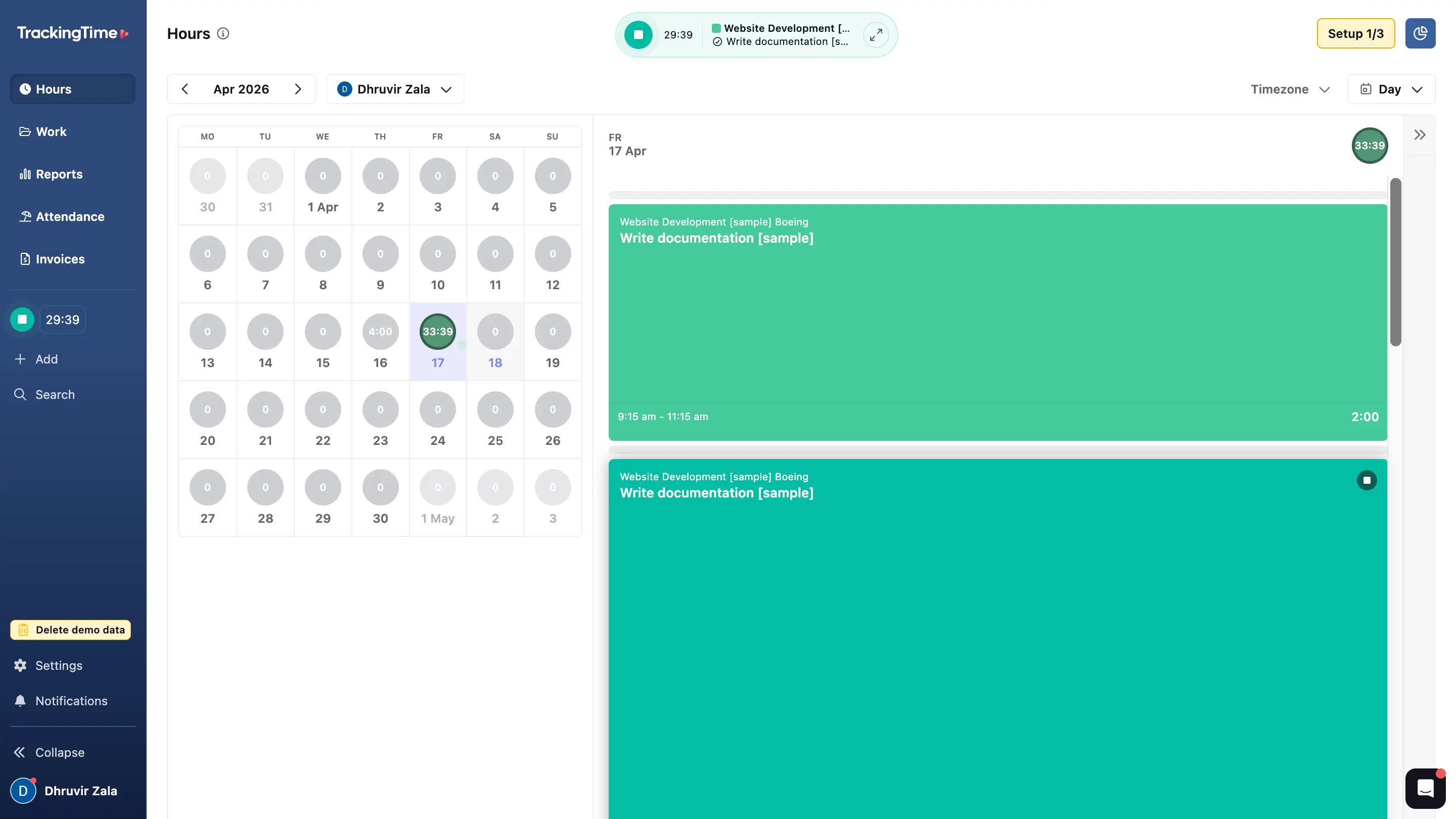
TrackingTime is the only tool on this list that is genuinely trying to replace two apps instead of one. Where Rize, Clockify, and Harvest are purpose-built time trackers that integrate with project management tools, TrackingTime builds the project management layer directly in. The Work tab gives you a full task list organized by client and project, with time logged against each task as you go. If your current setup is "Asana plus Toggl" and you want to consolidate, TrackingTime is worth a serious look.
The AutoTrack feature requires the desktop app and works similarly to Clockify's Auto Tracker. It runs in the background, builds a private timeline of every app and website you use, and then surfaces AI-powered suggestions so you can log entries with a single click. You're not tracking passively the way Rize does. You're still reviewing and assigning entries, but the timeline is already there when you sit down to reconcile, which removes the worst part of manual logging.
Where TrackingTime surprises you is in the breadth of what's included beyond time tracking. The Attendance tab tracks time off, time off policies, accruals, public holidays, and time cards in a calendar view. That's HR-adjacent functionality that most time trackers don't touch. For a small team lead who currently manages time tracking in one tool and PTO requests in a spreadsheet or a separate HR tool, having both in the same dashboard is a real consolidation. No other tool on this list offers it.
The integration list is wide: Asana, Basecamp, Figma, Google Sheets, Microsoft Teams, Monday.com, and more, plus browser extensions for Chrome, Firefox, Safari, and Edge.
TrackingTime pricing: Free plan available for unlimited users (includes AutoTrack, task management, and basic reporting). Starter is $4.50/user/month (annual) or $6/user/month. Pro is $6.50/user/month (annual) or $8.50/user/month; invoicing, billing rates, and time off management start here. Business is $10/user/month (annual) or $13.50/user/month. A 14-day free trial of Pro features is available, no credit card required.
8. Memtime
Best for privacy-first automatic tracking that feeds directly into your existing project software.
Memtime pros:
- Truly automatic tracking
- All activity data stays on your device
- 100+ native integrations that push time entries directly into your project software
Memtime cons:
- No free plan; paid subscription required after the 14-day trial
- Integrations with project software require the Connect plan or above; Basic limits you to two
- You still create time entries manually by dragging from the Memory Aid; this is not truly fire-and-forget like Rize
- No invoicing built in
If Timing is privacy-first, Memtime is privacy-absolute. Timing offers opt-in cloud sync. Memtime offers no cloud sync for activity data, full stop. Everything Memtime captures stays offline on your machine, and the company is explicit that they never upload your automatic activity data. If you work with sensitive client information and that distinction matters to you, Memtime is the more defensible choice.
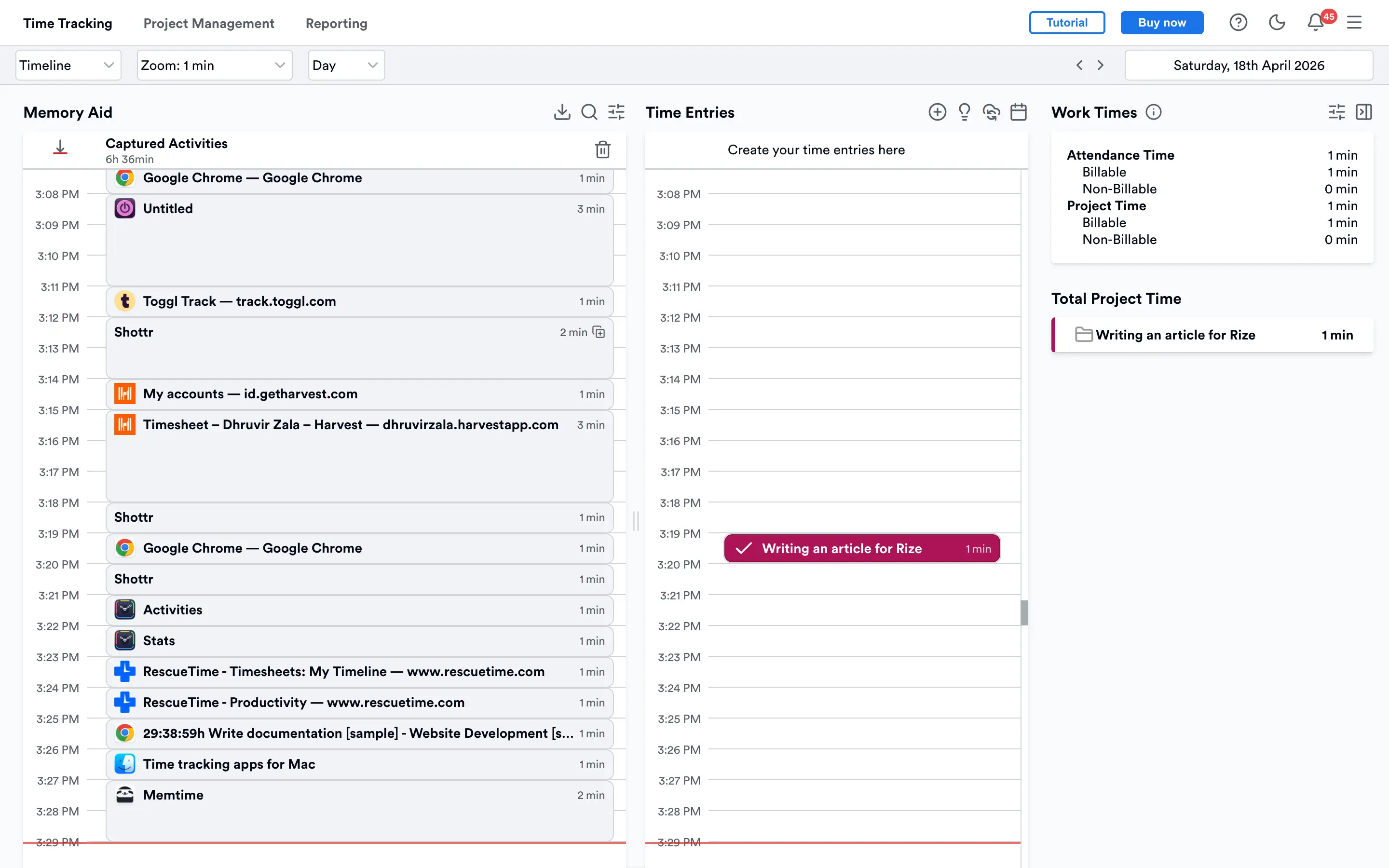
The interface is built around what Memtime calls the Memory Aid. The left panel shows a chronological grid of every app, browser tab, and file you were in, captured automatically down to the minute. The right panel is where you create your actual billable time entries by clicking and dragging from that captured timeline.
The split is deliberate: the automatic data stays private on the left; you decide what becomes a time entry on the right, and only those entries ever leave your device. This is still a step below Rize in automation since you are building entries yourself, but it is a meaningful step above manual logging because you have a complete record to work from rather than relying on memory.
The time increments feature deserves a specific mention because no other tool on this list has it. Legal, accounting, and consulting professionals who bill in 6-minute increments can snap captured activities to whatever unit their billing requires. If you are a lawyer who bills in tenths of an hour, that one feature is probably worth the subscription on its own.
Where Memtime separates itself from Timing is integration depth. Timing exports to a handful of formats. Memtime connects natively to over 100 tools: Asana, ClickUp, Jira, QuickBooks, Xero, FreshBooks, Harvest, Teamwork, Wrike, and more. One pricing caveat worth knowing: the Basic plan caps you at two software integrations. If your reason for considering Memtime is to push time entries into Jira or QuickBooks, you need the Connect plan.
Memtime pricing: 14-day free trial, no credit card required. Prices depend on the billing term, and longer terms cost less. Basic is $12 to $18/user/month. Connect (100+ software integrations) is $18 to $26/user/month. Premium (call system integrations, SSO, priority support) is $23 to $35/user/month.
9. ActivityWatch
Best free, open-source, fully local tracker for developers and privacy absolutists.
ActivityWatch pros:
- Completely free with no usage limits, no tiers, and no ads
- All data is stored locally and never leaves your device
- Extensible via a watcher API, browser extensions, and editor plugins
ActivityWatch cons:
- The UI runs entirely in a browser at localhost:5600, not a native Mac app
- No invoicing, no client or project billing, and no team features
- Setup requires comfort with a developer-oriented install process
- Cloud sync is not available yet
- The interface is functional but noticeably dated compared to every paid tool on this list
ActivityWatch is the only tool on this list that costs nothing, keeps everything on your machine, and lets you inspect or modify the underlying code if you want to. If you are a developer, a privacy-conscious power user, or someone who simply refuses to pay a monthly subscription for something you could run yourself, ActivityWatch is your answer. For everyone else, the trade-offs are real.
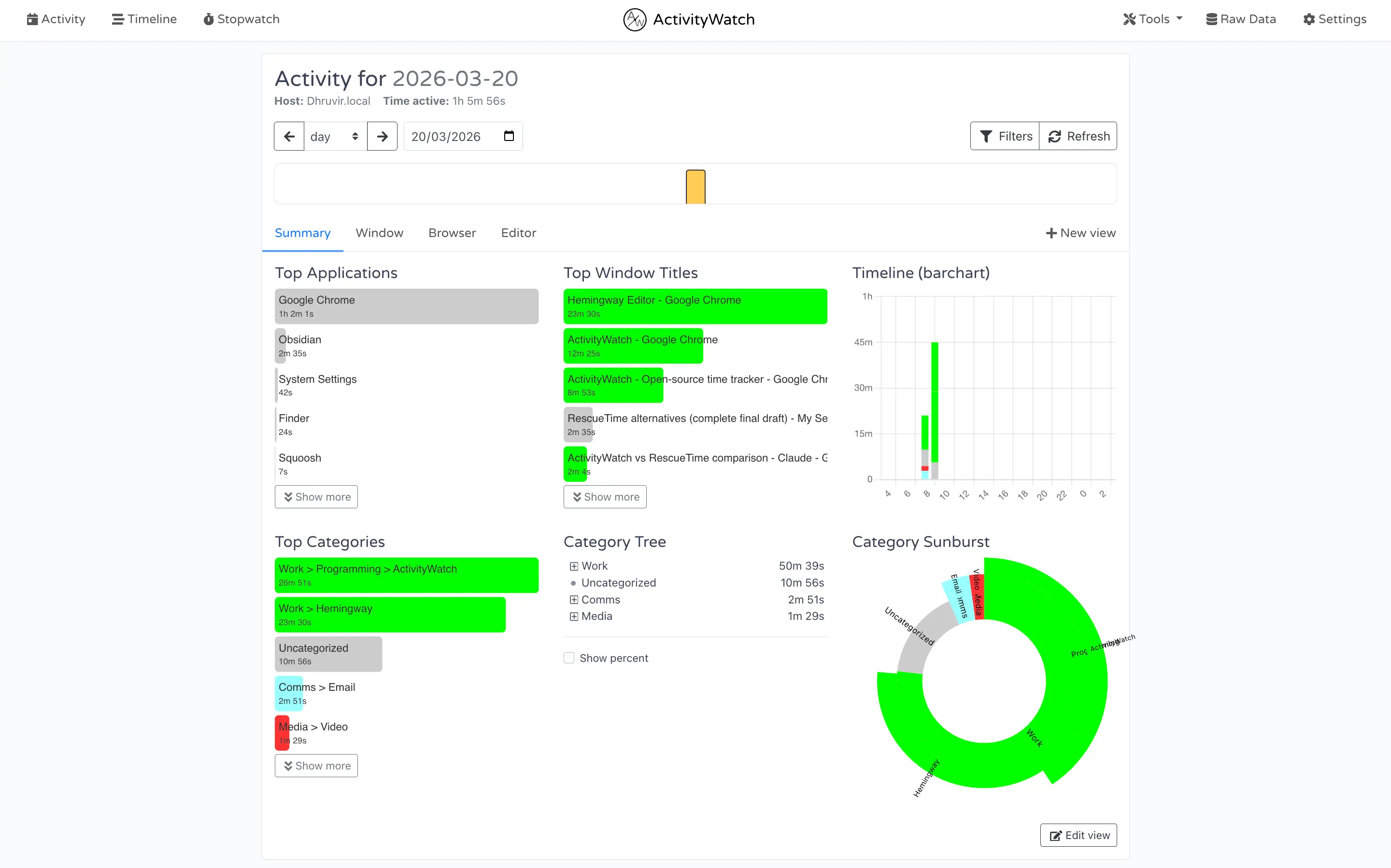
The installation process sets the tone immediately. You download the app and open a browser tab at localhost:5600 to access everything: the Activity dashboard, the Timeline view, the Stopwatch, and Settings. The Activity view breaks your day down by application, window title, and category, with a timeline and sunburst chart for category distribution. Categories are hierarchical and user-defined, which means you do the setup work that Rize handles automatically.
The extensibility is where ActivityWatch earns its reputation among developers. Browser extensions for Chrome and Firefox feed web activity into the timeline. Editor watchers for VS Code, Vim, Emacs, and others track exactly which file and project you were in. The Raw Data tab exposes every logged event via a local API, so if you want to build custom dashboards or pipe data into your own scripts, that access is there.
The honest limitation is everything outside the activity log. No invoicing, no client billing structure, no team features, and no cloud sync between devices. ActivityWatch is not a replacement for Rize or Timing. It is what you reach for when your priority is owning your data completely, paying nothing indefinitely, and doing the configuration work yourself.
ActivityWatch pricing: Free, forever. Open source under the MPL-2.0 license.
Two newer Mac trackers worth a look: Chronoid and Timemator
Chronoid and Timemator are newer automatic trackers that come up often in Mac recommendations. Neither made the main list of nine, but both are worth a trial if a one-time price or local-only data matters to you.
Chronoid
Chronoid is an automatic Mac time tracker that keeps all tracked data on your Mac and assigns captured apps, websites, and documents to client projects.
According to Chronoid's site, it needs no account and runs its AI locally through Ollama, LM Studio, or Apple Intelligence, with cloud AI optional. It ships an MCP server that runs on your Mac, so you can ask about your tracked time from Claude Code, Claude Desktop, or Cursor. It also sends invoices, imports iPhone and iPad sessions from Screen Time, and pulls tasks from ClickUp, monday.com, and Linear.
Chronoid pricing: One-time licenses are $59 (Basic), $99 (Personal), and $149 (Lifetime). The subscription is $15/month or $96/year. A free trial is available.
Timemator
Timemator is a Mac time tracker that starts and stops tasks automatically based on rules you set for apps, files, and websites.
The Mac app is a one-time purchase, and Timemator's site says tasks, sessions, and auto-tracking rules sync across your Macs through iCloud. A separate app covers iPhone, iPad, and Apple Watch. The trade-off is setup: tracking is only as automatic as the rules you write.
Timemator pricing: $39 one time for the Mac app, activated on 2 devices. The iOS app is a separate $7.99 one-time purchase. A free trial is available.
How to choose the right time tracking app for Mac
If you want one tool that handles everything automatically and gets smarter over time, start with Rize. It's the default answer for most Mac users.
If billing is the end goal and your workflow runs through QuickBooks, Harvest is the cleaner end-to-end choice. Toggl Track is a close second if you need broader integrations and don't mind a manual workflow.
If you're running a small team on a tight budget, Clockify's free plan covers more than most paid tools do. TrackingTime is worth a look if you also want task management and basic HR in the same place.
If automatic tracking matters but you want your data to stay on your Mac, Timing is the right call for individuals. Memtime is the better fit if you need that same privacy posture with deep integrations into project software.
If focus and distraction blocking are the actual problem, not billing, RescueTime is built for that.
If you want everything free and fully local, and you're comfortable with a developer-oriented setup, ActivityWatch does the job.
If you want automatic tracking with local AI and a one-time license, try Chronoid. If you want the lowest one-time price for an automatic tracker and an iPhone companion app, try Timemator.
Start tracking time automatically
Join thousands of professionals who stopped guessing where their time goes. Free for 7 days.
“Rize has been a no-brainer for me.” — Ali Abdaal Read more →