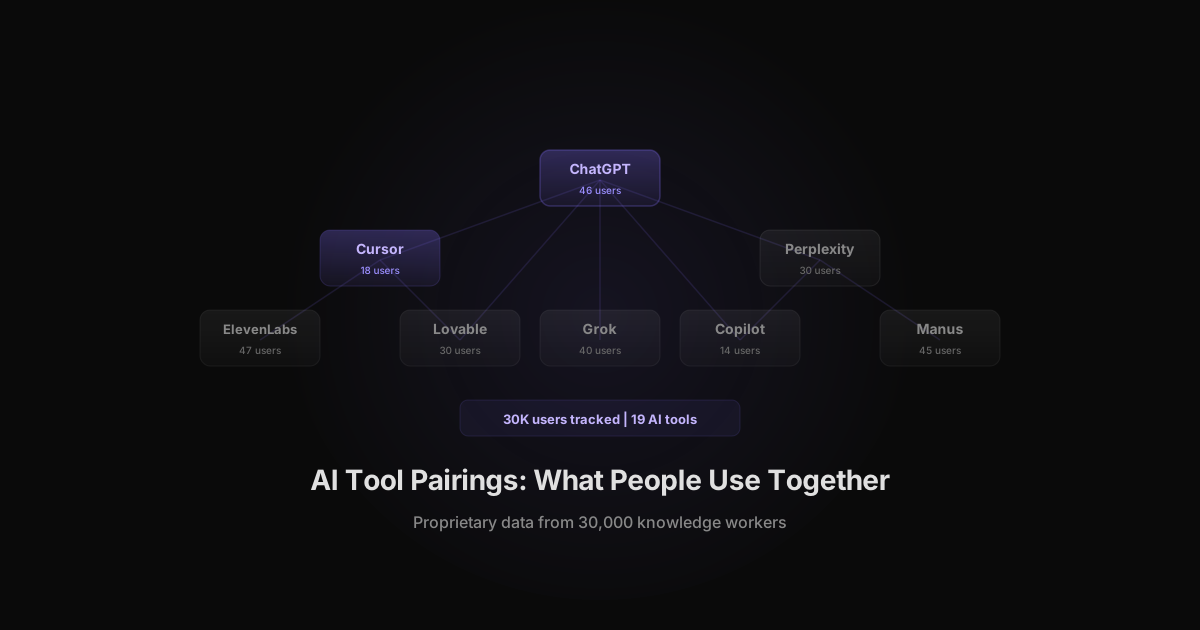
We tracked AI tool usage across 30,000 knowledge workers using Rize's automatic time tracking. Instead of surveying people about which AI tools they use, we measured it directly from desktop activity data. The result is a map of which AI tools people actually spend time in and which tools cluster together in daily workflows.
Key Takeaway
ChatGPT is the hub of nearly every AI tool stack. It pairs with code editors (Cursor, Copilot), research tools (Perplexity, Grok), and media tools (ElevenLabs, Midjourney). The most common pattern is "ChatGPT for reasoning, specialized tool for execution." Teams that understand their pairings can cut duplicate tools and double down on combinations that produce output.
The Data: 19 AI Tools Across 30K Users
Rize's automatic time tracking captures every application a user opens, including AI tools. We identified 19 distinct AI tools appearing across our user base of 30,000 knowledge workers. The data below reflects unique users and cumulative hours tracked per tool.
This is not a survey. Nobody self-reported their usage. Rize runs in the background and records which applications and websites each person spends time in. That eliminates the self-reporting bias that plagues most AI adoption data. According to HelpNetSecurity, 78% of workers use unapproved AI tools they would not report in a survey.
| AI Tool | Unique Users | Avg Hours Per User | Category | |---|---|---|---| | ElevenLabs | 47 | 5.6 | Audio / voice | | ChatGPT | 46 | 13.0 | General reasoning | | Manus | 45 | 5.5 | AI agent | | Grok | 40 | 8.1 | General reasoning | | Google AI Studio | 40 | 2.8 | Model playground | | Lovable | 30 | 8.5 | App generation | | Perplexity | 30 | 6.1 | Research | | ChatGPT Atlas | 27 | 26.0 | Deep research | | OpenRouter | 23 | -- | Model router | | Fireflies | 20 | -- | Meeting AI | | Cursor | 18 | -- | AI code editor | | Replit | 15 | -- | AI code / deploy | | Copilot | 14 | -- | AI code editor | | M365 Copilot | 12 | -- | Enterprise AI | | Suno | 9 | -- | Music generation | | Windsurf | 8 | -- | AI code editor | | LM Studio | 6 | -- | Local models | | Bolt.new | 5 | -- | App generation | | Midjourney | 4 | -- | Image generation |
Two things stand out. First, ElevenLabs has more unique users than ChatGPT (47 vs 46), despite being a niche audio tool. This suggests audio/voice AI has crossed from novelty into regular workflow. Second, ChatGPT Atlas users spend 26 hours per user on average, nearly double any other tool, which indicates deep research sessions rather than quick queries.
The 5 Most Common AI Tool Pairings
Our data suggests five recurring tool pairings based on which tools appear together in user workflows. These are not random overlaps. Each pairing reflects a "reasoning + execution" pattern where one tool handles planning and the other handles production.
1. ChatGPT + Cursor (reasoning + code editing)
ChatGPT (46 users) and Cursor (18 users) form the most common developer pairing. Based on usage patterns, developers use ChatGPT for architecture decisions, debugging strategy, and code review, then switch to Cursor for implementation. Cursor's 32,000 GitHub stars confirm its position as the dominant AI code editor.
2. ChatGPT + Perplexity (drafting + research)
ChatGPT (46 users) and Perplexity (30 users) pair for content and strategy work. The pattern: use Perplexity to find current data and sources, then use ChatGPT to draft, synthesize, or plan based on those findings. Perplexity users spend 6.1 hours per user, suggesting regular research workflows rather than occasional lookups.
3. ChatGPT + ElevenLabs (planning + audio production)
ChatGPT (46 users) and ElevenLabs (47 users) co-occur at nearly identical user counts. Our data suggests users write scripts, outlines, or dialogue in ChatGPT, then produce audio or voice content in ElevenLabs. With 5.6 hours per user, ElevenLabs is not a toy -- it is a production tool. This pairing grew 21.9% week-over-week in our most recent data, making it the fastest-growing AI creative workflow in our dataset. For teams managing creative output, tracking this pairing with automatic time tracking reveals how much production time shifts from manual editing to AI-assisted generation.
4. Cursor + Copilot (AI editor + inline suggestions)
Cursor (18 users) and Copilot (14 users) overlap in the developer segment. While both are AI code tools, they serve different functions. Copilot provides inline autocomplete within the editor. Cursor provides a chat-driven coding environment. Some developers run both for complementary coverage.
5. ChatGPT + Manus (reasoning + autonomous agents)
ChatGPT (46 users) and Manus (45 users) is the newest pairing. Manus is an AI agent that can browse the web, write code, and complete multi-step tasks autonomously. Users appear to use ChatGPT for task definition and Manus for task execution, a pattern that mirrors how teams will work with AI agents going forward.
See which AI tools your team actually uses
Rize tracks AI tool pairings per employee automatically. No surveys, no guessing. Free for 7 days.
Start Free TrialAI Tool Stack by Role
Different roles build different AI tool stacks. Based on the tool categories and usage patterns in our data, four distinct role-based stacks emerge. Each follows the same "reasoning hub + specialized tools" pattern, but the specialized tools change by function.
Developer stack
| Layer | Tools in our data | Function | |---|---|---| | Reasoning | ChatGPT, Grok | Architecture, debugging, code review | | Code editor | Cursor, Copilot, Windsurf | Implementation, refactoring | | App generation | Lovable, Bolt.new, Replit | Prototyping, scaffolding | | Model routing | OpenRouter, LM Studio | Cost optimization, local inference |
Developers show the most tool diversity. Cursor (18 users), Copilot (14 users), and Windsurf (8 users) all serve overlapping code editing functions. This is a natural consolidation target for teams tracking AI tool spend. See our Cursor vs Windsurf and Cursor vs GitHub Copilot comparisons for how these tools differ.
Marketer stack
| Layer | Tools in our data | Function | |---|---|---| | Reasoning | ChatGPT, Grok | Copy, strategy, planning | | Research | Perplexity | Competitive intel, data sourcing | | Audio/video | ElevenLabs, Suno | Voiceovers, podcast production | | Meeting AI | Fireflies | Transcript analysis, follow-ups |
Marketers show the cleanest pairings with less overlap. ChatGPT handles drafting. Perplexity handles fact-finding. ElevenLabs handles production. Each tool does one job.
Creative stack
| Layer | Tools in our data | Function | |---|---|---| | Planning | ChatGPT | Briefs, scripts, storyboards | | Audio | ElevenLabs, Suno | Voice, music generation | | Visual | Midjourney | Image generation | | Prototyping | Lovable | Interactive mockups |
Creatives use fewer tools but spend more hours per tool. Lovable at 8.5 hours per user and ElevenLabs at 5.6 hours per user indicate sustained production sessions, not quick experiments.
Operations stack
| Layer | Tools in our data | Function | |---|---|---| | General | ChatGPT, M365 Copilot | Email, docs, analysis | | Research | Perplexity, Grok | Market research, vendor eval | | Meetings | Fireflies | Notes, action items | | Agents | Manus | Multi-step task automation |
Operations teams show the highest M365 Copilot adoption (12 users), which makes sense -- these roles live in Outlook, Excel, and Teams. Manus at 45 users suggests early AI agent adoption for automating repetitive operational workflows.
Which Tools Get the Most Hours
User count tells you adoption breadth. Hours per user tells you engagement depth. The tools with the most hours per user are where people spend sustained working sessions, not just quick lookups.
| Tool | Avg Hours Per User | What it suggests | |---|---|---| | ChatGPT Atlas | 26.0 | Deep research sessions, multi-hour investigations | | ChatGPT | 13.0 | Daily driver, used across tasks | | Lovable | 8.5 | Sustained app building sessions | | Grok | 8.1 | Extended reasoning and conversation | | Perplexity | 6.1 | Regular research workflow | | ElevenLabs | 5.6 | Production-grade audio work | | Manus | 5.5 | Agent task delegation and monitoring | | Google AI Studio | 2.8 | Model experimentation, shorter sessions |
ChatGPT Atlas at 26 hours per user is a standout. Atlas is OpenAI's deep research mode -- users give it a complex question and let it work for extended periods. The high hours reflect a new usage pattern: delegating research to an AI that works asynchronously while you do other things.
Lovable at 8.5 hours per user is notable for a tool that launched recently. Users are not testing it -- they are building with it. The same pattern appears with Manus at 5.5 hours, which suggests agentic AI tools earn sustained engagement once people find a workflow for them.
The "ChatGPT + X" Pattern
ChatGPT appears in every tool pairing we identified. With 46 unique users, it is the most connected node in the AI tool graph. The pattern is consistent: ChatGPT serves as the reasoning layer while a specialized tool handles the output.
| Pairing | ChatGPT role | Specialized tool role | |---|---|---| | ChatGPT + Cursor | Plan and review code | Write and edit code | | ChatGPT + Perplexity | Draft and synthesize | Find sources and data | | ChatGPT + ElevenLabs | Script and outline | Produce audio | | ChatGPT + Lovable | Spec and iterate | Generate app UI | | ChatGPT + Manus | Define tasks | Execute multi-step work | | ChatGPT + Midjourney | Describe visuals | Generate images | | ChatGPT + Fireflies | Prepare agendas | Record and summarize |
This hub-and-spoke pattern has implications for AI budgeting. ChatGPT is not optional in most stacks -- it is the coordination layer. Cutting ChatGPT to save on per-seat costs would break every pairing that depends on it. The better optimization is to ensure ChatGPT is on a team plan with usage visibility rather than 46 individual subscriptions.
For teams managing AI tool sprawl, the "ChatGPT + X" pattern is the framework. Keep the intentional pairings. Cut the tools where two or more serve the same "X" function for the same team.
Emerging Tools Gaining Fastest
Three categories of AI tools are gaining users and engagement faster than the market overall: AI agents, app generation tools, and local model runners. GitHub star data from week 20 (May 11, 2026) confirms the trajectory.
AI agents: Manus leads adoption
Manus reached 45 users in our dataset despite being a newer entrant. Users average 5.5 hours per user, which indicates real workflow adoption rather than trial curiosity. The agent category overall is accelerating -- CrewAI hit 51,000 GitHub stars with 587 new stars per week.
App generation: Lovable outpaces Bolt.new 6:1
Lovable (30 users, 8.5 hours) versus Bolt.new (5 users) shows a clear winner in the "generate a full app from a prompt" category. Lovable users spend 8.5 hours per user -- the third-highest engagement in our dataset. Replit (15 users) occupies the middle ground between full app generation and traditional coding.
AI coding tools: Claude Code surges
While Cursor leads AI code editors in our tracking data (18 users), the GitHub star trajectory tells a different story about momentum. Claude Code reached 122,000 stars with 2,249 new stars per week -- the fastest growth rate of any AI coding tool. For comparison, Cursor has 32,000 stars and Cline has 61,000. Claude Code's growth suggests it will appear in our tracking data at higher volumes in coming months.
Local models: early but real
LM Studio at 6 users is small but signals a pattern. These are power users running models locally for privacy, cost, or latency reasons. As local model quality improves, this segment will grow -- especially for teams with data sensitivity requirements.
Map your team's AI tool pairings
Book a 15-minute walkthrough. See which AI tools each team member uses, which pairings drive output, and where you can consolidate.
Book a DemoWhat This Means for Your Team
AI tool pairings are not random. They follow a reasoning-plus-execution pattern that varies by role. Understanding your team's pairings lets you make three decisions: which tools to standardize, which to cut, and which to invest more in.
Audit before you standardize. Most teams do not know their actual tool pairings. They know which tools they procured. They do not know which tools employees adopted on their own, which pairings produce output, and which tools sit unused. Deploy automatic time tracking to capture the real picture before making procurement decisions.
Consolidate within function, not across roles. If three developers use Cursor, Copilot, and Windsurf for the same job, consolidate to one. But do not force developers and marketers onto the same tool stack. The role-based pairings in our data exist because different work requires different tools.
Protect the hub. ChatGPT appears in every pairing. If your team uses ChatGPT as the reasoning layer, put it on a team plan with AI usage tracking so you have visibility into per-person, per-project usage. Individual subscriptions create blind spots.
Watch the agent category. Manus at 45 users and 5.5 hours per user is not a fad. Agentic AI tools are earning real engagement. Teams that build agent workflows now will have a head start when these tools mature. Track agent usage alongside traditional AI tools to understand where autonomous work is replacing manual steps. Our AI adoption trends data shows agent frameworks are the fastest-growing category in open-source AI, with CrewAI adding 587 GitHub stars per week.
Benchmark against your industry. AI tool pairings vary by sector. Agencies lean toward creative AI pairings (ChatGPT + ElevenLabs, ChatGPT + Midjourney), while professional services firms stay in the LLM chat + search lane. Our AI adoption by industry breakdown shows the tool mix differences across six sectors. If your team's AI stack does not match your industry pattern, you are either ahead or behind -- and the data tells you which.
Measure pairings, not just tools. Knowing your team uses ChatGPT is not enough. Knowing they pair ChatGPT with Cursor for code and Perplexity for research tells you where AI actually fits in the workflow. That is the data you need for AI cost optimization and ROI measurement.
How to get your team's AI tool pairing data
Rize's ATT (Agent Token Tracking) captures AI tool usage per employee automatically. No surveys, no browser extensions, no manual logging. Within one week of deployment, you have a complete map of which AI tools each person uses, how long they spend in each tool, and which tools pair together in daily workflows.
The data in this article came from that same tracking infrastructure running across 30,000 knowledge workers. You can have the same visibility for your team.
Start tracking time automatically
Join thousands of professionals who stopped guessing where their time goes. Free for 7 days.
“Rize has been a no-brainer for me.” — Ali Abdaal Read more →