Hourly workers live and die by accurate time data. Every untracked minute is lost revenue for freelancers, missed billing for agencies, and compliance risk for employers. Manual timers depend on people remembering to click start and stop — and they don't. According to the American Payroll Association, the average employee loses 10 minutes per timesheet per day to rounding errors and estimation, costing employers the equivalent of weeks of productive time per worker annually. A Harvard Business Review analysis found that professionals who track time manually spend an average of 17 minutes per day just on the administrative overhead of recording hours. Automated time capture eliminates this problem entirely by recording activity in the background without any manual input.
But not all "automatic" tracking is the same. Some tools fully automate capture with AI. Others just add an auto-start feature to a manual timer. This guide compares seven leading tools on what matters most for hourly workers: capture accuracy, ease of use, integrations with payroll and invoicing, and pricing.
What Hourly Workers Need from Time Tracking
Hourly workers have different requirements than salaried project teams. The U.S. Department of Labor's Fair Labor Standards Act (FLSA) requires employers to maintain accurate records of hours worked for all non-exempt employees — making reliable time capture a legal obligation, not just a productivity preference. The tool needs to:
- Capture every minute automatically — no gaps from forgotten timers
- Distinguish billable from non-billable time — critical for freelancers and agencies billing clients
- Integrate with payroll and invoicing — QuickBooks, Gusto, PayPal, Wise, Deel
- Work across platforms — desktop, browser, and ideally mobile
- Export clean reports — for client invoices, employer timesheets, or tax records
- Respect privacy — track time without screenshots or keystroke logging
Tool Comparison: Automated Time Capture for Hourly Workers
| Tool | Automation Level | Billable Tracking | Key Integrations | Privacy | Price (per user/mo) |
|---|---|---|---|---|---|
| Rize | Full AI auto-capture — zero manual input | Automatic billable/non-billable classification | Linear, ClickUp, Asana, Google Calendar, Zapier | No screenshots, no keystroke logging | From $8.33 |
| Hubstaff | Auto-start timers + activity monitoring | Manual billable tagging per project | Jira, Slack, Asana, ClickUp, Trello, GitHub, QuickBooks, Gusto, PayPal, Wise, Deel, Monday, Zendesk, Salesforce (35+) | Optional screenshots, activity levels | From $4.99 |
| Clockify | Manual timers + desktop auto-tracker | Billable rate per project | Jira, Asana, Trello, ClickUp, QuickBooks, Monday (80+) | Optional screenshots (paid) | Free / $5.49+ |
| TimeCamp | Keyword-based auto-tracking rules | Automatic billable classification by keyword | Jira, Asana, Trello, ClickUp, Monday, QuickBooks, Xero (30+) | No screenshots by default | Free / $3.99+ |
| Time Doctor | Auto-start + silent tracking mode | Manual project-level billing | Jira, Asana, ClickUp, Slack, Salesforce, Gusto, ADP, QuickBooks (60+) | Screenshots, app/URL tracking, optional distraction alerts | From $5.90 |
| Timely | AI memory tracker — logs everything, you confirm | Billable rates per project and team member | Jira, Asana, Google Calendar, Outlook, Slack, QuickBooks, Xero (15+) | No screenshots, private by default | From $11 |
| RescueTime | Full auto-capture — passive monitoring | No billable tracking | Slack, Google Calendar, Zapier | No screenshots, no keystroke logging | From $6.50 |
Start tracking time automatically
Join thousands of professionals who stopped guessing where their time goes. Free for 7 days.
Start Free TrialDetailed Breakdown
Rize — Best for Fully Automatic Capture with Privacy
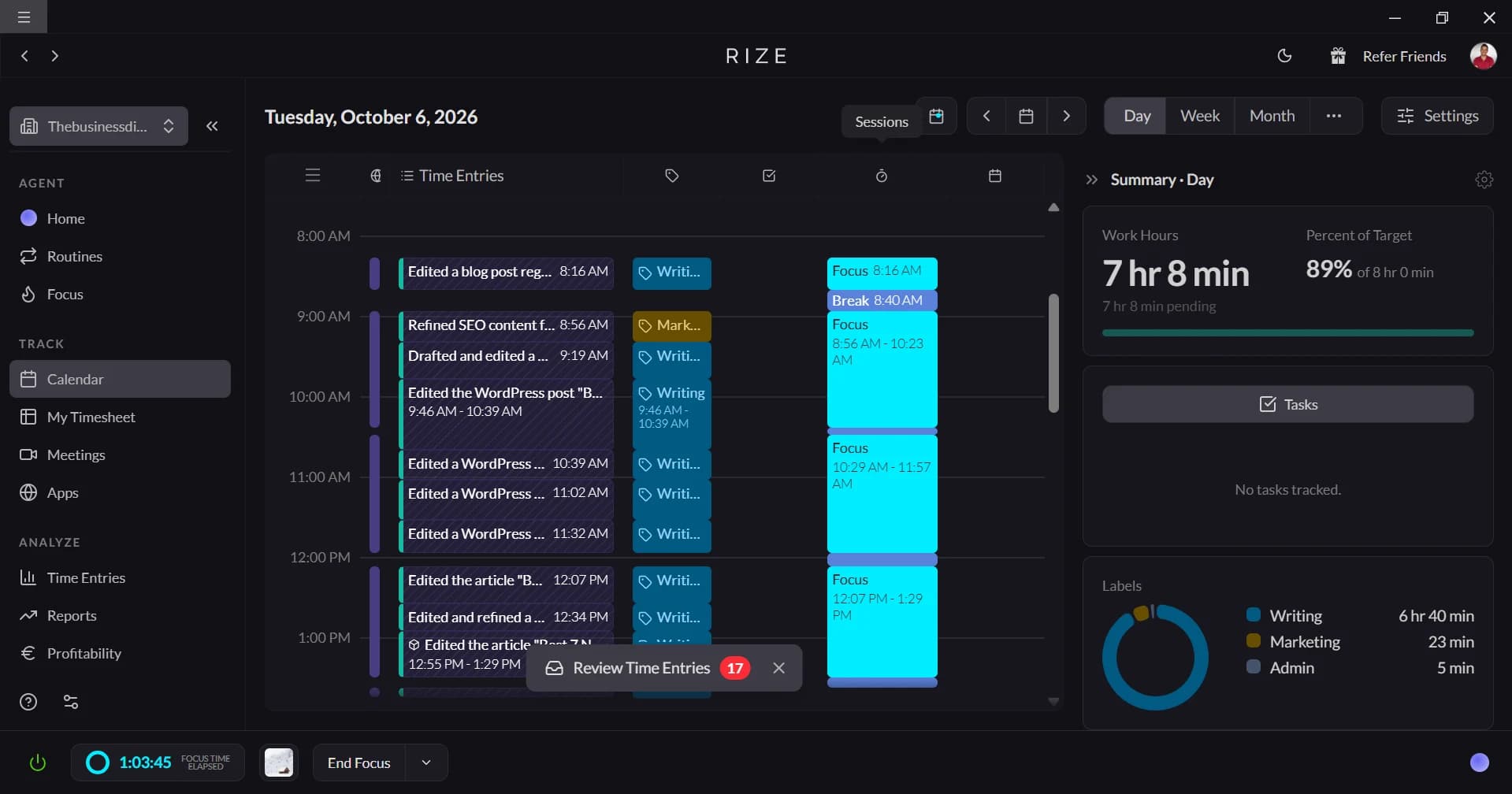
Rize is the only tool in this comparison that offers truly zero-input time capture with AI-powered categorization. It runs silently in the background on macOS and Windows, detecting which apps, websites, and projects you're working on and tagging them automatically. For hourly workers, this means every minute is captured — no timers to forget, no end-of-day guessing. As Quaestor co-founder Kevin Hsu puts it: "With Rize I never need to ask myself where I'm spending my time. Instead, I can ask myself how I want to spend my time."
Key strengths:
- Fully automatic — no manual start/stop
- AI categorizes time by client, project, and activity type
- Billable time reports with PDF export for client invoices
- Privacy-first: no screenshots, no keystroke logging
- Break detection and productivity analytics
Possible limitations:
- Desktop only (macOS, Windows) — no mobile tracking
- Fewer direct payroll integrations than Hubstaff (no native QuickBooks/Gusto)
- Requires Zapier for some integrations
Best for: Freelancers, contractors, and agency teams who want accurate hours without touching a timer. Particularly strong for knowledge workers and designers who context-switch between apps and projects throughout the day. See how Momentum Studio improved billing accuracy by switching from manual tracking to Rize.
Hubstaff — Best Integration Ecosystem for Payroll and Invoicing
Hubstaff offers the deepest integration ecosystem in this category, with 35+ direct connections including QuickBooks, Gusto, PayPal, Wise, Deel, and Salesforce. For hourly workers whose primary need is getting paid accurately, this payroll pipeline is a major differentiator. Time capture uses auto-start timers triggered by schedule or geofence, plus activity monitoring via mouse/keyboard tracking.
Key strengths:
- Widest payroll integration coverage: QuickBooks, Gusto, Wise, Deel, PayPal
- PM integrations: Jira, Slack, Asana, ClickUp, Trello, GitHub, Monday, Zendesk
- GPS tracking and geofencing for field/mobile workers
- Auto-pay based on tracked hours
- Cross-platform: desktop, web, iOS, Android
Possible limitations:
- Not truly automatic — uses auto-start timers, not passive capture
- Activity monitoring (screenshots, activity %) feels surveillance-heavy to some teams
- Higher per-user cost for full feature set
Best for: Remote teams, field workers, and agencies that need time tracking tightly connected to payroll and invoicing. The integration list (Jira, Slack, Wise, Deel, Asana, Google Calendar, Trello, GitHub, ClickUp, Zendesk, QuickBooks, Monday, PayPal, Gusto, Salesforce) covers most agency tech stacks.
Clockify — Best Free Option with Basic Auto-Tracking
Clockify is the most popular free time tracker, with a free tier covering up to 5 users. The desktop app includes an "auto-tracker" that logs which apps and websites you use, but it still requires you to manually review and assign time entries afterward. It's not truly automatic in the way Rize or RescueTime are.
Key strengths:
- Free tier with unlimited users
- 80+ integrations including QuickBooks and major PM tools
- Cross-platform with browser extension
- Billable rates and project budgets
Possible limitations:
- Auto-tracker requires manual review and assignment
- Advanced features (screenshots, GPS, approvals) locked behind paid plans
- No AI categorization
Best for: Budget-conscious teams and freelancers who primarily need a timer with reporting. Not ideal if your goal is eliminating manual input entirely.
TimeCamp — Best Keyword-Based Automation
TimeCamp takes a rules-based approach to automation: you define keywords that map to projects, and the desktop tracker automatically assigns time based on which apps and URLs match those keywords. It's more automatic than Clockify but requires upfront configuration.
Key strengths:
- Keyword-based auto-assignment reduces manual entry
- Free plan for unlimited users (basic features)
- Automatic billable classification by keyword rules
- Direct QuickBooks and Xero integration
Possible limitations:
- Keyword rules need maintenance as projects change
- Less accurate than AI-based categorization for varied workflows
- Desktop auto-tracker only — browser/mobile require manual timers
Best for: Teams with repetitive workflows where the same apps map consistently to the same projects.
Time Doctor — Best for Employer-Managed Hourly Teams
Time Doctor is built for employers tracking hourly remote workers. It offers auto-start based on schedules, silent tracking mode, and detailed activity monitoring including screenshots, app usage, and distraction alerts. The integration ecosystem (60+ tools including Gusto, ADP, Salesforce) is strong for enterprise HR workflows.
Key strengths:
- Payroll integrations: Gusto, ADP, QuickBooks
- CRM integrations: Salesforce
- Client login portal for time review
- Detailed productivity analytics for managers
Possible limitations:
- Surveillance-oriented: screenshots, distraction alerts, activity levels
- Not truly automatic — still timer-based with auto-start
- Can feel invasive for self-directed workers and freelancers
Best for: Companies managing remote hourly teams where management needs visibility into activity and productivity patterns.
Timely — Best AI-Assisted Capture for Consultants
Timely uses an "AI memory" approach: it passively records everything you work on throughout the day, then presents a timeline for you to confirm and assign to projects. It's more automatic than manual timers but still requires a daily review step that Rize eliminates.
Key strengths:
- AI memory captures full daily timeline
- Privacy-first: only you see the raw timeline
- Project budgets and profitability reporting
- Clean integration with Google Calendar and Outlook
Possible limitations:
- Requires daily confirmation — not fully hands-off
- Fewer integrations than Hubstaff or Clockify
- Higher price point
Best for: Consultants and mid-size agencies who want AI assistance but prefer to review before time is finalized.
RescueTime — Best for Personal Productivity (Not Billing)
RescueTime is fully automatic and privacy-conscious, but it's designed for personal productivity insights — not hourly billing. There's no concept of clients, projects, or billable rates. For hourly workers who just need to understand where their time goes (without invoicing), it's simple and effective.
Key strengths:
- Truly passive — zero configuration needed
- Focus sessions and distraction blocking
- No screenshots or surveillance features
Possible limitations:
- No billable time tracking at all
- No client/project structure
- Minimal integrations (Slack, Google Calendar, Zapier only)
- Cannot generate invoices or client reports
Best for: Individual contributors tracking personal productivity, not billing.
Integration Coverage: Priority Tools for Hourly Workers
For hourly workers, the integration that matters most depends on how you get paid. Here's how each tool connects to the most-requested payroll, invoicing, and project management platforms:
| Integration | Rize | Hubstaff | Clockify | TimeCamp | Time Doctor | Timely |
|---|---|---|---|---|---|---|
| QuickBooks | via Zapier | Native | Native | Native | Native | Native |
| Gusto | — | Native | — | — | Native | — |
| PayPal | — | Native | — | — | — | — |
| Wise | — | Native | — | — | — | — |
| Deel | — | Native | — | — | — | — |
| Xero | — | — | — | Native | — | Native |
| Jira | — | Native | Native | Native | Native | Native |
| ClickUp | Native | Native | Native | Native | Native | — |
| Asana | Native | Native | Native | Native | Native | Native |
| Slack | — | Native | Native | Native | Native | Native |
| Google Calendar | Native | Native | Native | Native | — | Native |
| Salesforce | — | Native | — | — | Native | — |
| Zapier (catch-all) | Native | Native | Native | Native | Native | Native |
Hubstaff leads on integration breadth, especially for payroll — it's the only tool with native connections to Gusto, PayPal, Wise, and Deel alongside QuickBooks. If your primary bottleneck is getting time data into your payment pipeline, Hubstaff's integration ecosystem is hard to beat. Rize covers the core project management tools natively (ClickUp, Asana, Linear, Google Calendar) and uses Zapier to bridge the payroll gap — a tradeoff for its superior automatic capture accuracy.
Which Tool Should You Choose?
The right choice depends on what "hourly tracking" means for your workflow:
| If you need... | Choose | Why |
|---|---|---|
| Fully automatic capture with zero input | Rize | Only tool with true AI auto-tracking + privacy |
| Direct payroll integrations (QuickBooks, Gusto, Deel) | Hubstaff | Deepest payroll/invoicing integration ecosystem |
| Free tier for a large team | Clockify | Unlimited free users with basic auto-tracking |
| Rule-based automation without AI | TimeCamp | Keyword rules auto-assign time to projects |
| Employer oversight of remote hourly team | Time Doctor | Screenshots, activity levels, distraction alerts |
| AI-assisted capture with manual confirmation | Timely | AI memory timeline you review daily |
How to Choose an Automated Time Capture Tool
Evaluate each tool against these criteria to find the right fit for your hourly workflow:
- Automation depth — Does the tool passively capture all activity, or does it still require you to start and stop timers? Fully automatic tools like Rize and RescueTime eliminate human error entirely.
- Billable time support — Can the tool distinguish billable from non-billable hours and attach rates per client or project? This is non-negotiable for freelancers and agencies invoicing by the hour.
- Payroll and invoicing integrations — Does it connect natively to your payment pipeline (QuickBooks, Gusto, Deel, Xero)? A Zapier bridge works but adds friction and cost.
- Platform coverage — Do you need mobile tracking for field work, or is desktop-only sufficient? Tools like Hubstaff and Time Doctor cover mobile with GPS, while Rize and RescueTime are desktop-focused.
- Privacy posture — Does the tool use screenshots, keystroke logging, or activity-level monitoring? Privacy-first tools (Rize, Timely, RescueTime) avoid surveillance features that can erode trust with contractors and employees.
- Reporting and export quality — Can you generate clean PDF reports, client-ready invoices, or CSV exports for tax records? The reporting format matters as much as the data itself.
- Total cost at your team size — Free tiers (Clockify, TimeCamp) work for solo users, but per-seat pricing adds up fast. Calculate the annual cost for your full team before committing.
Start tracking time automatically
Join thousands of professionals who stopped guessing where their time goes. Free for 7 days.
“Rize has been a no-brainer for me.” — Ali Abdaal Read more →
Frequently Asked Questions
What is automated time capture?
Automated time capture is a feature where time tracking software records your work activity in the background without requiring you to manually start and stop timers. The level of automation varies: tools like Rize use AI to fully track and categorize your time with zero input, while others like Hubstaff auto-start timers on a schedule but still require project assignment.
Is automated time tracking accurate for hourly billing?
Yes — automated tracking is typically more accurate than manual entry because it eliminates reliance on memory. Manual timesheets are often filled out hours or days after the work, leading to rounded estimates and missed time. Automated tools capture the actual minutes spent, which is critical for hourly billing accuracy. Impulse Lab, a 6-person web agency, achieved 98% client billing accuracy after switching to Rize's fully automatic capture. Agencies like Momentum Studio switched from manual tracking to Rize specifically to solve billing inaccuracies.
Do automated time trackers work on mobile?
It depends on the tool. Hubstaff, Clockify, TimeCamp, and Time Doctor all offer mobile apps with varying levels of automation (including GPS tracking for field workers). Rize, Timely, and RescueTime are desktop-focused and do not offer mobile tracking. If mobile tracking is essential for your hourly work, Hubstaff or Time Doctor are the strongest options.
Can automated time tracking integrate with QuickBooks or payroll?
Hubstaff has the deepest native payroll integration, connecting directly to QuickBooks, Gusto, PayPal, Wise, and Deel. Clockify and TimeCamp also have native QuickBooks integrations. Rize connects to payroll tools via Zapier. For agencies that need a direct time-to-payment pipeline, check the integration comparison table above.
Is automated time tracking legal for employees?
Yes, in most jurisdictions. However, tools that capture screenshots, log keystrokes, or monitor activity levels may be subject to local privacy laws (such as GDPR in Europe or state-level privacy laws in the US like the California Consumer Privacy Act). Privacy-first tools like Rize and Timely, which track time without screenshots or keystroke logging, present fewer compliance concerns. Employers should always disclose their time tracking practices to employees regardless of which tool they use.
Macgill Davis is cofounder of Rize, an automatic time tracker that improves focus and builds better work habits.